GoTo Connect Pricing 2026: Reviews, Pros and Cons
A neutral breakdown of GoTo Connect pricing in 2026 — what each tier actually costs after taxes and add-ons, where reviewers say it wins, and where it quietly frustrates sales teams.
TL;DR
- GoTo Connect's published pricing starts around $26/user/month (Phone System) and climbs to roughly $34–$43/user/month for the Connect CX and Contact Center tiers, billed annually. Month-to-month costs more.
- The sticker price is not the invoice. Regulatory fees, 911 surcharges, per-number charges, international minutes, and SMS campaign registration add a realistic 12–20% on top.
- Reviewers consistently praise setup speed, the drag-and-drop dial plan editor, and call quality. They consistently complain about support response times, contract auto-renewals, and thin native CRM depth on lower tiers.
- It is a strong fit for SMBs replacing a legacy PBX. It is a weaker fit for outbound sales teams that need power dialing, local presence, and enriched contact data out of the box.
- A phone system is only as good as the numbers you feed it. Pair any VoIP platform with a verified data layer before you judge its ROI.
What is GoTo Connect and who actually buys it?#
GoTo Connect is a cloud phone system (UCaaS) from GoTo — the company formerly known as LogMeIn, which also owns GoTo Meeting and GoTo Resolve. It bundles a business phone system, video meetings, team chat, SMS, and — on higher tiers — contact center features like queues, call monitoring, and outbound campaigns.
The typical buyer is a 10–200 seat company that has outgrown a desk-phone PBX or a consumer VoIP app and wants one vendor for calling and meetings. Multi-location businesses like clinics, law firms, property managers, and regional service companies show up repeatedly in G2 reviews of the product.
That profile matters when you evaluate the price. GoTo Connect is priced and built as a communications platform, not a sales engagement platform. If you are benchmarking it against a dialer built for cold outbound, you are comparing two different categories and the pricing will look misleading in both directions.

How much does GoTo Connect cost in 2026?#
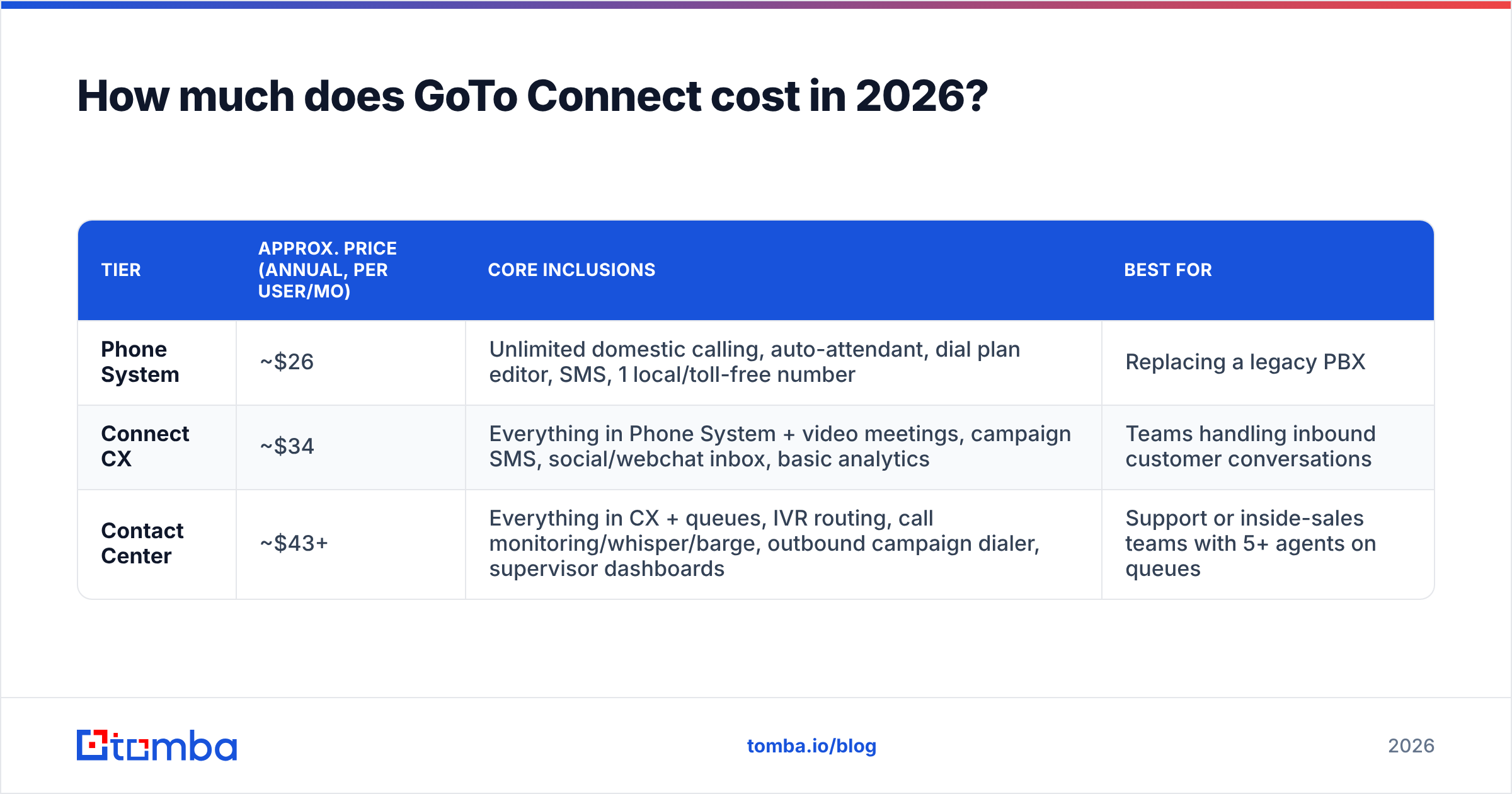
GoTo publishes three main tiers. Prices below reflect annual billing per user; month-to-month typically runs 15–25% higher, and volume discounts kick in above roughly 50 seats.
| Tier | Approx. price (annual, per user/mo) | Core inclusions | Best for |
|---|---|---|---|
| Phone System | ~$26 | Unlimited domestic calling, auto-attendant, dial plan editor, SMS, 1 local/toll-free number | Replacing a legacy PBX |
| Connect CX | ~$34 | Everything in Phone System + video meetings, campaign SMS, social/webchat inbox, basic analytics | Teams handling inbound customer conversations |
| Contact Center | ~$43+ | Everything in CX + queues, IVR routing, call monitoring/whisper/barge, outbound campaign dialer, supervisor dashboards | Support or inside-sales teams with 5+ agents on queues |
A few pricing mechanics you should know before you sign:
- Annual commitment is the default. The advertised price almost always assumes a 12- or 36-month term. Monthly flexibility is available but repriced.
- Numbers are not unlimited. Each tier includes a small allotment; extra local, toll-free, or vanity numbers are billed per number per month.
- International calling is metered. "Unlimited" applies to domestic US/Canada calling. International destinations are per-minute or require an international add-on plan.
- Hardware is separate. Desk phones are purchased or rented; expect $80–$220 per handset if your team is not going softphone-only.
- Contact Center is a separate SKU per agent. You can mix — not every seat needs the top tier — but the mixing is a manual negotiation, not a self-serve toggle.
- Auto-renewal is real. Multiple reviewers on Capterra flag renewal notice windows as a friction point. Diary the cancellation date the day you sign.
What does GoTo Connect actually cost per seat after add-ons?#
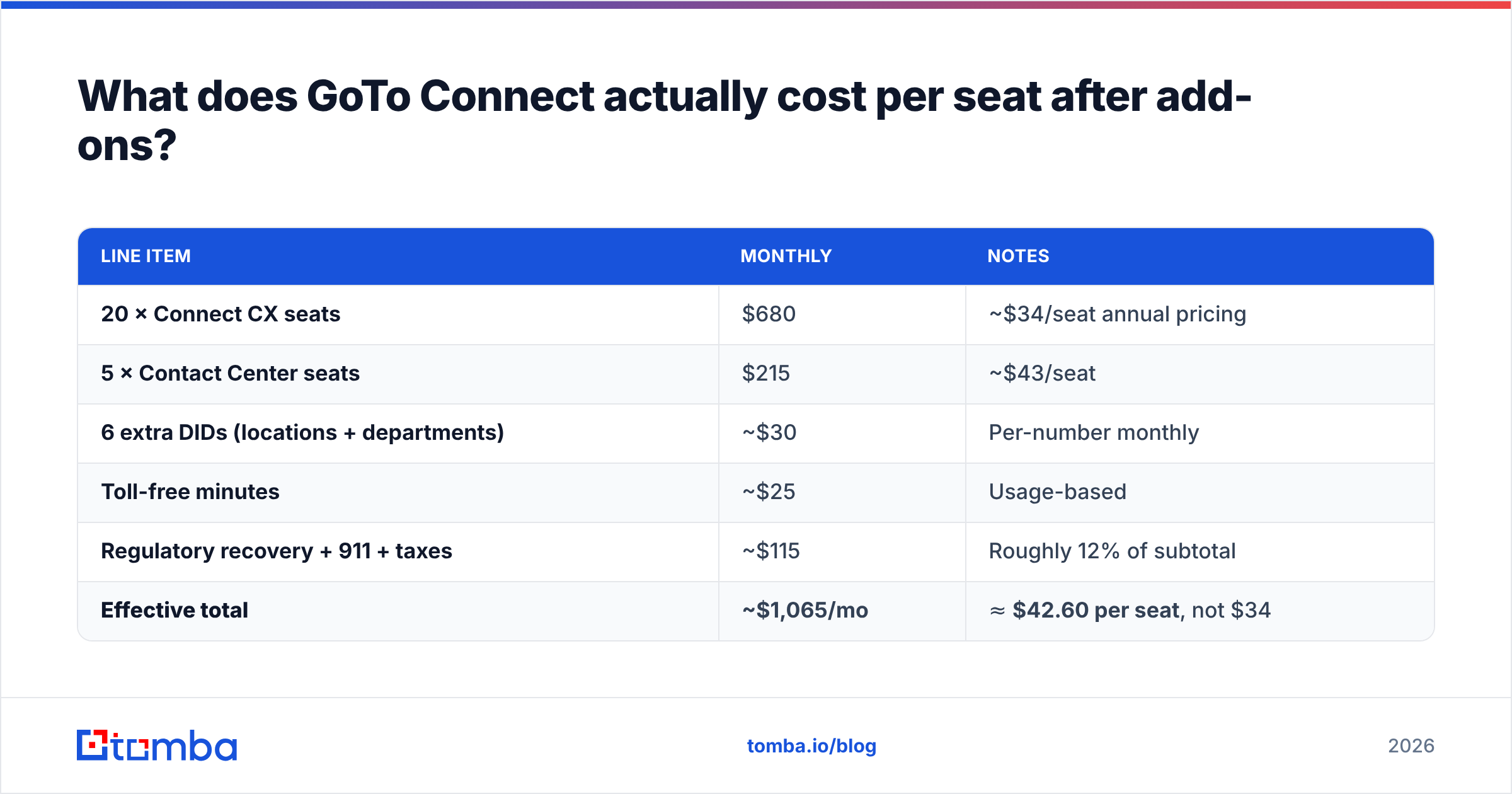
Take a 25-person company on Connect CX with a small support queue. Here is a realistic annualized build-up rather than the marketing number.
| Line item | Monthly | Notes |
|---|---|---|
| 20 × Connect CX seats | $680 | ~$34/seat annual pricing |
| 5 × Contact Center seats | $215 | ~$43/seat |
| 6 extra DIDs (locations + departments) | ~$30 | Per-number monthly |
| Toll-free minutes | ~$25 | Usage-based |
| Regulatory recovery + 911 + taxes | ~$115 | Roughly 12% of subtotal |
| Effective total | ~$1,065/mo | ≈ $42.60 per seat, not $34 |
That ~25% gap between headline and invoice is not unique to GoTo — RingCentral, Nextiva, and Dialpad all layer fees the same way. The mistake is budgeting off the pricing page and then treating the variance as a surprise.
Is GoTo Connect worth it? Honest pros and cons#
Where GoTo Connect earns its price
- Dial plan editor. The visual drag-and-drop call flow builder is genuinely the standout feature. Non-technical office managers can restructure an IVR in minutes without a support ticket. Reviewers mention this more than any other capability.
- Setup speed. Most small deployments go live in days, not weeks. Number porting is handled competently.
- Bundled meetings. If you are already paying separately for a video tool, folding it in can offset $8–$15 per user elsewhere.
- Call quality and uptime. Rarely the complaint in reviews. The network side is solid.
- Predictable admin UX. One console for phones, users, and call flows. It does not require a certified partner to operate.
Where it frustrates buyers
- Support latency. The most repeated criticism across review sites: first-line support response times and escalation paths on lower tiers.
- Contract rigidity. Mid-term downgrades are difficult. If you hire seasonally, you will pay for seats you are not using.
- Analytics depth. Reporting is adequate for operations, thin for revenue teams that want talk-time-to-pipeline attribution.
- CRM integration surface. Salesforce and HubSpot connectors exist, but field-level mapping and activity logging are less granular than sales-native tools.
- No data layer. This is the big one for outbound teams. GoTo Connect dials numbers. It does not find, verify, or enrich them.

How does GoTo Connect compare to the main alternatives?#
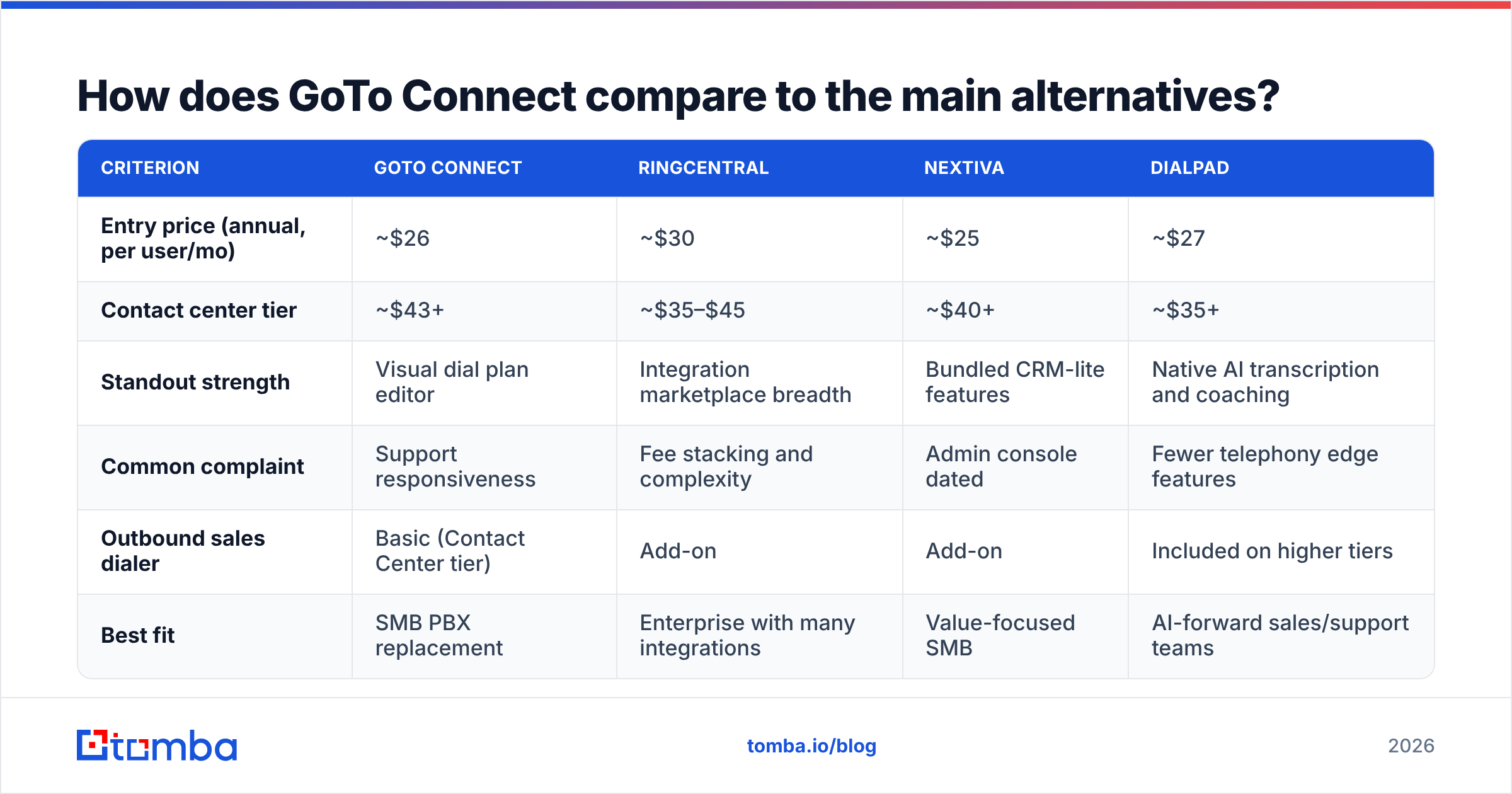
| Criterion | GoTo Connect | RingCentral | Nextiva | Dialpad |
|---|---|---|---|---|
| Entry price (annual, per user/mo) | ~$26 | ~$30 | ~$25 | ~$27 |
| Contact center tier | ~$43+ | ~$35–$45 | ~$40+ | ~$35+ |
| Standout strength | Visual dial plan editor | Integration marketplace breadth | Bundled CRM-lite features | Native AI transcription and coaching |
| Common complaint | Support responsiveness | Fee stacking and complexity | Admin console dated | Fewer telephony edge features |
| Outbound sales dialer | Basic (Contact Center tier) | Add-on | Add-on | Included on higher tiers |
| Best fit | SMB PBX replacement | Enterprise with many integrations | Value-focused SMB | AI-forward sales/support teams |
The honest summary: on raw price, these four cluster within a few dollars of each other. You are not choosing on cost — you are choosing on which specific weakness you can tolerate. GoTo Connect's weakness is support experience; RingCentral's is billing complexity; Dialpad's is telephony depth.
If your evaluation is genuinely about outbound sales productivity rather than office telephony, the more useful comparison is not GoTo vs. RingCentral at all. It is "phone system + data provider" vs. "sales engagement suite." A $26 phone system paired with accurate contact data frequently outperforms a $90 all-in-one suite running on stale records.
Why does contact data matter more than your phone system's price?#
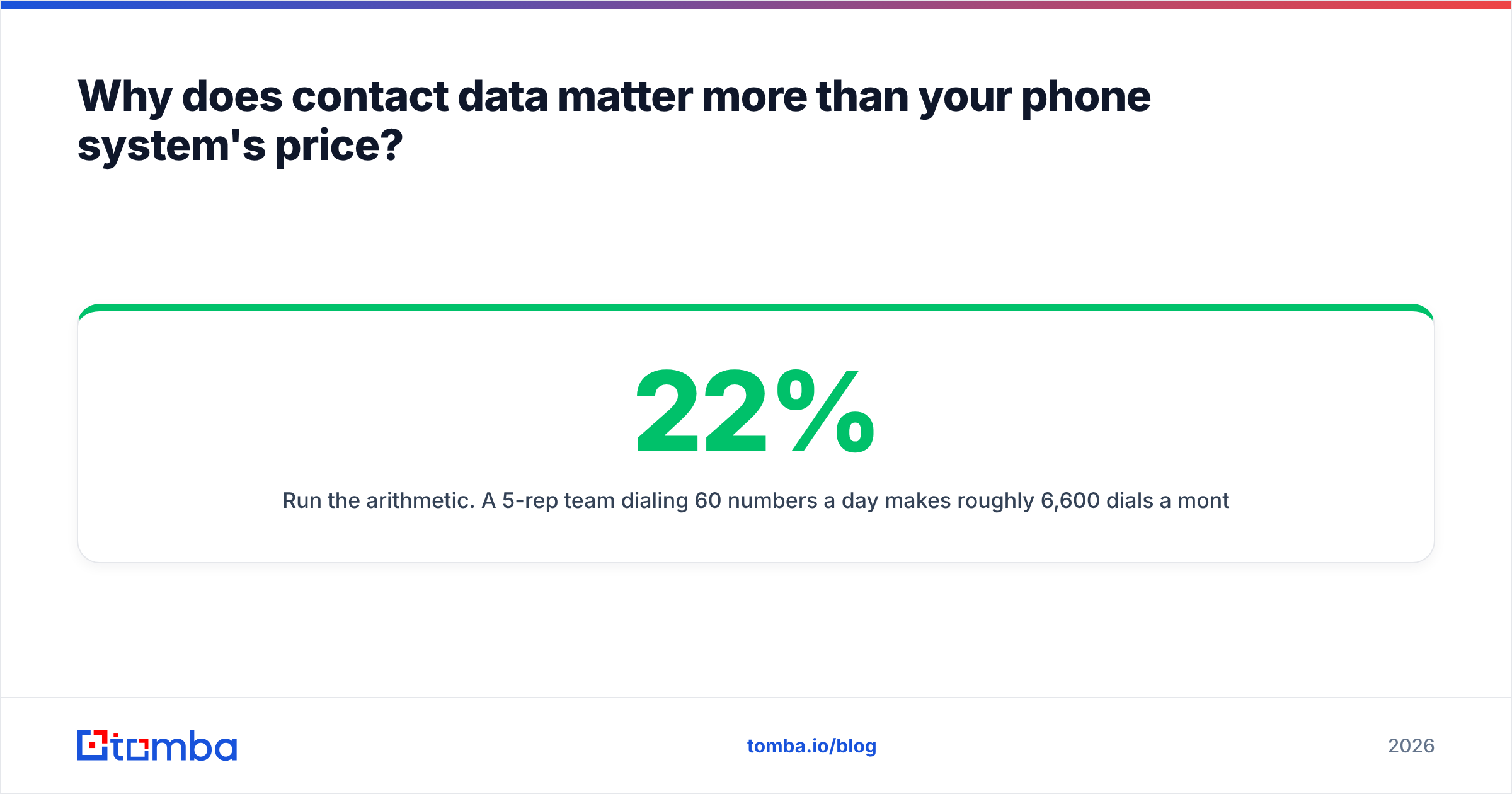
Run the arithmetic. A 5-rep team dialing 60 numbers a day makes roughly 6,600 dials a month. If 22% of your numbers are wrong — a conservative figure for a list that has not been refreshed in a year — that is about 1,450 dials into dead air every month. At $43 per seat, your phone bill is $215. The wasted rep hours are worth several thousand.
Nobody switches VoIP vendors to fix that. You fix it upstream, at the data layer:
- Verify before you dial. Run numbers through a phone validator so disconnected and invalid lines never enter the queue.
- Source direct dials, not switchboards. A phone finder that returns direct B2B numbers beats a scraped main line every time.
- Enrich the record around the number. Title, company size, and a verified email turn a cold dial into a multi-channel sequence. That is what data enrichment is for.
- Keep email as the fallback channel. Most dials go to voicemail. A verified email address turns a missed call into a touchpoint instead of a dead end — which is why an email verifier belongs in the same workflow as your dialer.
For reference on how outbound cost-per-meeting gets modeled, HubSpot's sales research and Gartner's buyer-behavior work both land in the same place: connect rate, not dial volume, is the lever.
Who should buy GoTo Connect, and who should not?#
Buy it if:
- You are replacing an on-premise PBX and want a low-drama migration.
- Your call flows are complex (multiple locations, after-hours routing, department trees) and you want to edit them yourself.
- Video meetings are currently a separate line item you would like to consolidate.
- Your team is primarily inbound — support, reception, scheduling.
Look elsewhere if:
- You need a power dialer, local presence dialing, and automated call logging as first-class features. Sales-native platforms do this better at similar cost.
- You need deep conversation intelligence. Dialpad and Gong-class tools are built for it; GoTo's transcription is functional, not analytical.
- You expect to flex seat count monthly. The annual commitment structure will work against you.
- You want telephony and prospecting data from one vendor. That vendor does not really exist — assembling a phone system plus a dedicated data provider gives you better results for less money.
Negotiation notes if you do buy: ask for the multi-year rate at a one-year term, get the number-porting fee waived in writing, request a mid-term seat-reduction clause, and confirm the exact renewal-notice window in the order form rather than the MSA.
How should you structure the full outbound stack around it?#
Think of your phone system as the plumbing and your data as the water. Excellent plumbing carrying bad water still produces a bad glass of water.
A workable 2026 stack for a small outbound team looks like this: GoTo Connect (or any comparable UCaaS) at roughly $26–$43 per seat for calling infrastructure; a verified data provider for contacts and direct dials; a CRM to hold state; and a sequencing tool to orchestrate email and call touches. Total per-rep cost lands in the $90–$150 range — noticeably cheaper than a single bundled suite, and each component is independently replaceable when it stops earning its slot.
The data component is where you get the most leverage per dollar. On Tomba pricing, the free tier gives you 25 searches a month to test list quality before committing, Starter is $49/mo, Growth is $99/mo, and Pro is $249/mo. Running your existing dial list through verification before your GoTo renewal is a cheap way to find out whether your connect-rate problem is actually a phone-system problem at all. It usually is not.
The bottom line on GoTo Connect pricing#
GoTo Connect is fairly priced for what it is: a competent, easy-to-administer business phone system for SMBs, at roughly $26–$43 per seat before fees and about 12–20% more after them. The dial plan editor is a real differentiator. Support responsiveness and contract rigidity are real drawbacks. Nothing in the pricing is predatory — it is just less transparent than the pricing page suggests, which is true of the entire UCaaS category.
The larger point: if your goal is more conversations, the phone vendor is rarely the constraint. Bad numbers and missing contacts are. Before you spend another quarter comparing per-seat sheets, audit the list you are dialing.
Start with the data. Use the Tomba Email Finder to build verified contact records — direct emails, matched companies, and clean fields — so every dial your team makes on GoTo Connect (or any platform) reaches a real person at a real company. The free tier is enough to test 25 contacts against your current list and see exactly how much of your calling budget is going nowhere.
Related guides#
Ready to find emails that actually work?
Join 150,000+ professionals who stopped guessing and started sending. Free credits on signup — no credit card required.
Get the Tomba newsletter
Practical outbound tactics and product updates — once every two weeks.
About the author