How to Find Job Candidates for Free: 9 Proven Methods
Job boards cost $300+ per post and still send you noise. Here are nine free sourcing channels that actually surface qualified candidates, plus how to get their contact details without a recruiter seat.
TL;DR
- Paid job boards charge $300–$500 per posting and mostly deliver inbound volume, not fit. Free sourcing channels deliver fit, but you have to go get it.
- The nine highest-yield free channels: GitHub, LinkedIn free search, Stack Overflow, Behance/Dribbble, Reddit and Discord communities, X/Twitter, university career portals, conference speaker lists, and your own alumni/referral network.
- The real bottleneck is not finding candidates. It is reaching them — most profiles show a name and a company, not an email.
- A domain search plus email verification turns a public profile into a deliverable inbox for a fraction of a recruiter-seat price.
- Budget rule of thumb: 80% of your sourcing time on channel work, 20% on contact resolution. Reverse that and you are just building a list nobody reads.
Why do paid job boards underperform for hard-to-fill roles?#
Because job boards optimise for volume, and you need fit.
Post a senior backend role on a major board and you will get applications. Most will be from people who applied to 200 other postings the same week. LinkedIn's own hiring data has long shown that the strongest hires tend to come through referrals and direct outreach rather than cold inbound — and any recruiter who has read 400 résumés for one opening already knows this in their bones.
The math is worse than it looks. A $495 job posting that produces 180 applications, of which six are qualified, costs you roughly $82 per qualified candidate — before the 20 hours of screening. Direct sourcing flips that: you start from the qualified pool and work backwards to contact.

The catch is that direct sourcing is labour. That is exactly why it stays cheap — most teams will not do it. If you will, the free channels below are genuinely competitive with paid tooling.
What are the best free channels to find job candidates?#
Nine channels, ranked by signal density rather than by size. Signal density means: how much of what you see tells you whether the person can actually do the job.
- GitHub — The highest-signal channel for engineering roles, full stop. Search by language, stars, and location (
language:rust location:Berlin). You are reading actual code, not a self-description. Contributors to libraries your stack depends on are pre-qualified. - LinkedIn free search — Without Recruiter, you still get keyword search, filters on current company and title, and 2nd/3rd-degree visibility. Boolean strings in the main search bar work. The limit is commercial search caps, not data quality.
- Stack Overflow and niche Q&A — Look at top answerers in the tags matching your stack. Someone with 12k reputation in
kuberneteshas demonstrated depth that no résumé line proves. - Behance, Dribbble, and Read.cv — Design and product roles. The portfolio is the screening. Filter by availability status; many designers flag "open to work" directly.
- Reddit, Discord, and Slack communities — r/ExperiencedDevs, r/datascience, community Discords for specific frameworks. Read before you post; most have strict self-promo rules and a designated hiring thread.
- X/Twitter — Still the fastest channel for niche technical talent. Search bio keywords plus "open to work" or "looking for". Advanced search with
min_favesfilters out low-reach noise. - University career portals and lab pages — Free for employers at most institutions. For junior and research-adjacent roles, a PhD lab page lists every member with their research focus and, often, their institutional email.
- Conference speaker and attendee lists — Public, searchable, and pre-filtered for people who care enough about a domain to talk about it in front of a room.
- Alumni networks and past applicants — Your own ATS is a free database you already paid to build. Silver-medal candidates from six months ago are the cheapest pipeline in existence.
Which channel fits which role?#
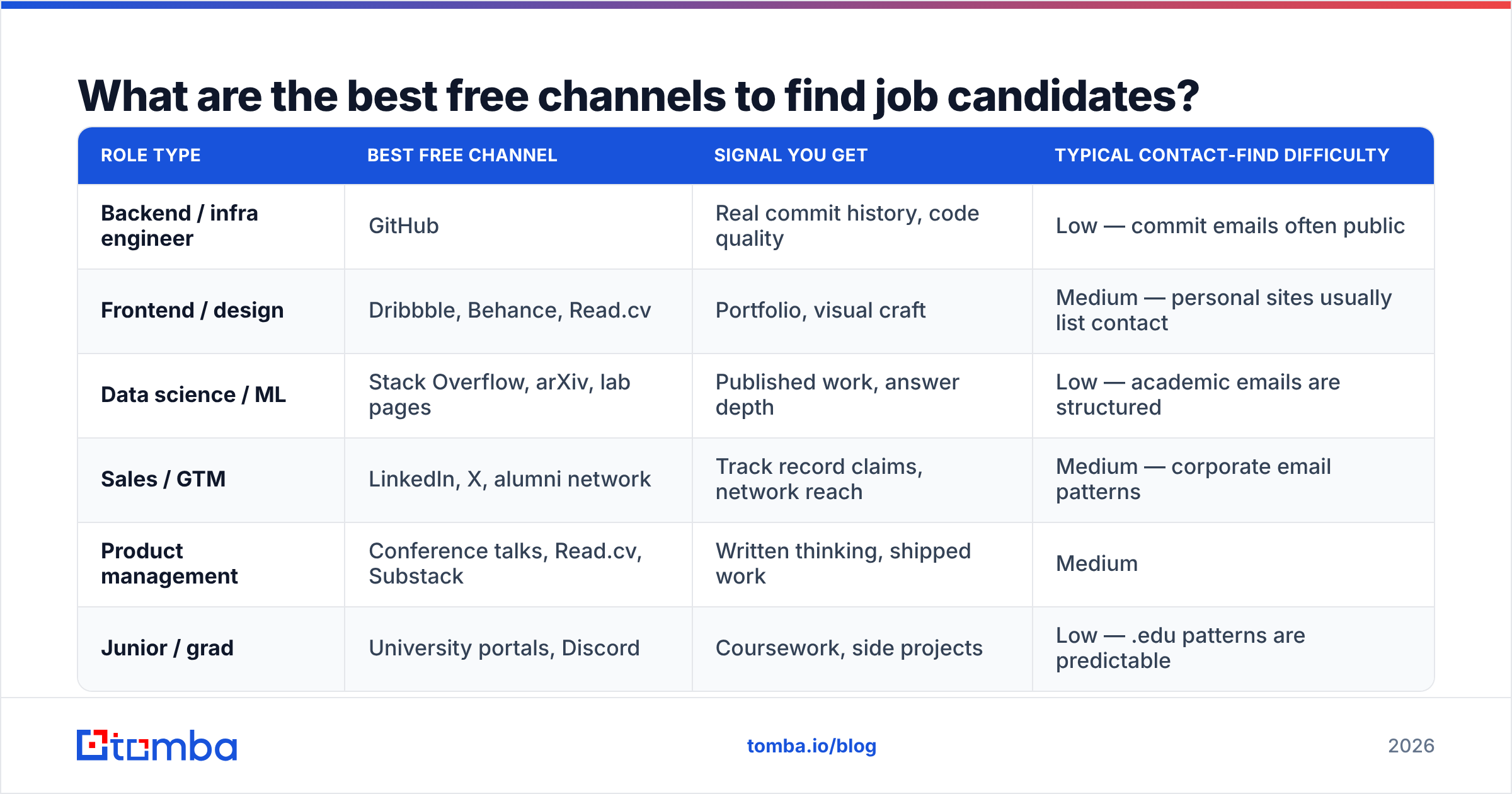
| Role type | Best free channel | Signal you get | Typical contact-find difficulty |
|---|---|---|---|
| Backend / infra engineer | GitHub | Real commit history, code quality | Low — commit emails often public |
| Frontend / design | Dribbble, Behance, Read.cv | Portfolio, visual craft | Medium — personal sites usually list contact |
| Data science / ML | Stack Overflow, arXiv, lab pages | Published work, answer depth | Low — academic emails are structured |
| Sales / GTM | LinkedIn, X, alumni network | Track record claims, network reach | Medium — corporate email patterns |
| Product management | Conference talks, Read.cv, Substack | Written thinking, shipped work | Medium |
| Junior / grad | University portals, Discord | Coursework, side projects | Low — .edu patterns are predictable |
How do you find a candidate's email without a recruiter seat?#
You infer the company email pattern, then verify before you send.
Nearly every company uses one of a handful of formats: first.last@, first@, flast@, first_last@. Once you know a company's pattern, every employee at that company becomes reachable. That is the whole trick, and it is why domain-level tooling beats person-by-person guessing.
The workflow that takes the least time:
- Step 1 — Identify the company domain. From the LinkedIn profile, GitHub bio, or portfolio footer.
- Step 2 — Resolve the pattern. A company email pattern check returns the dominant format for that domain, sourced from previously observed addresses rather than guesswork.
- Step 3 — Generate the candidate address. Name plus pattern. An email permutator gives you every plausible variant if the pattern is ambiguous.
- Step 4 — Verify before sending. This is non-negotiable. Sending to unverified guesses is how you torch your sending domain.
- Step 5 — Log it. Push the verified address into your ATS or sheet so you never re-do the work.
For engineering candidates specifically, there is a shortcut: git log on a public repo exposes commit author emails. Many developers commit with a personal address they actively read. It is public data by design.
Free vs paid contact-finding: what actually differs?#
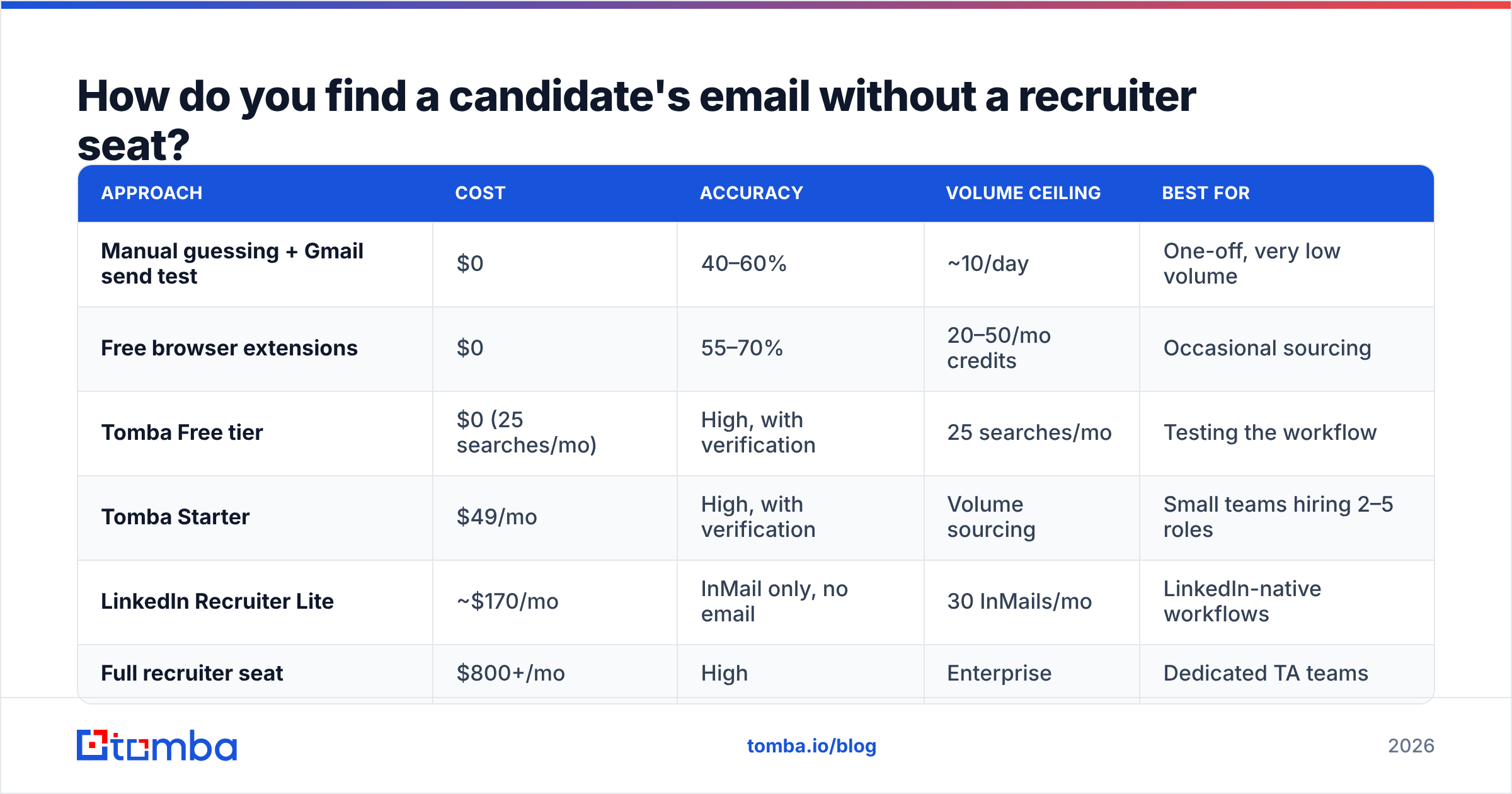
| Approach | Cost | Accuracy | Volume ceiling | Best for |
|---|---|---|---|---|
| Manual guessing + Gmail send test | $0 | 40–60% | ~10/day | One-off, very low volume |
| Free browser extensions | $0 | 55–70% | 20–50/mo credits | Occasional sourcing |
| Tomba Free tier | $0 (25 searches/mo) | High, with verification | 25 searches/mo | Testing the workflow |
| Tomba Starter | $49/mo | High, with verification | Volume sourcing | Small teams hiring 2–5 roles |
| LinkedIn Recruiter Lite | ~$170/mo | InMail only, no email | 30 InMails/mo | LinkedIn-native workflows |
| Full recruiter seat | $800+/mo | High | Enterprise | Dedicated TA teams |
Read that table honestly: if you are hiring one role a quarter, the free tiers and manual work genuinely suffice. If you are hiring five roles at once, the time cost of manual resolution exceeds the tool cost within the first week.

Does bulk sourcing hurt your email deliverability?#
Yes — if you skip verification. And candidate outreach is more fragile than sales outreach because you often only get one shot at a passive candidate.
Three rules that keep you out of spam:
Verify every address before it enters a sequence. A bounce rate above 3% signals to mailbox providers that you are sending to a scraped list. Run addresses through an email verifier first; catch-all domains need a catch-all verifier because a standard SMTP check will return "valid" for every address on them, including addresses that do not exist.
Get your authentication right. SPF, DKIM, and DMARC must all pass. Google's bulk sender guidelines made this mandatory rather than optional. Check your SPF record before your first send, not after your third bounce report.
Keep volume human. Candidate outreach at 500 sends a day from a new domain looks exactly like spam to a filter. Fifty personalised sends beat 500 templated ones on reply rate anyway — G2's recruiting software category reviews are full of teams who learned this the expensive way.
Also worth saying plainly: personalisation is not a deliverability trick, it is a response-rate requirement. A passive senior engineer receives several recruiter messages a week. A message that references their specific talk, repo, or answer gets read. A message that opens "I came across your impressive profile" gets deleted before the second line.
How do you build a repeatable free sourcing pipeline?#
Treat it like a weekly operating rhythm, not a scramble when a req opens.
Monday — harvest. Ninety minutes on two channels. GitHub search plus one community. Target 30–40 names, no contact work yet. Just names, companies, and one line on why they fit.
Tuesday — resolve. Batch the contact-finding. Doing 40 lookups in one session is dramatically faster than 40 context switches. A bulk email finder handles the batch; verification runs in the same pass.
Wednesday — write. Personalised first touch. Reference the specific artefact you found them through. Two sentences on the role, one on why them, one clear ask.
Thursday — send and log. Small batches. Track opens and replies per channel so you learn which source converts.
Friday — review. Which channel produced replies? Double down there next Monday. Kill the channels that produce nothing after three cycles.
Four weeks of this produces a warm bench of 120–160 sourced candidates per role family. That bench is worth more than any single job posting, because it persists across reqs.
If your ATS or sheet is the system of record, connect the pieces: a Google Sheets workflow keeps sourcing and enrichment in one tab, and the Tomba API handles it if you would rather script the whole thing.
What mistakes make free sourcing fail?#
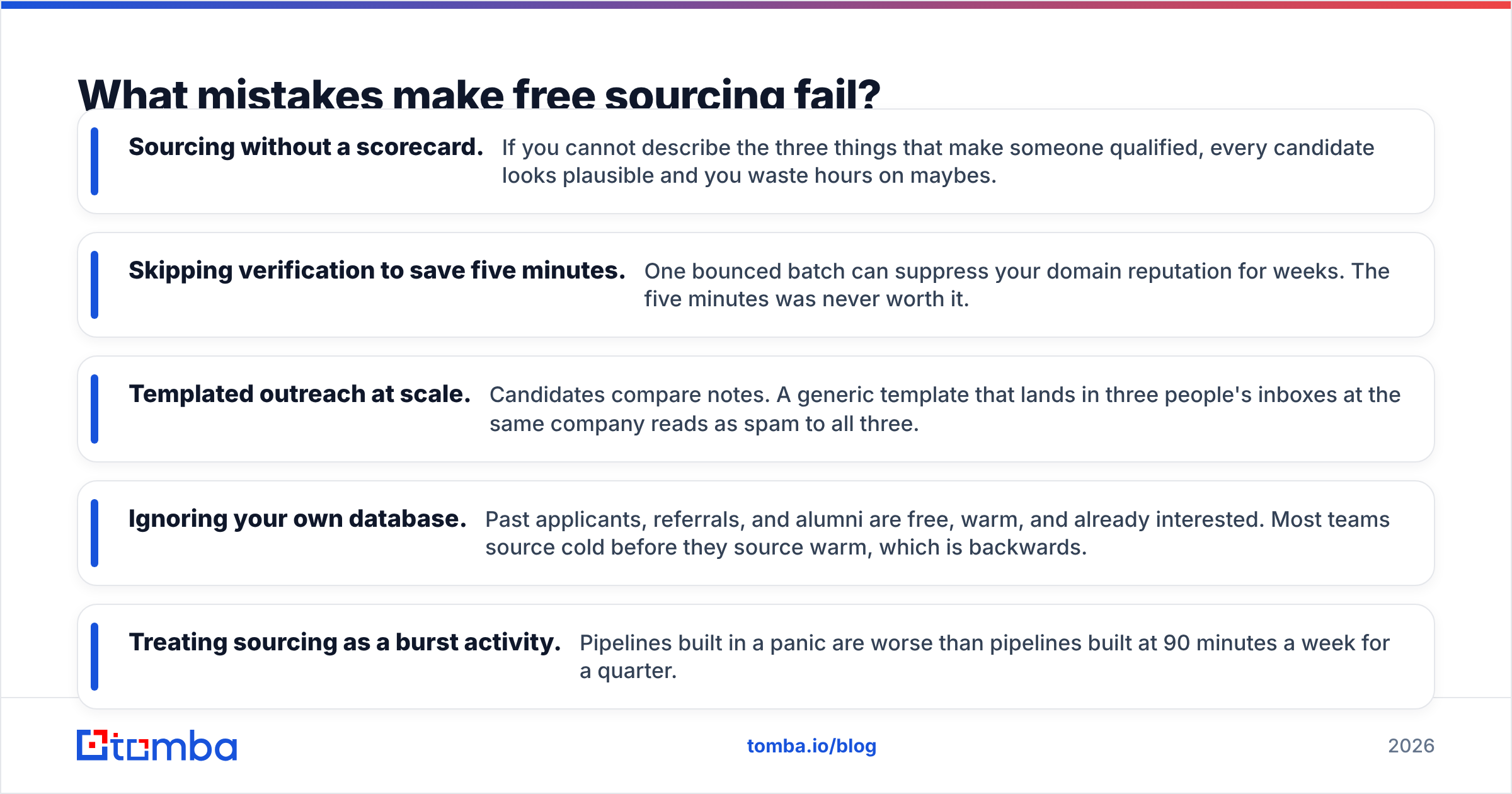
Five failure modes account for most of it.
- Sourcing without a scorecard. If you cannot describe the three things that make someone qualified, every candidate looks plausible and you waste hours on maybes.
- Skipping verification to save five minutes. One bounced batch can suppress your domain reputation for weeks. The five minutes was never worth it.
- Templated outreach at scale. Candidates compare notes. A generic template that lands in three people's inboxes at the same company reads as spam to all three.
- Ignoring your own database. Past applicants, referrals, and alumni are free, warm, and already interested. Most teams source cold before they source warm, which is backwards.
- Treating sourcing as a burst activity. Pipelines built in a panic are worse than pipelines built at 90 minutes a week for a quarter.
One more, less obvious: over-indexing on a single channel. GitHub is superb for engineers who open-source. It is blind to the excellent engineers who work exclusively on proprietary systems — which is most of them. Every channel has a systematic blind spot; running three channels in parallel covers more of the real population than mastering one.
Is free sourcing actually better than paid tools?#
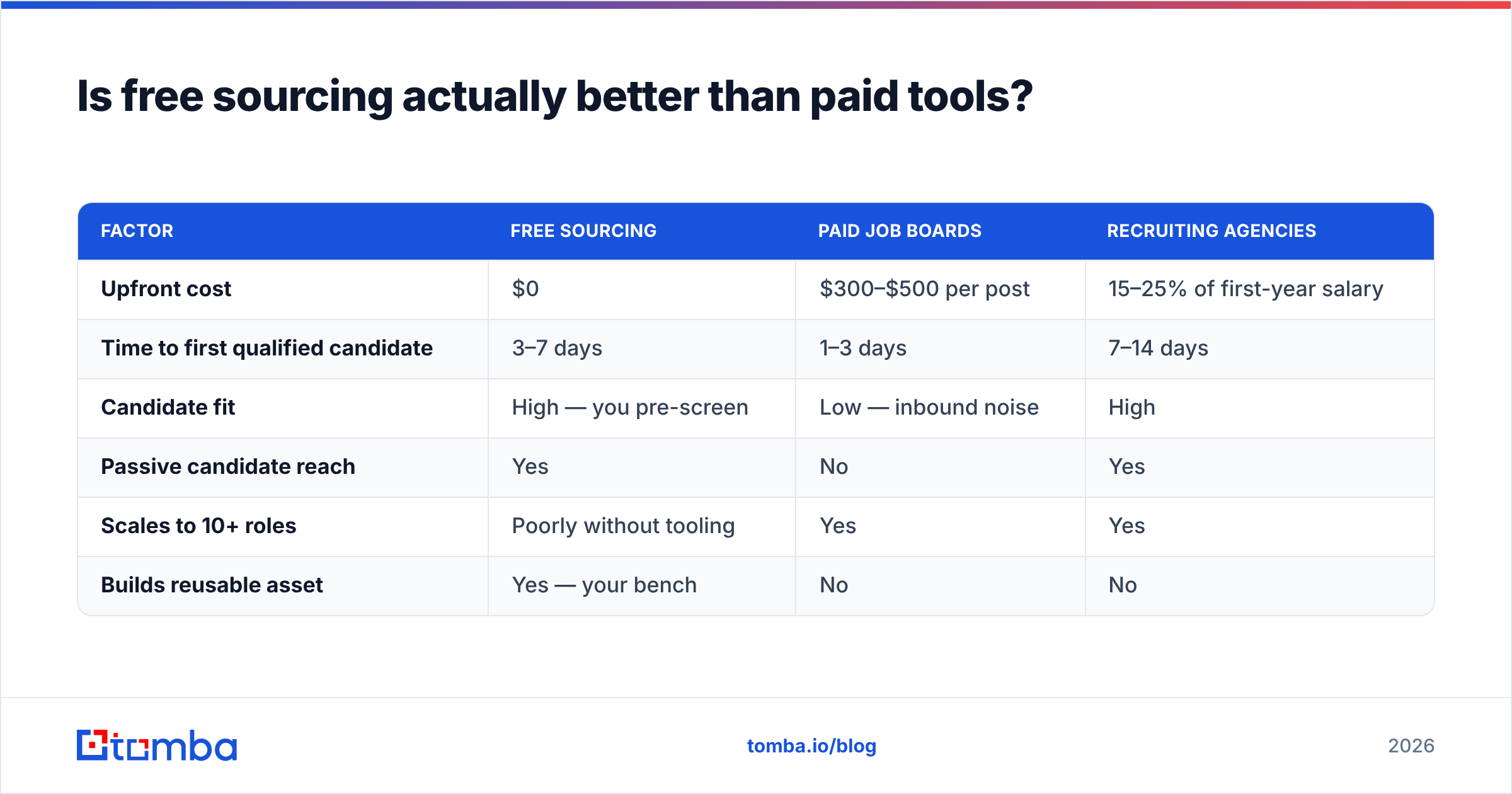
Free sourcing wins on candidate quality and cost. Paid tools win on speed and scale. Most teams need both, weighted by hiring volume.
The honest breakdown:
| Factor | Free sourcing | Paid job boards | Recruiting agencies |
|---|---|---|---|
| Upfront cost | $0 | $300–$500 per post | 15–25% of first-year salary |
| Time to first qualified candidate | 3–7 days | 1–3 days | 7–14 days |
| Candidate fit | High — you pre-screen | Low — inbound noise | High |
| Passive candidate reach | Yes | No | Yes |
| Scales to 10+ roles | Poorly without tooling | Yes | Yes |
| Builds reusable asset | Yes — your bench | No | No |
The cross-over point in practice: below three concurrent roles, free sourcing plus a low-cost contact-finding tool beats everything on cost per hire. Above five concurrent roles, you need either headcount or automation, and automation is cheaper.
If you are comparing contact-data vendors specifically, look at coverage in your geography before you look at price. A provider with excellent North American coverage and thin European data will quietly fail you on half your reqs. Tools like BookYourData take a database-first approach with strong verified-list coverage, while search-first tools resolve addresses on demand from live sources — different shapes for different workflows, and worth testing both against 20 of your actual target profiles rather than trusting anyone's marketing page. Tomba's data sources page documents where its records come from, which is the kind of transparency worth demanding from any vendor you evaluate.
What is the fastest way to start this week?#
Pick one role. Pick two channels. Spend 90 minutes.
Do not build a system before you have proven the channel produces candidates you would actually interview. Source 20 names from GitHub or LinkedIn, resolve 20 emails, verify them, send 20 genuinely personalised messages. Measure replies. That single cycle tells you more than a month of reading about sourcing strategy.
The contact-resolution step is the one people quit on, because guessing addresses one at a time is miserable and unreliable. That is the part worth automating first. Tomba's Email Finder takes a name and a company domain and returns a verified professional address, with a free tier of 25 searches a month to test the workflow before you commit — and Starter at $49/mo when your sourcing rhythm outgrows it. Run your next 20 sourced candidates through it and compare the bounce rate against your manual guesses. The difference is usually the whole argument.
Related guides#
// get started
Find, verify and enrich your first contacts today
Start on the free plan with 25 searches a month, then scale when your team is ready.
Free plan · No credit card required · GDPR & CCPA
// about the author