Hunter vs Mailtester Ninja: Email Finder Showdown 2026
One is a full email finder with a database behind it. The other is a bare-metal verifier that costs almost nothing. Here is how Hunter and Mailtester Ninja actually compare on accuracy, pricing, catch-alls, and API fit in 2026.
Hunter vs Mailtester Ninja is not a fair fight, because the two tools do different jobs. Hunter finds email addresses. Mailtester Ninja checks the addresses you already have. This guide compares them on accuracy, catch-all domains, API cost, and workflow fit in 2026.
TL;DR
- They are not the same category of tool. Hunter is an email finder built on a crawled database, with a verifier attached. Mailtester Ninja is a verifier with a very cheap API and a light guesser bolted on.
- If you only have domains and names, Hunter (or Tomba) wins. Mailtester Ninja cannot hand you a contact list from scratch.
- If you already own a list, Mailtester Ninja is hard to beat on price per check. The trade-off is thinner support, fewer integrations, and less detail on how each verdict was reached.
Two more points decide most of these deals:
- Catch-all domains are where both tools get judged. Roughly a fifth of B2B domains are catch-all. How a tool labels them decides whether your bounce rate is 1% or 8%.
- Most teams end up running a finder plus a verifier. The real question is whether you want two vendors, two invoices, and two APIs, or one of each.
What are Hunter and Mailtester Ninja?#
Hunter is one of the oldest names in B2B email discovery. It crawls the public web and links addresses to domains. You get a domain search, an email finder, a verifier, a Chrome extension, a Sheets add-on, and a light cold-email sender called Campaigns. Its selling point is breadth. Type stripe.com and you get back a list of addresses with sources and a confidence score.
Mailtester Ninja started from the other end. It is an SMTP-level validation service. You hand it an address, and it tells you whether the mailbox looks real. It later added a name-plus-domain guessing endpoint. Even so, the product's centre of gravity is verification. Its reputation was built on one thing: a much lower price per check than the older verifiers.
That difference in origin explains almost every gap between them. Hunter sells you data you do not have yet. Mailtester Ninja sells you confidence in data you already have.
Hunter vs Mailtester Ninja: how do they actually differ?#
Six differences matter once you leave the marketing pages. Three of them are about the product itself:
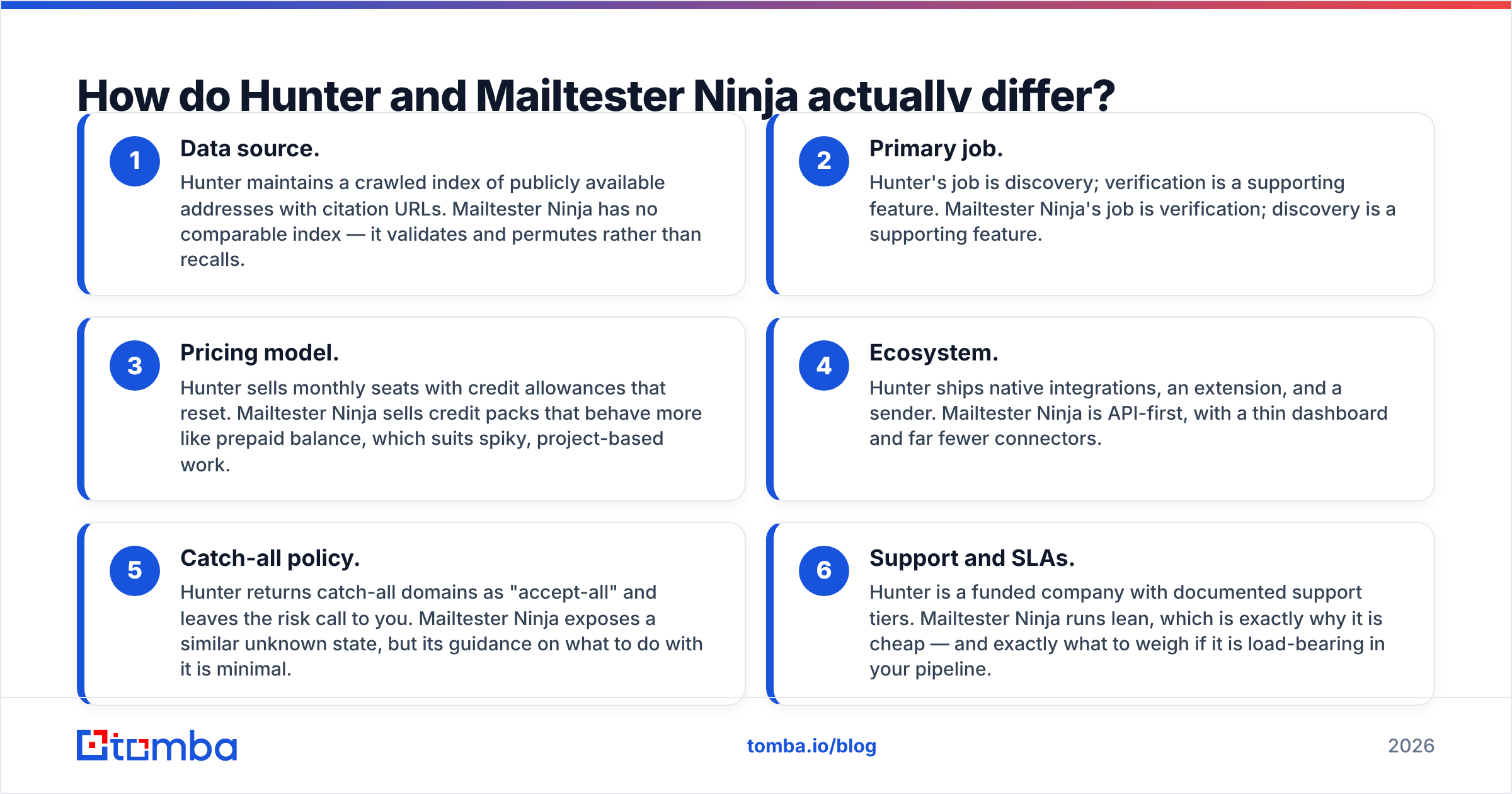
- Data source. Hunter keeps a crawled index of public addresses, each with a citation URL. Mailtester Ninja has no index. It validates and permutes instead.
- Primary job. Hunter is built for discovery, and verification supports it. Mailtester Ninja is built for verification, and discovery supports it.
- Catch-all policy. Hunter returns catch-all domains as "accept-all" and leaves the risk call to you. Mailtester Ninja shows a similar unknown state, but says little about what to do next.
The other three are about money and operations:
- Pricing model. Hunter sells monthly seats with credits that reset. Mailtester Ninja sells credit packs that behave like a prepaid balance. Packs suit spiky, project-based work.
- Ecosystem. Hunter ships native integrations, an extension, and a sender. Mailtester Ninja is API-first, with a thin dashboard and far fewer connectors.
- Support and SLAs. Hunter is a funded company with documented support tiers. Mailtester Ninja runs lean. That is why it is cheap, and it is what to weigh if the tool is load-bearing in your pipeline.

Which one is more accurate?#
Accuracy here is really two questions, and vendors love to blur them.
Question one: coverage. Given a name and a domain, how often does the tool return any address at all? Hunter is strong on well-crawled Western SaaS, media, and agency domains. It is weaker on small private companies, non-English markets, and firms with no public footprint.
Mailtester Ninja's guesser leans on the mail server. It needs that server to accept or reject permutations honestly. So it does well against strict servers and falls apart on catch-alls, where every guess "passes."
Question two: precision. Of the addresses returned, how many actually deliver? Verification quality decides this one. Say a tool returns a guessed address on a catch-all domain and calls it "valid." It has inflated its coverage by borrowing against your sender reputation.

The honest read: neither tool has a fixed accuracy number. Both move with region, company size, and mail provider. Google Workspace and Microsoft 365 domains behave very differently under SMTP probing. Any vendor quoting one "97% accurate" figure across all of them is quoting a marketing average, not your list.
Test both on 200 rows of your ICP before you buy anything. That sample tells you more than every benchmark table on the internet, including this one. Want a third data point? Run the same list through a free email verifier pass and compare the disagreements. Rows where two tools disagree are where your bounces live.
Hunter vs Mailtester Ninja: price and features compared#
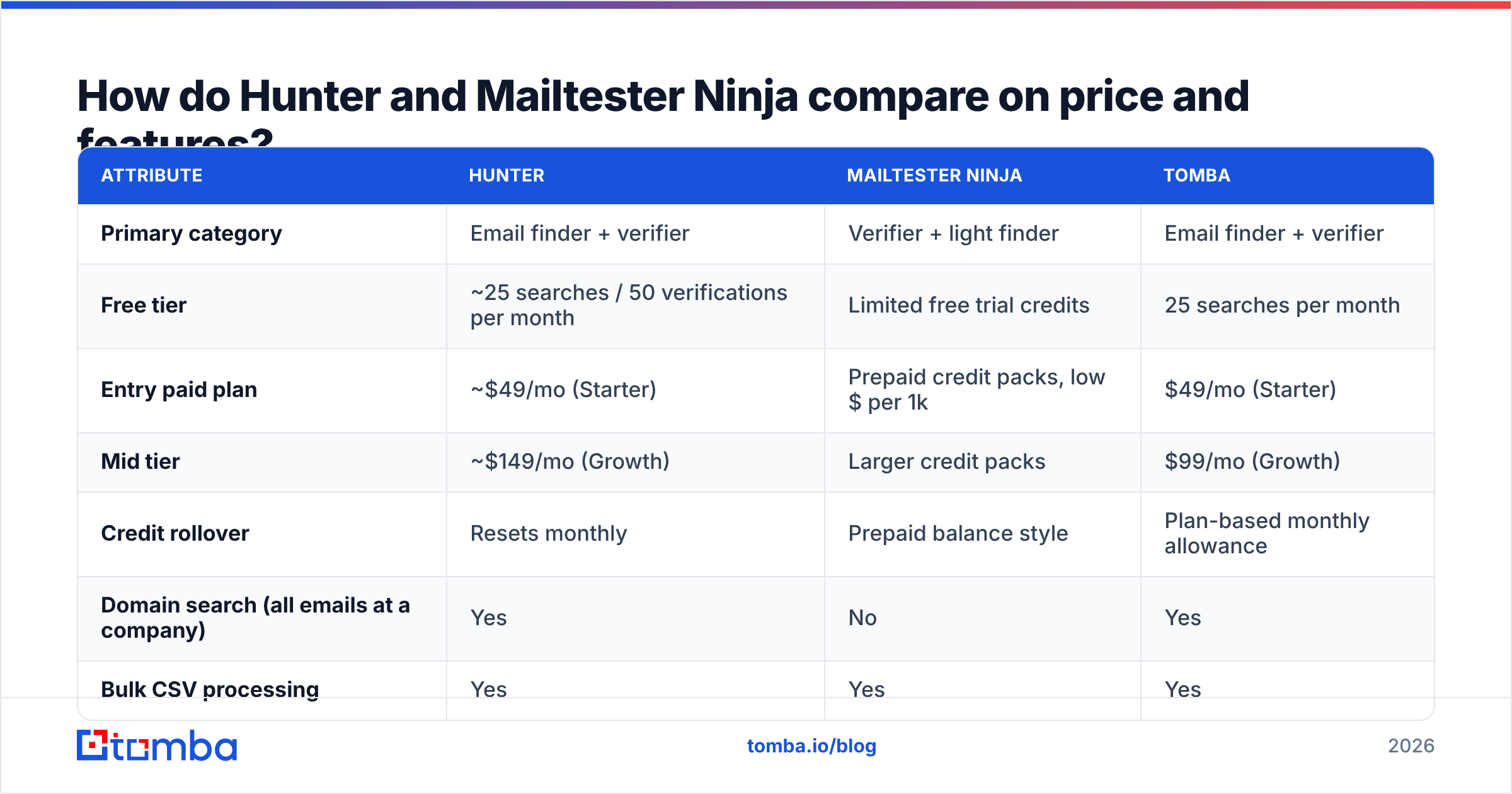
Pricing on both platforms changes. Treat the table below as a shape, not a quote, and confirm on the vendors' own pages before you commit budget.
| Attribute | Hunter | Mailtester Ninja | Tomba |
|---|---|---|---|
| Primary category | Email finder + verifier | Verifier + light finder | Email finder + verifier |
| Free tier | ~25 searches / 50 verifications per month | Limited free trial credits | 25 searches per month |
| Entry paid plan | ~$49/mo (Starter) | Prepaid credit packs, low $ per 1k | $49/mo (Starter) |
| Mid tier | ~$149/mo (Growth) | Larger credit packs | $99/mo (Growth) |
| Credit rollover | Resets monthly | Prepaid balance style | Plan-based monthly allowance |
| Domain search (all emails at a company) | Yes | No | Yes |
| Bulk CSV processing | Yes | Yes | Yes |
| Catch-all handling | Flags "accept-all" | Flags unknown/risky | Dedicated catch-all verifier |
| Phone numbers | No | No | Yes |
| Chrome extension | Yes | Limited | Yes |
| Native CRM integrations | HubSpot, Salesforce, Pipedrive, Zapier | Mostly API / Zapier-style | HubSpot, Salesforce, Pipedrive, Sheets, Airtable |
| API | Yes, mature docs | Yes, API-first | Yes, plus CLI and MCP |
| Best for | Discovery-led prospecting | Cheap high-volume scrubbing | Teams wanting find + verify in one bill |

The pattern is clear. Hunter charges finder prices because it sells finder value. Mailtester Ninja charges utility prices because it sells a utility. Comparing the headline numbers is like comparing a grocery store to a spice rack. Both sell things you eat. Only one gets you dinner.
You feel the real difference in the total cost of a campaign. Need 5,000 net-new contacts? Mailtester Ninja's low price is irrelevant, because you have nothing to verify yet. Bought a 50,000-row list that needs a scrub before it touches your sending domain? Hunter's per-credit economics start to sting.
Is Mailtester Ninja good enough to replace a dedicated finder?#
For most outbound teams, no. That is not a criticism. It is a category boundary.
A finder like Hunter or Tomba answers one question: who works at this company, in this role, and what is their address? Answering it needs an index built from crawling, contributions, partnerships, and enrichment. A verifier answers a narrower question: does this mailbox exist? You can brute-force your way from the second question to the first with permutation guessing (first.last@, flast@, first@). Mailtester Ninja's guess endpoint does exactly that.
Permutation works when three things are true. The company uses a predictable format. The mail server honestly rejects unknown recipients. The person's name is spelled the way you assume. Break one of the three and you get nothing, or worse, a false positive.
Run a few dozen domains through a company email pattern check and watch how often format assumptions collapse. Hyphenated surnames, non-Latin transliterations, and second-hire collisions (jsmith2@) all break the pattern.
So use Mailtester Ninja for what it is genuinely good at: bulk hygiene on lists you already own, pre-send checks inside an automation, and cheap validation at API scale. Do not build a prospecting motion on top of it.
What happens on catch-all domains?#
A catch-all domain, sometimes called accept-all, says "yes" to every address at that domain, valid or not. Roughly one in five B2B domains is set up this way. It is most common at enterprises that run aggressive spam filters in front of their mail.
Under SMTP probing, catch-all domains are a black hole. Hunter labels them "accept-all" and lowers the confidence score. Mailtester Ninja shows a similar unknown state. Neither vendor is doing anything wrong. The protocol simply cannot answer the question.
You have three options:
- Drop them. Safest for email deliverability, but you will delete a chunk of your best enterprise accounts.
- Send anyway, isolated. Route catch-alls through a separate sending domain so bounces stay away from your primary reputation.
- Use a specialised layer. A catch-all verifier uses pattern intelligence, historical engagement, and secondary signals instead of the SMTP handshake alone.
Decide your catch-all policy before you upload the list. Teams that skip this step are the ones asking why the bounce rate hit 9% after a "verified" send. Google and Microsoft have both tightened their bulk-sender rules. Staying under a 0.3% spam-complaint rate leaves little room for guesswork, so read the sender requirements Google publishes once, properly.
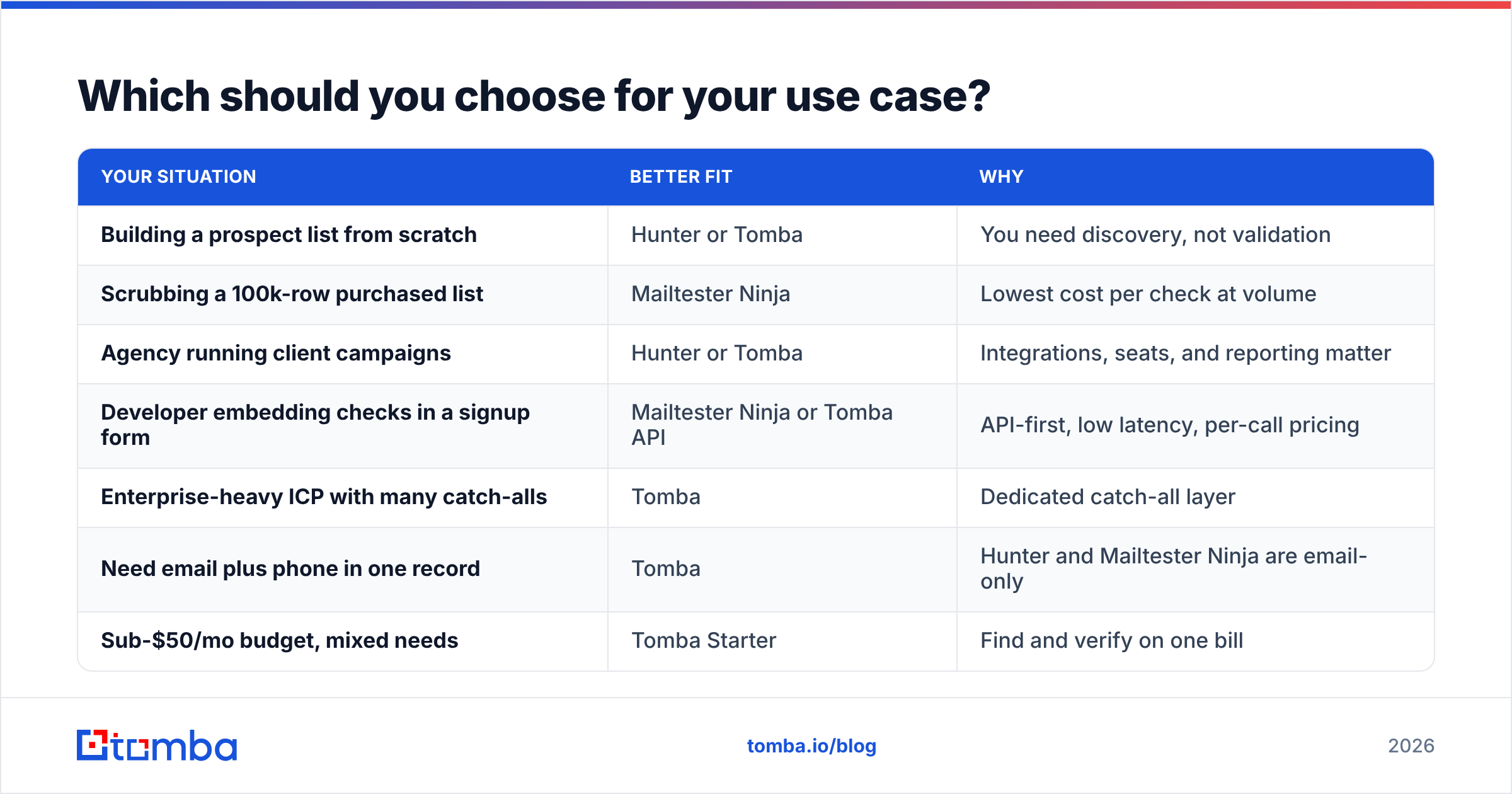
Which should you choose for your use case?#
| Your situation | Better fit | Why |
|---|---|---|
| Building a prospect list from scratch | Hunter or Tomba | You need discovery, not validation |
| Scrubbing a 100k-row purchased list | Mailtester Ninja | Lowest cost per check at volume |
| Agency running client campaigns | Hunter or Tomba | Integrations, seats, and reporting matter |
| Developer embedding checks in a signup form | Mailtester Ninja or Tomba API | API-first, low latency, per-call pricing |
| Enterprise-heavy ICP with many catch-alls | Tomba | Dedicated catch-all layer |
| Need email plus phone in one record | Tomba | Hunter and Mailtester Ninja are email-only |
| Sub-$50/mo budget, mixed needs | Tomba Starter | Find and verify on one bill |
Still comparing? Real user reviews on G2 beat vendor claims. Read the two-star reviews first. That is where credit-expiry policies and support response times get discussed honestly.
Where does Tomba fit in this comparison?#
Tomba sits in the overlap on purpose. It is a finder first. You can find email addresses by name and domain, or pull every public address at a company with domain search. Verification, catch-all handling, phone lookup, and enrichment sit on the same account and the same invoice.
In practice, that removes the two-vendor tax. The usual loop is find in one tool, export a CSV, verify in another, re-import, then reconcile the columns. Here the find-and-verify step happens in one pass. If you run the workflow through code, the same functions are on the Tomba API, a CLI, and an MCP server, so an agent or script can do the whole job without a browser.
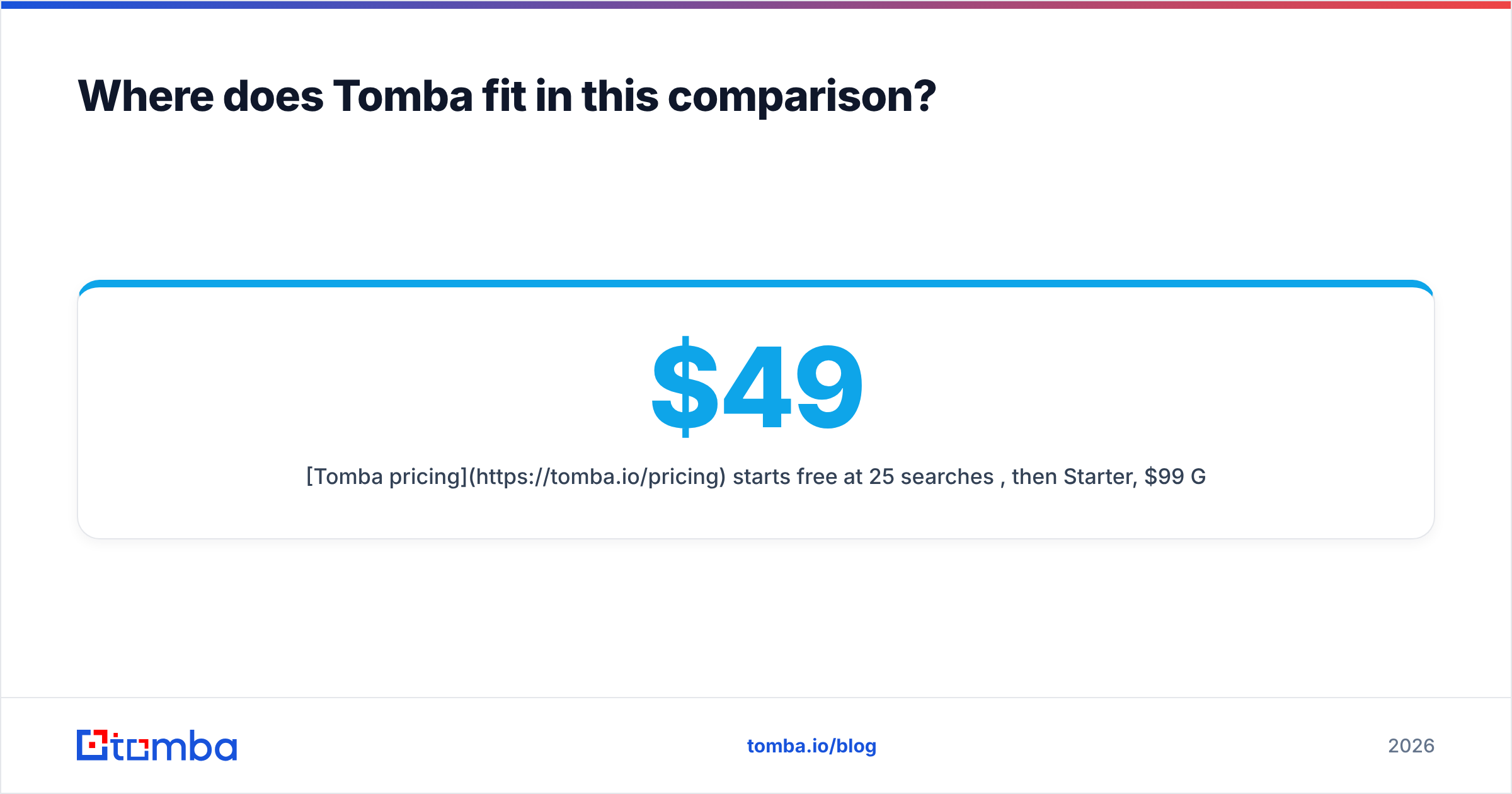
Tomba pricing starts free at 25 searches per month, then $49/mo Starter, $99/mo Growth, and $249/mo Pro. That is roughly Hunter's entry point, with verification and catch-all coverage folded in. It will not beat Mailtester Ninja on pure cost per verification, because a bundle never beats a specialist utility on unit price. The question is whether a fraction of a cent per check is worth a second vendor in your stack.
What is the honest verdict?#
The Hunter vs Mailtester Ninja answer depends on the shape of your data, not on a feature list.
Choose Hunter if discovery is your bottleneck, you want a mature ecosystem and a citation for every address, and finder-tier pricing fits your budget.
Choose Mailtester Ninja if you already have volume, you need it validated for close to nothing, and you are technical enough to work API-first with little hand-holding.
Choose Tomba if you do both jobs every week and would rather run one pipeline than stitch two together. That goes double if your ICP skews enterprise and catch-all domains are eating your list.
There is no universally correct pick. Run all three against the same 200 rows of your real ICP. Count the deliverable addresses, divide by what you paid, and let that number decide.
Ready to test the find-and-verify path in one pass? Start with the Tomba Email Finder on the free tier: 25 searches a month, no card. Run your own head-to-head before you commit to anyone's annual plan.
Related guides#
// get started
Find, verify and enrich your first contacts today
Start on the free plan with 25 searches a month, then scale when your team is ready.
Free plan · No credit card required · GDPR & CCPA
// about the author