Influno vs Salesbot (2026): Which Outbound Tool Wins?
Influno and Salesbot both promise automated outbound, but they solve different halves of the problem. Here is an honest breakdown of pricing, data quality, deliverability and which one fits your team.
TL;DR
- Influno is a cold-email sending and sequencing platform: inboxes, warmup, multi-step campaigns, reply detection. It is strongest once you already have a list.
- Salesbot is an AI conversation layer: chat-style qualification, automated replies, and bot-driven handoff to reps. It is strongest at the top and bottom of the funnel, not the middle.
- They overlap less than the "vs" framing suggests. Most teams that evaluate both end up needing one of them plus a data source, because neither ships contact data you can trust at scale.
- Budget reality: expect $60–$150/month for either at a single-seat level, plus the cost of email data and verification on top.
- If your bottleneck is who to contact rather than how to message them, fix the data layer first with something like Tomba's email finder before you pay for either platform.
What are Influno and Salesbot, actually?#
Influno positions itself as an outbound email execution platform. You connect sending mailboxes, warm them up, load a list, build a multi-step sequence with conditional branches, and let it run. The feature set you'd compare it against is Instantly, Smartlead, or Lemlist — unlimited-ish mailbox connections, deliverability tooling, unified inbox, basic AI copy assistance.
Salesbot is a different animal. The name is used by a few products, but the category is consistent: AI-driven conversational sales. A bot qualifies inbound traffic, answers product questions, books meetings, and sometimes handles reply triage on outbound threads. Think of it as a front-desk receptionist that never sleeps, versus Influno's mailroom that sends ten thousand letters a day.
The analogy matters because it explains why head-to-head feature grids tend to mislead. Comparing them is like comparing a delivery van to a customer-service desk. Both move a deal forward. Only one of them puts your message in front of someone who has never heard of you.
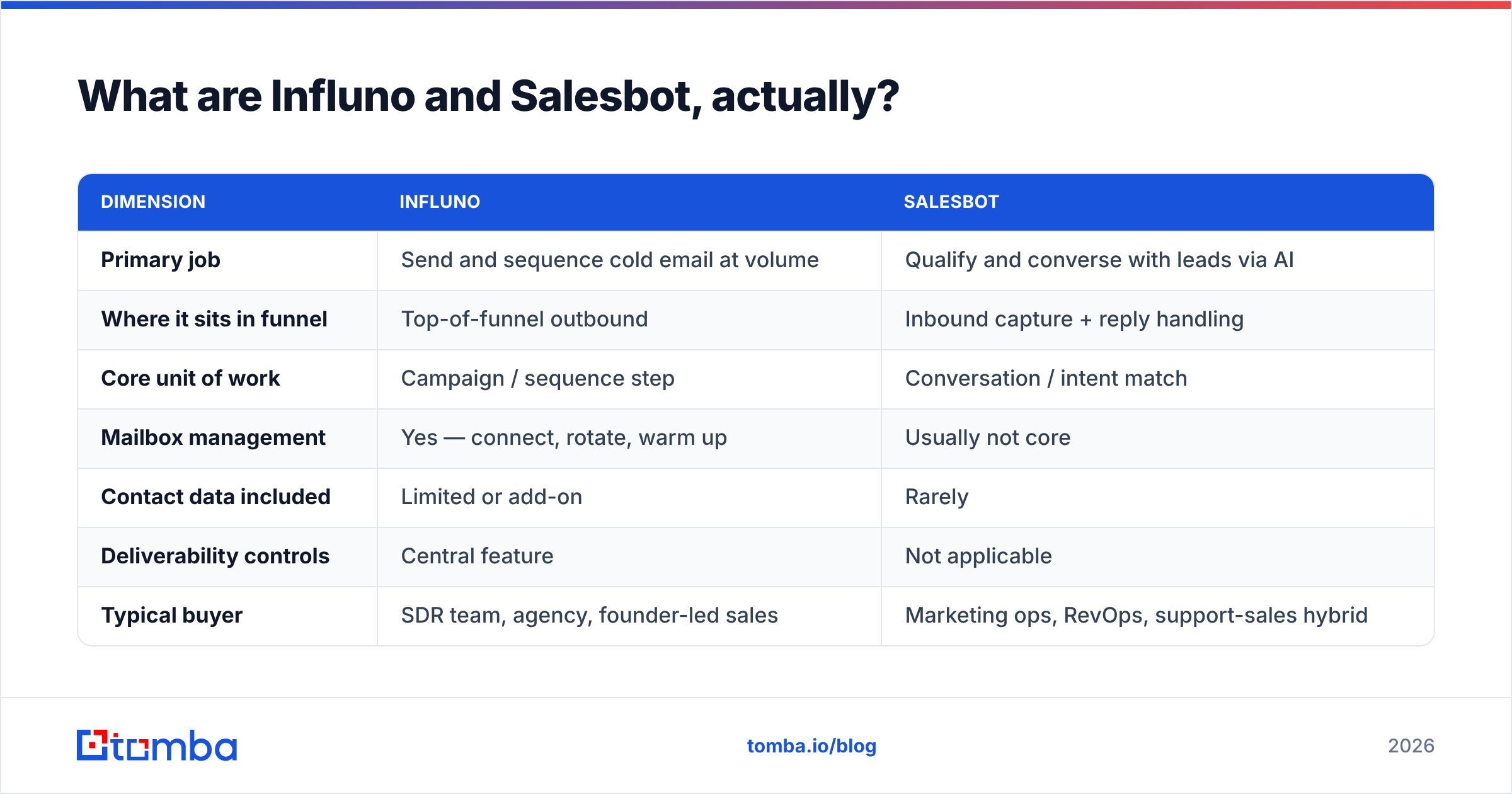
| Dimension | Influno | Salesbot |
|---|---|---|
| Primary job | Send and sequence cold email at volume | Qualify and converse with leads via AI |
| Where it sits in funnel | Top-of-funnel outbound | Inbound capture + reply handling |
| Core unit of work | Campaign / sequence step | Conversation / intent match |
| Mailbox management | Yes — connect, rotate, warm up | Usually not core |
| Contact data included | Limited or add-on | Rarely |
| Deliverability controls | Central feature | Not applicable |
| Typical buyer | SDR team, agency, founder-led sales | Marketing ops, RevOps, support-sales hybrid |
| Learning curve | Moderate (sequence logic, domains) | Low to moderate (flow builder, training data) |
Which one should you buy first?#
Buy the one that matches your bottleneck. That sounds obvious, but most teams buy the tool that matches their anxiety instead.
If you have 2,000 target accounts and nobody is opening your emails, you have a deliverability and targeting problem. Influno-class tooling helps. If you have 400 inbound form fills a month and reps are answering "what's your pricing" forty times a day, you have a qualification problem. Salesbot-class tooling helps.
Here's the decision path in order:
- Do you have verified contact data? If your bounce rate is above 3%, neither tool fixes it. Clean the list first with an email verifier, then talk about platforms.
- Is your inbound volume above ~200 qualified conversations a month? Below that, a bot is overhead. A shared inbox and a rep will outperform it.
- Are you sending more than 500 cold emails a week? Below that, your native mailbox plus a spreadsheet is fine. Above it, you need domain rotation and warmup.
- Does your team live in a CRM? Both categories claim integrations. Verify the specific object mapping before you sign — "syncs with HubSpot" can mean anything from bidirectional contact sync to a Zapier webhook.
- Who owns the tool after purchase? Sequencing platforms fail when nobody owns domain health. Bots fail when nobody owns the training corpus.

How do Influno and Salesbot compare on pricing?#
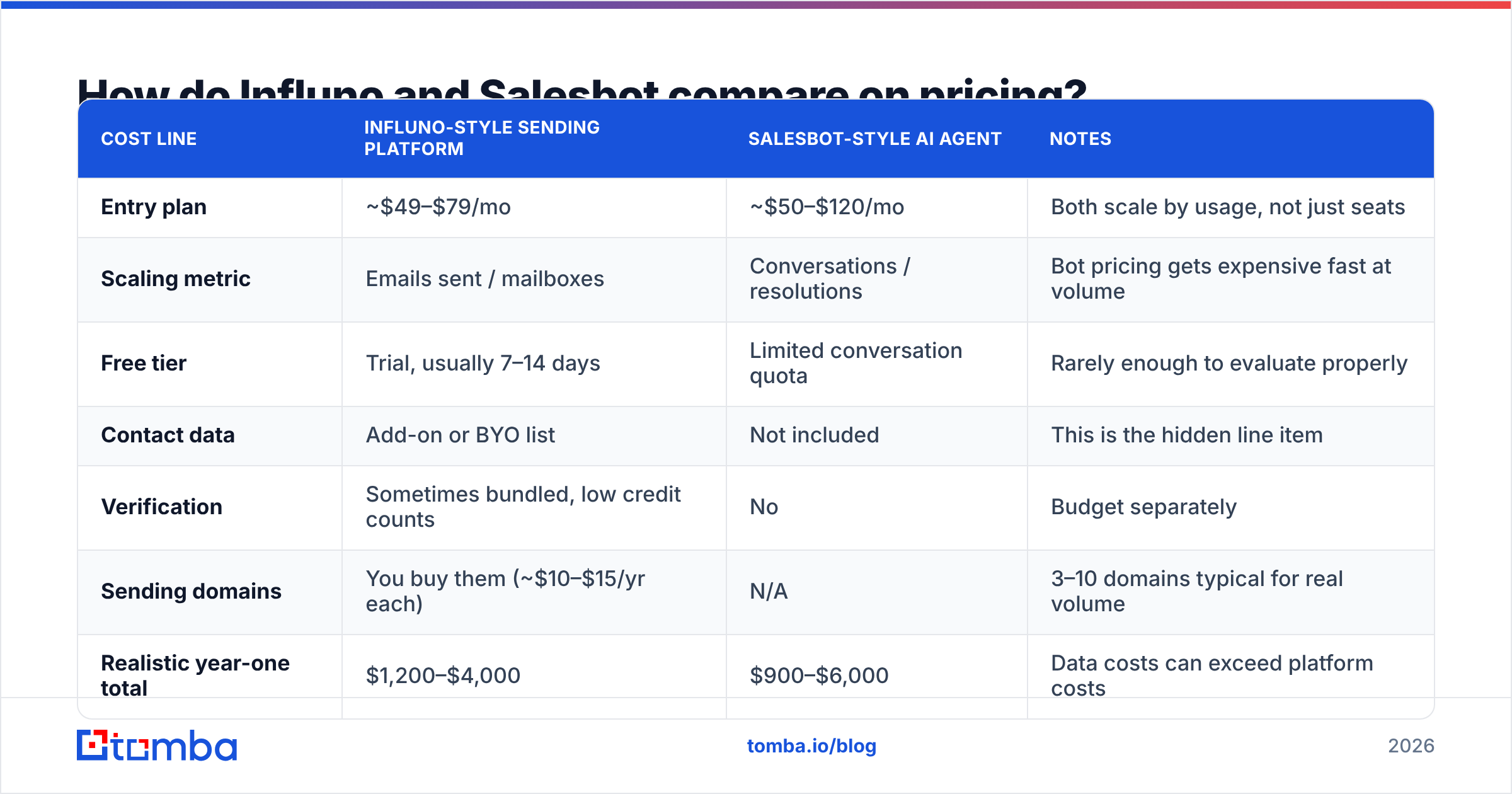
Neither vendor publishes pricing that survives a year unchanged, so treat these as shape-of-the-market numbers rather than quotes. Check each vendor's own page — influno.com and the Salesbot product you're evaluating — before budgeting.
| Cost line | Influno-style sending platform | Salesbot-style AI agent | Notes |
|---|---|---|---|
| Entry plan | ~$49–$79/mo | ~$50–$120/mo | Both scale by usage, not just seats |
| Scaling metric | Emails sent / mailboxes | Conversations / resolutions | Bot pricing gets expensive fast at volume |
| Free tier | Trial, usually 7–14 days | Limited conversation quota | Rarely enough to evaluate properly |
| Contact data | Add-on or BYO list | Not included | This is the hidden line item |
| Verification | Sometimes bundled, low credit counts | No | Budget separately |
| Sending domains | You buy them (~$10–$15/yr each) | N/A | 3–10 domains typical for real volume |
| Realistic year-one total | $1,200–$4,000 | $900–$6,000 | Data costs can exceed platform costs |
The line that catches teams out is contact data. A sequencing platform with an empty list is a very expensive text editor. A bot with no traffic pointed at it is a very expensive FAQ page. When you model cost, model the whole stack: platform + data + verification + domains.
For reference on what the data layer costs on its own, Tomba pricing runs a free tier at 25 searches/month, Starter at $49/mo, Growth at $99/mo, and Pro at $249/mo, with Enterprise custom. That is a separate budget line from whatever sending or bot tool you pick, and pretending otherwise is how outbound programs blow their quarter-one budget in week three.
Is Influno better than Salesbot for cold outreach?#
For cold outreach specifically — yes, and it isn't close. Cold outreach is a sending, sequencing, and deliverability discipline. An AI conversation agent has nothing to send from and nobody to talk to until a message lands in someone's inbox and gets a reply.
Where Salesbot-style tools earn their keep in an outbound motion is the reply side. When 300 people respond to a campaign and 200 of those are "not right now" or "send me more info," an AI agent that triages, tags, and drafts contextual responses genuinely saves rep hours. That's a real workflow, and it's complementary rather than competitive.
The honest framing: Influno owns the send, Salesbot owns the conversation. Teams running serious volume often run both, plus a CRM, plus a data provider. Teams running 200 emails a week need one of them at most.
One caveat on AI reply agents in cold outbound: automated replies to cold prospects carry brand risk. A bot that misreads intent and pushes for a meeting from someone who asked to be removed creates compliance exposure under GDPR and CAN-SPAM. Keep a human in the loop on anything that looks like an opt-out. G2's category listings are useful for reading how real buyers describe these failure modes before you commit.
What do both tools get wrong about data?#
Both categories quietly assume you already have accurate contact records. That assumption is where most outbound programs die.
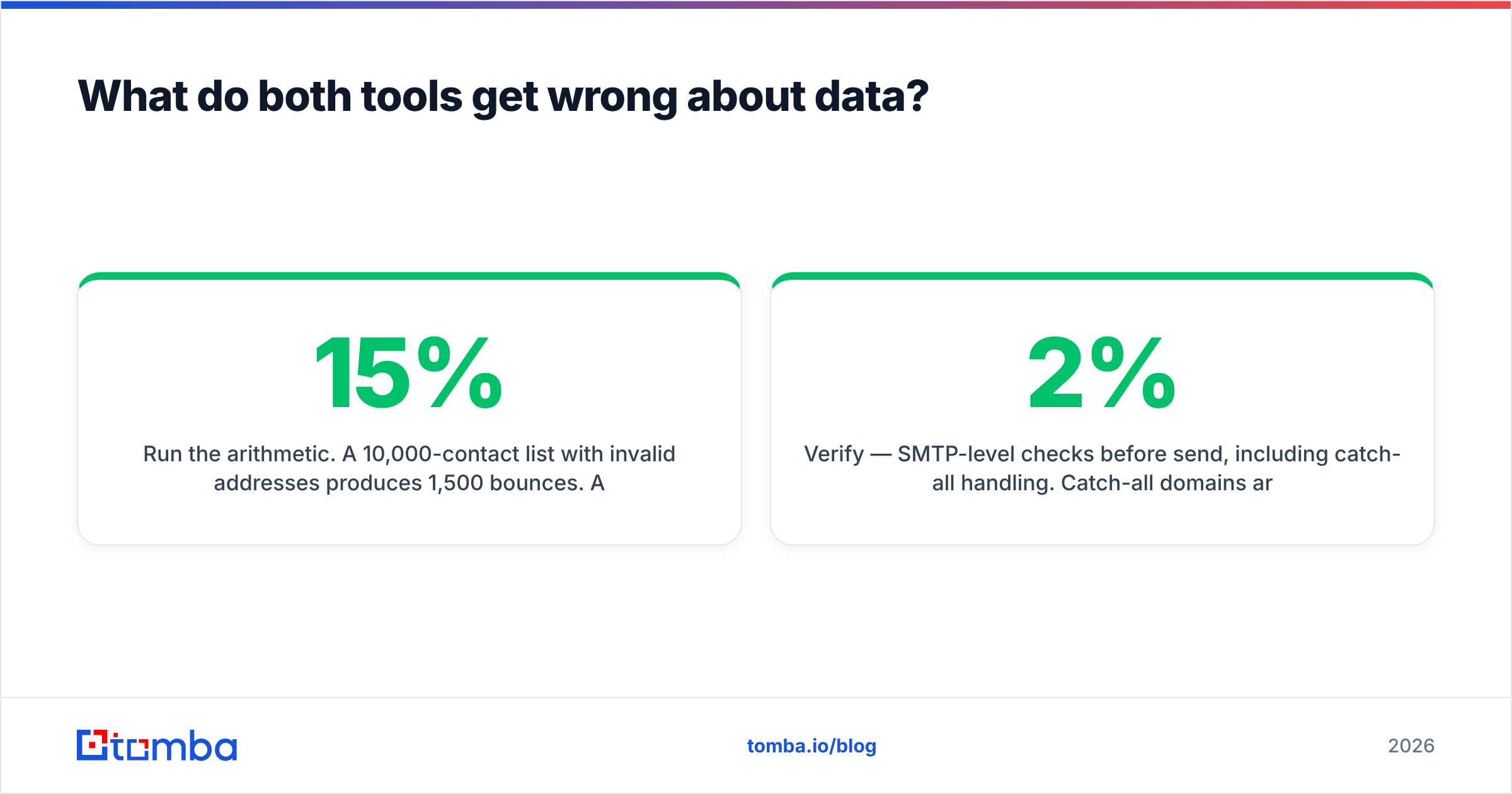
Run the arithmetic. A 10,000-contact list with 15% invalid addresses produces 1,500 bounces. At typical thresholds, a bounce rate above 5% starts degrading sender reputation at the mailbox-provider level. Once Google and Microsoft start filtering your domain, no amount of sequencing logic or AI copywriting recovers it. You buy new domains and start over — a six-week setback that no feature comparison table will warn you about.
This is why the practical stack looks like:
- Source — find verified addresses by domain, name, or LinkedIn profile. A domain search that returns every public address at a target company plus the company's email pattern is more useful than a static list you bought.
- Verify — SMTP-level checks before send, including catch-all handling. Catch-all domains are the single most common cause of "verified" lists that still bounce; a dedicated catch-all verifier is the difference between a 2% and an 11% bounce rate on enterprise targets.
- Enrich — job title, seniority, company size, so your segmentation isn't guesswork.
- Send — Influno or equivalent.
- Converse — Salesbot or equivalent, with human review on anything ambiguous.
- Record — CRM as the system of truth.
Tools in the same neighborhood worth knowing about: BookYourData is a solid choice if you want a pay-as-you-go prebuilt B2B list with no subscription commitment, which suits one-off campaigns and agencies running short engagements. It solves a different shape of the problem than an on-demand lookup API, and plenty of teams use both. Clearbit-style enrichment providers sit further up-market and price accordingly.
How do you evaluate either tool in a two-week trial?#
Feature lists lie. Trials tell the truth, but only if you test the right things.
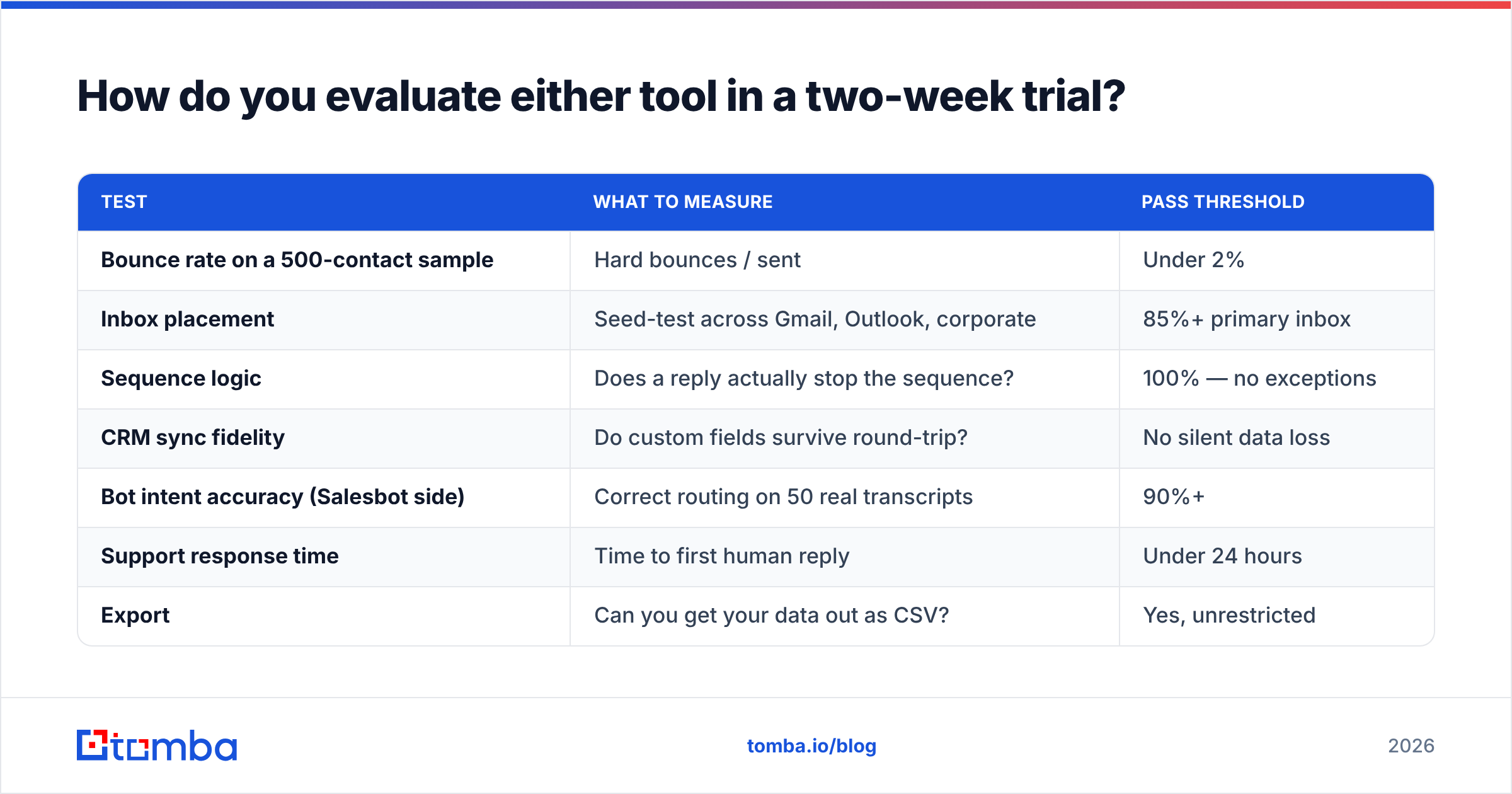
| Test | What to measure | Pass threshold |
|---|---|---|
| Bounce rate on a 500-contact sample | Hard bounces / sent | Under 2% |
| Inbox placement | Seed-test across Gmail, Outlook, corporate | 85%+ primary inbox |
| Sequence logic | Does a reply actually stop the sequence? | 100% — no exceptions |
| CRM sync fidelity | Do custom fields survive round-trip? | No silent data loss |
| Bot intent accuracy (Salesbot side) | Correct routing on 50 real transcripts | 90%+ |
| Support response time | Time to first human reply | Under 24 hours |
| Export | Can you get your data out as CSV? | Yes, unrestricted |
That last row matters more than people expect. Platforms that make export painful are betting you won't leave. Test it on day two of the trial, not day fourteen.
For inbox placement specifically, don't trust the vendor's own deliverability dashboard. Use an independent seed test and cross-check against Google Postmaster Tools. Vendor dashboards report what they sent, not what got delivered to the primary tab. HubSpot's deliverability documentation covers the authentication baseline — SPF, DKIM, DMARC — that you should have in place before either platform touches your domain.
What's the verdict for 2026?#
Pick by bottleneck, not by brand:
- Founder-led sales, under 1,000 emails/month: Neither. Use your own mailbox, a good data source, and manual follow-up. You'll learn more about your ICP in six weeks than any automation will teach you.
- SDR team of 2–10, outbound-heavy: Influno-class sending platform. Pair it with a real data layer and a verification step. Skip the bot until reply volume genuinely hurts.
- Strong inbound, thin SDR coverage: Salesbot-class agent. It pays for itself in speed-to-lead alone — responding within five minutes versus an hour changes qualification rates materially.
- Both motions running at scale: Run both, but wire them in sequence, not parallel. The sending platform generates replies; the bot triages them; humans close.
- Agency running client campaigns: Sending platform plus a per-lookup data provider so you can attribute costs per client cleanly.
The comparison that actually determines outcomes isn't Influno vs Salesbot. It's verified data vs. scraped data. Two teams running identical sequences on identical platforms will see 4x different reply rates based entirely on list quality. That's not a marketing claim; it's what happens when one team's messages reach humans and the other's hit spam traps.
Where should you start?#
Start with the list. Before you commit to a twelve-month contract on either platform, spend a week proving you can build a clean, targeted, verified contact list for your ICP. If you can't, the platform decision is premature.
Tomba's Email Finder is built for exactly that step — find professional email addresses by domain, name, or company, with verification built into the same workflow so you're not stitching two vendors together. The free tier gives you 25 searches a month to test accuracy against contacts you already know are real, which is the only honest way to benchmark a data provider. Run that test first, then go pick your sending platform or your bot with a list that actually deserves the spend.
Related guides#
// get started
Find, verify and enrich your first contacts today
Start on the free plan with 25 searches a month, then scale when your team is ready.
Free plan · No credit card required · GDPR & CCPA
// about the author