Infofree vs SalesQL: Which B2B Lead Data Tool Wins in 2026?
One sells unlimited lists from a legacy database. The other scrapes contacts off LinkedIn profiles one click at a time. Here is how Infofree and SalesQL actually compare on data freshness, bounce rates, pricing and workflow fit.
TL;DR
- Infofree is a subscription database: you pay a flat monthly fee, filter a large US business/consumer file by SIC code, revenue, employee count or geography, and export lists. Volume is its selling point, not precision.
- SalesQL is a LinkedIn-first Chrome extension: you browse a profile or a Sales Navigator search, click, and it returns personal and work emails plus phone numbers. Precision per contact is better; scale and coverage outside LinkedIn are worse.
- They are not really competitors. Infofree answers "give me 5,000 HVAC companies in Texas." SalesQL answers "give me the email of this specific VP of Ops."
- Neither ships a serious verification layer. If you send cold email off either one raw, expect bounce rates that will hurt your domain.
- Most teams end up using a targeting source plus a dedicated finder/verifier. That is where a tool like Tomba Email Finder slots in — and why the "which one wins" question usually has a third answer.
What are Infofree and SalesQL, exactly?#
They come from opposite eras of B2B data.
Infofree descends from the classic American list-compilation business — phone directories, business registrations, public filings, self-reported firmographics, all compiled into one enormous file. Its pitch is unlimited access: pay a flat rate, pull as many lists as you want, no per-record credits. Included with it is a lightweight CRM so you can work the lists without exporting to a separate system. The buyer profile is a small business owner, an insurance agency, a local services company, or an inside sales team that dials more than it emails.
SalesQL is the newer shape of the same problem. It is a browser extension that sits on top of LinkedIn. You open a profile, hit the button, and it surfaces work email, personal email, and (on paid plans) direct and mobile numbers. It also handles bulk extraction from LinkedIn search results, Sales Navigator lists, and group member lists. The buyer profile is an SDR, a recruiter, or a founder doing their own outbound.
The distinction that actually matters: Infofree sells you a haystack with filters. SalesQL sells you one needle at a time.
How do Infofree and SalesQL source their data?#
Sourcing determines everything downstream — freshness, bounce rate, coverage, and how nervous your compliance person should be.
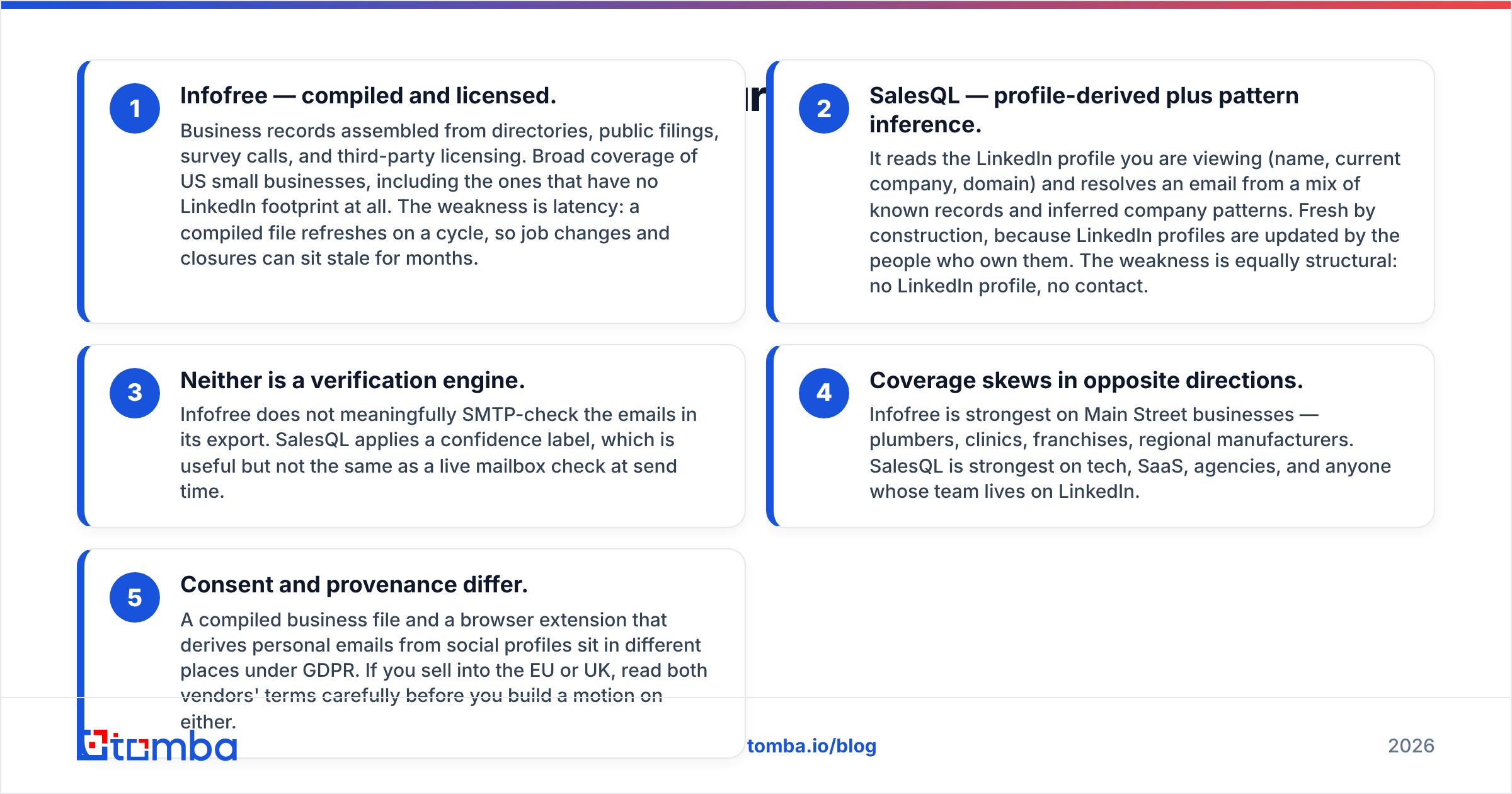
Infofree — compiled and licensed. Business records assembled from directories, public filings, survey calls, and third-party licensing. Broad coverage of US small businesses, including the ones that have no LinkedIn footprint at all. The weakness is latency: a compiled file refreshes on a cycle, so job changes and closures can sit stale for months.
SalesQL — profile-derived plus pattern inference. It reads the LinkedIn profile you are viewing (name, current company, domain) and resolves an email from a mix of known records and inferred company patterns. Fresh by construction, because LinkedIn profiles are updated by the people who own them. The weakness is equally structural: no LinkedIn profile, no contact.
Neither is a verification engine. Infofree does not meaningfully SMTP-check the emails in its export. SalesQL applies a confidence label, which is useful but not the same as a live mailbox check at send time.
Coverage skews in opposite directions. Infofree is strongest on Main Street businesses — plumbers, clinics, franchises, regional manufacturers. SalesQL is strongest on tech, SaaS, agencies, and anyone whose team lives on LinkedIn.
Consent and provenance differ. A compiled business file and a browser extension that derives personal emails from social profiles sit in different places under GDPR. If you sell into the EU or UK, read both vendors' terms carefully before you build a motion on either.

How do Infofree and SalesQL compare on pricing and features?#
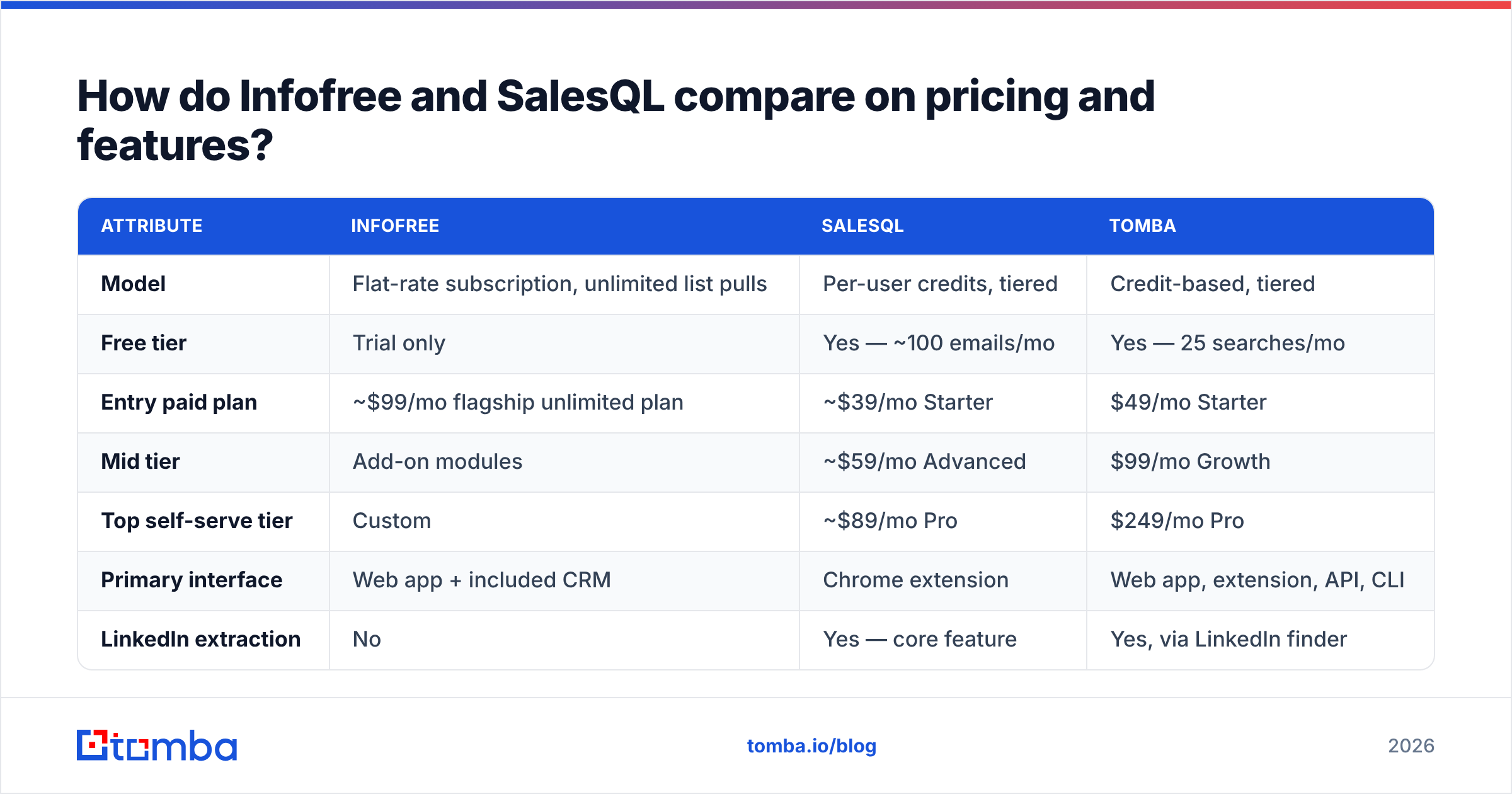
List prices move, and both vendors run promotional annual rates — treat the figures below as the shape of the offer, not a quote. Check each vendor's pricing page before you commit.
| Attribute | Infofree | SalesQL | Tomba |
|---|---|---|---|
| Model | Flat-rate subscription, unlimited list pulls | Per-user credits, tiered | Credit-based, tiered |
| Free tier | Trial only | Yes — ~100 emails/mo | Yes — 25 searches/mo |
| Entry paid plan | ~$99/mo flagship unlimited plan | ~$39/mo Starter | $49/mo Starter |
| Mid tier | Add-on modules | ~$59/mo Advanced | $99/mo Growth |
| Top self-serve tier | Custom | ~$89/mo Pro | $249/mo Pro |
| Primary interface | Web app + included CRM | Chrome extension | Web app, extension, API, CLI |
| LinkedIn extraction | No | Yes — core feature | Yes, via LinkedIn finder |
| Domain-wide search | Limited | No | Yes |
| Email verification | Minimal | Confidence score only | Dedicated verifier + catch-all handling |
| Phone numbers | Yes — business landlines | Yes — direct and mobile on paid tiers | Yes — phone finder + validator |
| Public API | No | Limited | Yes, documented REST API |
| Best for | Volume list-building, dialing campaigns | 1:1 LinkedIn prospecting | Programmatic finding + verification at scale |
Read that table by column, not by row. Infofree's unlimited model is genuinely good value if your bottleneck is list volume and you plan to dial. SalesQL's per-seat pricing is good value if your bottleneck is one hard-to-find decision maker at a time. If your bottleneck is "I need 3,000 verified emails through an API by Thursday," neither column is the right answer, which is why the third one exists.

Which tool gives you more accurate emails?#
SalesQL, on the specific contacts it can find. Infofree, on nothing in particular.
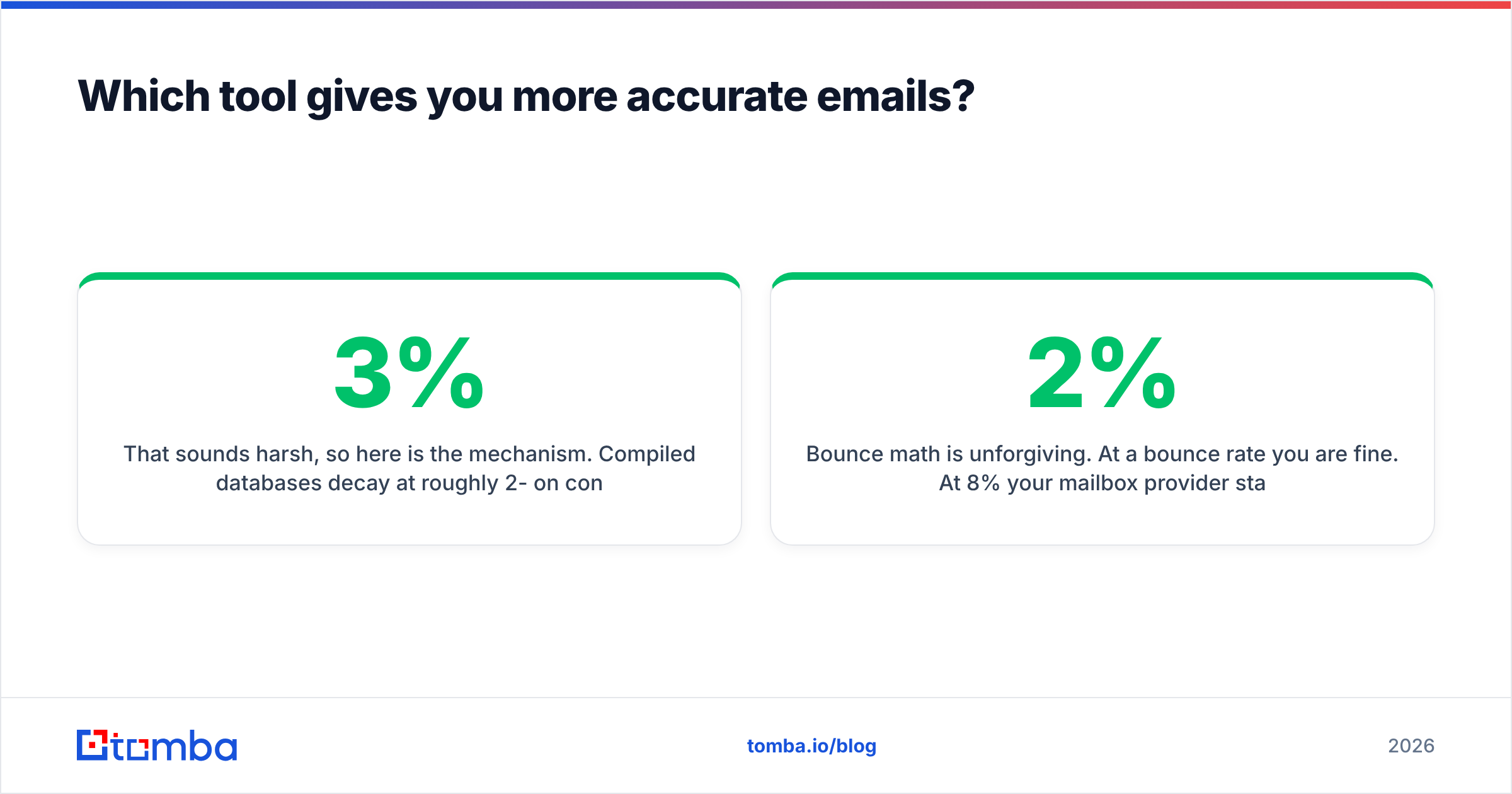
That sounds harsh, so here is the mechanism. Compiled databases decay at roughly 2-3% per month on contact-level fields — people change jobs, companies rebrand, generic inboxes get retired. A file that refreshes quarterly is, on average, already six weeks stale when you download it. Business-level fields (address, phone, SIC code) decay much slower, which is why Infofree holds up far better as a dialing list than as an emailing list.
SalesQL starts from a profile the person maintains themselves, so the company and title are usually current. The email is then resolved or inferred. Inference is where the variance lives: for a company with a clean, well-known pattern, hit rates are high. For a company with mixed patterns, aliases, or a catch-all MX record, the confidence score becomes a coin flip dressed as a number.

The practical rule, whichever you pick: never send to an unverified address. Run every export through an email verifier before it touches your sequencer. A verifier does a live syntax, MX, and mailbox check, then tells you what is deliverable, what is risky, and what is a catch-all domain that needs a different treatment. Catch-alls are the specific trap here — both tools will happily hand you addresses at catch-all domains that accept everything and deliver nothing, and only a catch-all verifier will separate the real inboxes from the black holes.
Bounce math is unforgiving. At a 2% bounce rate you are fine. At 8% your mailbox provider starts throttling. Past 10% you are rebuilding sender reputation for a month. That single number decides whether a cheap list was actually cheap.

Is Infofree better than SalesQL for cold outreach?#
No — and mostly SalesQL is not great at it either, for different reasons.
Infofree's failure mode in cold email is generic addresses. A compiled business file leans heavily on info@, office@, and contact@. Those route to a shared inbox, get filtered aggressively, and convert terribly for anything above a transactional offer. They are fine for a local services pitch. They are useless for a six-figure enterprise deal where you need the VP of Engineering.
SalesQL's failure mode is throughput and ceiling. Extracting from LinkedIn at volume runs into LinkedIn's own limits, and stacking a scraper on top of a Sales Navigator seat is a fragile foundation for a repeatable motion. It is excellent for 30 targeted contacts a day. It is not a data pipeline.
Where each genuinely wins:
- Infofree wins when you need geographic saturation of small businesses and your primary channel is the phone. Unlimited pulls plus landline coverage is a real advantage for a dialing team.
- SalesQL wins when you have already identified the individual and need to reach them directly, especially in tech and services verticals.
- Neither wins when you need repeatable, verified, domain-level coverage for a sequencer running a few thousand contacts a month.
For that third case you want domain search — give it a company domain, get back the people, their roles, and the company's actual email pattern, then verify. It is the same job Infofree does at the list level and SalesQL does at the profile level, but done at the layer where cold email actually operates.
How do you choose between them in five minutes?#
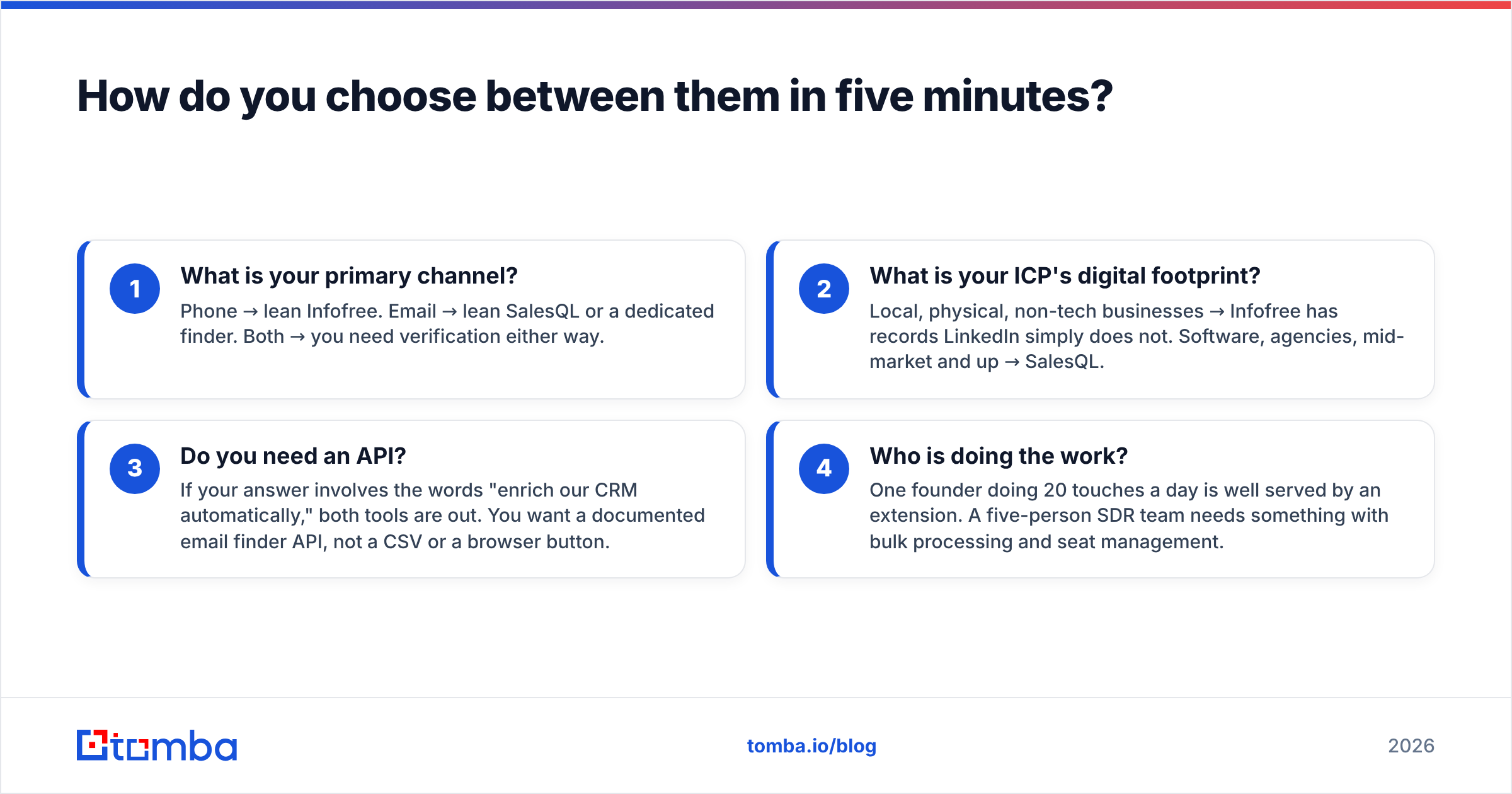
Answer these four questions honestly:
- What is your primary channel? Phone → lean Infofree. Email → lean SalesQL or a dedicated finder. Both → you need verification either way.
- What is your ICP's digital footprint? Local, physical, non-tech businesses → Infofree has records LinkedIn simply does not. Software, agencies, mid-market and up → SalesQL.
- Do you need an API? If your answer involves the words "enrich our CRM automatically," both tools are out. You want a documented email finder API, not a CSV or a browser button.
- Who is doing the work? One founder doing 20 touches a day is well served by an extension. A five-person SDR team needs something with bulk processing and seat management.
If you land in the middle — some LinkedIn prospecting, some list building, an eventual need to automate — check Tomba pricing against the flat-rate and per-seat models above. Credit-based pricing looks more expensive per month at the entry tier and is usually cheaper per usable contact, because you are not paying for records you will never send to.
What do reviewers actually say about each tool?#
Read the reviews with the buyer profile in mind. Infofree's ratings on sites like G2 cluster around two themes: people who love the flat-rate unlimited model for prospect volume, and people frustrated by data that was out of date by the time they called. Both things are true simultaneously — it is the predictable signature of a compiled file.
SalesQL reviews skew positive on ease of use and negative on two specifics: credits running out faster than expected on bulk extractions, and personal emails that turn out to be old Gmail addresses from a previous job. Again, both are structural, not defects.
What almost no review of either tool mentions is deliverability testing, which tells you something about how many buyers discover the bounce problem only after their domain is already singed.
Which should you actually buy?#
Here is the honest breakdown:
- Buy Infofree if you run a phone-first motion targeting small and mid-sized US businesses, you value predictable flat-rate cost, and you accept that the email fields are a bonus rather than the product.
- Buy SalesQL if LinkedIn is where your buyers live, your volume is modest, and you want individual contacts fast without learning a new platform.
- Buy neither alone if you plan to run real cold email volume. Whatever you use for targeting, you still need finding and verification underneath it, or your sender reputation absorbs the cost of the data quality gap.
The cheapest lead list in the world becomes the most expensive one the moment it burns a sending domain. Price the tool, then price the bounces.
Ready to stop guessing at addresses? Tomba Email Finder resolves verified professional emails by name, domain, or company, with a live verification check built into every lookup — so what lands in your sequencer is deliverable, not hopeful. Start free with 25 searches a month, no card required, and run your existing Infofree or SalesQL export through it to see exactly how much of your current list is real.
Related guides#
// get started
Find, verify and enrich your first contacts today
Start on the free plan with 25 searches a month, then scale when your team is ready.
Free plan · No credit card required · GDPR & CCPA
// about the author