Infofree vs Skrapp (2026): Which B2B Lead Data Tool Wins?
One sells unlimited US business records for a flat fee. The other pulls verified emails off LinkedIn profiles. They are not the same product — and picking the wrong one costs you a quarter of pipeline. Here is the honest breakdown.
TL;DR
- Infofree vs Skrapp is not a like-for-like fight. Infofree is a flat-fee US business and consumer database you download from. Skrapp is a LinkedIn-first email finder you use one prospect at a time.
- Pick Infofree if you sell to local SMBs by phone or direct mail, want unlimited record pulls for a flat monthly fee, and can live with stale contact data.
- Pick Skrapp if your buyers live on LinkedIn, you build lists by job title rather than SIC code, and you need emails that clear an SMTP check.
- Neither is a verification layer. Both hand you addresses. Neither keeps a list clean over time, and that gap is where bounce rates come from.
- Our 2026 pick for cold email: Skrapp over Infofree, on data quality. Pair either one with a dedicated email verifier before you send.
Infofree vs Skrapp: what is each tool?#
These two tools get compared because both end with a spreadsheet of leads. That is where the similarity stops.
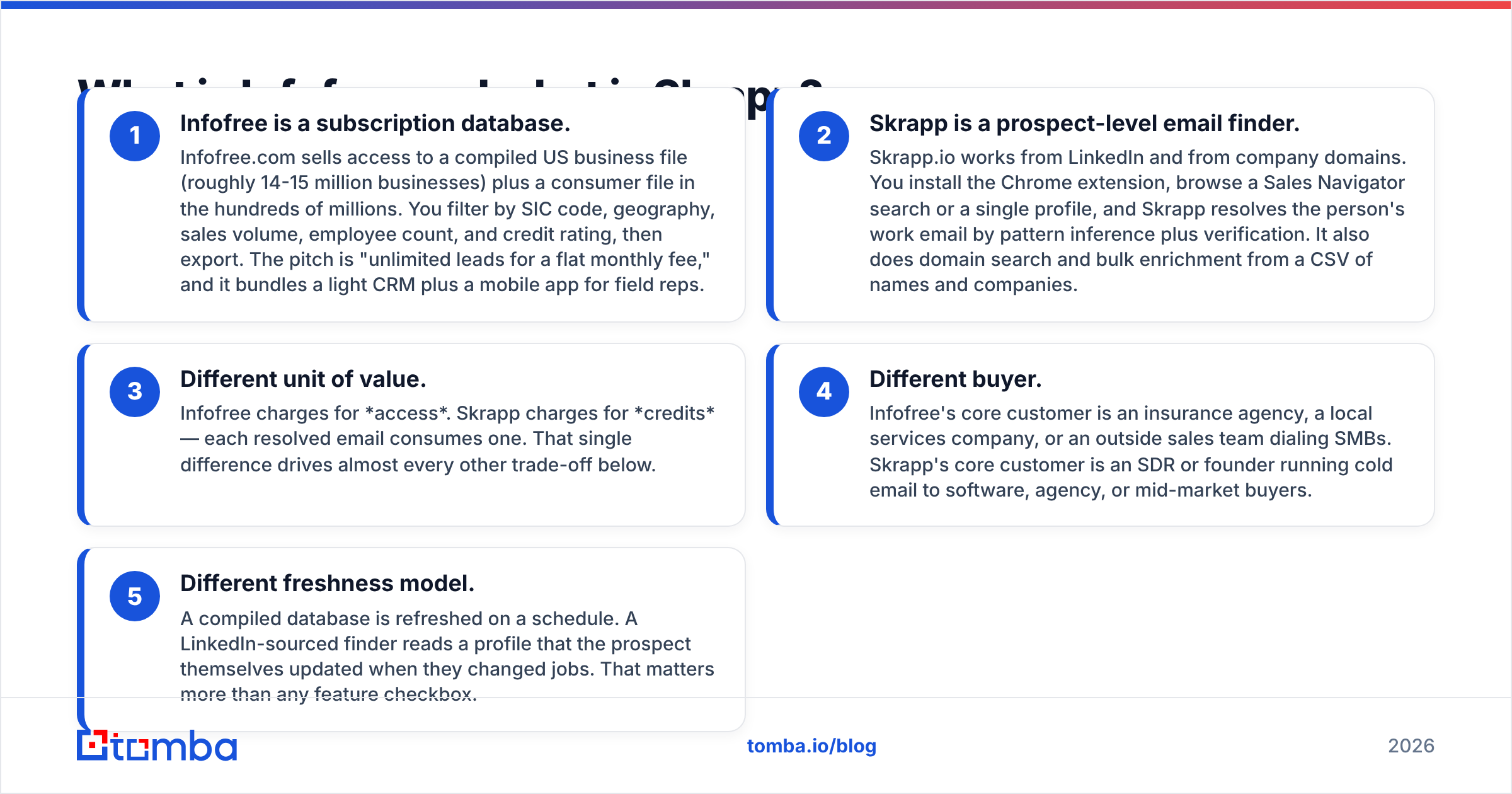
- Infofree is a subscription database. Infofree.com sells access to a compiled US business file (roughly 14-15 million businesses) plus a consumer file in the hundreds of millions. You filter by SIC code, geography, sales volume, employee count, and credit rating, then export. The pitch is "unlimited leads for a flat monthly fee." A light CRM and a mobile app for field reps come in the box.
- Skrapp is a prospect-level email finder. Skrapp.io works from LinkedIn and from company domains. You install the Chrome extension, then browse a Sales Navigator search or a single profile. Skrapp resolves the person's work email by pattern inference plus verification. It also does domain search and bulk enrichment from a CSV.
Three deeper splits matter more than any feature checkbox:
- Different unit of value. Infofree charges for access. Skrapp charges for credits — each resolved email uses one. That single difference drives almost every trade-off below.
- Different buyer. Infofree sells to insurance agencies, local services companies, and outside sales teams dialing SMBs. Skrapp sells to the SDR or founder running cold email to software, agency, and mid-market buyers.
- Different freshness model. A compiled database is refreshed on a schedule. A LinkedIn-sourced finder reads a profile the prospect updated when they changed jobs.
If you are comparing infofree vs skrapp because you want "a list of leads," answer one question first: do you target companies by firmographic filter, or people by job title? Infofree is excellent at the first and weak at the second.
Infofree vs Skrapp: how do they compare head-to-head?#
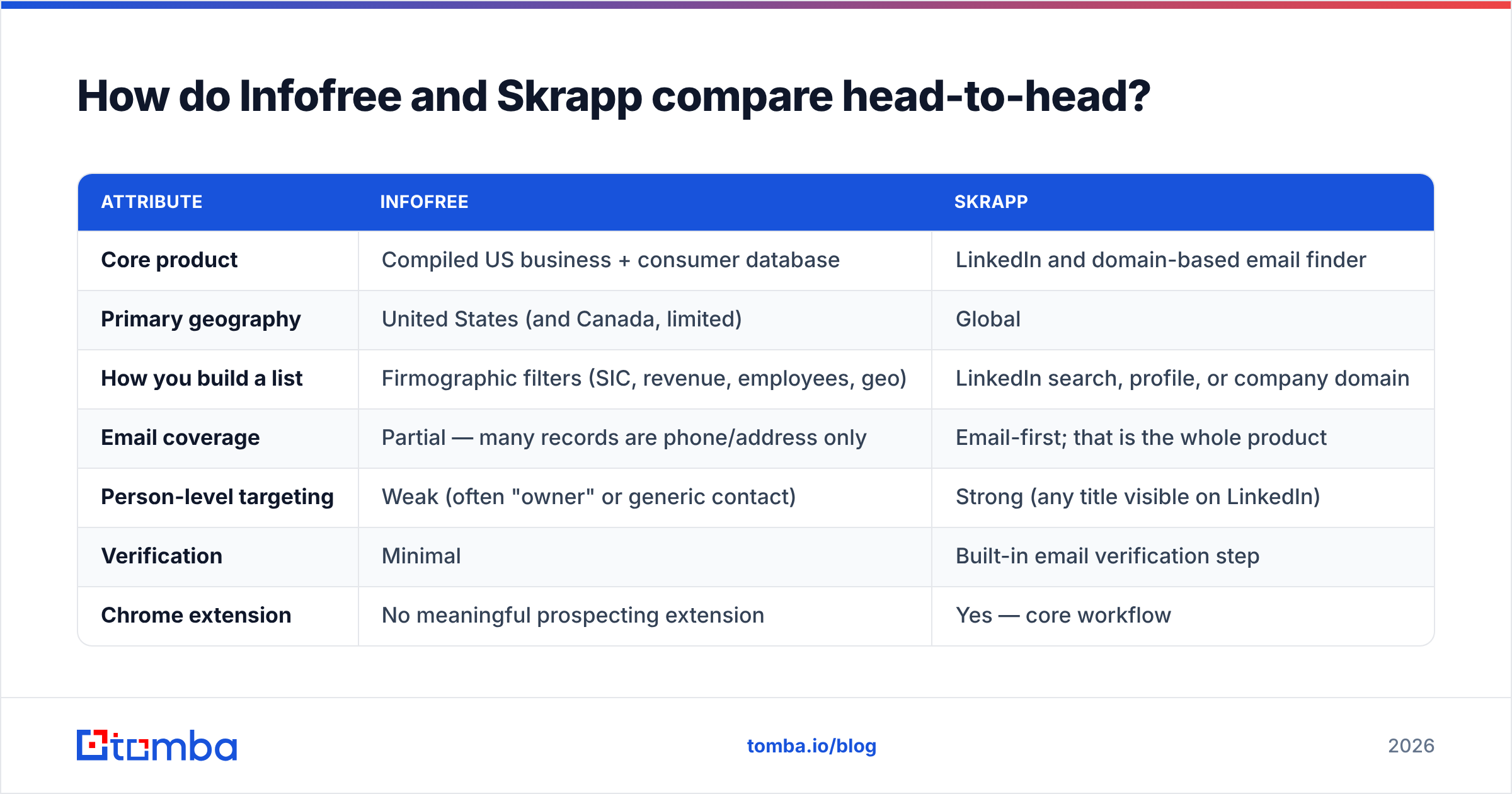
| Attribute | Infofree | Skrapp |
|---|---|---|
| Core product | Compiled US business + consumer database | LinkedIn and domain-based email finder |
| Primary geography | United States (and Canada, limited) | Global |
| How you build a list | Firmographic filters (SIC, revenue, employees, geo) | LinkedIn search, profile, or company domain |
| Email coverage | Partial — many records are phone/address only | Email-first; that is the whole product |
| Person-level targeting | Weak (often "owner" or generic contact) | Strong (any title visible on LinkedIn) |
| Verification | Minimal | Built-in email verification step |
| Chrome extension | No meaningful prospecting extension | Yes — core workflow |
| Bulk enrichment from CSV | Export-driven | Yes, credit-metered |
| API | Limited | Yes |
| Included CRM | Yes (CRM101) | No — integrates instead |
| Pricing model | Flat monthly, unlimited pulls | Credit tiers |
| Best for | SMB phone and direct-mail outbound | B2B cold email and LinkedIn outreach |

The table makes the split obvious. Infofree wins on breadth of records and on cost predictability. Skrapp wins on the thing most 2026 outbound teams actually need: a deliverable email for a named decision-maker.
Infofree vs Skrapp: which one has better data accuracy?#
Skrapp, for email. Infofree, for business existence and phone.
Compiled databases like Infofree are built from public filings, directory listings, phone verification passes, and licensed third-party feeds. That process is very good at telling you a dental practice exists in Tulsa with eight employees and $1.2M in revenue. It is much worse at the current email of the office manager. Compiled files inherit generic addresses (info@, contact@), and they lag behind job changes by months.
Skrapp's source of truth is different. It reads the person's own LinkedIn record plus the company's observed email pattern, then runs a validation pass. When someone changes jobs, LinkedIn updates within weeks, so the derived email follows. The trade-off is coverage. If your prospect is not on LinkedIn — common in trades, local retail, and many non-US SMB segments — Skrapp has nothing to work with.

Two accuracy realities worth internalizing before you buy either:
- "Unlimited" is not the same as "usable." A flat-fee database that lets you export 50,000 records is only valuable if a real share of those records are reachable. Run a sample of 500 through a verifier before you commit to a year.
- Catch-all domains break naive verification. A large share of corporate domains accept all mail at the SMTP layer, so a simple "valid" flag means nothing. If your list skews enterprise, you need a real catch-all verifier, not a green checkmark.
Neither vendor publishes an audited accuracy figure. Treat any number on a pricing page — from either company — as marketing until you have tested it on your own ICP. Public review data on G2 is useful directionally, but it skews toward whoever ran the last review campaign.
Infofree vs Skrapp: how does the pricing compare?#
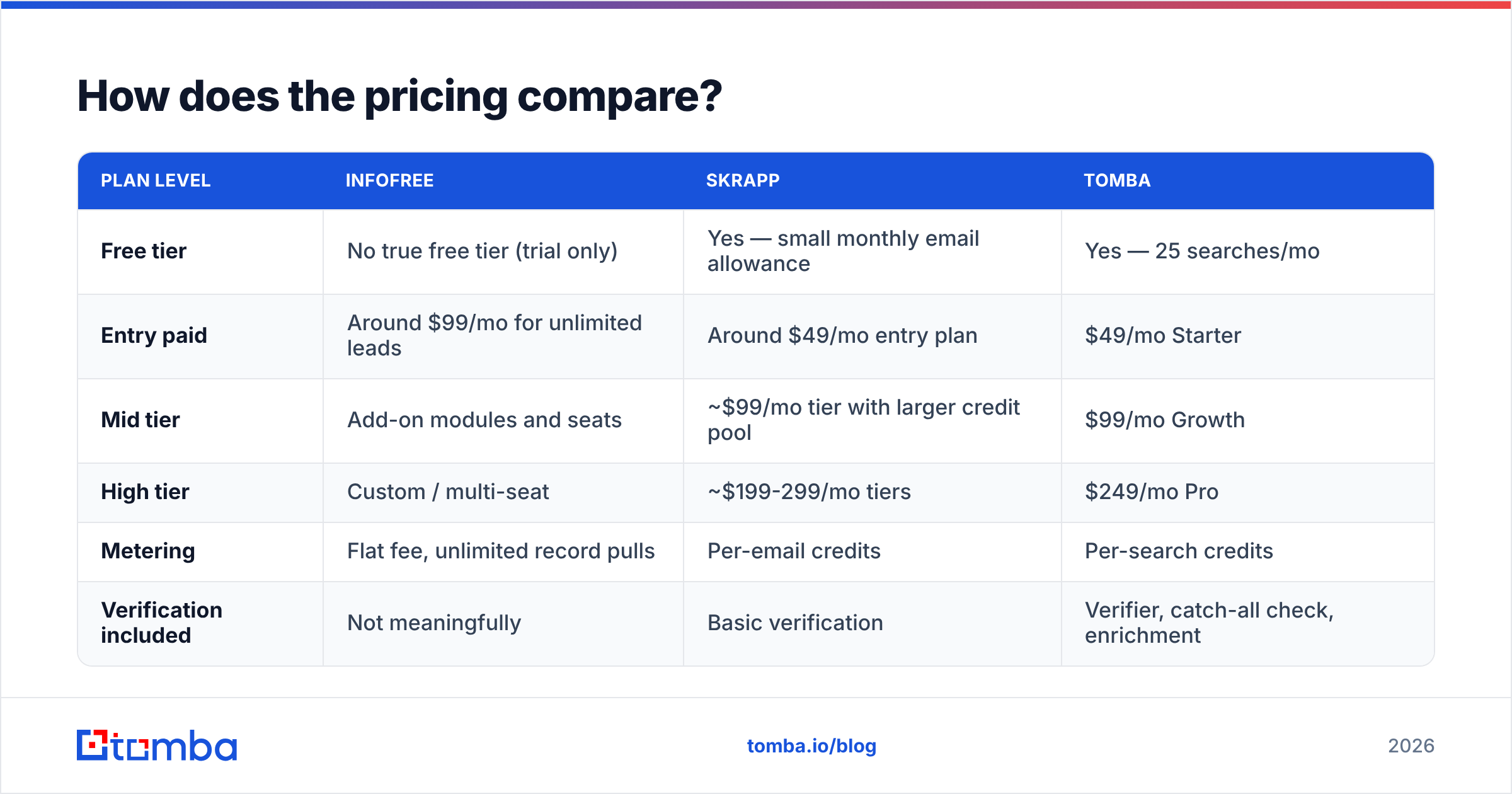
Pricing changes; confirm on each vendor's own page before you sign anything. As of this writing, the shape looks like this:
| Plan level | Infofree | Skrapp | Tomba |
|---|---|---|---|
| Free tier | No true free tier (trial only) | Yes — small monthly email allowance | Yes — 25 searches/mo |
| Entry paid | Around $99/mo for unlimited leads | Around $49/mo entry plan | $49/mo Starter |
| Mid tier | Add-on modules and seats | ~$99/mo tier with larger credit pool | $99/mo Growth |
| High tier | Custom / multi-seat | ~$199-299/mo tiers | $249/mo Pro |
| Metering | Flat fee, unlimited record pulls | Per-email credits | Per-search credits |
| Verification included | Not meaningfully | Basic verification | Verifier, catch-all check, enrichment |
Read the metering row twice. Flat-fee unlimited sounds like the better deal until you work out the cost per usable contact. Say Infofree gives you 10,000 records at $99/mo, and 20% carry a valid person-level email. Your real cost is about $0.05 per usable contact — genuinely competitive, if generic inbox outreach works for your motion. If you need the VP of Operations by name, that math collapses.
Skrapp's credit model is the opposite: you pay more per contact, but you only pay for contacts you actually resolved. For a 200-account ABM list, that is cheaper and cleaner.
For a third data point on where credit pricing lands in 2026, compare against Tomba pricing — the tiers are structured much like Skrapp's, with verification and enrichment folded in rather than sold as separate line items.
Who should actually buy Infofree?#
Infofree is the right call in a narrow but real set of situations:
- You sell to local SMBs by phone. Insurance, merchant services, commercial cleaning, HVAC supply, staffing. Your prospect is "the owner," you are going to dial, and firmographic filters beat job-title filters.
- You run direct mail. Infofree gives you mailing addresses at scale, which email finders simply do not.
- You need predictable cost. A flat monthly fee with no credit anxiety is easier to budget and easier to hand to a junior rep.
- You want a bundled CRM. For a two-person shop with no Salesforce budget, having CRM101 in the box removes a decision.
Where it falls down: modern B2B cold email. If you are emailing named buyers at software or services companies, a compiled US database will hand you generic inboxes, outdated contacts, and no title-level precision. That is not a knock on the product — it is a mismatch between the product and the motion.
Who should actually buy Skrapp?#
Skrapp fits when your pipeline starts on LinkedIn:
- Title-based targeting. You want every Head of RevOps at 500-2,000 employee SaaS companies. LinkedIn is the only practical source for that, and Skrapp reads it directly.
- Sales Navigator workflows. If your team already lives in Sales Navigator, the extension turns a saved search into a contactable list without leaving the tab.
- Cold email as primary channel. Skrapp's verification pass keeps bounce rates in a survivable range, which protects your sender reputation.
- Global prospecting. Infofree is US-centric. Skrapp is not.
Where it falls down: coverage gaps outside LinkedIn-heavy industries, credit ceilings that bite when you scale, and thin enrichment beyond the email itself. You get an address, not a full contact record with direct dials and technographics.
What are the real limitations of both?#
Three gaps show up regardless of which you pick.
1. Verification is treated as a feature, not a discipline. Both tools validate at the moment of capture. Neither re-validates the list you exported three months ago. B2B contact data decays roughly 2-3% per month through job changes alone, so a list that was 95% clean in January is far worse by summer. Run exports through a standalone bulk verify pass before each campaign. That is not optional in 2026, with Google and Yahoo bulk-sender rules enforcing tight complaint and authentication thresholds (Google's sender guidelines are the reference document here).
2. Single-source risk. Infofree is compiled-file dependent. Skrapp is LinkedIn dependent. When your ICP falls outside that source, coverage drops off a cliff with no fallback. Multi-source tools hedge this by combining pattern inference, crawled public sources, and verification — which is the argument for checking where the data comes from before you commit.
3. Workflow fragmentation. Neither covers find → verify → enrich → sync in one place. You will end up stitching a verifier, an enrichment step, and a CRM connector around whichever one you choose. Budget for that, because the sticker price is rarely the total cost.
Infofree vs Skrapp: how should you decide?#
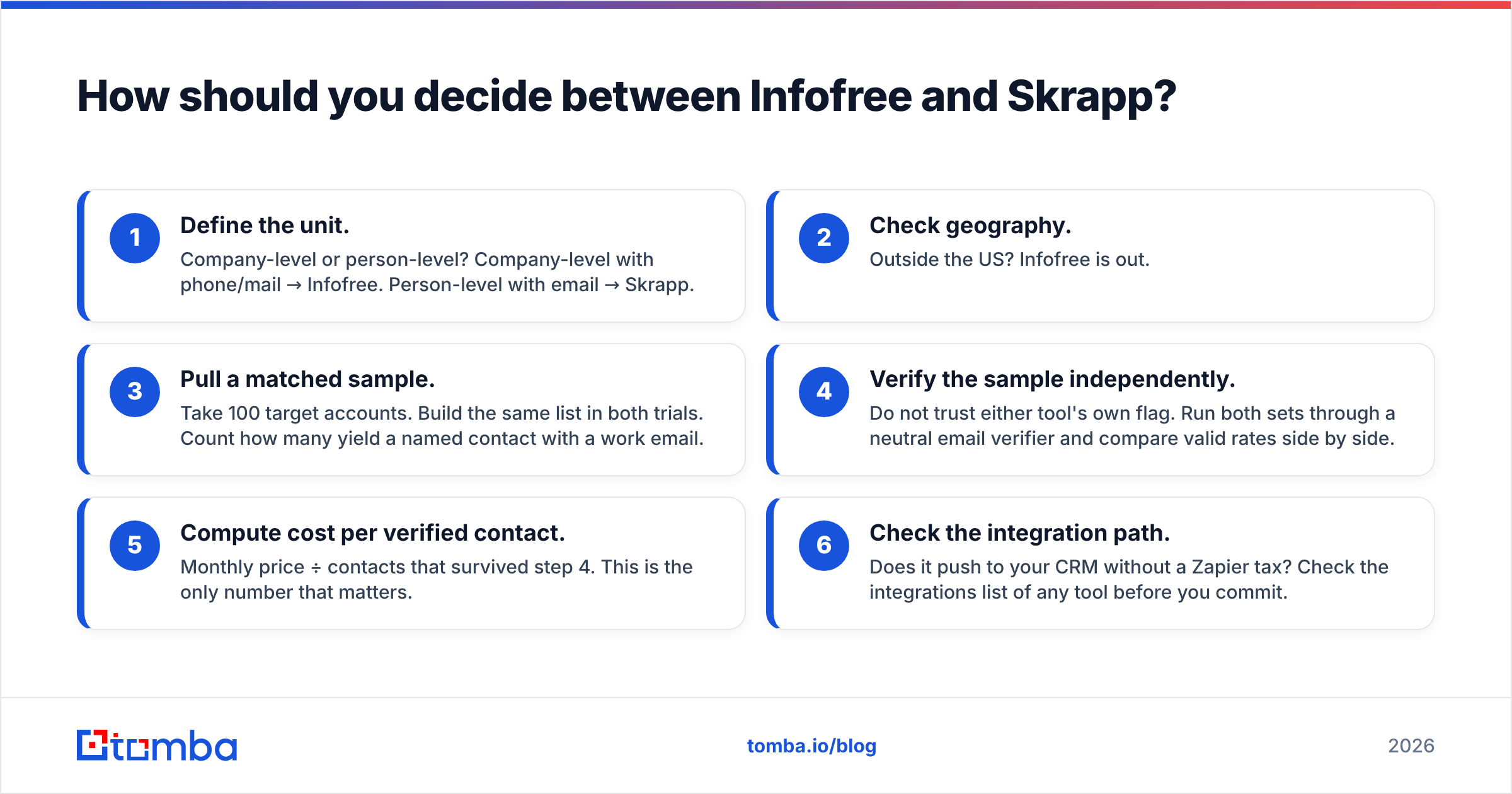
Run this in order. It takes an afternoon and saves a quarter.
- Define the unit. Company-level or person-level? Company-level with phone/mail → Infofree. Person-level with email → Skrapp.
- Check geography. Outside the US? Infofree is out.
- Pull a matched sample. Take 100 target accounts. Build the same list in both trials. Count how many yield a named contact with a work email.
- Verify the sample independently. Do not trust either tool's own flag. Run both sets through a neutral email verifier and compare valid rates side by side.
- Compute cost per verified contact. Monthly price ÷ contacts that survived step 4. This is the only number that matters.
- Check the integration path. Does it push to your CRM without a Zapier tax? Check the integrations list of any tool before you commit.
Most teams that run this honestly find the same thing. The flat-fee database looks cheaper on the invoice and more expensive per usable contact. The credit-based finder looks expensive per credit and cheaper per meeting booked.
Is there a better option than either?#
Depends on what you are optimizing for. If you want the Infofree motion — bulk US SMB records for dialing and mailing — no email finder replaces a compiled file, and you should buy the database.
If you want the Skrapp motion — verified work emails for named B2B buyers — the category has several credible players. The 2026 differentiators are multi-source resolution, honest catch-all handling, and whether verification is bundled or upsold. Tomba sits in that group: domain search for mapping an entire company, a LinkedIn finder for profile-level resolution, catch-all handling that reports uncertainty instead of hiding it, and a free tier of 25 searches per month so you can run the matched-sample test above without a credit card.
A note on adjacent options: if your requirement is genuinely "large prebuilt B2B lists, bought outright," a data marketplace like BookYourData is a reasonable third path. Pay-as-you-go list purchase sits between Infofree's flat-fee database and Skrapp's per-credit finder, and it suits teams that buy in bursts rather than subscribe.
The bottom line#
Infofree vs Skrapp is not really a head-to-head; it is two answers to two different questions. Infofree is a US business directory with a CRM attached, priced for unlimited use and built for phone and mail. Skrapp is a LinkedIn email finder priced per contact and built for cold email. Judged on cold email in 2026, Skrapp is the stronger tool. Judged on cost-per-record for local SMB dialing, Infofree is hard to beat.
Whichever you pick, the failure mode is identical: an unverified list, a spike in bounces, and a domain that stops landing in inboxes. Fix that layer first.
Ready to test the alternative? Run your next 25 target accounts through the Tomba Email Finder free — no card required — and compare the verified-contact count against whatever Infofree or Skrapp returns for the same list. If Tomba wins on your ICP, plans start at $49/mo. If it does not, you will have learned something concrete about your data for the price of an afternoon.
Related guides#
// get started
Find, verify and enrich your first contacts today
Start on the free plan with 25 searches a month, then scale when your team is ready.
Free plan · No credit card required · GDPR & CCPA
// about the author