Insightly Pricing Reviews Pros and Cons: 2026 Buyer Guide
Insightly's four CRM tiers look cheap until you hit the add-on math. Here's what each plan actually costs, where reviewers push back, and who should pick something else.
Insightly costs $29 to $99 per user each month. The plan price is only part of the bill. This Insightly pricing reviews pros and cons guide shows what each tier really costs, what buyers praise, and where they push back. Read it before you sign a yearly deal.
TL;DR
- Insightly CRM has four tiers: Plus at $29/user/mo, Professional at $49/user/mo, Enterprise at $99/user/mo, and a custom-quoted plan. All are billed yearly. Monthly billing costs a lot more.
- The list price is rarely what you pay. AppConnect, Insightly Marketing, and Insightly Service each cost extra. Most teams end up buying at least one.
- Reviewers praise the project tools inside the CRM and the clean record links. They gripe about report building, slow support, and the jump from Plus to Professional.
- Insightly ships no contact data. You still need a second source for verified emails, phone numbers, and company data.
- Best fit: 10–100 seat teams that deliver projects after the sale. Worst fit: high-volume outbound teams that need data and sequencing more than project handoff.
What is Insightly and who actually buys it?#
Insightly is a CRM that grew out of project tools. That root still shapes it. Most CRMs stop at "Closed Won." Insightly keeps going. A won deal turns into a project, with tasks, dates, and a work pipeline tied to the same contact record.
Think of it like a restaurant that owns both the dining room and the kitchen. Most CRMs take the order and pass a ticket through a window. Insightly keeps you in the building while the food gets made.
That makes the buyer fairly specific. Agencies, consultancies, systems integrators, makers with long setup cycles, and pro services firms are the core audience. If your motion is "sign the deal, then deliver over eight weeks," the model fits. If your motion is "book 400 meetings a quarter," it does not.
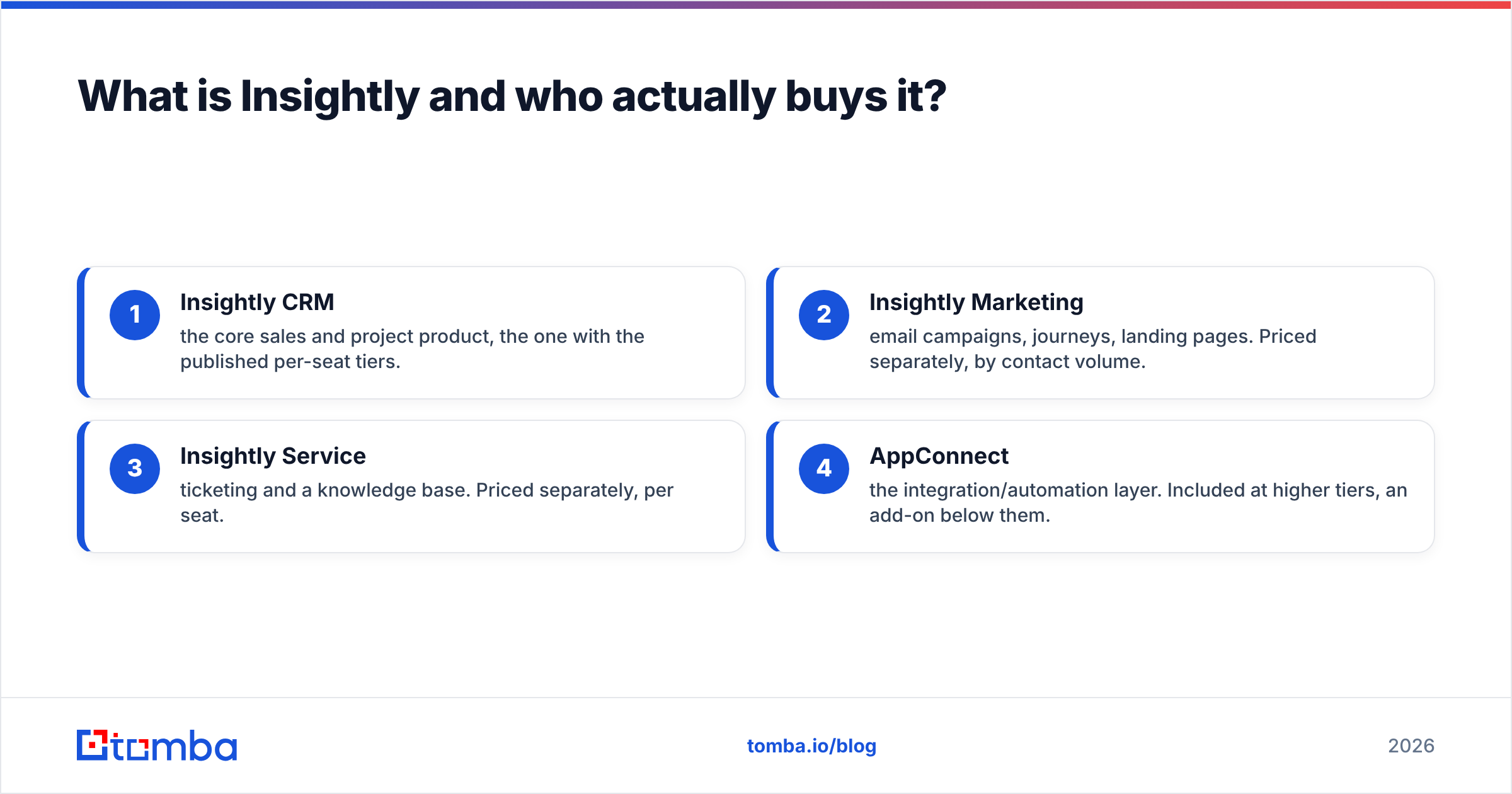
The company sells four things. This is where pricing gets murky:
- Insightly CRM — the core sales and project tool. It holds the published per-seat tiers.
- Insightly Marketing — email campaigns, journeys, landing pages. Priced on its own, by contact count.
- Insightly Service — ticketing and a knowledge base. Priced on its own, per seat.
- AppConnect — the layer that links apps and runs auto tasks. Included at higher tiers. An add-on below them.
Nobody buys just one of these and stays happy for three years. That is the key fact about Insightly pricing. It is also the root of most "the cost surprised us" reviews.
How much does Insightly cost in 2026?#
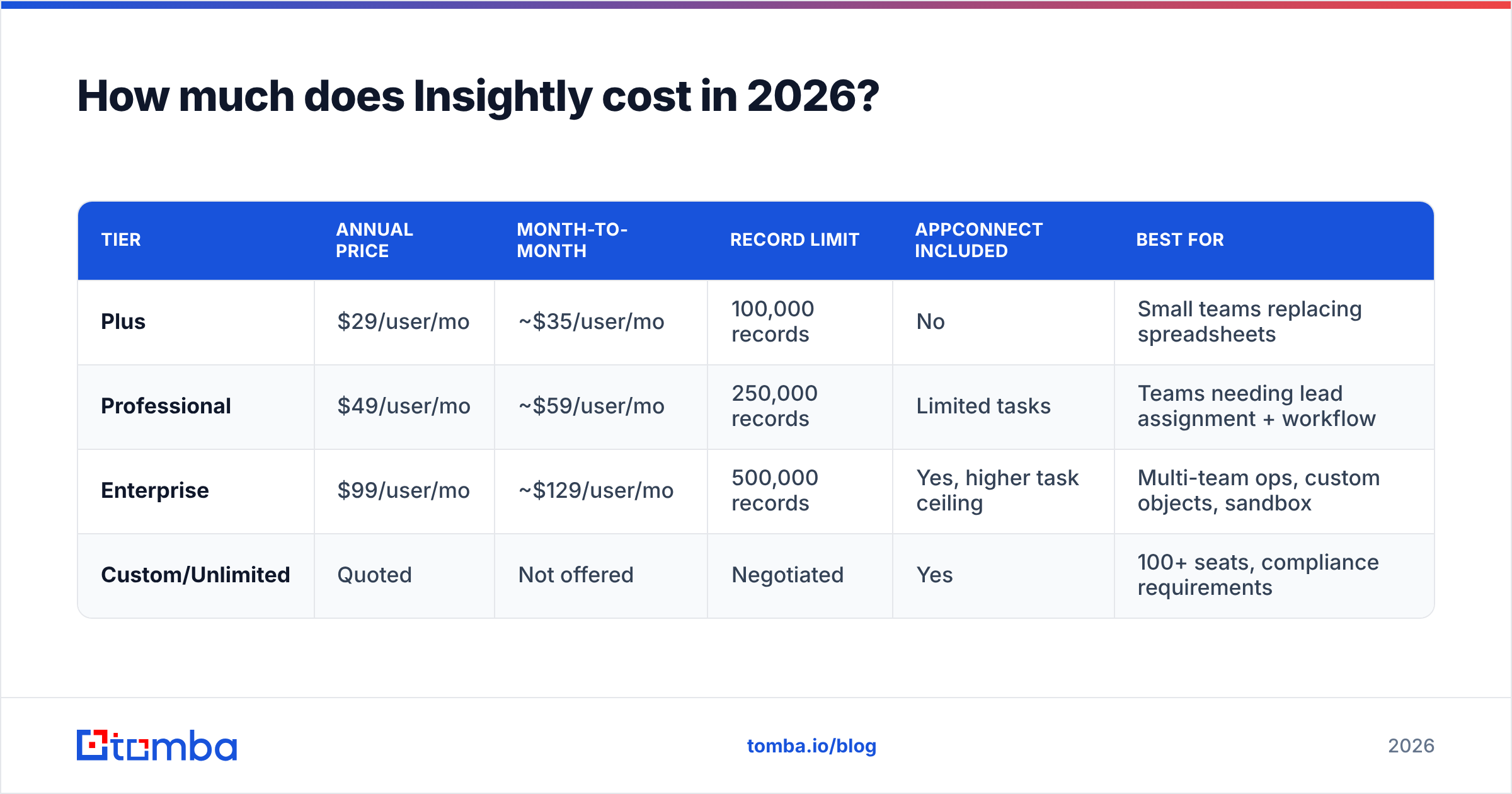
Here is the published CRM pricing. The caveats matter more than the numbers.
| Tier | Annual price | Month-to-month | Record limit | AppConnect included | Best for |
|---|---|---|---|---|---|
| Plus | $29/user/mo | ~$35/user/mo | 100,000 records | No | Small teams replacing spreadsheets |
| Professional | $49/user/mo | ~$59/user/mo | 250,000 records | Limited tasks | Teams needing lead assignment + workflow |
| Enterprise | $99/user/mo | ~$129/user/mo | 500,000 records | Yes, higher task ceiling | Multi-team ops, custom objects, sandbox |
| Custom/Unlimited | Quoted | Not offered | Negotiated | Yes | 100+ seats, compliance requirements |
Two things to flag right away.
First, annual billing is all but required if you care about the sticker price. Monthly billing adds 20–30% on top. That is steeper than the norm. A 12-seat team on Professional pays about $7,056 a year up front. The same team pays roughly $8,500 month to month. That is a $1,400 tax on staying flexible.
Second, the tier jump is the real cost event. Plus is truly cheap. But it drops lead routing rules, custom workflow rules, price books, and role-based rights. Most teams learn this in month three, not month one. The move from $29 to $49 is a 69% jump on every seat you own, not just the new ones.
Add-ons stack on top of that:
- Insightly Marketing starts near $99/mo for a small contact tier. The price grows with your list size. A 25,000-contact list lands well into four figures a month.
- Insightly Service is priced per agent seat, apart from your CRM seats.
- AppConnect task ceilings are real. Teams that lean on auto rules hit them. Then they upgrade or buy more tasks.
What do Insightly reviews actually say?#
Ratings on G2 and Capterra sit in the 4.0–4.2 range across thousands of reviews. That is solid but dull. The signal is in the patterns, not the average.
What reviewers praise again and again:
- Deal-to-project handoff. This shows up in more good reviews than any other feature. One click turns a won deal into a live project. The contact history stays intact.
- Record linking. The links between records (contact ↔ company ↔ deal ↔ project) are flexible. They are a real help for account-based teams.
- Setup speed. Teams report going live in days, not quarters. Next to a Salesforce rollout, that is a real budget line saved.
- Mobile app with business card scanning. A small feature that field teams name often.
What reviewers flag again and again:
- Report building. This is the most common gripe. Users call custom reports rigid. Cross-object reports annoy anyone who wants a pivot table.
- Slow support. Lower tiers get email-only help. The gap between that and paid premium support is a frequent source of annoyance.
- Email sync limits. Sync caps and the Gmail/Outlook add-in draw steady complaints from heavy emailers.
- Feature gating. The "I need one feature and it is two tiers up" gripe shows up a lot in review text.
- No native data. Insightly holds your contacts. It doesn't find them. Every review that mentions prospecting says the same thing.
That last point is worth sitting with. Insightly is a system of record, not a system of search. You will pair it with a source of verified contact data. That means a B2B database, an email finder, or hand research you would rather not fund.
How does Insightly pricing compare to other CRMs?#
The useful question isn't "which CRM is cheapest." It is "what does a working stack cost per seat, per month, all in."
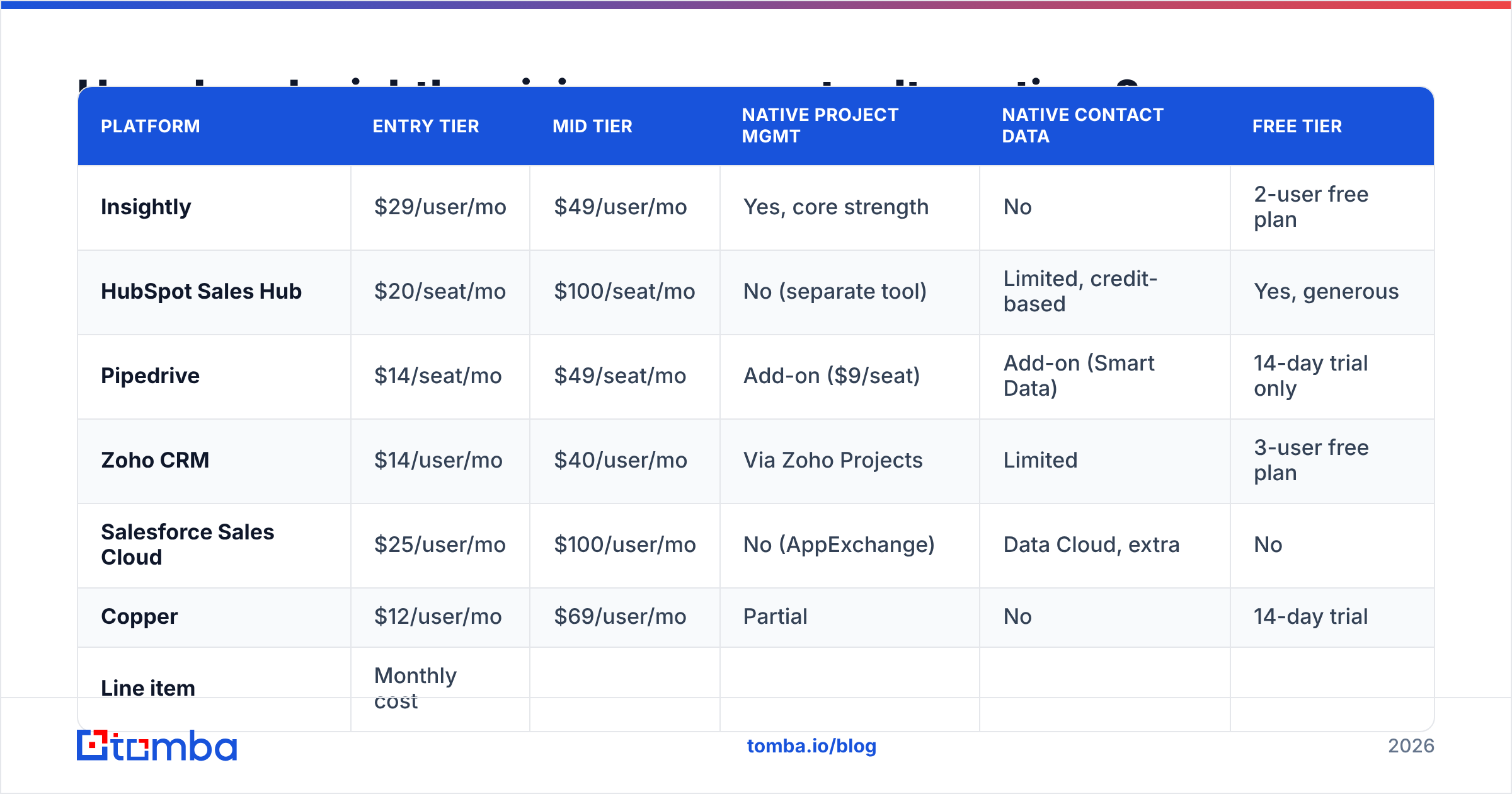
| Platform | Entry tier | Mid tier | Native project mgmt | Native contact data | Free tier |
|---|---|---|---|---|---|
| Insightly | $29/user/mo | $49/user/mo | Yes, core strength | No | 2-user free plan |
| HubSpot Sales Hub | $20/seat/mo | $100/seat/mo | No (separate tool) | Limited, credit-based | Yes, generous |
| Pipedrive | $14/seat/mo | $49/seat/mo | Add-on ($9/seat) | Add-on (Smart Data) | 14-day trial only |
| Zoho CRM | $14/user/mo | $40/user/mo | Via Zoho Projects | Limited | 3-user free plan |
| Salesforce Sales Cloud | $25/user/mo | $100/user/mo | No (AppExchange) | Data Cloud, extra | No |
| Copper | $12/user/mo | $69/user/mo | Partial | No | 14-day trial |
Read the table column by column, not row by row.
On entry price, Insightly is mid-pack. Pipedrive, Zoho, and Copper all undercut it. On mid-tier price, Insightly at $49 is in line with Pipedrive and well under HubSpot and Salesforce at $100.
On built-in project tools, Insightly wins outright, and it is not close. Every rival either skips it or bolts on a second tool with a second bill. If project handoff is why you are shopping, this column is the whole call.
On built-in contact data, everybody loses — Insightly included. HubSpot and Salesforce sell data credits that get costly fast. That gap is why most teams run a data layer next to the CRM, no matter which one they pick.
What does the all-in stack actually cost?#
Take a real 15-seat services team:
| Line item | Monthly cost |
|---|---|
| Insightly Professional, 15 seats | $735 |
| Insightly Marketing (10k contacts) | ~$299 |
| Contact data + verification (Tomba Growth) | $99 |
| Total | ~$1,133/mo |
Put that next to the same team on HubSpot Sales Hub Professional ($100/seat = $1,500) plus Marketing Hub. Insightly holds a real cost edge. Now put it next to Pipedrive Advanced plus the Projects add-on ($58/seat = $870). Insightly looks dear, until you note that Pipedrive's project module is much thinner.
The data line stays flat in every case. Tomba pricing runs Free (25 searches/mo), Starter at $49/mo, Growth at $99/mo, and Pro at $249/mo. The cost is per month, not per seat. So it barely moves the all-in math as your team grows.

Insightly pricing reviews pros and cons: the honest ledger#
Stripped of the sales pitch, here is what you get and what you give up.
Pros
- Project tools are built in, not bolted on. You get one record, one timeline, one source of truth from first touch to final handoff. No Zapier tax, no second login.
- Custom objects at Enterprise are truly flexible. Say your business tracks a thing that is not a contact, company, or deal. A property, a ship, a drug trial. You can model it.
- Setup is fast and cheap. Most teams do it themselves. That is a five-figure consulting bill you never pay.
- Pricing is public. Insightly lists real numbers on its site. Several rivals do not. You can budget before you talk to sales.
- The free plan is real. Two users, 2,500 records. Enough to test the object model before you commit.
Cons
- Reporting is the weak link. If your ops lead lives in dashboards, demo reports first and hard. This is where deals sour after the sale.
- Annual lock-in is priced in. Monthly billing costs 20–30% more. So "we will try it for a quarter" is a costly plan.
- The Plus tier is a trap for growing teams. No workflow rules, no lead routing, no role rights. Budget for Professional from day one if you have more than five reps.
- Add-ons stack. Marketing and Service are separate buys with their own renewal dates. Model the three-year total, not the first invoice.
- Zero contact data. No email finding, no phone lookup, no company data. Budget a line for it.
- Support tiers matter. If fast replies are a dealbreaker, price in premium support before you sign.
Who should buy Insightly, and who shouldn't?#
Buy Insightly if:
- You deliver a project after the sale, and today you hand off between two split systems.
- Your team is 10–100 seats and you want a CRM live this month, not next quarter.
- You have outgrown spreadsheets. A Salesforce rollout would eat your whole tool budget.
- Your data has custom objects a standard CRM cannot hold.
Skip Insightly if:
- Your main motion is high-volume outbound. You would pay for project features you never open. You would still need a sequencer and a data source on top. Look at a purpose-built Apollo alternative stack instead.
- Deep reporting is a top-three need.
- You need contact data bundled into the CRM price. It is not there, and no tier adds it.
- You're under five seats and Pipedrive or Zoho covers your needs for half the price.
One note on the data layer. Vendors like BookYourData serve teams that want ready-made, pay-as-you-go B2B lists with wide coverage and no monthly tie-in. That is a truly different model from search-and-verify tools. It fits if you buy data in bursts, not all year.
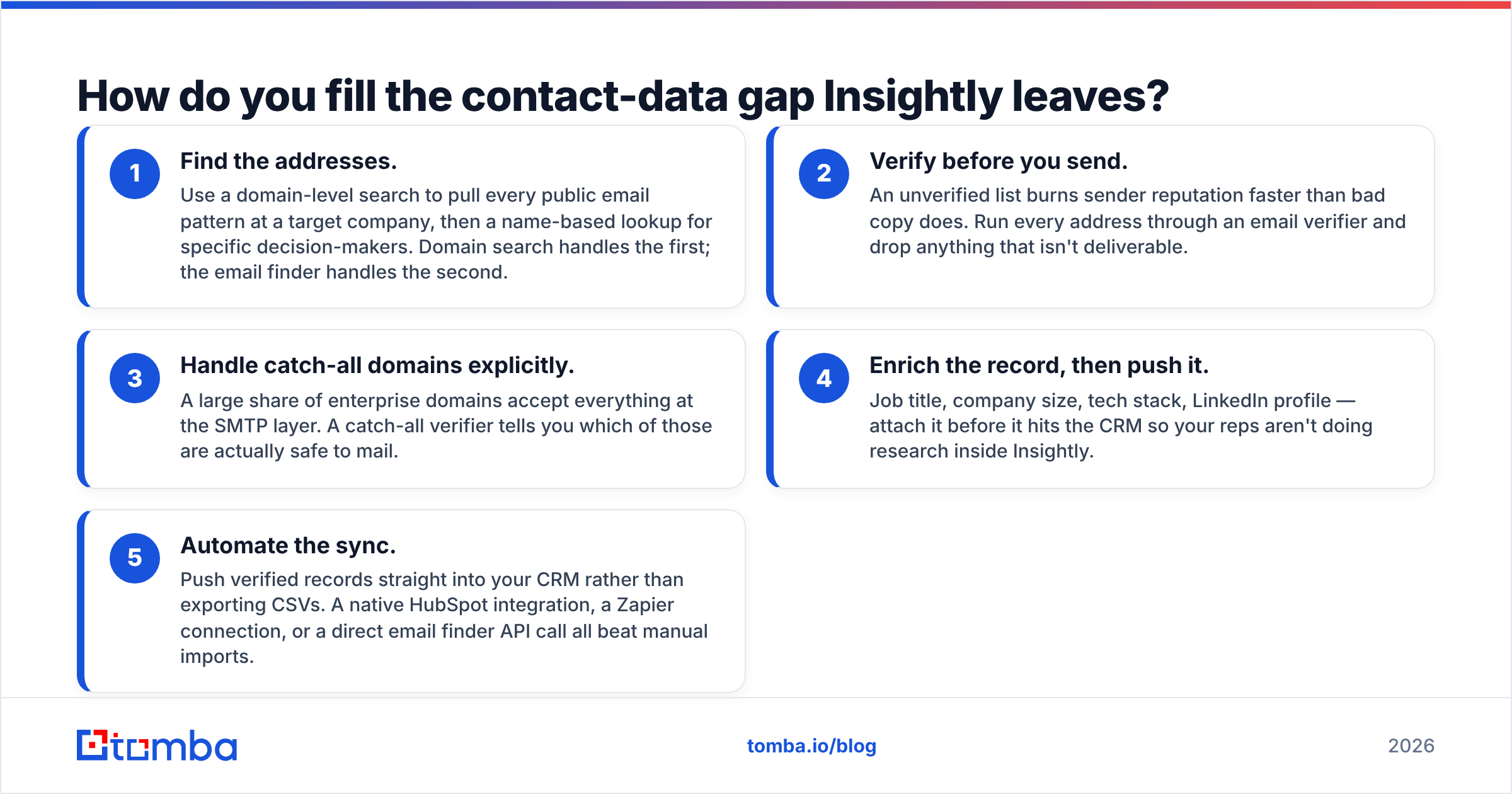
How do you fill the contact-data gap Insightly leaves?#
Whatever CRM you pick, the data gap is yours to close. Here is the order that works.
- Find the addresses. Use a domain search to pull the public email patterns at a target company. Then use a name lookup for each buyer.
- Verify before you send. A raw list burns sender reputation faster than bad copy does. Run every address through an email verifier. Drop what does not land.
- Handle catch-all domains. Many big domains accept every address at the SMTP layer. A catch-all verifier tells you which ones are safe to mail.
- Add the details, then push. Job title, company size, tech stack, LinkedIn page. Attach it all before it hits the CRM. Your reps should not do research inside Insightly.
- Sync it. Push clean records straight into your CRM instead of trading CSV files. A HubSpot integration, a Zapier link, or a direct email finder API call all beat manual imports.
That five-step loop costs a flat monthly fee, no matter how many seats you have. Per-seat data credits do not work that way.
Is Insightly worth it in 2026?#
Yes — for the team it was built for, and no for everyone else.
If you sell and then deliver, Insightly at $49/user/mo is one of the few CRMs where the project module is not an afterthought. The total cost undercuts HubSpot and Salesforce for the same work. The weak reports are real, but you can live with them if you export to a BI tool. The yearly deal is the price of the discount. At $49 a seat, that is a fair trade.
If you sell high-volume and hand nothing off, you are buying half a product. Most reviewers who rate Insightly poorly sit in this camp. They bought a delivery CRM to run an outbound machine. The tool never had the features they needed. That is a fit problem, not a quality problem.
Either way, plan the data layer before you sign. The CRM you pick sets where your contacts live. It does not set where they come from. Start free with the Tomba Email Finder — 25 searches a month, no card. See how many verified buyer emails you can pull for your top 20 accounts before your CRM trial ends. If it works, Starter at $49/mo covers most small teams. The flat rate means your data cost stays put while your seat count grows.
Related guides#
// get started
Find, verify and enrich your first contacts today
Start on the free plan with 25 searches a month, then scale when your team is ready.
Free plan · No credit card required · GDPR & CCPA
// about the author