Insightly vs Streak (2026): Which CRM Fits Your Team?
Streak lives inside Gmail. Insightly runs the project after the deal closes. Here's the honest breakdown of pricing, pipelines, automation, and which CRM your team should actually buy in 2026.
TL;DR
- Streak is a CRM that lives inside Gmail. If your team runs its entire day in a Google Workspace inbox and you want pipelines without leaving it, Streak wins on adoption speed and almost nothing else matters.
- Insightly is a standalone CRM with real project management attached. If work continues after the deal closes — onboarding, implementation, delivery — Insightly handles the handoff that Streak simply doesn't model.
- Pricing flips depending on team size. Streak's free tier is genuinely usable for solo operators; Insightly's entry plan is cheaper per seat than Streak Pro once you're past three or four people.
- Both are weak in the same place: getting accurate contact data in. Neither ships a serious enrichment or email-verification layer, so you'll bolt one on regardless of which you pick.
- Rule of thumb: Gmail-centric, deal-only workflow → Streak. Post-sale delivery, multi-department, reporting for a manager → Insightly.
What are Insightly and Streak, exactly?#
They solve the same problem from opposite ends of the workflow.
Streak is a Chrome extension that turns Gmail into a CRM. Your pipeline renders as a grid inside the inbox, deals are threads, and stages are columns. There's no separate app to open and no separate place for your team to forget to log activity. That's the whole pitch, and it's a good one — the biggest killer of CRM projects is reps not updating records, and Streak removes the context switch that causes it.
Insightly is a conventional web CRM — contacts, organizations, leads, opportunities, dashboards — with a second half most CRMs skip: projects, milestones, and tasks that fire automatically when an opportunity is marked won. It also sells adjacent marketing and service products, and now sits inside the Unbounce group after the two companies merged. For agencies, consultancies, and anyone whose "sale" is really the start of a delivery engagement, that post-close half is the reason to look.
So the real question behind "insightly vs streak" isn't which CRM has more features. It's whether your revenue motion ends at the signature or begins there.
How do Insightly and Streak compare at a glance?#
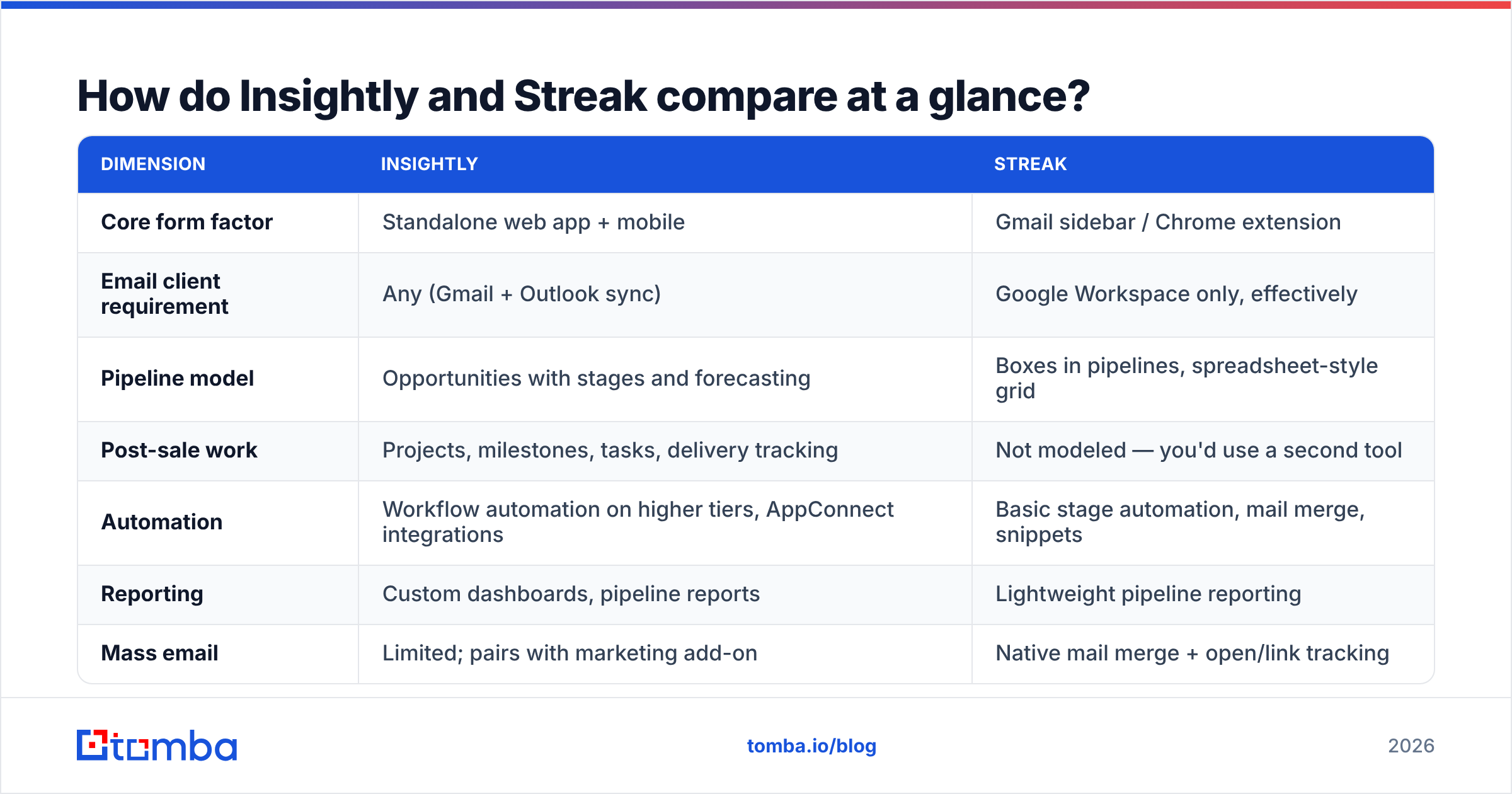
| Dimension | Insightly | Streak |
|---|---|---|
| Core form factor | Standalone web app + mobile | Gmail sidebar / Chrome extension |
| Email client requirement | Any (Gmail + Outlook sync) | Google Workspace only, effectively |
| Pipeline model | Opportunities with stages and forecasting | Boxes in pipelines, spreadsheet-style grid |
| Post-sale work | Projects, milestones, tasks, delivery tracking | Not modeled — you'd use a second tool |
| Automation | Workflow automation on higher tiers, AppConnect integrations | Basic stage automation, mail merge, snippets |
| Reporting | Custom dashboards, pipeline reports | Lightweight pipeline reporting |
| Mass email | Limited; pairs with marketing add-on | Native mail merge + open/link tracking |
| Learning curve | Days — it's a real CRM | Minutes — it's your inbox |
| Best-fit team size | 5–200 seats | 1–15 seats |
| Weakest point | Feels heavy for a two-person team | Ceiling hits fast as headcount grows |
The table already shows the trade. Streak buys adoption and pays for it in depth. Insightly buys depth and pays for it in onboarding time.
Which CRM should you pick for your workflow?#
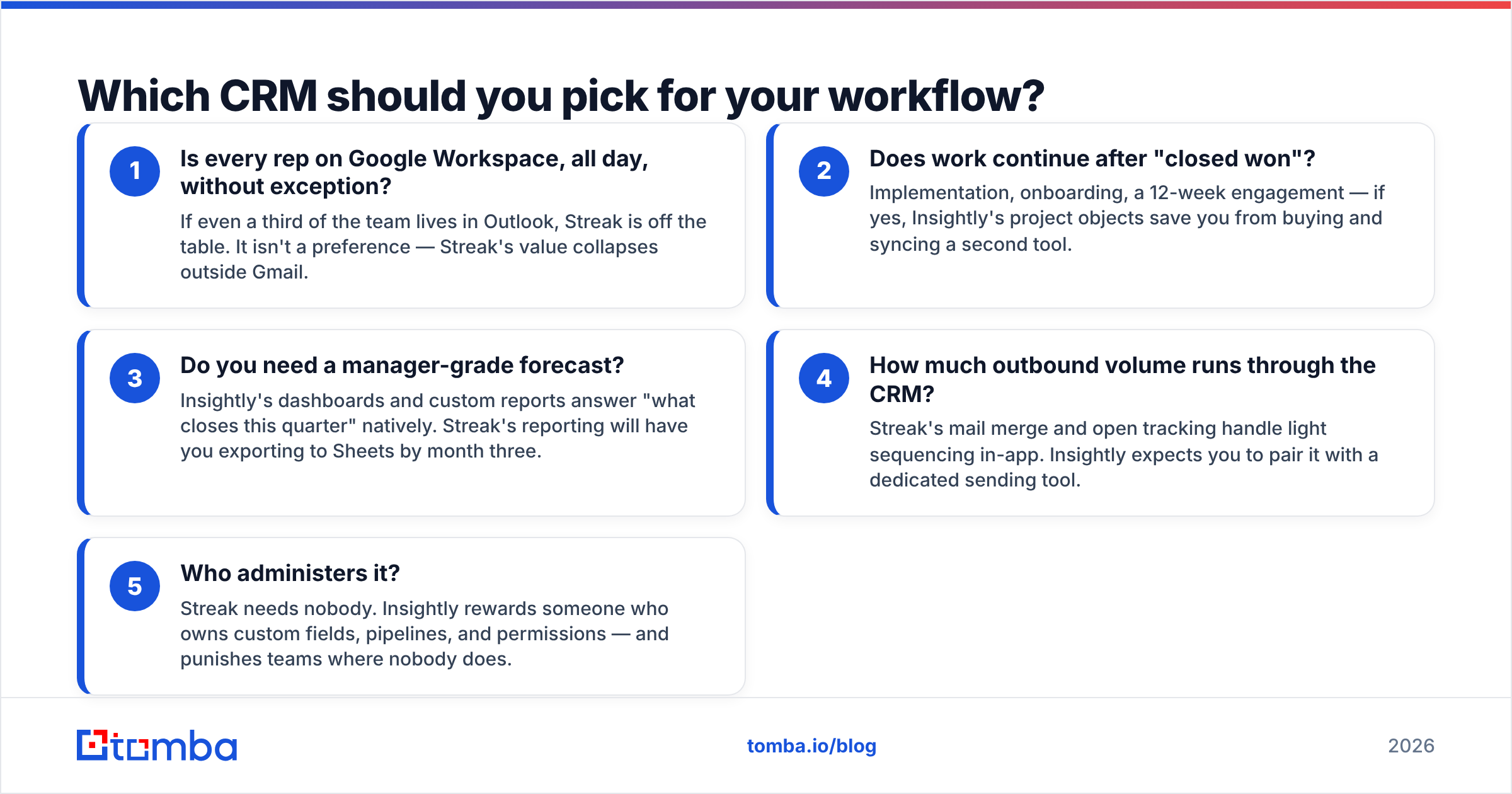
Work through these five questions in order. The first "yes" usually decides it.
- Is every rep on Google Workspace, all day, without exception? If even a third of the team lives in Outlook, Streak is off the table. It isn't a preference — Streak's value collapses outside Gmail.
- Does work continue after "closed won"? Implementation, onboarding, a 12-week engagement — if yes, Insightly's project objects save you from buying and syncing a second tool.
- Do you need a manager-grade forecast? Insightly's dashboards and custom reports answer "what closes this quarter" natively. Streak's reporting will have you exporting to Sheets by month three.
- How much outbound volume runs through the CRM? Streak's mail merge and open tracking handle light sequencing in-app. Insightly expects you to pair it with a dedicated sending tool.
- Who administers it? Streak needs nobody. Insightly rewards someone who owns custom fields, pipelines, and permissions — and punishes teams where nobody does.
What does Streak actually do best?#
Three things, and they're worth more than the feature-count comparison suggests.
Zero-friction logging. Every email is already in the CRM because the CRM is the email client. No BCC address, no sync plugin that silently breaks, no rep forgetting to log a call summary. For a five-person team, this single property often beats a more capable CRM that nobody updates.
Shared pipelines that feel like spreadsheets. Non-sales teams adopt Streak easily — support queues, hiring pipelines, partner tracking, content calendars. It's common to find a company running four unrelated Streak pipelines because each team spun one up in an afternoon.
Native email tooling. Mail merge, send-later, thread splitting, snippets, and open/click tracking are built in. For a founder doing their own outbound, that combination removes a $60/month sequencing tool from the stack.
Where it falls down is predictable: permissions get coarse as headcount grows, reporting stays shallow, the Chrome extension adds weight to Gmail, and there's no answer at all for what happens after the deal closes. If your team crosses roughly 15 seats or you hire a RevOps person, you will start shopping again.
What does Insightly actually do best?#
The sale-to-delivery handoff. Mark an opportunity won and Insightly can convert it into a project with a task template, an owner, and milestones. Agencies, systems integrators, and professional services firms buy Insightly for exactly this and tolerate everything else.
Relationship mapping. Insightly links contacts, organizations, opportunities, and projects in a graph rather than a flat list, which matters when one account has six stakeholders across three deals.
Reporting a manager will accept. Custom dashboards, pipeline reports, and configurable fields mean you can answer board questions without exporting. This is the single clearest gap versus Streak.
Integration depth. AppConnect plus a documented API gives you routes into accounting, support, and marketing stacks. If you're building a real revenue operations function, that matters more than inbox convenience.
The cost is honest: Insightly takes real setup. Custom fields, pipeline stages, permission profiles, and automation rules are a week of work, not an afternoon. Teams that skip that week end up with an expensive contact list.
How much do Insightly and Streak cost in 2026?#
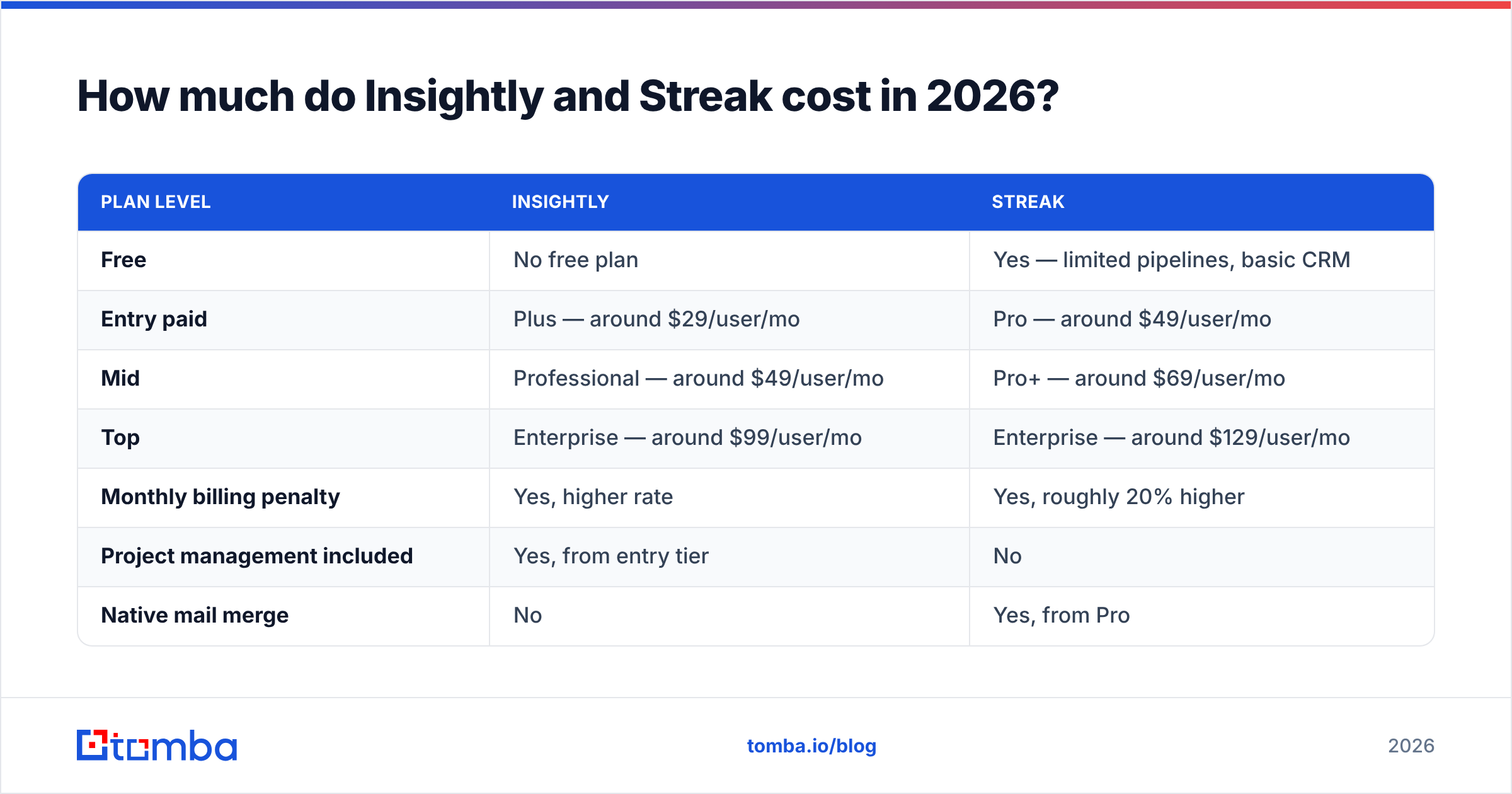
Both vendors change list pricing regularly, so confirm on their own pages before you budget. As listed at the time of writing, on annual billing:
| Plan level | Insightly | Streak |
|---|---|---|
| Free | No free plan | Yes — limited pipelines, basic CRM |
| Entry paid | Plus — around $29/user/mo | Pro — around $49/user/mo |
| Mid | Professional — around $49/user/mo | Pro+ — around $69/user/mo |
| Top | Enterprise — around $99/user/mo | Enterprise — around $129/user/mo |
| Monthly billing penalty | Yes, higher rate | Yes, roughly 20% higher |
| Project management included | Yes, from entry tier | No |
| Native mail merge | No | Yes, from Pro |
| Typical 8-seat annual cost | ~$2,800–$4,700 | ~$4,700–$6,600 |
Read that bottom row carefully, because it inverts the common assumption. Streak feels cheaper because it starts free, but its paid tiers are priced above Insightly's at every level. A solo founder pays nothing with Streak and $29/month with Insightly. An eight-person team pays materially more with Streak — and still doesn't get project tracking or real dashboards.
Check current numbers on the vendors' own pricing pages and cross-reference verified reviews on G2 before committing to an annual contract. Seat counts have a way of growing faster than CRM budgets.
Which CRM wins for each type of team?#
| Team type | Better pick | Why |
|---|---|---|
| Solo founder doing outbound | Streak (free, then Pro) | Mail merge + tracking + pipeline in one place |
| 3-person agency with delivery work | Insightly | Projects auto-created from won deals |
| 10-person SaaS sales team | Insightly | Forecasting, permissions, reporting depth |
| Recruiting or ops pipeline | Streak | Spreadsheet-style boxes, instant setup |
| Outlook-based company | Insightly | Streak is Gmail-only in practice |
| Consultancy billing by milestone | Insightly | Milestones and task templates are native |
| Team with no CRM admin | Streak | Nothing to configure or maintain |
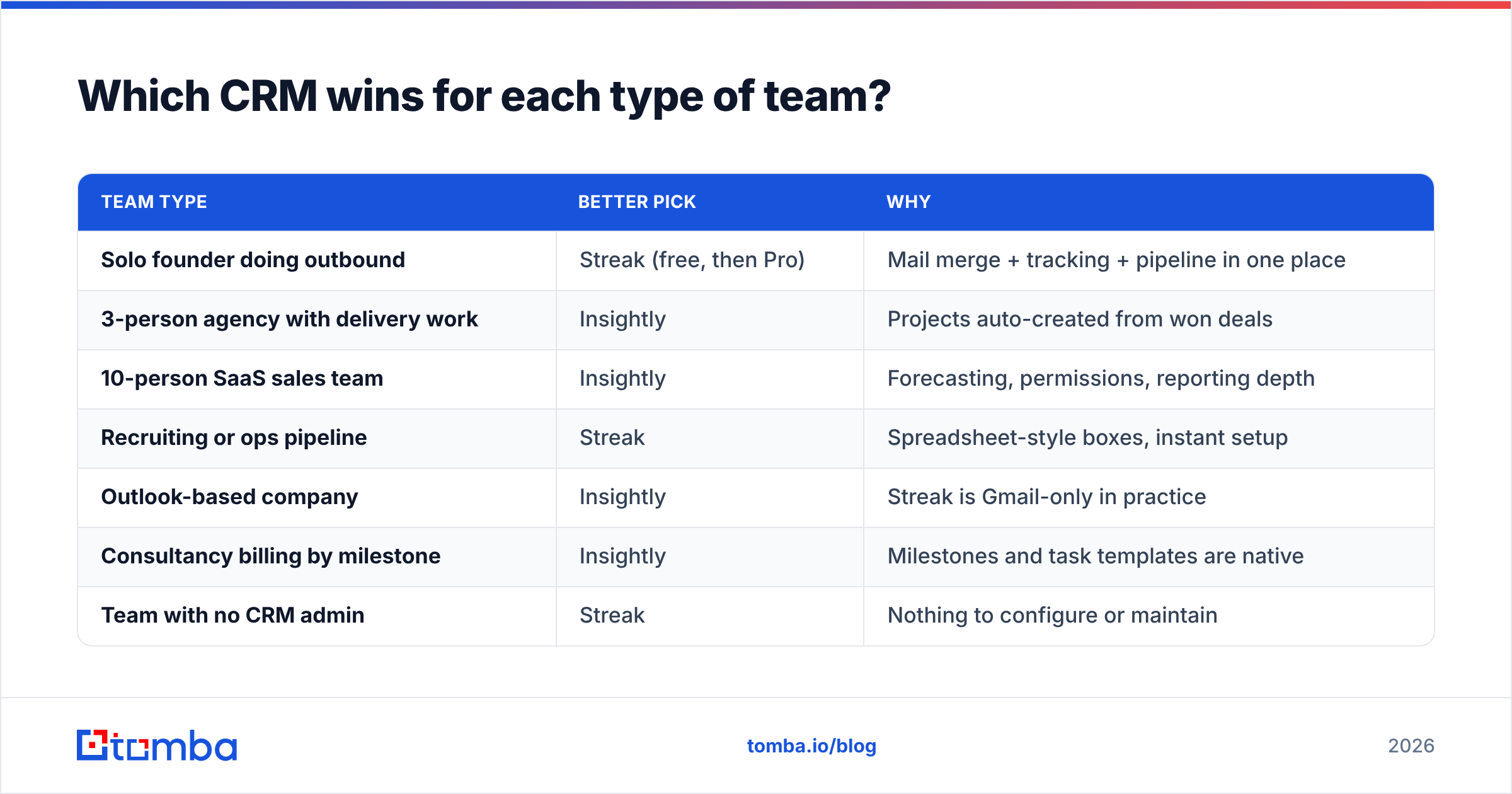
Neither answer is "it depends on your goals." It depends on your email client and on whether work continues after close. Everything else is secondary.
Where do both Insightly and Streak fall short?#
The same place every CRM comparison quietly skips: the data going in.
A CRM is a filing cabinet. It stores what you put in it and validates almost none of it. Neither Insightly nor Streak will tell you that the contact you imported left the company eight months ago, that the address is a role account that routes to a shared box nobody reads, or that the domain is a catch-all that accepts everything and delivers nothing. Both will happily hold 4,000 records with a 22% bounce rate and report a healthy pipeline built on them.
That's how teams end up with the classic failure pattern: a well-configured CRM, disciplined reps, and a response rate that keeps falling because a fifth of the list was never reachable. The CRM isn't broken. The inputs are.

Three fixes apply no matter which CRM you choose:
- Verify before import, not after bounce. Run every list through an email verifier before it touches a CRM record. Bounced sends damage sender reputation in ways a CRM cleanup can't undo.
- Enrich at creation time. A record with title, company size, and LinkedIn profile is segmentable. A record with a name and an email is a row. Contact enrichment at the point of record creation is cheaper than a database cleanup project 18 months later.
- Re-verify quarterly. B2B contact data decays somewhere around 2–3% per month through job changes alone. Whatever you import today is measurably worse by next quarter.
How do you fill either CRM with contacts worth working?#
Start from the company, not the person. Pick your target account list, run a domain search to pull the verified addresses and email patterns for each domain, and push only confirmed contacts into Insightly or Streak. You end up importing fewer records — and every one of them is workable.
For teams doing this at volume, the practical setup is a bulk email finder run against your account list, then a scheduled re-verification pass on anything older than 90 days. Teams with engineering support skip the UI and wire the same checks into record creation through the Tomba API, so a contact can't enter the CRM unverified in the first place.
The point isn't to add another tool for its own sake. It's that Insightly and Streak both assume the data problem is already solved, and for most teams it isn't.
So which one should you buy?#
Pick Streak if you're under roughly ten people, everyone lives in Gmail, your process ends at closed-won, and adoption risk is your biggest worry. Start on the free tier, and only upgrade when mail merge or pipeline limits actually bite.
Pick Insightly if you have delivery work after the sale, a manager who needs forecasts, anyone on Outlook, or a realistic path past fifteen seats. Budget a week for setup and assign an owner — the CRM is only as good as its configuration.
Pick neither yet if your contact data is the real constraint. A better CRM will not fix a list that bounces. Fix the inputs first; the pipeline math changes immediately.
Whichever you land on, the contacts have to come from somewhere and they have to be right. Tomba's email finder returns verified professional addresses by name, domain, or company, with a confidence score and the sources behind each result — so what lands in your Insightly opportunity or Streak box is a real person at a real inbox. The free tier covers 25 searches a month to test it against a list you already have; paid plans start at $49/month, and you can see full Tomba pricing before committing. Run your worst-performing segment through it and compare the bounce rate. That comparison usually settles the CRM argument too.
Related guides#
// get started
Find, verify and enrich your first contacts today
Start on the free plan with 25 searches a month, then scale when your team is ready.
Free plan · No credit card required · GDPR & CCPA
// about the author