Insightly vs Vtiger CRM (2026): Which CRM Should You Pick?
Insightly leans into project delivery after the deal closes. Vtiger bundles sales, marketing, and helpdesk into one cheap seat. Here is the honest breakdown of pricing, automation, data quality, and who each one actually fits.
Insightly vs Vtiger CRM comes down to one question. Do you deliver projects after the sale, or do you want sales, support, and marketing in one cheap seat? This guide compares price, automation, data quality, and fit — with real numbers and no vendor spin.
TL;DR
- Insightly is a CRM with a real project-delivery module bolted on. If your deals turn into implementations, onboarding, or client projects, it is the stronger pick.
- Vtiger CRM is an all-in-one suite — sales, marketing, helpdesk, inventory — at a lower per-seat price, plus a free open-source edition you can self-host.
- Price gap is wide. Vtiger's paid tiers start in the low-teens per user/month; Insightly's usable tiers start around $29–$49 per user/month and climb to $99.
- Neither one finds or verifies contact data. Both assume records arrive clean. They don't. That's where a dedicated email finder and verifier sit upstream.
- Fast rule: projects after the close → Insightly. Support plus sales in one seat, tight budget → Vtiger. Pure outbound pipeline at scale → look at Pipedrive or HubSpot instead.
What are Insightly and Vtiger CRM?#
Both tools solve the same headline problem — keep track of people, companies, and deals — but they were built by teams with different obsessions.
Insightly started as a CRM for small businesses that deliver work after the sale. Consultancies, agencies, implementation partners. Its defining feature is the Projects object. When a deal hits Closed Won, it turns into a project with tasks, milestones, and an owner. That project stays linked to the original deal. Insightly later added AppConnect (workflow automation), Marketing, and Service. Each one is a separate product you buy on top. That is how the pricing got so layered.
Vtiger CRM came out of the open-source world. It forked from SugarCRM in 2004 and still ships a free Open Source Edition you can host yourself. The cloud product, sold as "Vtiger One," is built to be broad. One subscription covers the sales pipeline, email marketing, a helpdesk with SLAs, inventory and quotes, project tracking, and a customer portal. The pitch is simple: replace four tools with one seat.
That split in origin explains almost every trade-off in this Insightly vs Vtiger CRM comparison. Insightly is narrower and more polished in its lane. Vtiger is wider and more configurable, and the UI shows its age in places.
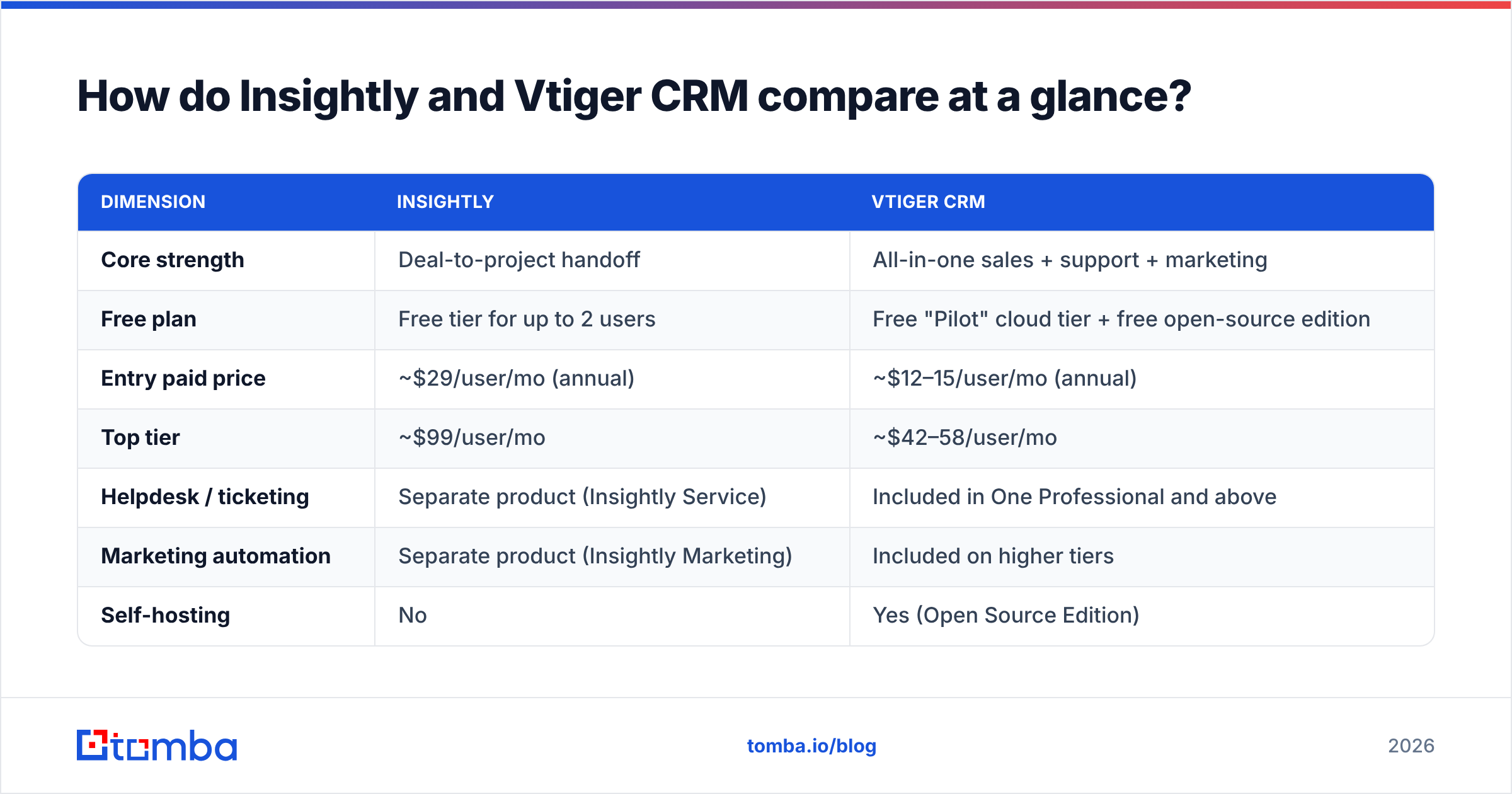
Insightly vs Vtiger CRM: how do they compare at a glance?#
| Dimension | Insightly | Vtiger CRM |
|---|---|---|
| Core strength | Deal-to-project handoff | All-in-one sales + support + marketing |
| Free plan | Free tier for up to 2 users | Free "Pilot" cloud tier + free open-source edition |
| Entry paid price | ~$29/user/mo (annual) | ~$12–15/user/mo (annual) |
| Top tier | ~$99/user/mo | ~$42–58/user/mo |
| Helpdesk / ticketing | Separate product (Insightly Service) | Included in One Professional and above |
| Marketing automation | Separate product (Insightly Marketing) | Included on higher tiers |
| Self-hosting | No | Yes (Open Source Edition) |
| Project management | Native, tightly linked to opportunities | Present, lighter than Insightly's |
| Quotes / inventory | Limited | Native (products, price books, invoices) |
| API | REST API on paid plans | REST API, open-source codebase available |
| Best fit | Services firms delivering client work | SMBs consolidating tool sprawl |
Prices move. Treat the numbers above as list price at the time of writing. Check each vendor's pricing page before you sign. Both companies bundle and rebundle modules often.
What does each one actually cost?#
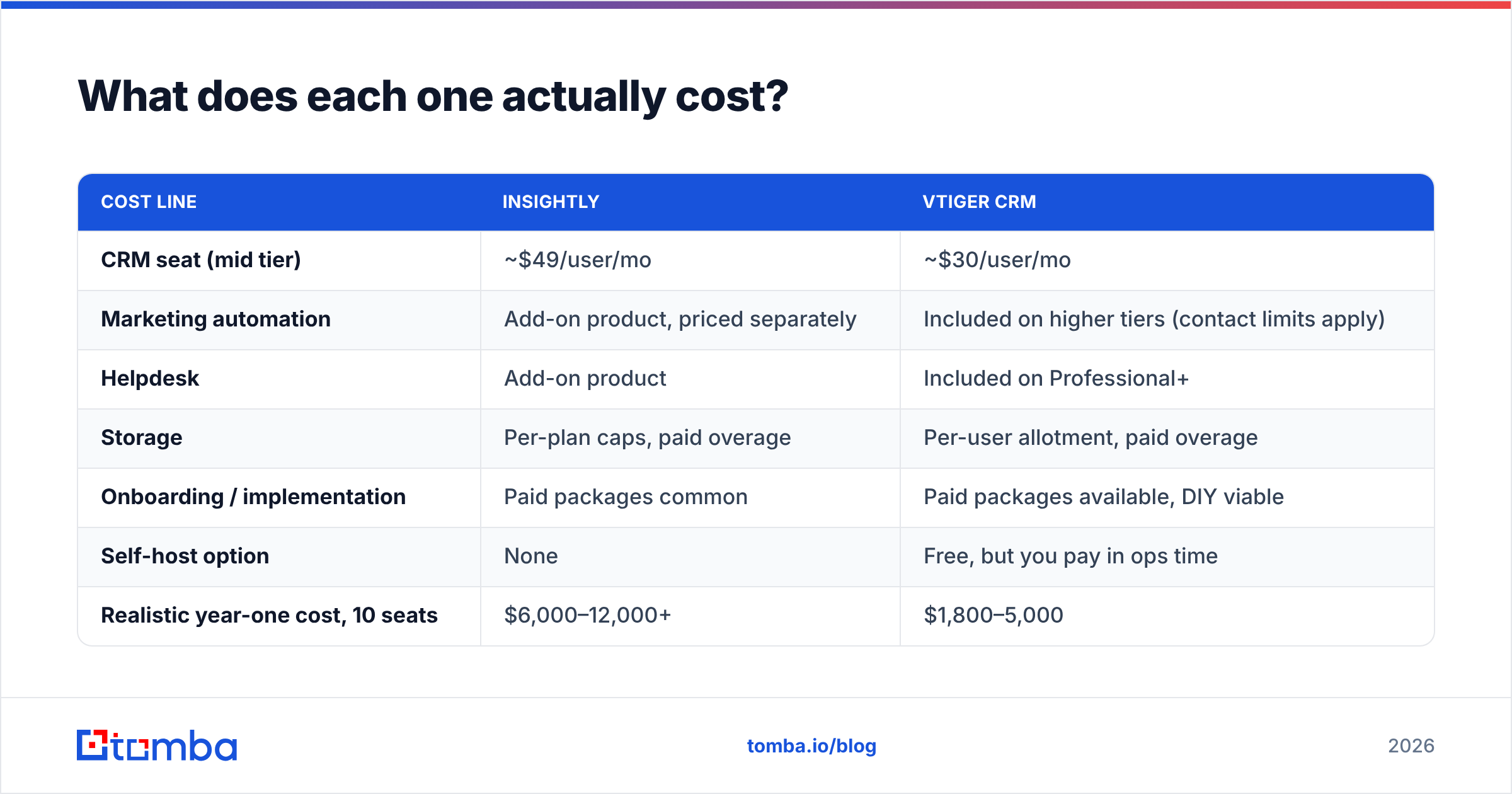
The sticker price is not the real price for either tool, and the reasons differ.
With Insightly, the CRM license is only one line item. Marketing automation and the service desk are sold as separate products. A team that wants CRM plus email campaigns plus ticketing buys three subscriptions. The combined per-seat cost climbs fast. The CRM tiers run about $29 (Plus), $49 (Professional), and $99 (Enterprise) per user per month on annual billing. The items most teams want — advanced workflow rules, custom validation, higher API limits — sit on the upper tiers.
With Vtiger, most modules are bundled. But the cheap tier is thin. The entry plan covers contacts, deals, and basic email. The features people actually want — workflow automation, the helpdesk with SLAs, approvals, multiple pipelines — sit on Professional or Enterprise. The free Open Source Edition drops the license cost to zero. In return you own the hosting bill, the upgrade path, and the security patching.
| Cost line | Insightly | Vtiger CRM |
|---|---|---|
| CRM seat (mid tier) | ~$49/user/mo | ~$30/user/mo |
| Marketing automation | Add-on product, priced separately | Included on higher tiers (contact limits apply) |
| Helpdesk | Add-on product | Included on Professional+ |
| Storage | Per-plan caps, paid overage | Per-user allotment, paid overage |
| Onboarding / implementation | Paid packages common | Paid packages available, DIY viable |
| Self-host option | None | Free, but you pay in ops time |
| Realistic year-one cost, 10 seats | $6,000–12,000+ | $1,800–5,000 |
The honest read on cost in the Insightly vs Vtiger CRM matchup: Vtiger is much cheaper for a team that wants breadth. Insightly costs more. It earns that only if the project module does real work for you. Buy Insightly as a plain pipeline tracker and you overpay for features you will never open.
Which CRM handles automation better?#
Vtiger wins on raw breadth; Insightly wins on how clean the automation feels to build.
Vtiger's workflow engine fires on record create, update, time triggers, and scheduled conditions. It can update fields, send emails, create tasks, call webhooks, and run custom functions. On the open-source edition you can write your own handlers. That is real power if you have a developer. The cost is a builder UI made for admins who already know the data model.
Insightly splits automation between built-in workflow rules and AppConnect, its integration layer. AppConnect is closer to a Zapier-style canvas: triggers, filters, actions across connected apps. It is friendlier. It is also where Insightly puts a lot of value behind higher tiers. That paywall is the recurring complaint in G2 reviews for both products. Users like the tools. They dislike where the gate sits.
Five things to test during a trial, in priority order:
- Lead assignment rules — build a round-robin that respects territory and seniority, not just a flat rotation. This breaks first in most CRMs.
- Deal-stage automation — can a stage change trigger a task, an email, and a Slack ping without custom code?
- Duplicate prevention — import 200 rows with three deliberate duplicates and see what survives. Vtiger's dedupe is rule-based; Insightly's is stricter but less flexible.
- Webhook reliability — fire 50 events at a test endpoint and count what arrives. Retry behaviour matters more than trigger variety.
- Bulk edit and rollback — make a 500-record bulk change, then try to undo it. If there's no undo, your admin needs a backup habit.
Run those five in both trials and you will know more than any review roundup will tell you.
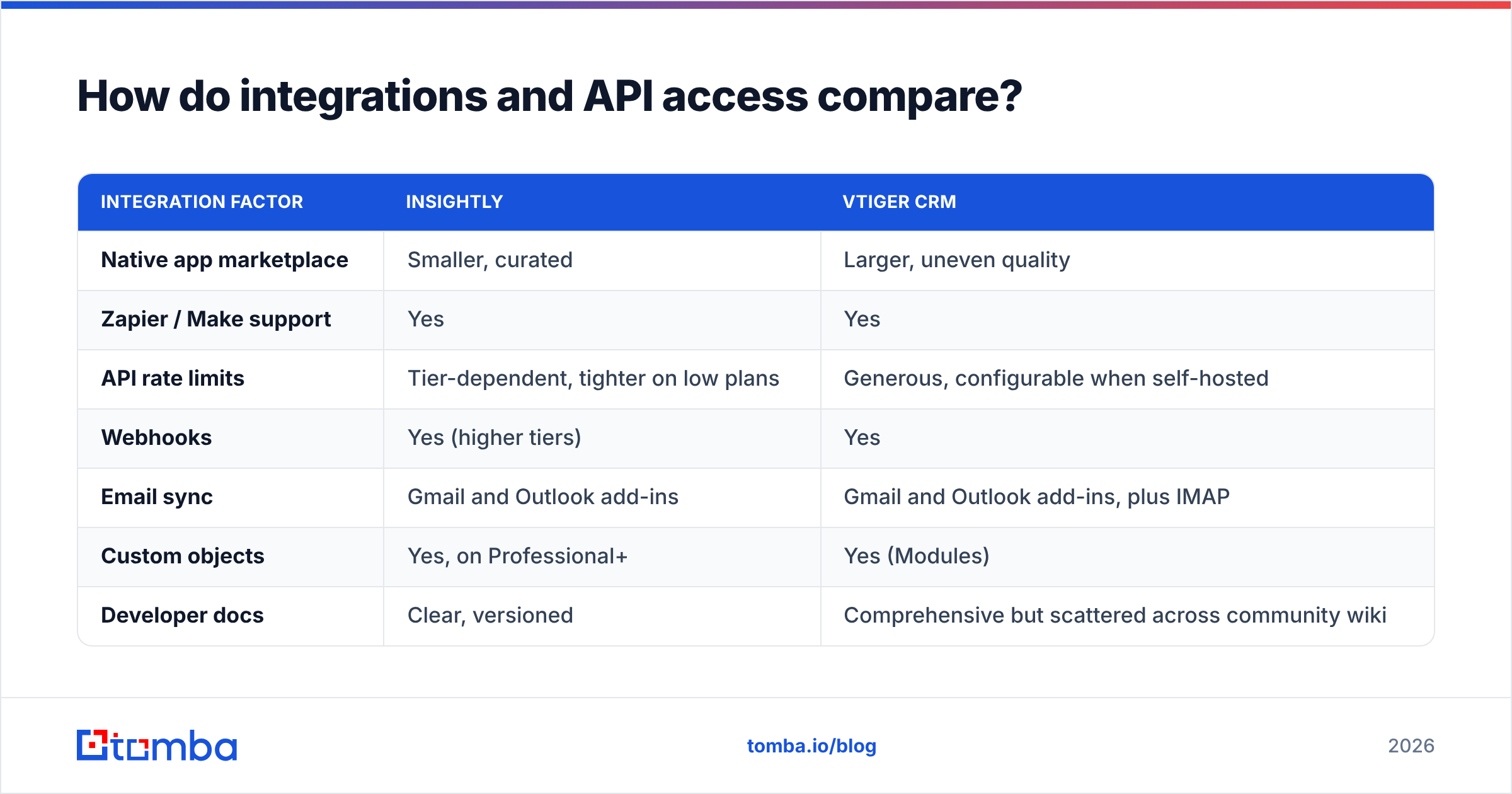
How do integrations and API access compare?#
Both ship REST APIs. Both connect to the usual suspects — email, calendar, Slack, accounting, Zapier. The practical differences:
| Integration factor | Insightly | Vtiger CRM |
|---|---|---|
| Native app marketplace | Smaller, curated | Larger, uneven quality |
| Zapier / Make support | Yes | Yes |
| API rate limits | Tier-dependent, tighter on low plans | Generous, configurable when self-hosted |
| Webhooks | Yes (higher tiers) | Yes |
| Email sync | Gmail and Outlook add-ins | Gmail and Outlook add-ins, plus IMAP |
| Custom objects | Yes, on Professional+ | Yes (Modules) |
| Developer docs | Clear, versioned | Comprehensive but scattered across community wiki |
If you plan to pipe data in from enrichment or prospecting tools, check rate limits before anything else. A CRM that caps you at a few hundred API calls per hour will choke every nightly sync you build. Teams moving from a spreadsheet-plus-scripts workflow hit this wall first. The limit rarely shows up on the pricing page.
Both CRMs sit downstream of the same data plumbing. A HubSpot integration or Pipedrive integration works the same way here. Find and verify the contact first. Push a clean record second.
Where does data quality break down in both tools?#
Here is the part neither vendor markets: a CRM is a filing cabinet, not a data source.
Insightly and Vtiger will both happily store jonh.smith@acme.co forever. Neither one will tell you the address bounces. Neither knows that Jon left the company eight months ago. Neither flags that Acme was acquired and moved to a new domain. Both have light enrichment features. But they enrich what you already have. They do not go find the contact.
The failure chain is predictable:
- Stale records accumulate. B2B contact data decays roughly 25–30% per year as people change jobs. After two years, a third of your CRM is fiction.
- Bounces wreck sender reputation. A 5% bounce rate on a sequence can damage email deliverability across your whole sending domain. Not just that one campaign.
- Reps stop trusting the CRM. Two dead contacts in a row and people go back to LinkedIn and spreadsheets. Your adoption metrics die quietly.
- Reporting lies. Forecasts built on unverified contacts overstate reachable TAM. Nobody catches it until the quarter misses.
The fix is upstream, not inside the CRM. Find the address with a domain search against the target company. Run it through an email verifier before it enters the database. Re-verify on a schedule; quarterly is enough for most lists. Add data enrichment at record creation so job titles and company details arrive filled in. A rep will not type them.
Do that and the Insightly vs Vtiger CRM decision becomes what it should be: a workflow question, not a data question.
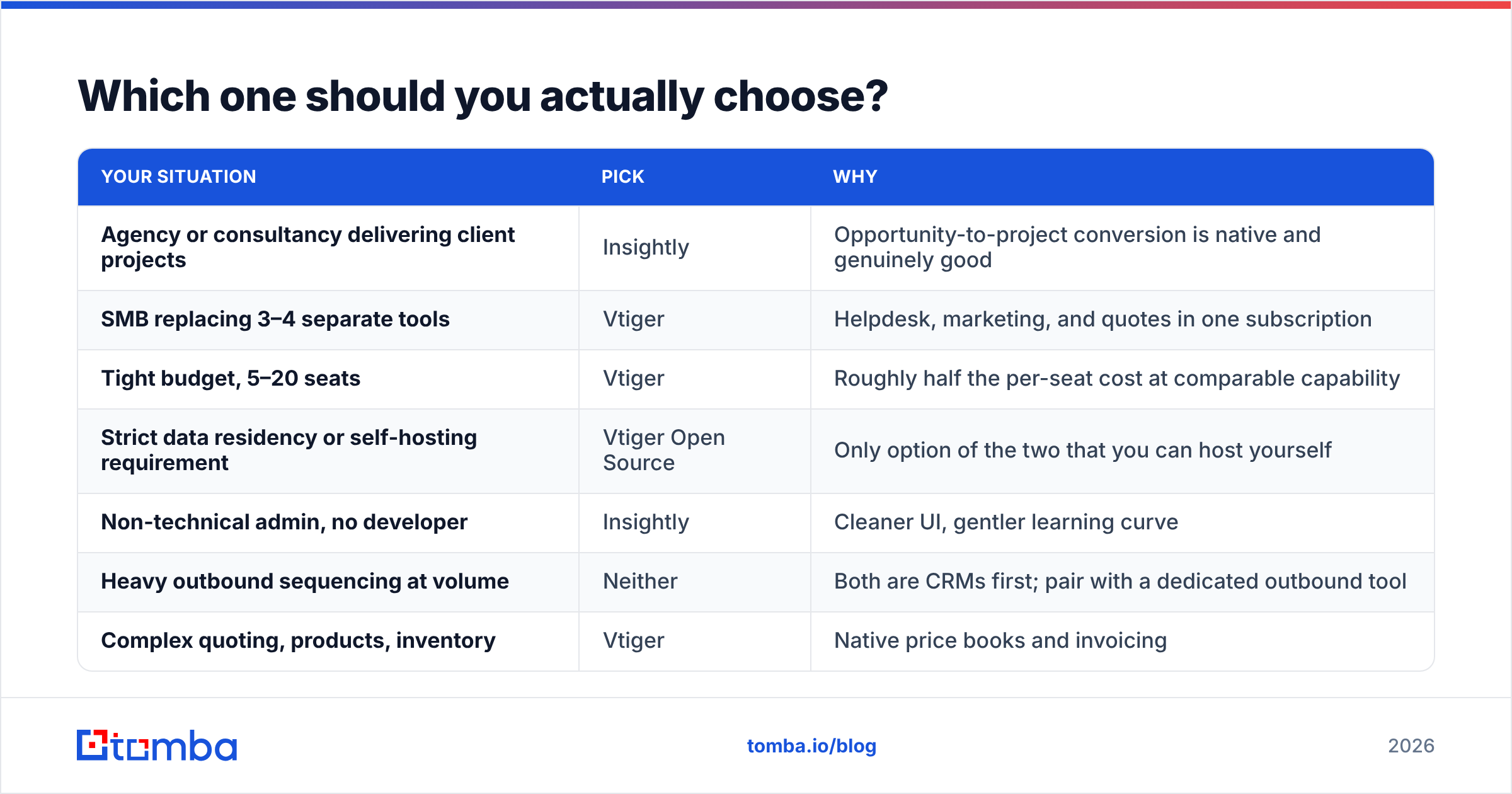
Which one should you actually choose?#
| Your situation | Pick | Why |
|---|---|---|
| Agency or consultancy delivering client projects | Insightly | Opportunity-to-project conversion is native and genuinely good |
| SMB replacing 3–4 separate tools | Vtiger | Helpdesk, marketing, and quotes in one subscription |
| Tight budget, 5–20 seats | Vtiger | Roughly half the per-seat cost at comparable capability |
| Strict data residency or self-hosting requirement | Vtiger Open Source | Only option of the two that you can host yourself |
| Non-technical admin, no developer | Insightly | Cleaner UI, gentler learning curve |
| Heavy outbound sequencing at volume | Neither | Both are CRMs first; pair with a dedicated outbound tool |
| Complex quoting, products, inventory | Vtiger | Native price books and invoicing |
| You need polished reporting out of the box | Insightly | Dashboard builder is more approachable |
Two honest caveats. First, Vtiger's interface takes longer to learn. Teams that skip admin training use maybe 30% of what they paid for. Second, Insightly sells several products. Your quoted price at signup is rarely your price at renewal. Ask for the full three-year cost, including marketing and service, before you commit.
Looking at a third option? Run the same test on it. Import 200 real records. Build one automation. Run one report. See which tool you resent least by Friday.
What should you do before you migrate either way?#
Clean the data first. Migrating a dirty database into a new CRM just gives your mess a nicer interface and a monthly bill.
A workable order: export everything to CSV. Remove duplicates. Verify every email address in bulk. Drop or quarantine anything that fails. Enrich the survivors with current titles and company data. Then import. Skip this step and you spend your first quarter on the new CRM doing cleanup that would have taken two days up front. Teams blame the CRM for it.
Whichever platform you land on, the records stay useful only if something keeps them accurate. Start with Tomba Email Finder. It sources verified professional addresses by domain, name, or company. Push clean records into Insightly or Vtiger from day one. The free tier covers 25 searches a month, so you can test accuracy against contacts you already know. Paid plans start at $49/month; see Tomba pricing for the full breakdown. Get the data right and either CRM will do its job.
Related guides#
// get started
Find, verify and enrich your first contacts today
Start on the free plan with 25 searches a month, then scale when your team is ready.
Free plan · No credit card required · GDPR & CCPA
// about the author