Istariai vs Leadsrush (2026): Which Lead Data Tool Wins?
Istariai and Leadsrush both promise verified B2B contacts on tap. Here is how they differ on data accuracy, pricing, export limits and API access — plus the 50-lead test that settles it for your own market.
Istariai vs Leadsrush comes down to two questions: whose data survives a neutral verifier, and what a usable contact really costs you. Here is the short version, then the test that settles it.
TL;DR
- Istariai leans AI-assisted prospecting: describe an ICP in plain language, get a built list. It is fast for discovery, weaker for auditability.
- Leadsrush leans volume and filters: classic search-and-export mechanics, cheaper per record, more manual work to keep the list clean.
- Neither publishes an independently audited accuracy rate. Treat every headline percentage from either vendor as a marketing claim until your own bounce data disagrees.
- The real cost difference is not the sticker price — it is credits burned on bad records and export caps per seat.
- If you mostly need accurate work emails rather than a whole prospecting suite, a dedicated email finder plus a verifier usually costs less and bounces less than either platform.
What are Istariai and Leadsrush?#
Both tools sit in the same crowded category: B2B contact data with a prospecting layer on top. G2's lead intelligence listings map the field well. Dozens of vendors there make near-identical accuracy claims with near-identical screenshots.
Istariai positions itself around AI-driven list building. The pitch is simple. You describe your ideal customer in plain words — "Series A fintech companies in the Nordics with a VP of Engineering" — and the system assembles the list, enriches it, and hands you contacts ready to sequence. The appeal is speed and low setup. The trade-off: you rarely see why a record was included. That makes a weak list hard to debug.
Leadsrush takes the older, more open route: structured filters, a searchable database, bulk export. You pick industry, headcount, geography, title keywords, and pull a CSV. Nothing magical. But you can repeat a search exactly, and that matters when a team shares one list definition month to month.
Here is the honest caveat that most "X vs Y" posts skip: both vendors change their pricing and their coverage quickly. Neither publishes a third-party audit of match rates. So every number below is framed as what to verify, not what to believe.
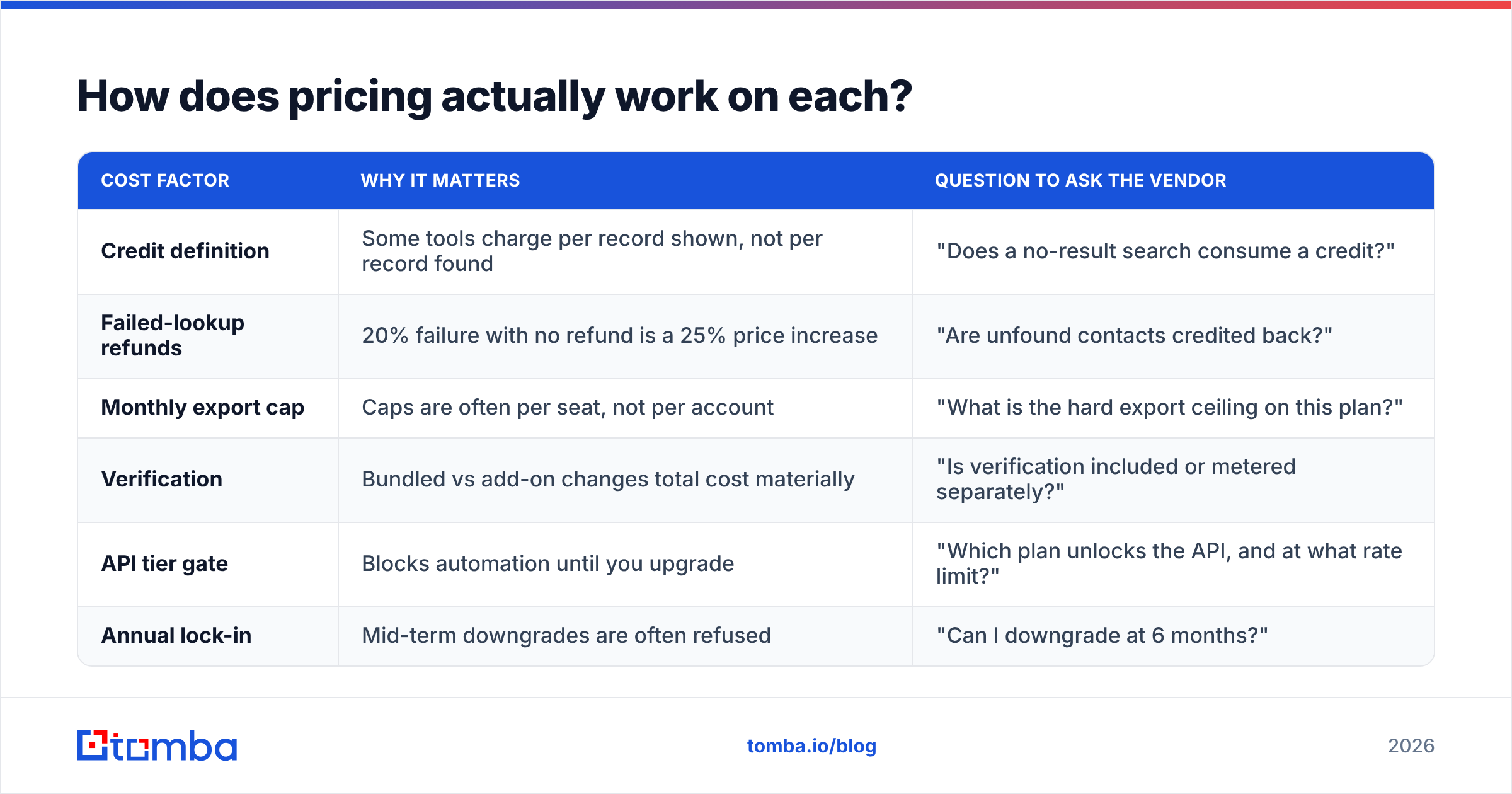
Istariai vs Leadsrush: how do they compare head-to-head?#
| Dimension | Istariai | Leadsrush | What to check yourself |
|---|---|---|---|
| Core model | AI prompt → built list | Filter → search → export | Can you reproduce the same list twice? |
| Best for | Fast ICP exploration, small ad-hoc lists | Repeatable, high-volume list pulls | Which matches your motion? |
| Data transparency | Low — sources abstracted | Medium — filters visible | Ask for source/last-verified date per record |
| Verification | Bundled, opaque status labels | Often a paid add-on or third-party step | Run 100 records through a neutral verifier |
| Export limits | Typically capped per seat/month | Higher bulk caps, credit-metered | Read the fair-use clause, not the pricing page |
| API access | Usually higher tiers only | Usually higher tiers only | Confirm rate limits before you build |
| Learning curve | Minutes | An afternoon | How technical is your SDR team? |
| Contract | Monthly + annual discount | Monthly + annual discount | Ask about mid-term downgrade rights |
Two rows in that table matter far more than the rest: data transparency and verification. Everything else is UI preference. A list you cannot audit and cannot verify is a list you pay for twice — once in credits, once in sender reputation.

Which one has better data accuracy?#
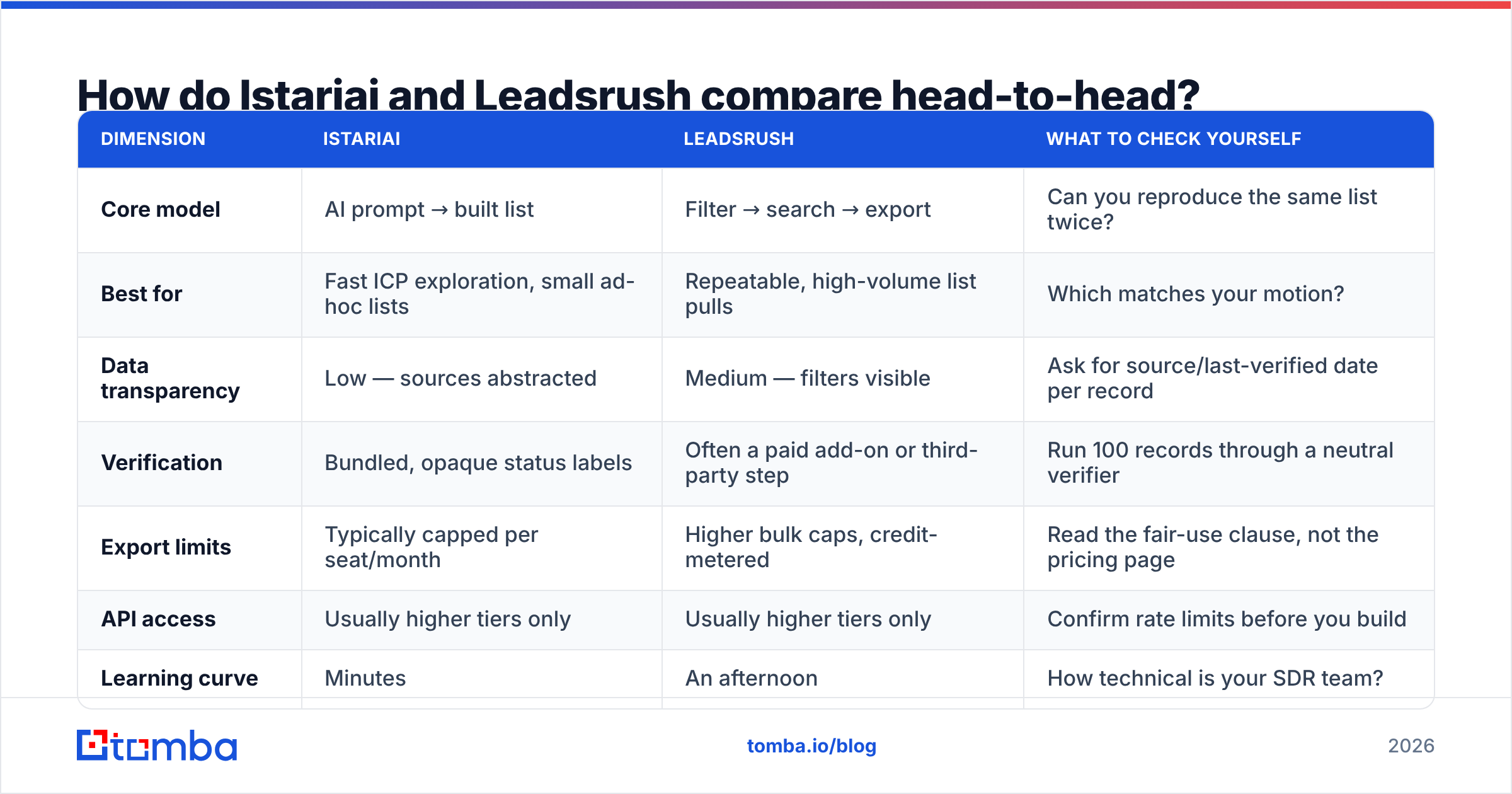
Neither vendor has published a repeatable accuracy benchmark. So the answer is simple: run the test yourself, on your own ICP. Accuracy is not a fixed property of a database. It is a property of your segment. A tool that hits 95% on US SaaS mid-market can drop to 60% on German manufacturing or Gulf-region logistics.

Suggested visual: side-by-side screenshots of the Istariai list-builder result panel and the Leadsrush filter results grid, with the "verified" status column highlighted in each.
Three failure modes account for most of the gap between a vendor's claimed accuracy and your actual bounce rate:
- Stale records. A contact that was correct 14 months ago is not correct today. People change jobs often. Any database older than a quarter needs re-verification before you send.
- Catch-all domains marked "valid." Many providers label a catch-all address as deliverable because the server accepts everything. That is not the same as valid. Use a dedicated catch-all verifier before you trust those rows.
- Pattern guesses presented as findings.
first.last@domain.comis a guess unless a real source confirms it. Guesses inflate coverage numbers and wreck deliverability.
The practical move, whichever platform you pick: never send to a vendor export without an independent verification pass. Run the file through a neutral email verifier and compare the pass rate to the vendor's claim. If a vendor claims 97% and your neutral verifier passes 71%, you have your answer. You get it in an hour, not after a burned domain.
How does pricing actually work on each?#
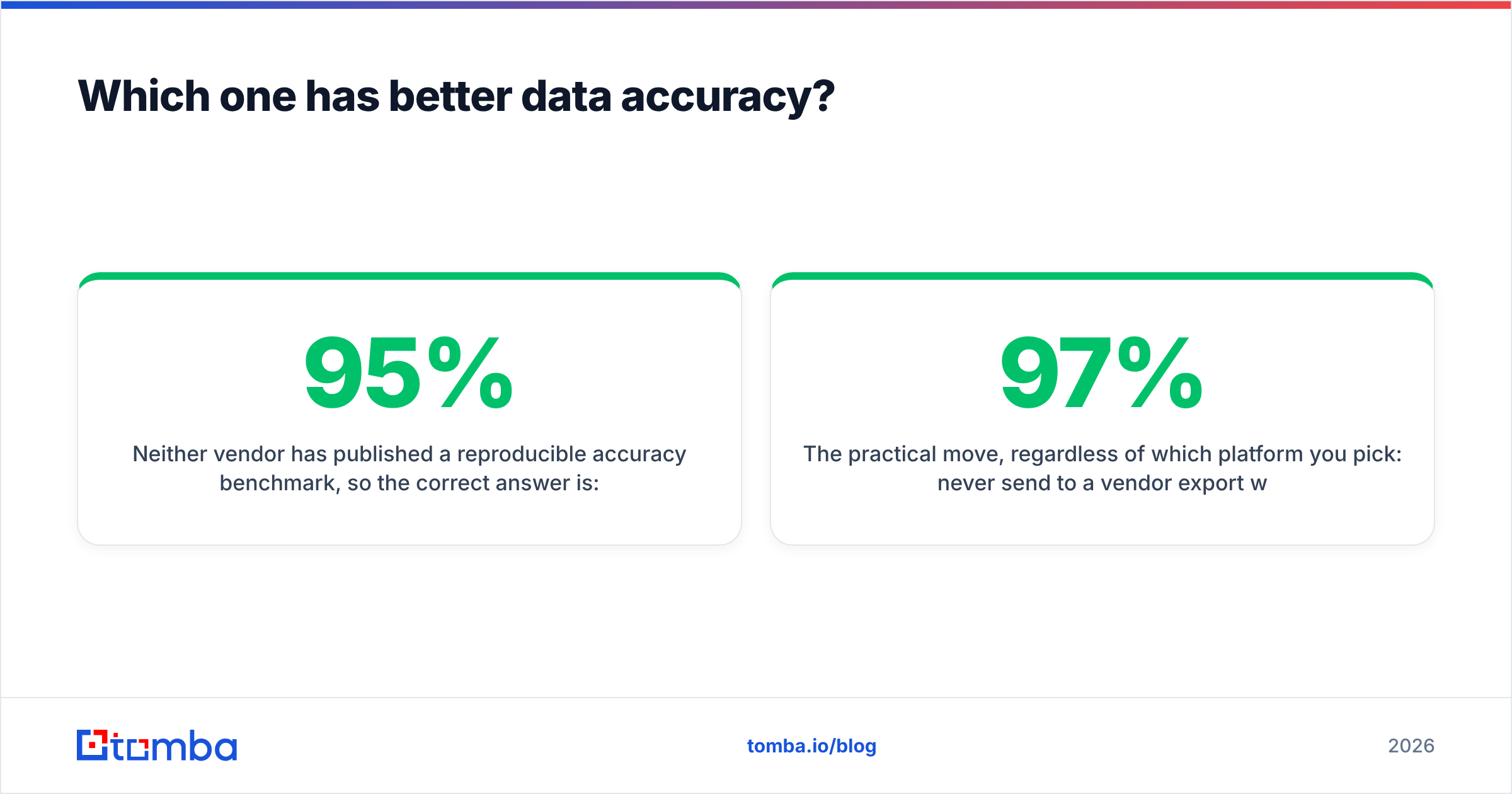
Sticker price is the least useful number on either pricing page. Four things set your real cost per usable contact: what consumes a credit, whether failed lookups are refunded, how high the monthly export cap sits, and whether the API is locked behind a higher tier.
| Cost factor | Why it matters | Question to ask the vendor |
|---|---|---|
| Credit definition | Some tools charge per record shown, not per record found | "Does a no-result search consume a credit?" |
| Failed-lookup refunds | 20% failure with no refund is a 25% price increase | "Are unfound contacts credited back?" |
| Monthly export cap | Caps are often per seat, not per account | "What is the hard export ceiling on this plan?" |
| Verification | Bundled vs add-on changes total cost materially | "Is verification included or metered separately?" |
| API tier gate | Blocks automation until you upgrade | "Which plan unlocks the API, and at what rate limit?" |
| Annual lock-in | Mid-term downgrades are often refused | "Can I downgrade at 6 months?" |
Run the arithmetic on cost per usable contact, not cost per credit:
(Monthly price ÷ credits) ÷ (your verified pass rate) = real cost per deliverable contact
A $99 plan with 5,000 credits at a 60% verified pass rate costs $0.033 per usable contact. A $49 plan with 1,000 credits at a 95% pass rate costs $0.052. So the cheaper-looking plan is not always cheaper, and the pricier plan is not always better. You need your own pass rate to decide. For a sense of what clear tiering reads like, Tomba pricing lists a free tier at 25 searches/month, Starter at $49/mo, Growth at $99/mo and Pro at $249/mo. Credit definitions are stated up front.
Which tool fits which team?#
- Founder-led sales, under 300 contacts/month. Istariai's prompt-first flow wins on time-to-first-list. You are not building a repeatable process yet; you are testing segments. Optimize for speed.
- SDR team of 3-10 with a defined ICP. Leadsrush's reproducible filters win. When five reps need the same list definition, "describe it in a prompt" produces five different lists and five different results.
- RevOps pushing data into a CRM automatically. Neither is ideal unless you are on a tier with a real API and documented rate limits. Check the Tomba API or an equivalent as a benchmark for what documented endpoints and per-minute limits should look like.
Three more cases are worth calling out on their own:
- Agencies running multiple client ICPs. Watch per-seat export caps closely. Agency workloads break seat-based pricing faster than any other use case.
- Teams in regulated or EU-heavy markets. Ask both vendors for their lawful-basis documentation and opt-out handling in writing before signing. Neither category leader makes this easy to find.
- Anyone whose main need is "get me the right work email." You probably do not need a full prospecting suite at all. A focused finder plus verifier is cheaper and more accurate than a platform you use 15% of.

What does each tool do badly?#
Istariai's weakness is auditability. When an AI-assembled list underperforms, you have limited ability to diagnose it. Was the firmographic filter wrong? Was the title matching too loose? Was the data simply stale? Prompt-based building compresses a lot of decisions into one opaque step. For exploratory work that is fine. For a quarterly pipeline target, it is a risk.
Leadsrush's weakness is manual overhead. Open filters mean you do the thinking. Expect to spend real time tuning title keywords, deduplicating across pulls, and stripping catch-all domains. The tool is honest about what it is — a database with a search box. But it will not save you the cleanup work. Budget for a bulk verify step on every export.
Both share the category's structural weakness: coverage outside North America and Western Europe drops off sharply. No vendor advertises this. If your ICP is in LATAM, MENA, or Southeast Asia, test coverage in those regions specifically during the trial. A US sample will flatter every tool.
It is also worth knowing the adjacent options. Say you want a bought, pre-verified list rather than a self-serve search tool. A specialist like BookYourData works on a different model: pay-as-you-go lists with per-record accuracy guarantees. That suits teams who want a finished file rather than a seat license. Different shape of product, genuinely different fit. Broader vendor comparisons across the category are catalogued on Capterra's lead generation software directory if you want to widen the shortlist first.
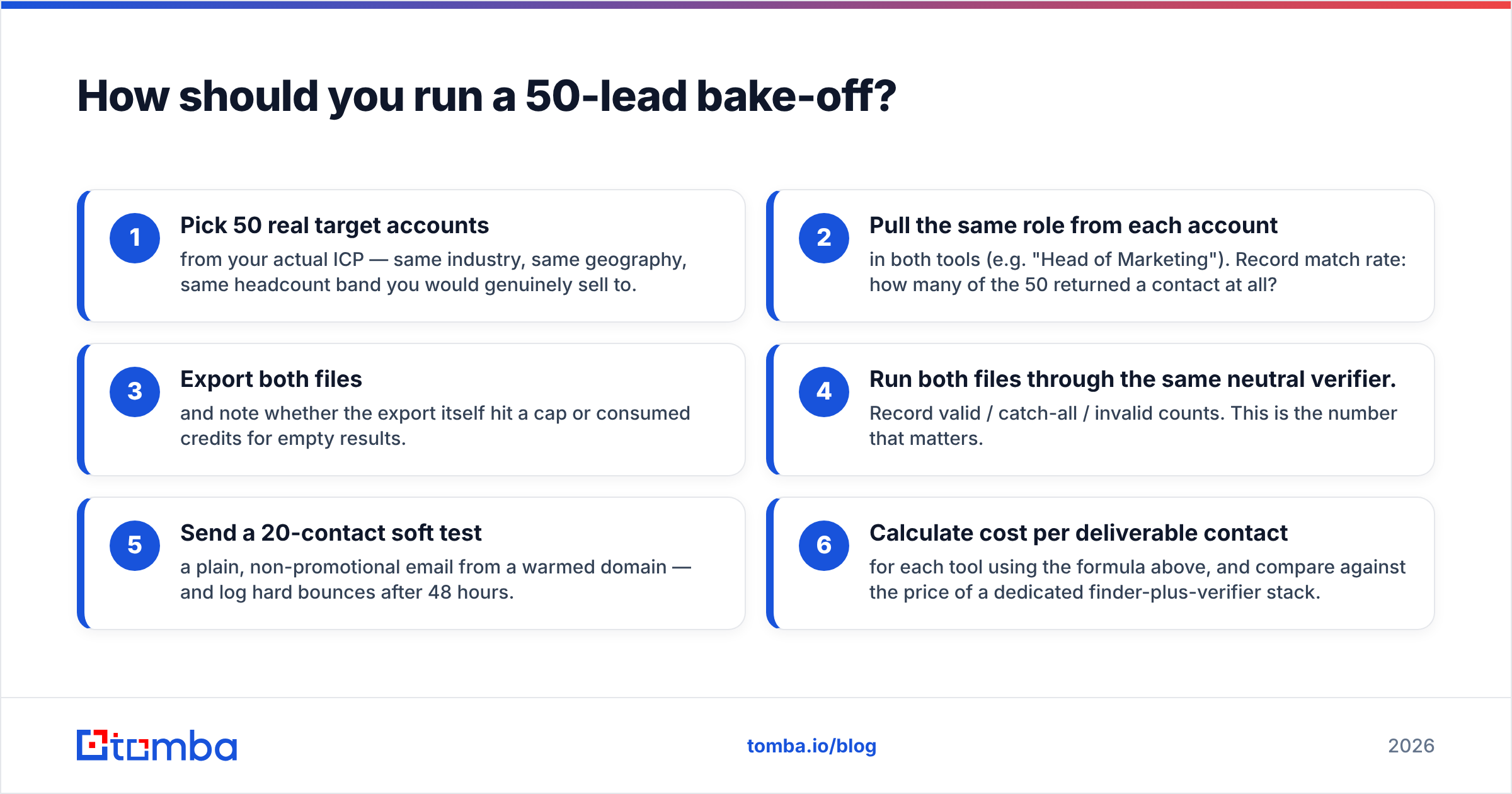
How should you run a 50-lead bake-off?#
Do not evaluate on demo data. Run this in under two hours:
- Pick 50 real target accounts from your actual ICP — same industry, same geography, same headcount band you would genuinely sell to.
- Pull the same role from each account in both tools (e.g. "Head of Marketing"). Record match rate: how many of the 50 returned a contact at all?
- Export both files and note whether the export itself hit a cap or consumed credits for empty results.
- Run both files through the same neutral verifier. Record valid / catch-all / invalid counts. This is the number that matters.
- Send a 20-contact soft test — a plain, non-promotional email from a warmed domain — and log hard bounces after 48 hours.
- Calculate cost per deliverable contact for each tool using the formula above, and compare against the price of a dedicated finder-plus-verifier stack.

Suggested visual: a screenshot of your verifier's results dashboard showing the valid/catch-all/invalid split for both vendor exports side by side.
Whatever the outcome, this test gives you something neither pricing page will: a number that reflects your market. Teams that skip it argue about interface preferences instead. Meanwhile their bounce rate quietly wrecks their sender reputation. For a broader view of how bounce rates feed into pipeline math, HubSpot's sales blog keeps a reasonable running baseline on outbound benchmarks.
Is there a simpler alternative to both?#
Often, yes. Most teams buy a prospecting platform and then use one feature: finding a verified work email for a person they already found on LinkedIn or in a company list.
If that describes you, the platform is overhead. A focused stack covers the same job with fewer moving parts: domain search to map a company's contacts, a finder for named individuals, and a verifier before every send. Credit accounting stays clear, and there is no seat-based export ceiling. It is also easier to audit when something goes wrong, because each step leaves a visible artifact.
Istariai and Leadsrush both earn their place for teams that genuinely need list discovery — building ICPs from scratch, exploring new segments, working without a target account list. If you already know who you want to reach, you are paying for discovery you do not use.
The bottom line#
The Istariai vs Leadsrush choice is really a choice about your stage. Pick Istariai if you are early, exploring segments, and value speed over repeatability. Pick Leadsrush if you have a settled ICP, several reps, and need the same list definition to produce the same list every month. Pick neither if your real bottleneck is accurate work emails rather than list discovery.
Whichever way you go, the verification step is non-negotiable. No vendor's "verified" badge replaces your own pass-rate data.
Ready to test the accuracy side yourself? Start with the Tomba Email Finder — find professional email addresses by domain, name, or company, with sources shown per result so you can see where a record came from. The free tier includes 25 searches a month, which is enough to run the 50-lead bake-off above against whichever platform you are considering. Paid plans start at $49/mo when you are ready to scale.
Related guides#
// get started
Find, verify and enrich your first contacts today
Start on the free plan with 25 searches a month, then scale when your team is ready.
Free plan · No credit card required · GDPR & CCPA
// about the author