Jamie Pricing, Reviews, Pros and Cons: An Honest 2026 Look
Jamie is the AI notetaker that refuses to send a bot into your calls. Here is what its plans really cost, what reviewers praise, where it frustrates people, and whether it earns a seat in a B2B sales stack.
TL;DR
- Jamie is a German-built AI meeting assistant that records and summarises calls without sending a bot into the meeting — it captures system audio from your device instead.
- Paid plans start around €24/month (Standard), with Pro near €47/month and Executive near €99/month; a limited free tier exists. Prices are per seat, listed in euros, and cheaper on annual billing.
- The pros people actually mention: no visible bot, strong multilingual transcription, genuinely usable executive summaries, EU data handling.
- The cons people actually mention: meeting-credit ceilings, desktop-app dependency, thinner CRM/automation integrations than Fireflies or Otter, and euro pricing that stings for US buyers.
- Jamie is a note-taking layer, not a pipeline engine. It does nothing to help you find the people worth meeting — that is a separate, cheaper line item.
What is Jamie and why does its pricing work differently?#
Jamie is an AI notetaker from Berlin-based meetjamie.ai that transcribes and summarises meetings from your computer's audio rather than joining the call as a participant. That single architectural choice explains most of what follows in this Jamie pricing reviews breakdown — the good, the awkward, and the price tag.
Most AI notetakers (Fireflies, Otter, Read.ai) work by dialling a bot into your Zoom, Teams, or Meet room. Everyone sees "Fireflies Notetaker has joined." Jamie runs as a desktop app and listens to whatever your machine plays and your microphone picks up. Think of it as the difference between hiring a stenographer who sits in the room with a badge on, versus dictating into your own recorder after the door closes. Same notes, very different optics — and very different implications for consent, which you still need to handle yourself.
That design has a cost consequence too. Because Jamie is not paying for bot infrastructure per meeting room but is paying for high-quality multilingual transcription and long-context summarisation, its plans are metered by meetings per month, not minutes or seats-with-unlimited-everything. You need to size the plan against your calendar, not your headcount alone.
What does Jamie cost in 2026?#
The numbers below reflect Jamie's public pricing at the time of writing. Vendors reshuffle tiers often, and Jamie prices in euros with VAT handled at checkout, so confirm against the official page before you put a card in. Annual billing typically knocks roughly 20% off the monthly rate.
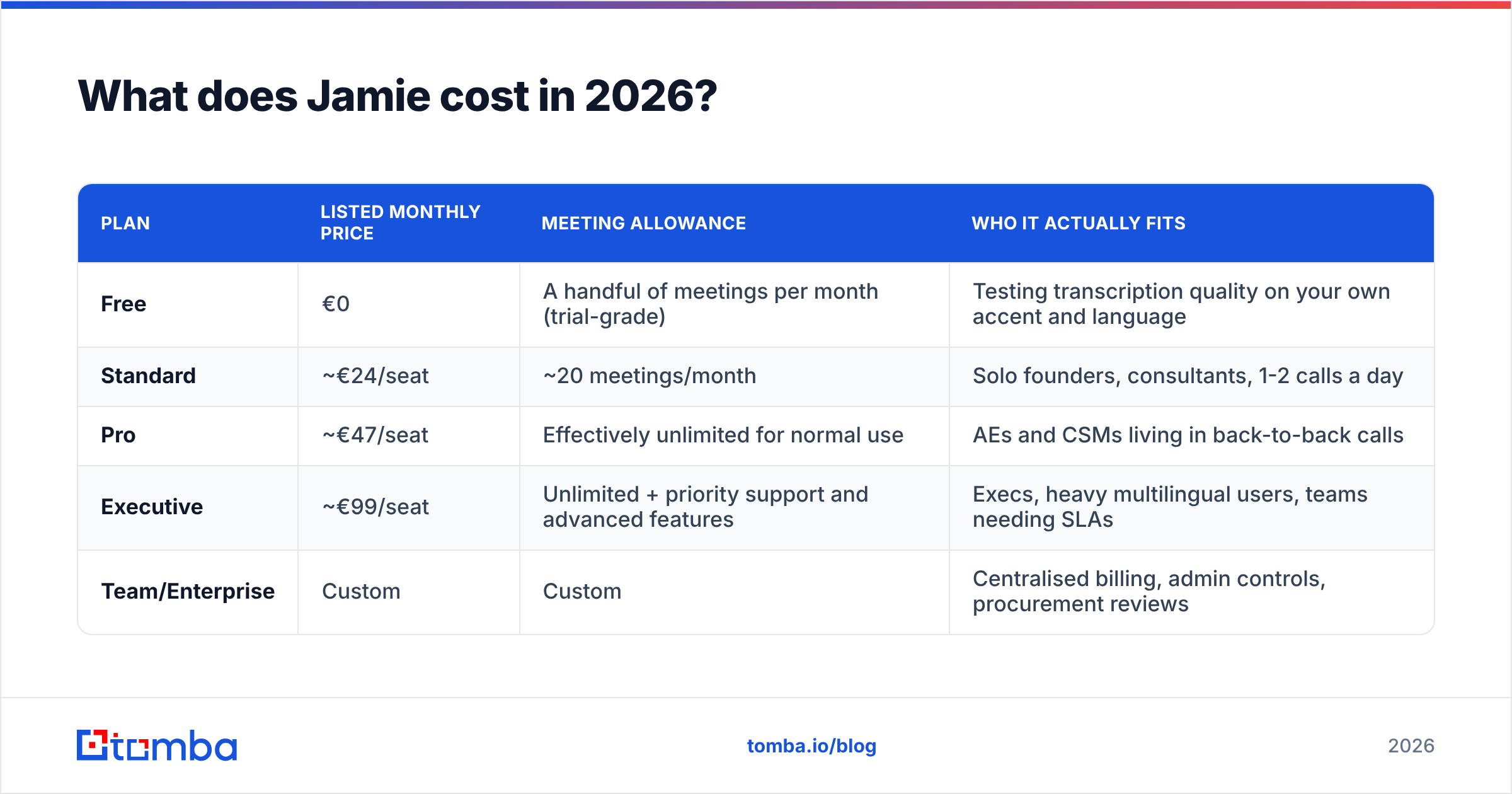
| Plan | Listed monthly price | Meeting allowance | Who it actually fits |
|---|---|---|---|
| Free | €0 | A handful of meetings per month (trial-grade) | Testing transcription quality on your own accent and language |
| Standard | ~€24/seat | ~20 meetings/month | Solo founders, consultants, 1-2 calls a day |
| Pro | ~€47/seat | Effectively unlimited for normal use | AEs and CSMs living in back-to-back calls |
| Executive | ~€99/seat | Unlimited + priority support and advanced features | Execs, heavy multilingual users, teams needing SLAs |
| Team/Enterprise | Custom | Custom | Centralised billing, admin controls, procurement reviews |
Two things to flag before you do the math:
- The Standard cap is the real decision point. Twenty meetings a month is roughly one a day. A working AE blows through that by the second week, which pushes most sales users to Pro — so budget €47, not €24, if you are buying for a quota-carrying rep.
- Euro pricing is not a rounding error. If you budget in dollars, currency movement and card FX fees mean your "€47" line item is not a fixed number month to month. Finance teams notice this on multi-seat renewals.
How should you actually size a Jamie plan?#
Work through these five checks before picking a tier — they map almost perfectly to where people later complain about overpaying:
- Count real meetings, not calendar invites. Internal standups you never re-read do not need AI notes. Only count calls where a summary changes a downstream action.
- Check your language mix. Jamie's multilingual handling (German, French, Spanish, and a long tail of others) is a genuine differentiator. If you sell in English only, you are paying for a strength you will not use.
- Decide who owns the recording. No-bot capture means the recording lives with the individual, not a shared workspace by default. Multi-seat teams need to plan handoffs.
- Audit your existing stack. If you already pay for Gong, Grain, or a Zoom AI Companion licence, you may be buying the same summary twice.
- Price the annual commitment honestly. The 20% annual discount is only a discount if the tool survives your first quarter of use. Run a month on Standard first.
What do Jamie reviews praise most?#
Across public review sites like G2 and Capterra, four themes repeat.
No bot in the room. This is the headline and it is not cosmetic. Sales teams report that prospects visibly relax when there is no third-party participant tile on the call. For sensitive conversations — legal, healthcare, M&A, anything where a named recording bot triggers a procurement reflex — it removes a friction point entirely. It also works in rooms you do not control: a Teams call hosted by the buyer's IT-locked tenant where external bots are blocked outright.
Summary quality over raw transcription. Plenty of tools produce a clean transcript. Reviewers consistently rate Jamie's executive summary as the part worth paying for — decisions, owners, and follow-ups separated out rather than a wall of bullet points restating the conversation. If you have ever pasted a Fireflies summary into a CRM note and then rewritten it anyway, this is the gap Jamie targets.
Multilingual performance. European teams selling across DACH, France, and Iberia report noticeably better accuracy on non-English calls, including accented English, than the US-first incumbents. This is where Jamie's home-market focus pays off.
EU data posture. Jamie is built and hosted with GDPR as the default assumption rather than an add-on. For German and Nordic buyers, that alone shortens the security review — which has real cost, even if it never shows up on the invoice.
What are the cons reviewers keep raising?#
Being fair about a tool means naming the friction.
It is a desktop-app dependency. No bot means no server-side capture. If you forget to open the app, the meeting is gone. There is no "it was recording in the cloud anyway" safety net. Reviewers who churn most often cite this: one missed QBR with no recording erodes trust fast.
Meeting credits create anxiety. Metered allowances make people ration a tool they should use reflexively. Teams end up asking "is this meeting worth a credit?" — which is exactly the wrong question to put in a rep's head.
Integration depth is narrower. Jamie connects to the obvious destinations, but if your workflow assumes deep bi-directional CRM field mapping, call-scoring, or coaching analytics, Fireflies, Otter Business, and revenue-intelligence platforms are further along. Jamie is a notetaker that summarises well, not a conversation-intelligence suite that scores talk ratios and flags competitor mentions.
Consent is your problem, not the app's. Because nothing announces itself in the room, the legal and ethical burden of disclosure sits entirely with you. In two-party-consent jurisdictions that is a policy you need to write down before rollout, not after.
No usage-based escape hatch. There is no meaningful pay-as-you-go option. A user with six heavy meetings one month and forty the next either overpays on Pro or gets capped on Standard.
How does Jamie compare to other AI notetakers?#
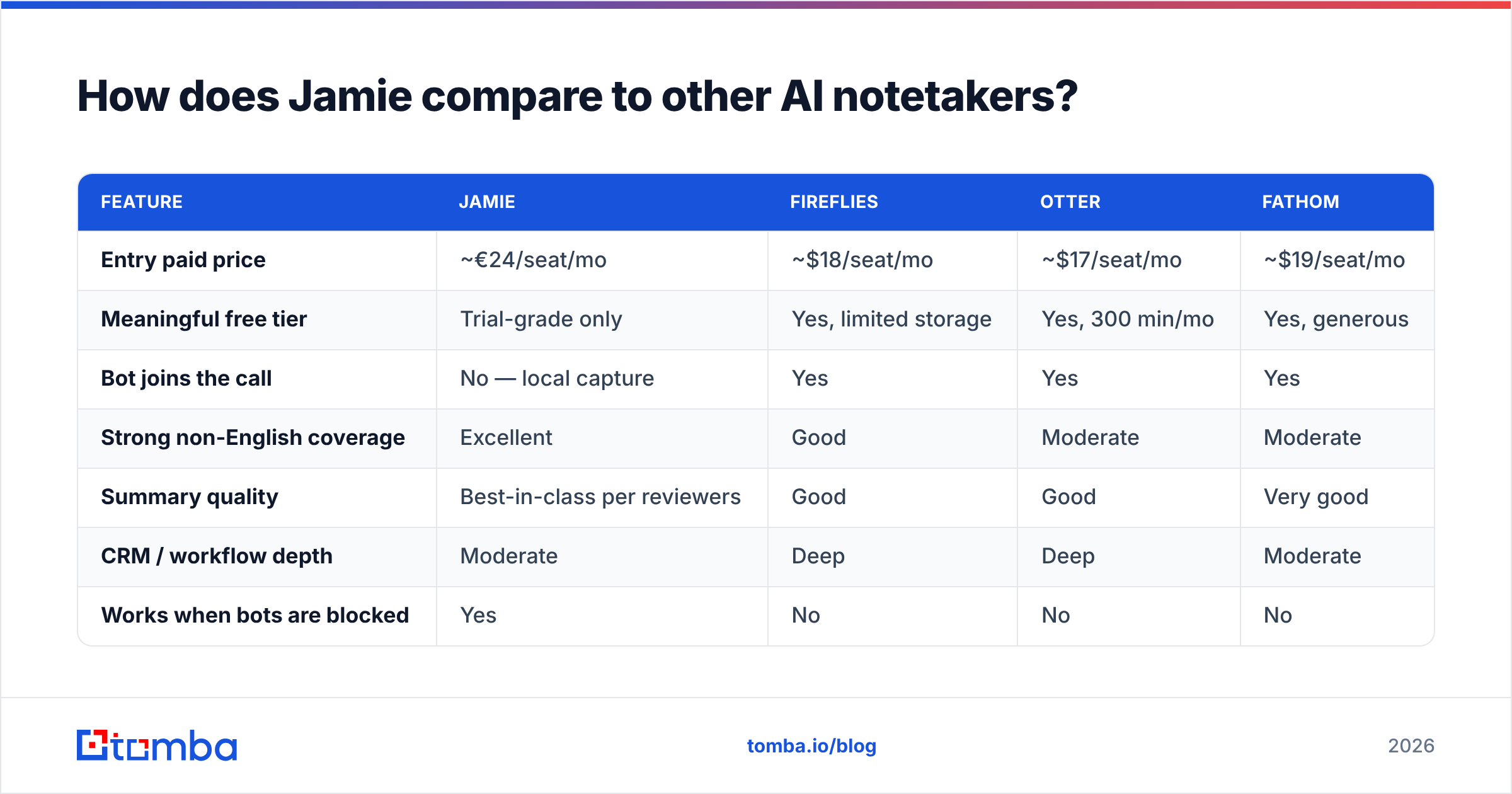
| Feature | Jamie | Fireflies | Otter | Fathom |
|---|---|---|---|---|
| Entry paid price | ~€24/seat/mo | ~$18/seat/mo | ~$17/seat/mo | ~$19/seat/mo |
| Meaningful free tier | Trial-grade only | Yes, limited storage | Yes, 300 min/mo | Yes, generous |
| Bot joins the call | No — local capture | Yes | Yes | Yes |
| Strong non-English coverage | Excellent | Good | Moderate | Moderate |
| Summary quality | Best-in-class per reviewers | Good | Good | Very good |
| CRM / workflow depth | Moderate | Deep | Deep | Moderate |
| Works when bots are blocked | Yes | No | No | No |
| Data residency | EU-first | US-first | US-first | US-first |
Read that table as a positioning map, not a scoreboard. Jamie wins decisively on two axes — bot-free capture and multilingual/EU handling — and trades away breadth of automation and free-tier generosity to get there. If neither of those two axes matters to you, you are paying a premium for capabilities you will never exercise, and a US-first tool at $17–19 will serve you better.
Is Jamie worth it for a B2B sales team?#
Short answer: yes for European or compliance-sensitive teams, no for high-volume outbound teams that live inside a CRM.
Here is the honest arithmetic. Pro at roughly €47/seat/month is about €564 per rep per year. That is worth it if better notes convert to faster follow-up and cleaner handoffs. A response rate lift on post-meeting follow-ups, or one fewer deal lost to a forgotten commitment, covers the cost easily. But it is only worth it if the rep is in enough meetings for the summaries to matter.
And that is the uncomfortable point most Jamie reviews skip: notetakers are a downstream tool. They improve the quality of meetings you already booked. They do nothing about the far more common problem — not having enough of the right meetings in the first place. A team with twelve discovery calls a month does not have a note-taking problem. It has a pipeline problem, and buying a €99 Executive seat will not fix it.
Where does Jamie fit in a complete outbound stack?#
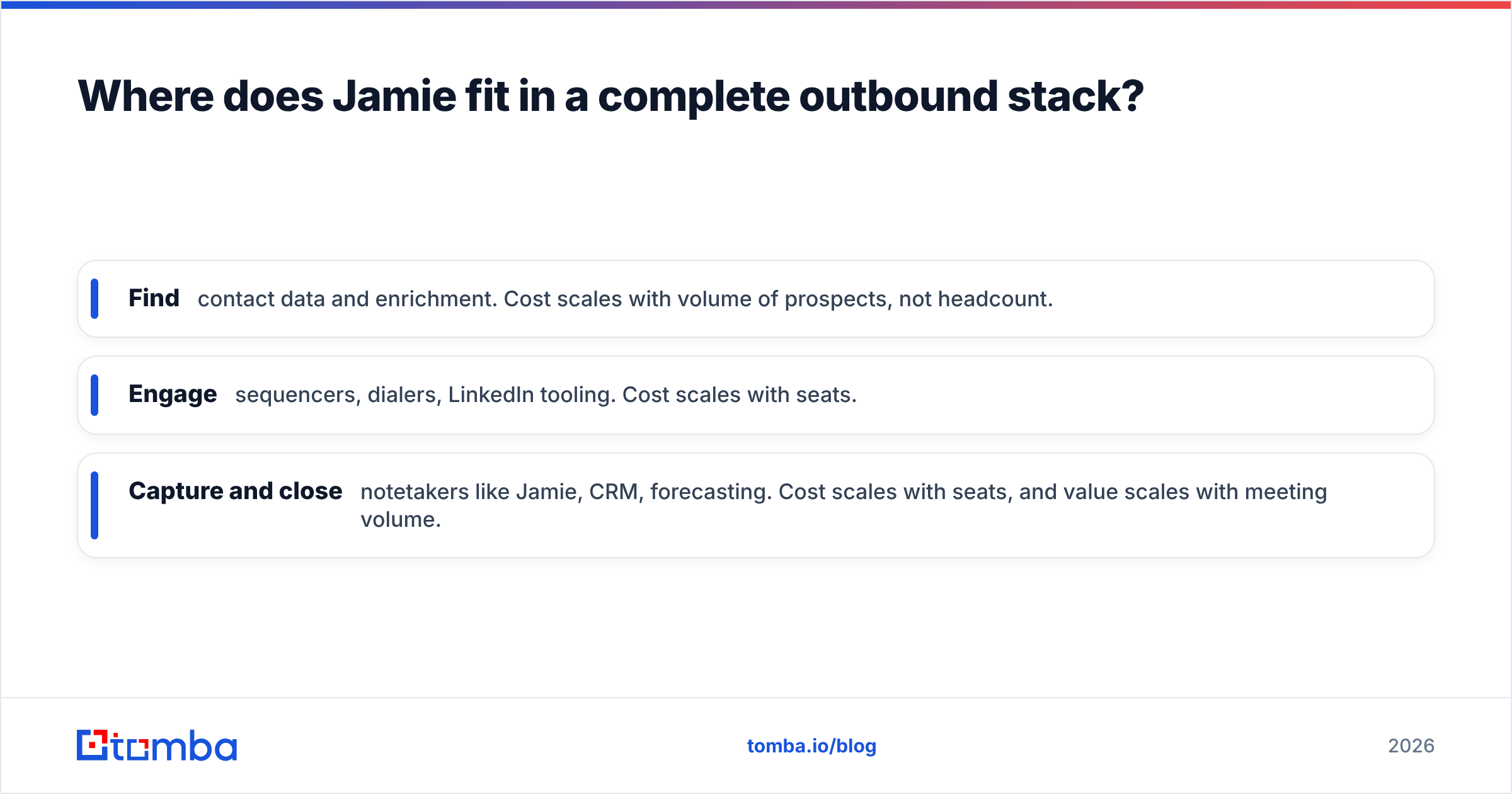
Think of your go-to-market stack as a funnel with three distinct spend categories, each with a different cost logic:
- Find — contact data and enrichment. Cost scales with volume of prospects, not headcount.
- Engage — sequencers, dialers, LinkedIn tooling. Cost scales with seats.
- Capture and close — notetakers like Jamie, CRM, forecasting. Cost scales with seats, and value scales with meeting volume.
Most teams overspend on the third bucket and underspend on the first, then wonder why the expensive tooling sits idle. If your reps are only running four calls a week, the fix is not a better summary — it is more verified contacts entering the top of the funnel.
That is where a dedicated email finder does more for the same money. Tomba's Starter plan is $49/month, Growth is $99/month, and there is a free tier with 25 searches a month to test accuracy before committing. Run a domain search against a target account, push the results through the email verifier to strip bounces, and you have booked meetings for Jamie to actually transcribe. Compare the full Tomba pricing against a per-seat notetaker and the sequencing becomes obvious: fill the calendar first, then instrument the calls.
What should you do before buying Jamie?#
Run this as a two-week test rather than a procurement exercise.
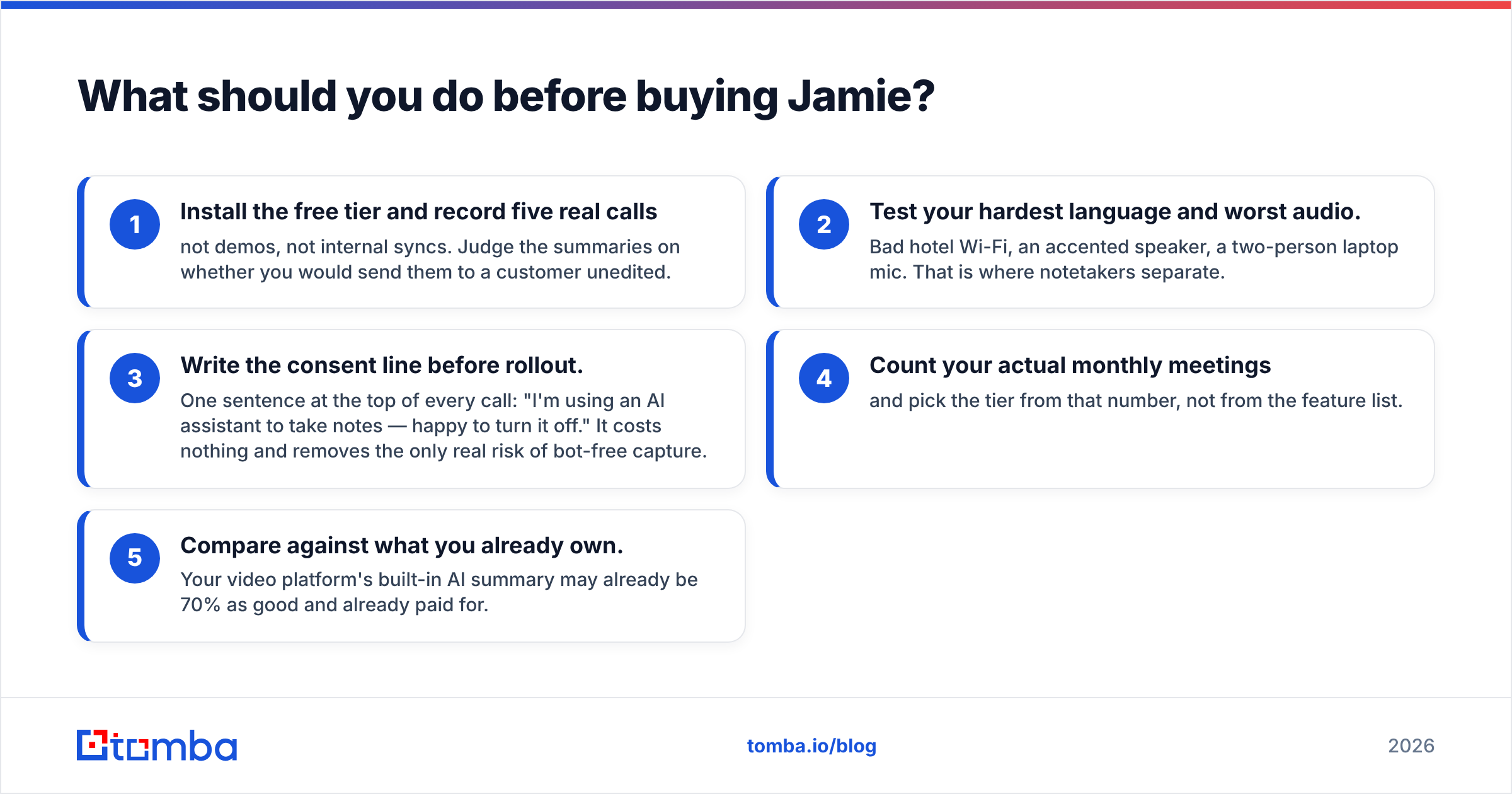
- Install the free tier and record five real calls — not demos, not internal syncs. Judge the summaries on whether you would send them to a customer unedited.
- Test your hardest language and worst audio. Bad hotel Wi-Fi, an accented speaker, a two-person laptop mic. That is where notetakers separate.
- Write the consent line before rollout. One sentence at the top of every call: "I'm using an AI assistant to take notes — happy to turn it off." It costs nothing and removes the only real risk of bot-free capture.
- Count your actual monthly meetings and pick the tier from that number, not from the feature list.
- Compare against what you already own. Your video platform's built-in AI summary may already be 70% as good and already paid for.
The verdict on Jamie pricing, reviews, pros and cons#
Jamie is a focused, well-built tool with a genuinely differentiated approach, priced at a modest premium over US competitors. The no-bot capture and multilingual accuracy are real advantages, not marketing. The meeting caps, desktop dependency, and narrower integration surface are real limitations, not nitpicks. If you sell in Europe, handle sensitive conversations, or routinely join calls where external bots are blocked, Pro at roughly €47/seat is defensible. If you are a US team running English-only calls inside a deep CRM workflow, cheaper and more integrated options will serve you better.
Either way, remember what a notetaker can and cannot do. It makes your existing meetings more useful. It does not create them. If your calendar has room in it, that is the problem to solve first — start with the Tomba Email Finder on the free tier, verify a hundred contacts from your ICP, and see how many meetings you can put on the books this month. Then let Jamie take the notes.
Related guides#
// get started
Find, verify and enrich your first contacts today
Start on the free plan with 25 searches a month, then scale when your team is ready.
Free plan · No credit card required · GDPR & CCPA
// about the author