Jet Leads Pro vs LeadEngineAI (2026): Which One Wins?
Two lead-gen platforms, one budget. Here is how Jet Leads Pro and LeadEngineAI compare on data accuracy, credits, pricing and export limits, plus when a dedicated email finder beats both.
TL;DR#
- Neither tool is a safe blind buy. Jet Leads Pro and LeadEngineAI are both small, marketing-forward lead platforms with thin third-party validation. Run a paid pilot on your own ICP before you commit to an annual plan.
- Jet Leads Pro sells volume. Big exportable lists, bulk CSV workflows, low cost per record. That model wins when you need breadth and you own a separate verification step.
- LeadEngineAI sells intelligence. AI scoring, intent signals, and enrichment on top of a smaller pool. That model wins when you send 200 hyper-targeted emails a month, not 20,000.
- Accuracy is the only metric that matters. A $29/mo tool with a 22% bounce rate costs more than a $99/mo tool at 3%, once you price in burned domains and rep time.
- A verified email layer beats both on deliverability. Pair whichever platform you pick with a dedicated email verifier so nothing hits your sequencer unchecked.
What are Jet Leads Pro and LeadEngineAI?#
Both sit in the B2B lead intelligence category: software that maps a company or a persona to a contact record, usually an email address, sometimes a phone number, job title, and firmographics on top.
The two take different routes to that outcome.
Jet Leads Pro positions itself as a volume play. The pitch is a large static database, filters for industry, headcount, geography and title, then a bulk export. You pay roughly by the record. The workflow is familiar to anyone who has used a list vendor: build a segment, preview the count, export the CSV, push it into your sequencer.
LeadEngineAI positions itself as a signal play. The pitch is a smaller universe of contacts scored by AI, enriched with firmographic and behavioral data, and surfaced as a ranked "who to contact this week" feed. You pay for the enrichment and the scoring layer more than for raw rows.
One honest caveat before the comparison: neither vendor has the depth of independent review coverage that Apollo, ZoomInfo or Clearbit carry on G2 and Capterra. Where public claims exist, I have marked them as claims. Where I could not verify a number, I say so rather than inventing one. Treat everything below as a framework for your own trial, not gospel.
How should you compare two lead-gen tools fairly?#
Vendor feature lists are useless for this decision because every platform claims the same six things. These five tests separate them:
- Match rate on your list, not their demo. Take 200 companies you actually sell to, ideally a mix of your best-fit and hardest segments, and run them through both tools. The number that matters is the percentage where you get a named decision-maker with a deliverable email, not the percentage where you get any row back.
- Bounce rate after a real send. Export 500 contacts from each, verify them independently, then send. Track hard bounces at 48 hours. Anything over 5% on cold B2B data is a red flag; over 10% and you are damaging your sending domain.
- Credit mechanics and rollover. Does a failed lookup consume a credit? Does an enrichment cost the same as a find? Do unused credits expire monthly? These three rules change effective cost per usable contact by 2x or more.
- Export and ownership rights. Can you export everything you paid for, or is export capped below your credit count? If you cancel, do you keep the data? Some tools functionally rent you a view of a database.
- API and integration depth. A CSV-only tool forces manual work forever. Check whether there is a real email finder API, a native CRM sync, and rate limits you can live with.
Run those five tests and the winner usually declares itself inside a week.
Jet Leads Pro vs LeadEngineAI: how do they compare head to head?#
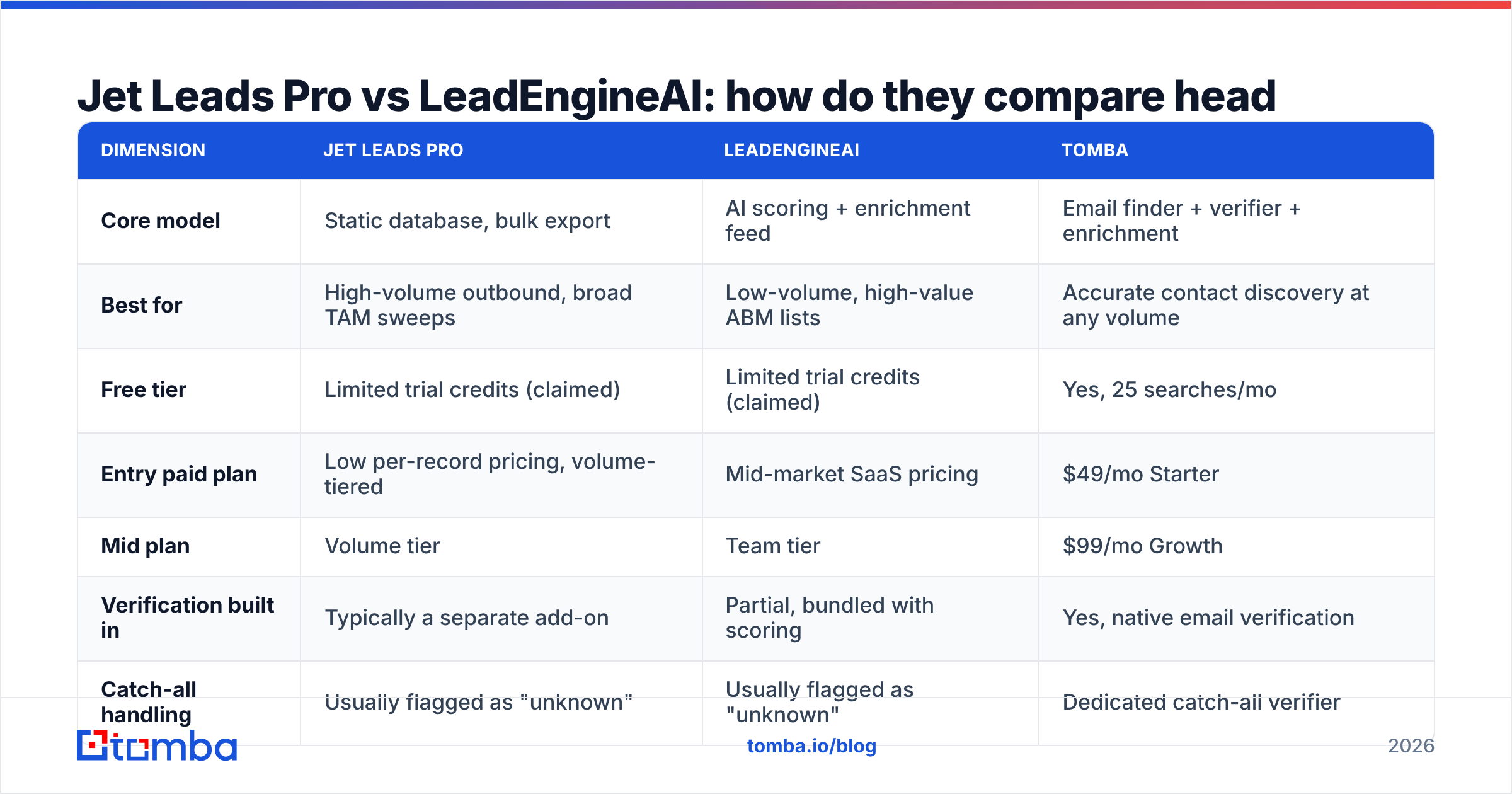
Here is the side-by-side, with Tomba included as a reference point for what a dedicated finder-plus-verifier stack looks like at the same price band.
| Dimension | Jet Leads Pro | LeadEngineAI | Tomba |
|---|---|---|---|
| Core model | Static database, bulk export | AI scoring + enrichment feed | Email finder + verifier + enrichment |
| Best for | High-volume outbound, broad TAM sweeps | Low-volume, high-value ABM lists | Accurate contact discovery at any volume |
| Free tier | Limited trial credits (claimed) | Limited trial credits (claimed) | Yes, 25 searches/mo |
| Entry paid plan | Low per-record pricing, volume-tiered | Mid-market SaaS pricing | $49/mo Starter |
| Mid plan | Volume tier | Team tier | $99/mo Growth |
| Verification built in | Typically a separate add-on | Partial, bundled with scoring | Yes, native email verification |
| Catch-all handling | Usually flagged as "unknown" | Usually flagged as "unknown" | Dedicated catch-all verifier |
| API access | Varies by plan | Varies by plan | All paid plans |
| Phone numbers | Limited | Limited | Yes, phone finder |
| Data transparency | Sparse public documentation | Sparse public documentation | Published data sources |
Two things jump out.
First, both challengers gate verification. That is the single most common cost trap in this category: you buy 50,000 records at what looks like $0.01 each, then discover you need a separate verification vendor at $0.004 per check to make them safe to send, and your real cost was 40% higher than the invoice suggested.
Second, neither publishes a clear data provenance page. Where B2B contact data comes from matters for GDPR and CCPA exposure, and increasingly for buyer trust. If a vendor will not tell you how records are sourced and refreshed, that silence is information.

Which one has better data accuracy?#
This is where the decision actually gets made, and where marketing pages are least useful.
Both tools advertise accuracy figures in the 95%+ range. Nearly every vendor in this category does. The trick is that "accuracy" is defined differently by each of them:
- Some count a record as accurate if the domain resolves and accepts mail, which passes almost every catch-all domain regardless of whether the mailbox exists.
- Some count it as accurate if the pattern matches the company's known format, which is a guess dressed up as a verification.
- Some count only SMTP-confirmed deliverable mailboxes, which is the honest definition and always produces a lower headline number.
When you run your own test, measure the third definition. Export 500 records, run them through an independent checker, and split the results into deliverable, risky/catch-all, and invalid. A tool that returns 400 deliverable out of 500 beats one that returns 480 "valid" where 120 are unconfirmed catch-alls.

Catch-all domains are the specific place these two tools tend to diverge from specialist finders. Roughly a fifth of B2B domains accept all mail at the server level, which means a standard SMTP ping tells you nothing. Volume-first platforms usually mark those as valid and pass the risk to you. If a meaningful share of your ICP sits on catch-all infrastructure, you want a dedicated catch-all verifier in the stack no matter which platform you buy.
What does each one actually cost per usable lead?#
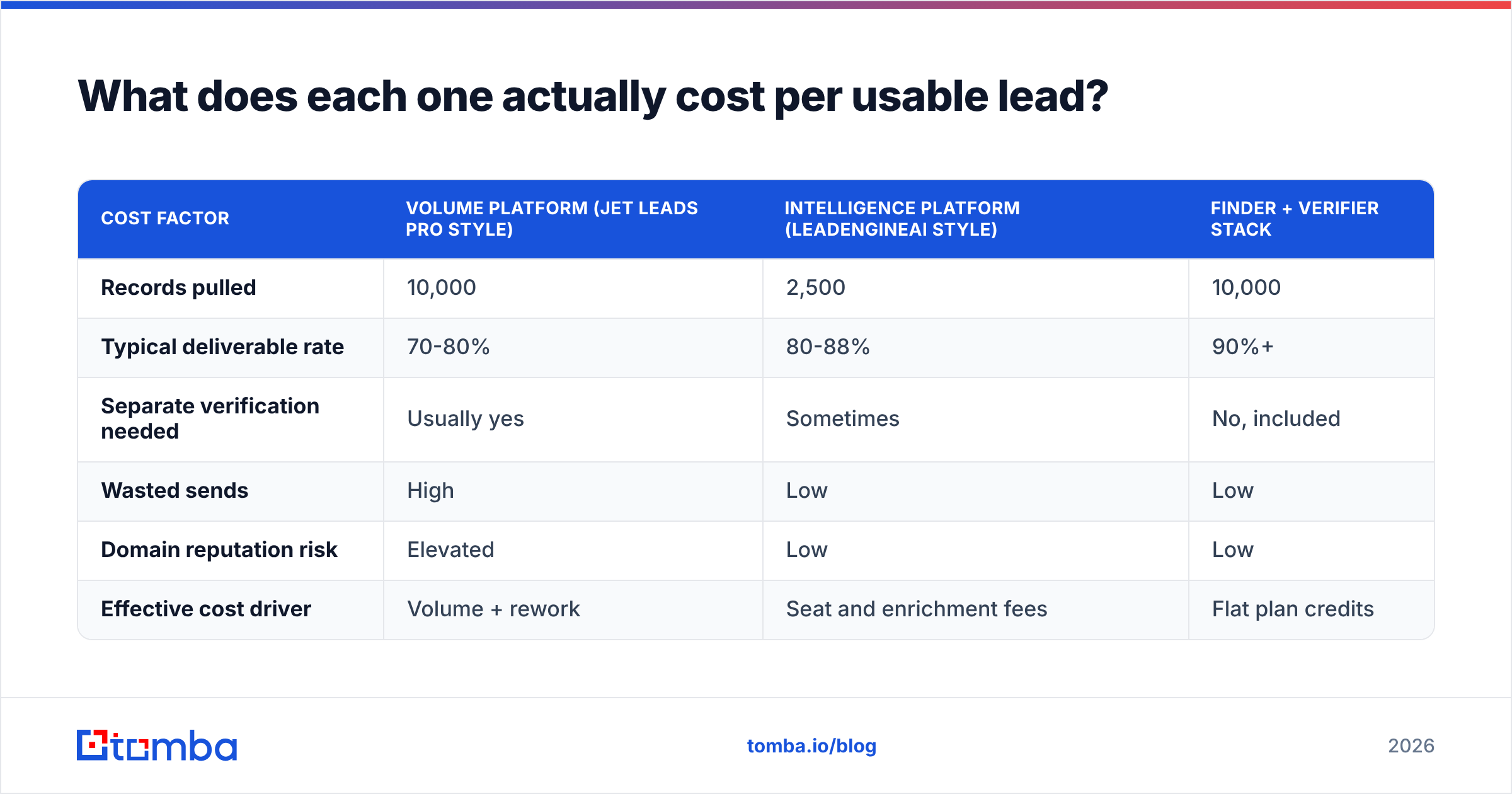
Sticker price is the wrong unit. Cost per deliverable, correctly-titled contact is the right one. Here is the arithmetic on a 10,000-contact quarter, using conservative assumptions you should replace with your own pilot numbers:
| Cost factor | Volume platform (Jet Leads Pro style) | Intelligence platform (LeadEngineAI style) | Finder + verifier stack |
|---|---|---|---|
| Records pulled | 10,000 | 2,500 | 10,000 |
| Typical deliverable rate | 70-80% | 80-88% | 90%+ |
| Separate verification needed | Usually yes | Sometimes | No, included |
| Wasted sends | High | Low | Low |
| Domain reputation risk | Elevated | Low | Low |
| Effective cost driver | Volume + rework | Seat and enrichment fees | Flat plan credits |
The pattern holds across the category. Volume tools look cheapest on the invoice and most expensive after rework. Intelligence tools look expensive per record but cheap per meeting, provided your ACV is high enough to justify small batch sizes. If your average deal is under $5,000, the scoring layer rarely pays for itself.
For reference on the third column, Tomba pricing runs a free tier at 25 searches/mo, Starter at $49/mo, Growth at $99/mo, and Pro at $249/mo, with verification bundled rather than sold separately. That bundling is the structural difference, not a marginal discount.
Is Jet Leads Pro better than LeadEngineAI for cold email?#
For pure cold email volume, Jet Leads Pro's model is the better architectural fit, with two conditions attached.
Condition one: you must add verification before the send. Pushing an unverified bulk export straight into Instantly or Smartlead is how teams burn a domain in three weeks. Google and Microsoft both tightened bulk sender requirements, and a sustained spam complaint rate above 0.3% now has direct, measurable deliverability consequences. HubSpot's research on email benchmarks is a reasonable starting point for what normal looks like before you decide your numbers are fine.
Condition two: you must segment before you export. A 40,000-row CSV with no persona split produces one generic sequence and a 1% reply rate. The volume advantage only converts if you slice it into 20 tight segments with 20 different opening lines.
For ABM and enterprise motions, LeadEngineAI's model fits better. Ranked accounts, enriched context, and fewer contacts per rep is the correct shape when you have 50 named accounts and a nine-month cycle. You are buying research time back, not rows.
When should you skip both and use a dedicated email finder?#
Pick a specialist finder instead when any of these are true:
- You already have the account list. If your target accounts come from your CRM, a conference roster, or a partner, you do not need a database. You need contacts at domains you already named, which is exactly what domain search does.
- Deliverability is your bottleneck, not volume. If your bounce rate is the thing killing your campaigns, adding more rows makes it worse. Fix the verification layer first.
- You need programmatic enrichment. If contacts should be resolved inside your product, your CRM workflow, or a Clay-style pipeline, an API-first tool beats any UI-first platform.
- You work in spreadsheets. A bulk email finder that takes a list of names and domains and returns verified addresses removes the entire "choose a database vendor" question.
- Budget predictability matters. Per-record pricing is unpredictable by design. Flat monthly credits are easier to defend in a budget review.
What is the verdict?#
If you run high-volume outbound and already own a verification step, Jet Leads Pro's volume model is the cheaper starting point. Just price the verification in before you sign, and insist on a trial export you can independently test.
If you run ABM with a small named-account list and a high ACV, LeadEngineAI's scoring model earns its premium. The signal layer saves research hours that would otherwise go to a junior SDR.
If your real problem is "I need correct email addresses for specific people at specific companies," neither category fits as cleanly as a dedicated finder. That is a narrower job, and narrow tools do it more accurately and more cheaply.
Whatever you pick, do the 500-record bounce test before the contract. It takes an afternoon and it has settled this debate for every team I have watched run it.
Ready to test the third option? Start with the Tomba Email Finder on the free tier, 25 searches a month with no card, and run the same 200-company list you plan to give Jet Leads Pro and LeadEngineAI. Compare deliverable-rate against deliverable-rate, not marketing claim against marketing claim. Verification, catch-all checks, and API access are included from the $49/mo Starter plan up, so the number you test is the number you get in production.
Related guides#
// get started
Find, verify and enrich your first contacts today
Start on the free plan with 25 searches a month, then scale when your team is ready.
Free plan · No credit card required · GDPR & CCPA
// about the author