Jet Leads Pro vs Pipileads: Which B2B Lead Tool Wins 2026
Two small lead-gen tools, very little public documentation, and a lot of marketing claims. Here's an honest look at Jet Leads Pro vs Pipileads — plus the tests that matter more than either brand.
TL;DR
- Jet Leads Pro and Pipileads are both small, lightly documented B2B lead-generation tools. Neither publishes third-party accuracy audits, and both change pricing without public changelogs — treat every number you see (including the ones on their sites) as provisional.
- Pipileads leans toward list-building and export volume. Jet Leads Pro leans toward a faster, extension-first prospecting workflow. Neither has the verification depth of a dedicated email-data vendor.
- The decision that actually moves your pipeline is not "which of these two" — it is "how many of these contacts bounce." A 15% bounce rate on a cheap list costs more than a $49/mo plan that lands at 2%.
- Run the same 200-contact test through both trials plus one established vendor before committing. The method is in this post.
- If you need verified professional emails with a published free tier and transparent pricing, Tomba's free plan (25 searches/mo) gives you a control group to test against.
What are Jet Leads Pro and Pipileads?#
Both tools sit in the crowded middle of the B2B contact-data market: smaller than Apollo or ZoomInfo, positioned as affordable alternatives to them, and marketed mainly through their own sites and affiliate content rather than through analyst coverage.
Jet Leads Pro is positioned as a speed-first prospecting tool. The pitch is the browser-extension workflow: land on a company site or a LinkedIn profile, click, get contact details, push them to your CRM or a CSV. Tools in this shape optimize for rep-level ergonomics — one person, one session, a few dozen contacts at a time.
Pipileads is positioned closer to list-building. The pitch is volume: filter a database by industry, headcount, geography, and role, then export. Tools in this shape optimize for campaign-level throughput — build 5,000 rows on Monday, load a sequencer on Tuesday.
Here is the thing you need to hear before anything else: neither vendor publishes the data that would let you compare them rigorously. No SOC 2 attestations linked from the homepage, no published verification methodology, no independent accuracy audit, and very thin review presence on G2 or Capterra. That is not automatically disqualifying — plenty of good software is young. But it does mean any article that hands you a confident "Jet Leads Pro is 94.3% accurate, Pipileads is 91.7%" is making it up.
So this comparison does two things. First, it lines up what each tool credibly claims and where the gaps are. Second — and more usefully — it gives you the buying framework that survives whichever tool you pick.

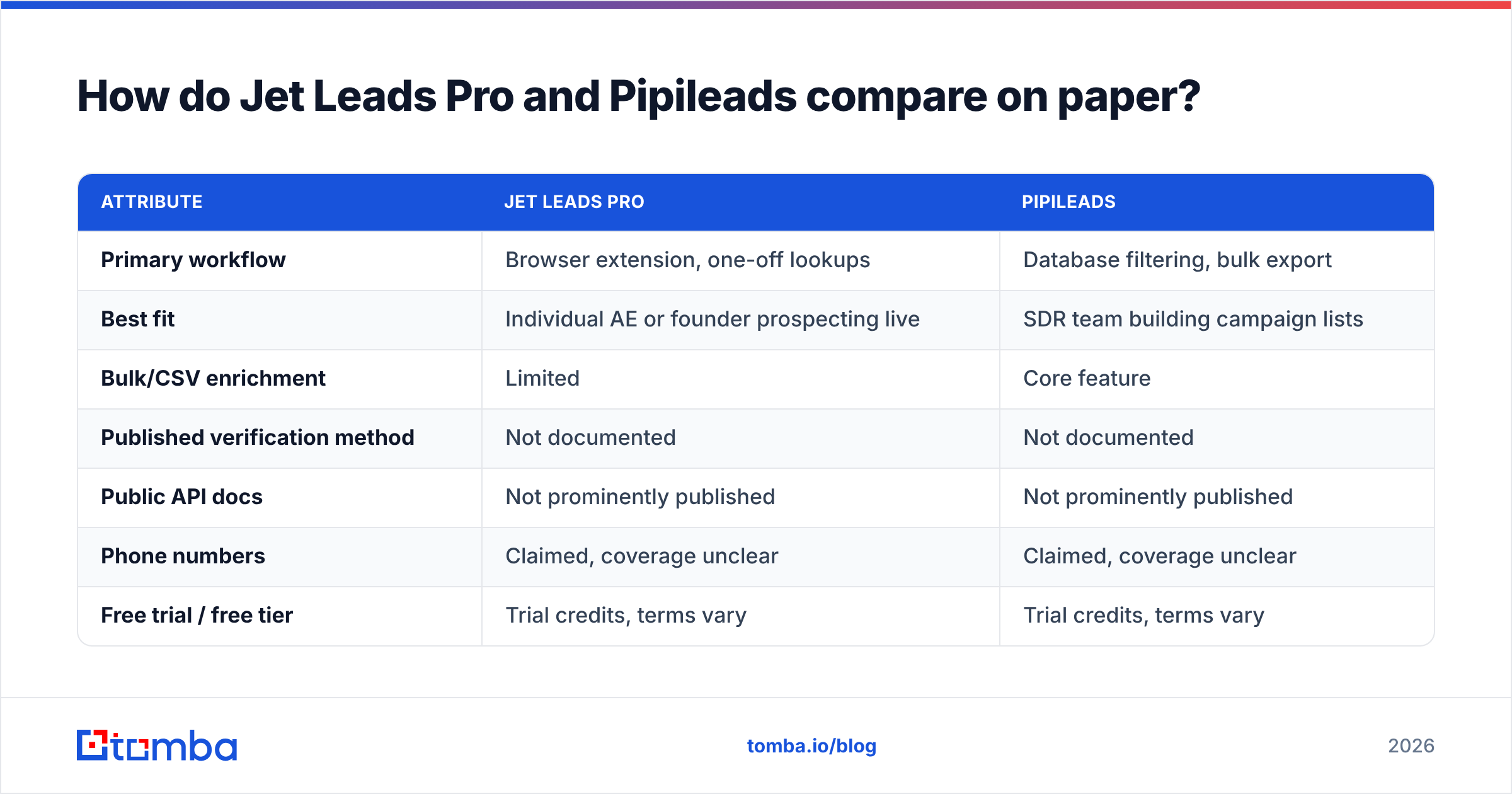
How do Jet Leads Pro and Pipileads compare on paper?#
| Attribute | Jet Leads Pro | Pipileads |
|---|---|---|
| Primary workflow | Browser extension, one-off lookups | Database filtering, bulk export |
| Best fit | Individual AE or founder prospecting live | SDR team building campaign lists |
| Bulk/CSV enrichment | Limited | Core feature |
| Published verification method | Not documented | Not documented |
| Public API docs | Not prominently published | Not prominently published |
| Phone numbers | Claimed, coverage unclear | Claimed, coverage unclear |
| Free trial / free tier | Trial credits, terms vary | Trial credits, terms vary |
| Independent review volume | Very low | Very low |
| Transparent public pricing page | Partial | Partial |
Two honest reads of that table:
If your team is one or two people doing account-based outbound — you research a company, you want the right person's email in ten seconds — the extension-first shape of Jet Leads Pro matches the job. If you are feeding a sequencer 2,000 contacts a month, the filter-and-export shape of Pipileads matches better.
But look at rows three through seven. "Not documented," "unclear," "very low." That is the real finding of this comparison. When two vendors both decline to publish how they source and validate data, you are not choosing between two known quantities — you are choosing between two black boxes, and the only way to open them is to test.
Which one has better data accuracy?#
Nobody outside those two companies can answer that question honestly, and you should be suspicious of anyone who tries.
What you can do is understand what drives accuracy, so your own test measures the right thing.
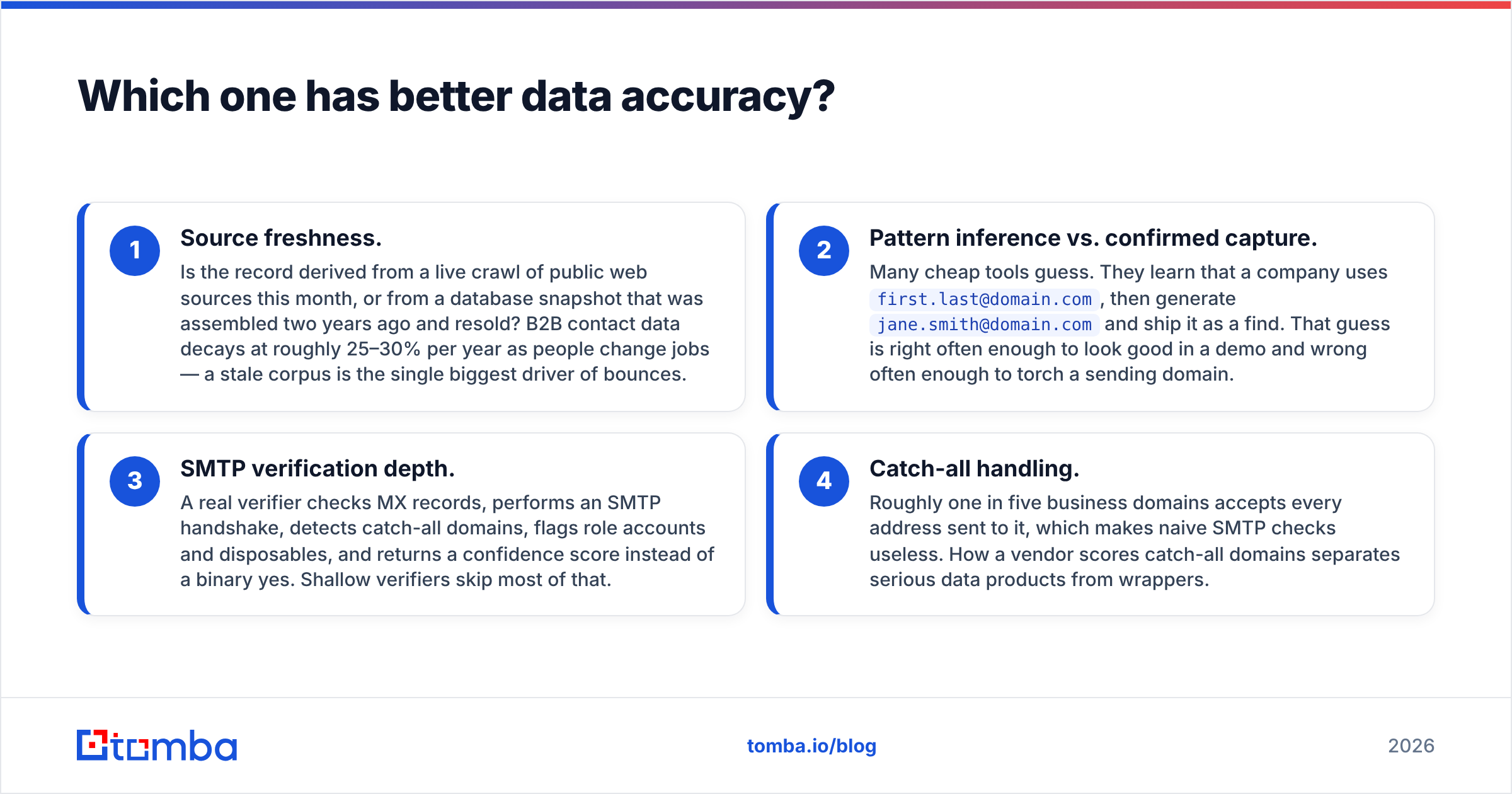
Contact data accuracy comes down to four mechanics:
- Source freshness. Is the record derived from a live crawl of public web sources this month, or from a database snapshot that was assembled two years ago and resold? B2B contact data decays at roughly 25–30% per year as people change jobs — a stale corpus is the single biggest driver of bounces.
- Pattern inference vs. confirmed capture. Many cheap tools guess. They learn that a company uses
first.last@domain.com, then generatejane.smith@domain.comand ship it as a find. That guess is right often enough to look good in a demo and wrong often enough to torch a sending domain. - SMTP verification depth. A real verifier checks MX records, performs an SMTP handshake, detects catch-all domains, flags role accounts and disposables, and returns a confidence score instead of a binary yes. Shallow verifiers skip most of that.
- Catch-all handling. Roughly one in five business domains accepts every address sent to it, which makes naive SMTP checks useless. How a vendor scores catch-all domains separates serious data products from wrappers.

Neither Jet Leads Pro nor Pipileads publicly documents how it handles points two through four. That is the gap. A vendor that has invested in catch-all verification and publishes its data sources is telling you something about where its engineering budget went. Silence tells you something too.
Practical safeguard regardless of which tool you buy: run every exported list through an independent email verifier before it touches your sequencer. Two to five dollars of verification credits protects a sending domain that took months to warm.
What does each one actually cost?#
Pricing on both tools moves, and neither maintains a public changelog, so verify on the vendor site before you budget. What matters more than the sticker price is the unit economics — cost per usable contact.
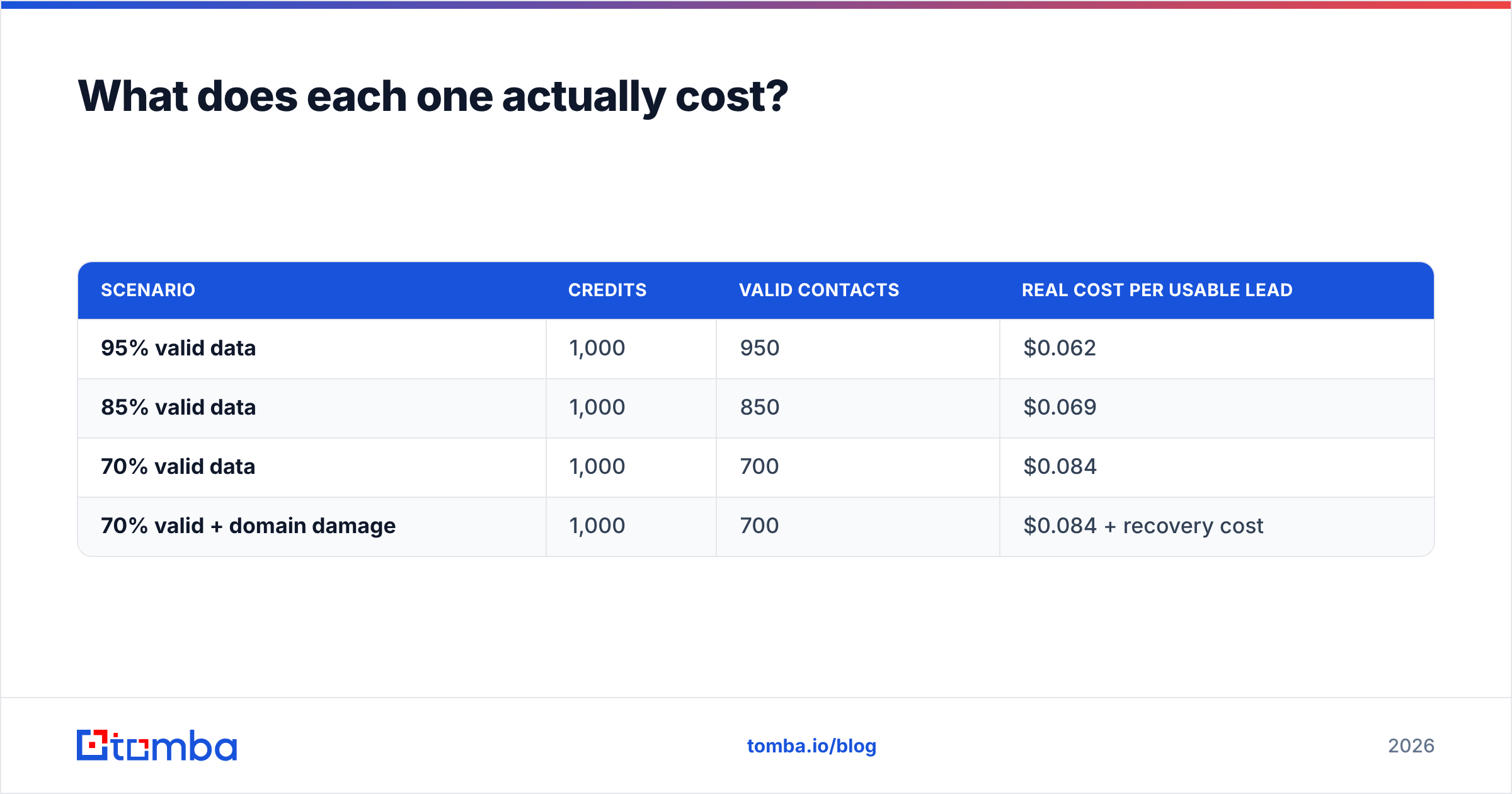
Here is how to run that math. Say a tool charges $59/mo for 1,000 credits.
| Scenario | Credits | Valid contacts | Real cost per usable lead |
|---|---|---|---|
| 95% valid data | 1,000 | 950 | $0.062 |
| 85% valid data | 1,000 | 850 | $0.069 |
| 70% valid data | 1,000 | 700 | $0.084 |
| 70% valid + domain damage | 1,000 | 700 | $0.084 + recovery cost |
The first three rows look survivable. The fourth row is where budgets actually die. A list that bounces above roughly 5% triggers filtering at Google and Microsoft, and your good emails stop landing too. The cost of that is not measured in credits — it is measured in the six weeks of reduced reply rates while you rebuild sender reputation.
This is why "cheapest credits" is a trap metric. A tool at half the price with 70% valid data is more expensive than a tool at full price with 95% valid data, before you even count the deliverability damage.

How do they stack up against established alternatives?#
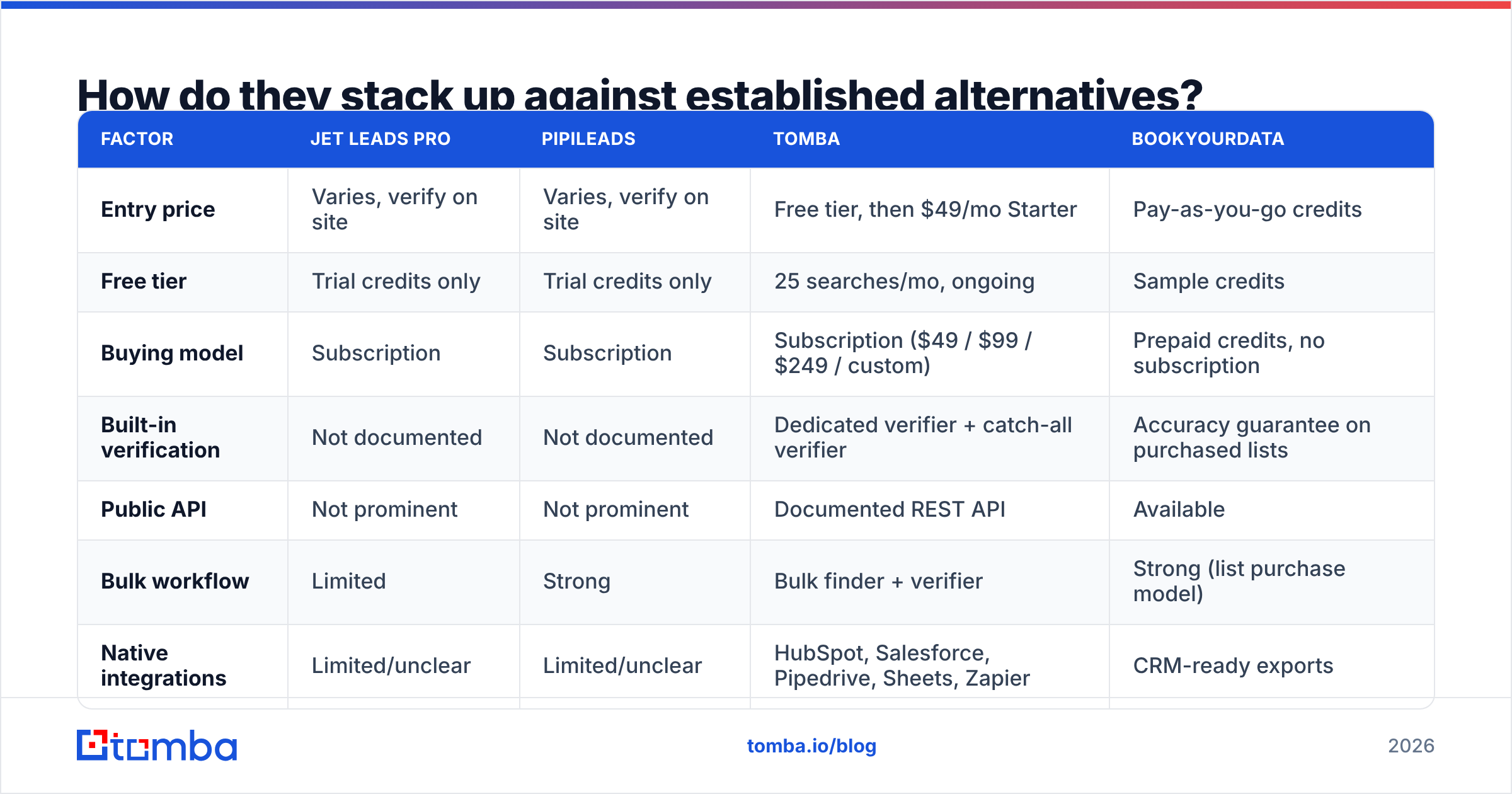
You should not evaluate two lightly documented tools in isolation. Put them next to vendors that publish their pricing and their methodology, so you have a reference point.
| Factor | Jet Leads Pro | Pipileads | Tomba | BookYourData |
|---|---|---|---|---|
| Entry price | Varies, verify on site | Varies, verify on site | Free tier, then $49/mo Starter | Pay-as-you-go credits |
| Free tier | Trial credits only | Trial credits only | 25 searches/mo, ongoing | Sample credits |
| Buying model | Subscription | Subscription | Subscription ($49 / $99 / $249 / custom) | Prepaid credits, no subscription |
| Built-in verification | Not documented | Not documented | Dedicated verifier + catch-all verifier | Accuracy guarantee on purchased lists |
| Public API | Not prominent | Not prominent | Documented REST API | Available |
| Bulk workflow | Limited | Strong | Bulk finder + verifier | Strong (list purchase model) |
| Native integrations | Limited/unclear | Limited/unclear | HubSpot, Salesforce, Pipedrive, Sheets, Zapier | CRM-ready exports |
| Best for | Solo live prospecting | Campaign list building | Verified email discovery at scale | Buying a defined list outright |

A few things worth calling out fairly.
BookYourData solves a genuinely different problem from all three of the others: you buy a defined list outright on credits, with no subscription. If your need is "I want 3,000 CFOs in German manufacturing, once, this quarter," that model is cleaner than renting seat access to a search tool you will use twice.
Tomba sits at the discovery-plus-verification end. The email finder is the core product, with the verifier, domain search, catch-all tooling, and enrichment around it, and the pricing is published without a sales call — Free (25 searches/mo), Starter $49/mo, Growth $99/mo, Pro $249/mo, Enterprise custom. Whether it beats Jet Leads Pro or Pipileads for your segment is exactly what the test below is for.
And Jet Leads Pro and Pipileads may well win on specific niches. Small vendors sometimes have unusually deep coverage in one vertical or one geography because that is where their sourcing focused. You will never learn that from a blog post. You will learn it from 200 rows of your own ICP.
What should you test before you buy?#
Run this before you spend anything beyond trial credits. It takes about ninety minutes.
- Build one control list. Pick 200 contacts from your actual ICP — same industries, same seniority, same regions you sell into. Not 200 random Fortune 500 CMOs. Your test is worthless if it does not mirror your real prospecting.
- Run the identical list through every candidate. Jet Leads Pro, Pipileads, and one established vendor as a control. Record match rate: how many of the 200 returned an email at all.
- Verify every result with a neutral third party. Do not trust any vendor's own "verified" flag on its own output. Use an independent bulk verifier and record how many pass, how many are catch-all, and how many are outright invalid.
- Check 20 results by hand. Pull twenty returned emails and confirm the person still works there via their LinkedIn or the company site. This catches the failure mode verification cannot: a technically deliverable address belonging to someone who left in March.
- Calculate cost per verified, current contact. Divide the plan price by the number of contacts that survived steps three and four. This is the only pricing number that matters, and it frequently reorders the vendor ranking completely.
- Send a 50-contact pilot from a secondary domain. Measure actual bounce rate in the wild. Anything above 3% on a verified list means the data is older than the vendor implies.
If a vendor will not give you enough trial credits to run step one, that is information. Vendors confident in their coverage make testing easy.
Which should you choose?#
Choose Jet Leads Pro if you are a founder or solo AE doing live, account-by-account research, you value a fast extension over a filter UI, and your monthly volume is low enough that a few misses do not move your numbers. Verify its trial output against your ICP first.
Choose Pipileads if you need repeatable bulk exports for a sequencer and its filters genuinely cover your segment. Budget separately for independent verification — the export volume only helps if the rows are deliverable.
Choose neither, yet, if your test in the previous section produced a match rate under about 60% on your own ICP, or a post-verification valid rate under 90%. Both outcomes are common with thinly documented vendors, and both are cheaper to discover in a trial than in a burned domain.
Choose an established, documented vendor if you need an API, predictable pricing you can forecast, published verification behavior, or CRM integrations that will still exist next year. That is the honest trade: smaller tools can be cheaper and occasionally deeper in a niche, but you carry more of the operational risk yourself.
One last framing. The contact-data market rewards you for being boring. Verified addresses, current job titles, and a sending domain in good standing beat clever tooling every time. Most teams that think they have a tool problem actually have a verification-discipline problem — and that one is fixable this week, with whatever tool you already own. If you want the underlying concepts, the B2B glossary covers deliverability, catch-all domains, and response-rate benchmarks in plain language.
Ready to run the control test?#
Set up your benchmark before you commit to either vendor. Start with the Tomba Email Finder free tier — 25 searches a month, no card — and run the same 200-contact ICP list you send through Jet Leads Pro and Pipileads. Compare match rate, post-verification valid rate, and cost per usable contact side by side. If Tomba wins on your segment, Starter is $49/mo. If it does not, you have just made a $0 decision with real data behind it, which is more than most teams get.
Related guides#
// get started
Find, verify and enrich your first contacts today
Start on the free plan with 25 searches a month, then scale when your team is ready.
Free plan · No credit card required · GDPR & CCPA
// about the author