Jet Leads Pro vs Skyp: Which Lead Tool Wins in 2026?
Jet Leads Pro and Skyp both promise clean B2B contact data, but they solve different halves of the prospecting problem. Here is an honest breakdown of accuracy, pricing, API access, and which one fits your outbound motion.
TL;DR
- Jet Leads Pro is built around volume: pull big lists fast, export, move on. Skyp leans toward targeted lookups and lighter workflows for smaller teams.
- Neither tool's marketing accuracy number is the number that matters. The one that matters is your bounce rate after you send, and that depends on verification, not database size.
- Pricing in this category is credit-based and changes often. Compare cost per verified, deliverable contact, not cost per credit.
- If you need an API, bulk processing, and catch-all handling in one place, a dedicated finder-plus-verifier stack (Tomba, starting at $49/mo with a free 25-search tier) usually beats bolting two single-purpose tools together.
- Decision shortcut: high-volume outbound → Jet Leads Pro-style bulk export; precision ABM lists → Skyp-style targeted lookup; both at once with an API → a full contact-data platform.
What are Jet Leads Pro and Skyp?#
Both sit in the same broad category — B2B contact data — but they attack it from different angles.
Jet Leads Pro positions itself as a lead list builder. The core loop is: filter by industry, title, geography, or company size; generate a list; export to CSV or push it into your sequencer. The appeal is speed and volume. You go from a blank screen to a few thousand rows in an afternoon.
Skyp sits closer to the lookup end of the spectrum. Instead of "give me 5,000 CFOs in DACH," the typical use is "I have this person and this company — get me the address." That makes it a natural fit for rep-driven prospecting, account-based lists, and recruiters working named accounts.
That difference matters more than any feature checklist, because it determines what you are actually buying:
- List builders sell you coverage. The pitch is breadth of the database.
- Lookup tools sell you precision. The pitch is hit rate on the specific person you named.
- Verifiers sell you deliverability. The pitch is that what you send lands.
- Platforms sell you consolidation. The pitch is one API, one credit pool, one vendor invoice.
- Sequencers sell you throughput. They assume the data problem is already solved.
Most teams buy one and then quietly discover they needed two. That is the real cost hiding in the Jet Leads Pro vs Skyp decision.
One caveat before the tables: vendors in this space ship changes monthly, and published plan pages move. Treat everything below as a structured checklist to run against the current vendor pages, not as a frozen spec sheet.
How do Jet Leads Pro and Skyp compare head-to-head?#
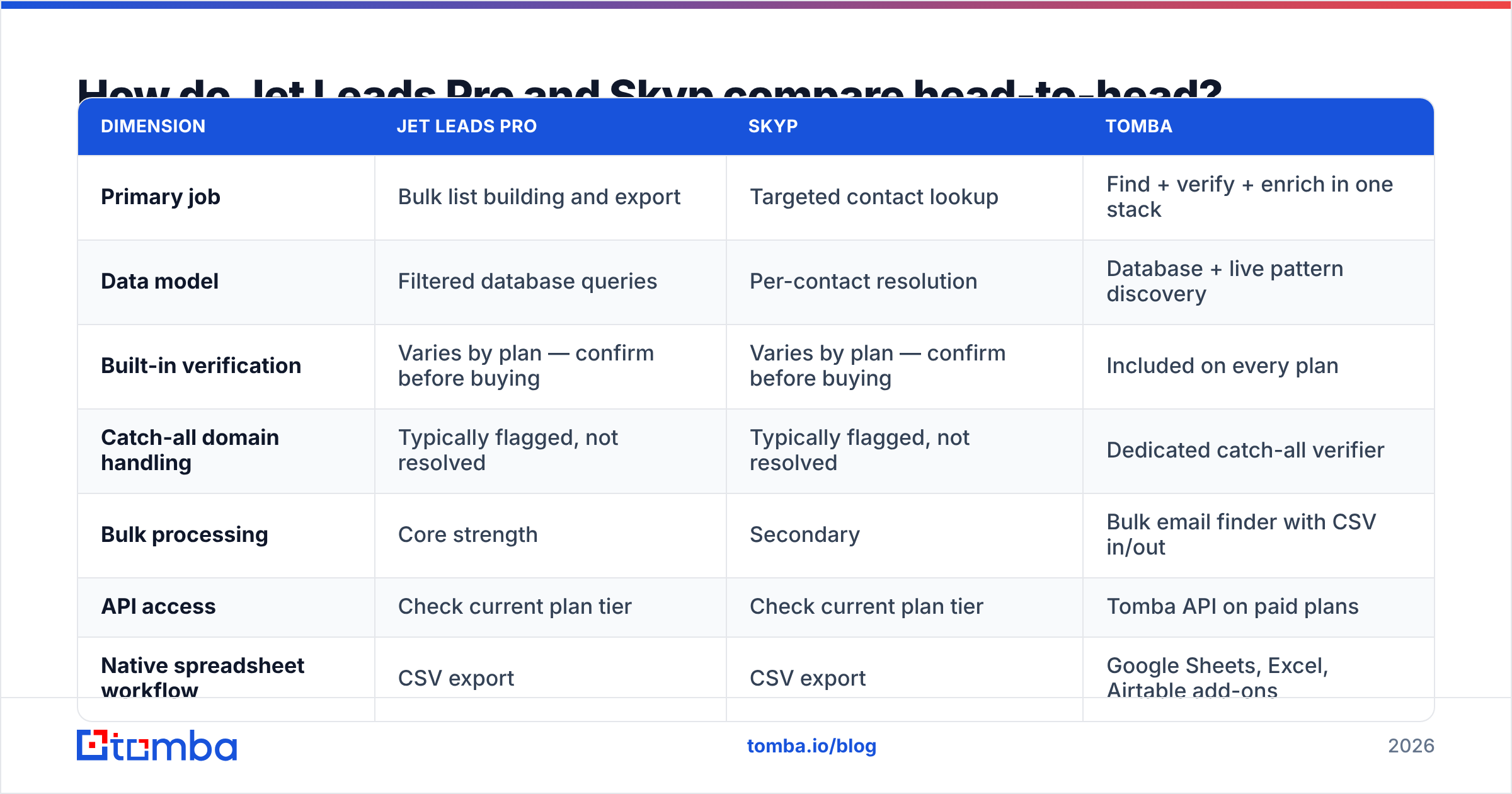
Here is the side-by-side, with Tomba added as a third reference point so you can see where a consolidated platform changes the math.
| Dimension | Jet Leads Pro | Skyp | Tomba |
|---|---|---|---|
| Primary job | Bulk list building and export | Targeted contact lookup | Find + verify + enrich in one stack |
| Data model | Filtered database queries | Per-contact resolution | Database + live pattern discovery |
| Built-in verification | Varies by plan — confirm before buying | Varies by plan — confirm before buying | Included on every plan |
| Catch-all domain handling | Typically flagged, not resolved | Typically flagged, not resolved | Dedicated catch-all verifier |
| Bulk processing | Core strength | Secondary | Bulk email finder with CSV in/out |
| API access | Check current plan tier | Check current plan tier | Tomba API on paid plans |
| Native spreadsheet workflow | CSV export | CSV export | Google Sheets, Excel, Airtable add-ons |
| Entry price | Confirm on vendor page | Confirm on vendor page | Free (25 searches), then $49/mo |
| Best for | Volume outbound, SDR teams | Named-account prospecting, recruiters | Teams that need both plus automation |
Read the table by row, not by column. Almost nobody needs every row. If you run a two-person outbound team sending 400 emails a week to named accounts, the bulk-processing row is noise and the verification row is everything. If you run a 12-rep SDR floor, the reverse is true.
Which one gives you more accurate emails?#
This is where most comparisons go wrong, so let's be precise about what "accuracy" means.
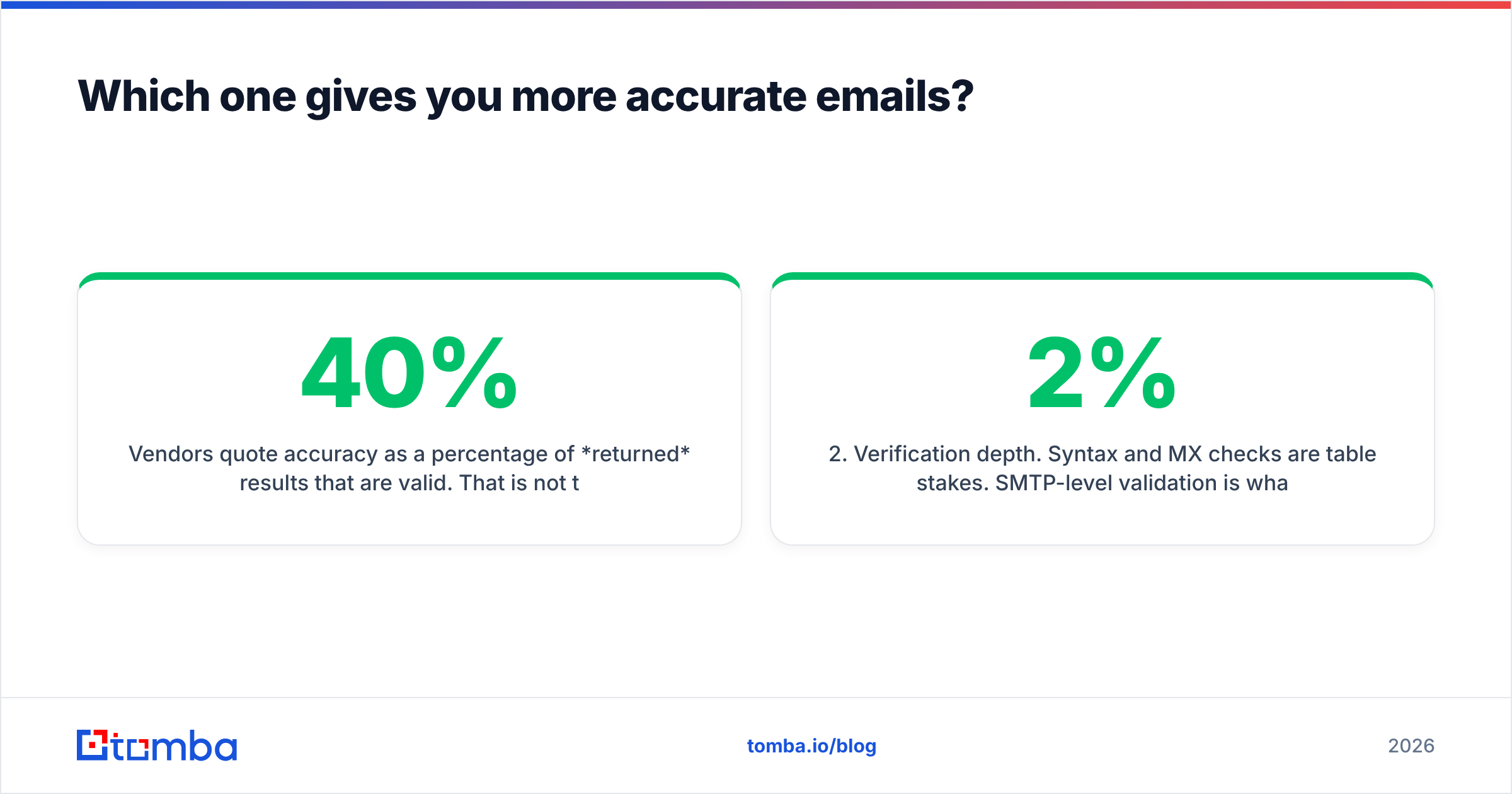
Vendors quote accuracy as a percentage of returned results that are valid. That is not the same as the percentage of your target list they can find. A tool that returns an address for 40% of your list with 98% accuracy and a tool that returns 85% of your list with 88% accuracy produce very different outcomes — and the second one usually puts more meetings on the calendar, even though its headline number looks worse.

Three things actually move your bounce rate:
- Coverage on your ICP specifically. A database that is deep in US SaaS may be thin in European manufacturing. Test with 100 rows of your real list, not the vendor's demo.
- Verification depth. Syntax and MX checks are table stakes. SMTP-level validation is what separates a 2% bounce rate from a 9% one. Run anything you buy through a real email verifier before it touches your sending domain.
- Catch-all policy. Catch-all domains accept everything at the server level, so a naive verifier marks them "valid" and you find out the truth after you send. A tool that flags them honestly is being more useful than one that quietly passes them through.
The honest answer to "which is more accurate, Jet Leads Pro or Skyp" is: run the same 100-row test list through both, then verify both outputs with a third-party verifier and count what survives. That test costs you an hour and a few free credits. It beats any blog post — including this one.
If you want a repeatable version of that test, export the two candidate lists, dedupe them, and push both through a neutral verification pass. Whatever percentage survives verification is the accuracy number for your use case.
What do Jet Leads Pro and Skyp actually cost?#
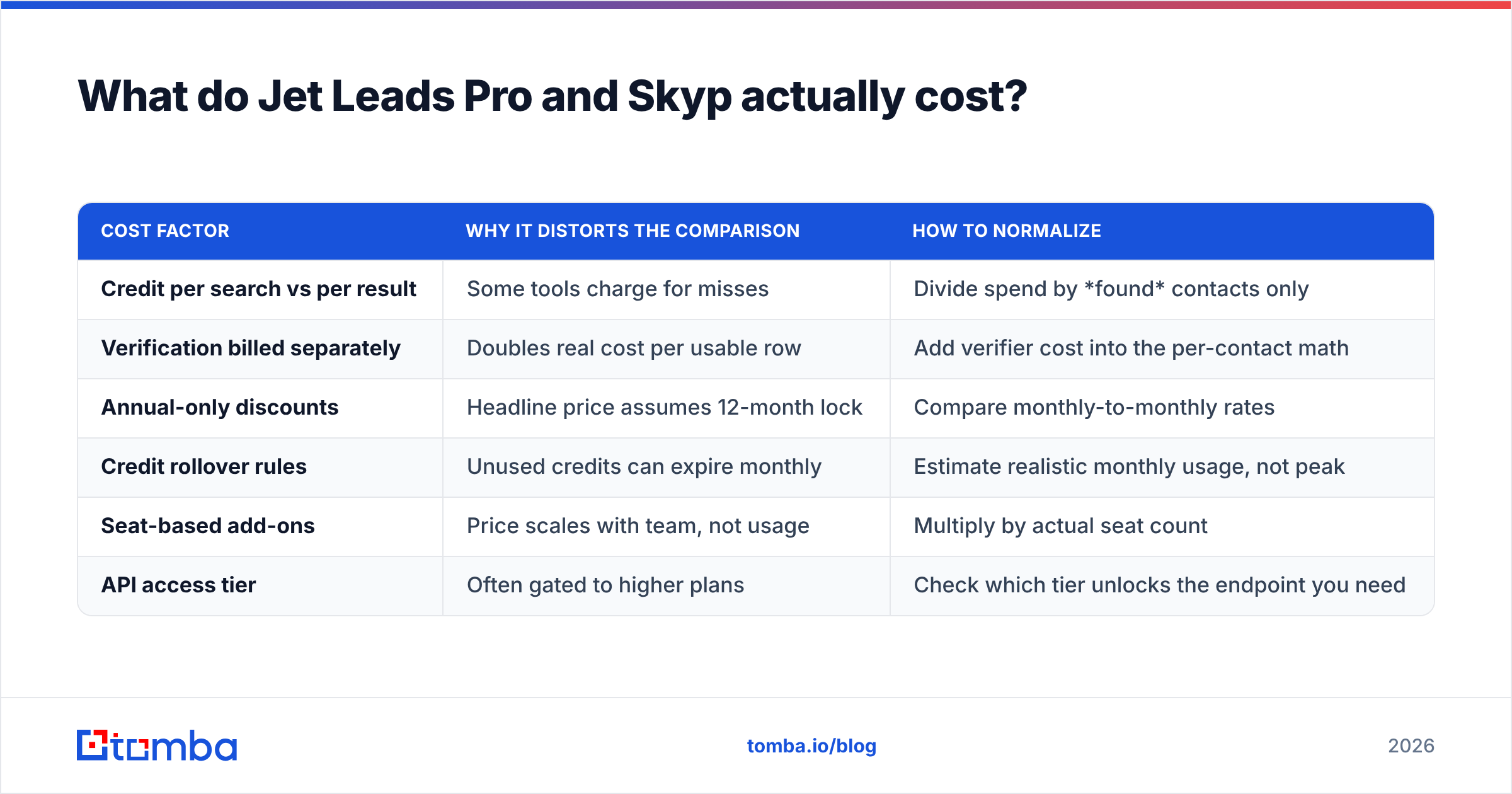
Credit pricing makes vendors look cheaper than they are. Here is how to normalize it.
| Cost factor | Why it distorts the comparison | How to normalize |
|---|---|---|
| Credit per search vs per result | Some tools charge for misses | Divide spend by found contacts only |
| Verification billed separately | Doubles real cost per usable row | Add verifier cost into the per-contact math |
| Annual-only discounts | Headline price assumes 12-month lock | Compare monthly-to-monthly rates |
| Credit rollover rules | Unused credits can expire monthly | Estimate realistic monthly usage, not peak |
| Seat-based add-ons | Price scales with team, not usage | Multiply by actual seat count |
| API access tier | Often gated to higher plans | Check which tier unlocks the endpoint you need |
Run your own numbers through that grid and the ranking often flips. A $79 plan that bills per search and charges extra for verification can land north of $0.12 per deliverable contact, while a $49 plan that bundles verification and only bills for hits lands under $0.05.
For reference, Tomba pricing runs Free (25 searches/mo), Starter $49/mo, Growth $99/mo, Pro $249/mo, and Enterprise on quote — with verification included rather than sold as a second SKU. Whatever you choose, ask the vendor directly: do you charge for searches that return nothing? The answer tells you a lot.

Which is better for cold outreach at scale?#
Scale changes the requirements list. Below roughly 500 contacts a month, either tool will do and you should pick on UI preference. Above that, four things start to hurt.
Throughput ceilings. Manual lookup tools bottleneck on human clicks. If your motion needs 3,000 verified contacts a month, you need bulk upload and an API, not a browser extension and a patient intern.
Deliverability discipline. Sending to unverified data is how a warmed domain gets burned. Google and Microsoft both tightened bulk-sender requirements, and their published guidance is explicit that complaint and bounce rates drive filtering decisions — HubSpot's deliverability documentation covers the practical side of this well. Bounce rate is not a vanity metric; it is a sender reputation input.
Data decay. B2B contact data degrades roughly 2-3% per month as people change jobs. A list you bought in January is meaningfully worse by June. Tools that re-verify on demand beat tools that hand you a static export, which is an argument for API access over CSV downloads at any real volume.
Enrichment gaps. Once you're personalizing at scale you need more than an address — company size, tech stack, role seniority. That is a data enrichment job, and it's usually the point where a single-purpose finder runs out of runway.
If your evaluation is really about scale, widen the shortlist. Check the category listings on G2 and Capterra for tools that publish API docs publicly — a vendor that hides its API reference behind a sales call is telling you something about how it expects to be used.
Where does Tomba fit in the Jet Leads Pro vs Skyp comparison?#
Honestly: Tomba is not the right answer for everyone. If you want a pure list-buying experience with no API and no verification workflow, a dedicated list builder is simpler and you should use one.
Tomba makes sense when the comparison keeps producing the same conclusion — I need both. You need to find addresses by domain, verify them before sending, handle catch-all domains without guessing, and do all of it programmatically.

Concretely, that means:
- Domain search to pull every discoverable address at a company, with the detected email pattern, instead of guessing at
first.last@. - Verification on the same credit pool, so you aren't reconciling two vendor invoices to answer "what did this list cost?"
- A documented REST API plus Sheets, Excel, and Airtable connectors, so the workflow survives contact with your actual ops stack.
- Transparent data sources — worth asking of any vendor, given how much of this market resells the same underlying pools. The mechanics of address structure and validation are well documented publicly, including on Wikipedia's email address entry, and any vendor should be able to explain their method in plain language.
How should you decide between them?#
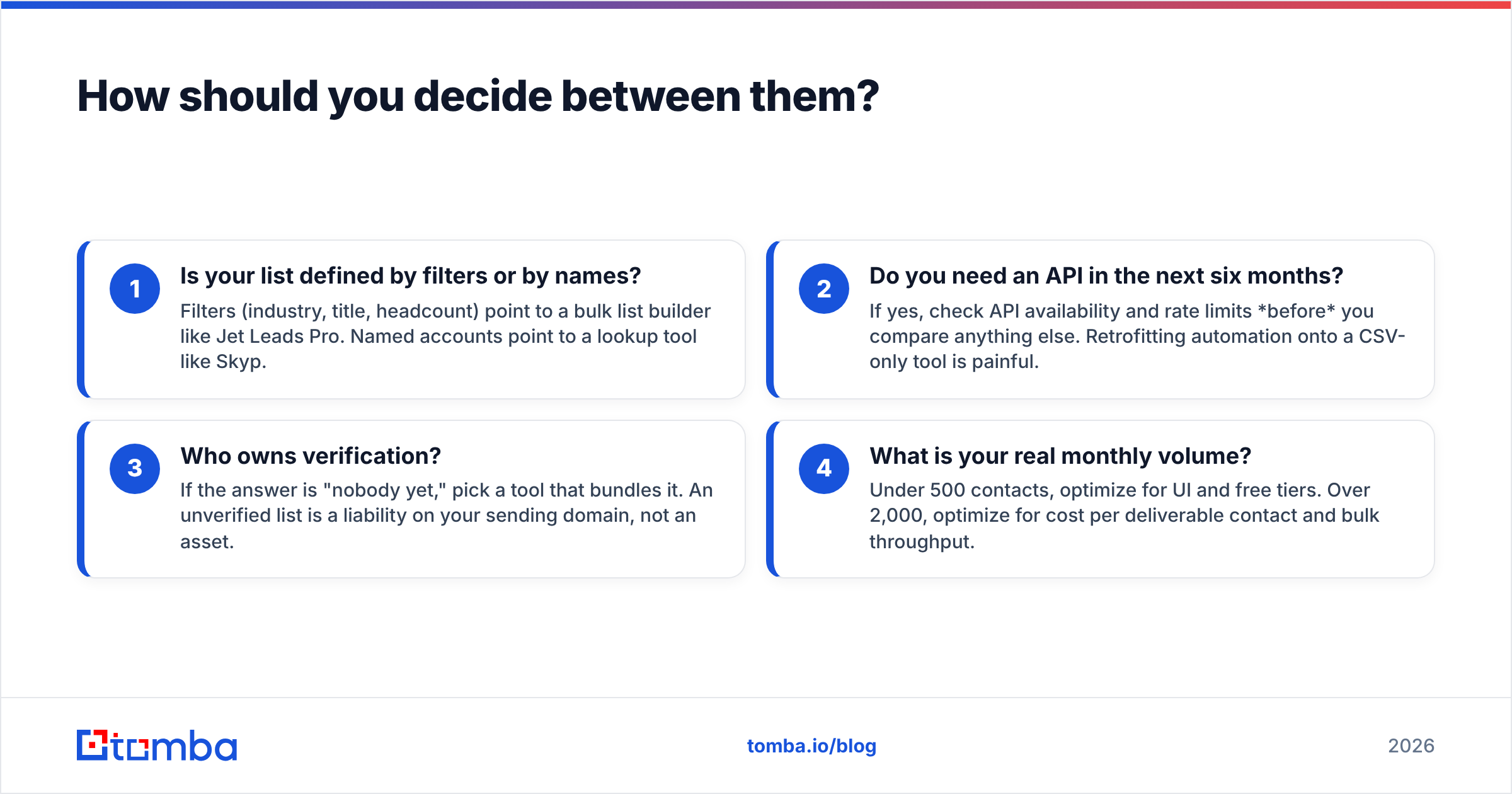
Answer these four questions in order and the choice usually makes itself.
- Is your list defined by filters or by names? Filters (industry, title, headcount) point to a bulk list builder like Jet Leads Pro. Named accounts point to a lookup tool like Skyp.
- Do you need an API in the next six months? If yes, check API availability and rate limits before you compare anything else. Retrofitting automation onto a CSV-only tool is painful.
- Who owns verification? If the answer is "nobody yet," pick a tool that bundles it. An unverified list is a liability on your sending domain, not an asset.
- What is your real monthly volume? Under 500 contacts, optimize for UI and free tiers. Over 2,000, optimize for cost per deliverable contact and bulk throughput.
Then run the 100-row bake-off. Take a real slice of your ICP, run it through both free tiers, verify all outputs neutrally, and compare survivors. Whichever tool returns more verified, deliverable contacts on your data is the winner — regardless of what any comparison table says.
Ready to test the data yourself?#
Skip the vendor claims and check your own list. The Tomba Email Finder gives you 25 free searches a month with verification included — enough to run a proper side-by-side against whatever else is on your shortlist. Find addresses by domain, name, or company, confirm they're deliverable before you send, and export or call the API from there. If it wins on your data, upgrade at $49/mo. If it doesn't, you've lost nothing but an hour and gained a real benchmark.
Related guides#
// get started
Find, verify and enrich your first contacts today
Start on the free plan with 25 searches a month, then scale when your team is ready.
Free plan · No credit card required · GDPR & CCPA
// about the author