Jet Leads Pro vs Spherescout: Which B2B Lead Tool Wins in 2026
Both promise verified B2B contacts at a lower price than Apollo. We compare Jet Leads Pro vs Spherescout on data sourcing, accuracy, pricing structure and API depth — and show the 30-minute test that settles it.
TL;DR
- Jet Leads Pro and Spherescout sell the same promise — verified B2B emails, cheaper than Apollo — but they solve different problems. Jet Leads Pro leans list-building and volume; Spherescout leans real-time lookup and enrichment.
- Neither publishes an independently audited accuracy figure. Treat every "98% accurate" claim on either site as marketing until your own bounce test says otherwise.
- Pricing structure matters more than headline price. Per-seat plans punish small teams who need one shared credit pool; credit-based plans punish teams who burn credits on failed searches.
- If you need an API and a real catch-all verdict, check that before you check price. That's where most cheap lead tools quietly fall apart.
- Run the 30-minute test at the end of this post on 100 accounts you actually care about. It costs nothing and beats every vendor benchmark chart.
What are Jet Leads Pro and Spherescout?#
Both are B2B contact-data tools competing in the crowded space below Apollo, ZoomInfo and Clearbit — the tier where teams land when a $15k annual seat contract is not happening.
Jet Leads Pro positions itself as a list-building platform: you filter by industry, headcount, geography and title, then export a CSV of contacts. The workflow is batch-first. You define an ICP, pull a few thousand rows, and hand them to your sequencer.
Spherescout positions itself as a lookup-and-enrich layer: you feed it a domain or a person and it returns a work email, sometimes a phone, sometimes firmographics. The workflow is record-first. It's closer to what a RevOps team bolts onto a CRM than what an SDR uses to build a cold list from scratch.
That difference is the whole comparison. Everything else — price, credits, UI — is downstream of it.
One honesty note before we go further: neither vendor has the public review volume of an Apollo or a Lusha. Check current listings on G2's lead intelligence category and Capterra's lead generation directory before you commit budget, and weight recent reviews far more heavily than old ones. Data vendors change sourcing constantly, and a 2023 review tells you almost nothing about 2026 coverage.

How do Jet Leads Pro and Spherescout compare head-to-head?#
Here's the practical comparison across the dimensions that actually change your reply rate. Where a vendor doesn't publish a number, we say so rather than inventing one — and Tomba is included as a reference point since it competes in the same bracket.
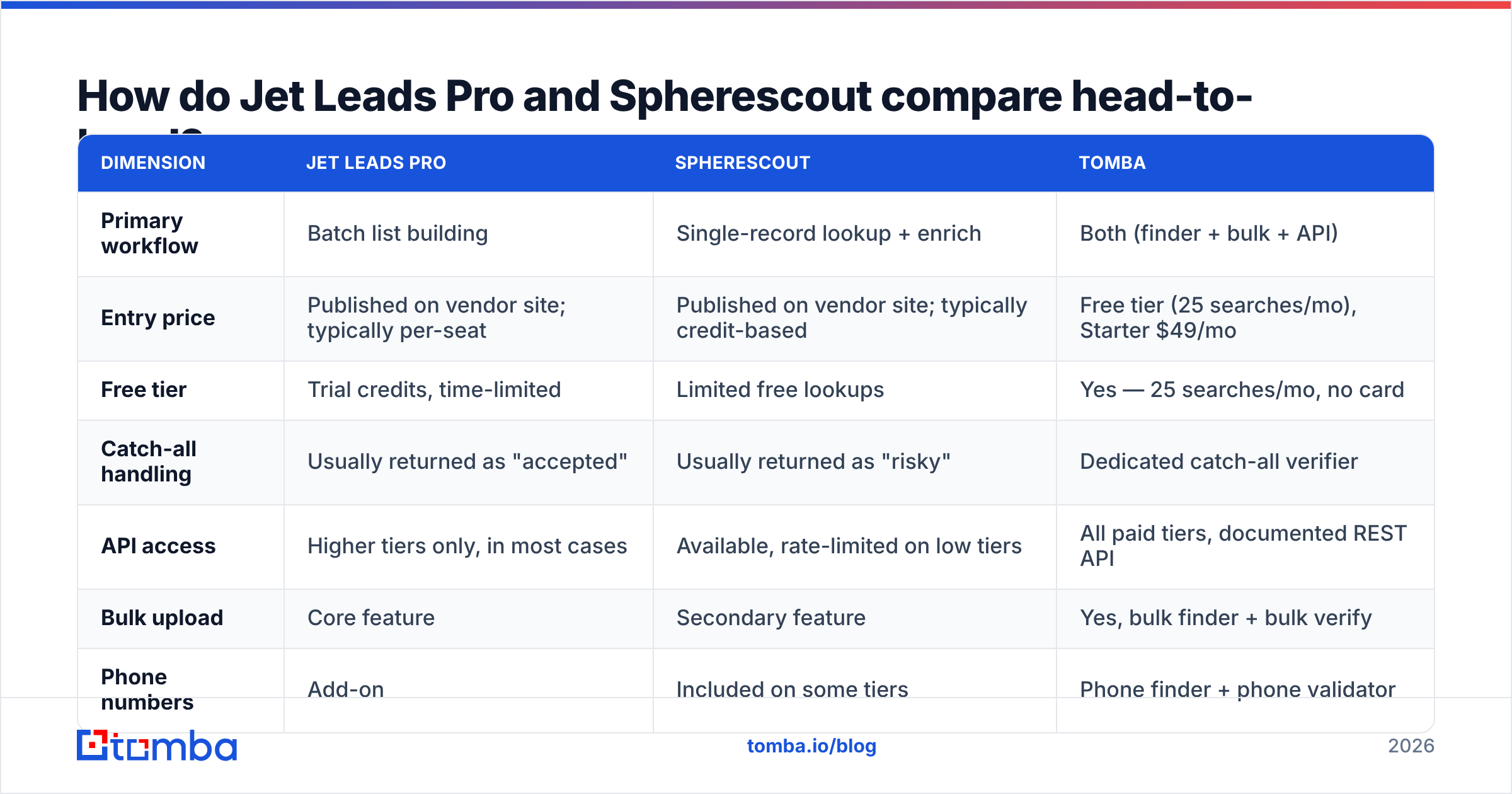
| Dimension | Jet Leads Pro | Spherescout | Tomba |
|---|---|---|---|
| Primary workflow | Batch list building | Single-record lookup + enrich | Both (finder + bulk + API) |
| Entry price | Published on vendor site; typically per-seat | Published on vendor site; typically credit-based | Free tier (25 searches/mo), Starter $49/mo |
| Free tier | Trial credits, time-limited | Limited free lookups | Yes — 25 searches/mo, no card |
| Catch-all handling | Usually returned as "accepted" | Usually returned as "risky" | Dedicated catch-all verifier |
| API access | Higher tiers only, in most cases | Available, rate-limited on low tiers | All paid tiers, documented REST API |
| Bulk upload | Core feature | Secondary feature | Yes, bulk finder + bulk verify |
| Phone numbers | Add-on | Included on some tiers | Phone finder + phone validator |
| Spreadsheet add-ons | CSV export | CSV export | Google Sheets, Excel, Airtable |
| Best for | Building 5k-row ICP lists fast | Enriching inbound and CRM records | Teams that need both, plus verification |

The row that decides most evaluations is catch-all handling. A catch-all domain accepts every address at the SMTP layer, so a naive verifier marks everything as valid. If Jet Leads Pro returns "accepted" for a catch-all and you send to it, your bounce rate absorbs the damage. If Spherescout returns "risky" and you skip it, you silently drop 20–40% of your enterprise TAM, because large companies run catch-all domains constantly.
Neither answer is good. What you want is a tool that runs a separate pattern-and-source check on catch-all domains instead of shrugging — which is what a dedicated catch-all verifier does.
Which one finds more valid emails?#
Nobody can answer that for you from a blog post, and you should distrust any article that claims to.
Contact-data accuracy is not a global property of a vendor. It's a property of the intersection between that vendor's sources and your ICP. A tool that nails US SaaS mid-market can be near-useless for German manufacturing or Japanese logistics. Two teams running the same head-to-head on the same day, with different target lists, routinely get opposite winners.

What you can evaluate objectively:
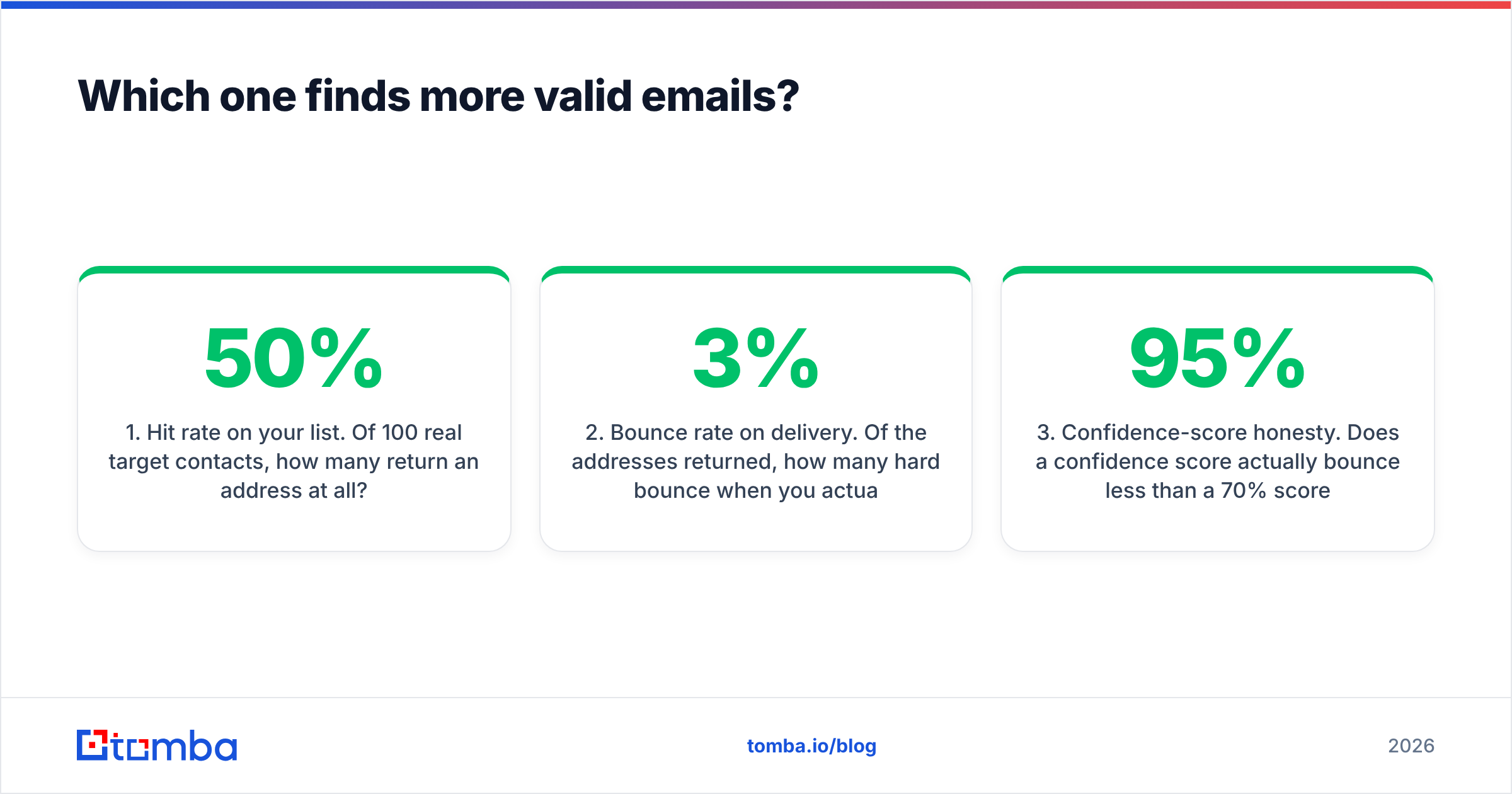
- Hit rate on your list. Of 100 real target contacts, how many return an address at all? Anything under 50% on a mainstream ICP is weak.
- Bounce rate on delivery. Of the addresses returned, how many hard bounce when you actually send? This is the only number that matters commercially. Under 3% is acceptable; under 2% is good.
- Confidence-score honesty. Does a 95% confidence score actually bounce less than a 70% score? Sort your test results by score and check. Plenty of vendors emit scores that correlate with nothing.
- Freshness. Pick ten contacts you know changed jobs in the last six months. Does the tool still show the old company? Stale rows are the silent killer in every cheap database.
- Catch-all transparency. Does the tool tell you a domain is catch-all, or does it hide the ambiguity inside a green checkmark?
Run those five checks and you will learn more in an afternoon than from every comparison chart on the internet, including ours. It also protects your email deliverability, which is the asset you can't buy back once it's damaged — a bounced send is a signal to receiving mailbox providers, and per the SMTP handshake there's no way to un-send that signal.
Where does the data actually come from?#
This is the question most buyers skip and later regret.
Most tools in this price bracket are not primary data collectors. They license aggregated panels, scrape public web sources, buy from the same handful of wholesalers, and blend in user-contributed records. That's why you'll sometimes see three different vendors return the identical wrong email for the same person — they're all downstream of the same bad row.

Ask both vendors, in writing:
- Are addresses verified at query time or served from cache? Cached-only means you're buying a snapshot, potentially months old.
- What is the refresh cadence per record? "Continuously" is not an answer. Ask for days.
- Is there a GDPR/CCPA data-processing addendum? If the vendor can't produce one in a day, walk. HubSpot's GDPR resource center is a reasonable baseline for what compliant handling looks like.
- Can I see the source type per record? Transparent vendors publish where their data comes from. Opaque ones deflect.
If a vendor treats these as hostile questions, that tells you everything about what happens when their data is wrong at scale.
Which tool fits which team?#
- Outbound SDR team building lists weekly — Jet Leads Pro's batch model fits better. You want filters and export, not one-off lookups. Budget separately for a verification pass before send.
- RevOps enriching inbound signups — Spherescout's record-first API model fits better. You're resolving known people, not discovering unknown ones.
- Founder doing sales solo — neither, at first. Start on a free tier, validate that your ICP is even reachable by email, then pay. Tomba's free tier gives 25 searches/mo with no card, which is enough to sanity-check an ICP.
- Agency running outbound for multiple clients — check per-seat vs shared-pool pricing hard. Per-seat licensing gets ugly fast when you have six accounts and three operators.
- Engineering-led growth team — API depth wins. If the API is gated to the top tier on either vendor, your real price is that top tier, not the advertised one.
- Anyone sending over 2,000 emails a month — you need verification as a separate, explicit step. Treat "our finder already verifies" as unproven until your bounce log agrees.
How do the pricing models actually differ?#
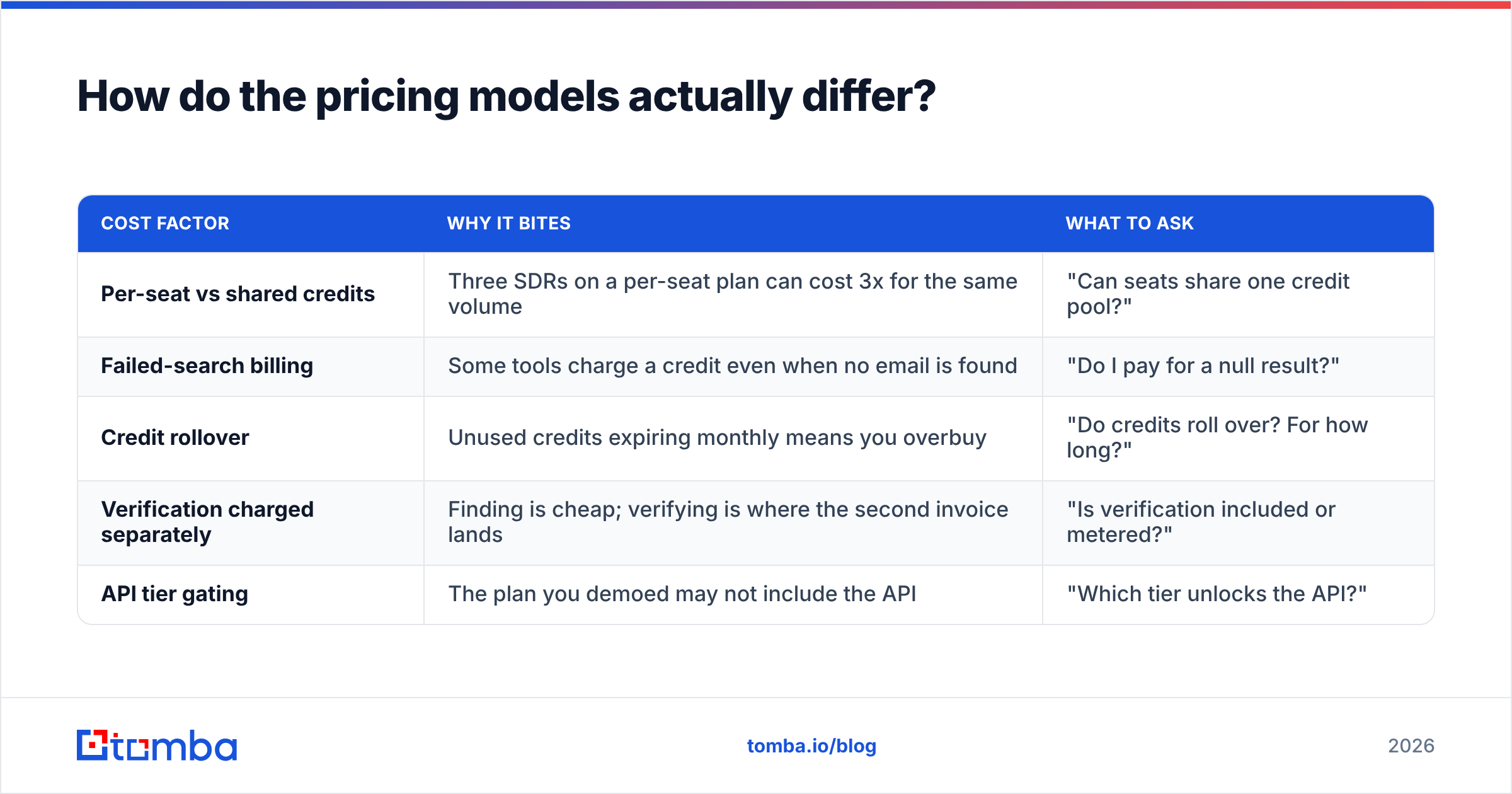
Headline price is the least useful number in this category. Three structural things decide your real annual cost:
| Cost factor | Why it bites | What to ask |
|---|---|---|
| Per-seat vs shared credits | Three SDRs on a per-seat plan can cost 3x for the same volume | "Can seats share one credit pool?" |
| Failed-search billing | Some tools charge a credit even when no email is found | "Do I pay for a null result?" |
| Credit rollover | Unused credits expiring monthly means you overbuy | "Do credits roll over? For how long?" |
| Verification charged separately | Finding is cheap; verifying is where the second invoice lands | "Is verification included or metered?" |
| API tier gating | The plan you demoed may not include the API | "Which tier unlocks the API?" |
For reference, Tomba's pricing runs Free (25 searches/mo), Starter $49/mo, Growth $99/mo, Pro $249/mo, and custom Enterprise, with the API available on paid tiers rather than reserved for the top one. Use that as a yardstick when you read either vendor's quote: if a comparable volume costs meaningfully more and the API is locked behind an upgrade, you're paying a packaging tax, not a data premium.
What should you test before you buy either one?#
Thirty minutes, one spreadsheet, no vendor assistance. Do this before any call with a rep.
- Build a 100-row truth list. Real companies in your ICP, real names, pulled from LinkedIn or a conference attendee list. Include at least 15 companies you suspect run catch-all domains (usually enterprises).
- Run the same list through every candidate. Jet Leads Pro, Spherescout, and at least one third option so you have a control. Free tiers are enough for 100 rows.
- Record four columns per tool: found/not found, returned address, confidence score, catch-all flag.
- Cross-verify with an independent verifier. Don't let a vendor grade its own homework. Run the returned addresses through a separate email verifier and compare verdicts. Disagreements are where the truth lives.
- Send a small real campaign. Fifty addresses from each tool, from a warmed domain, plain text. Log hard bounces at 48 hours.
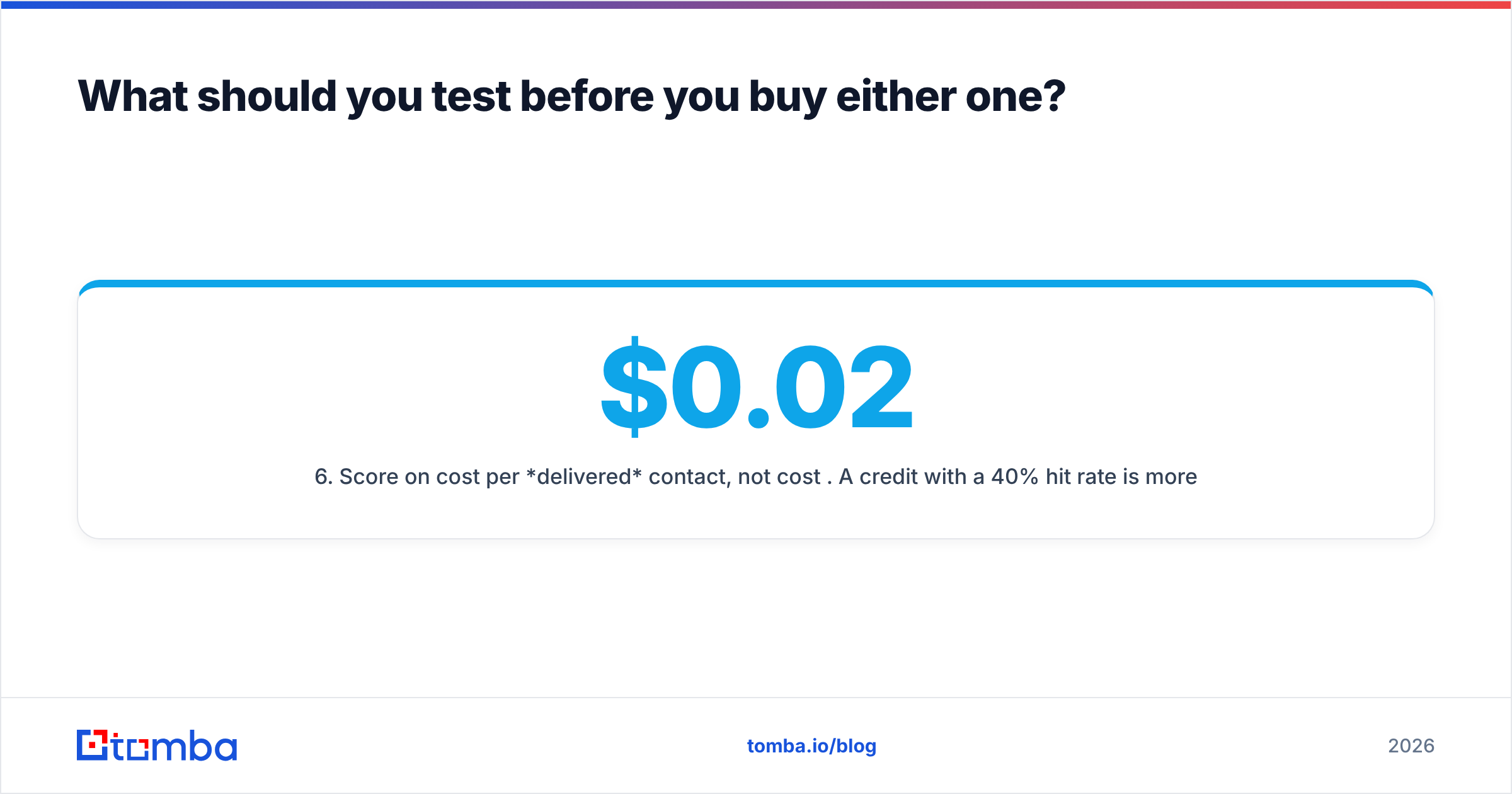
- Score on cost per delivered contact, not cost per credit. A $0.02 credit with a 40% hit rate is more expensive than a $0.05 credit with a 90% hit rate.
That last line is the entire buying decision compressed into a sentence. Vendors price credits because credits look cheap. Your CFO cares about cost per meeting booked, and every step between a credit and a meeting is leakage.
What's the verdict on Jet Leads Pro vs Spherescout?#
If you're building lists, Jet Leads Pro's model fits. If you're enriching known records, Spherescout's model fits. Neither is a category-defining tool, and both should be evaluated on your own ICP rather than on positioning.
The real risk with either is the same: you buy a finder, assume verification is handled, and discover the gap through a damaged sender reputation three weeks later. Finding and verifying are two different technical jobs. Vendors that bundle them loosely tend to do one of them well and the other badly.
So the honest recommendation is architectural, not brand-based: pick the workflow that matches how your team actually works, then make sure a genuine verification layer — including a real catch-all verdict — sits between your data source and your sequencer. If one vendor can do both credibly, you've saved a line item. If not, buy them separately and stop pretending the bundle works.
Ready to test a third option on the same list?#
Take the 100-row truth list you built above and run it through the Tomba Email Finder alongside Jet Leads Pro and Spherescout. The free tier gives you 25 searches a month with no card, paid plans start at $49/mo with API access included rather than gated, and the finder, verifier, catch-all check and bulk tools sit in one account — so your cost-per-delivered-contact math stays in one place instead of spread across two invoices. Run the comparison on your own ICP, look at the bounce log at 48 hours, and let the numbers pick the winner.
Related guides#
// get started
Find, verify and enrich your first contacts today
Start on the free plan with 25 searches a month, then scale when your team is ready.
Free plan · No credit card required · GDPR & CCPA
// about the author