JustCall Pricing, Reviews, Pros and Cons: A 2026 Breakdown
JustCall's sticker price looks cheap until you add numbers, minutes, AI credits and seat minimums. Here's what the plans actually cost, what reviewers praise, and where teams get burned.
TL;DR
- JustCall is a cloud phone system and SMS platform built for sales and support teams, sold per user per month with four published tiers plus AI-enabled variants.
- The headline per-seat price is only part of the bill. Phone numbers, outbound minutes, SMS segments, AI credits and seat minimums all move the real number, often by 40-80%.
- Reviewers consistently praise the CRM integrations, the dialer, and SMS at scale. The recurring complaints are call quality variability, support response times, and billing surprises.
- JustCall is a strong fit for 5-50 seat outbound teams that live inside HubSpot, Salesforce or Pipedrive. It is overkill for solo founders and underpowered for enterprise contact centers with heavy WFM needs.
- A dialer only pays for itself if the numbers you load are real. Verified mobile and direct-dial data upstream matters more than the per-seat price you negotiate.
What is JustCall and who is it actually for?#
JustCall is a cloud-based business phone system: you buy seats, rent numbers in 70+ countries, and your reps call, text and record conversations from a browser, desktop app or mobile app. It sits in the same category as Aircall, CloudTalk, Kixie and Dialpad, and it competes hardest on two things — a sales dialer that does power/predictive dialing, and native two-way sync with mainstream CRMs.
The product has drifted upmarket over the last two years. What started as a straightforward VoIP layer for small teams now markets itself as an "AI-powered customer communication platform," with call transcription, sentiment scoring, conversation intelligence, AI coaching and agent assist bolted on. That drift matters for pricing, because most of the AI functionality lives on higher tiers or behind credit-based add-ons rather than in the base seat.
Who it fits well:
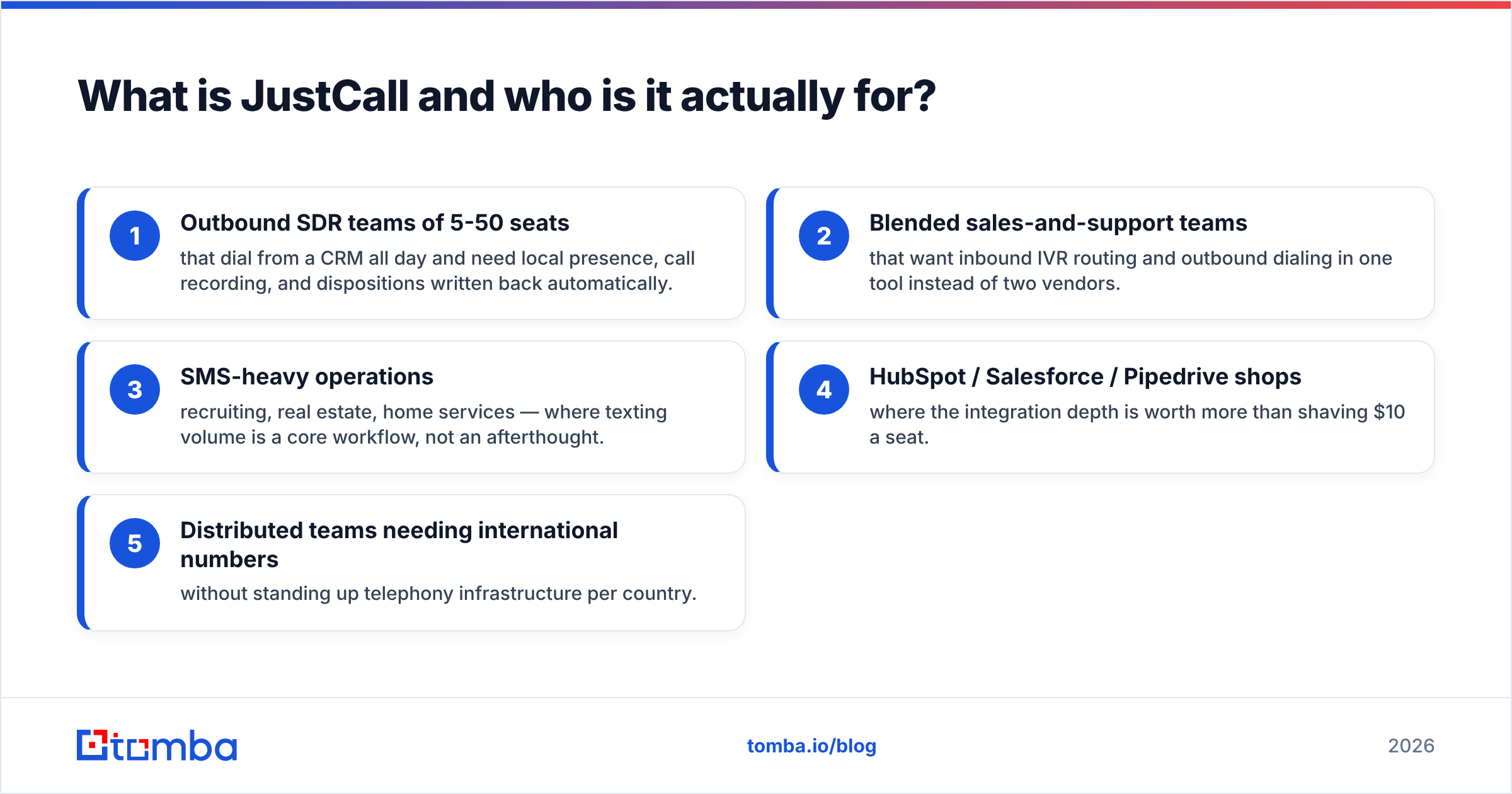
- Outbound SDR teams of 5-50 seats that dial from a CRM all day and need local presence, call recording, and dispositions written back automatically.
- Blended sales-and-support teams that want inbound IVR routing and outbound dialing in one tool instead of two vendors.
- SMS-heavy operations — recruiting, real estate, home services — where texting volume is a core workflow, not an afterthought.
- HubSpot / Salesforce / Pipedrive shops where the integration depth is worth more than shaving $10 a seat.
- Distributed teams needing international numbers without standing up telephony infrastructure per country.
Who it does not fit: solo operators who just need a second line (a $15 VoIP app does that), and large contact centers that need serious workforce management, omnichannel queuing and strict compliance tooling — those buyers end up at Genesys, Five9 or NICE.
How much does JustCall pricing actually cost per seat?#
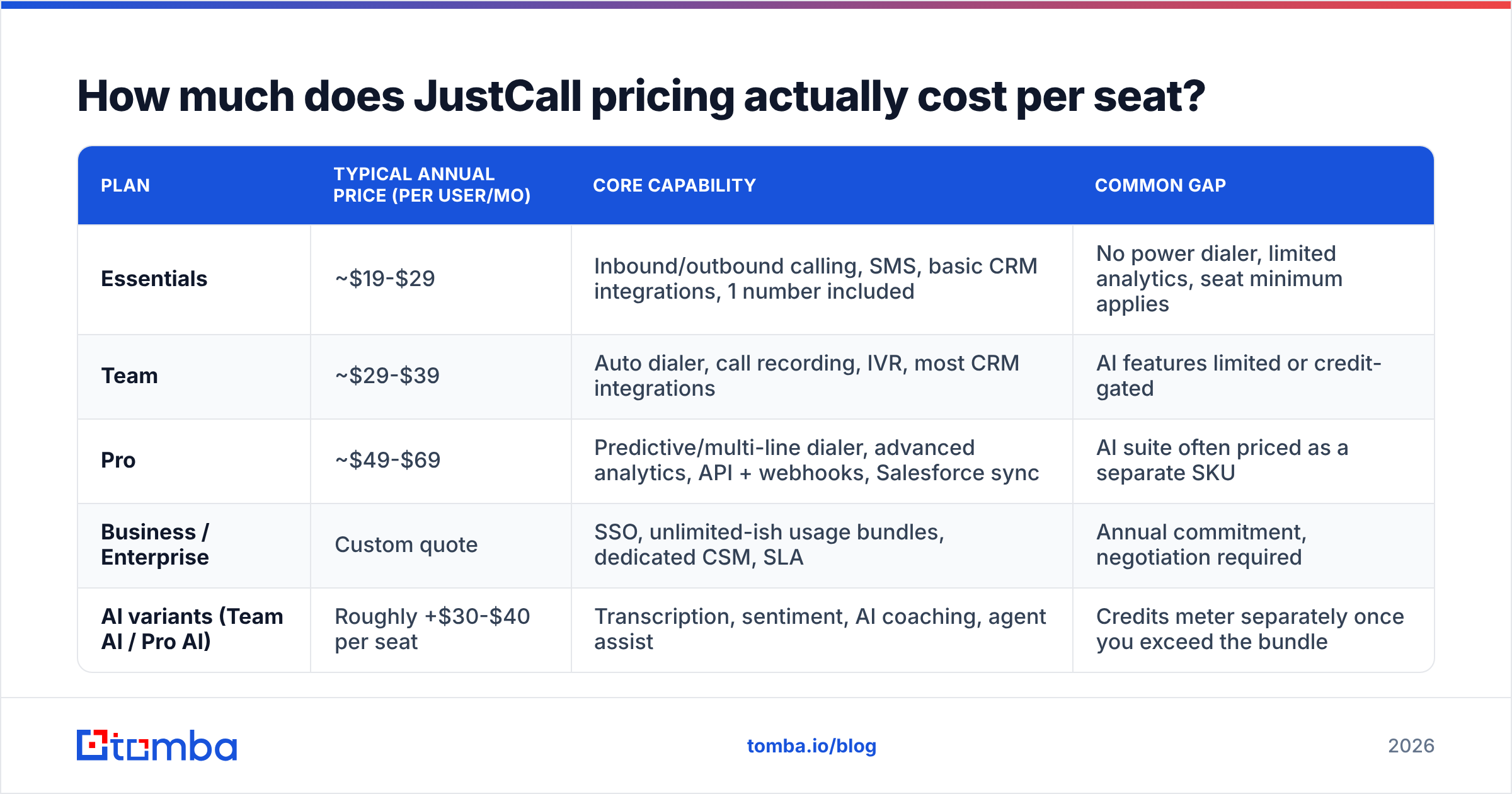
JustCall publishes four tiers, priced per user per month, with a meaningful discount for annual billing. Below is the shape of the pricing as listed on justcall.io at the time of writing. Telephony vendors reprice frequently and run quarter-end promotions, so treat this as the structure, not a quote.
| Plan | Typical annual price (per user/mo) | Core capability | Common gap |
|---|---|---|---|
| Essentials | ~$19-$29 | Inbound/outbound calling, SMS, basic CRM integrations, 1 number included | No power dialer, limited analytics, seat minimum applies |
| Team | ~$29-$39 | Auto dialer, call recording, IVR, most CRM integrations | AI features limited or credit-gated |
| Pro | ~$49-$69 | Predictive/multi-line dialer, advanced analytics, API + webhooks, Salesforce sync | AI suite often priced as a separate SKU |
| Business / Enterprise | Custom quote | SSO, unlimited-ish usage bundles, dedicated CSM, SLA | Annual commitment, negotiation required |
| AI variants (Team AI / Pro AI) | Roughly +$30-$40 per seat | Transcription, sentiment, AI coaching, agent assist | Credits meter separately once you exceed the bundle |
The pattern is familiar for the category: the entry tier exists to win the comparison table, and the tier most sales teams actually need is two steps up. If you want a power dialer, decent reporting and bidirectional CRM sync — the reason you were shopping in the first place — budget for Pro, not Essentials.
What costs are hidden in a JustCall invoice?#
This is where the "$19 a seat" framing falls apart. The per-seat line is the beginning of the bill, not the end.
- Phone numbers. Each local or toll-free number carries a monthly rental. One number per plan is typically included; local presence across ten area codes is not.
- Outbound minutes. Plans bundle a minute allowance. Heavy dialers blow through it, and overage bills per minute at country-specific rates. A rep making 120 dials a day with 2-minute average talk time is a very different invoice than one making 20.
- SMS segments. Texting is metered by segment, and US A2P 10DLC registration adds carrier fees plus a registration process you have to complete before campaigns run cleanly.
- AI credits. Transcription, summaries and sentiment are consumption-based on most configurations. The seat price buys access; the volume is metered.
- Seat minimums and annual terms. Lower tiers often carry a minimum user count, and the advertised price assumes annual prepay. Month-to-month typically costs 20-30% more.
- Number porting and compliance. Porting existing numbers, registering for local regulations in some countries, and toll-free verification all take time and sometimes fees.
The practical move before you sign: ask the sales rep to model your actual dial volume — dials per rep per day, average talk time, SMS per rep per day, transcription hours — and put the resulting all-in monthly number in writing. Vendors do this willingly. The teams that get surprised are the ones that never asked.
What do JustCall reviews say about the pros and cons?#
Aggregate sentiment on G2 and Capterra lands JustCall in the solid-but-not-flawless band — generally in the low-to-mid 4s out of 5 across several thousand reviews, with a clear split between what people love and what makes them churn.
What reviewers consistently praise
- CRM integration depth. Calls, recordings, transcripts and dispositions land in HubSpot or Salesforce without manual logging. For managers this is the single most-cited value driver.
- Dialer throughput. The auto and predictive dialers meaningfully raise connects per hour versus manual dialing from a CRM record page.
- Fast setup. Most teams are live in days, not weeks. Numbers provision quickly and the admin console is approachable.
- SMS at scale. Two-way texting, templates and bulk campaigns are better-implemented than in most competing phone systems.
- Price-to-feature ratio versus enterprise suites. Against RingCentral or Five9, JustCall delivers a lot of the useful surface at a fraction of the contract size.
What reviewers consistently complain about
- Call quality variability. Dropped calls, one-way audio and latency show up repeatedly, often tied to network conditions or specific regions rather than universally. Test in your actual offices before committing.
- Support responsiveness. The most common negative theme. Chat-first support with slow escalation frustrates teams during outages.
- Billing and cancellation friction. Unexpected overages, annual auto-renewals and difficulty downgrading mid-term appear often enough to take seriously.
- AI features that under-deliver. Transcription accuracy on accented speech and noisy lines draws criticism; sentiment scoring is viewed by many reviewers as directional rather than decision-grade.
- Reporting depth. Fine for activity metrics, thinner than dedicated conversation-intelligence tools for coaching workflows.
A fair reading: JustCall is a competent dialer with good CRM plumbing and average-to-below-average support. That is an acceptable trade for a lot of teams, and a dealbreaker for teams whose revenue stops when the phone stops.
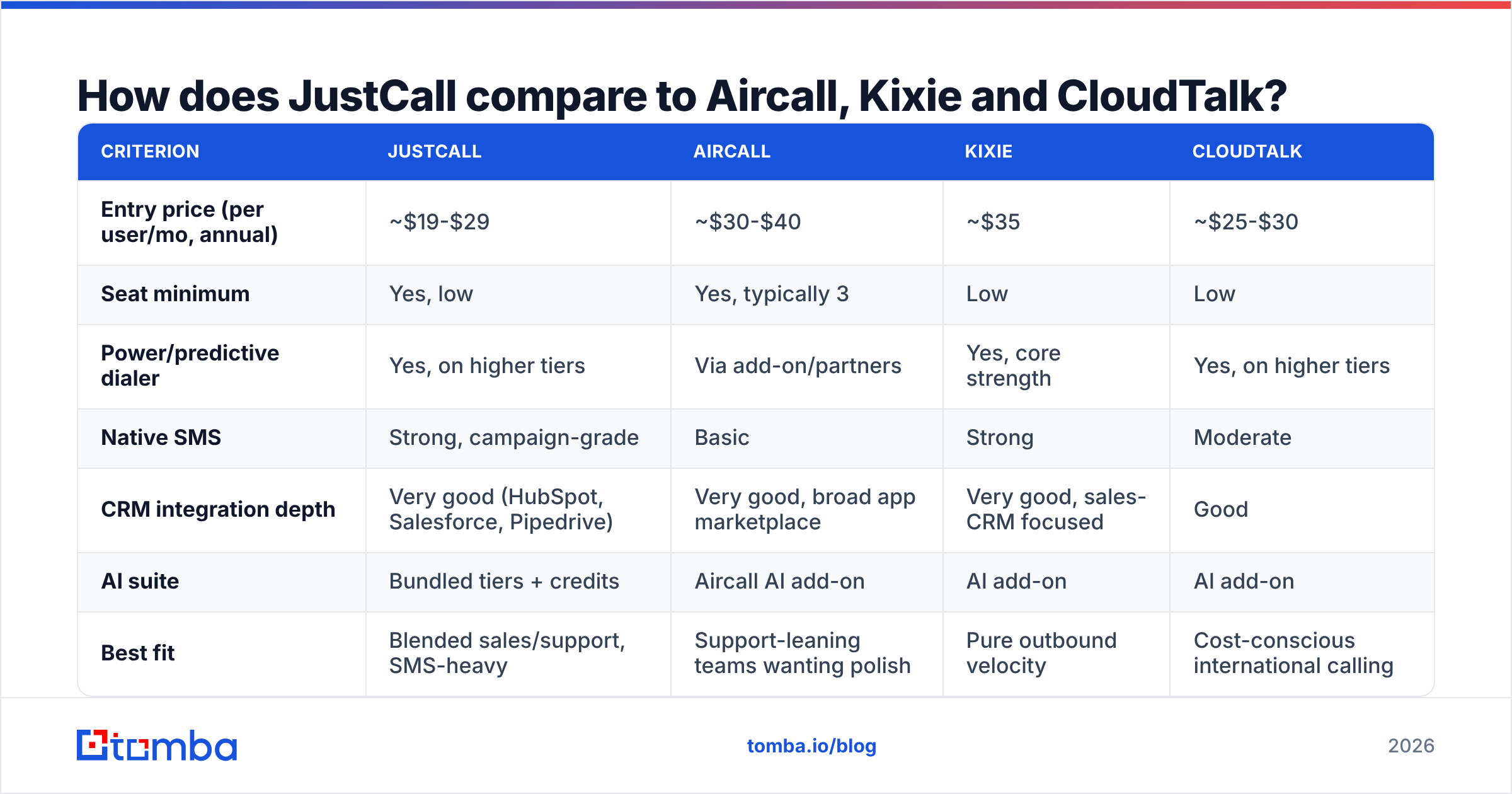
How does JustCall compare to Aircall, Kixie and CloudTalk?#
| Criterion | JustCall | Aircall | Kixie | CloudTalk |
|---|---|---|---|---|
| Entry price (per user/mo, annual) | ~$19-$29 | ~$30-$40 | ~$35 | ~$25-$30 |
| Seat minimum | Yes, low | Yes, typically 3 | Low | Low |
| Power/predictive dialer | Yes, on higher tiers | Via add-on/partners | Yes, core strength | Yes, on higher tiers |
| Native SMS | Strong, campaign-grade | Basic | Strong | Moderate |
| CRM integration depth | Very good (HubSpot, Salesforce, Pipedrive) | Very good, broad app marketplace | Very good, sales-CRM focused | Good |
| AI suite | Bundled tiers + credits | Aircall AI add-on | AI add-on | AI add-on |
| Best fit | Blended sales/support, SMS-heavy | Support-leaning teams wanting polish | Pure outbound velocity | Cost-conscious international calling |
Practical guidance: if your team's bottleneck is dial volume, Kixie and JustCall's Pro tier are the shortlist. If your bottleneck is inbound support experience and app ecosystem breadth, Aircall usually wins. If you are calling across many countries on a budget, CloudTalk is worth a quote. And if you are already paying for HubSpot Sales Hub or Salesforce Sales Engagement, price out the native calling before adding a fourth vendor — HubSpot's own calling features cover basic needs for smaller teams.
Is JustCall worth it in 2026?#
Yes, conditionally — and the condition has almost nothing to do with the dialer.
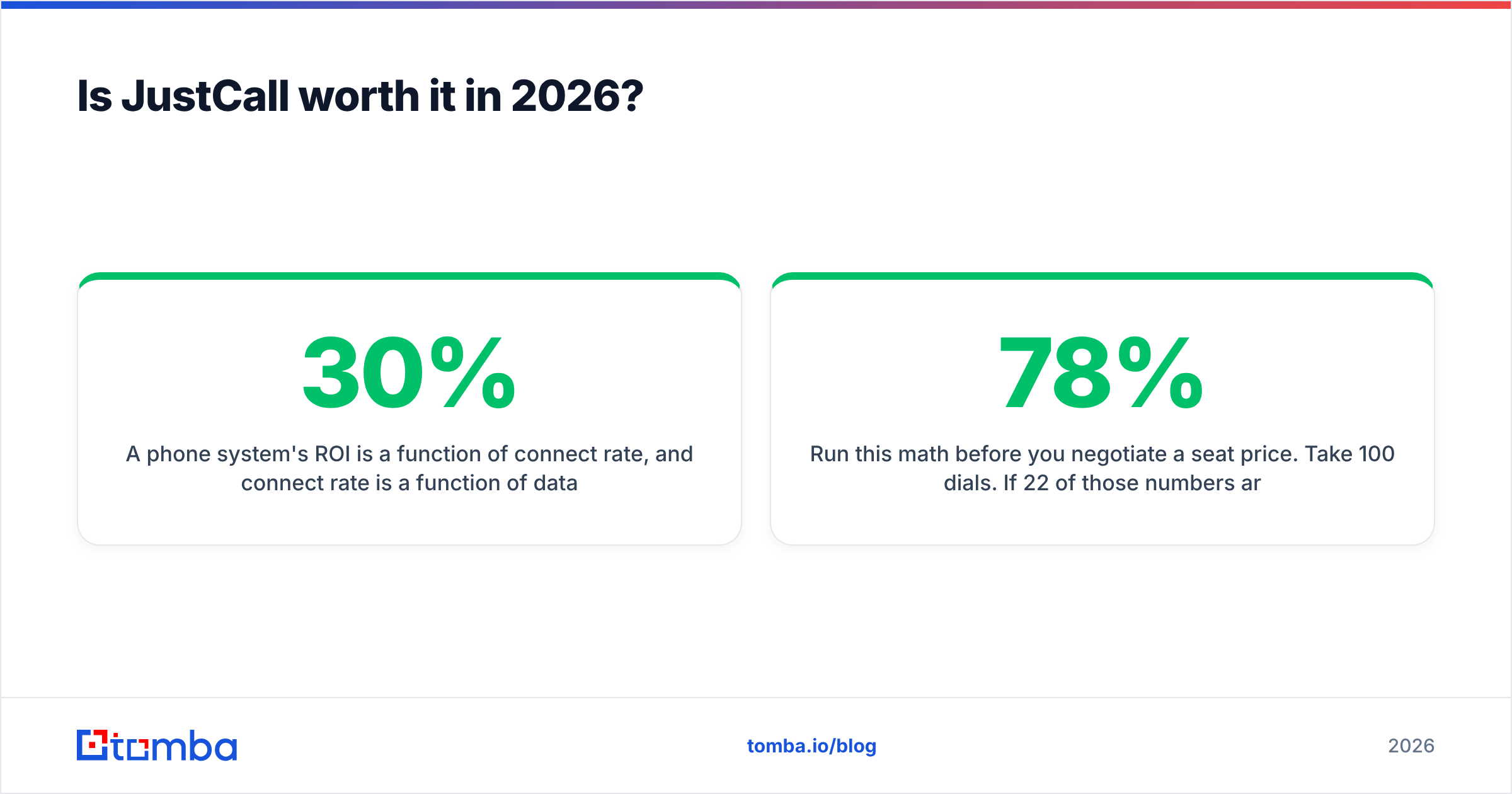
A phone system's ROI is a function of connect rate, and connect rate is a function of data quality. A rep on the fastest predictive dialer in the category still gets nowhere if 30% of the numbers are disconnected, wrong-department switchboards, or stale records scraped two years ago. Most teams that conclude "JustCall didn't work for us" are describing a data problem wearing a telephony costume.
Run this math before you negotiate a seat price. Take 100 dials. If 22 of those numbers are bad, you paid for 22 dials of dead air, plus the minutes, plus the rep's hour. Improving list accuracy from 78% to 92% delivers more connects than upgrading a plan tier — and costs less.
That is why the sequence matters: enrich and validate first, dial second. Use a phone finder to source direct-dial and mobile numbers tied to the actual decision-maker rather than a generic company line, run them through a phone validator to strip disconnected and invalid numbers before they hit the dialer, and push the surviving records into your CRM with contact enrichment so reps see title, company and email context on the screen pop. Pair the call channel with email so a no-answer becomes a follow-up rather than a dead end.
A reasonable decision framework:
- Under 3 seats, light volume — skip JustCall. A basic VoIP line plus CRM logging is cheaper.
- 5-50 seats, outbound-heavy, CRM-native — JustCall Pro is a legitimate shortlist entry; get the all-in quote modeled on your volume.
- Support-first teams — weigh Aircall, and weight support SLA heavily given JustCall's review pattern.
- Enterprise contact center, 100+ agents, WFM required — look at dedicated CCaaS platforms instead.
- Any team with a list-quality problem — fix the data before you fix the dialer. The dialer is not the constraint.
What should you ask before signing a JustCall contract?#
Bring these to the demo call and write the answers down:
- What is my all-in monthly cost at my modeled dial and SMS volume, including numbers, minutes, and AI credits?
- What are the minute and SMS allowances per seat, and what is the overage rate for my top three calling countries?
- Are AI transcription and sentiment included at this tier, or metered? At what rate after the bundle?
- What is the contract term, the auto-renewal notice period, and the process for reducing seats mid-term?
- What is the published support SLA on my tier, and what is the escalation path during an outage?
- What does number porting cost and how long does it take?
Vendors answer all six willingly during the sales cycle. Getting them in writing is the difference between a predictable line item and the billing complaints you read in the reviews.
Ready to make every dial count?#
A dialer multiplies whatever list you feed it — including the bad parts. Before you commit to per-seat pricing, fix the input: use Tomba's Email Finder to build verified, decision-maker-level contact records, then layer phone data on top so your reps dial real people at real numbers instead of burning minutes on dead records. Tomba starts free with 25 searches a month, and paid plans begin at $49/mo — see Tomba pricing for the full breakdown. Get the data right first, and whichever phone system you choose will look a lot better on the quarterly review.
Related guides#
// get started
Find, verify and enrich your first contacts today
Start on the free plan with 25 searches a month, then scale when your team is ready.
Free plan · No credit card required · GDPR & CCPA
// about the author