Kickbox vs OneMoreLead: Verification and B2B Data Compared
Kickbox verifies the emails you already have. OneMoreLead sells you emails you don't. Here's a concrete breakdown of pricing, accuracy, data freshness, and which one actually belongs in your stack in 2026.
TL;DR — Kickbox vs OneMoreLead in one minute
- This is not a fair fight. Kickbox checks emails you already own. OneMoreLead sells you emails you do not. The two tools do different jobs.
- Kickbox wins on trust. Its Sendex score, live API, and role-account flags guard your sender name. It does not find new leads.
- OneMoreLead wins on raw volume per dollar. Flat-rate access to tens of millions of records beats per-credit pricing for bulk lists. Some of those records will be stale.
- Never send a bought list without a check first. That is the costly mistake here. Static lists rot by 22-30% a year.
- The stack most teams need: a finder that pulls fresh, checked contacts (Tomba, from $49/mo) plus a verify step before every send.
Kickbox vs OneMoreLead: what does Kickbox do?#
Kickbox is an email verification tool. You feed it addresses, one by one through the API or in bulk by CSV. It tells you which ones will accept mail.
Think of it as a bouncer at the door of your mail setup. It does not find people to invite. It checks IDs and turns away the ones that cause trouble.
What Kickbox returns for each address:
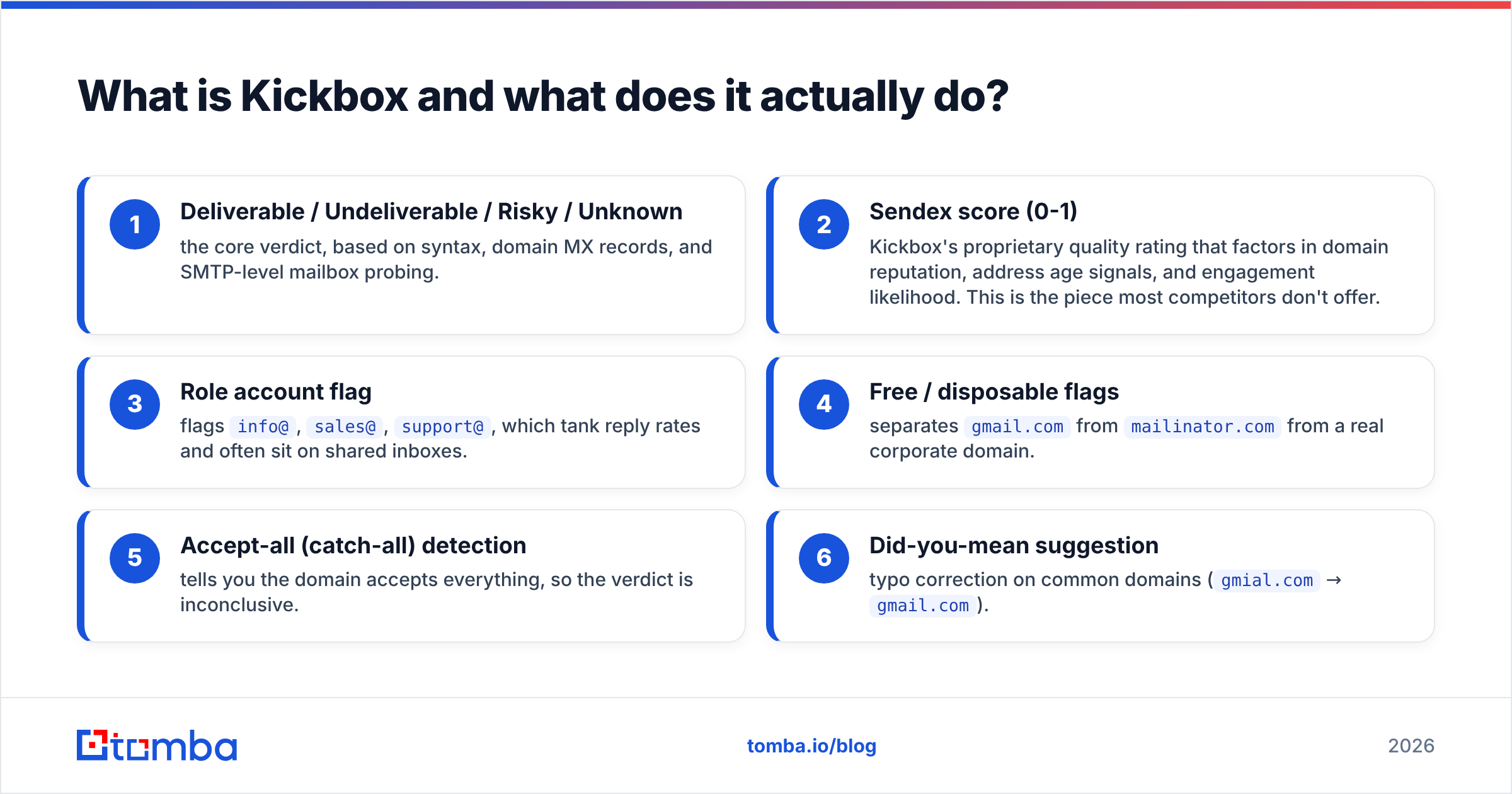
- Deliverable, Undeliverable, Risky, or Unknown — the core verdict. It comes from syntax, domain MX records, and an SMTP mailbox probe.
- Sendex score (0-1) — Kickbox's own quality rating. It weighs domain trust, address age, and likely engagement. Most rivals do not offer this.
- Role account flag — marks
info@,sales@, andsupport@. These tank reply rates and often sit on shared inboxes. - Free and disposable flags — splits
gmail.comfrommailinator.comfrom a real work domain. - Accept-all (catch-all) detection — tells you the domain takes every address, so the verdict is not clear.
- Did-you-mean tips — fixes typos on common domains (
gmial.com→gmail.com).
Kickbox also sells a deliverability suite and a sending API. The suite covers inbox placement tests and blocklist alerts. Still, the verifier is what people buy it for. Their official documentation is good, which helps when you wire checks into a signup form.
Pricing: pay-as-you-go credits. Expect $0.008-0.01 per check at low volume, and near $0.004 at high volume. You get 100 free credits. No plan needed.

What is OneMoreLead and who is it for?#
OneMoreLead is a B2B contact database. You pay for access and search a pre-built index. You can filter by industry, job title, company size, place, and tech stack. Then you export the matches to CSV or to your CRM.
It is the flip side of Kickbox. Kickbox judges data you hold. OneMoreLead hands you data you lack.
The pitch is volume and price. It offers tens of millions of B2B records. It is sold hard to agencies and small sales teams that cannot justify a ZoomInfo or Apollo deal. Plans are flat-rate with export caps, not per-lookup credits. That makes budgets easy to plan.
It has the same weak spot as every static database. The records were gathered in the past and have sat there since. B2B contact data goes stale fast. People switch jobs. Firms rebrand domains. Mailboxes get shut off. Most estimates put yearly decay at 22% to 30%. Job-change rates also spiked after 2022. A record from a 2024 crawl is a coin flip in 2026.
That flaw is not unique to OneMoreLead. It hits every list vendor, even the ones that charge ten times more. Pricey vendors simply re-crawl more often.
Is Kickbox better than OneMoreLead?#
That is the wrong question. The two tools solve different problems. You likely need both jobs done, not both tools bought.
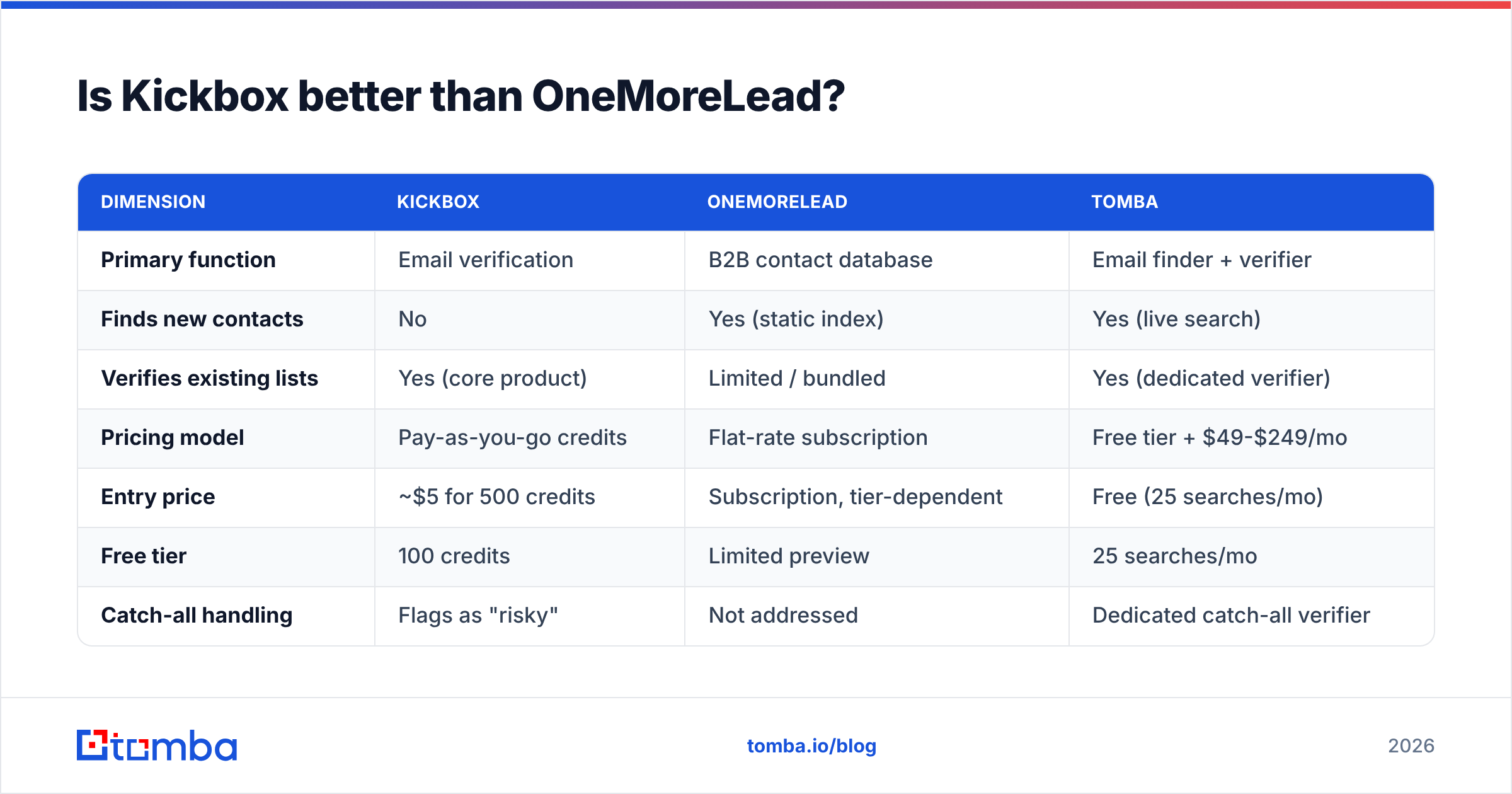
Here is the direct Kickbox vs OneMoreLead comparison on the points that actually differ:
| Dimension | Kickbox | OneMoreLead | Tomba |
|---|---|---|---|
| Primary function | Email verification | B2B contact database | Email finder + verifier |
| Finds new contacts | No | Yes (static index) | Yes (live search) |
| Verifies existing lists | Yes (core product) | Limited / bundled | Yes (dedicated verifier) |
| Pricing model | Pay-as-you-go credits | Flat-rate subscription | Free tier + $49-$249/mo |
| Entry price | ~$5 for 500 credits | Subscription, tier-dependent | Free (25 searches/mo) |
| Free tier | 100 credits | Limited preview | 25 searches/mo |
| Catch-all handling | Flags as "risky" | Not addressed | Dedicated catch-all verifier |
| Real-time API | Yes, sub-second | Export-oriented | Yes |
| Data freshness | N/A (verifies live) | Depends on crawl date | Verified at query time |
| Best for | Protecting sender reputation | Cheap bulk list acquisition | End-to-end sourcing + hygiene |
The table shows a clean split. Kickbox is deep on one job. OneMoreLead is broad on another. A finder-plus-verifier covers the gap between them. That is not a sales pitch. It is what the columns show.
Which one protects your sender reputation?#
Kickbox, by a wide margin. This is where Kickbox vs OneMoreLead stops being an even match.
Every hard bounce is a signal. It tells Gmail, Outlook, and Yahoo that you mail people who do not know you. Google's bulk sender rules got tighter through 2024 and 2025. The spam complaint limit sits at 0.3%. High bounce rates can get you throttled or blocked. Once your sender reputation drops, even good mail lands in spam.
A bought list that was never checked bounces at 8-25%. Send that cold from a warm domain and you can undo months of email deliverability work in one campaign.
So the order of steps matters more than the brand you pick:
- Never export and send. Any list, from any source, gets checked first.
- Gate the form too. Live checks on signup forms stop junk before it enters your CRM. This is Kickbox's single best use case.
- Re-check each quarter. A list checked in January is not clean in July. Decay never stops.
- Split out catch-all domains. They pass basic checks but tell you little. Send them through a catch-all verifier or keep them out of heavy sequences.
Kickbox handles the first three well. It flags catch-alls as "risky" but does not resolve them. That is a real gap if you sell to mid-market and enterprise buyers, where accept-all setups are common.
How do the pricing models compare?#
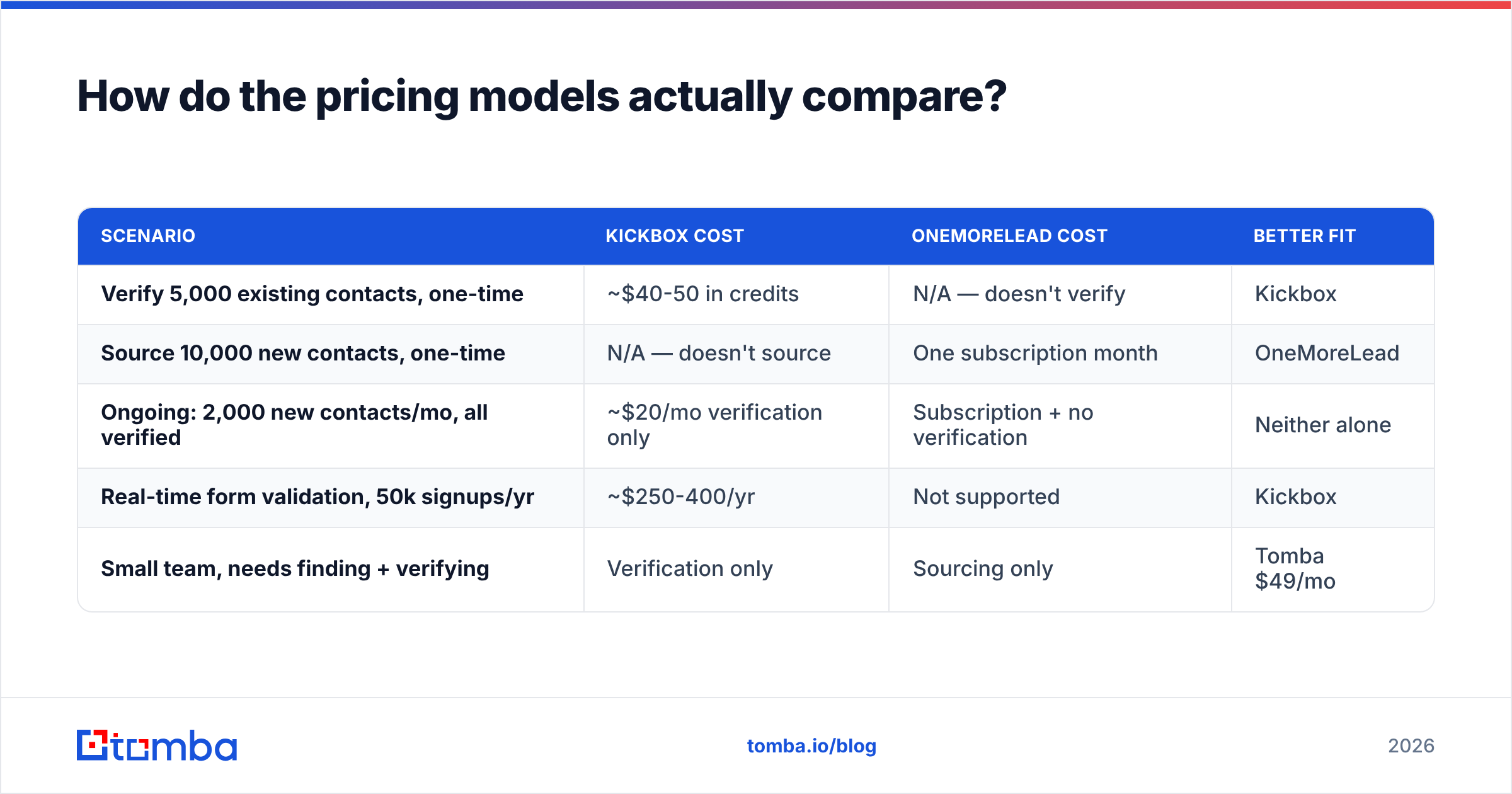
Credits versus flat rate is the real choice. The winner flips with your volume shape.
| Scenario | Kickbox cost | OneMoreLead cost | Better fit |
|---|---|---|---|
| Verify 5,000 existing contacts, one-time | ~$40-50 in credits | N/A — doesn't verify | Kickbox |
| Source 10,000 new contacts, one-time | N/A — doesn't source | One subscription month | OneMoreLead |
| Ongoing: 2,000 new contacts/mo, all verified | ~$20/mo verification only | Subscription + no verification | Neither alone |
| Real-time form validation, 50k signups/yr | ~$250-400/yr | Not supported | Kickbox |
| Small team, needs finding + verifying | Verification only | Sourcing only | Tomba $49/mo |
Row three is where most teams live. It is why Kickbox vs OneMoreLead is a false either-or. You would pay two vendors for two halves of one job, with a CSV shuttle in the middle.
One tool can do both halves. It finds the address against live sources, checks it in the same call, and skips the export-import loop. That is how Tomba's email finder works. It is also why Tomba pricing starts with a free tier of 25 searches a month and $49/mo for Starter, instead of billing each half apart.
When should you choose Kickbox?#
Pick Kickbox when checking is the job and you already have contacts.
Strong fit:
- You run a SaaS signup flow and need fast API checks at the form. Kickbox's speed and uptime are excellent here.
- You took over a CRM with 200,000 stale records. You need one big clean-up before you switch ESPs.
- You want the Sendex score. It beats a plain valid or invalid flag. It also helps you split a "risky" pile into safe and unsafe.
- Your volume is spiky. Pay-as-you-go means you waste nothing in quiet months.
Weak fit:
- You need to build a prospect list from scratch. Kickbox does none of that.
- Most of your targets sit behind catch-all domains and you need a clear verdict.
- You want finding, checking, and enrichment on one invoice.
When should you choose OneMoreLead?#
Pick OneMoreLead when you need cheap volume and you will check the list later.
Strong fit:
- Agency work. You build lists for many clients across broad profiles, and cost per record drives the choice.
- Top-of-funnel market mapping. You want to see how many firms match a profile. Coverage matters more than precision.
- Tight budgets. Flat-rate costs are easier to plan than per-credit bills.
Weak fit:
- Narrow ICPs. Tight filters on a static database return thin, stale results, and you pay the same.
- Compliance-heavy markets. If you mail the EU, the source of a bought list is a legal question under GDPR. Read the vendor's data sourcing statement before you export. Compare it with how openly other vendors list their data sources.
- Anyone who will not check before sending. Then you are buying bounces at a discount.
For a market view, G2's email verification category and G2's lead intelligence category are fair third-party checkpoints. Reviews are noisy. Even so, volume and recency show which products are still cared for.
What does a sane 2026 workflow look like?#
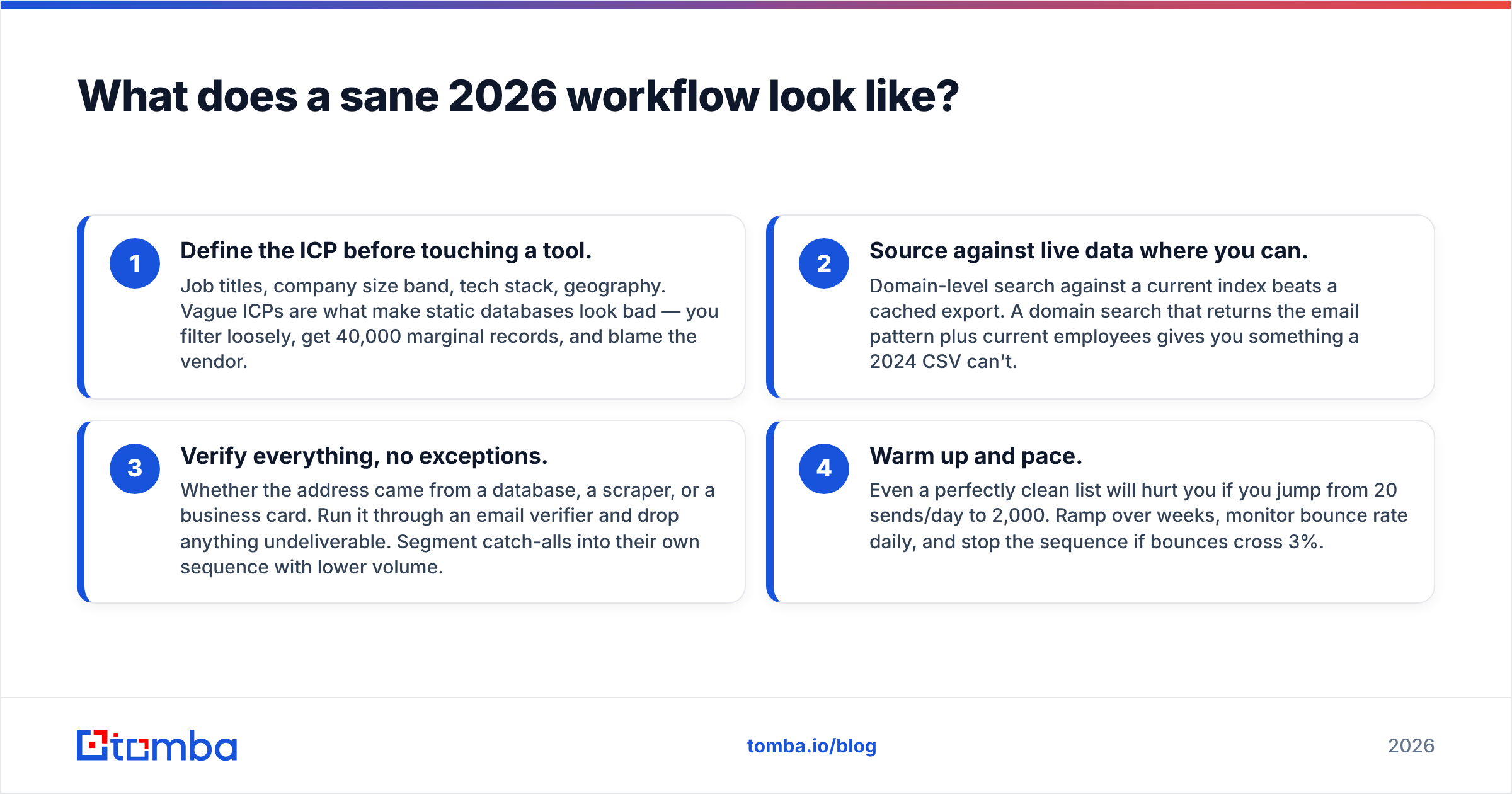
Four steps, and the order is fixed:
- Define the ICP first. Job titles, company size, tech stack, and place. Vague ICPs make static databases look bad. You filter loosely, get 40,000 weak records, and blame the vendor.
- Source from live data where you can. A search against a current index beats a cached export. A domain search gives you the email pattern plus current staff. A 2024 CSV cannot.
- Check every address. It does not matter if it came from a database, a scraper, or a business card. Run it through an email verifier and drop the bad ones. Put catch-alls in their own slow sequence.
- Warm up and pace. Even a clean list will hurt you if you jump from 20 sends a day to 2,000. Ramp over weeks. Watch bounce rate daily. Stop if bounces pass 3%.
Step 3 is where Kickbox earns its keep. Step 2 is where OneMoreLead tries to. Teams that do step 2 and skip step 3 are the ones who struggle. That failure is self-inflicted, whoever sold the list.
One more note on data vendors. Firms like BookYourData now sell pay-as-you-go records that are checked at purchase. That model deals with decay better than flat-rate static access. It is a useful yardstick. Ask any vendor when they last re-checked their records, and whether that check was SMTP-level or just syntax.
What's the verdict on Kickbox vs OneMoreLead?#
You have contacts and need them clean: Kickbox. It is focused, well documented, and strong under load. The Sendex score is a real edge. Pay-as-you-go means no lock-in.
You need volume on a small budget and will check later: OneMoreLead. It does what it says at a price the big data vendors cannot match. Just do not read "exported" as "valid".
You can only fund one of them: then pick neither. A tool that finds and checks in one step drops the CSV round-trip and the second invoice. That is why most small outbound teams merge tools instead of stitching two together.
Whatever you pick, the rule that matters is dull: check before you send, every time. The tool that enforces that rule beats the one with the biggest export.
Ready to skip the two-vendor shuffle? Tomba's Email Finder finds work emails by domain, name, or company. It checks them in the same request. What lands in your CRM is ready to mail. Start free with 25 searches a month, no card needed, and move to Starter at $49/mo as your pipeline grows.
Related guides#
// get started
Find, verify and enrich your first contacts today
Start on the free plan with 25 searches a month, then scale when your team is ready.
Free plan · No credit card required · GDPR & CCPA
// about the author