9 Best Kintone Alternatives in 2026 Compared (Free & Paid)
Kintone is solid no-code plumbing, but seat minimums, a dated UI, and thin integrations push teams to shop around. Here are 9 Kintone alternatives compared on price, build depth, and how well they handle real B2B data.
TL;DR
- Kintone is a competent no-code database and workflow builder, but its per-seat pricing with a seat minimum, an interface that feels a decade old, and a thin native integration catalog are the three reasons teams shop for Kintone alternatives.
- If you want the closest like-for-like replacement, look at Zoho Creator (cheapest real app builder), Quickbase (enterprise workflow), and SmartSuite (best modern UI for process-heavy teams).
- If your "app" is really a structured database with automations, Airtable, monday.com, and Smartsheet are faster to stand up and far easier to hire for.
- If budget or data residency is the driver, Baserow self-hosted costs you infrastructure instead of seats.
- Whichever platform you land on, the migration failure mode is almost never the app builder — it's the contact data you carry over. Clean and enrich records before import, not after.
What is Kintone, and who actually uses it?#
Kintone is a no-code platform from Cybozu that lets non-developers build database-backed business apps — inventory trackers, approval workflows, CRMs, project registers — and wrap them in thread-based discussion spaces. Think of it as a filing cabinet where each drawer also has a comment thread bolted to it, plus a rules engine that moves folders between drawers when someone clicks Approve.
It lands well with operations, HR, and finance teams at mid-market companies that have outgrown spreadsheets but do not want to hire developers. Its strongest feature is the process-management engine: multi-step approvals with conditional branching, assignees, and status history, configured through forms rather than code. Kintone also has genuine traction outside the US — Cybozu is a Japanese company, and Kintone's adoption in Japan is far deeper than its English-language market share suggests.
Where it struggles is everything around the core. The official Kintone site positions it as a workplace platform, but in practice teams treat it as an internal app builder, then hit walls on reporting, external-facing forms, and integrations with the GTM stack. At list price it runs roughly $24 per user per month with a seat minimum — pricing shifts by region and plan, so verify on their page before you budget. That per-seat structure is the single most common trigger for a switch: when the ops team wants read-only access for 40 people who touch the app twice a month, the math stops working.
Why do teams look for Kintone alternatives?#
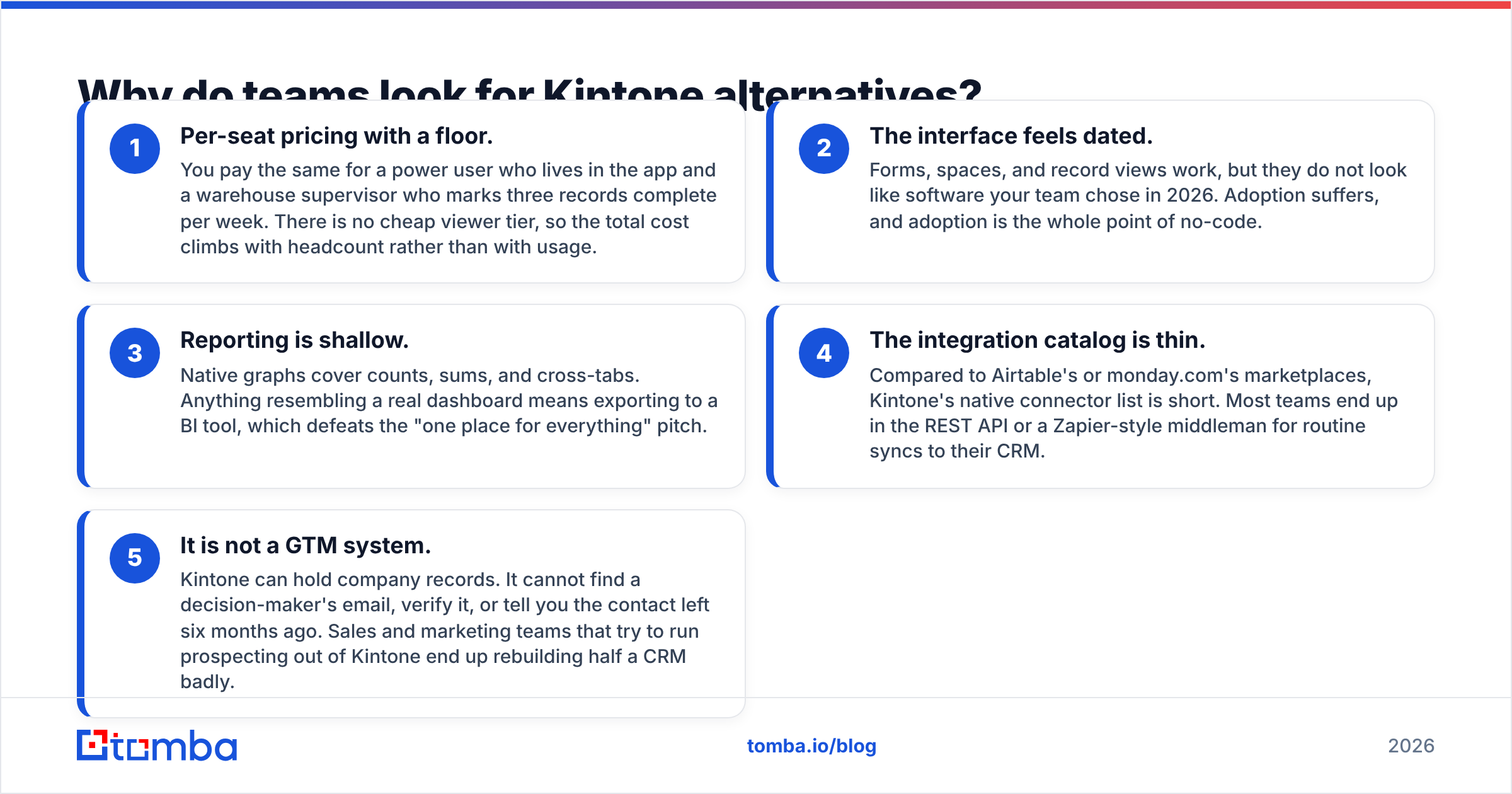
Five reasons come up over and over in G2 reviews and migration conversations. If none of these apply to you, stay put — Kintone is stable software and switching costs are real.
- Per-seat pricing with a floor. You pay the same for a power user who lives in the app and a warehouse supervisor who marks three records complete per week. There is no cheap viewer tier, so the total cost climbs with headcount rather than with usage.
- The interface feels dated. Forms, spaces, and record views work, but they do not look like software your team chose in 2026. Adoption suffers, and adoption is the whole point of no-code.
- Reporting is shallow. Native graphs cover counts, sums, and cross-tabs. Anything resembling a real dashboard means exporting to a BI tool, which defeats the "one place for everything" pitch.
- The integration catalog is thin. Compared to Airtable's or monday.com's marketplaces, Kintone's native connector list is short. Most teams end up in the REST API or a Zapier-style middleman for routine syncs to their CRM.
- It is not a GTM system. Kintone can hold company records. It cannot find a decision-maker's email, verify it, or tell you the contact left six months ago. Sales and marketing teams that try to run prospecting out of Kintone end up rebuilding half a CRM badly.

What are the best Kintone alternatives in 2026?#
Prices below are approximate list prices on annual billing at the time of writing. Every vendor on this list changes packaging at least yearly — treat these as a shortlist filter, not a quote.
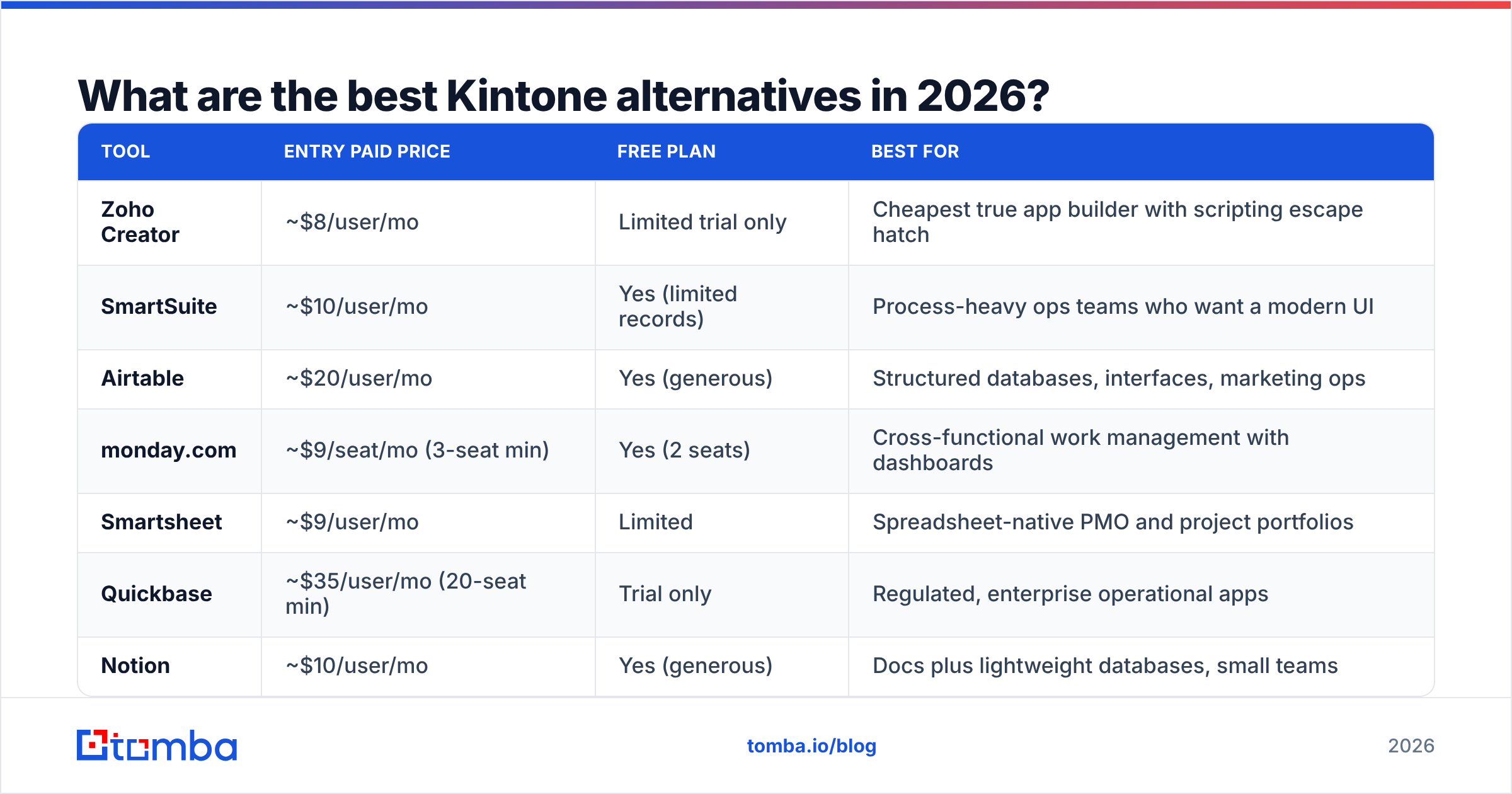
| Tool | Entry paid price | Free plan | Best for |
|---|---|---|---|
| Zoho Creator | ~$8/user/mo | Limited trial only | Cheapest true app builder with scripting escape hatch |
| SmartSuite | ~$10/user/mo | Yes (limited records) | Process-heavy ops teams who want a modern UI |
| Airtable | ~$20/user/mo | Yes (generous) | Structured databases, interfaces, marketing ops |
| monday.com | ~$9/seat/mo (3-seat min) | Yes (2 seats) | Cross-functional work management with dashboards |
| Smartsheet | ~$9/user/mo | Limited | Spreadsheet-native PMO and project portfolios |
| Quickbase | ~$35/user/mo (20-seat min) | Trial only | Regulated, enterprise operational apps |
| Notion | ~$10/user/mo | Yes (generous) | Docs plus lightweight databases, small teams |
| Baserow | Free self-hosted | Yes (open source) | Data residency, cost control, engineering-adjacent teams |
| Microsoft Power Apps | ~$20/user/mo | Dev plan only | Shops already standardized on Microsoft 365 |
Is Zoho Creator the closest Kintone replacement?#
For most teams, yes. Zoho Creator is the other genuine low-code application platform on this list at a small-business price. You get forms, workflows, role-based permissions, a mobile app generator, and Deluge scripting when the visual builder runs out of road. The catch is the Zoho experience: documentation quality is uneven, and you will feel gentle gravitational pull toward the rest of the Zoho suite. If you already run Zoho CRM or Books, that pull is a feature.
Why is SmartSuite the best-looking alternative?#
SmartSuite is what Kintone would look like if it had been designed after 2018. It combines record-based databases with real process automation, multiple view types (kanban, timeline, calendar, map), and a permissions model granular enough for HR and finance use cases. It sits neatly between Airtable's database orientation and Quickbase's enterprise weight. Pricing is the main draw: a Team tier around $10 per user per month undercuts Kintone substantially while delivering a better day-to-day experience.
Should you pick Airtable instead?#
Pick Airtable if your app is fundamentally a set of related tables with automations and a nice front end on top. Interfaces give you presentable views for stakeholders without building a real app, the automation builder covers most workflows, and the extension marketplace is the deepest in the category. Where Airtable loses to Kintone is approval-chain depth and per-record discussion — commenting exists, but structured multi-step approvals require workarounds. Per-seat pricing also climbs quickly on the Business tier, so run the numbers at your actual headcount.
What about monday.com and Smartsheet?#
These two are work-management platforms that happen to be flexible enough to replace many Kintone apps. monday.com wins on dashboards, cross-board reporting, and sheer breadth of integrations; it is the easiest to get an entire department using without training. Smartsheet wins with people who think in spreadsheets — its grid is a real grid, with formulas that behave the way Excel users expect, plus portfolio-level rollups that project offices care about. Neither is a true app builder. If your Kintone instance contains ten apps that are basically trackers, either one will do; if it contains a custom order-management system, neither will.
When does Quickbase make sense?#
When the app is load-bearing for the business and failure is expensive. Quickbase is the enterprise end of the market: strong governance, audit trails, granular roles, a mature formula language, and pipeline-style integrations. It costs accordingly — roughly $35 per user per month with a 20-seat minimum on entry tiers, which means it only makes sense above a certain scale. Teams in construction, manufacturing, healthcare operations, and government contracting pick it for compliance reasons more than features.
Are Notion and Baserow real alternatives?#
Conditionally. Notion is excellent if your Kintone usage is mostly registers and documentation with light automation, and if the team already lives in Notion docs. It is a poor choice for permission-sensitive processes — the sharing model is built for openness, not for locking finance data away from interns.
Baserow is the open-source play. Self-host it and your marginal cost per user is zero; you pay in DevOps time instead. That trade is worth it for teams with data-residency requirements, hard budget caps, or an engineer who already maintains internal infrastructure. It is a weaker choice if nobody on staff wants to own a Postgres instance.
What if you already pay for Microsoft 365?#
Then Power Apps deserves a look, because the licensing may already be partly covered and the Dataverse-plus-Power-Automate combination is powerful. Be honest about the learning curve: Power Apps is "low-code" in the way that a manual transmission is "low-effort." Teams without a technical champion routinely stall out. The payoff is native integration with SharePoint, Teams, Outlook, and the rest of the estate.
How do the top three compare head-to-head with Kintone?#
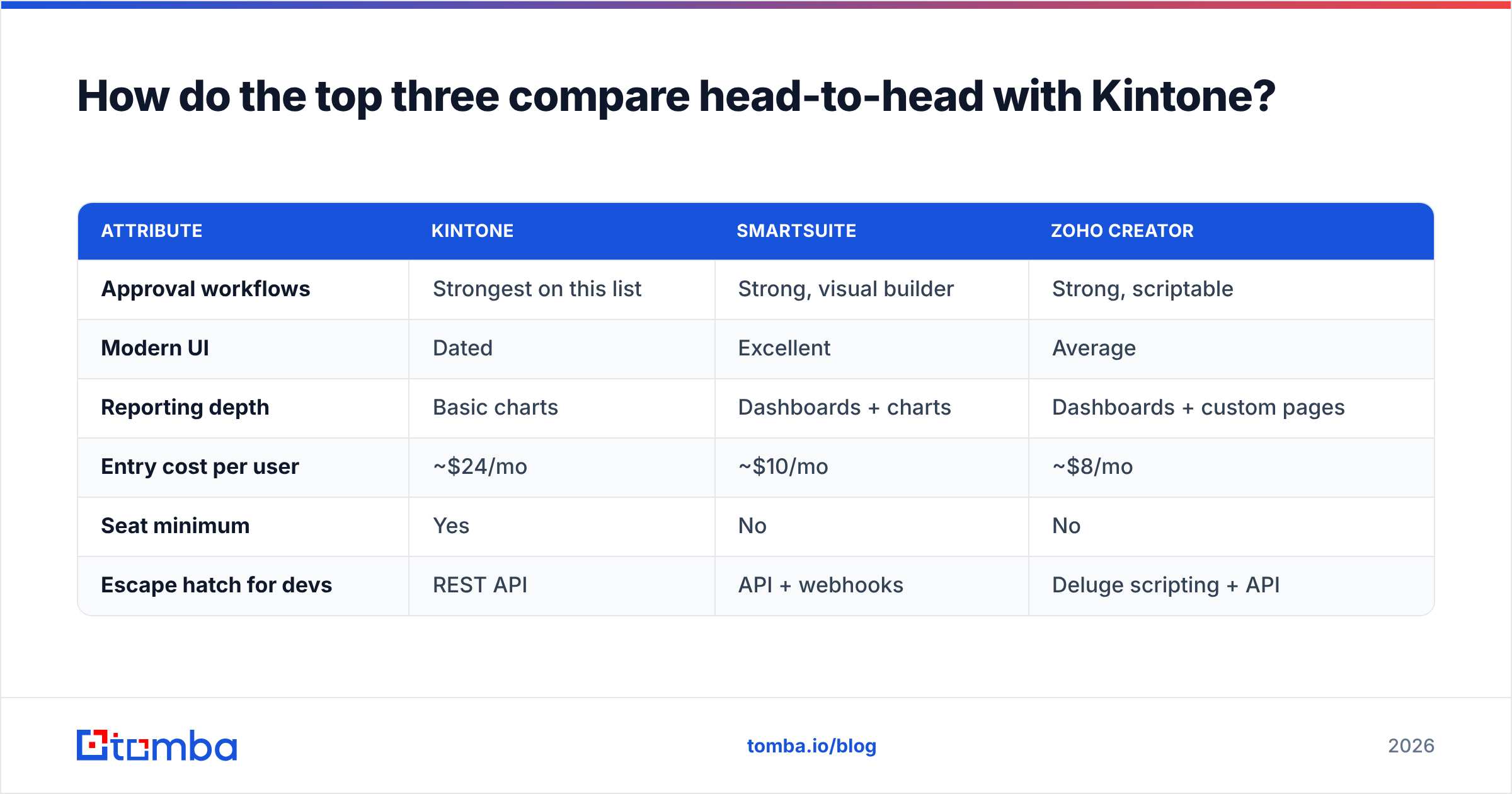
| Attribute | Kintone | SmartSuite | Zoho Creator |
|---|---|---|---|
| Approval workflows | Strongest on this list | Strong, visual builder | Strong, scriptable |
| Modern UI | Dated | Excellent | Average |
| Reporting depth | Basic charts | Dashboards + charts | Dashboards + custom pages |
| Entry cost per user | ~$24/mo | ~$10/mo | ~$8/mo |
| Seat minimum | Yes | No | No |
| Escape hatch for devs | REST API | API + webhooks | Deluge scripting + API |

How do you migrate off Kintone without losing data?#
Treat the migration as three separate projects, not one.
First, inventory honestly. Export the app list and record counts. In most instances, 20 percent of apps hold 90 percent of the records, and a long tail of abandoned apps exists that nobody will miss. Do not port dead weight — that is how a two-week migration becomes a quarter.
Second, rebuild logic rather than translating it. Kintone's process management encodes assumptions that may not map cleanly onto another platform's automation model. Write out each workflow as plain sentences ("when status moves to Submitted, notify the regional manager, and lock the amount field"), then build that from scratch in the new tool. Field-by-field translation produces Frankenstein apps.
Third, clean the data on the way out, not after it lands. This is the step teams skip and regret. Export to CSV, then deduplicate, normalize company names, and — critically — re-verify every contact record before import. B2B contact data decays at roughly 25 to 30 percent per year; a Kintone instance that has been running for three years is carrying a lot of dead weight. Run the export through an email verifier to strip invalid addresses, then use bulk email finder passes to fill the gaps where you have a name and a company but no working address.
What about the contact data inside your no-code app?#
Here is the part the alternatives roundups skip: the app builder is not your bottleneck. The data is.
Every platform on this list is a container. None of them generate contact data, and none of them know when a contact changes jobs. If your Kintone replacement is going to hold accounts, leads, vendors, candidates, or partners, you need a data layer underneath it — something that turns "Acme Corp, VP of Operations" into a verified, deliverable email address and a phone number.
Three patterns work well regardless of which platform you choose:
- Enrich at the point of entry. Wire an automation that fires when a new company record is created, calls a data enrichment endpoint, and writes firmographics and contact details straight into the record. No manual research step, no stale rows.
- Batch-refresh on a schedule. Monthly or quarterly, push the contact table through verification and re-enrichment. Records that fail get flagged, not deleted, so a human can decide.
- Build it on an API, not on copy-paste. Airtable scripting, monday.com integrations, Zoho's Deluge, and Baserow webhooks can all call the Tomba API directly. If your team works in spreadsheets during migration, the Google Sheets add-on covers the same job without any code at all.
The teams that get the most out of a no-code migration are the ones who use it as a forcing function to fix data hygiene. You are already touching every record. Verify them while you are in there.
Is Kintone still worth it in 2026?#
Yes, for a specific profile: mid-market ops teams with genuinely complex approval chains, a stable headcount, and no appetite for another platform migration. Kintone's process engine is still one of the better ones in the no-code category, it is stable, and support is responsive.
Everyone else should compare seriously. If cost is the issue, Zoho Creator and SmartSuite cut your per-seat spend by half or more with comparable capability. If usability is the issue, SmartSuite, Airtable, and monday.com are all several years ahead on interface design. If you need enterprise governance, Quickbase is the safer landing spot. And if you simply need a flexible database that your marketing and sales teams will actually open, Airtable remains the default for good reason.
Run a two-week pilot with your single most complex app, not your simplest. The simple ones work everywhere; the hard one is what decides the platform.
Ready to fix the data, not just the container?#
Whichever Kintone alternative you pick, it will be exactly as useful as the contact records inside it. Tomba Email Finder finds verified professional email addresses by name, domain, or company, and feeds them into whatever platform you land on through the API, the Sheets add-on, or a bulk CSV run. The free tier includes 25 searches a month so you can test accuracy on your own export before committing, with paid plans starting at $49/mo — see Tomba pricing for the full breakdown. Verify your list before you migrate it, and your new no-code build starts clean instead of inheriting three years of bounces.
Related guides#
// get started
Find, verify and enrich your first contacts today
Start on the free plan with 25 searches a month, then scale when your team is ready.
Free plan · No credit card required · GDPR & CCPA
// about the author