Kintone Pricing Reviews Pros and Cons: 2026 Buyer Guide
Kintone charges per user, not per app — which makes it cheap for builders and expensive for viewers. Here is what the pricing really costs, what reviewers praise, and where teams hit walls.
This Kintone pricing reviews pros and cons guide gives you the numbers first. What a seat really costs in 2026. What buyers praise. Where teams hit a wall and start shopping again.
TL;DR
- Kintone charges per user, per month — not per app. You build unlimited apps on a flat seat price, which is the single biggest reason teams pick it.
- The published rate is $24/user/month on the Standard plan with a 10-user minimum, so the real entry cost is roughly $240/month even if only three people need it.
- Reviewers praise the no-code app builder, the workflow engine, and the fast support. They complain about dated UI, weak reporting, and a steep learning curve once apps get complex.
- The hidden cost is not the license. It's the internal person who becomes "the Kintone admin," plus the paid plugins you buy for charts, calendars, and Gantt views.
- Kintone is a database and workflow platform, not a sales data source. If your goal is pipeline, you still need contact data feeding it. That's a separate line item.
What is Kintone, and who actually buys it?#
Kintone is a no-code work platform from Cybozu. Think of it as Airtable crossed with a workflow engine, raised inside a Japanese enterprise. You build small business apps by dragging fields onto a canvas. Then you wire approval routes and permissions on top. Typical apps: expense approvals, inventory logs, customer records, recruitment pipelines.
The everyday analogy: most tools sell you a finished house. Kintone sells you a very good set of Lego and a floor plan. If your team has one person who enjoys building, you get exactly the process you wanted. If nobody wants that job, you get an expensive box of bricks.
Under the hood, it is a cloud database with record-level permissions. On top sits a process layer for multi-step approvals and a comment thread on every record. A REST API and a JavaScript layer cover what the drag-and-drop builder cannot do. You can read the vendor's own framing at kintone.com.
Who buys it in practice:
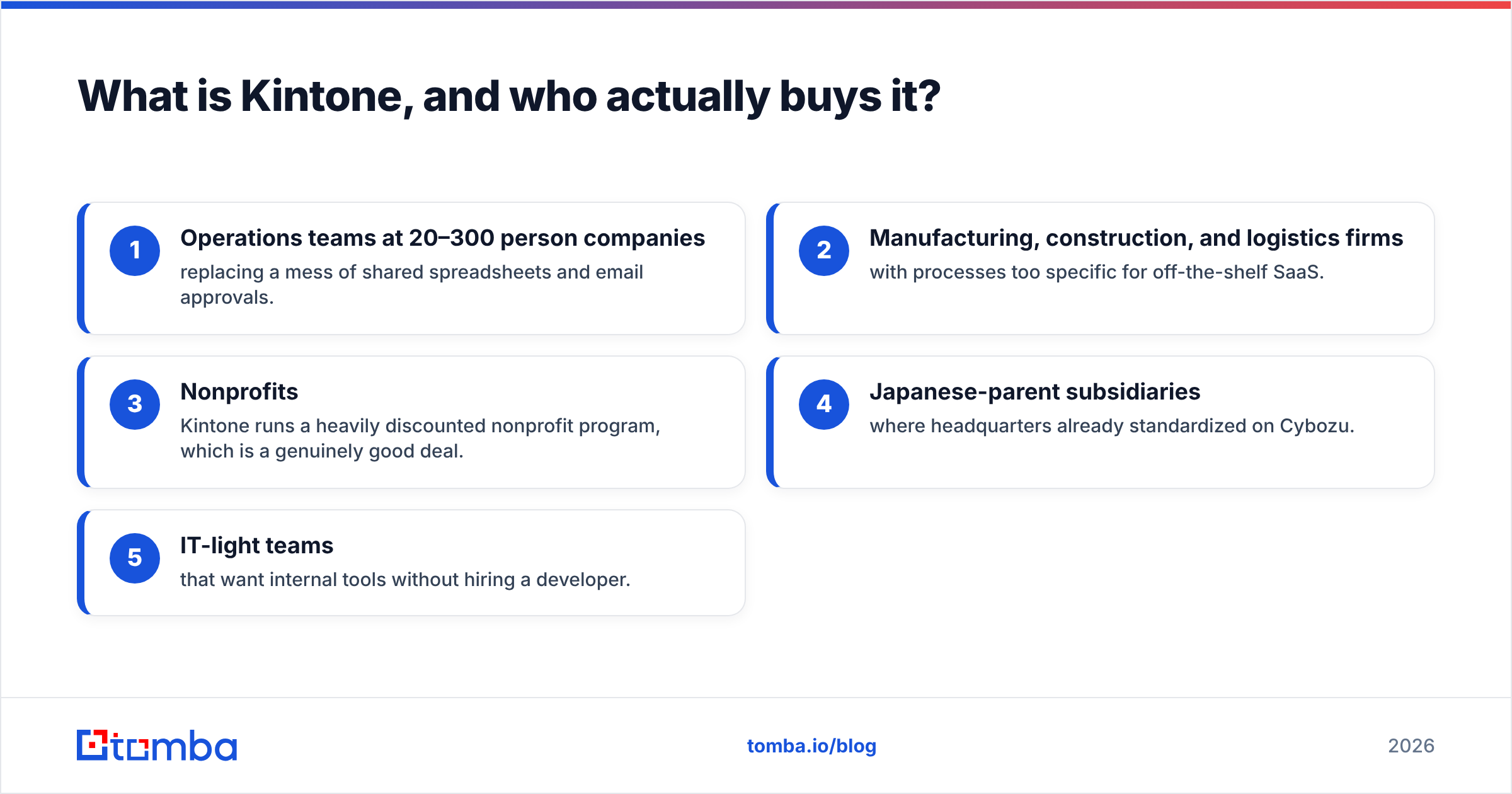
- Operations teams at 20–300 person companies replacing a mess of shared spreadsheets and email approvals.
- Manufacturing, construction, and logistics firms with processes too specific for off-the-shelf SaaS.
- Nonprofits — Kintone runs a heavily discounted nonprofit program, which is a genuinely good deal.
- Japanese-parent subsidiaries where headquarters already standardized on Cybozu.
- IT-light teams that want internal tools without hiring a developer.

How much does Kintone actually cost in 2026?#
Here's the number that matters: $24 per user per month, 10-user minimum, billed monthly or annually. That's the Standard plan. For most buyers it is the only plan.
Kintone reworked its published pricing over the last couple of years. Older reviews still quote $15/user, and those are out of date. Check the current tiers on kintone.com/pricing before you budget — vendors move these numbers.
The seat price includes unlimited apps, unlimited workflows, 5 GB of storage per user (pooled), the API, guest spaces, and standard support. It does not include most advanced charts, Gantt views, advanced calendars, e-signature, and several integrations. Those come from the plugin marketplace or third-party vendors. Budget $5–$15 per user per month each, or a flat annual fee.
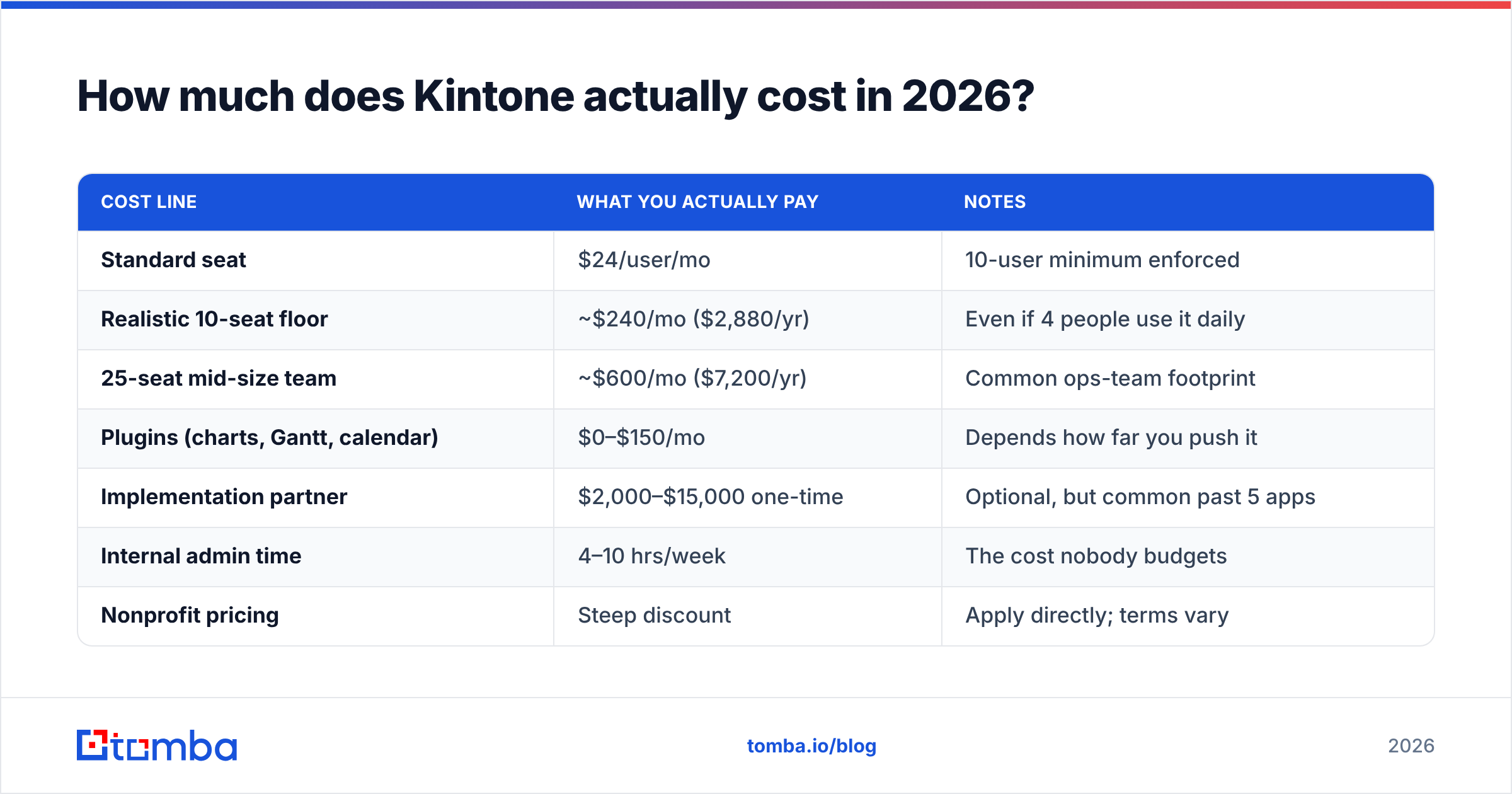
| Cost line | What you actually pay | Notes |
|---|---|---|
| Standard seat | $24/user/mo | 10-user minimum enforced |
| Realistic 10-seat floor | ~$240/mo ($2,880/yr) | Even if 4 people use it daily |
| 25-seat mid-size team | ~$600/mo ($7,200/yr) | Common ops-team footprint |
| Plugins (charts, Gantt, calendar) | $0–$150/mo | Depends how far you push it |
| Implementation partner | $2,000–$15,000 one-time | Optional, but common past 5 apps |
| Internal admin time | 4–10 hrs/week | The cost nobody budgets |
| Nonprofit pricing | Steep discount | Apply directly; terms vary |
The 10-user minimum is the most under-discussed part of Kintone pricing. If you're a 6-person ops team, your effective per-user cost is $40/month, not $24. It is also the line most Kintone pricing reviews pros and cons write-ups skip. Run that math before you compare it to anything else.
What do Kintone reviews consistently praise?#
Pull the reviews on G2 and Capterra. The same four themes repeat across hundreds of entries.
The app builder is genuinely no-code. Not "no-code if you know SQL." Reviewers with zero technical background report shipping a working app in an afternoon. This is the strongest, most consistent praise in the corpus.
Process management handles real approval chains. You get multi-step routing, conditional branches, role-based assignment, and status tracking — all without scripting. For companies replacing an email-and-PDF approval loop, this alone justifies the spend.
Support is responsive and human. Praise here is unusually consistent. Reviewers mention named support reps, fast ticket resolution, and free onboarding webinars. For a platform this configurable, support quality is a real feature.
Per-user pricing scales predictably. Because apps are unlimited, your bill doesn't jump when the ops team builds app number 40. Compare that to per-app or per-record pricing, where success gets punished.
What are the real Kintone cons?#
Now the other side. These complaints are just as consistent.
The UI looks like 2015. It is functional and dense, not beautiful. Reviewers who came from Notion or Airtable mention this in the first paragraph, every time. It breaks nothing. It does slow internal adoption when you want sales reps to use it by choice.
Reporting and dashboards are thin out of the box. You get basic aggregation charts. Anything close to a real BI dashboard means a plugin, a spreadsheet export, or pushing data out through the API. Teams expecting Looker-grade analytics end up disappointed.
The learning curve steepens fast. Building one app is easy. Building fifteen linked apps is not. Lookups, related records, and permission inheritance all take real skill. Someone has to learn the platform properly, and that person becomes a dependency.
Mobile is serviceable, not great. The mobile app covers record entry and approvals. Complex apps with many fields feel cramped.
It is not a CRM, and forcing it to be one hurts. Plenty of teams build a Kintone CRM. It works for tracking. It does not give you contact data, email sequencing, or enrichment — the pieces that actually generate pipeline. You'll bolt those on.
How does Kintone compare to the alternatives buyers shortlist?#
Most Kintone evaluations come down to three or four finalists. Here's the honest shape of that decision.
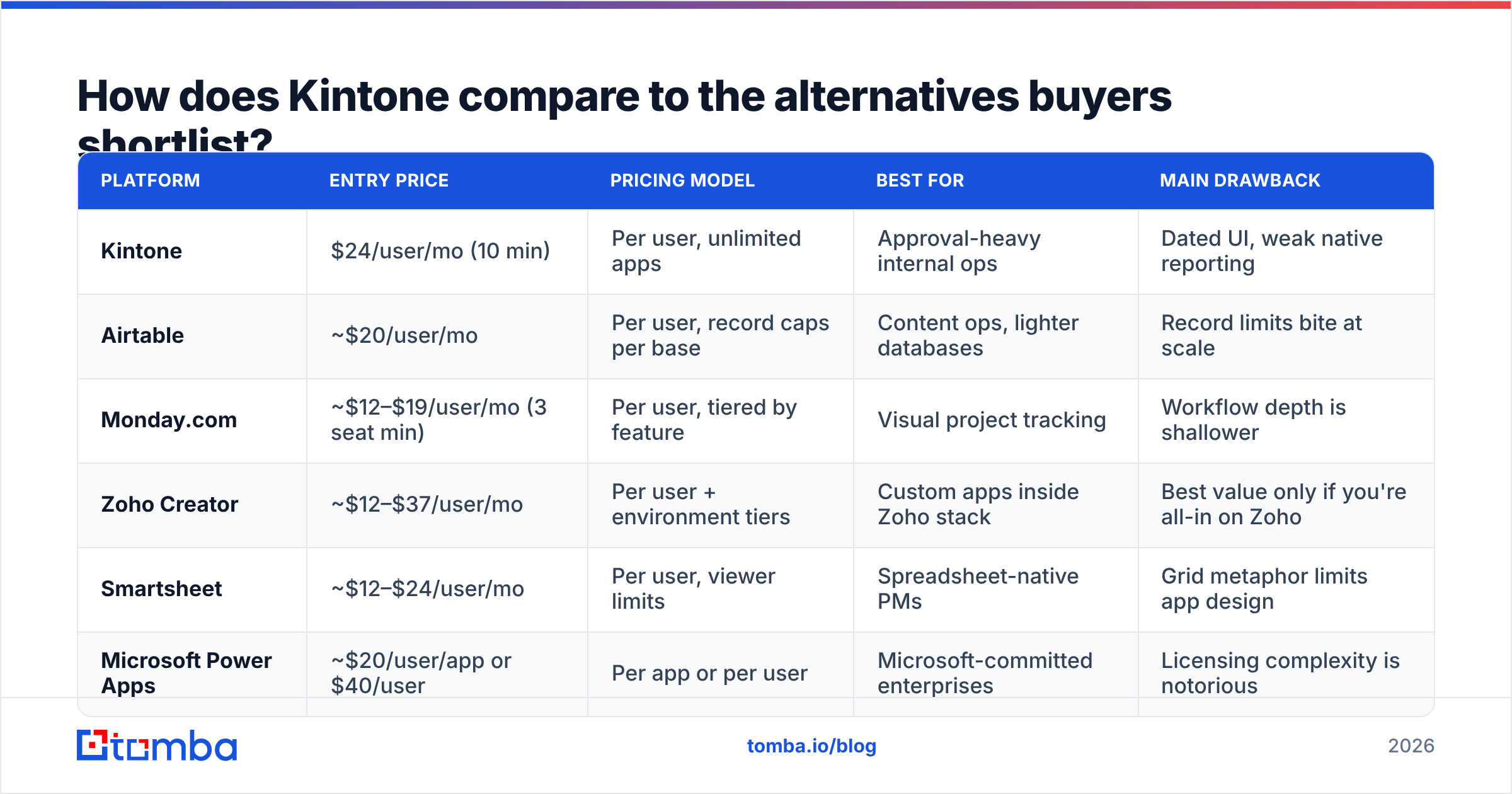
| Platform | Entry price | Pricing model | Best for | Main drawback |
|---|---|---|---|---|
| Kintone | $24/user/mo (10 min) | Per user, unlimited apps | Approval-heavy internal ops | Dated UI, weak native reporting |
| Airtable | ~$20/user/mo | Per user, record caps per base | Content ops, lighter databases | Record limits bite at scale |
| Monday.com | ~$12–$19/user/mo (3 seat min) | Per user, tiered by feature | Visual project tracking | Workflow depth is shallower |
| Zoho Creator | ~$12–$37/user/mo | Per user + environment tiers | Custom apps inside Zoho stack | Best value only if you're all-in on Zoho |
| Smartsheet | ~$12–$24/user/mo | Per user, viewer limits | Spreadsheet-native PMs | Grid metaphor limits app design |
| Microsoft Power Apps | ~$20/user/app or $40/user | Per app or per user | Microsoft-committed enterprises | Licensing complexity is notorious |
The honest verdict: Kintone wins when your bottleneck is approval workflow and process permissions, not visual polish. If your requirement list starts with "multi-step approval with conditional routing and record-level permissions," Kintone is cheaper and faster than building it in Power Apps. If your list starts with "pretty dashboards the CEO will look at," you're buying the wrong tool.

Is Kintone worth it for a sales or revenue team?#
Partially. This is where buyers most often misjudge the fit.
Kintone is excellent at the record-keeping and process half of sales operations. Deal stage approvals. Discount sign-offs. Territory requests, quote review chains, post-sale handoff checklists. Those are approval workflows, and approval workflows are Kintone's home turf. If you're mapping this to your broader revenue operations stack, Kintone slots in as the internal process layer.
What Kintone does not do is generate or maintain the contact data that fills those records. There's no built-in prospecting database, no verification, no enrichment. A Kintone "CRM" starts empty and stays empty until someone feeds it.
That gap is solvable, and the API usually solves it. A typical setup looks like this:
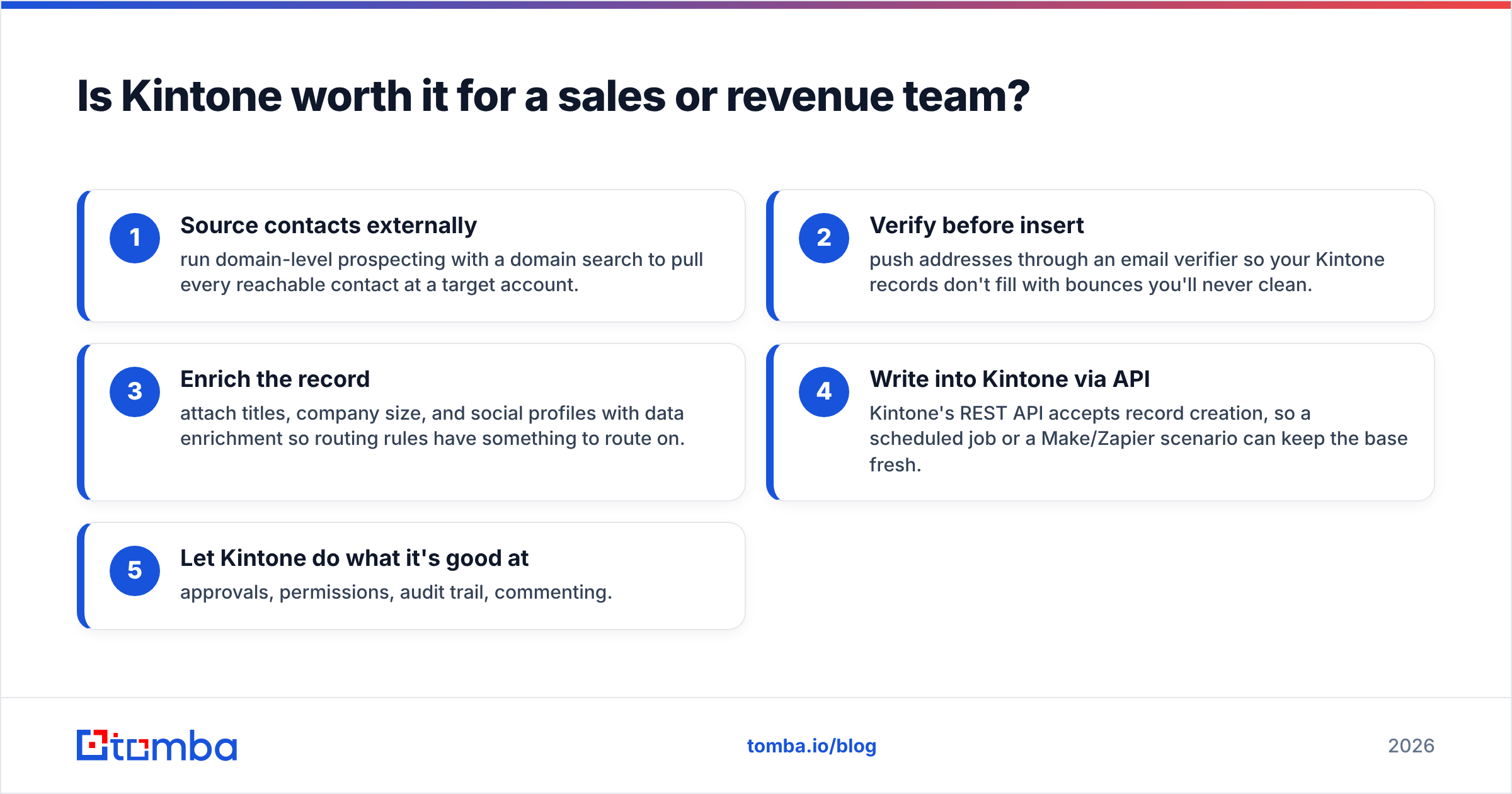
- Source contacts externally — run domain-level prospecting with a domain search to pull every reachable contact at a target account.
- Verify before insert — push addresses through an email verifier so your Kintone records don't fill with bounces you'll never clean.
- Enrich the record — attach titles, company size, and social profiles with data enrichment so routing rules have something to route on.
- Write into Kintone via API — the REST API accepts record creation, so a scheduled job or a Make/Zapier scenario can keep the base fresh.
- Let Kintone do what it's good at — approvals, permissions, audit trail, commenting.
The cost consequence: budget Kintone as your process line item, not your data line item. Those are two purchases. Teams that conflate them pay $24/seat for an empty database, then blame the platform.
What questions should you ask before you sign?#
Run through these before the contract, not after.
- How many seats do we truly need — and does the 10-user minimum change the math? If you need six, your real rate is $40/seat.
- Who owns app maintenance? Name the person. If you can't, budget an implementation partner instead.
- Which reports do executives need, and can Kintone produce them natively? Test this in trial with your actual data, not sample data.
- What's our plugin list, and what does it cost annually? Charts, Gantt, calendar, and e-sign add up quickly.
- Does our data need to leave Kintone? If yes, confirm API rate limits against your sync volume before you build.
- What's the exit path? Kintone exports to CSV per app. Fifteen linked apps means fifteen exports and a reassembly project.
The free 30-day trial requires no card, and it's a real trial. Build your hardest app in it. Most buyer regret comes from evaluating with a toy use case.
Kintone pricing reviews pros and cons: who should buy, and who should walk away?#
Buy it if: you have 10+ people, at least three genuinely approval-driven processes, someone willing to own configuration, and tolerance for utilitarian UI. The value compounds — the fifth app costs the same as the first.
Walk away if: your team is under 10 people (the minimum kills the economics), your primary need is reporting and dashboards, your processes are standard enough that a purpose-built SaaS already exists, or nobody on the team wants to be the admin.
The middle case — most readers — is a team that needs Kintone for internal process and a separate, dedicated stack for outbound and contact data. That's not a failure of Kintone. It's an accurate reading of what a no-code database platform is.
If you're building that second half, the data layer, start there. Tomba's Tomba Email Finder pulls verified professional emails by domain, name, or company. It then pushes them into whatever system you've built, including a Kintone app via the Tomba API. The free tier gives you 25 searches a month, enough to test the match rate on your own target accounts. Paid plans start at $49/month on Starter and $99/month on Growth. Check Tomba pricing to see where your volume lands. Then let Kintone handle the approvals while something purpose-built handles the pipeline.
Related guides#
// get started
Find, verify and enrich your first contacts today
Start on the free plan with 25 searches a month, then scale when your team is ready.
Free plan · No credit card required · GDPR & CCPA
// about the author