Kintone vs Odoo in 2026: Which Platform Fits Your Team?
Kintone is a no-code workspace for building custom business apps. Odoo is a full open-source ERP suite. They solve different problems, and picking the wrong one costs you a year. Here is the honest breakdown.
TL;DR
- Kintone is a no-code app builder, Odoo is an ERP suite. Kintone gives you a blank canvas and drag-and-drop database apps. Odoo gives you 80+ pre-built modules (CRM, accounting, inventory, HR) that already talk to each other.
- Pick Kintone when your processes are weird, spreadsheet-shaped, and change every quarter, and when you need non-technical staff to build and edit apps themselves.
- Pick Odoo when you need real accounting, inventory, manufacturing, or e-commerce out of the box and you have (or can hire) a partner to configure it.
- Cost is not the deciding factor. Both land in the $20-40 per user per month range on list pricing. Implementation time and internal ownership are what actually blow up budgets.
- Neither one finds you customers. Both are containers. Whatever you pick, the pipeline still needs verified contact data pushed in via API.
What is Kintone and who actually uses it?#
Kintone is a no-code platform from Cybozu for building internal business apps without a developer. Think of it as a shared Airtable with workflow, permissions, and a comment thread bolted onto every record.
The mental model: a spreadsheet you outgrew. You have a Google Sheet tracking client onboarding. Six people edit it, two of them break formulas weekly, and nobody knows which row is current. Kintone turns that sheet into an app with field validation, assignment rules, approval steps, and an audit trail, in an afternoon.
Here is what you get:
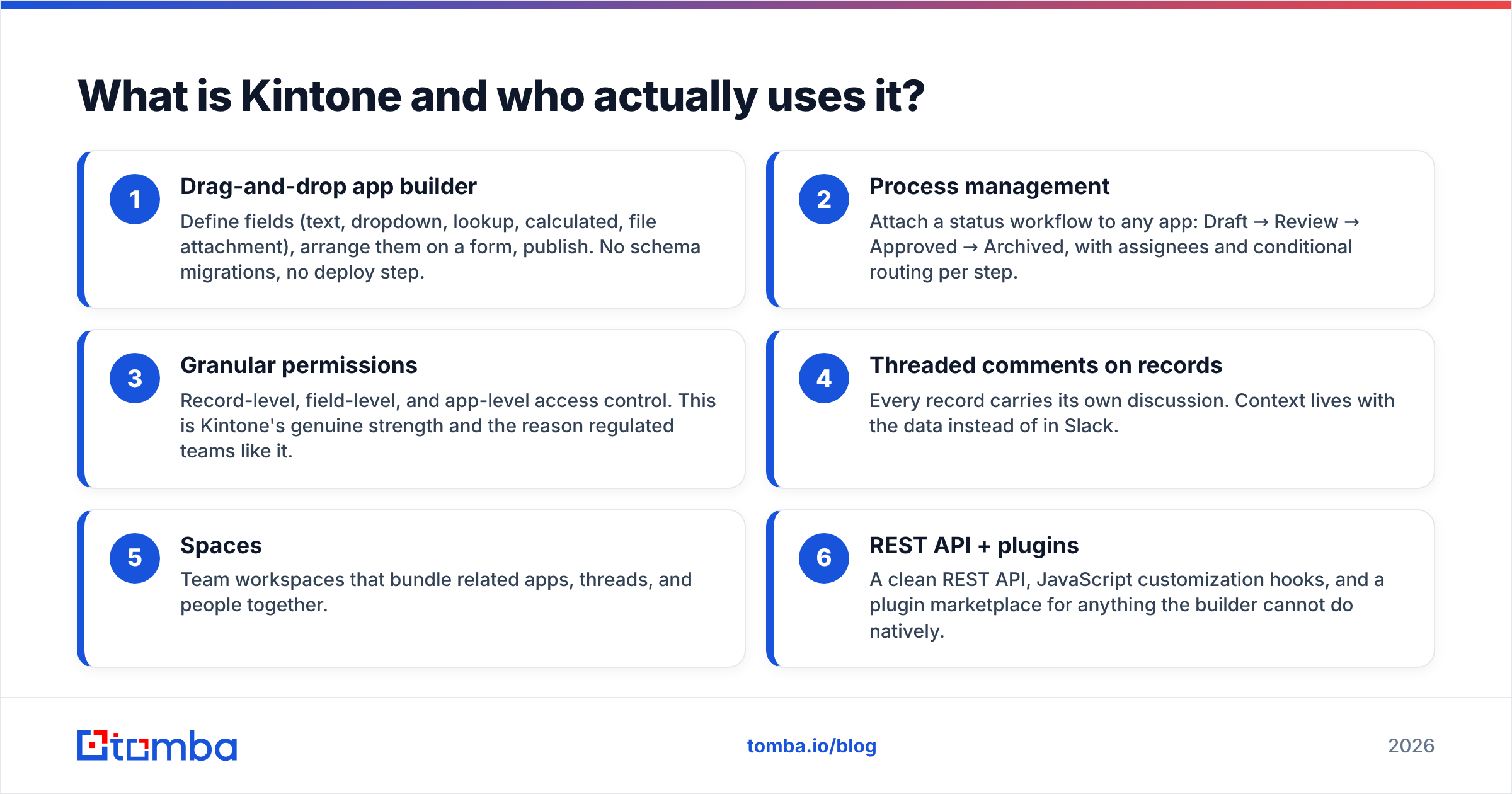
- Drag-and-drop app builder — Define fields (text, dropdown, lookup, calculated, file attachment), arrange them on a form, publish. No schema migrations, no deploy step.
- Process management — Attach a status workflow to any app: Draft → Review → Approved → Archived, with assignees and conditional routing per step.
- Granular permissions — Record-level, field-level, and app-level access control. This is Kintone's genuine strength and the reason regulated teams like it.
- Threaded comments on records — Every record carries its own discussion. Context lives with the data instead of in Slack.
- Spaces — Team workspaces that bundle related apps, threads, and people together.
- REST API + plugins — A clean REST API, JavaScript customization hooks, and a plugin marketplace for anything the builder cannot do natively.
Kintone is dominant in Japan (Cybozu reports tens of thousands of customers there) and has been pushing into North America and Europe. You can see the current feature set on kintone.com.
What is Odoo and what does it replace?#
Odoo is an open-source ERP and business suite. Instead of a blank canvas, you get a catalog of interlocking modules: CRM, Sales, Accounting, Inventory, Manufacturing, Purchase, Project, Timesheets, HR, Website, eCommerce, POS, Marketing Automation, Helpdesk, and more.
The mental model: a hardware store where every tool already fits the same battery. Enable Inventory and Accounting, and a delivery order automatically posts a journal entry. That cross-module wiring is the whole point, and it is the thing Kintone will never give you no matter how many apps you build.
Odoo ships in two editions. Community is free, open source (LGPLv3), self-hosted, and missing a long list of features including studio customization, most accounting localizations, and official support. Enterprise is paid per user, adds the proprietary modules, and comes with hosting on Odoo Online or Odoo.sh. Details on odoo.com.
Kintone vs Odoo: how do they compare head to head?#
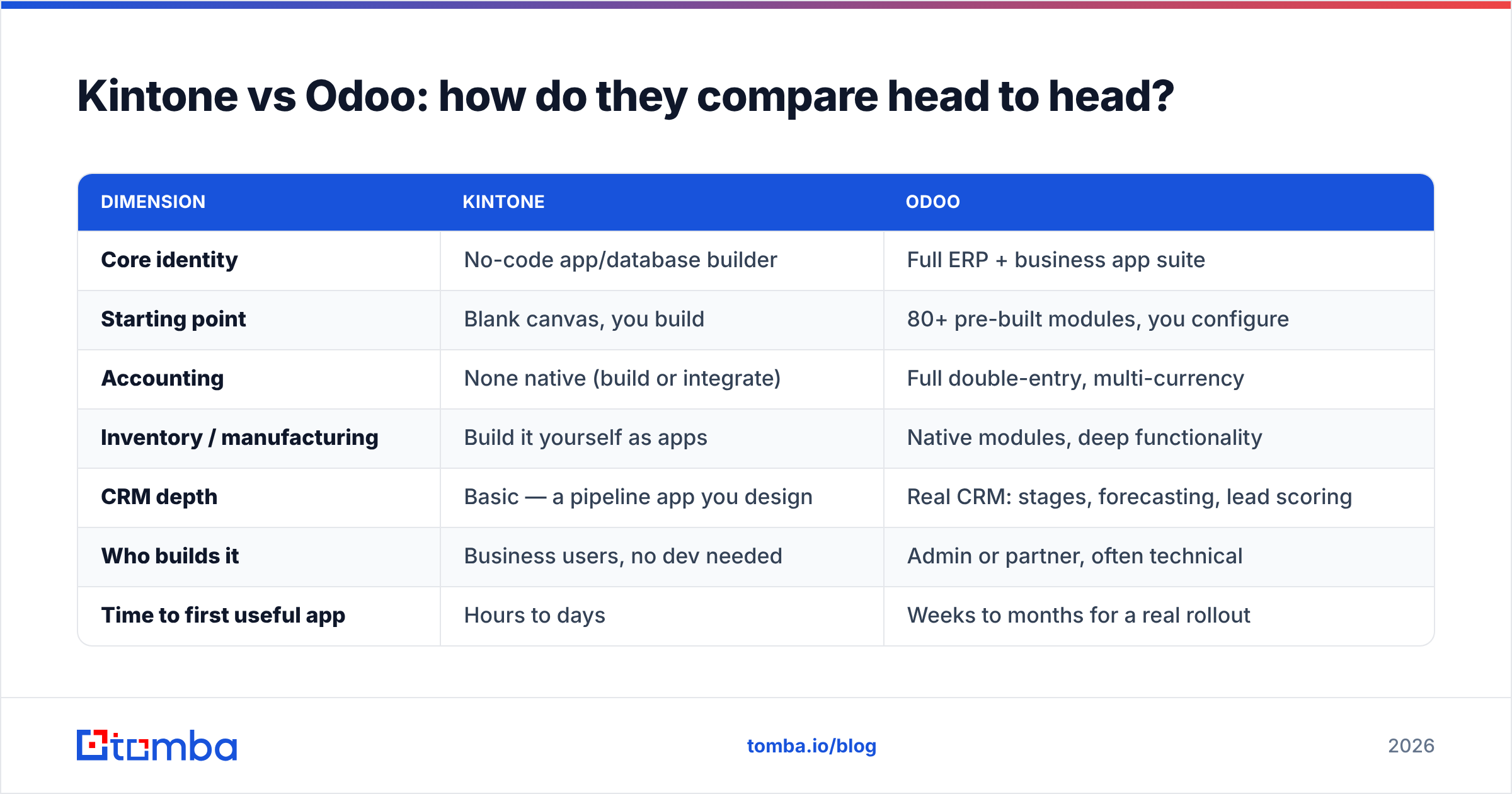
| Dimension | Kintone | Odoo |
|---|---|---|
| Core identity | No-code app/database builder | Full ERP + business app suite |
| Starting point | Blank canvas, you build | 80+ pre-built modules, you configure |
| Accounting | None native (build or integrate) | Full double-entry, multi-currency |
| Inventory / manufacturing | Build it yourself as apps | Native modules, deep functionality |
| CRM depth | Basic — a pipeline app you design | Real CRM: stages, forecasting, lead scoring |
| Who builds it | Business users, no dev needed | Admin or partner, often technical |
| Time to first useful app | Hours to days | Weeks to months for a real rollout |
| Open source | No | Yes (Community edition, LGPLv3) |
| Self-hosting | No, SaaS only | Yes, full control |
| Permissions model | Best-in-class, field-level | Good, role/group based |
| Customization ceiling | Medium — JS hooks, plugins, API | Very high — Python modules, full source |
| Best for | Process-heavy teams with unique workflows | Companies needing an operational backbone |
The table makes the split obvious. These are not two versions of the same product. They rarely appear on the same shortlist for the right reasons — teams usually end up comparing them because both showed up in a search for "flexible business software that is not Salesforce."
What do Kintone and Odoo actually cost in 2026?#
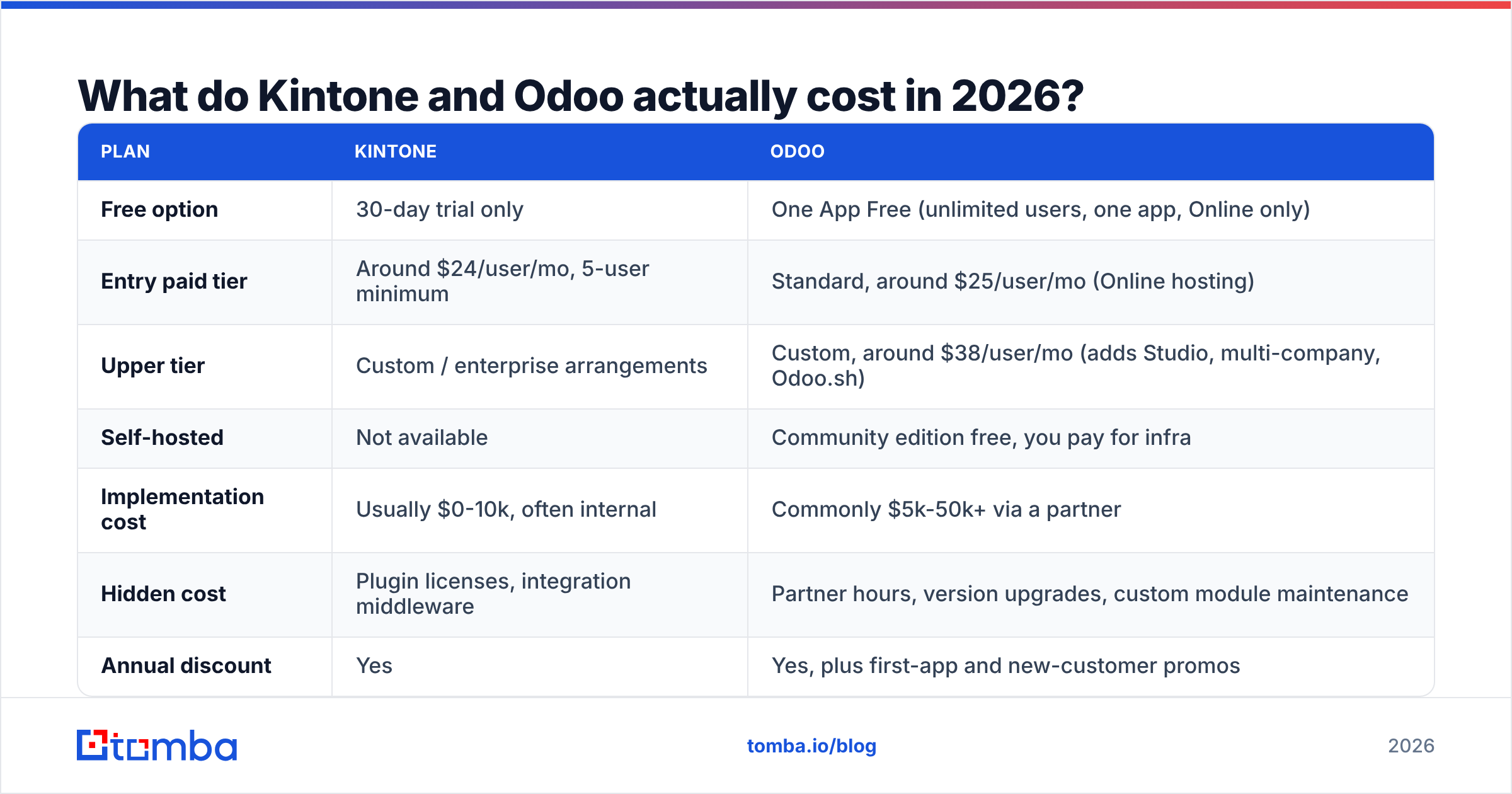
Both vendors change list pricing and run regional promotions, so treat these as directional and confirm on the vendor's own pricing page before you budget.
| Plan | Kintone | Odoo |
|---|---|---|
| Free option | 30-day trial only | One App Free (unlimited users, one app, Online only) |
| Entry paid tier | Around $24/user/mo, 5-user minimum | Standard, around $25/user/mo (Online hosting) |
| Upper tier | Custom / enterprise arrangements | Custom, around $38/user/mo (adds Studio, multi-company, Odoo.sh) |
| Self-hosted | Not available | Community edition free, you pay for infra |
| Implementation cost | Usually $0-10k, often internal | Commonly $5k-50k+ via a partner |
| Hidden cost | Plugin licenses, integration middleware | Partner hours, version upgrades, custom module maintenance |
| Annual discount | Yes | Yes, plus first-app and new-customer promos |
Notice the last three rows. That is where the real Kintone vs Odoo cost difference lives.
Kintone's total cost is close to its sticker price because the person building the apps is usually already on payroll. Odoo's sticker price is similarly modest, but a proper multi-module rollout with accounting localization, data migration, and a few custom modules routinely costs more in services than in licenses for the first year. Odoo's own partner directory exists precisely because most companies do not self-implement. Reviews on G2 repeat this pattern: happy Odoo customers almost always mention a good partner; unhappy ones almost always went it alone.
Which one is better for sales teams?#
Odoo, clearly — if you need a CRM.
Odoo CRM ships with pipeline stages, opportunity scoring, activity scheduling, email integration, quotation-to-invoice flow, and revenue forecasting. Your reps get a working system on day one, and the quote they send becomes the invoice finance chases. That handoff is worth more than any single feature.
Kintone can absolutely hold a sales pipeline — plenty of teams build one — but you are building a CRM, not buying one. You design the deal app, the stage dropdown, the activity log app, the lookup between them, and the reporting. It works, it will fit your process exactly, and it will take a few days plus ongoing ownership. If your sales motion is genuinely unusual (channel-heavy, project-bid-based, grant-funded, multi-party approvals), that control is a feature. If your motion is "qualify, demo, quote, close," you are rebuilding a solved problem.
There is a third possibility people miss: use Kintone for the weird operational process and keep a dedicated CRM alongside it. Kintone's API makes that a legitimate architecture rather than a workaround.

How hard is each one to implement?#
Kintone rewards impatience. A department lead can sign up, build a functioning request-and-approval app before lunch, and roll it out to eight people the same week. Nothing is blocked on IT. The risk is the opposite of ERP risk: eighteen months later you have 60 apps, four of which do nearly the same thing, and no data model anyone designed on purpose. Governance is the tax.
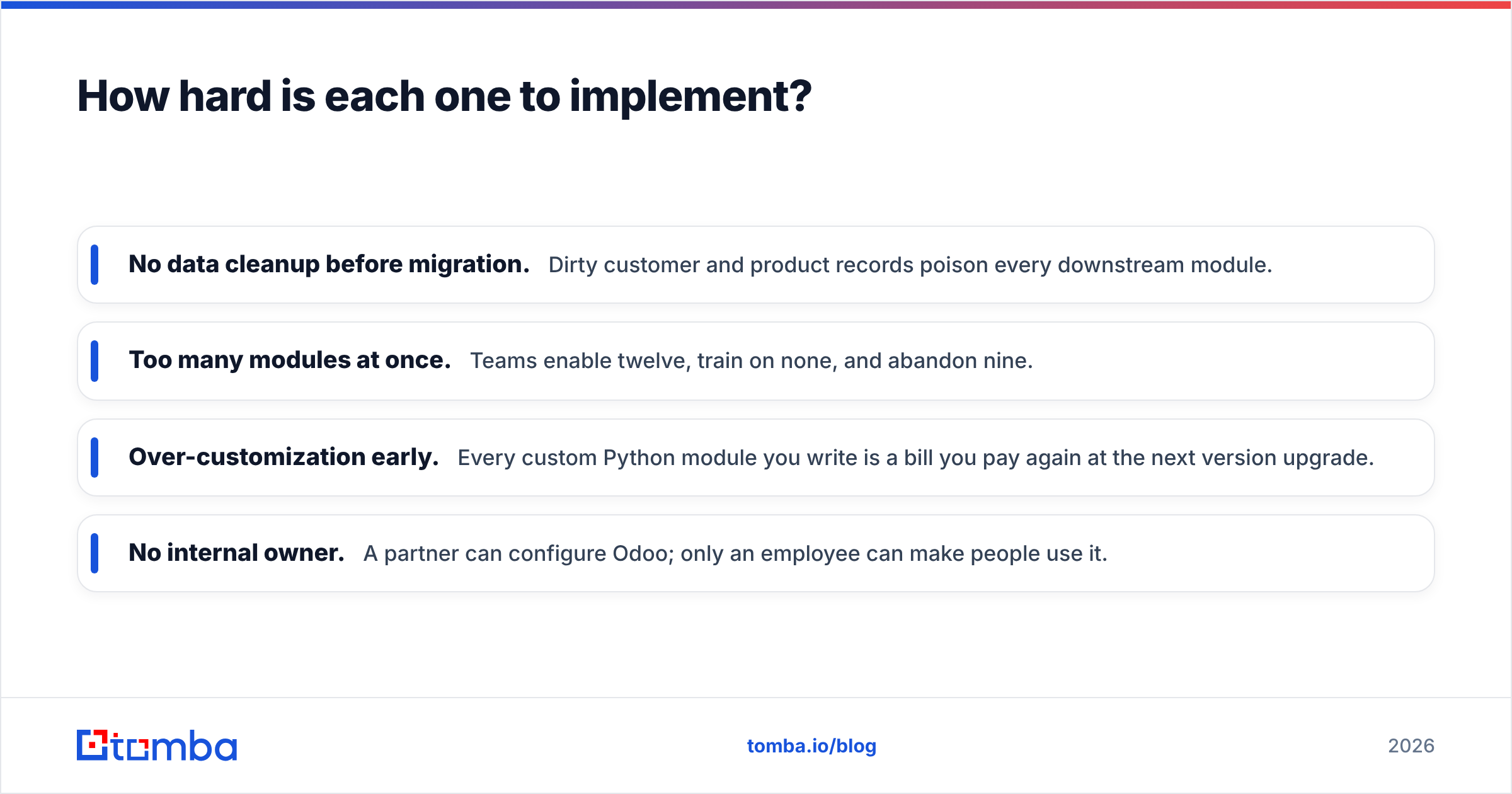
Odoo punishes impatience. The demo is fast and the trial is genuinely impressive. Then you hit chart of accounts, tax rules, product variants, warehouse routes, and multi-company settings, and the project becomes a real project with a real timeline. Odoo rollouts that go badly almost always went badly for one of four reasons:
- No data cleanup before migration. Dirty customer and product records poison every downstream module.
- Too many modules at once. Teams enable twelve, train on none, and abandon nine.
- Over-customization early. Every custom Python module you write is a bill you pay again at the next version upgrade.
- No internal owner. A partner can configure Odoo; only an employee can make people use it.
Budget honestly: a single-department Kintone rollout is measured in days, a multi-module Odoo rollout in months.
What about integrations, APIs, and data?#
Both platforms are open enough to build on, which matters more than any feature checklist.
Kintone exposes a clean REST API per app, supports webhooks, and lets you inject JavaScript and CSS for front-end customization. It also connects through Zapier and Make for the long tail of SaaS.
Odoo exposes XML-RPC and JSON-RPC across every model in the system, which is unusually complete — anything the UI can do, the API can do. Self-hosting means you can also go straight to PostgreSQL if you need to. Add the OCA (Odoo Community Association) module ecosystem and the extension surface is enormous.
This is where the comparison stops mattering and data quality starts. Both platforms are containers. A CRM module with 4,000 records, 900 of which bounce, is worse than an empty one because it teaches your reps to distrust the system. Before you import anything into either platform:
- Deduplicate and normalize your existing lists — a simple pass with a remove duplicates tool catches more than you expect.
- Run every address through an email verifier so bounce-prone contacts never reach the new system.
- Fill the gaps with data enrichment instead of letting reps hand-type job titles.
- Wire ongoing inbound leads through the Tomba API or a Zapier integration so records arrive complete rather than getting cleaned up later.
Migration day is the cheapest moment you will ever have to fix your data. After go-live, every bad record has opinions attached to it.
Where does each platform fall short?#
Kintone's honest weaknesses:
- No native accounting, inventory, or e-commerce. If you need those, you are integrating or you chose wrong.
- Reporting and dashboards are functional but basic compared to a dedicated BI tool.
- Cross-app relationships exist but are shallower than a real relational schema.
- The 5-user minimum makes it awkward for very small teams.
- Smaller ecosystem outside Japan — fewer consultants, fewer templates, fewer Stack Overflow answers.
Odoo's honest weaknesses:
- Community vs Enterprise feature gaps are not always obvious until you hit one mid-project.
- Version upgrades with custom modules are genuine engineering work, not a button.
- The UI is dense. Users coming from single-purpose tools find it overwhelming.
- Partner quality varies enormously, and a bad partner will cost you the project.
- "Free and open source" is true for the license and misleading about total cost.
Kintone vs Odoo: which should you choose?#
Pick Kintone if: your processes do not match off-the-shelf software, you want business users building and editing apps without IT tickets, permissions and approvals matter more than accounting, and you want something live this month.
Pick Odoo if: you need accounting, inventory, manufacturing, or e-commerce working together, you are replacing several disconnected tools with one system of record, you want the option to self-host and own the source, and you can commit a real budget and an internal owner.
Pick neither if your actual problem is "we do not have enough qualified leads." No platform fixes that. A configured pipeline with nothing in it is an expensive empty filing cabinet, and switching platforms is the most popular way to avoid admitting the problem is top-of-funnel.
How do you keep either system full of real contacts?#
Whichever way you go, the workflow is the same: find the right people, verify they exist, push them in clean.
That is the layer Tomba handles. Use the Tomba Email Finder to pull verified professional addresses by name and company domain, run a domain search when you need every reachable contact at a target account, and batch it through the bulk email finder when you are loading a segment rather than a single lead. Plans start free with 25 searches a month, with Starter at $49/mo and Growth at $99/mo — see current Tomba pricing for the full breakdown.
Set up the data layer before you finish setting up the platform. Kintone and Odoo both decide how your team works. Your contact data decides whether there is any work to do at all.
Related guides#
// get started
Find, verify and enrich your first contacts today
Start on the free plan with 25 searches a month, then scale when your team is ready.
Free plan · No credit card required · GDPR & CCPA
// about the author