Kylas Pricing, Reviews, Pros and Cons: A 2026 CRM Breakdown
Kylas sells a CRM with unlimited users on a flat monthly fee. That math is great for growing teams and terrible for tiny ones. Here is the honest breakdown of pricing, real user reviews, and where the platform falls short.
TL;DR
- Kylas sells a sales CRM on a flat monthly fee with unlimited users — the headline differentiator against per-seat tools like HubSpot, Zoho, and Pipedrive.
- The flat fee only pays off past roughly 8–12 users. Below that, per-seat CRMs are usually cheaper.
- Reviews on G2 and Capterra cluster around the same themes: fast onboarding, responsive support, generous customization — and a weaker mobile app, thinner native integrations, and reporting that stops short of what RevOps teams want.
- Kylas is a system of record, not a source of contacts. It does not find or verify emails, so you still need a prospecting data layer feeding it.
- Best fit: India-based or cost-sensitive SMB sales teams of 10–100 reps that want everyone (including ops, support, and founders) in the CRM without seat anxiety.
What is Kylas and who is it actually built for?#
Kylas is a sales CRM built by Sell.Do, aimed squarely at small and mid-sized businesses that have outgrown spreadsheets but do not want to pay enterprise CRM prices. It covers the standard stack: lead capture, contact and company records, deal pipelines, quotations, activity logging, workflow automation, and reporting.
The product decision that defines Kylas is pricing structure. Nearly every mainstream CRM charges per user per month. Kylas charges a flat monthly fee and lets you add as many users as you want. That single choice cascades through everything — who adopts it, what the pros and cons look like, and whether the numbers work for you.
It also explains the positioning. Kylas is strongest in markets where per-seat pricing in USD is painful relative to local salaries: India first, then Southeast Asia and the Middle East. If you are a 40-person sales org in Pune paying $50/user/month for a US CRM, you are spending $2,000/month on software while your reps cost a fraction of their US counterparts. Flat-fee pricing fixes that asymmetry.
The trade-off, which we will get to: Kylas is not trying to be the deepest CRM on the market. It is trying to be the one where seat count stops being a budgeting conversation.
How much does Kylas cost in 2026?#
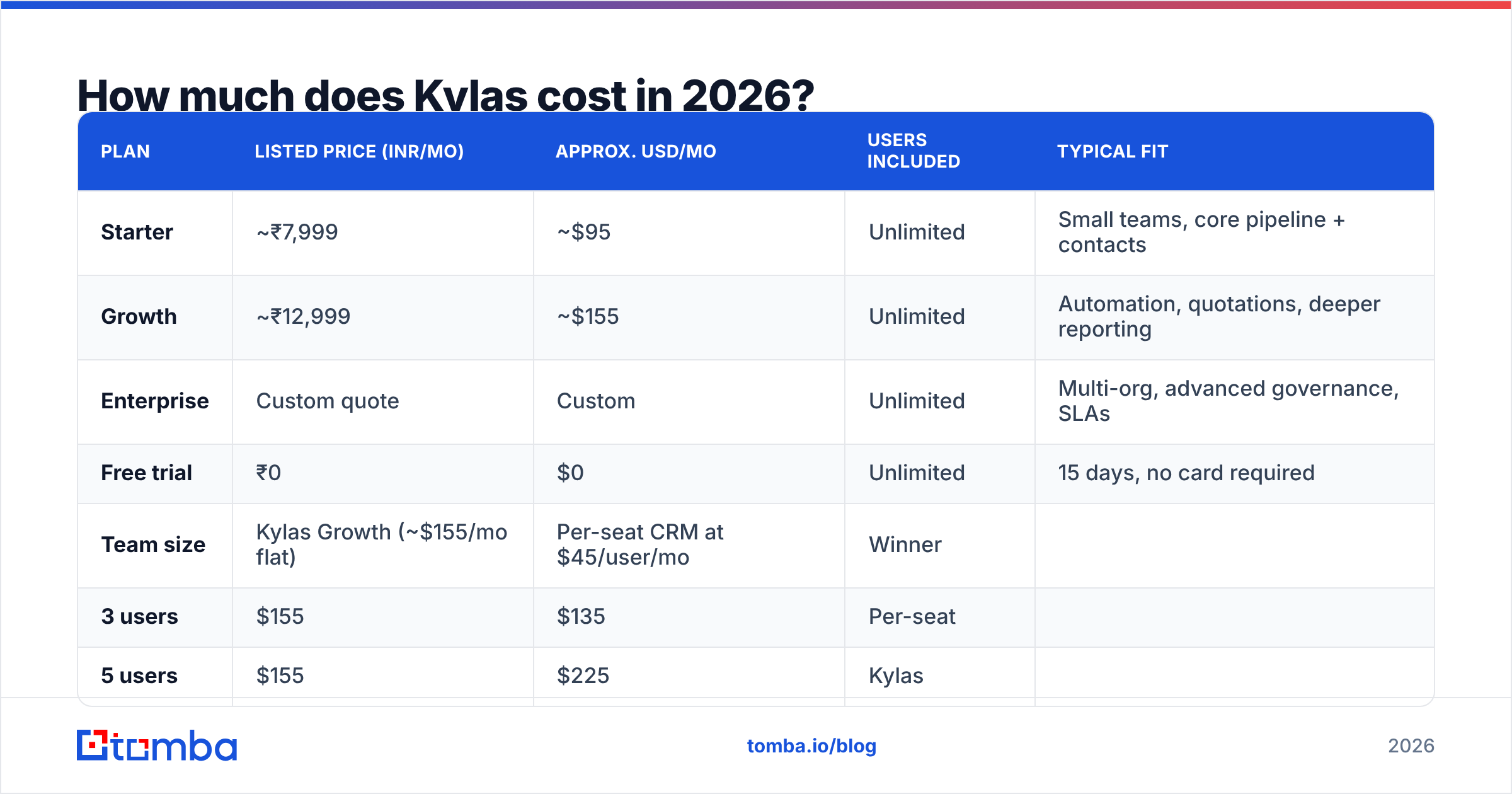
Kylas publishes pricing in INR on its own pricing page, and rates change — always confirm the current numbers before you commit. As of publication, the structure looks like this:
| Plan | Listed price (INR/mo) | Approx. USD/mo | Users included | Typical fit |
|---|---|---|---|---|
| Starter | ~₹7,999 | ~$95 | Unlimited | Small teams, core pipeline + contacts |
| Growth | ~₹12,999 | ~$155 | Unlimited | Automation, quotations, deeper reporting |
| Enterprise | Custom quote | Custom | Unlimited | Multi-org, advanced governance, SLAs |
| Free trial | ₹0 | $0 | Unlimited | 15 days, no card required |
Two things matter more than the sticker price.
First, "unlimited users" is real but not free of friction. You still pay for the plan tier that unlocks the features your team needs, and some capabilities — extra storage, additional pipelines, certain integrations, or higher API limits — sit behind the higher tier or an add-on. Budget for the tier, not the headline.
Second, annual billing and local taxes change the effective number. Indian customers pay GST on top. Non-Indian customers deal with FX, and the USD equivalent drifts with the rupee. A quote in January is not a quote in July.
Here is the break-even math, which is the only calculation that actually decides this:
| Team size | Kylas Growth (~$155/mo flat) | Per-seat CRM at $45/user/mo | Winner |
|---|---|---|---|
| 3 users | $155 | $135 | Per-seat |
| 5 users | $155 | $225 | Kylas |
| 10 users | $155 | $450 | Kylas |
| 25 users | $155 | $1,125 | Kylas |
| 50 users | $155 | $2,250 | Kylas, by a lot |
At three or four reps, a per-seat CRM with a cheap starter tier usually wins. Somewhere between five and eight users, the flat fee flips to being the better deal — and past twenty, it is not close. If your team is growing fast, the flat fee also removes the quiet tax where every new hire triggers a procurement conversation.

What do Kylas reviews actually say?#
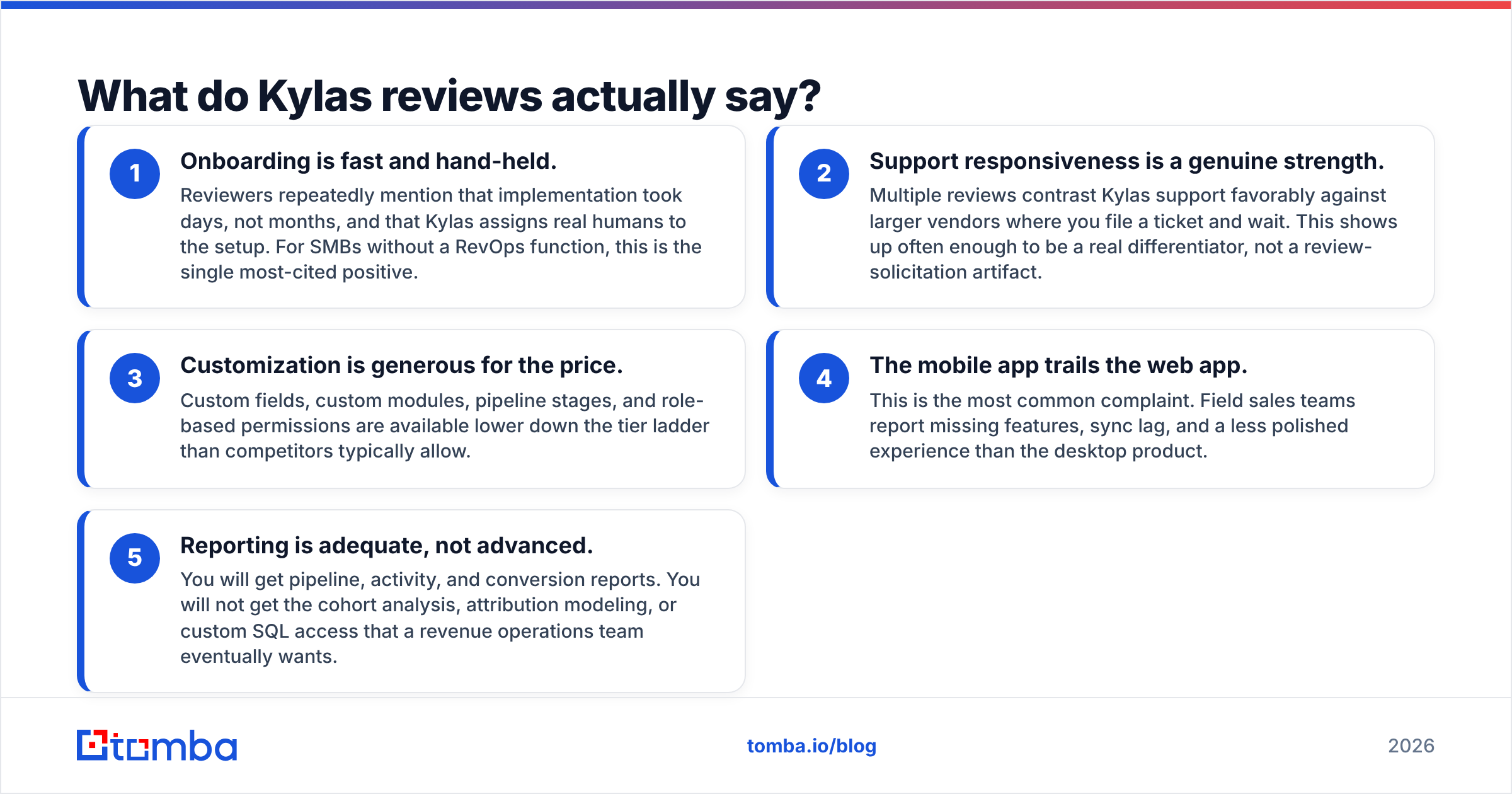
Aggregate review sentiment on G2 and Capterra is broadly positive, and the pattern is consistent enough to be useful. Read enough of them and the same five themes surface.
- Onboarding is fast and hand-held. Reviewers repeatedly mention that implementation took days, not months, and that Kylas assigns real humans to the setup. For SMBs without a RevOps function, this is the single most-cited positive.
- Support responsiveness is a genuine strength. Multiple reviews contrast Kylas support favorably against larger vendors where you file a ticket and wait. This shows up often enough to be a real differentiator, not a review-solicitation artifact.
- Customization is generous for the price. Custom fields, custom modules, pipeline stages, and role-based permissions are available lower down the tier ladder than competitors typically allow.
- The mobile app trails the web app. This is the most common complaint. Field sales teams report missing features, sync lag, and a less polished experience than the desktop product.
- Reporting is adequate, not advanced. You will get pipeline, activity, and conversion reports. You will not get the cohort analysis, attribution modeling, or custom SQL access that a revenue operations team eventually wants.
One caveat on reading Kylas reviews: the review base skews heavily toward Indian SMBs. That is fine if you are one. If you are a US or EU team evaluating it, weight the reviews about integrations and compliance more heavily than the reviews about ease of use, because integration depth is where geography actually matters.
What are the pros of Kylas?#
Unlimited users changes team behavior, not just the bill. When seats are free, you put everyone in the CRM — support, finance, the founder, the marketing contractor. Data quality improves because nobody is emailing screenshots to the one person with a license. This is the underrated benefit and it is hard to quantify until you have lived the alternative.
Predictable budgeting. One line item, no seat reconciliation, no surprise true-up at renewal. Finance teams like this more than sales teams do.
Fast time-to-value. Reviewers consistently report going live in under two weeks. Compare that to a Salesforce implementation, where the consulting spend can exceed the license spend in year one.
Quotation and invoicing built in. Kylas includes quote generation natively rather than pushing you to a separate CPQ tool — useful for SMBs selling products with configurable pricing.
Workflow automation without a developer. Rule-based assignment, follow-up triggers, and stage automation are configurable in the UI. It is not Salesforce Flow, but it covers the 80% of sales automation that SMBs actually use.
A real free trial. Fifteen days, no credit card. You can load real data and test with your actual team before spending anything — which you should, because the flat-fee bet is only good if adoption is high.
What are the cons of Kylas?#
The mobile app is the weak link. If your reps live in the field, test the mobile experience hard during the trial. This is the complaint that shows up most often and the one most likely to affect daily usage.
Native integration catalog is thinner than the incumbents. HubSpot and Zoho have hundreds of first-party integrations plus enormous partner ecosystems. Kylas covers the essentials — email, calendar, telephony, WhatsApp, payment gateways, Zapier-style connectors — but you will hit gaps with niche tools. Check your specific stack before signing.
Reporting ceiling arrives earlier than you expect. Fine at 10 reps. Frustrating at 60, when you want multi-touch attribution and forecast accuracy tracking.
Brand recognition and hiring pool. A rep who has used Salesforce, HubSpot, or Pipedrive can be productive on day one. Kylas requires training. That is a real, if small, switching cost.
No native contact data. This is the big structural gap, and it applies to almost every CRM, not just Kylas. The CRM stores contacts. It does not find them. An empty CRM is an expensive spreadsheet.

How does Kylas compare to other SMB CRMs?#
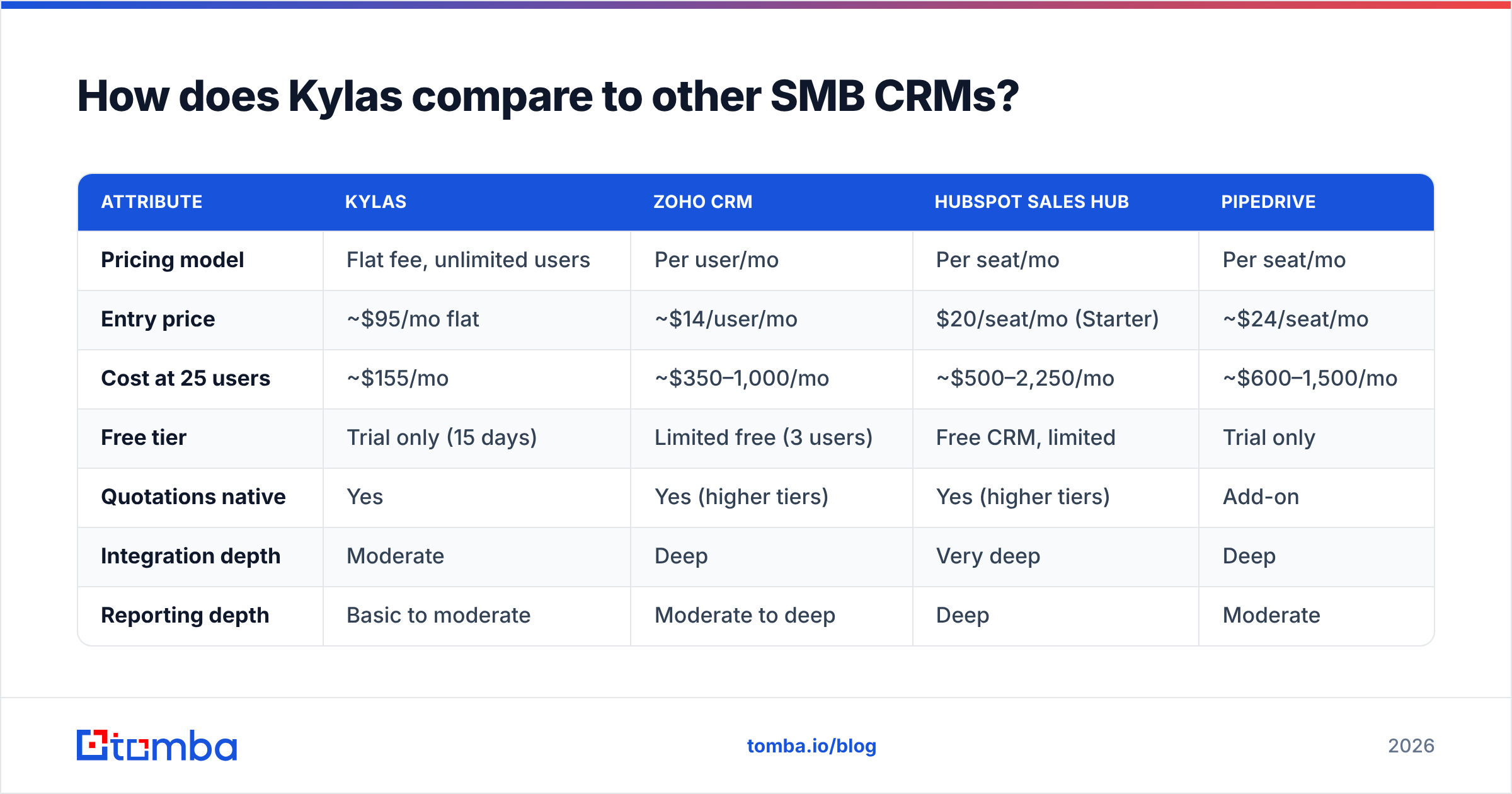
| Attribute | Kylas | Zoho CRM | HubSpot Sales Hub | Pipedrive |
|---|---|---|---|---|
| Pricing model | Flat fee, unlimited users | Per user/mo | Per seat/mo | Per seat/mo |
| Entry price | ~$95/mo flat | ~$14/user/mo | $20/seat/mo (Starter) | ~$24/seat/mo |
| Cost at 25 users | ~$155/mo | ~$350–1,000/mo | ~$500–2,250/mo | ~$600–1,500/mo |
| Free tier | Trial only (15 days) | Limited free (3 users) | Free CRM, limited | Trial only |
| Quotations native | Yes | Yes (higher tiers) | Yes (higher tiers) | Add-on |
| Integration depth | Moderate | Deep | Very deep | Deep |
| Reporting depth | Basic to moderate | Moderate to deep | Deep | Moderate |
| Contact/email data included | No | No | Limited, higher tiers | No |
| Best for | 10–100 user SMBs, cost-sensitive markets | Feature breadth on a budget | Marketing + sales alignment | Pipeline-first simplicity |
Prices are indicative list rates at publication and vary by region, term, and tier. Verify current pricing on each vendor's site.
The honest read: if you are under five users, Zoho or Pipedrive will be cheaper and have deeper ecosystems. If you are 10–100 users and cost-sensitive, Kylas has a legitimate structural advantage that the incumbents cannot match without abandoning their own pricing model. Above 100 users with complex governance needs, you are probably looking at HubSpot Enterprise or Salesforce regardless of price.
Does Kylas solve your contact data problem?#
No — and you should not expect it to.
This is the most common mistake in CRM buying. Teams evaluate CRMs as if the contacts arrive with the software. They do not. Kylas gives you a place to put leads, workflows to move them, and reports to measure them. Where those leads come from is entirely your problem.
That means your stack needs two layers:
- The system of record — Kylas, holding accounts, contacts, deals, and activity history.
- The data layer — whatever finds verified contact details and keeps them from rotting.
B2B contact data decays fast. Job changes, domain migrations, and departures mean a list you bought last year is meaningfully worse today. A CRM full of bounced addresses actively hurts you: it damages your sender reputation, it inflates your pipeline math, and it wastes rep time on records that will never convert.
The practical setup for a Kylas-based stack:
- Use an email finder to source verified work addresses for target accounts before they enter the CRM.
- Run a bulk verify pass on any list you import so bad records never touch your sending domain.
- Use data enrichment to fill in job titles, company size, and technology signals so your Kylas segmentation and lead scoring have something to work with.
- Re-verify your existing CRM contacts quarterly. Records that were valid at import are not automatically valid a year later.
If you use a marketplace list provider such as BookYourData for pre-built audience lists, the same logic applies — verify on import and re-verify on a schedule, because no provider can guarantee a record stays accurate after delivery.
Is Kylas worth it in 2026?#
It depends on one number: your headcount.
Buy Kylas if: you have 8+ people who should touch the CRM, you are in a market where per-seat USD pricing is painful, you value fast onboarding over feature depth, and your reporting needs stop at pipeline and activity. The flat fee is not a gimmick at this size — it is a materially better deal.
Skip Kylas if: you have fewer than five users (per-seat wins), you need deep marketing automation attached to the CRM (HubSpot), you run a heavily field-based team that lives on mobile (test hard first), or you need a long tail of niche integrations.
Do this before you decide: run the 15-day trial with real data and at least three real users. Import a live segment of your list, not a sample. Test the mobile app in the field. Pull the three reports your manager asks for every Monday. If all three work, the pricing math will take care of itself.
Frequently asked questions#
Does Kylas really have unlimited users on every plan? Yes, unlimited users is the core model across tiers. What differs between tiers is features, storage, and limits — not seat count. Confirm current terms on kylas.io before purchase.
Is there a free version of Kylas? There is a 15-day free trial with no credit card. There is no permanent free tier the way HubSpot and Zoho offer one.
Does Kylas integrate with email finding tools? Kylas supports standard integration paths including API access and connector platforms. If you need contact data flowing into records automatically, check whether your data provider offers a direct connector or whether you will route it through a middleware step. Tomba's integrations cover the common CRM and automation destinations.
How does Kylas handle data residency? Data residency and compliance specifics should be confirmed directly with Kylas sales, especially if you operate under GDPR or similar regimes. Do not assume — ask, and get it in the contract.
Fill the CRM before you pay for it. Whichever CRM you land on, it is only as valuable as the contacts inside it. Start with Tomba Email Finder to source verified work emails by name, domain, or company, then push clean records into Kylas from day one. The free tier includes 25 searches per month, and paid plans start at $49/month — see Tomba pricing for the full breakdown. A CRM with 500 verified contacts beats one with 5,000 guesses, every quarter.
Related guides#
// get started
Find, verify and enrich your first contacts today
Start on the free plan with 25 searches a month, then scale when your team is ready.
Free plan · No credit card required · GDPR & CCPA
// about the author