What Is a Lead App? The 2026 Guide to Picking the Right One
Lead app is a category, not a product. This guide breaks down the five kinds of lead apps, what they really cost in 2026, and how to tell which one your pipeline actually needs.
TL;DR
- "Lead app" is not one product. It covers five distinct jobs: capture, sourcing, enrichment, verification, and management. Most teams buy the wrong one first.
- The expensive mistake is buying a sourcing app with a huge database before you have a verification layer. Big list plus no verification equals burned domain.
- Realistic 2026 entry pricing runs $0 to $99/month for capture and verification, and $49 to $500+/month for sourcing and enrichment depending on credit volume.
- Data freshness matters more than database size. A 200M-contact database refreshed every 18 months is worse than a 50M database refreshed continuously.
- If you already have a CRM, you do not need a "lead management app." You need the layer your CRM cannot do: finding and validating contact data.
What is a lead app, exactly?#
A lead app is any software whose primary job is to get a qualified, contactable prospect into your pipeline. That definition is deliberately wide, because the market uses the term for at least five different products that share almost no functionality.
Think of it like "kitchen appliance." A blender and a dishwasher are both kitchen appliances, but if you buy a dishwasher expecting a smoothie, that is a purchasing failure, not a product failure. The same thing happens when a founder buys a 300-million-record database expecting it to run their inbound forms.
The confusion is expensive. Buyers search for a lead app, land on a vendor that solves a different part of the funnel, sign an annual contract, and then discover six weeks in that the tool does not touch the problem they had. Lead generation as a discipline spans awareness through handoff to sales, and no single app covers that whole span honestly.
So before you compare pricing, figure out which of the five jobs you are actually buying.
What are the five types of lead app?#
These are the five categories the term covers. Read them as a sequence, because most funnels need them in roughly this order.
Lead capture apps — Forms, chat widgets, pop-ups, and landing pages that convert existing traffic. They only work if you already have traffic. Typical tools: HubSpot forms, Typeform, Instapage. These create leads from demand you already generated.
Lead sourcing apps — Databases and search tools that let you build a list from scratch: filter by industry, headcount, title, geography, or technology, then export contacts. This is where outbound starts. Typical tools: Apollo, BookYourData, Tomba's domain search.
Lead enrichment apps — Take a partial record (a domain, a name, a LinkedIn URL) and fill in the rest: job title, company size, funding stage, phone, email. Enrichment is what makes a raw list segmentable. Tomba's data enrichment sits in this layer.
Lead verification apps — Check whether the contact data you collected is real and deliverable before you send anything to it. This is the least glamorous layer and the one that saves the most money. Skipping it is how teams end up on blocklists.
Lead management apps — Routing, scoring, assignment, and pipeline tracking. This is CRM territory. Salesforce and HubSpot own it. If you already pay for one of these, a separate lead management app is redundant spend.
Most stacks need layers 2, 3, and 4 and already have 1 and 5 covered by tools they forgot they were paying for.
How do the lead app categories compare?#
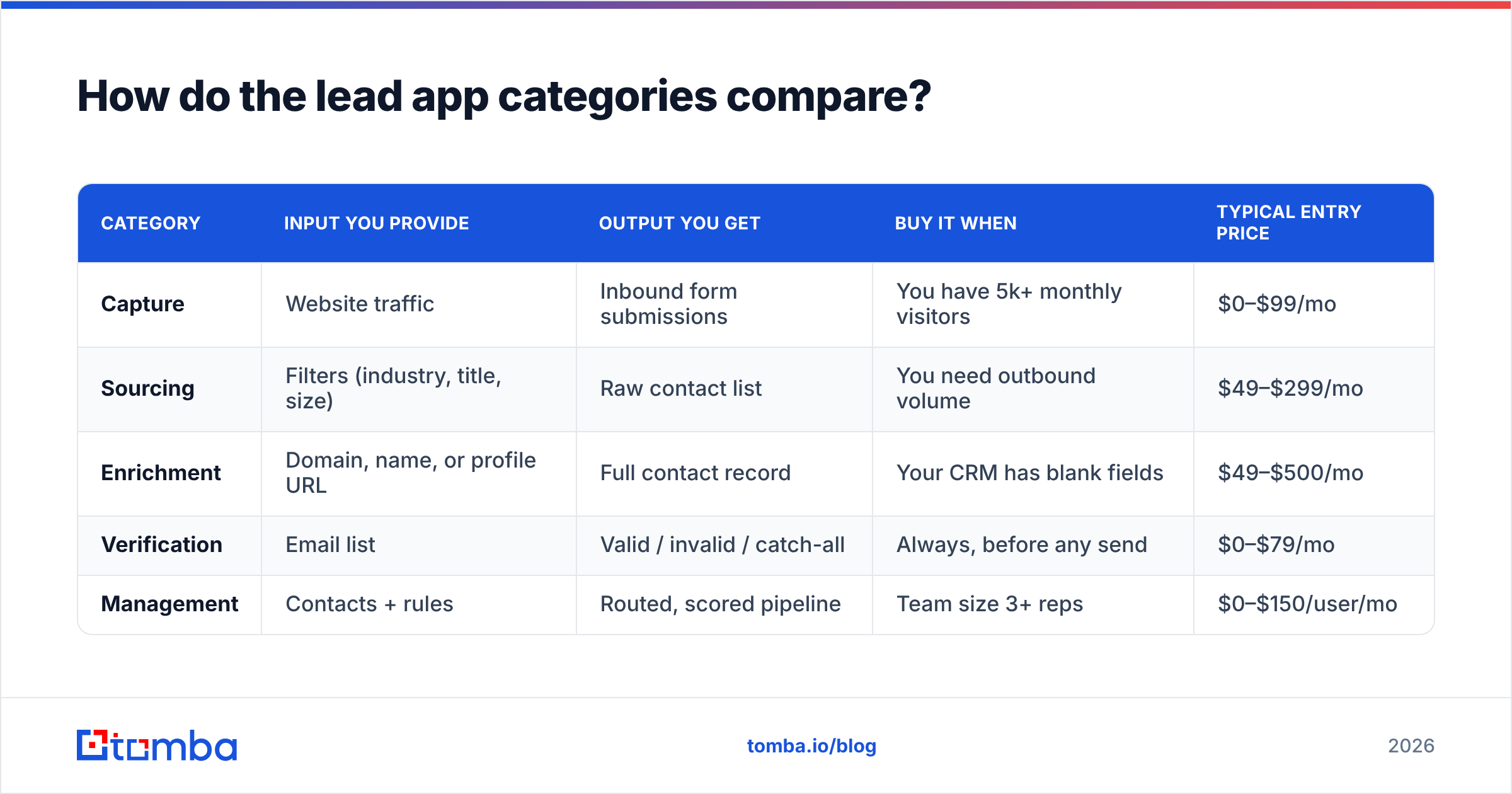
Here is the same five categories laid out against what actually differs between them: what you put in, what you get out, and when they are worth paying for.
| Category | Input you provide | Output you get | Buy it when | Typical entry price |
|---|---|---|---|---|
| Capture | Website traffic | Inbound form submissions | You have 5k+ monthly visitors | $0–$99/mo |
| Sourcing | Filters (industry, title, size) | Raw contact list | You need outbound volume | $49–$299/mo |
| Enrichment | Domain, name, or profile URL | Full contact record | Your CRM has blank fields | $49–$500/mo |
| Verification | Email list | Valid / invalid / catch-all | Always, before any send | $0–$79/mo |
| Management | Contacts + rules | Routed, scored pipeline | Team size 3+ reps | $0–$150/user/mo |
The row most teams skip is verification, and it is the cheapest one on the table. That ordering mistake costs more than every other line item combined.

Why does data quality beat database size?#
Because you only pay for the records you send to, and a dead record costs you twice: once in credits, once in sender reputation.
Vendor marketing loves absolute numbers. "450 million contacts." "Largest B2B database in the world." Those numbers are close to meaningless on their own, for three reasons.
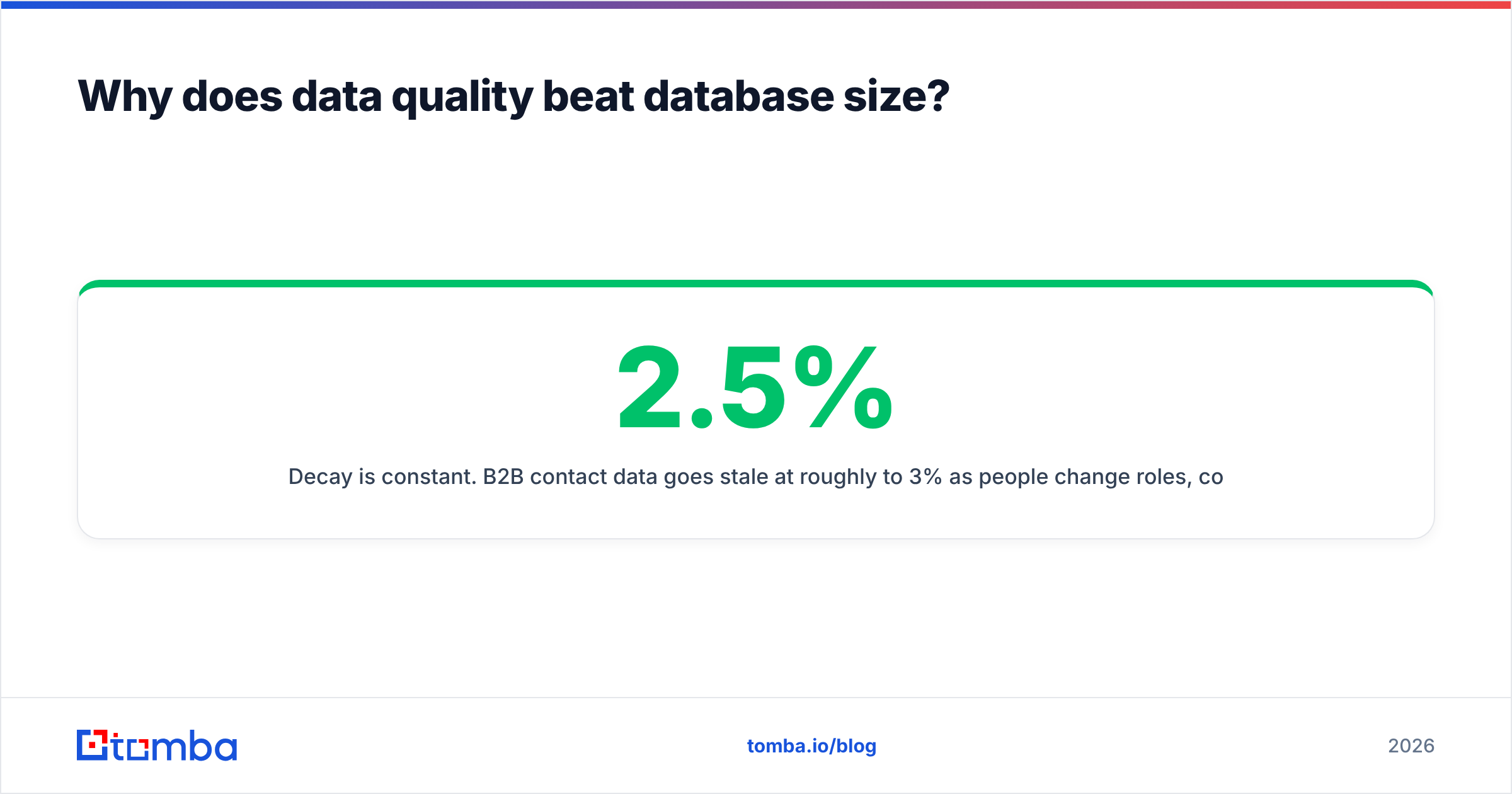
Decay is constant. B2B contact data goes stale at roughly 2.5% to 3% per month as people change roles, companies get acquired, and email conventions change. Over a year, that is around 30% of a database. A vendor that crawls once and sits on the result has a fundamentally worse product a year later, regardless of headline volume.
Coverage is not uniform. A database of 400M records skewed toward US enterprise tech gives you nothing if you sell to German mid-market manufacturers. Ask vendors for coverage by your ICP segment, not global totals. Most will not answer, which is itself an answer.
Verification status is often assumed, not tested. Many sourcing apps return an email with a confidence label that was generated by pattern matching, not by an SMTP check. Pattern matching guesses that firstname.lastname@company.com exists because six other people at that company follow that format. It is a reasonable guess. It is not a verified address.
That last point is why the verification layer exists as a separate product category. Running a sourced list through a dedicated email verifier before your first send is the single highest-ROI step in the whole workflow, and it takes minutes.
What does a lead app actually cost in 2026?#
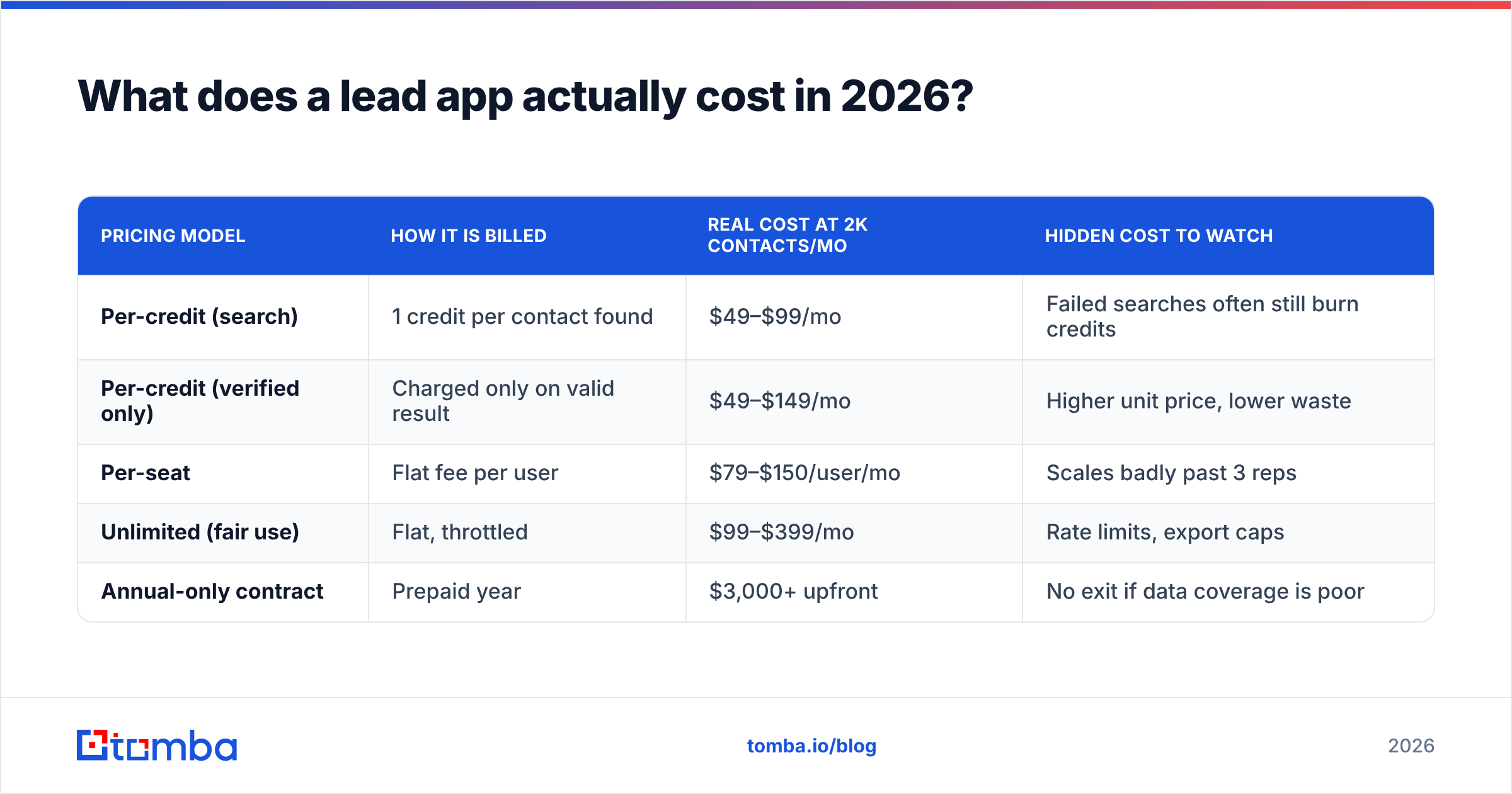
Sticker price is rarely the real price. Here is how the common pricing models compare on total cost, using a realistic scenario: a two-person outbound team building 2,000 new contacts per month.
| Pricing model | How it is billed | Real cost at 2k contacts/mo | Hidden cost to watch |
|---|---|---|---|
| Per-credit (search) | 1 credit per contact found | $49–$99/mo | Failed searches often still burn credits |
| Per-credit (verified only) | Charged only on valid result | $49–$149/mo | Higher unit price, lower waste |
| Per-seat | Flat fee per user | $79–$150/user/mo | Scales badly past 3 reps |
| Unlimited (fair use) | Flat, throttled | $99–$399/mo | Rate limits, export caps |
| Annual-only contract | Prepaid year | $3,000+ upfront | No exit if data coverage is poor |
Two things are worth flagging. First, "credits are only charged on a valid result" is a meaningfully better deal than it sounds, because it shifts the accuracy risk to the vendor. Second, unlimited plans almost always cap exports somewhere, so read the fair-use clause before you assume you can pull 50,000 rows.
For reference, Tomba pricing runs a free tier at 25 searches per month, Starter at $49/mo, Growth at $99/mo, and Pro at $249/mo, with Enterprise quoted custom. That range is typical for the sourcing-plus-enrichment layer in 2026. Anything materially cheaper is usually reselling a stale dataset; anything materially more expensive is usually bundling intent data you may not need yet.
Should you buy one lead app or build a stack?#
Buy a stack, but keep it to three tools maximum.
The all-in-one pitch is genuinely appealing: one vendor, one invoice, one login. The problem is that all-in-one platforms are almost never equally good at all five jobs. They are strong at one or two and adequate at the rest, and the adequate parts are the ones that quietly cost you deliverability.
A practical three-tool stack for most B2B teams looks like this:
- Your existing CRM handles capture and management. You already pay for it.
- One sourcing and enrichment tool handles finding and completing contact records via search, Tomba API, or a spreadsheet add-on.
- One verification step, ideally built into the same tool so verification happens before export rather than after.
The consolidation argument only wins when the bundled components are genuinely competitive. Check reviews per module rather than per platform. Sites like G2 break out satisfaction scores by feature, which is more useful than the composite rating.

How do you evaluate a lead app before you sign?#
Run this test before any purchase. It takes about an hour and it has a higher hit rate than any review site.
- Build a 50-contact control list by hand. Pick real companies in your ICP where you already know the correct contact. This is your answer key.
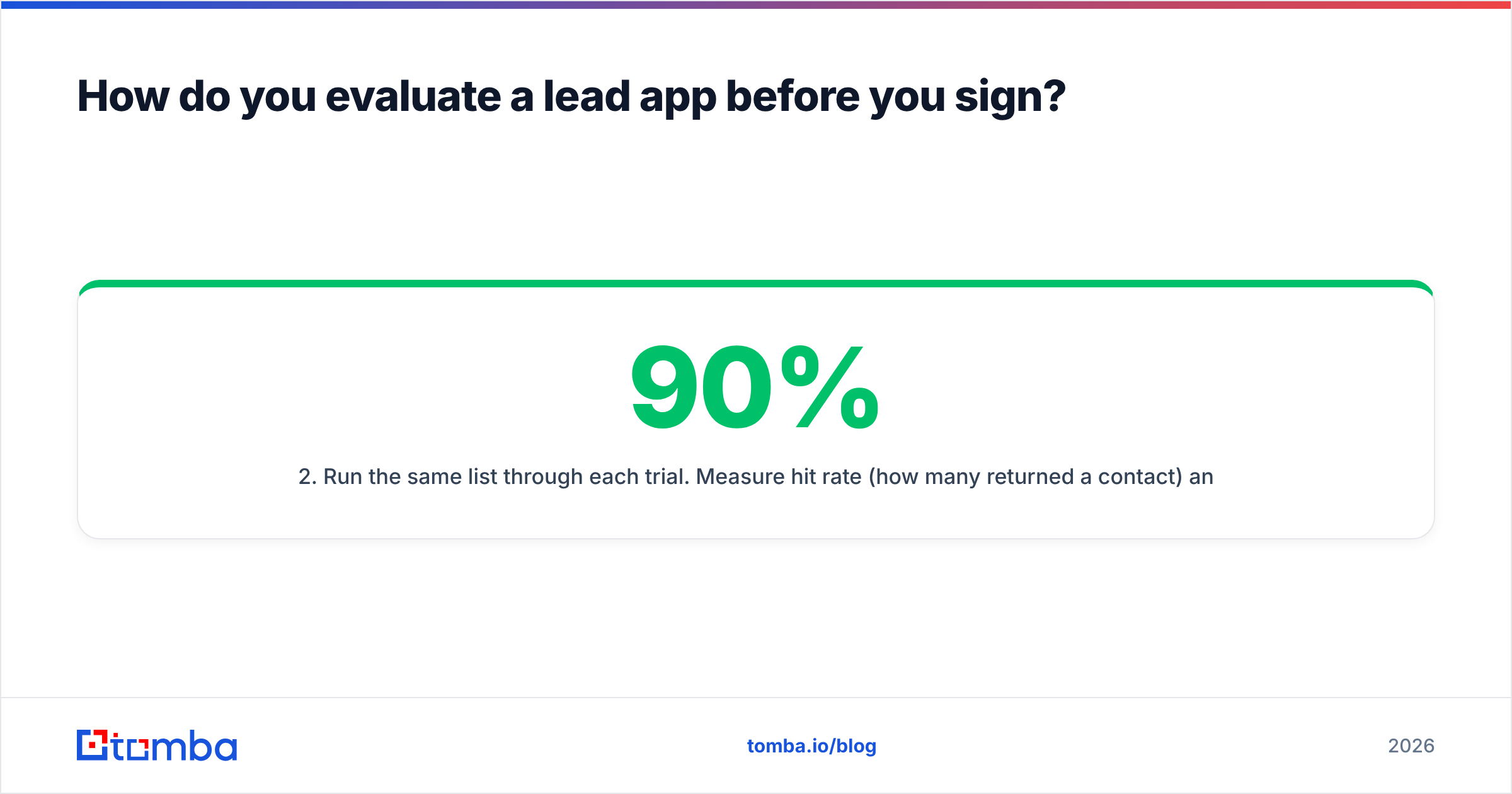
- Run the same list through each trial. Measure hit rate (how many returned a contact) and accuracy (how many matched your answer key). Both matter. A tool with 90% hit rate and 60% accuracy is worse than one with 70% hit rate and 95% accuracy.
- Send a verification test. Take the 50 results and run them through a verifier. Count catch-all and unknown results separately from valid ones. Catch-all domains accept everything at the SMTP layer and tell you nothing, which is why a dedicated catch-all verifier exists as a separate check.
- Check the API and export path. If the data cannot reach your CRM without a CSV round trip, someone will stop doing it within a month. Native integrations and a documented API are not nice-to-haves.
- Read the credit refund policy. Ask directly: "If a returned email bounces, do I get the credit back?" The answer tells you how confident the vendor is in their own data.
- Test support response time during the trial. Whatever you experience as a prospect is the ceiling, not the floor.
Step 1 is the one people skip, and it is the only one that produces evidence instead of opinion.
Is a lead app the same as a CRM?#
No, and conflating them is the most common category error in this space.
A CRM is a system of record. It stores what you know about an account and tracks what happened. It is deliberately passive about data: it holds whatever you put in it, including blanks and typos.
A lead app in the sourcing, enrichment, or verification sense is a system of acquisition. Its job is to produce data that did not previously exist in your CRM, and to confirm that data is real.
The practical test: if the record already exists in your database, you need a CRM feature. If the record does not exist yet, or exists but is incomplete, you need a lead app. Teams that try to solve acquisition problems with CRM features end up with expensive, well-organized emptiness.
What is the fastest way to get started?#
Start at the verification layer, not the sourcing layer. It is counterintuitive, but it is the right order.
Take whatever list you already have, whether that is an export from your CRM, a conference attendee list, or a spreadsheet a colleague built. Verify it. You will almost certainly find 15% to 30% of it is undeliverable, and cleaning that costs you nothing in sender reputation while teaching you exactly how good (or bad) your current data process is.
Then add sourcing. Once you know your baseline accuracy, you have a benchmark to judge any new vendor against, and the hand-built control list from the evaluation section becomes a repeatable test you can run every renewal cycle.
Ready to test your own lead app stack? Start with the Tomba Email Finder. Search by domain, name, or company, get a confidence-scored result with the sources it was verified against, and run the whole thing through built-in verification before a single address reaches your sequence. The free tier gives you 25 searches per month, which is enough to run the 50-contact control test on your real ICP and see the accuracy numbers for yourself before you commit a dollar.
Related guides#
// get started
Find, verify and enrich your first contacts today
Start on the free plan with 25 searches a month, then scale when your team is ready.
Free plan · No credit card required · GDPR & CCPA
// about the author