Lead Database Software in 2026: How to Pick the Right One
Most lead database software sells you contact volume when what you actually need is accuracy, coverage in your segment, and a sane cost per usable record. Here's how to tell them apart.
TL;DR
- Lead database software is a licensed, searchable store of B2B contact and company records — not a scraper, and not a CRM. You rent access; you don't own the data.
- Record count is the least useful buying signal. A 700M-record database that covers 12% of your ICP is worse than a 30M-record one that covers 80%.
- The number that decides ROI is cost per usable contact: list price divided by records that are in-ICP, deliverable, and legally usable — not credits purchased.
- Two architectures dominate: static prebuilt databases (fast, cheap per record, decays ~2.1%/month) and on-demand find-and-verify (slower per lookup, fresher, pay-for-hit).
- Most teams end up running both — a database for volume and mapping, a real-time finder like Tomba Email Finder for the accounts that actually matter.
What is lead database software, exactly?#
Lead database software is a hosted, searchable repository of B2B people and company records that you query with filters — job title, seniority, industry, headcount, tech stack, location, funding stage — and export or sync into your outbound stack.
Think of it like a phone book that a thousand people keep re-editing, except nobody tells you which entries were last checked. The book is enormous. The question that matters is whether your page is current.
Three things it is not:
- Not a CRM. A CRM stores your relationships and your pipeline. A lead database stores the market. One is your record of truth about accounts you're working; the other is a rented view of accounts you haven't met.
- Not a scraper. Scrapers pull from a live source on demand. Databases serve a pre-collected index, refreshed on a schedule you don't control.
- Not an enrichment API by default. Enrichment takes a record you already have and fills gaps. Many vendors sell both, but the pricing and accuracy profiles differ sharply.
How does lead database software actually get its data?#
Every vendor has some mix of five sources, and the mix determines everything about accuracy in your segment.
- Public web crawling — company sites, press releases, directories, team pages. High coverage on mid-market and enterprise, thin on sub-20-person companies that have no team page.
- Contributory networks — users install an extension or sync their inbox/CRM, and their contacts flow back into the pool. This is why some databases are freakishly good at US SaaS sales titles and useless for German manufacturing.
- Licensed third-party panels — bought from data brokers, resold. Cheapest to acquire, oldest on average, most likely to be identical across "competing" vendors.
- Pattern inference — the vendor knows
acme.comusesfirst.last@, knows Jane Doe works there, so it generatesjane.doe@acme.com. Fast and often right, but it's a guess until verified. - Real-time SMTP verification — an actual mailbox check at query time. This is the step that separates a plausible address from a deliverable one.
A vendor that leans on 3 and 4 with no 5 will happily hand you a 700M-record count and a 35% bounce rate. Check where the data comes from before you check how much of it there is.

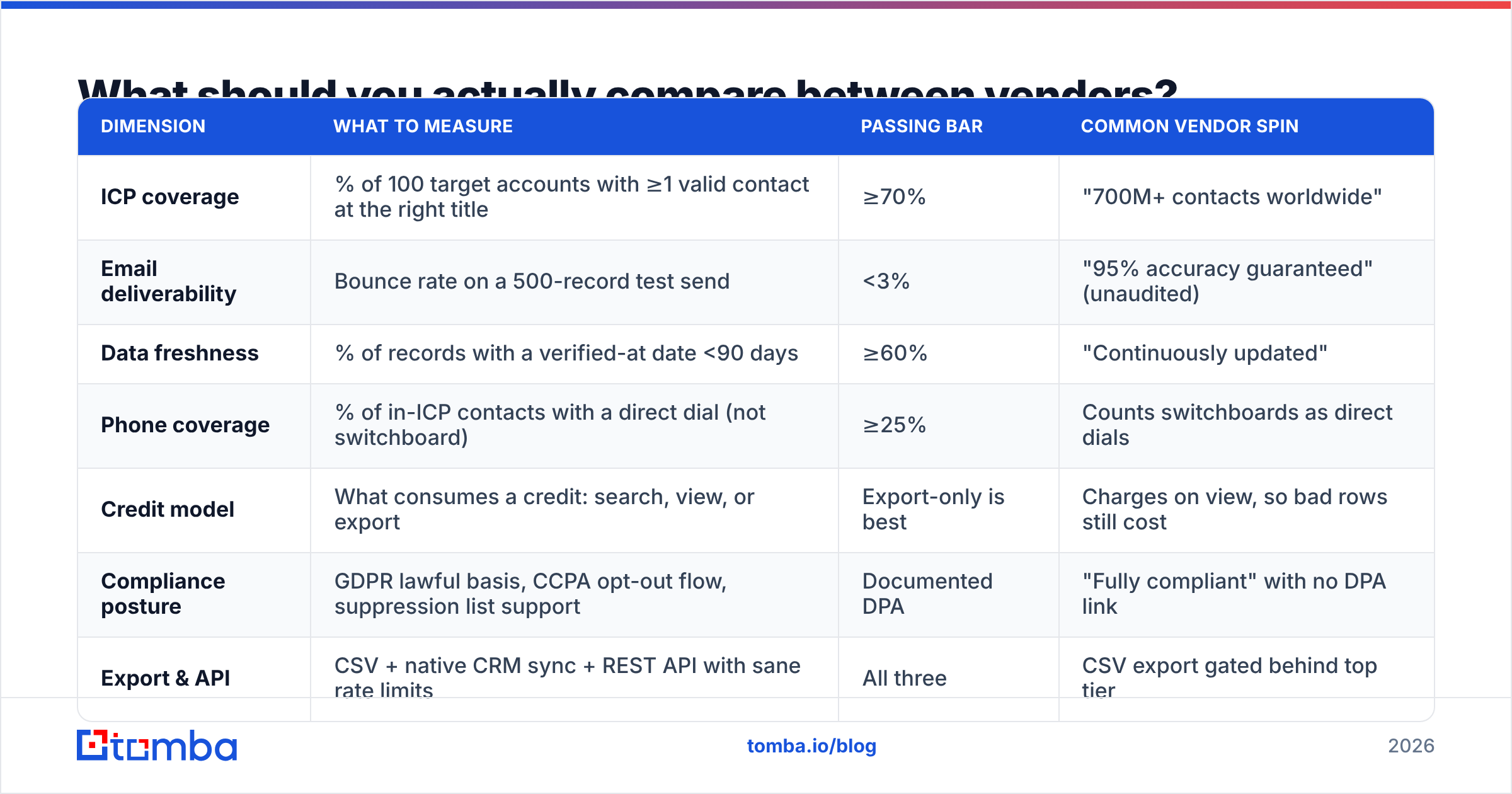
What should you actually compare between vendors?#
Here's the comparison frame that survives contact with a real evaluation. Ignore the marketing site and score each vendor on these seven dimensions against a sample of your accounts.
| Dimension | What to measure | Passing bar | Common vendor spin |
|---|---|---|---|
| ICP coverage | % of 100 target accounts with ≥1 valid contact at the right title | ≥70% | "700M+ contacts worldwide" |
| Email deliverability | Bounce rate on a 500-record test send | <3% | "95% accuracy guaranteed" (unaudited) |
| Data freshness | % of records with a verified-at date <90 days | ≥60% | "Continuously updated" |
| Phone coverage | % of in-ICP contacts with a direct dial (not switchboard) | ≥25% | Counts switchboards as direct dials |
| Credit model | What consumes a credit: search, view, or export | Export-only is best | Charges on view, so bad rows still cost |
| Compliance posture | GDPR lawful basis, CCPA opt-out flow, suppression list support | Documented DPA | "Fully compliant" with no DPA link |
| Export & API | CSV + native CRM sync + REST API with sane rate limits | All three | CSV export gated behind top tier |
Run that test before you sign anything. A hundred accounts and a 500-record send costs you an afternoon and saves you a year of a contract you can't use.
Static database or on-demand finder — which model fits you?#
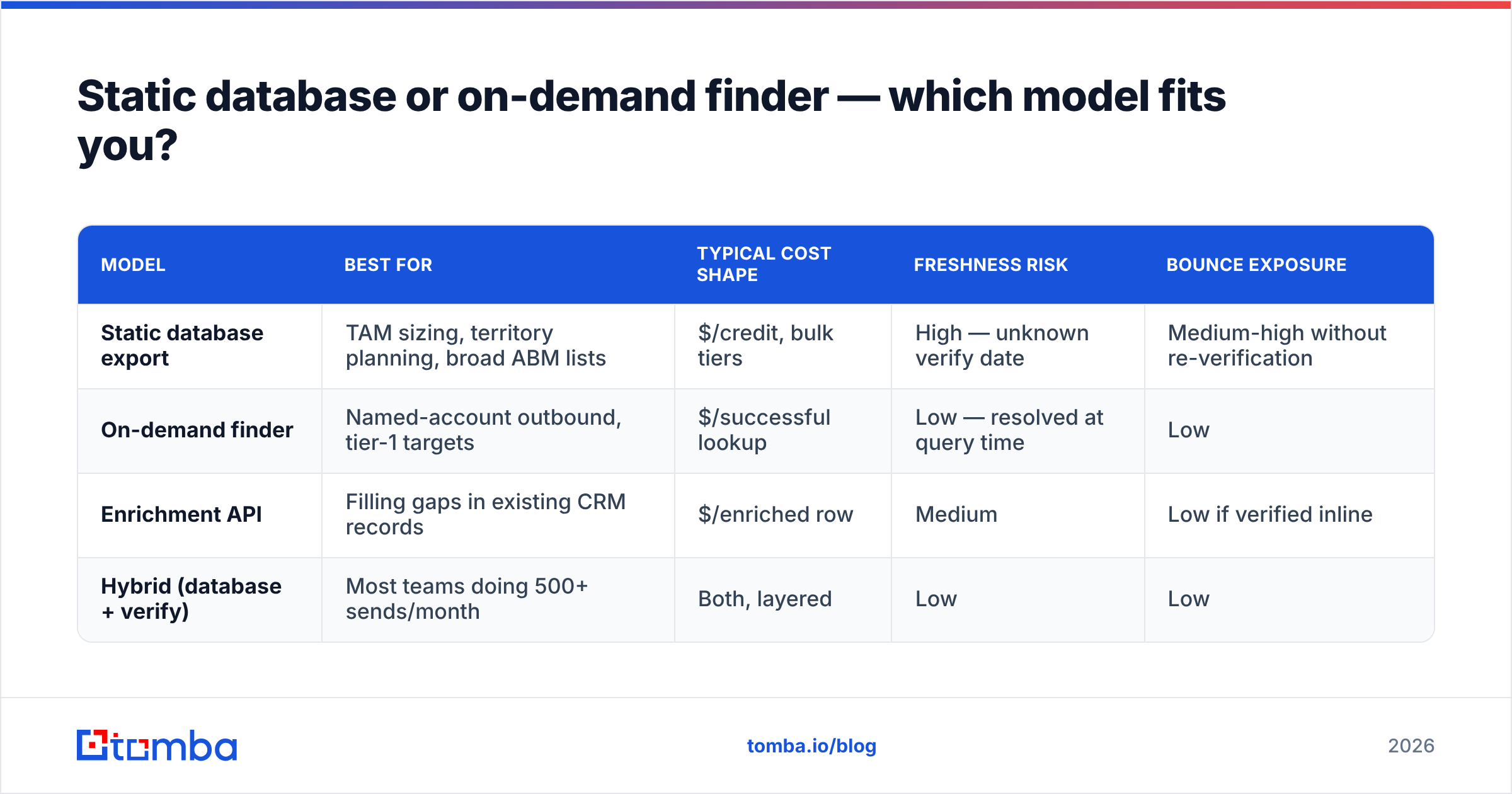
This is the real architectural fork, and it matters more than brand choice.
Static prebuilt database. You search an index, you filter, you export 5,000 rows. Strengths: instant, cheap per row, great for territory mapping and TAM sizing. Weakness: B2B contact data decays roughly 2.1% per month — about 25–30% annually — as people change jobs. A row exported today was verified at some point you can't see.
On-demand find-and-verify. You supply a name and domain (or a LinkedIn URL), and the tool resolves and verifies the address at query time. Strengths: freshness is by definition today, and pay-per-hit pricing means you don't pay for the misses. Weakness: you need to know who you're looking for first, so it pairs badly with pure "give me 10,000 leads" workflows and brilliantly with account-based ones.
The hybrid that most teams land on: use a static database to build the account map and the org chart, then run the 200 contacts you actually plan to touch through a live email verifier before the sequence starts. You get volume economics on discovery and accuracy economics on send.
| Model | Best for | Typical cost shape | Freshness risk | Bounce exposure |
|---|---|---|---|---|
| Static database export | TAM sizing, territory planning, broad ABM lists | $/credit, bulk tiers | High — unknown verify date | Medium-high without re-verification |
| On-demand finder | Named-account outbound, tier-1 targets | $/successful lookup | Low — resolved at query time | Low |
| Enrichment API | Filling gaps in existing CRM records | $/enriched row | Medium | Low if verified inline |
| Hybrid (database + verify) | Most teams doing 500+ sends/month | Both, layered | Low | Low |
How much does lead database software cost in 2026?#
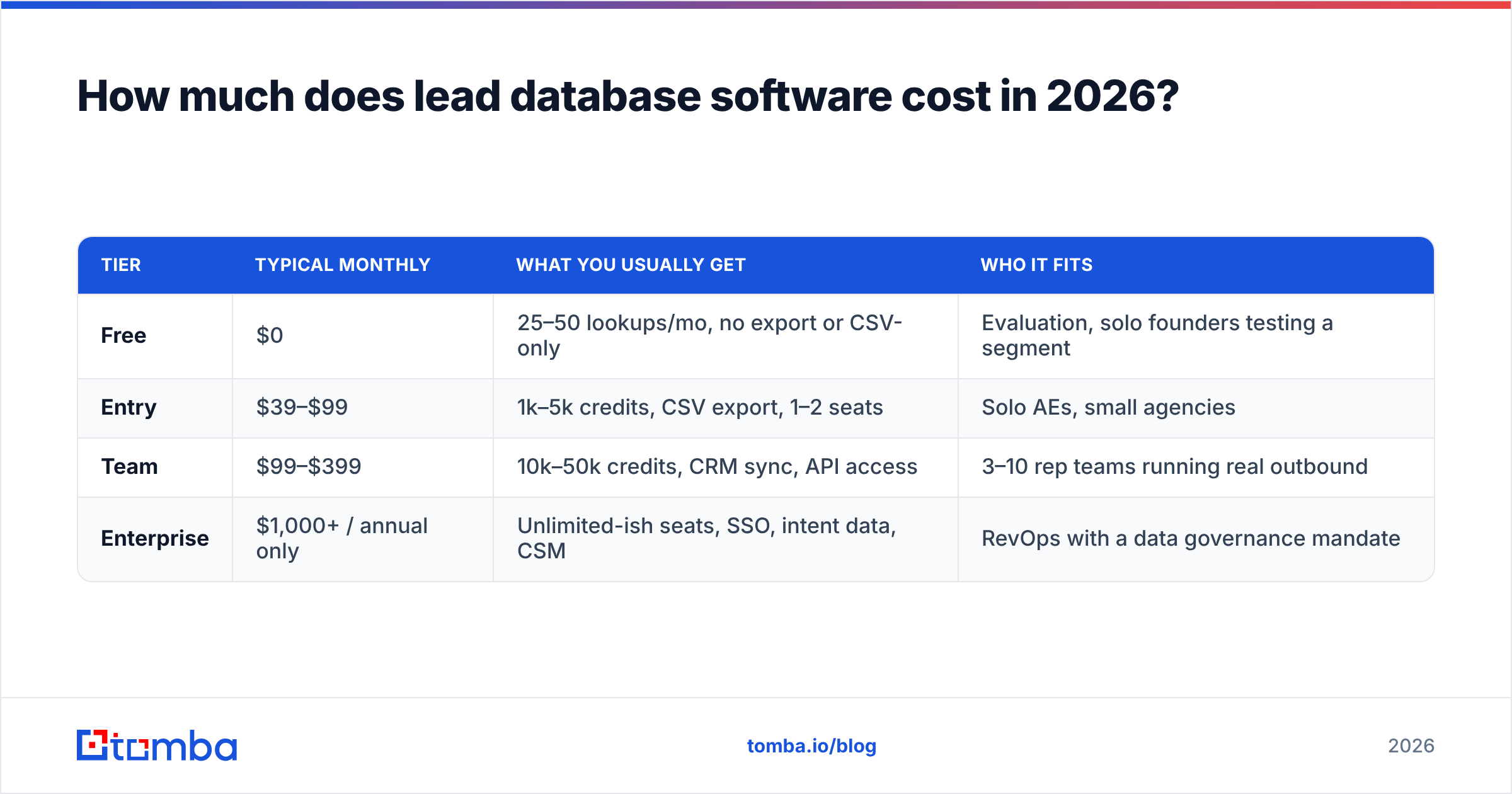
Published pricing across the category clusters into four bands. The band matters less than what a credit is at each vendor — some burn a credit when you reveal a contact, whether or not the address is valid.
| Tier | Typical monthly | What you usually get | Who it fits |
|---|---|---|---|
| Free | $0 | 25–50 lookups/mo, no export or CSV-only | Evaluation, solo founders testing a segment |
| Entry | $39–$99 | 1k–5k credits, CSV export, 1–2 seats | Solo AEs, small agencies |
| Team | $99–$399 | 10k–50k credits, CRM sync, API access | 3–10 rep teams running real outbound |
| Enterprise | $1,000+ / annual only | Unlimited-ish seats, SSO, intent data, CSM | RevOps with a data governance mandate |
For reference, Tomba pricing sits at a free tier with 25 searches/month, Starter at $49/mo, Growth at $99/mo, Pro at $249/mo, and custom Enterprise — a finder-first model where credits burn on results, not on browsing. Peers in the prebuilt-list space price differently: BookYourData, for example, sells pay-as-you-go verified B2B lists with no subscription, which suits teams that buy in bursts rather than monthly. Neither model is universally better; they solve different purchasing rhythms.
The only cost math that matters:
cost per usable contact = plan price / (credits × ICP-match rate × deliverability rate)A $99 plan with 10,000 credits looks like $0.0099/contact. If 30% match your ICP and 80% of those are deliverable, your real number is $0.041 — four times the sticker. Run this for every shortlisted vendor with their test-sample results and the ranking usually inverts.
Which features are non-negotiable versus nice-to-have?#
Non-negotiable, in order:
- Verification at export, not at ingest. A record verified when it entered the index nine months ago is not verified. Ask the vendor when the check happens.
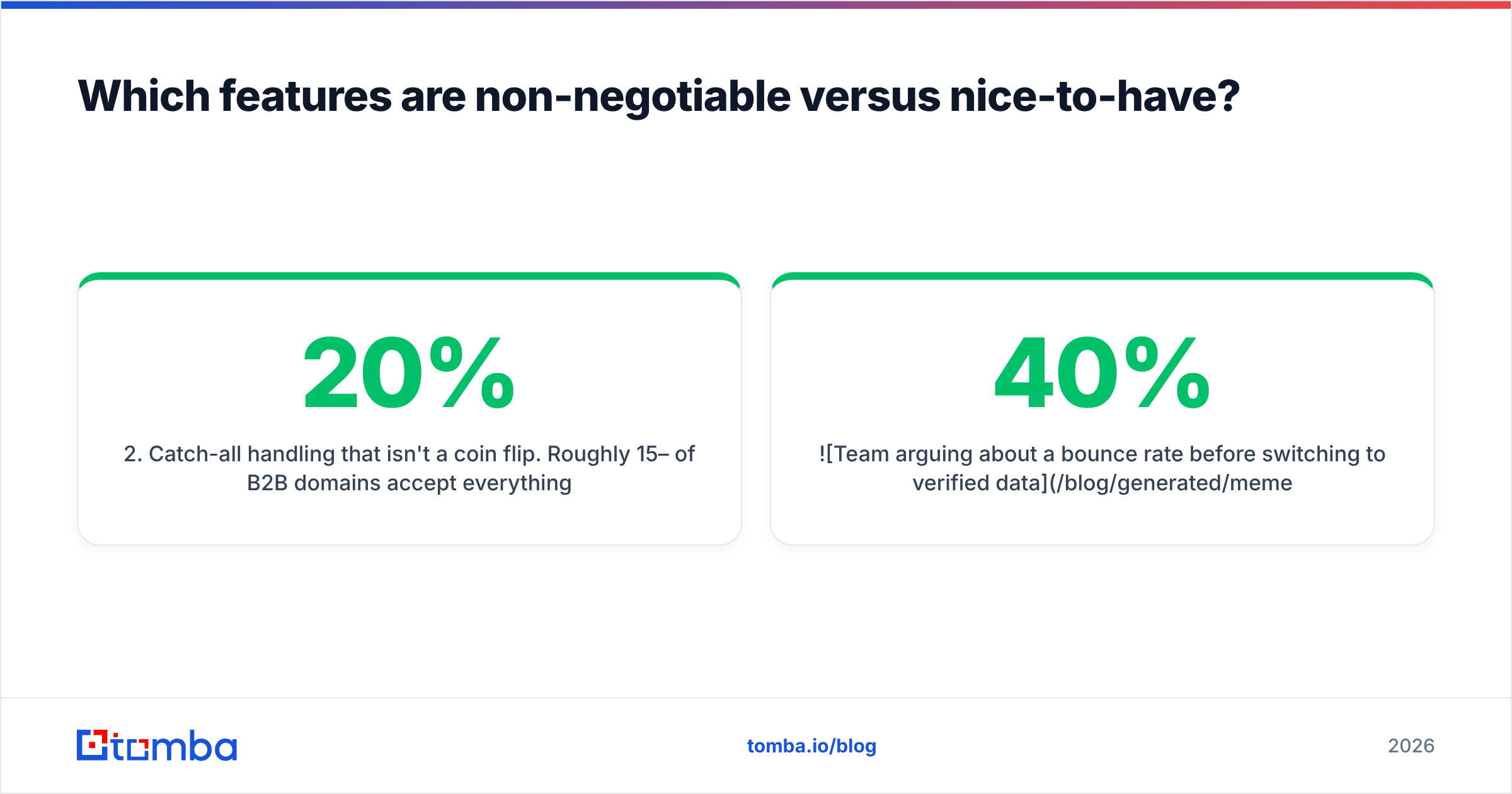
- Catch-all handling that isn't a coin flip. Roughly 15–20% of B2B domains accept everything at the SMTP layer. A vendor that marks these "valid" is lying to you by omission; one that marks them "unknown" and stops is leaving money on the table. Look for a real catch-all verifier that scores confidence instead of shrugging.
- Suppression and exclusion lists. You need to exclude existing customers, churned accounts, and opt-outs at query time — not after export.
- A usable API. If your enrichment can't run inside your workflow, someone is doing CSV round-trips at 11pm.
Nice-to-have, genuinely:
- Intent signals. Useful at scale, noisy below ~200 accounts/quarter, and the main thing enterprise tiers charge for.
- Org charts. Great for multi-threading, frequently stale at the VP level.
- Built-in sequencing. Convenient, but it locks your data layer to your sending layer. Most mature teams keep these separate on purpose.
- Chrome extensions. Real productivity win for reps living in LinkedIn; check that extension lookups don't burn 2x credits.

How do you evaluate a vendor without wasting a quarter?#
A seven-day protocol that actually discriminates:
Day 1 — Build the truth set. Pick 100 accounts you know well. Include 20 you already have verified contacts for. That overlap is your accuracy control; if a vendor gets those wrong, nothing else it reports is trustworthy.
Day 2–3 — Run the same query across every shortlisted tool. Identical filters, identical titles. Record ICP match rate, contact-per-account yield, and direct-dial coverage. Export everything.
Day 4 — Deduplicate and cross-check. Overlap between vendors tells you who's reselling the same broker feed. If two "competitors" agree on 85% of rows including the stale ones, you're paying twice for one dataset. A quick deduplicate pass makes this obvious in minutes.
Day 5 — Send a real 500-record test. Not a verification tool's opinion — an actual send from a warmed domain. Measure hard bounces. Anything above 3% fails. If you're unsure whether your sending setup will confound the test, check email deliverability fundamentals first so you're measuring the data, not your DNS.
Day 6 — Price the winner properly. Apply the cost-per-usable-contact formula. Ask explicitly: do credits roll over, what happens on overage, is there an annual-only clause, and can you export what you've already paid for if you leave?
Day 7 — Read the DPA. Specifically: lawful basis for processing EU personal data, how opt-out requests propagate, and whether the vendor indemnifies you. G2's data-provider category reviews are useful here mostly for the complaints — filter to 2- and 3-star reviews and read what breaks in month four.
What mistakes make lead database software fail in practice?#
Buying on record count. Covered above, but it remains the single most common error. Volume is the vendor's metric; coverage is yours.
Skipping re-verification on old exports. A list you pulled in January is a different list in June. Re-verify before every campaign, or accept that your sender reputation pays the difference.
Treating "95% accuracy" as a spec. It's a marketing claim with no shared definition. Does it mean syntactically valid? Mailbox-exists? Person-still-employed? Ask which, get it in writing, then test it yourself anyway.
Letting the data tool dictate the sequencing tool. Bundles are seductive. But when the data degrades, you want to swap one layer, not migrate your entire outbound motion. Keep the integrations layer flexible — Zapier, HubSpot, Salesforce, and a plain API beat any all-in-one lock-in.
No suppression discipline. Emailing an existing customer as a cold prospect is the fastest way to lose internal trust in the whole program. Wire your CRM's customer list into the exclusion filter on day one — HubSpot's guidance on list hygiene is a reasonable starting framework regardless of which CRM you run.
Is a database even the right purchase for your team?#
Three honest scenarios:
- You're selling to a defined list of 300 named accounts. Don't buy a database. Buy a finder and a verifier, and spend the savings on research. Coverage of a static index on 300 specific companies is a coin flip; on-demand resolution is not.
- You're running broad outbound across a 50,000-company TAM. Buy the database. You need the filtering and the volume economics, and you'll layer verification on top of exports.
- You're enriching inbound signups and form fills. Buy neither as a seat license — buy an enrichment API and pay per row. Data enrichment priced per successful match is dramatically cheaper than seats you don't use.
Most mid-market teams discover in month three that they're in scenario one and two simultaneously, for different segments. That's the case for a hybrid stack and against a single all-in-one contract signed annually before you've tested anything.
The bottom line#
Lead database software is a commodity layer with wildly non-commodity results. The vendors mostly buy from overlapping sources; what differentiates them is verification discipline, coverage in your specific segment, and whether their credit model charges you for guesses or for answers.
Test on your own accounts. Measure bounces on a real send. Compute cost per usable contact, not per credit. And keep your data layer swappable — the vendor that wins your test this year will not automatically win it next year.
If your bottleneck is finding and verifying addresses for accounts you've already identified — the scenario where static databases fail hardest — start with the Tomba Email Finder. The free tier gives you 25 searches a month to run the coverage test described above on your own account list before you spend anything, and Starter at $49/mo covers most solo and small-team outbound. Test it against whatever you're using now on the same 100 accounts, and let the bounce rate decide.
Related guides#
// get started
Find, verify and enrich your first contacts today
Start on the free plan with 25 searches a month, then scale when your team is ready.
Free plan · No credit card required · GDPR & CCPA
// about the author