Lead Kahuna vs Wiza: Local Lead Scraper or LinkedIn Email Finder?
Lead Kahuna and Wiza both promise leads with emails, but they pull from completely different sources. Here's which one fits your market, your budget, and your outbound motion in 2026.
TL;DR
- Lead Kahuna is a local-business lead generation tool. It scrapes public business listings and directories, then adds outreach automation on top. It fits agencies and freelancers selling to SMBs like dentists, roofers, and restaurants.
- Wiza is a LinkedIn and Sales Navigator email finder. It turns a LinkedIn search into a verified list of named decision-makers. It fits B2B SDR teams prospecting into mid-market and enterprise accounts.
- Pricing is built differently. Lead Kahuna has historically been sold as an annual license. Wiza uses monthly credits that expire, and its paid tiers run roughly $49 to $199/mo, plus the Sales Navigator seat you need anyway.
- Choosing between them is really choosing a market. If your buyers live on Google Maps, look at Lead Kahuna. If they live on LinkedIn, look at Wiza.
- If you need verified work emails by domain or by name without either lock-in, a dedicated email finder plus verifier (Tomba starts at $49/mo) covers the gap.
What is the real difference between Lead Kahuna and Wiza?#
Most "Lead Kahuna vs Wiza" searches come from people who assume the two tools are interchangeable. They aren't. Both hand you a spreadsheet of leads with email addresses, but the leads come from different places and describe different kinds of people.
Lead Kahuna starts with a business. You pick a niche and a location, for example "HVAC contractors in Phoenix", and it collects businesses from public listings along with whatever contact data it can attach: website, phone, generic or owner email, social profiles, and ratings. The vendor says it aggregates 80+ data points per lead, and it bundles email open and click alerts so you can follow up quickly. The official site is leadkahuna.com.
Wiza starts with a person. You run a search in LinkedIn or Sales Navigator, such as "VP of Finance, 200-1,000 employees, SaaS, US", and Wiza's Chrome extension exports that list and adds verified work emails, and phone numbers on higher plans. The official site is wiza.co.
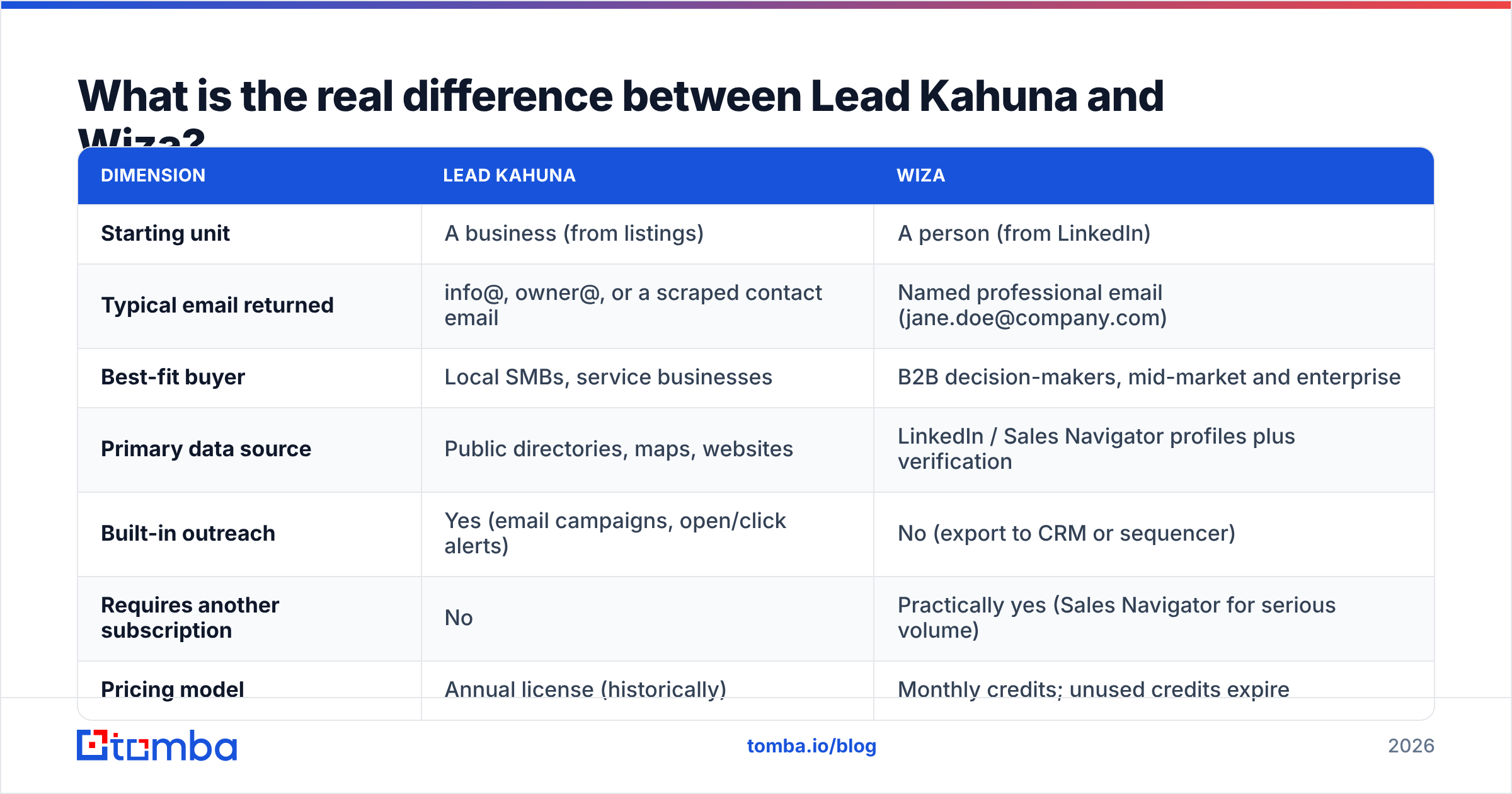
That one difference drives everything else in the comparison:
| Dimension | Lead Kahuna | Wiza |
|---|---|---|
| Starting unit | A business (from listings) | A person (from LinkedIn) |
| Typical email returned | info@, owner@, or a scraped contact email | Named professional email (jane.doe@company.com) |
| Best-fit buyer | Local SMBs, service businesses | B2B decision-makers, mid-market and enterprise |
| Primary data source | Public directories, maps, websites | LinkedIn / Sales Navigator profiles plus verification |
| Built-in outreach | Yes (email campaigns, open/click alerts) | No (export to CRM or sequencer) |
| Requires another subscription | No | Practically yes (Sales Navigator for serious volume) |
| Pricing model | Annual license (historically) | Monthly credits; unused credits expire |

How does Lead Kahuna work in practice?#
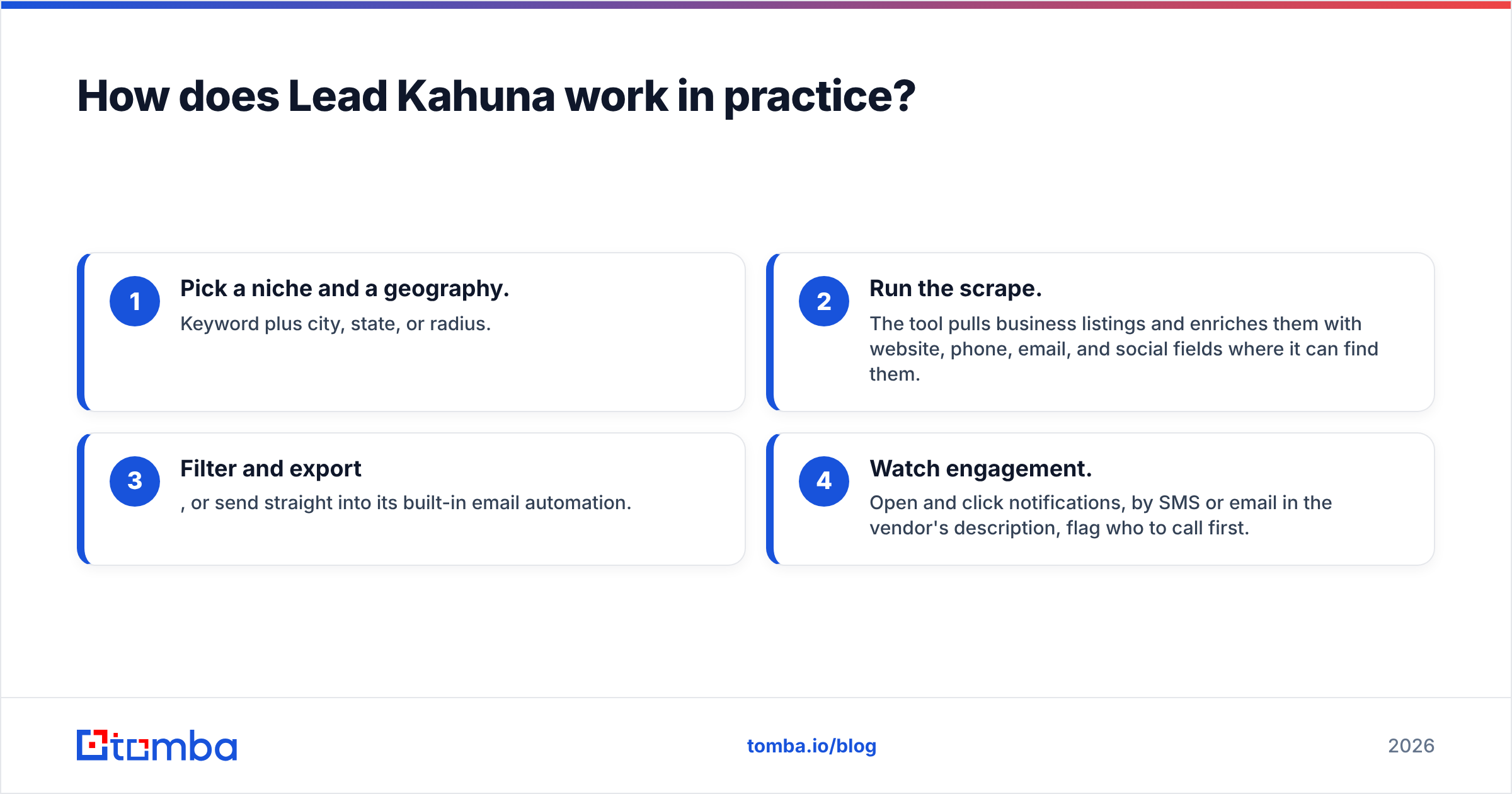
Lead Kahuna is built for volume across local markets. The workflow usually looks like this:
- Pick a niche and a geography. Keyword plus city, state, or radius.
- Run the scrape. The tool pulls business listings and enriches them with website, phone, email, and social fields where it can find them.
- Filter and export, or send straight into its built-in email automation.
- Watch engagement. Open and click notifications, by SMS or email in the vendor's description, flag who to call first.
Where it's strong:
- Geographic prospecting at scale. If you sell websites, SEO, reviews management, or bookkeeping to local businesses, a list of every plumber in three counties is exactly what you need.
- All-in-one for small teams. Lead source plus outreach in one tool means one less integration to manage.
- Predictable cost. A yearly license is easier to budget than a credit meter, especially for solo operators.
Where it's weak:
- Generic inboxes. Scraped local-business emails are often role addresses such as info@ or contact@. They're fine for a family-owned shop where the owner reads everything, but weak for any company with a real org chart.
- No persona targeting. You can't ask for "the operations manager". You get the business and whatever contact is public.
- Verification is on you. Listing data gets stale quickly: businesses close, domains lapse, inboxes fill up. Before you send, run the list through an email verifier to protect your domain.
- Pricing transparency. Third-party reviews and competitor pages have cited about $299/year, but offers have changed over the product's history. Check the current offer on the vendor site before you plan around it.
How does Wiza work in practice?#
Wiza grew up as a Sales Navigator exporter and is still best at that. The flow:
- Build a lead list in LinkedIn or Sales Navigator using title, seniority, headcount, industry, geography, and so on.
- Click the Wiza extension to export the list, or reveal contacts one profile at a time.
- Wiza finds and verifies emails and returns a CSV, or pushes to HubSpot, Salesforce, or your sequencer.
- You're charged only for valid results. Per Wiza's own help center, risky or undeliverable contacts don't consume credits.
Where it's strong:
- Named decision-makers. You get the person you actually filtered for, with a professional email address.
- Verification built in. The pay-for-valid-only model means the list you export is reasonably clean on arrival.
- CRM-native workflows. It fits standard SDR stacks (Sales Navigator, Wiza, CRM, sequencer) without friction.
Where it's weak:
- LinkedIn dependency. If your buyers aren't on LinkedIn, and many local business owners aren't or never update their profiles, Wiza has nothing to work from.
- Stacked cost. You're paying for Sales Navigator (roughly $120-$160/user/mo in 2026) plus Wiza.
- Expiring credits. Unused monthly credits don't roll over, which hurts seasonal or bursty outbound.
- No outreach layer. You'll need a separate sequencer to send.
How do Lead Kahuna and Wiza compare on pricing?#
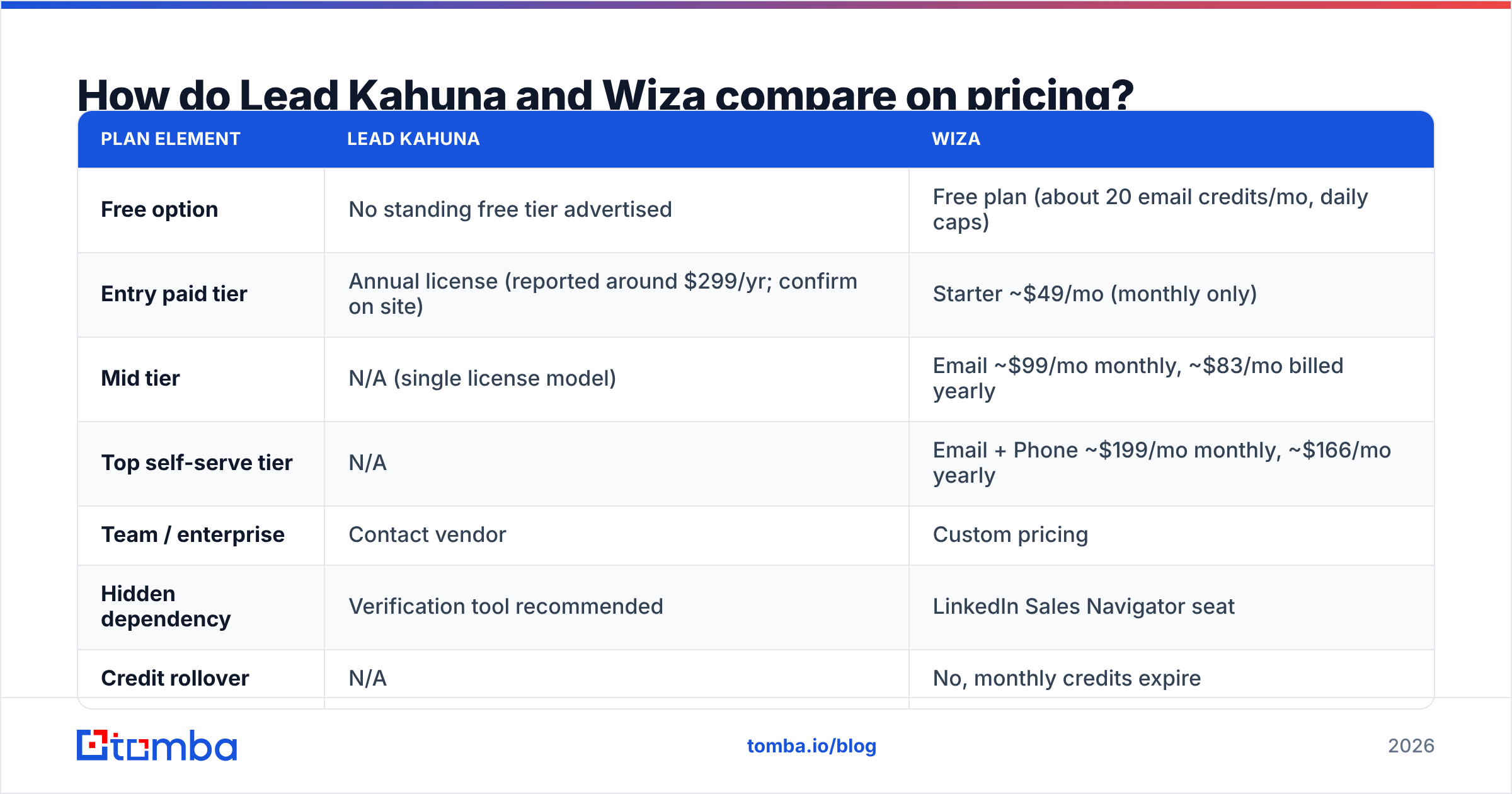
List prices are the smaller part of the cost. The bigger parts are what each tool assumes you already own, and how much of what you buy goes unused.
| Plan element | Lead Kahuna | Wiza |
|---|---|---|
| Free option | No standing free tier advertised | Free plan (about 20 email credits/mo, daily caps) |
| Entry paid tier | Annual license (reported around $299/yr; confirm on site) | Starter ~$49/mo (monthly only) |
| Mid tier | N/A (single license model) | Email ~$99/mo monthly, ~$83/mo billed yearly |
| Top self-serve tier | N/A | Email + Phone ~$199/mo monthly, ~$166/mo yearly |
| Team / enterprise | Contact vendor | Custom pricing |
| Hidden dependency | Verification tool recommended | LinkedIn Sales Navigator seat |
| Credit rollover | N/A | No, monthly credits expire |
Wiza figures reflect published 2026 plan data summarized on G2's Wiza pricing page and vendor documentation. Both vendors change plans, so treat these as ranges, not quotes.
What this means for you:
- A solo agency owner prospecting local SMBs will almost always spend less with a Lead Kahuna-style tool, even after adding a verification pass.
- A three-person SDR team on Wiza's Email plan plus Sales Navigator is looking at roughly $650-$850/mo all-in. That's reasonable if each rep books even a few meetings a month with enterprise buyers, and expensive if they don't.
Which tool gives you better email accuracy?#
It depends on what you mean by "accurate".
- Deliverability accuracy (will the email bounce?): Wiza has the edge out of the box because it verifies before charging. Lead Kahuna's scraped emails need an external verification step, especially when a list is more than a few weeks old.
- Relevance accuracy (is this the right person?): Wiza again, for B2B. You filtered for a title, and the email belongs to that person. Lead Kahuna gives you the business's public contact, which may or may not reach the decision-maker.
- Coverage for local SMBs: Lead Kahuna wins. Wiza can't find the owner of a two-truck landscaping company who has no LinkedIn presence.
In practice, many teams get the best results by combining approaches: take a business list from a local scraper, then look up the owner or manager at each domain with a proper email finder, then verify everything before sending. Our breakdown of Wiza alternatives covers tools that do domain- and name-based lookups without requiring a LinkedIn seat.
Is Lead Kahuna better than Wiza?#
Neither tool is better across the board. Each one clearly wins for a particular kind of buyer. Use this as a quick decision guide:
- You sell to local businesses (agency services, SaaS for trades, B2B services for SMBs): Lead Kahuna. Maps and directories are where your prospects are listed, and the built-in outreach saves you a tool.
- You sell to defined roles inside companies (Head of RevOps, IT Director, CFO): Wiza. Persona targeting through Sales Navigator is the whole point.
- You're a solo operator on a tight budget: Lead Kahuna's annual model is easier to live with. Budget for a verification pass on every list.
- You run a structured SDR team with a CRM and sequencer: Wiza fits the stack. Watch credit expiry and match your plan to real monthly volume.
- You need both local coverage and named contacts: Neither does it alone. Pair a business-list source with a domain-based email finder and a verifier.

What do users say about each tool?#
Review sentiment follows the product designs above.
Wiza reviewers on G2 and Capterra most often praise how easy the Chrome extension is, how fast Sales Navigator exports run, and the fairness of paying only for valid emails. The recurring complaints are credit consumption on large lists, expiring credits, and the added cost of Sales Navigator.
Lead Kahuna users tend to praise the volume of local leads and the "set it and run it" automation. Complaints center on generic email addresses, data freshness, and the learning curve of the automation features. Independent review coverage is thinner than Wiza's, so run your own small test before you commit a full campaign.
Whichever you choose, do a 100-lead pilot before scaling:
- Bounce rate after verification. Target under 2%.
- Share of named versus role emails. Aim for over 60% named if you sell B2B.
- Reply rate on a single short sequence. This is the only number that matters in the end.
- Cost per booked meeting. Include every subscription in the stack.
When should you consider an alternative to both?#
Look past both tools if any of these apply to you:
- You already have target accounts (domains or company names) and just need the right people's emails. A domain search or name-plus-domain lookup is faster and cheaper than scraping or exporting from LinkedIn.
- You don't want to pay for Sales Navigator just to access an email finder.
- You need API or spreadsheet workflows to enrich lists that live in your CRM, Google Sheets, or a data warehouse.
- You process large lists occasionally, and expiring monthly credits keep going to waste. Bulk email finder jobs let you enrich thousands of rows in one pass when the campaign calls for it.
A dedicated email finder works alongside either tool rather than replacing the prospecting layer. Keep Lead Kahuna for local discovery or Sales Navigator for persona search, then use a finder and verifier to get the right inbox for each lead. Plans and limits are listed on Tomba pricing: a free tier with 25 searches/mo, Starter at $49/mo, Growth at $99/mo, Pro at $249/mo, and custom Enterprise.
Lead Kahuna vs Wiza: what's the final verdict?#
Pick Lead Kahuna if your market is local and small: you want a large number of businesses per city, you prefer an annual license, and built-in outreach matters more than reaching a specific title.
Pick Wiza if your market is B2B with an org chart: you already pay for Sales Navigator, you target by role and seniority, and you want verified, named emails flowing into your CRM.
Pick neither on its own if your real problem is "I know which companies I want and I need the right people's work emails". That's an email-finder job.
If that last case sounds like you, try the Tomba Email Finder. Enter a name and a company domain, or just a domain, and you get professional email addresses with verification status and source signals, without a LinkedIn seat or a scraping license. Start on the free tier with 25 searches a month, test it against your current tool on the same 100 leads, and keep whichever produces fewer bounces and more replies.
Related guides#
// get started
Find, verify and enrich your first contacts today
Start on the free plan with 25 searches a month, then scale when your team is ready.
Free plan · No credit card required · GDPR & CCPA
// about the author