LeadEngineAI vs Minelead: Which Email Finder Wins in 2026?
LeadEngineAI and Minelead both promise cheap B2B emails, but they solve different problems. We break down accuracy, pricing, API depth, and who each tool actually fits.
TL;DR
- LeadEngineAI leans on AI-assisted prospecting and list building; Minelead is a lightweight, cheap domain-and-email lookup tool with a generous free tier and a simple API.
- If your bottleneck is finding names to target, LeadEngineAI's workflow fits better. If your bottleneck is getting an address for a name you already have, Minelead is faster and cheaper.
- Neither tool publishes independently audited accuracy numbers. Budget 10-25% bounce on any unverified export from either, and run a separate verification pass.
- Both have thin catch-all handling. That matters more than raw database size — roughly a quarter of B2B domains are catch-all, and a bad guess there is an invisible bounce.
- Best fit test: pick the tool whose unit matches your motion — per-domain scraping (Minelead), AI-assisted list building (LeadEngineAI), or verified per-contact finding with an API you can build on (Tomba).
What are LeadEngineAI and Minelead?#
They sit in the same category but were built for different jobs.
LeadEngineAI positions itself as an AI-layer prospecting tool: you describe an ideal customer profile, it assembles a list, enriches it with work emails and company data, and pushes it into your outbound stack. The pitch is "fewer manual steps between an ICP definition and a sendable list." In practice that means the tool is doing three things — sourcing, enrichment, and light verification — and you're trusting its judgment at each hop.
Minelead (minelead.io) is the opposite philosophy: a narrow, cheap utility. Type a domain, get the emails associated with it. There's a free tier, a Chrome extension, a straightforward REST API, and pricing that undercuts almost everyone in the category. It does not try to build your list for you. It answers one question — "what emails exist at this domain?" — and gets out of the way.
That difference is the whole comparison. Everything below is downstream of it.
Here's the practical split:
- Sourcing — LeadEngineAI generates the target list from criteria. Minelead assumes you already have domains.
- Enrichment depth — LeadEngineAI attaches firmographic and role data. Minelead mostly returns emails plus whatever metadata it scraped.
- Verification — Both do some syntax and MX checking. Neither is a dedicated email verifier with SMTP-level confidence scoring and catch-all logic.
- API maturity — Minelead's API is simple and well documented for what it does. LeadEngineAI's is more oriented around pulling finished lists than around per-lookup calls.
- Price ceiling — Minelead stays cheap as you scale. AI-assisted tools price on enriched records, so cost climbs with volume.
How do LeadEngineAI and Minelead compare on features and price?#
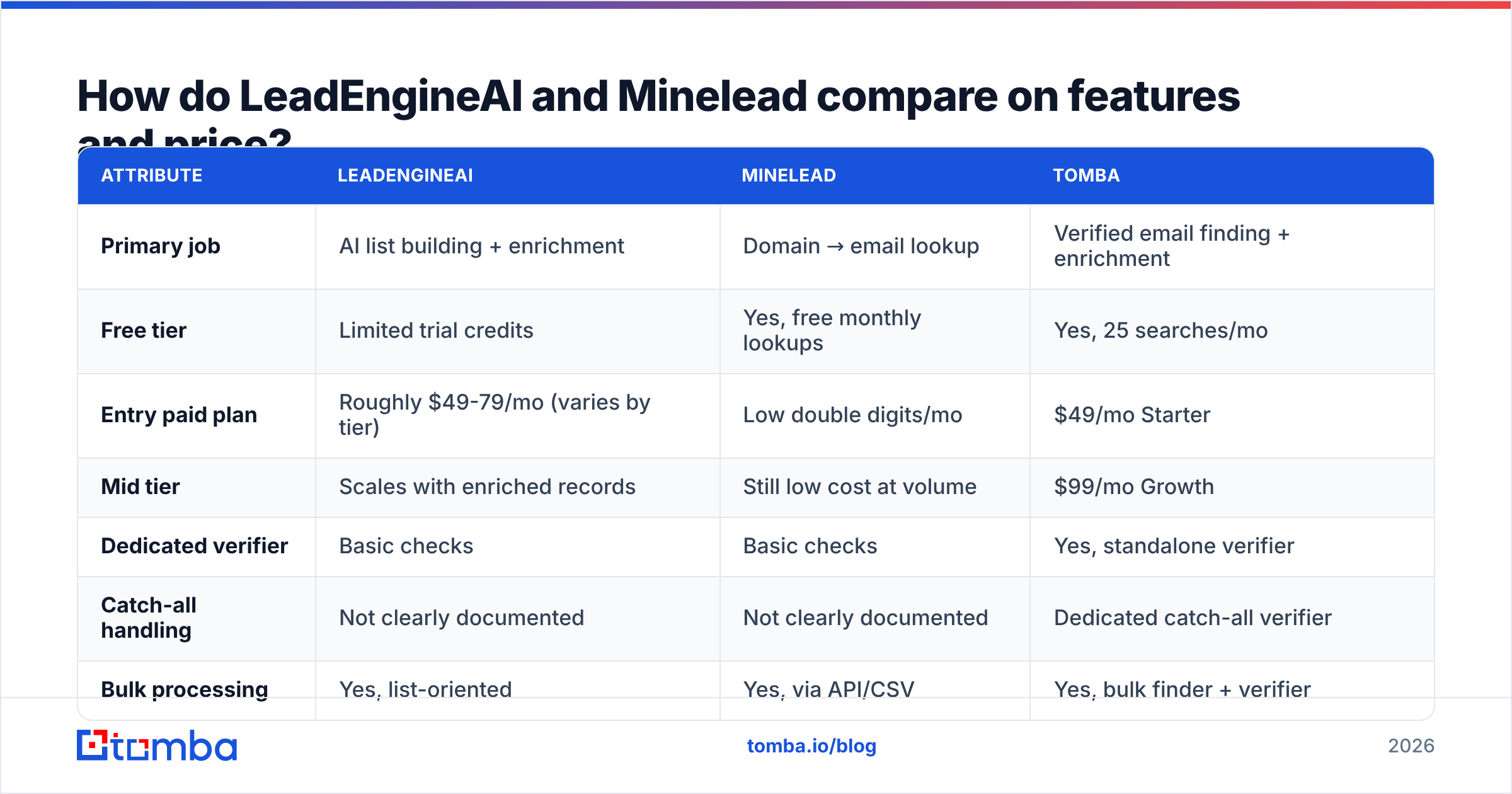
Pricing on both tools moves, and neither publishes a full public matrix with the granularity buyers want. Treat the figures below as directional and confirm on the vendor's own pricing page before you commit. Tomba is included as a reference point, not as a thumb on the scale.
| Attribute | LeadEngineAI | Minelead | Tomba |
|---|---|---|---|
| Primary job | AI list building + enrichment | Domain → email lookup | Verified email finding + enrichment |
| Free tier | Limited trial credits | Yes, free monthly lookups | Yes, 25 searches/mo |
| Entry paid plan | Roughly $49-79/mo (varies by tier) | Low double digits/mo | $49/mo Starter |
| Mid tier | Scales with enriched records | Still low cost at volume | $99/mo Growth |
| Dedicated verifier | Basic checks | Basic checks | Yes, standalone verifier |
| Catch-all handling | Not clearly documented | Not clearly documented | Dedicated catch-all verifier |
| Bulk processing | Yes, list-oriented | Yes, via API/CSV | Yes, bulk finder + verifier |
| Phone / mobile data | Sometimes, plan-dependent | No | Yes, phone finder |
| Chrome extension | Yes | Yes | Yes |
| Native CRM integrations | Growing | Minimal, Zapier-style | HubSpot, Salesforce, Pipedrive, Zapier, Make |
| Sheets / Excel add-ons | No | No | Yes |
The pattern: Minelead wins on cost-per-lookup, LeadEngineAI wins on "I don't have a list yet," and neither is built to be the verification layer of record. That's the gap most teams discover in month two, after the first campaign bounces.
Which one is more accurate?#
Neither vendor publishes third-party-audited accuracy, so the honest answer is: you have to test on your own domains.
Accuracy in this category is not one number. It decomposes into four things, and tools are strong in different places:
- Coverage — what percentage of your target contacts return any result. Broad-database tools look great here and can still be wrong.
- Precision — of the addresses returned, how many actually deliver. This is what your bounce rate measures.
- Freshness — how old the record is. A 2023 email at a company with 30% annual churn is a coin flip.
- Catch-all discipline — whether the tool tells you honestly that it cannot confirm a catch-all domain, or quietly returns a pattern guess with high confidence.
That last one is where cheap tools leak. A catch-all server accepts every address at SMTP time, so naive verification marks anything@company.com as valid. You send, the message lands in a void or a spam trap, and your sender reputation absorbs the damage. Neither LeadEngineAI nor Minelead documents a rigorous catch-all methodology, which is why a catch-all verifier in the pipeline is not optional if a meaningful slice of your list sits on those domains.

How to read this: pay attention to the spread between "found" and "verified deliverable." Tools that maximize the first number at the expense of the second are optimizing for a demo, not for your inbox placement.
Run this test before you buy, on both tools:
- Take 100 contacts you can independently confirm — existing customers, partners, people who've replied to you.
- Strip the emails, keep name + domain.
- Run the list through each tool.
- Score three buckets: correct, wrong, and no-result.
- Compute cost per correct email, not cost per credit.
The ranking almost always changes between step 4 and step 5. A tool at half the credit price with double the miss rate is more expensive, plus it costs you domain reputation you can't buy back.
Is LeadEngineAI better than Minelead for cold outbound?#
For cold outbound specifically, it depends on where your list comes from.
Choose LeadEngineAI if: you're early, you don't have a defined account list, and you want the tool to propose targets. The AI-assisted sourcing genuinely saves hours versus manually building an account list from LinkedIn Sales Navigator exports. The trade-off is that you inherit whatever the model decided your ICP means, and you'll spend review time pruning.
Choose Minelead if: you already run account-based outbound. You have 400 target domains from a conference list, a funding database, or a partner referral. You need addresses at those domains and you need the per-lookup cost to be near zero. Minelead's domain search equivalent does exactly this and its free tier means you can validate the workflow before paying anything.
Choose neither as your only tool if: deliverability is the constraint. Both are finders with verification bolted on. Cold outbound in 2026 lives and dies on inbox placement — Google and Yahoo's bulk sender requirements made a sub-0.3% spam complaint rate a hard operational requirement, not a nice-to-have. A finder that hands you a 12% bounce list will get your domain throttled before your copy ever gets a fair test. Google's own bulk sender guidelines spell out the thresholds.
What does the real cost per verified email look like?#
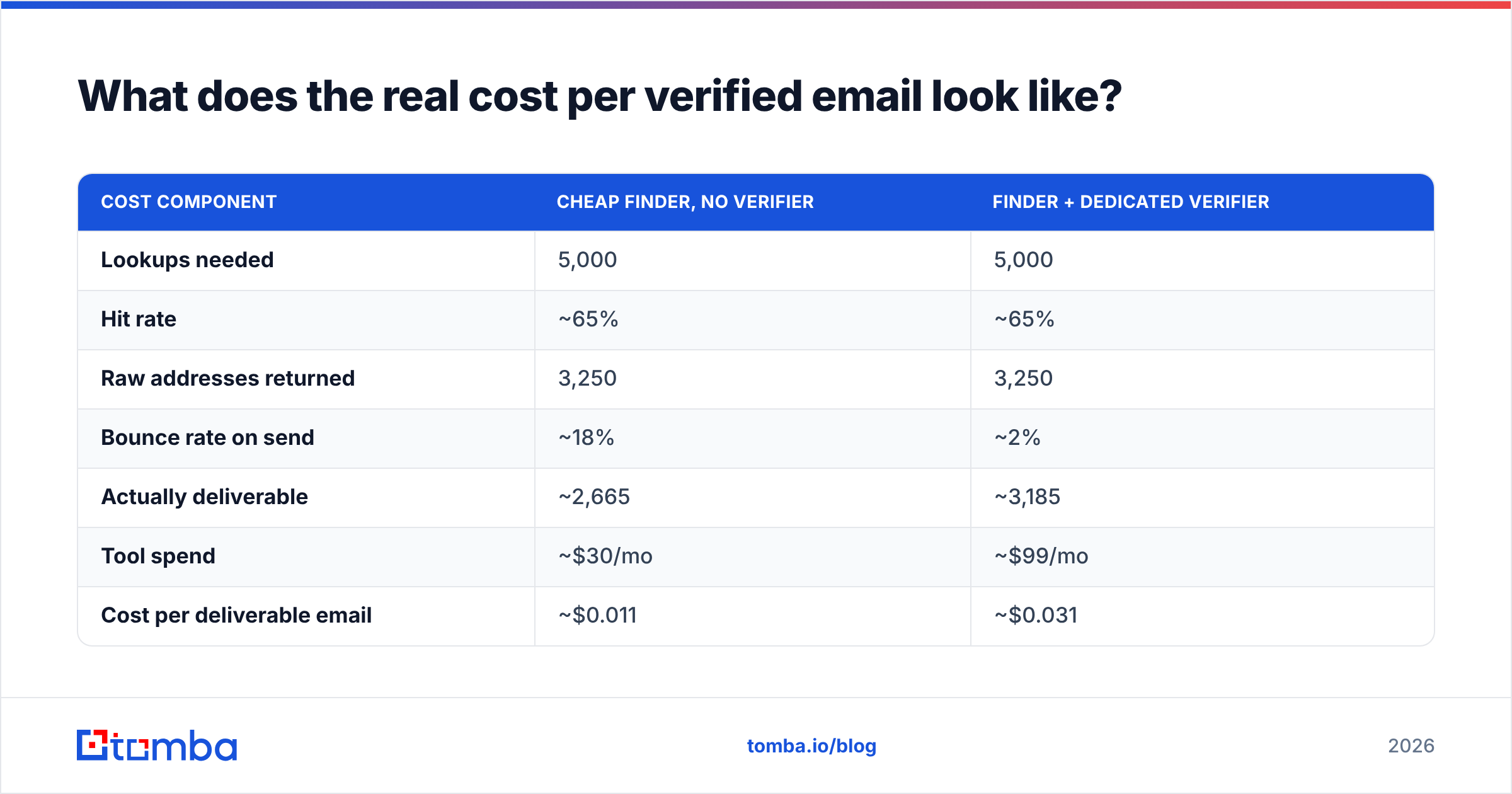
Credit prices lie. Model the full chain.
Say you need 5,000 verified contacts a month.
| Cost component | Cheap finder, no verifier | Finder + dedicated verifier |
|---|---|---|
| Lookups needed | 5,000 | 5,000 |
| Hit rate | ~65% | ~65% |
| Raw addresses returned | 3,250 | 3,250 |
| Bounce rate on send | ~18% | ~2% |
| Actually deliverable | ~2,665 | ~3,185 |
| Tool spend | ~$30/mo | ~$99/mo |
| Cost per deliverable email | ~$0.011 | ~$0.031 |
| Domain reputation cost | High — 18% bounce triggers throttling | Low |
| Rework cost (re-finding, re-warming) | 4-8 hrs/mo | Near zero |
On paper the cheap column wins by 3x. In practice, an 18% bounce rate on a sending domain means suppression lists, a warm-up restart, and a month of degraded placement across every campaign running on that domain — including the ones with good lists. Price the blast radius, not the line item.
This is also why comparing finders purely on database size is a mistake. A 700M-record database that's 40% stale is worse than a 200M-record database with active re-verification. Ask each vendor how often records are re-checked, not how many they hold. Tomba publishes its data sources for exactly this reason — provenance is checkable, headcount claims aren't.

How do they compare on API and developer experience?#
If you're wiring this into a product or an internal RevOps pipeline, this section matters more than the UI.
Minelead offers a clean REST API with domain search and single-email endpoints. Documentation is adequate. Rate limits are modest on lower tiers. It's a good fit for a script that enriches a Postgres table overnight. What you won't get: webhook-driven bulk jobs, SDKs across many languages, or fine-grained confidence scoring in the response payload.
LeadEngineAI's API is shaped around its product — pull a generated list, push it somewhere. That's useful for the sourcing use case and awkward if what you want is a synchronous single-contact lookup inside a signup flow.
What to check on any finder API before you build:
- Response schema stability — does the vendor version its endpoints, or silently change field names?
- Confidence score granularity — a binary valid/invalid is far less useful than a 0-100 score you can threshold per campaign.
- Bulk semantics — are bulk jobs asynchronous with webhooks, or do you poll?
- Rate limits per plan — the number that kills prototypes at 2am.
- SDK coverage — official libraries in your stack, or do you hand-roll HTTP?
- Credit refund policy — do failed lookups burn credits? Over a year this is a real line item.
The Tomba API covers finder, verifier, domain search, enrichment, and catch-all under a single key, with a CLI and an MCP server if you're building agent workflows. Consolidating on one key also means one confidence-score scale across every operation, which makes threshold tuning tractable instead of guesswork.
For teams evaluating this space more broadly, G2's email finder category is a reasonable place to sanity-check review volume and recency — though be aware review recency skews heavily toward whoever is currently running a review campaign.
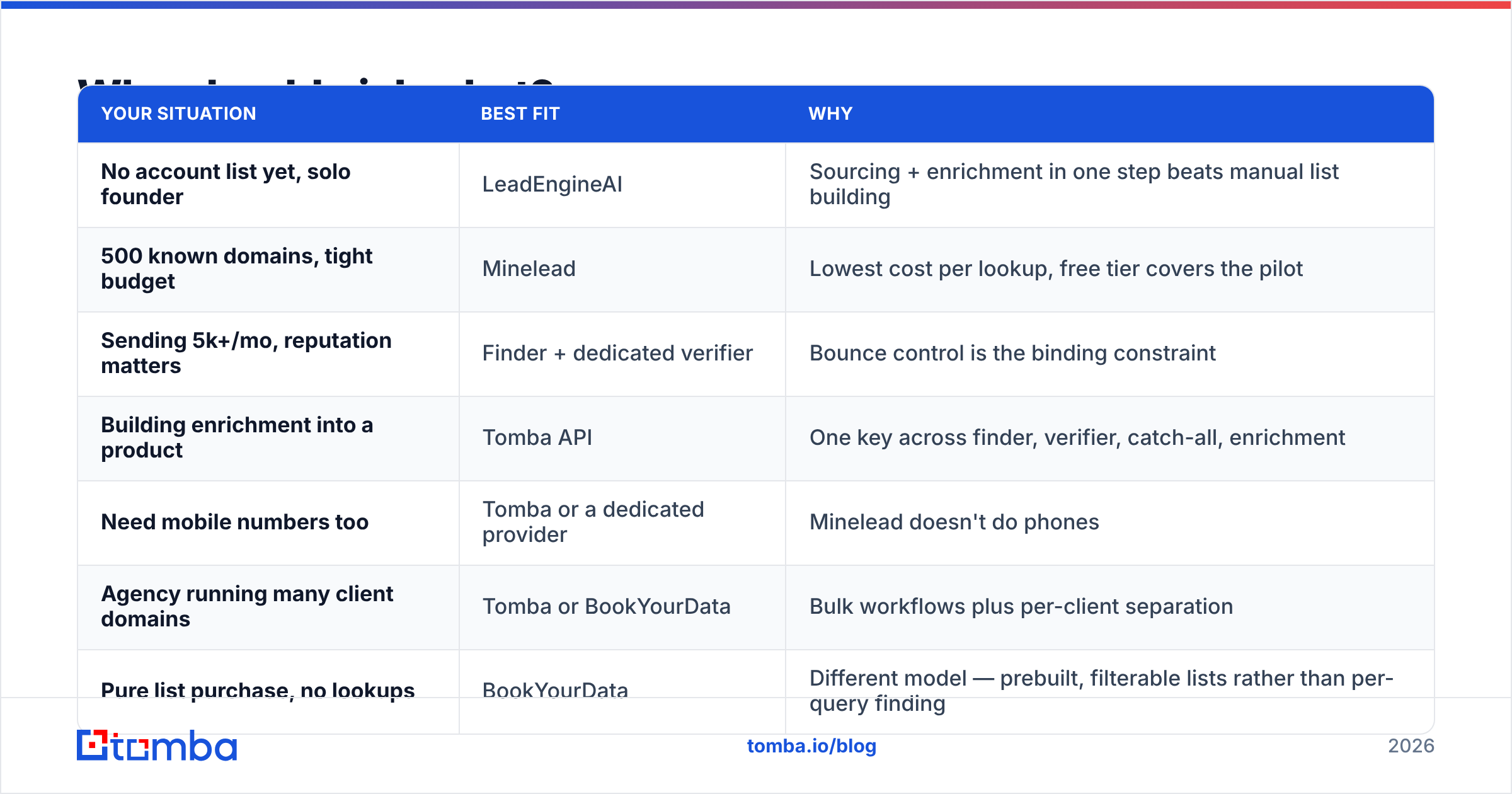
Who should pick what?#
| Your situation | Best fit | Why |
|---|---|---|
| No account list yet, solo founder | LeadEngineAI | Sourcing + enrichment in one step beats manual list building |
| 500 known domains, tight budget | Minelead | Lowest cost per lookup, free tier covers the pilot |
| Sending 5k+/mo, reputation matters | Finder + dedicated verifier | Bounce control is the binding constraint |
| Building enrichment into a product | Tomba API | One key across finder, verifier, catch-all, enrichment |
| Need mobile numbers too | Tomba or a dedicated provider | Minelead doesn't do phones |
| Agency running many client domains | Tomba or BookYourData | Bulk workflows plus per-client separation |
| Pure list purchase, no lookups | BookYourData | Different model — prebuilt, filterable lists rather than per-query finding |
Worth naming explicitly: BookYourData solves a genuinely different problem from both tools here. If you want to buy a pre-filtered list by industry, title, and geography with pay-as-you-go credits and no subscription, that's a legitimate path and it competes with the "source the list" half of LeadEngineAI rather than with the "look up this domain" half of Minelead. Pick based on whether you want a list handed to you or an API you query.
What about verification, catch-alls, and deliverability hygiene?#
Whichever finder you land on, the pipeline should look the same:
- Find — get candidate addresses from your finder of choice.
- Verify — run every address through a dedicated verifier. Syntax, MX, disposable, role-based, SMTP.
- Segment catch-alls — don't treat them as valid or invalid. Route them to a separate, lower-volume, higher-warmth sequence, or run a catch-all finder pass to raise confidence.
- Suppress — role addresses (
info@,sales@), known complainers, and anything scoring below your threshold. - Warm — new domains and new mailboxes ramp over weeks, not days.
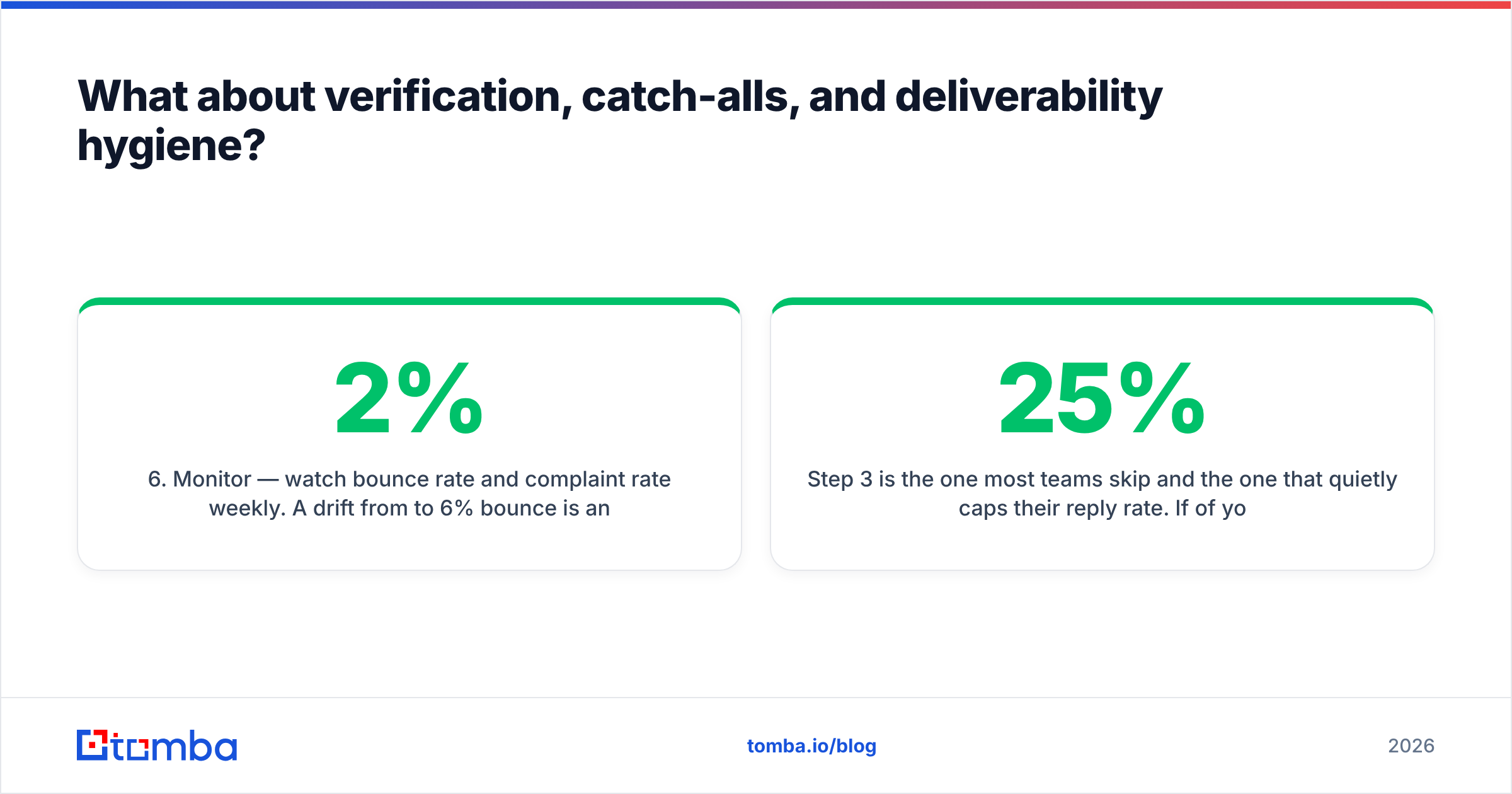
- Monitor — watch bounce rate and complaint rate weekly. A drift from 2% to 6% bounce is an early signal your data source went stale.
Step 3 is the one most teams skip and the one that quietly caps their reply rate. If 25% of your list is catch-all and you're treating those as valid, roughly a quarter of your send volume is generating zero signal and nonzero reputation risk.
Also check your own sending setup independently of any tool: SPF, DKIM, and DMARC alignment. HubSpot's email deliverability guide is a solid, vendor-neutral refresher if you're auditing this for the first time.
Verdict: LeadEngineAI vs Minelead#
Minelead wins on cost and simplicity. LeadEngineAI wins on getting from zero to a list. Neither wins on verified accuracy, and that's the axis that determines whether your campaigns work.
If you're testing outbound for the first time on a small budget, start with Minelead's free tier plus a separate verification step. If you don't have an ICP list and want the tool to do that thinking, LeadEngineAI earns its higher price — as long as you review its output rather than trusting it.
If you're past the experiment stage and email is now a real channel with real revenue attached, consolidate. Running a finder, a verifier, a catch-all checker, and an enrichment tool as four separate vendors with four confidence scales and four billing cycles is how RevOps teams lose a day a week to plumbing.
Try the Tomba Email Finder free — 25 searches a month, no card. Run the 100-contact benchmark from earlier against whatever you're using now and compare cost per deliverable email, not cost per credit. If the numbers favor your current tool, keep it. If they don't, paid plans start at $49/mo and the same API key covers verification, catch-all checks, domain search, and enrichment. Full Tomba pricing is public, with no per-seat surcharge.
Related guides#
// get started
Find, verify and enrich your first contacts today
Start on the free plan with 25 searches a month, then scale when your team is ready.
Free plan · No credit card required · GDPR & CCPA
// about the author