LeadEngineAI vs NinjaPear: Which Lead Tool Wins in 2026?
LeadEngineAI and NinjaPear both promise AI-sourced B2B leads on tap. Here is how they differ on data sourcing, verification, export limits and real cost — and when a dedicated email finder beats both.
TL;DR
- LeadEngineAI vs NinjaPear comes down to one thing: workflow or data. LeadEngineAI builds, scores and enriches lists for you. NinjaPear is a quick, self-serve contact lookup.
- Neither vendor publishes an independent accuracy test. Treat any "98% accurate" claim as a marketing number until you run your own.
- Price per credit is not the real cost. What matters is how credits burn on bad records, and whether verification is bundled or billed on top.
Also worth knowing:
- An all-in-one engine makes sense if you need list building, enrichment and sending in one place. If you already own a sequencer, you pay for it twice.
- For plain email discovery and verification at a steady price, a focused tool like Tomba ($49/mo Starter, free 25 searches/mo) usually wins on cost per usable contact.
What are LeadEngineAI and NinjaPear?#
Both tools sit in the same crowded category: AI-assisted B2B prospecting. You give them a target profile — industry, headcount, location, job title, maybe a tech signal. They hand back a list of companies and contacts. Most rows come with a work email, and some come with an AI-written first line.
LeadEngineAI sits at the "engine" end. The pitch is automation. You define an ICP once, and the platform keeps pulling matching accounts, scoring them and enriching the contacts. Then it hands them to your outbound motion. Apollo, Amplemarket and Seamless.AI made the same bet: own the whole funnel, from list to send.
NinjaPear sits at the fast, self-serve end. Less orchestration, more "type a company, get contacts, export." That is how RocketReach, ContactOut and browser-extension tools behave. Lower friction, lower ceiling.
That split matters more than any feature checkbox. It decides whether the tool replaces part of your stack or adds to it.
One caution first. Both vendors are small. Their plans, credit rules and coverage claims change often. Everything below reflects how each product presents itself in public. Check the current terms on each vendor's own site before you sign. And never buy an annual plan off a blog post — including this one.

LeadEngineAI vs NinjaPear: how do they actually differ?#
Here is the practical breakdown. A dedicated email-finding tool sits in the table as a reference point, so you can see what you pay for when you buy a bundle.
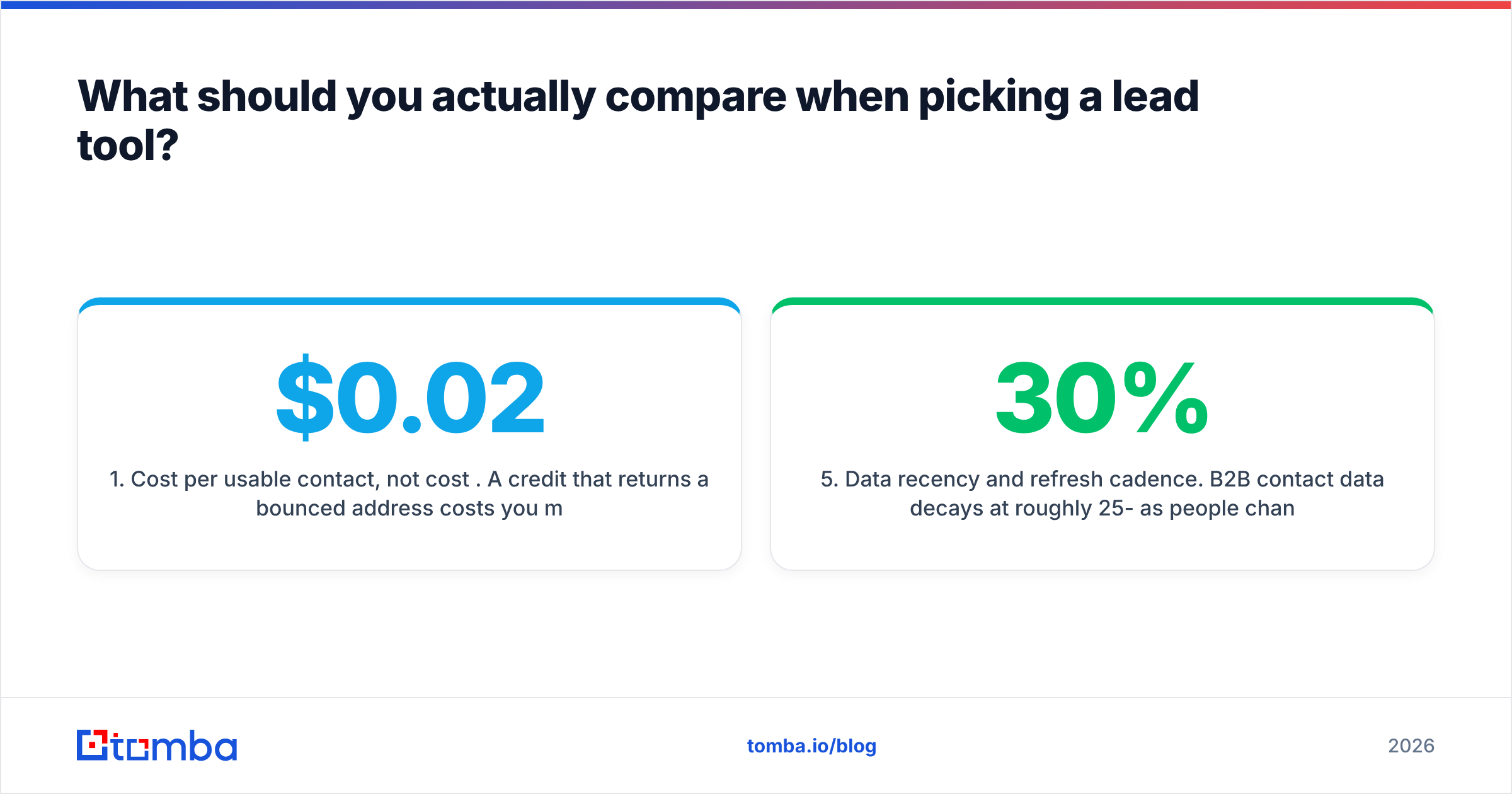
| Dimension | LeadEngineAI | NinjaPear | Tomba (reference) |
|---|---|---|---|
| Core job | ICP-driven list building + scoring | Fast contact lookup and export | Email discovery + verification |
| Best for | Teams without a prospecting stack | Solo founders, recruiters, small teams | Anyone who needs clean emails at volume |
| Built-in sequencer | Yes (platform-native) | No / limited | No — integrates with yours |
| Verification | Bundled, opaque confidence score | Bundled, basic syntax + MX | Dedicated email verifier with catch-all handling |
| Credit model | Credits consumed per enriched record | Credits per lookup, exports metered | Searches per month, verifications separate |
| Entry price | Mid-market tier, published per seat | Low-cost self-serve tier | Free (25/mo), then $49/mo Starter |
| API access | Higher tiers only | Limited | Tomba API on all paid plans |
| Bulk workflows | Yes, list-level | Manual, CSV-driven | Bulk email finder + CSV enrich |
| Data transparency | Aggregate sourcing statement | Aggregate sourcing statement | Public data sources page |

Read that table one column at a time and the trade is clear. LeadEngineAI wants to be your workflow. NinjaPear wants to be your shortcut. A dedicated finder wants to be your data layer and nothing else. Those are three different purchases. The common mistake is to compare them on price per credit, as if they were the same thing.
What should you actually compare when picking a lead tool?#
Feature grids are easy to game. These six checks separate a tool that still works at month six from one you quietly stop opening.
Start with the three that move your budget the most:
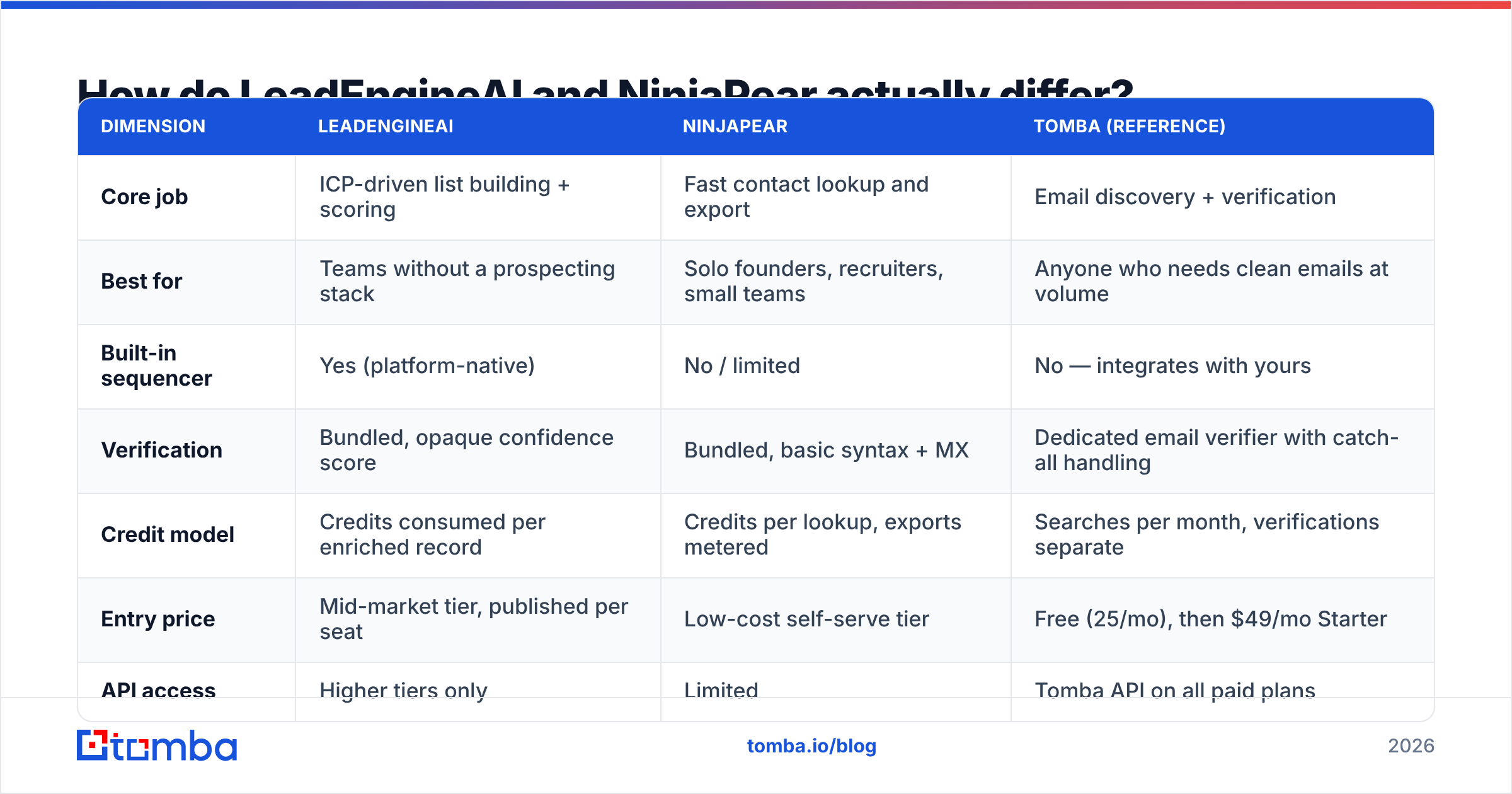
- Cost per usable contact, not cost per credit. A $0.02 credit that bounces costs more than a $0.08 credit that lands. Run 200 records through both tools and send to both. Divide spend by contacts that got delivered and opened. That is the only price that matters.
- What happens to credits on a miss. Some platforms bill for any row they return, guesses included. Others bill only on a confirmed hit. Ask this in writing before you buy. It can swing your real cost by two to three times.
- Catch-all domain handling. About a third of enterprise domains accept every address at the SMTP layer. Simple checks tell you nothing there. A tool that marks catch-alls "valid" is lying to you. One that marks them "unknown" and stops is no help either. You want a real catch-all verifier that adds other signals.
Then check the three that decide how long the tool keeps earning its price:
- Export and seat limits. All-in-one platforms often cap monthly exports well below your credit allowance. You can find 10,000 contacts and still pull out only 2,500. Check the export cap, not the credit cap.
- Data recency. B2B contact data decays by roughly 25-30% a year as people change jobs. If a vendor cannot tell you when a record was last re-verified, you are buying a snapshot of 2023.
- Escape velocity. If you cancel, do you keep your lists, your sequences and your reply history? Platform-native sequencers make migration painful by design. Data tools do not, because they never held your workflow.
Analyst listings help with the shortlist. G2's lead intelligence category and Capterra's lead generation software directory are both useful here. But review volume leans toward whoever runs the biggest incentive program. Use them to find candidates, not to pick a winner.
Which one has better data accuracy?#
Neither vendor publishes a repeatable, third-party benchmark. So the honest answer is simple: test both on your own ICP, and believe your own bounce rate.
Accuracy is never one number. A tool can be 95% right on US SaaS firms with 50-500 staff and 60% right on European manufacturers or Japanese enterprises. Vendors quote the first number. You find the second one later. So segment your trial:
- 50 contacts from your best-performing existing segment
- 50 from a segment you want to grow into
- 50 from non-English-speaking markets, if you sell abroad

Then compare hard bounce rate, not "valid" labels. A platform that grades its own homework always passes. Mailbox providers are less kind, and your sender reputation pays the bill.
One structural point favors dedicated finders. When email discovery is the whole product, the incentive is to return fewer, better records. When it is a credit line inside a platform sold on volume, the incentive tilts toward returning something rather than nothing. That is not an accusation against either vendor. It is just how the business models push.

How do pricing and credits compare?#
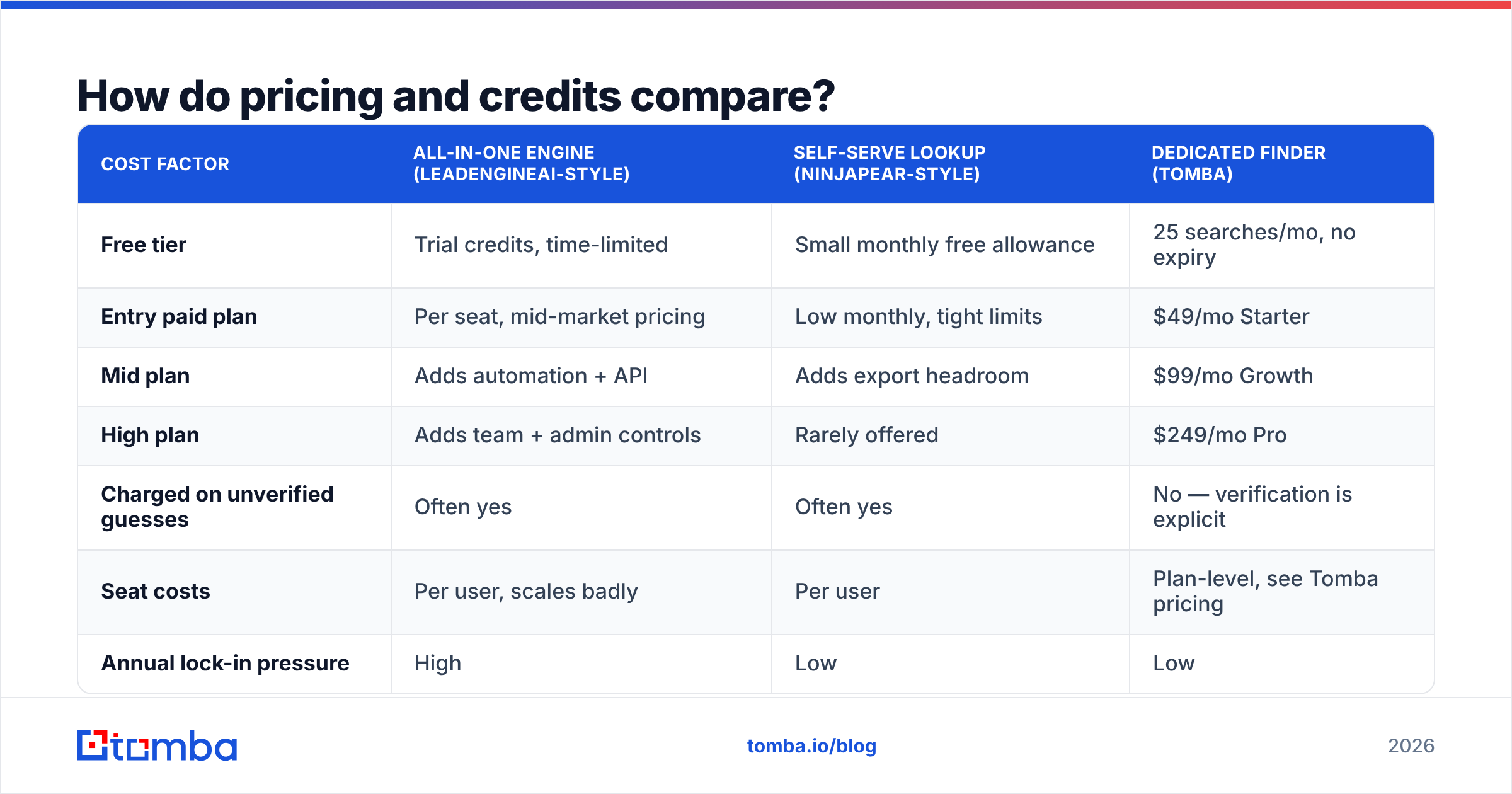
Sticker prices here are close enough that they rarely decide anything. What decides it is the cost of one usable contact after waste.
| Cost factor | All-in-one engine (LeadEngineAI-style) | Self-serve lookup (NinjaPear-style) | Dedicated finder (Tomba) |
|---|---|---|---|
| Free tier | Trial credits, time-limited | Small monthly free allowance | 25 searches/mo, no expiry |
| Entry paid plan | Per seat, mid-market pricing | Low monthly, tight limits | $49/mo Starter |
| Mid plan | Adds automation + API | Adds export headroom | $99/mo Growth |
| High plan | Adds team + admin controls | Rarely offered | $249/mo Pro |
| Charged on unverified guesses | Often yes | Often yes | No — verification is explicit |
| Seat costs | Per user, scales badly | Per user | Plan-level, see Tomba pricing |
| Annual lock-in pressure | High | Low | Low |
Watch for two patterns in the fine print. First, per-seat pricing punishes the teams that get the most value. Add more SDRs and your unit economics get worse, even though the data costs the vendor nothing extra. Second, rollover rules. Credits that expire each month turn an 8,000-credit plan into whatever you managed to use in 30 days. For most teams that is about half.
If you are eyeing an all-in-one engine to cut vendors, price that move honestly. Add up what you pay today for data, verification and sending. If the bundle is cheaper, consolidate. If it lands within 15%, do not. You would pay about the same for a worse sequencer and less data flexibility. Teams at this fork often weigh an Apollo alternative or a Seamless.AI alternative first.
LeadEngineAI vs NinjaPear: which is better for cold outbound?#
For a team running structured, multi-touch outbound at volume, the engine usually wins on workflow alone. It keeps a live ICP-matched list, scores it and pushes it into a sequence. That removes real daily overhead. If you have no CRM discipline and no sequencer, it is worth paying for.
For a founder, a recruiter or a two-person team sending 50 researched emails a week, it almost never wins. You pay for orchestration you never touch. The per-seat model gets worse the moment you add a second person. NinjaPear's lighter model fits that profile better. So does a plain email finder paired with the sending tool you already like.
There is a third pattern worth naming, and most experienced outbound teams run it: one data source, one verification step, one sender, loosely coupled. Data comes from a finder with an API. Verification is an explicit gate. Sending happens in a tool picked for deliverability, not for its database. That stack takes more work to assemble. It also costs less to run, and no single vendor's price change can hold it hostage.
What about compliance and data sourcing?#
Ask both vendors the same three questions before you buy, and get the answers by email:
- Where does the contact data come from? Public web, partner feeds, user-uploaded address books, or bought lists? Contributed-contact models, where an extension harvests users' own inboxes, carry very different risk from public-web extraction.
- What is your legal basis for processing EU personal data? Under the GDPR, legitimate interest is the usual answer for B2B prospecting. The vendor should state it plainly and show you their data subject request process.
- Can you complete a deletion within 30 days? If a prospect files a request against you, the upstream vendor has to act. "We'll look into it" is not an answer.
Any vendor that gets defensive here is telling you something. Mature ones publish it. That is the point of a public data sources page.
So which should you pick?#
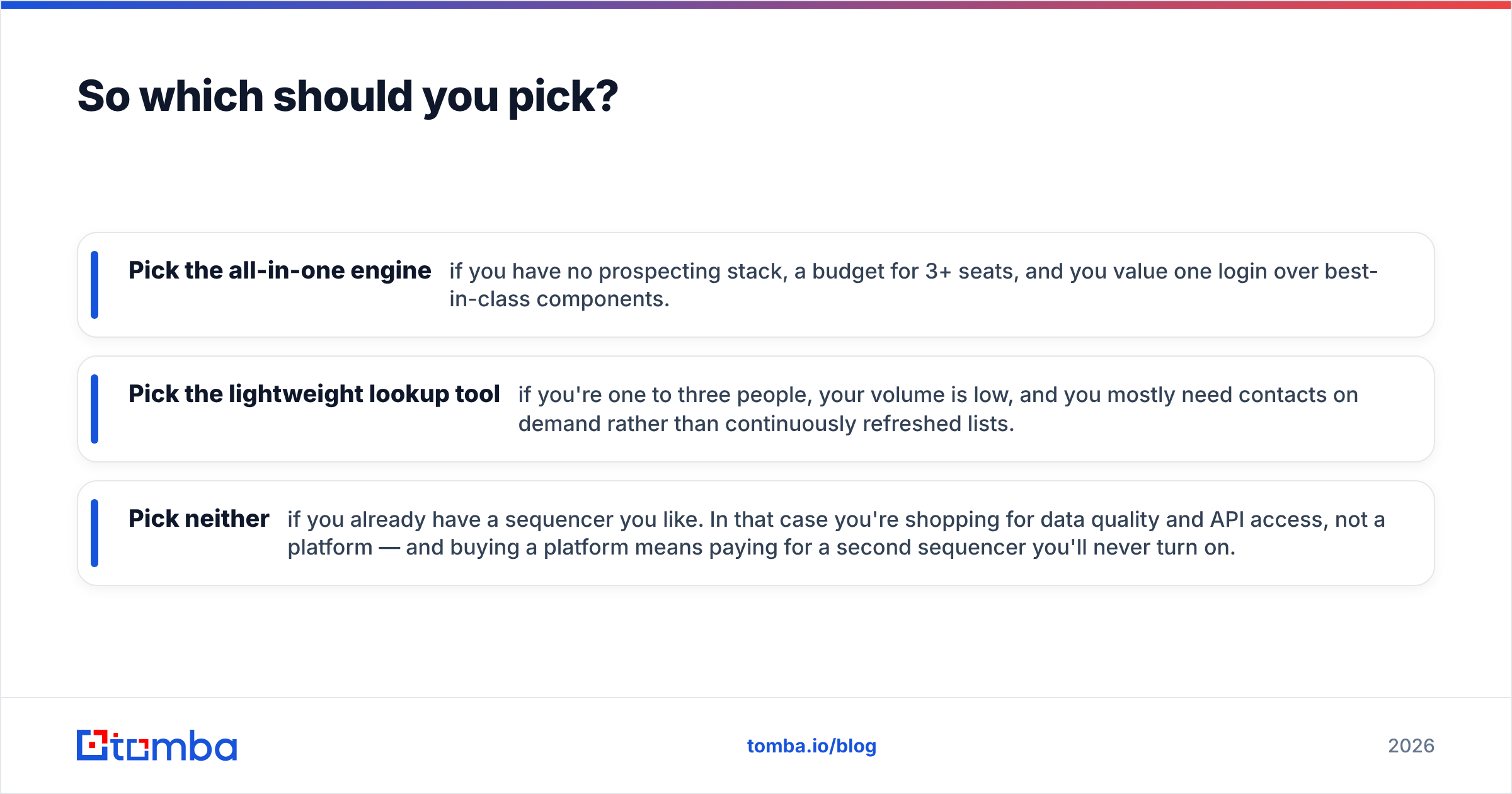
- Pick the all-in-one engine if you have no prospecting stack, budget for 3+ seats, and you value one login over best-in-class parts.
- Pick the lightweight lookup tool if you are one to three people, your volume is low, and you need contacts on demand rather than lists that refresh.
- Pick neither if you already have a sequencer you like. Then you are shopping for data quality and API access, not a platform. Buying a platform means paying for a second sequencer you will never turn on.
Run a paid one-month trial on both before you commit to a year. Use the same 150-contact test set on each. Compare hard bounce rate, reply rate, and total spend divided by contacts that reached a real conversation. That test costs under $200, and it often changes the decision.
If what you need is clean, verified work emails — not another platform to learn — start with the Tomba Email Finder. The free tier gives you 25 searches a month with no card. Starter is $49/mo. Every plan includes API access, so you can wire it into the sequencer, CRM and spreadsheet you already use. Test it against your current tool on the same 150 contacts and compare bounce rates. That is the only benchmark that decides anything.
Related guides#
// get started
Find, verify and enrich your first contacts today
Start on the free plan with 25 searches a month, then scale when your team is ready.
Free plan · No credit card required · GDPR & CCPA
// about the author