LeadEngine AI vs Pubrio (2026): Which B2B Lead Tool Wins?
LeadEngine AI and Pubrio both promise AI-sourced B2B leads, but they solve different halves of the prospecting problem. Here is how they compare on data accuracy, pricing, workflow fit — and when a dedicated email finder beats both.
TL;DR — LeadEngine AI vs Pubrio is a choice between two habits. One tool builds the list for you. The other lets you filter it yourself. Neither one fixes bad email data.
- LeadEngine AI is pitched as an AI prospecting layer. Describe your ICP in plain language, let the system build and score a list, then hand it to your sequencer. It optimises for speed to list.
- Pubrio leans on a searchable B2B database plus buyer-intent and technographic filters. It optimises for targeting precision before you ever write an email.
- Neither is primarily a verification tool. In both cases you are trusting a bundled email guess, and bundled guesses are where bounce rates come from.
Two more things to budget for:
- Pricing on AI-first lead platforms is credit-based, and it moves often. Check the live pricing page before you budget. Treat any figure in a blog post, including this one, as a starting point rather than a quote.
- If your real bottleneck is valid work emails at scale, a dedicated finder plus verifier usually costs less than either platform. It also bounces less. Tomba's email finder starts free at 25 searches/month, then $49/mo on Starter.
What are LeadEngine AI and Pubrio?#
They are both trying to replace the same painful afternoon: the one where a rep opens LinkedIn, copies twelve company names into a spreadsheet, guesses at email formats, and calls it a pipeline.
LeadEngine AI sits in the "AI SDR / AI prospecting agent" category that exploded after 2024. The pitch is conversational targeting. You write something like "Series B fintechs in the UK with 50-200 staff hiring compliance people." The product then builds a list, enriches contacts, and scores them for fit. The value is the collapsed workflow: research, list-build, and enrichment in one pass instead of three tools.
Pubrio (pubrio.com) is closer to a classic B2B data platform with an AI wrapper. You get a contact and company database, filters for firmographics and technographics, buyer-intent signals, and email lookup/verification bundled in. The value is that you narrow before you spend credits, so the list you export is smaller and better.
Think of it like grocery shopping. LeadEngine AI is the meal-kit box — the ingredients arrive pre-chosen and portioned. Pubrio is a well-organised supermarket with good signage — more work, more control over exactly what lands in the basket. Both feed you. Which one you want depends on whether your constraint is time or precision.
Neither is a bad product. The honest framing is that they answer different questions, and most teams pick badly because they compare feature lists instead of comparing bottlenecks.
LeadEngine AI vs Pubrio: how do they compare head-to-head?#
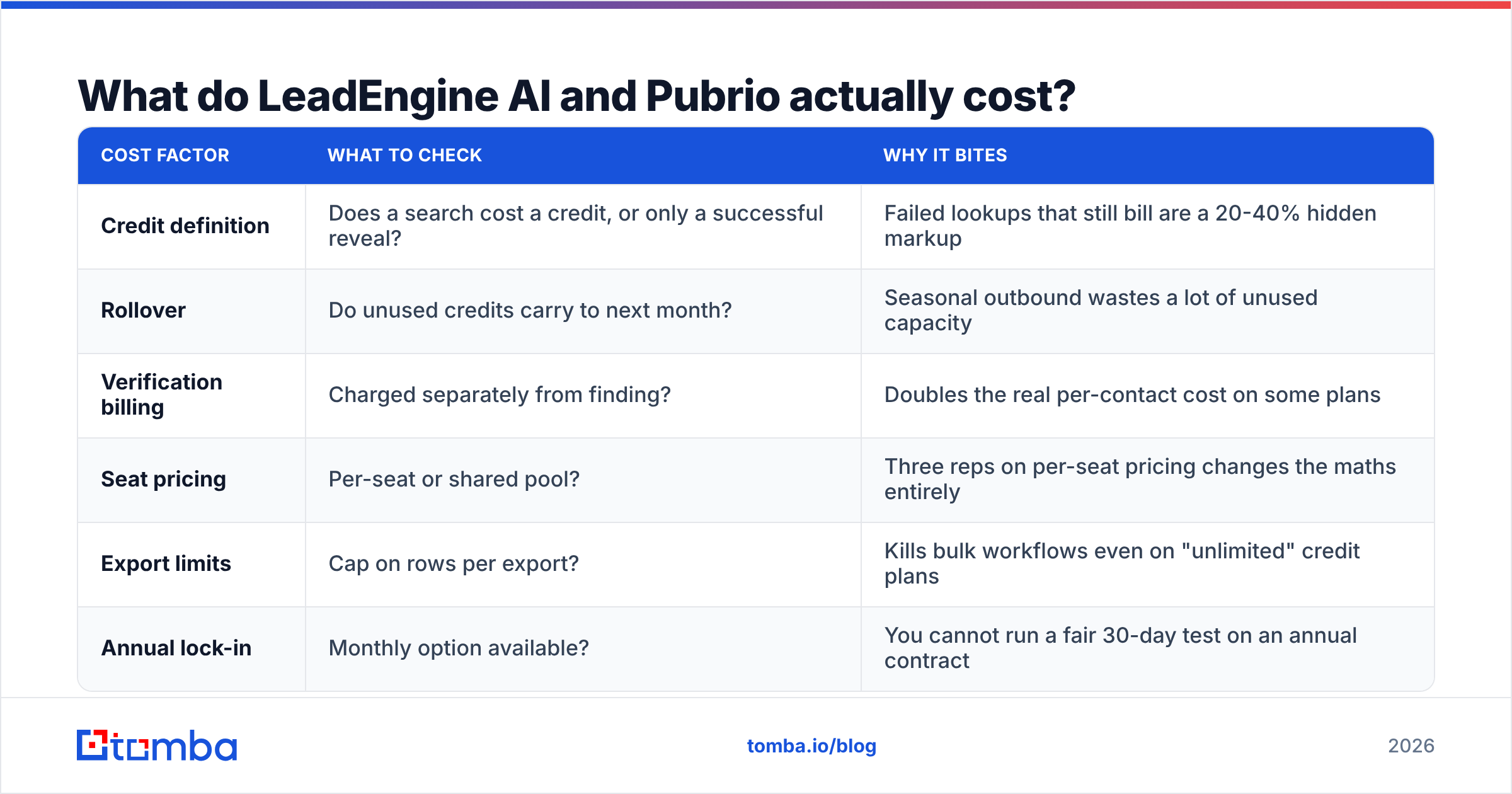
Here is the practical comparison — the attributes that actually change your week, not the ones that fill a feature matrix.
| Dimension | LeadEngine AI | Pubrio | Dedicated finder (e.g. Tomba) |
|---|---|---|---|
| Core job | AI-built target lists from a prompt | Filtered database search + intent signals | Find and verify work emails |
| Targeting control | Prompt-driven, less granular | Granular filters (firmo/techno/intent) | Domain, name, or company based |
| Buyer intent data | Limited / varies by plan | Yes, a headline feature | No — not its job |
| Email verification | Bundled, opaque | Bundled | Standalone, with catch-all handling |
| Bulk workflow | List export to CSV/CRM | List export to CSV/CRM | Bulk upload + API + Sheets/Excel |
| API access | Plan-dependent | Plan-dependent | Yes, on every paid tier |
| Best for | Small teams with no research capacity | Targeted ABM and intent plays | High-volume outbound that must not bounce |
| Pricing model | Credit-based, tiered | Credit-based, tiered | Credit-based, published tiers from $49/mo |
Two things jump out of that table.
First, LeadEngine AI and Pubrio overlap heavily in output (a CSV of contacts) but barely overlap in method. If you already know exactly who you want to reach, LeadEngine AI's main selling point — deciding for you — is worth less. If you genuinely do not know your ICP yet, Pubrio's filters are a blank page problem, not a solution.
Second, neither column has "verification" as its primary discipline. That matters more than any other row, and it is the row buyers skip.

Which one gives you more valid email addresses?#
The honest answer: you will not know until you test them against your ICP, and any vendor-published accuracy number should be read as a best case.
Here is why bundled accuracy claims mislead. An "AI-found" email address usually comes from one of three places: a scraped public source, a pattern guess based on the company's known format, or a licensed data partner. Pattern guessing is cheap and frequently right for mid-size companies with first.last@ conventions. It is frequently wrong for companies using initials, nicknames, or regional subdomains. On catch-all domains it is close to a coin flip. The mail server there accepts everything and tells you nothing.
That last case is the silent killer. Catch-all domains represent a meaningful slice of B2B, and most bundled verifiers mark them "accept-all" and hand them to you anyway. Send to enough of those and your bounce rate climbs past the 2-3% threshold where Google and Microsoft start throttling. A catch-all verifier exists precisely because "accept-all" is not the same as "valid".

Reference: independent email-finder accuracy benchmarking, 2026.
A defensible test takes about an hour:
- Build one seed list of 100 contacts you can independently confirm — customers, past leads, people whose addresses you already have in your CRM.
- Run the same 100 through each platform without telling it the answer. Record found / not found.
- Compare found addresses to known-good addresses. This gives you a true accuracy rate, not a coverage rate.
- Run every "found" address through a neutral third-party verifier. If the platform says valid and an independent email verifier says risky, believe the pessimist.
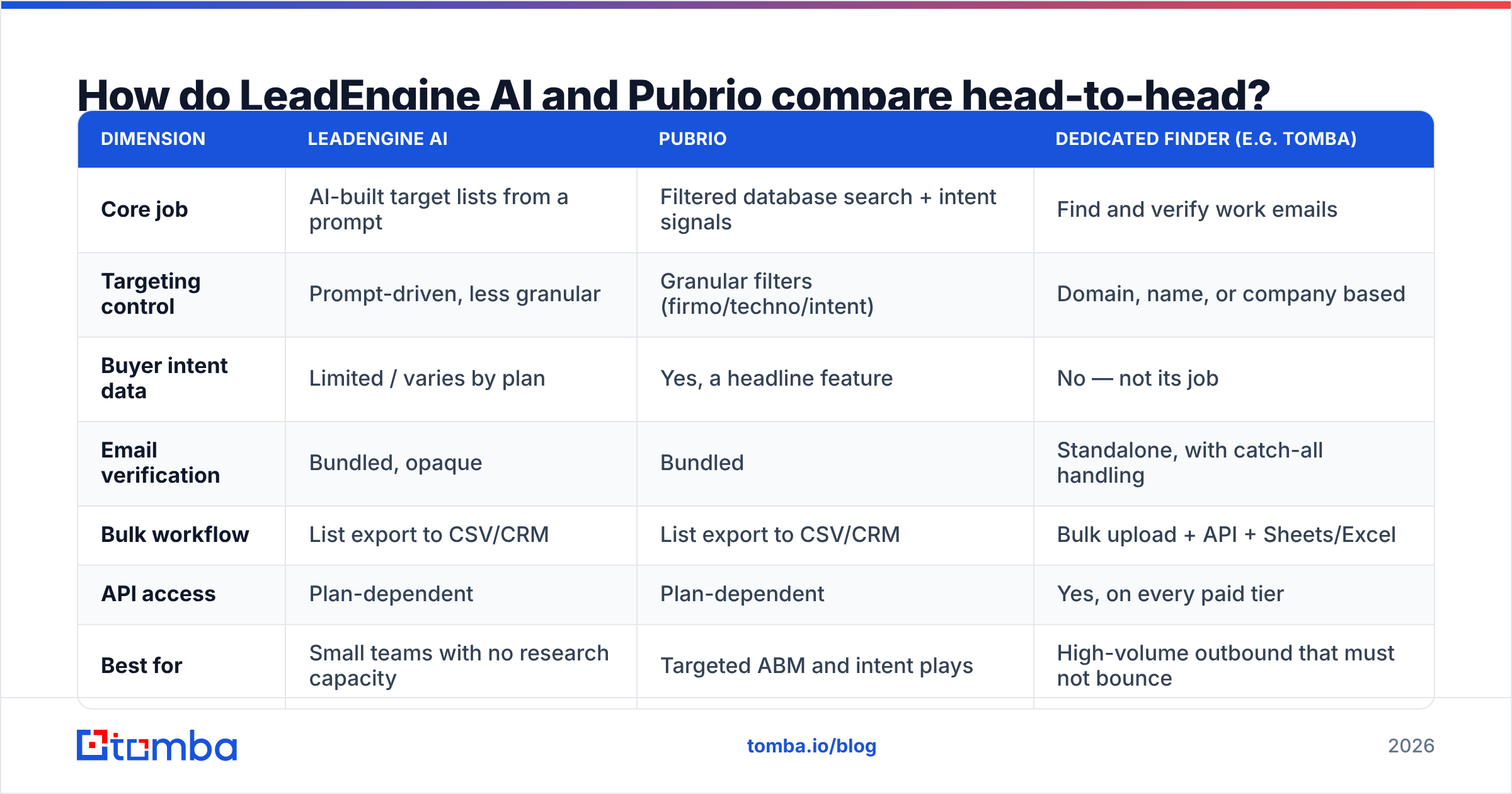
- Count catch-alls separately. A tool that finds 90% of addresses but delivers 30% of them as unresolved catch-alls is not a 90% tool.
Teams that run this test almost always find the same pattern: coverage numbers are similar across vendors, and verified accuracy is where they separate.
What do LeadEngine AI and Pubrio actually cost?#
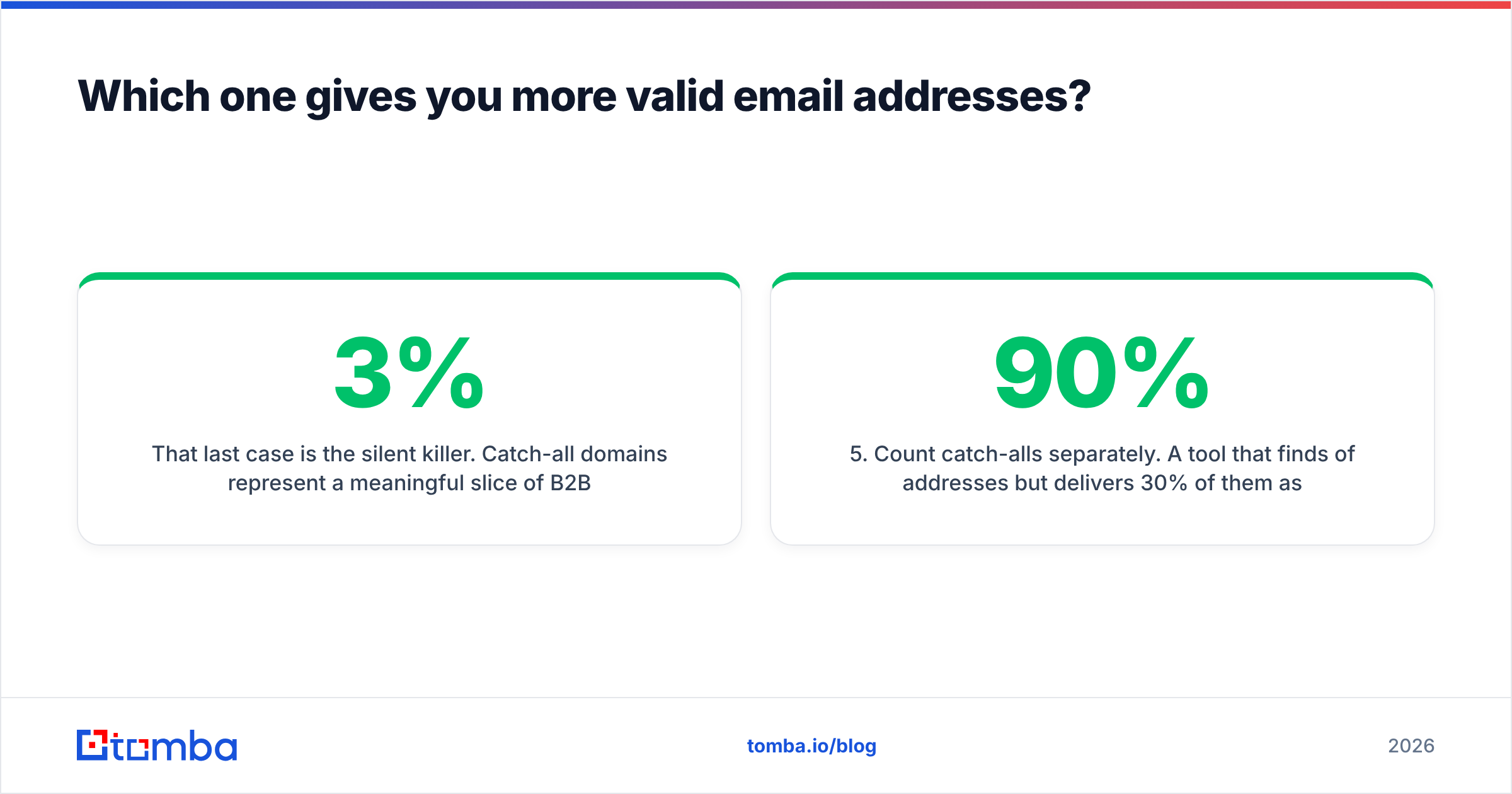
Both use credit-based pricing with tiered plans, which means the sticker price tells you almost nothing. What matters is the effective cost per usable contact.
| Cost factor | What to check | Why it bites |
|---|---|---|
| Credit definition | Does a search cost a credit, or only a successful reveal? | Failed lookups that still bill are a 20-40% hidden markup |
| Rollover | Do unused credits carry to next month? | Seasonal outbound wastes a lot of unused capacity |
| Verification billing | Charged separately from finding? | Doubles the real per-contact cost on some plans |
| Seat pricing | Per-seat or shared pool? | Three reps on per-seat pricing changes the maths entirely |
| Export limits | Cap on rows per export? | Kills bulk workflows even on "unlimited" credit plans |
| Annual lock-in | Monthly option available? | You cannot run a fair 30-day test on an annual contract |
For reference, Tomba's model is deliberately boring and published: free tier at 25 searches/month, Starter $49/mo, Growth $99/mo, Pro $249/mo, Enterprise custom — full detail on the Tomba pricing page. That predictability is the point. When you are forecasting a 20,000-contact quarter, a plan you can model in a spreadsheet beats a plan that requires a sales call.
Before you commit to either one, do the arithmetic that vendors rarely present. Take your monthly contact target. Divide it by the plan's credit allowance, then multiply by the realistic hit rate from your 100-contact test. Add whatever you will spend verifying the output elsewhere. That final number — cost per sendable contact — is the only fair way to settle LeadEngine AI vs Pubrio. It is worth scanning G2 and Capterra for complaints about credit burn. That is exactly what frustrated users post about.

Who should choose LeadEngine AI?#
Pick LeadEngine AI if most of these describe you:
- You have no dedicated research function. One or two reps, no ops person, nobody whose job is list hygiene. The collapsed workflow genuinely saves hours.
- Your ICP is still fuzzy. You are testing three or four segments and want the system to propose accounts rather than filter them.
- Volume is modest. Under a few thousand contacts a month, the per-contact premium for automation is easy to justify against a salary.
- You value one login over best-in-class parts. Fewer tools means fewer integrations to maintain and one bill to approve.
Pick something else if you need auditable sourcing. AI-assembled lists are harder to trace back to a source. That matters for GDPR-sensitive outbound in the EU and UK. It matters again in any procurement process that asks "where did this data come from?"
Who should choose Pubrio?#
Pick Pubrio if most of these describe you:
- You run account-based motions. Intent signals and technographic filters are the whole value proposition, and they are wasted on spray-and-pray outbound.
- Your ICP is narrow and well-defined. Filters reward precision. If you know you want companies running a specific CRM in a specific headcount band, database search beats a prompt.
- Marketing and sales share the list. Intent data is as useful for ad targeting and content timing as it is for cold email.
- You want to see the list before you pay for it. Filter-first workflows let you narrow to 400 accounts before spending reveal credits, instead of buying 4,000 and sorting later.
Skip it if intent data is not part of your motion. You would pay for the headline feature and use the parts you can get cheaper elsewhere. A domain search and a solid verifier cover the basic "find people at these companies" job for a fraction of the cost.
Is a dedicated email finder the better buy than either?#
Often, yes. This is the comparison nobody runs. "Platform vs point tool" feels like an unfair fight until you look at where deals actually break.
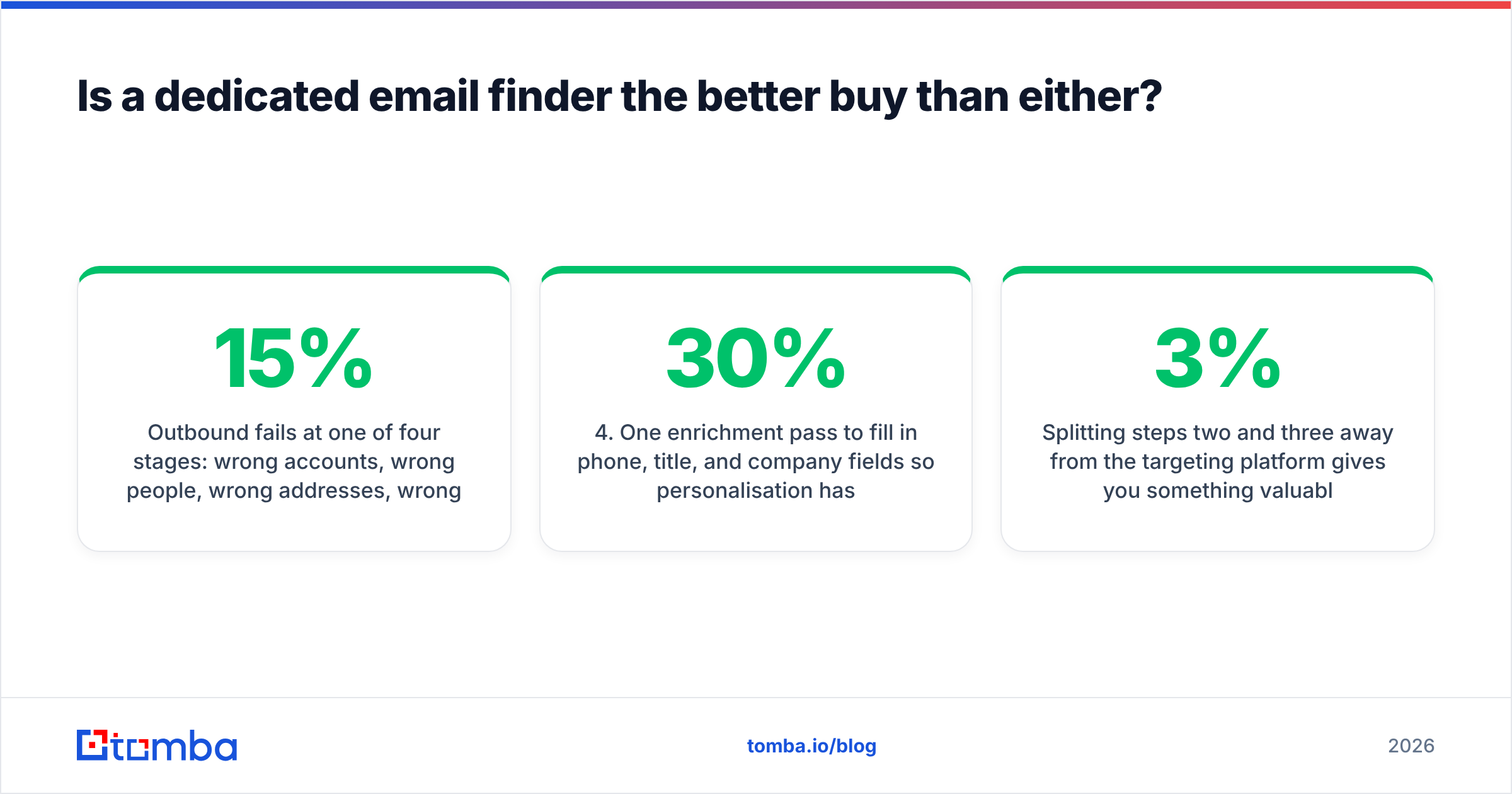
Outbound fails at one of four stages: wrong accounts, wrong people, wrong addresses, wrong message. LeadEngine AI vs Pubrio is a fight over stages one and two. Almost nobody attacks stage three properly. That is the stage that damages your sending domain permanently. A bad account list wastes a week. A 15% bounce rate on a new domain costs you months of sender reputation repair.
The stack that most consistently works for teams sending 5,000+ cold emails a quarter looks like this:
- One targeting source — your CRM, LinkedIn Sales Navigator, a database like Pubrio, or an AI lister like LeadEngine AI. Whichever you already trust.
- One dedicated finder for work emails at scale, with bulk upload and API access so it runs inside your workflow rather than beside it.
- One independent verifier — including real catch-all handling, not just an "accept-all" label passed through.
- One enrichment pass to fill in phone, title, and company fields so personalisation has something to work with. Data enrichment on already-verified records is far cheaper than enriching a list that is 30% dead.
- One sequencer that you keep boring and warm.
Splitting steps two and three away from the targeting platform gives you something valuable: leverage. Every vendor's accuracy slips sooner or later, because data decays at roughly 2-3% per month as people change jobs. When it slips, you swap one component instead of migrating a platform. That is the entire argument for point tools, and it is a good one. Lead generation stacks that survive three years are always modular.
How do you run a fair 7-day bake-off?#
Do not trial both at once in production. Run this instead:
- Day 1: Build your 100-contact known-good seed list. Freeze it. Do not add to it later.
- Days 2-3: Trial LeadEngine AI. Record coverage, verified accuracy, catch-all share, and — importantly — how long the workflow took in wall-clock minutes.
- Days 4-5: Trial Pubrio with the same seed list and the same stopwatch.
- Day 6: Run both output sets through a neutral verifier. Recalculate accuracy on verified-only results.
- Day 7: Compute cost per sendable contact for each, including the verification spend. Pick the winner on that number, not on the demo.
The two platforms usually land within a few points of each other. When they do, the tiebreaker should be workflow fit, not data. Which one exports cleanly into your CRM? Which one has an API on the tier you can afford? Which one lets a non-technical rep use it unsupervised? Those questions predict twelve-month satisfaction better than any accuracy benchmark.

The verdict#
LeadEngine AI wins on speed for small teams with no research capacity. Pubrio wins on precision for ABM and intent-driven motions. Neither wins on email accuracy, because that is not what either was built to do.
If your pipeline problem is "I don't know who to contact," buy one of them. If it is "I know who to contact but half my emails bounce," neither platform fixes it. A third subscription you do not need will feel like progress for about a month.
Start with the cheapest accurate layer. Add complexity only when you hit a real ceiling. Tomba's email finder gives you 25 free searches a month to test against your own known-good list. That is enough to run the accuracy test in this post end to end, before you spend anything. If the numbers hold up, Starter is $49/mo with bulk processing, a full API, and catch-all verification included. Your finder then scales with your outbound instead of capping it. Run the test, keep whichever tool wins on cost per sendable contact, and put the savings into a better first line.
Related guides#
// get started
Find, verify and enrich your first contacts today
Start on the free plan with 25 searches a month, then scale when your team is ready.
Free plan · No credit card required · GDPR & CCPA
// about the author