LeadEngineAI vs SalesBot 2026: AI Sales Tool Comparison
One is a data-and-scoring engine, the other is a conversational AI seller. They solve different halves of the same pipeline problem, and only one of them fixes your bad contact data.
LeadEngineAI vs SalesBot comes down to one question. Do you need more leads, or faster replies? Here is the short version.
TL;DR
- LeadEngineAI and SalesBot are not really competitors. One is a lead engine (find, score, route accounts). The other is a conversational AI seller (reply, qualify, book). Buy one expecting the other's job and you will be disappointed.
- Buy LeadEngineAI-style tooling when your problem is "we don't know who to contact." Buy SalesBot-style tooling when your problem is "we can't answer the people already talking to us."
- Both platforms share the same weakness. They use contact data they did not verify. Neither one promises that the email address it hands your sequence is deliverable.
Two more things to weigh before you sign:
- Cost per booked meeting swings more on data accuracy than on subscription price. A $99/mo stack with 95% valid emails beats a $600/mo stack at 70%.
- The practical 2026 setup: put a verified data layer underneath, then pick the tool that solves your real bottleneck. Do not stack both until you have proof you need both.
What are LeadEngineAI and SalesBot, exactly?#
Both names get typed into the same search box. That is how the comparison got invented. In truth they sit in different product categories.
LeadEngineAI describes the "AI lead engine" pattern. You connect your CRM and define an ICP. The platform then surfaces accounts and contacts that look like your closed-won customers. It scores them, adds firmographic and technographic data, watches for intent signals, and pushes ranked lists into your sequencer or CRM. The output is a queue.
SalesBot describes the "AI sales agent" pattern. An LLM-driven assistant handles the conversation layer. It answers inbound chat, qualifies website visitors, replies to email threads, handles objections from a knowledge base, and books meetings on a rep's calendar. The output is a conversation.
Put plainly: a lead engine is the scout. A sales bot is the receptionist who never sleeps. Gartner's sales technology research keeps making the same point. Buyers often buy in the wrong category, because vendors in both camps use the same words ("AI-powered pipeline generation").
That mismatch is expensive. If your reps already have 4,000 untouched contacts, another lead engine only adds noise. If nobody lands on your site, a chatbot has nothing to talk to.
LeadEngineAI vs SalesBot: how do they compare head-to-head?#
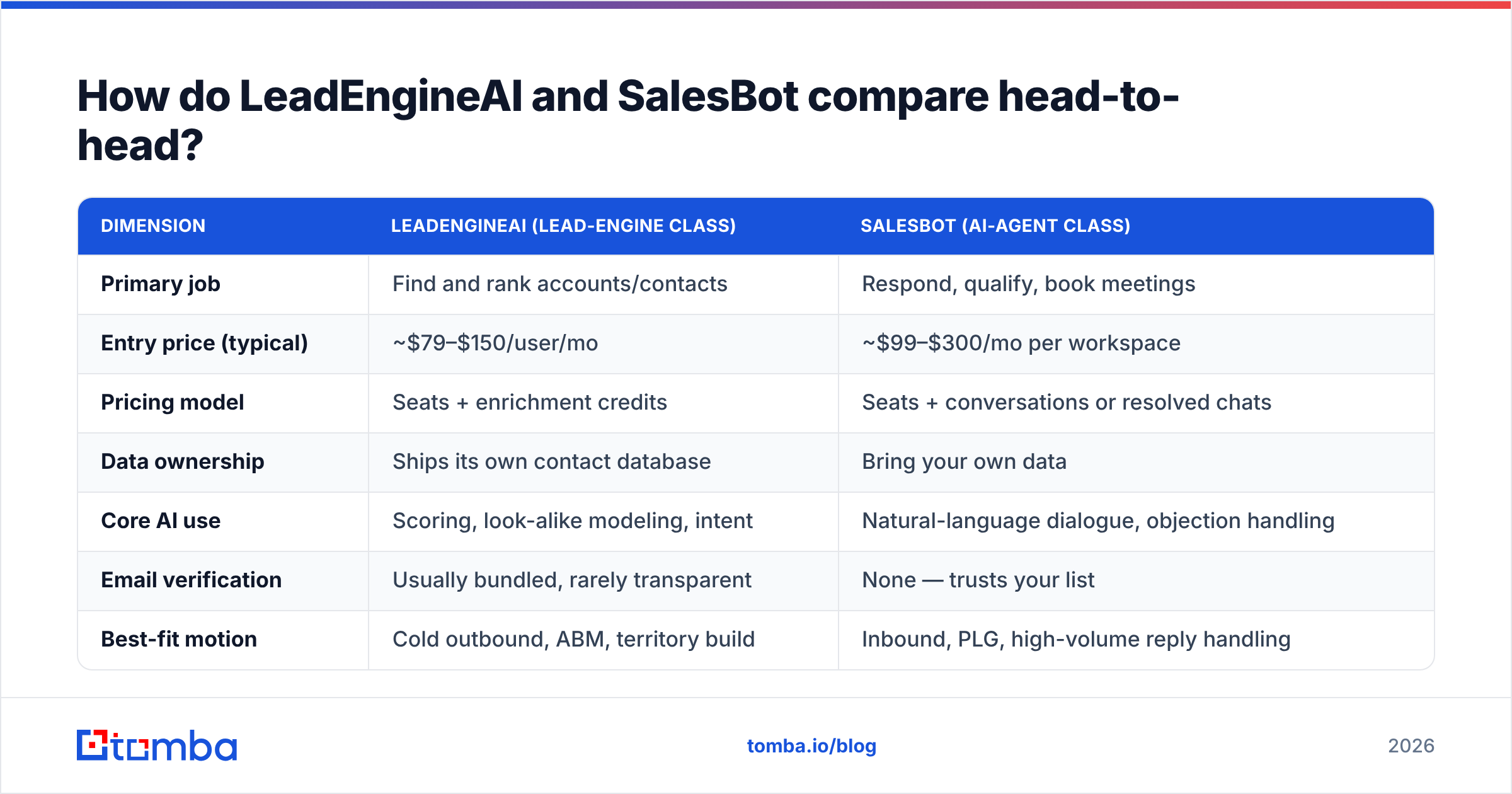
Here is the honest side-by-side. Treat every price as a published starting range you should confirm on the vendor's own pricing page. AI sales tooling repriced twice in 2025, and seat-plus-credit plans are now the norm.
| Dimension | LeadEngineAI (lead-engine class) | SalesBot (AI-agent class) |
|---|---|---|
| Primary job | Find and rank accounts/contacts | Respond, qualify, book meetings |
| Entry price (typical) | ~$79–$150/user/mo | ~$99–$300/mo per workspace |
| Pricing model | Seats + enrichment credits | Seats + conversations or resolved chats |
| Data ownership | Ships its own contact database | Bring your own data |
| Core AI use | Scoring, look-alike modeling, intent | Natural-language dialogue, objection handling |
| Email verification | Usually bundled, rarely transparent | None — trusts your list |
| Best-fit motion | Cold outbound, ABM, territory build | Inbound, PLG, high-volume reply handling |
| Time to first value | 2–4 weeks (ICP tuning) | 3–7 days (knowledge base upload) |
| Failure mode | Beautiful lists of dead emails | Confident answers to the wrong person |
| Fits a 2-person team? | Marginal — credit minimums hurt | Yes, if inbound volume exists |
The row that decides most deals is "Email verification." A lead engine that ships 5,000 contacts a month at 71% deliverability is quietly burning your domain reputation. The dashboard will still show a green "5,000 contacts delivered" tile.
Which problems does each one actually solve?#
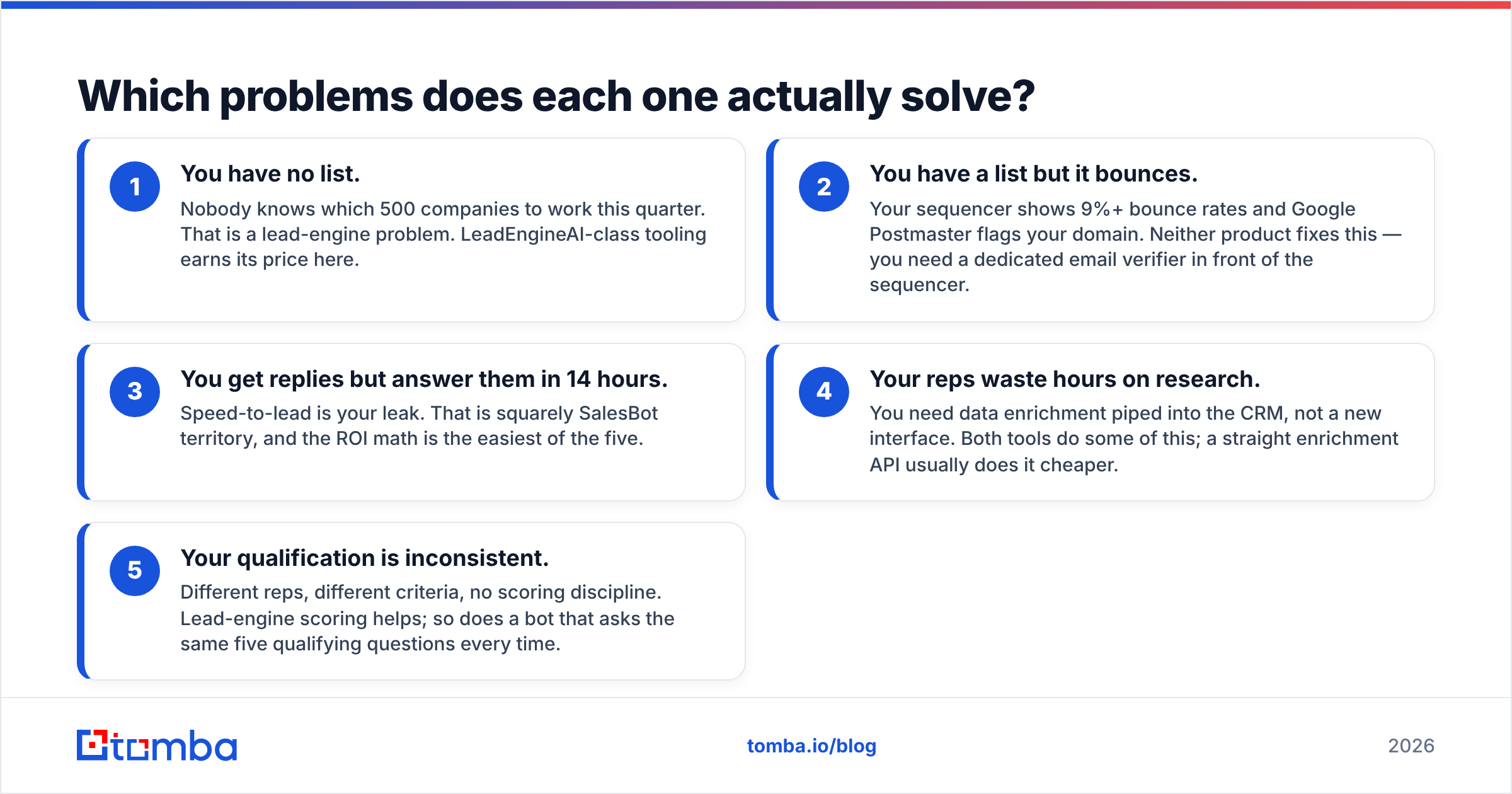
Map your bottleneck to the tool before you map budget to a contract. Start with these three checks:
- You have no list. Nobody knows which 500 companies to work this quarter. That is a lead-engine problem. LeadEngineAI-class tooling earns its price here.
- You have a list but it bounces. Your sequencer shows 9%+ bounce rates and Google Postmaster flags your domain. Neither product fixes this. You need a dedicated email verifier in front of the sequencer.
- You get replies but answer them in 14 hours. Speed-to-lead is your leak. That is squarely SalesBot territory, and the ROI math is the easiest of the five.
Two more checks worth running:
- Your reps waste hours on research. You need data enrichment piped into the CRM, not a new interface. Both tools do some of this. A straight enrichment API usually does it cheaper.
- Your qualification is inconsistent. Different reps, different criteria, no scoring discipline. Lead-engine scoring helps. So does a bot that asks the same five qualifying questions every time.
Most teams have problem 2 and buy a fix for problem 1 or 3. That is the most common mis-purchase in this category. It is also why "we tried AI sales tools and they didn't work" shows up so often in G2's AI sales assistant reviews.
Is LeadEngineAI better than SalesBot for outbound?#
Yes. For pure cold outbound the lead engine wins. But the caveat matters more than the win.
Cold outbound needs three things in order: the right accounts, reachable contacts at those accounts, and a message worth reading. A lead engine handles step one well. It handles step two nominally. It will hand you an email address, but the quality of that address comes from the underlying database, not from the AI.
Conversational agents are built badly for cold outbound. An LLM replying to a stranger who never opted in creates the uncanny-valley effect every buyer now spots: fluent, contextless, faintly wrong. HubSpot's sales blog has published reply-rate data that shows the pattern. Copy that is obviously machine-made loses to a plain, short, human email.
SalesBot flips the result in the second half of outbound: the replies. A 1,000-contact campaign with 60 replies is 60 conversations a rep must sort, half of them "not now" or "wrong person." An agent that routes, defers, and re-engages those is doing real work.
So the honest verdict: LeadEngineAI builds the motion, SalesBot survives its output. If you can fund only one and you start from zero pipeline, fund the lead engine.
Where do both tools break down?#
Both break at the same seam: data they did not verify.
Lead engines refresh their databases on a cycle. But B2B contact data decays by about 2 to 2.5% a month. People change roles, companies rebrand, and mail servers get reconfigured. A contact scraped 11 months ago may well be dead today, and nothing in the scoring model knows that. The AI confidently ranks a ghost as a 92/100 fit.
Conversational agents break in a different way. They trust the identity attached to a conversation. If the record says "VP Marketing at Acme" and that person left in March, the bot will happily book a demo slot with someone who has no budget authority.
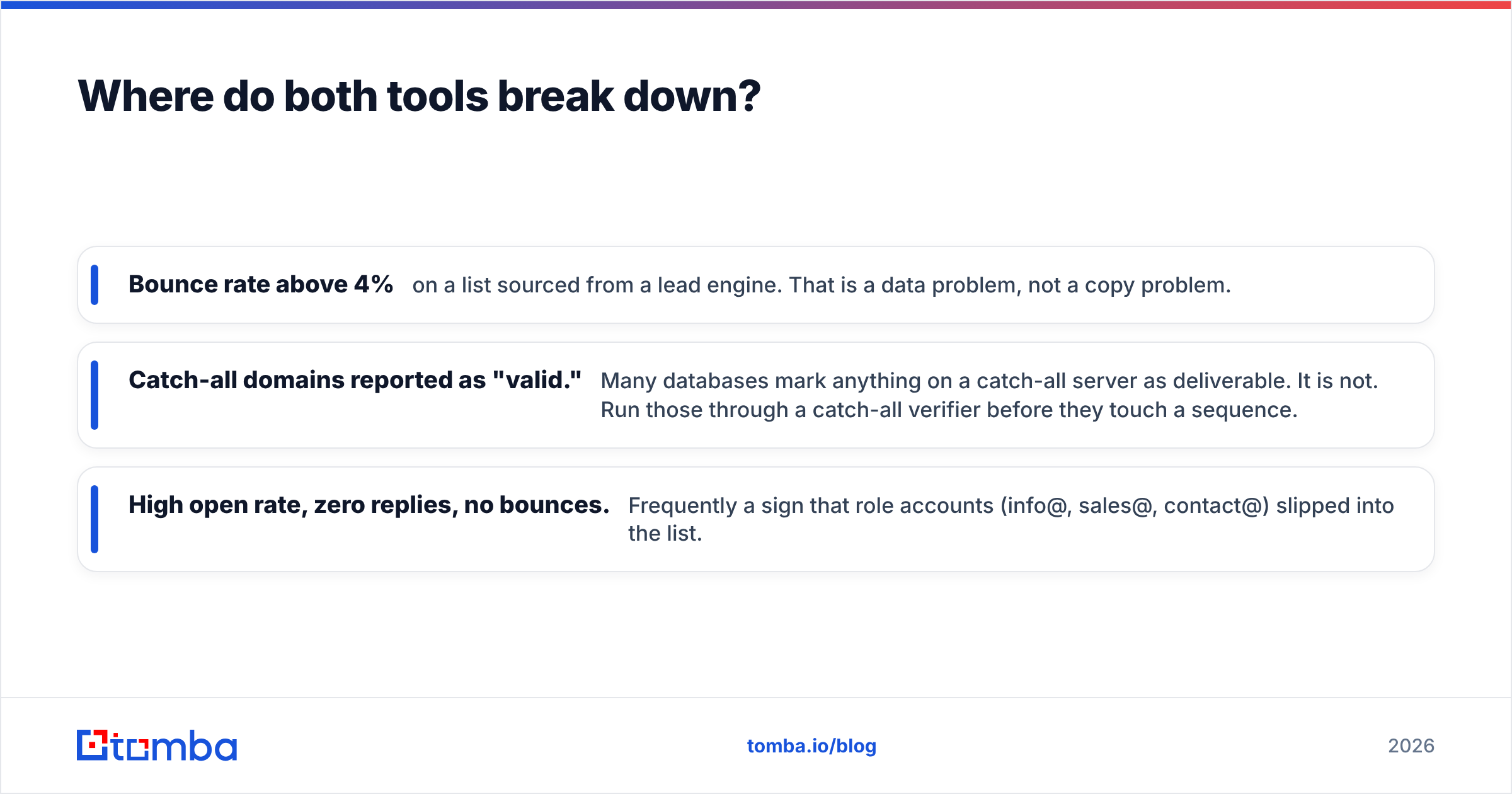
Three failure signs to watch for in your own numbers:
- Bounce rate above 4% on a list sourced from a lead engine. That is a data problem, not a copy problem.
- Catch-all domains reported as "valid." Many databases mark anything on a catch-all server as deliverable. It is not. Run those through a catch-all verifier before they touch a sequence.
- High open rate, zero replies, no bounces. This often means role accounts (info@, sales@, contact@) slipped into the list.
The fix is dull and cheap next to either subscription. Verify every address at the point of import, not after the campaign. A verification pass on 10,000 addresses costs less than one seat-month of most AI sales platforms.
What do they really cost per booked meeting?#
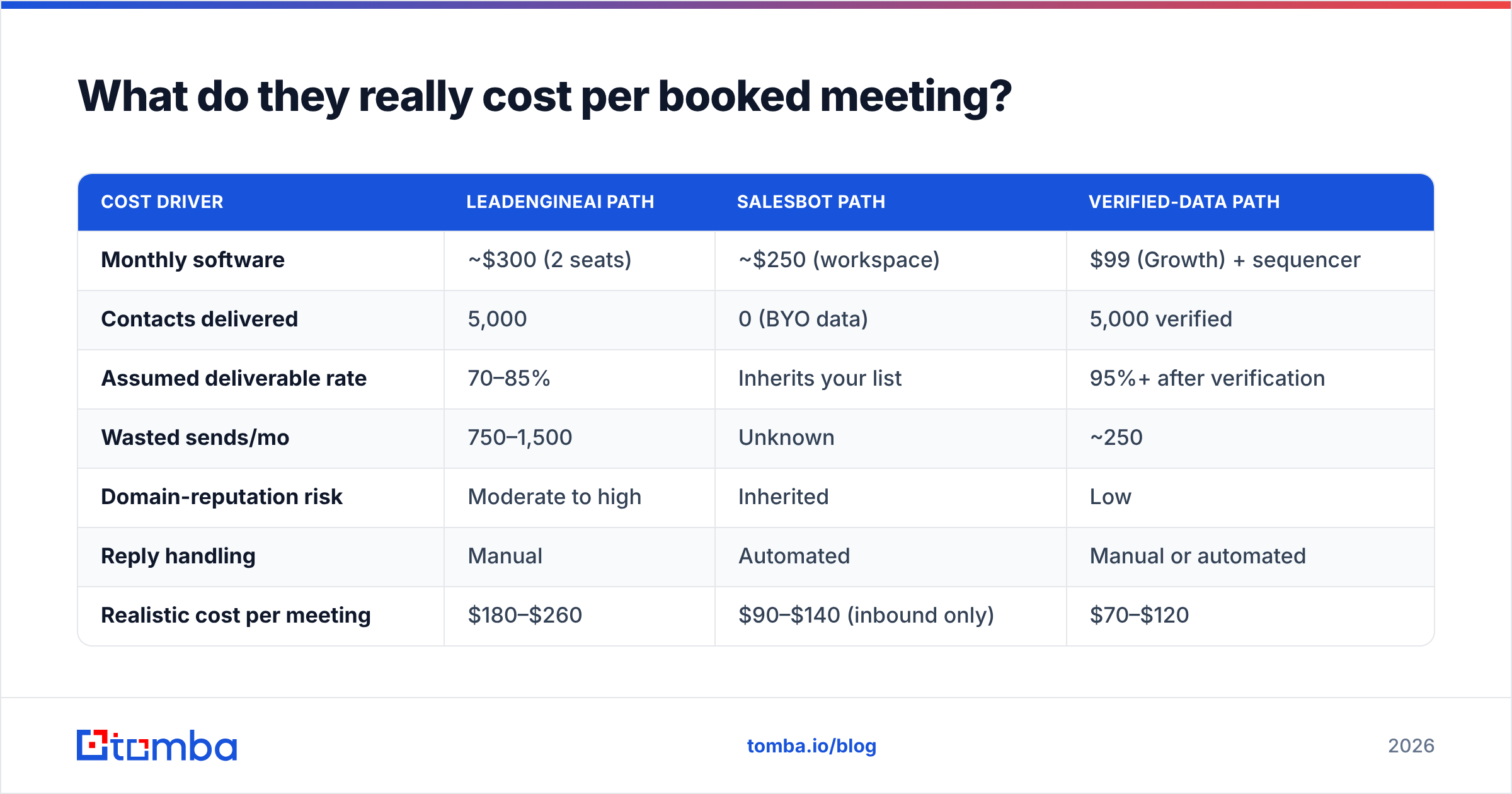
Subscription price is the least useful number. Model the cost per outcome instead. Below is a LeadEngineAI vs SalesBot comparison at a realistic mid-market scale: 5,000 contacts worked per month, two SDRs.
| Cost driver | LeadEngineAI path | SalesBot path | Verified-data path |
|---|---|---|---|
| Monthly software | ~$300 (2 seats) | ~$250 (workspace) | $99 (Growth) + sequencer |
| Contacts delivered | 5,000 | 0 (BYO data) | 5,000 verified |
| Assumed deliverable rate | 70–85% | Inherits your list | 95%+ after verification |
| Wasted sends/mo | 750–1,500 | Unknown | ~250 |
| Domain-reputation risk | Moderate to high | Inherited | Low |
| Reply handling | Manual | Automated | Manual or automated |
| Realistic cost per meeting | $180–$260 | $90–$140 (inbound only) | $70–$120 |
Two things jump out. First, the AI agent looks cheapest per meeting. But it only works warm inbound traffic, and it does not create that traffic. Second, the biggest lever is the deliverable rate, and neither platform sells you that directly.
Tomba pricing sits below both categories on purpose, because it is a data layer and not a workflow suite. There is a free tier at 25 searches/mo, Starter at $49/mo, Growth at $99/mo, Pro at $249/mo, and custom Enterprise. You pay for accuracy, not for another dashboard your reps must learn.
Can you run both together?#
Yes, and large teams do. Just sequence the purchase.
A workable 2026 stack looks like this:
- Data layer first. Verified contacts and enrichment, wired via the Tomba API so every record entering the CRM is checked once, automatically.
- Lead engine second, if account selection is truly your constraint and you have the volume to justify credit minimums.
- Conversational agent third, once reply volume exceeds what your reps can triage in a day.
Running steps two and three without step one is the costly mistake. You pay a premium platform to score contacts that a $0.001 verification call would have flagged as dead. Then you pay a second platform to hold polished conversations with nobody.
One more practical note: check integration depth before you sign. Both categories advertise long integration lists, but "supports HubSpot" can mean a two-way sync or a nightly CSV. Ask for the field-level mapping documentation during the trial, and test a record round-trip yourself.
LeadEngineAI vs SalesBot: which should you buy in 2026?#
Short answer, by situation:
- Zero pipeline, outbound-first, 5+ reps → LeadEngineAI class. You need targets before you need conversation automation.
- Strong inbound traffic, slow response times → SalesBot class. Speed-to-lead payback is fast and easy to measure.
- Under 5 reps, budget-constrained → Neither yet. A verified data source plus a sequencer covers 80% of the value for a fraction of the cost.
- Existing CRM full of stale records → Fix the data first. Both platforms amplify whatever quality you feed them.
- Compliance-sensitive industry → Scrutinize data provenance in writing. Ask both vendors where each field comes from and how opt-outs propagate.
And the question neither sales deck will answer: what share of the email addresses you ship are deliverable today? Ask for the number. If you get a range, a deflection, or "our AI handles that," you have learned something useful.
Get the data layer right first#
Whichever side of LeadEngineAI vs SalesBot you pick, the tool is only as good as the contact records under it. Start with a verified source. The Tomba Email Finder returns professional email addresses by name, domain, or company. Each result carries a confidence score and verification in the same call, so the contacts reaching your lead engine or your AI agent are actually reachable.
Test it against a sample of your current list on the free tier (25 searches/month, no card). If your existing data comes back clean, keep your stack. If it does not, you just found the cheapest fix on your roadmap.
Related guides#
// get started
Find, verify and enrich your first contacts today
Start on the free plan with 25 searches a month, then scale when your team is ready.
Free plan · No credit card required · GDPR & CCPA
// about the author