LeadEngineAI vs Snappy Leads: Honest 2026 Comparison
Two AI lead tools, two very different buying risks. Here is how LeadEngineAI and Snappy Leads actually differ on data accuracy, pricing transparency, API access, and who each one really fits.
TL;DR
- LeadEngineAI and Snappy Leads sit in the same bucket: newer, AI-branded lead generation tools that promise contact data plus some layer of automation on top. Neither publishes the kind of documentation an established data vendor does.
- The decision rarely comes down to features. It comes down to verifiable accuracy, pricing you can read without a sales call, and an API you can test before committing.
- Run the same 100-contact test on both before you buy. A tool that returns 85 emails at 70% deliverability is worse than one returning 60 emails at 96%.
- If you need a transparent, published price and a free tier you can test today, a dedicated finder-plus-verifier stack (Tomba's free tier is 25 searches/month, Starter is $49/mo) is the safer default until either vendor proves out on your ICP.
- Both vendors change fast. Treat every claim in this post — and on their sites — as something to re-verify at signup.
What are LeadEngineAI and Snappy Leads?#
Both are lead generation platforms in the "AI-assisted prospecting" category — the wave of tools that launched after 2023 promising to collapse list-building, enrichment, and outreach into one workflow.
Think of them like two new restaurants that opened on the same block with nearly identical menus. The signage differs, the plating differs, but until you eat there you cannot tell whether the kitchen sources good ingredients or reheats the same frozen supply everyone else uses. In B2B data, "the kitchen" is the data source — and that is exactly what neither tool documents in detail.
Here is what each one is positioned to do, based on how tools in this category typically present themselves:
- LeadEngineAI — AI-first list building. The pitch is that you describe your ideal customer in plain language and the engine assembles a targeted list, often with scoring or intent signals layered on.
- Snappy Leads — speed-first prospecting. The pitch is fast extraction and quick handoff to outreach, usually with a browser or platform-scraping angle.
That overlap matters. When two tools describe themselves the same way, the differentiator is almost never the feature list. It is what happens to your bounce rate 30 days later.
A quick honesty note, because this is a neutral review and not a vendor page: neither LeadEngineAI nor Snappy Leads publishes the kind of independent accuracy benchmark, data-sourcing disclosure, or public API reference that lets an outside reviewer make hard claims. So this comparison does two things instead of inventing numbers — it maps the real differences you can observe from the outside, and it gives you the test protocol to settle the question on your own data.

How do LeadEngineAI and Snappy Leads compare head-to-head?#
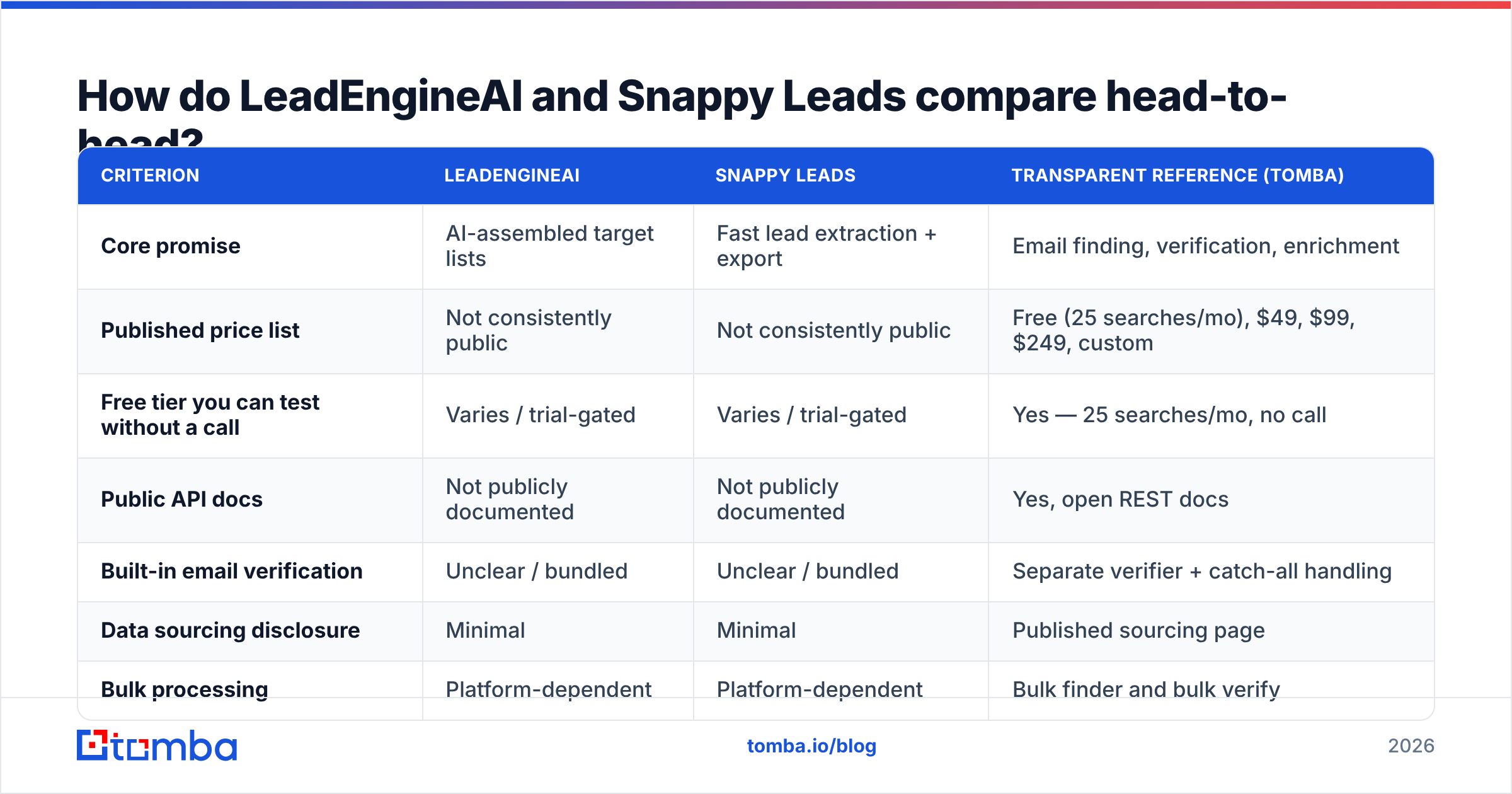
The table below compares the two against a transparent-pricing reference point, so you can see what "normal" looks like in this category. Where a cell says not publicly documented, that is the finding — it is not a gap in our research, it is a gap you inherit as a buyer.
| Criterion | LeadEngineAI | Snappy Leads | Transparent reference (Tomba) |
|---|---|---|---|
| Core promise | AI-assembled target lists | Fast lead extraction + export | Email finding, verification, enrichment |
| Published price list | Not consistently public | Not consistently public | Free (25 searches/mo), $49, $99, $249, custom |
| Free tier you can test without a call | Varies / trial-gated | Varies / trial-gated | Yes — 25 searches/mo, no call |
| Public API docs | Not publicly documented | Not publicly documented | Yes, open REST docs |
| Built-in email verification | Unclear / bundled | Unclear / bundled | Separate verifier + catch-all handling |
| Data sourcing disclosure | Minimal | Minimal | Published sourcing page |
| Bulk processing | Platform-dependent | Platform-dependent | Bulk finder and bulk verify |
| Best fit | Teams wanting list ideation | Teams wanting speed to export | Teams needing accuracy + API control |
Two things jump out of that grid.
First, pricing opacity is the shared weakness. When a vendor routes you to a demo before showing a number, you lose the ability to compare cost-per-verified-contact — which is the only unit that matters. You can compare a published $49/mo Starter plan against anything. You cannot compare "contact us" against anything.
Second, verification is the hidden variable. Many AI lead tools count a "found" email as a delivered result. A dedicated email verifier counts it only after SMTP-level checks. Those are wildly different definitions of the same word, and the gap shows up in your bounce rate, not in the dashboard.
Which one has better data accuracy?#
Neither vendor publishes a number you can audit — so the honest answer is: test it, do not trust it.

Accuracy in this category is not one metric, it is three, and vendors love to blur them:
- Coverage (hit rate) — of 100 target contacts, how many return any email? Easy to inflate by guessing patterns.
- Validity — of the emails returned, how many pass SMTP verification? This is where guessed patterns die.
- Deliverability in practice — of the valid emails, how many actually land and do not bounce or hit a spam trap? This is the only number your domain reputation cares about.
A tool can advertise 95% coverage and still hand you a list that bounces at 18%, because coverage was measured before validity. When you compare LeadEngineAI vs Snappy Leads, insist on running the same 100 rows through both and scoring all three columns separately.
Here is the protocol, and it takes about an hour:
- Build one control list. 100 contacts you already have verified emails for — ideally from a closed-won segment, so they match your real ICP rather than a generic tech list.
- Strip the emails. Feed each tool only name + company domain. Never let a tool see the answer key.
- Score coverage. Count returns. Note how many are role accounts (info@, sales@) — those inflate coverage and rarely convert.
- Score validity independently. Do not use the vendor's own verifier to grade the vendor's own finder. Run results through a neutral email verification pass.
- Score catch-all handling. Ask specifically what each tool does with catch-all domains. Some mark every catch-all as "valid," which is functionally a coin flip. A proper catch-all verifier treats them as their own risk category.
- Compute cost per verified contact. Total spend divided by contacts that passed steps 3–5. This single number ends most vendor debates.
If either tool refuses to let you run this test on a free or trial tier, that refusal is your answer.
Is the AI layer actually worth paying for?#
Sometimes — but only when it changes who you contact, not how fast you export.
AI list building has real value when it does targeting work a human would take hours to do: parsing job descriptions for tech-stack signals, reading recent funding or hiring patterns, clustering accounts that look like your best customers. That is genuine leverage.
It has near-zero value when it is a natural-language wrapper on the same filters you could have clicked in 20 seconds. And it has negative value when it generates plausible-looking contacts that were never verified — an AI that confidently invents first.last@company.com is not doing prospecting, it is doing an email permutator with extra marketing copy.
So when you evaluate the AI layer on either LeadEngineAI or Snappy Leads, ask one question: does this narrow my list to better accounts, or does it just produce the same list faster? Only the first one earns a premium price. Industry analysts on G2's lead intelligence category consistently show that buyers churn from these tools over data quality, not over missing features.
What should you check before you sign with either one?#
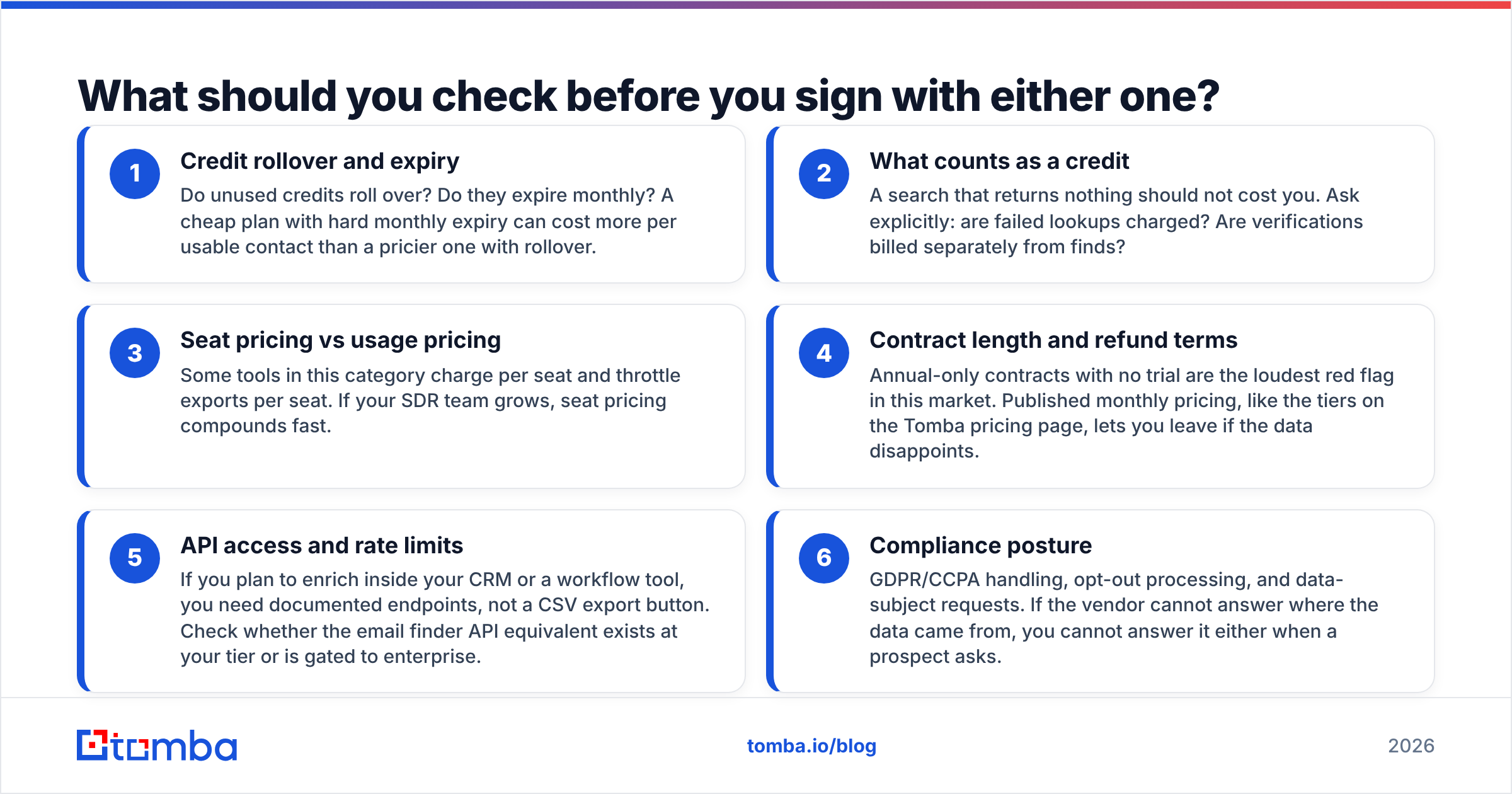
Use this as a literal checklist on the demo call. Every item below has burned a real buyer.
- Credit rollover and expiry — Do unused credits roll over? Do they expire monthly? A cheap plan with hard monthly expiry can cost more per usable contact than a pricier one with rollover.
- What counts as a credit — A search that returns nothing should not cost you. Ask explicitly: are failed lookups charged? Are verifications billed separately from finds?
- Seat pricing vs usage pricing — Some tools in this category charge per seat and throttle exports per seat. If your SDR team grows, seat pricing compounds fast.
- Contract length and refund terms — Annual-only contracts with no trial are the loudest red flag in this market. Published monthly pricing, like the tiers on the Tomba pricing page, lets you leave if the data disappoints.
- API access and rate limits — If you plan to enrich inside your CRM or a workflow tool, you need documented endpoints, not a CSV export button. Check whether the email finder API equivalent exists at your tier or is gated to enterprise.
- Compliance posture — GDPR/CCPA handling, opt-out processing, and data-subject requests. If the vendor cannot answer where the data came from, you cannot answer it either when a prospect asks.

Which tool fits which team?#
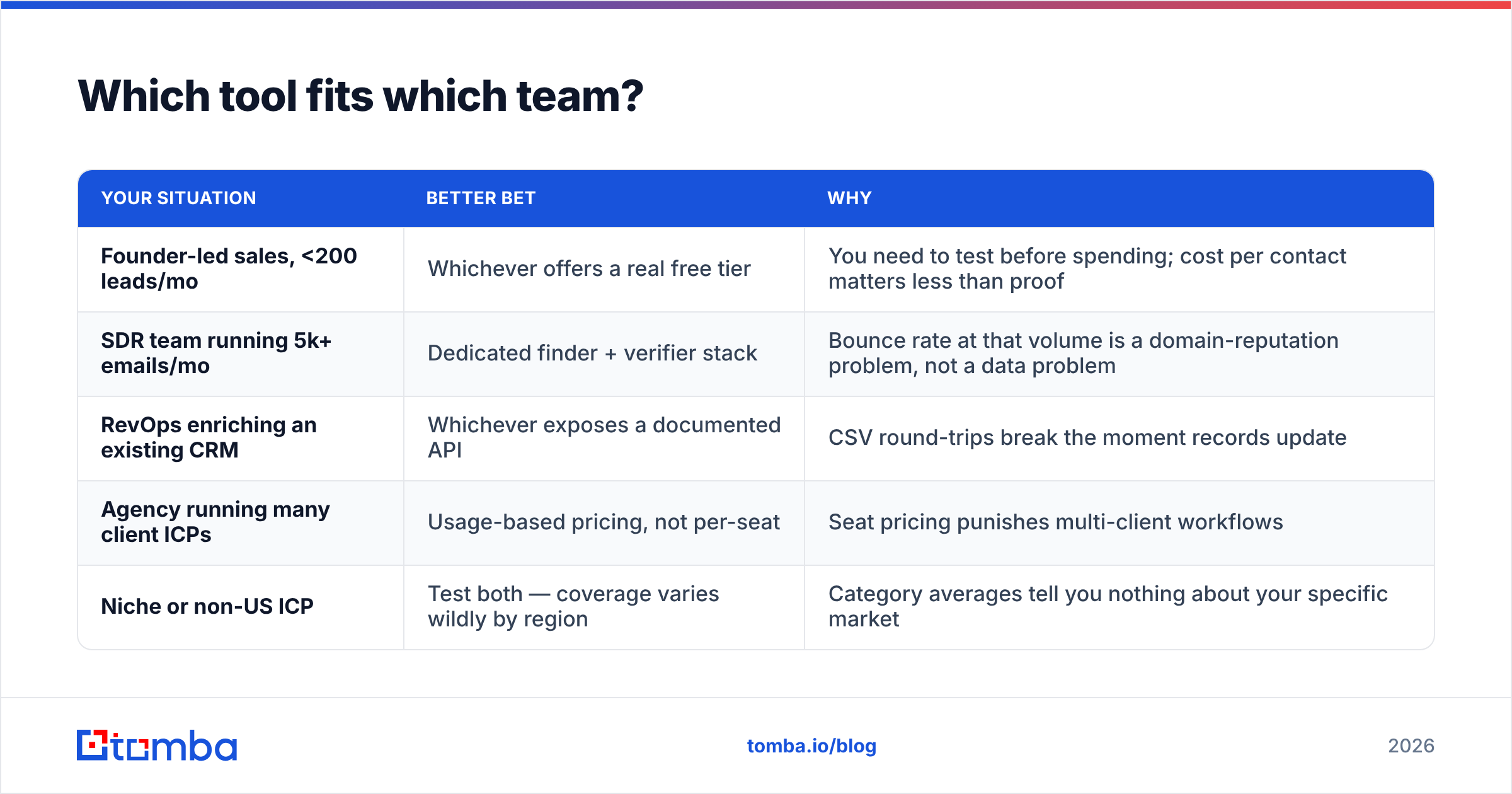
There is no universal winner here — there is a fit question, and it splits cleanly by how you work.
| Your situation | Better bet | Why |
|---|---|---|
| Founder-led sales, <200 leads/mo | Whichever offers a real free tier | You need to test before spending; cost per contact matters less than proof |
| SDR team running 5k+ emails/mo | Dedicated finder + verifier stack | Bounce rate at that volume is a domain-reputation problem, not a data problem |
| RevOps enriching an existing CRM | Whichever exposes a documented API | CSV round-trips break the moment records update |
| Agency running many client ICPs | Usage-based pricing, not per-seat | Seat pricing punishes multi-client workflows |
| Niche or non-US ICP | Test both — coverage varies wildly by region | Category averages tell you nothing about your specific market |
The pattern across all five rows: the winner is decided by your volume and your integration surface, not by the AI branding on the homepage.
How do these compare to the wider email-finder market?#
Worth zooming out, because "LeadEngineAI vs Snappy Leads" is a narrower question than most buyers realize. Both compete against a mature field of finders and verifiers with published benchmarks, open API docs, and free tiers.

Established players in this space — including data-first vendors like BookYourData, which sells verified B2B lists with an accuracy guarantee, and full-stack platforms like Apollo — solve the problem from different ends. BookYourData and similar list providers optimize for pre-verified volume you buy once. Platform tools optimize for workflow. Finder APIs optimize for programmatic accuracy at the point of need.
That framing helps, because it tells you what to compare on:
- If you want a list — compare cost per verified record and refund terms on bad records.
- If you want a workflow — compare integration depth with your CRM and sequencer.
- If you want infrastructure — compare API docs, rate limits, and uptime.
Newer AI-branded tools usually claim all three and specialize in none. That is not a knock on either vendor specifically; it is the structural trade-off of a young product. Capterra's lead generation software directory is a reasonable place to sanity-check how each one is actually reviewed by buyers at your company size, rather than by their own case studies.
What does the honest verdict look like?#
If you must pick one today with no testing: neither, yet. Both are reasonable to trial, but neither has published the accuracy data or pricing transparency that justifies a blind commitment.
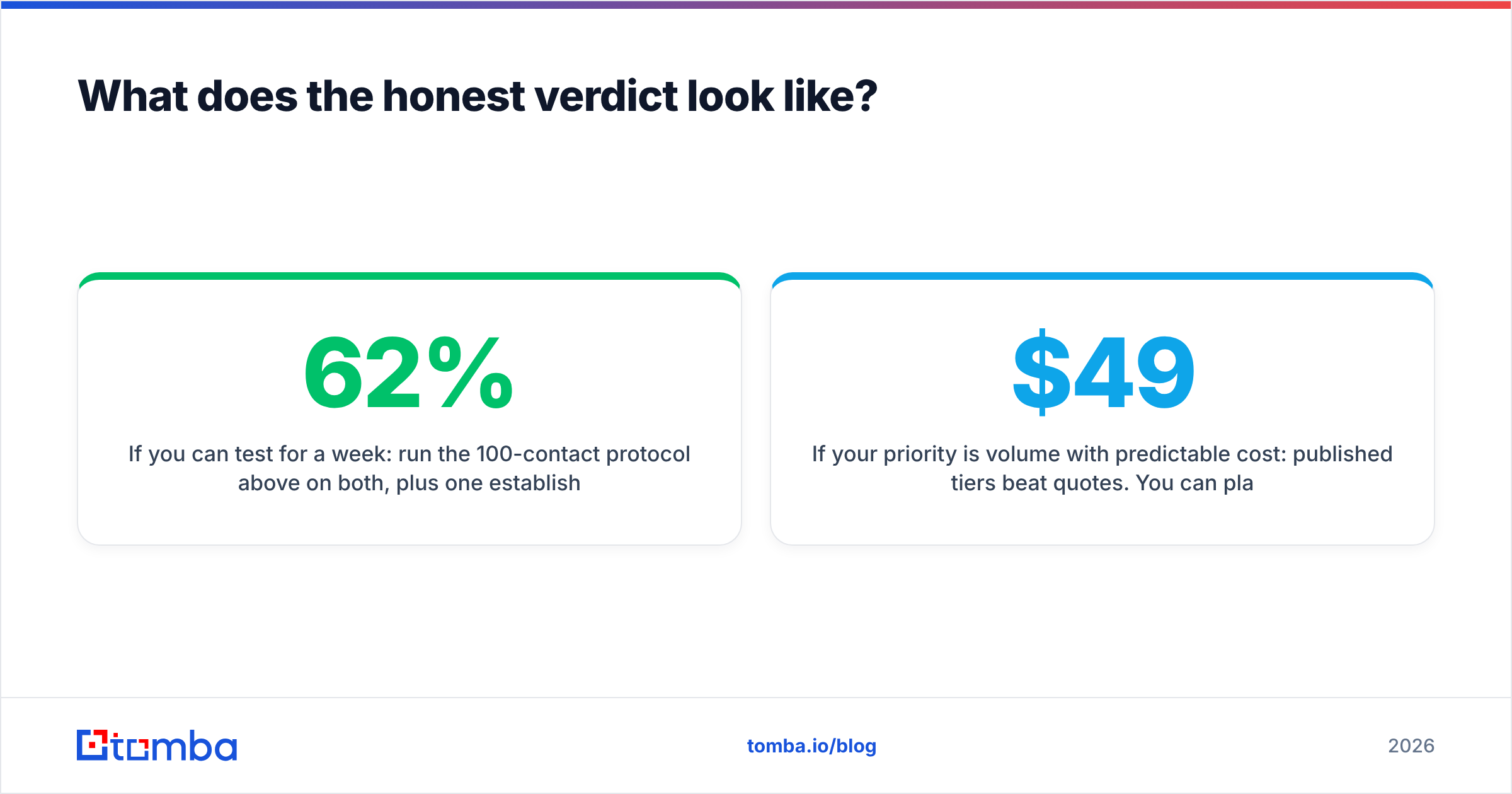
If you can test for a week: run the 100-contact protocol above on both, plus one established finder as a control. The control is the important part — without it you cannot tell whether a 62% hit rate on your ICP is bad or simply reflects a hard-to-reach market.
If your priority is not bouncing: separate the two jobs. Use a finder to get candidates, then run an independent verification pass before anything touches your sending domain. Bundled "find and verify in one click" is convenient right up until the verifier is grading its own homework.
If your priority is volume with predictable cost: published tiers beat quotes. You can plan a quarter around $49/mo or $99/mo. You cannot plan a quarter around "let's get you on a call."
For teams that want to stop guessing, the practical move is to make the accuracy test cheap. Tomba's free tier gives you 25 searches a month with no sales call — enough to run a real sample against your own ICP — and the Tomba Email Finder returns a confidence score with every result so you can grade coverage and validity separately instead of taking one blended number on faith. Pair it with bulk verify when you scale, keep the vendor you test against honest, and let the bounce rate pick the winner.
Whatever you choose between LeadEngineAI and Snappy Leads, make the decision with your own 100 rows, not their landing page.
Related guides#
// get started
Find, verify and enrich your first contacts today
Start on the free plan with 25 searches a month, then scale when your team is ready.
Free plan · No credit card required · GDPR & CCPA
// about the author