LeadIQ vs Lead Kahuna: Which B2B Lead Tool Wins in 2026?
One is a cloud prospecting platform built around LinkedIn and CRM sync. The other is a desktop scraper built for local-business lists. Here is the honest breakdown of where each one wins, what they cost, and when neither is the right answer.
LeadIQ vs Lead Kahuna is an odd match-up. One tool finds named people at named companies. The other finds local businesses in bulk. This guide shows which one fits your outbound team, what each really costs, and when a third option beats both.
TL;DR
- LeadIQ is a cloud sales tool. A Chrome extension grabs contacts from LinkedIn and pushes them into Salesforce, Outreach, Salesloft, or HubSpot. You pay per seat, per month.
- Lead Kahuna is a Windows desktop scraper. It harvests business listings from search engines and directories, pulls whatever contact data is public, and exports a CSV. You buy a license, not a seat.
- They are not real rivals. LeadIQ suits B2B SaaS teams that sell to named accounts. Lead Kahuna suits agencies that need bulk lists of small firms.
- Data quality is the fault line. LeadIQ sells a verified contact database. Lead Kahuna sells raw scraped output that you must verify yourself.
- Need work emails at volume, but not per-seat pricing? A dedicated email finder with an API is usually cheaper.
What is LeadIQ?#
LeadIQ is a B2B contact tool. The core loop is simple. You open a LinkedIn profile or a Sales Navigator list. You click the LeadIQ extension. It returns a work email, plus a mobile number on paid plans. One click sends that record into your CRM and sequencer. You never touch a CSV.
Around that core, LeadIQ adds:
- Scribe — AI writes first-touch emails from profile and company signals.
- Tracking signals — job changes, funding news, and account alerts tell reps when to reach out again.
- CRM hygiene — it flags stale or wrong records already sitting in Salesforce.
- Team workflow — shared lists, usage reports, and admin caps on credit spend.
The tool assumes you already know who you want. Its job is speed. A known name becomes a routed, enriched, sequence-ready CRM record in seconds. You can see the current feature set on LeadIQ's own site. User reviews sit in the sales intelligence category on G2.
What is Lead Kahuna?#
Lead Kahuna is a different animal. It is a desktop app, Windows first, built to harvest local leads in bulk. You give it a keyword and a place, such as "dentist, Austin TX". It then crawls search results, business directories, and the sites it finds. The output is a spreadsheet of businesses with whatever was public: site URL, phone, email, social profiles, and SEO or tech signals about the site.
Its audience is clear from the feature set. SEO and web design agencies pitch small firms. Others run high-volume local outreach. The tool is built to find businesses with a problem you can fix — a broken site, no SSL, a missing listing. It is not built to find one decision-maker at a named enterprise.
Two structural gaps matter more than any feature list:
- It runs on your machine, on your connection. Speed depends on your hardware and your IP reputation, not on a vendor's servers.
- It scrapes; it does not query a kept database. Nothing is pre-verified. Raw output needs a cleaning pass before it touches a mailbox.

LeadIQ vs Lead Kahuna: how do they compare head to head?#
Here is the practical breakdown. Prices reflect public plans at the time of writing. Both vendors change tiers, so check their pricing pages before you budget.
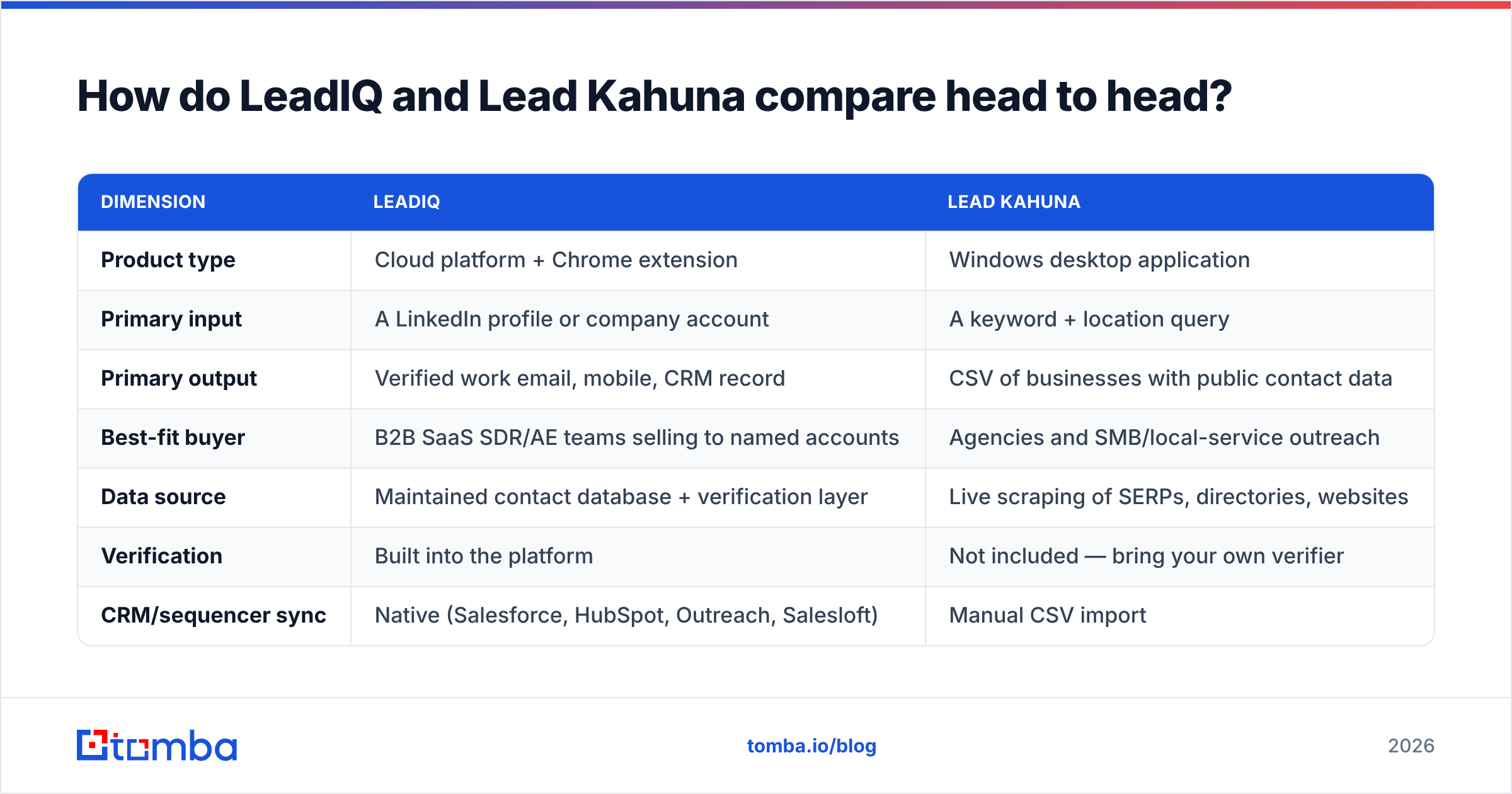
| Dimension | LeadIQ | Lead Kahuna |
|---|---|---|
| Product type | Cloud platform + Chrome extension | Windows desktop application |
| Primary input | A LinkedIn profile or company account | A keyword + location query |
| Primary output | Verified work email, mobile, CRM record | CSV of businesses with public contact data |
| Best-fit buyer | B2B SaaS SDR/AE teams selling to named accounts | Agencies and SMB/local-service outreach |
| Data source | Maintained contact database + verification layer | Live scraping of SERPs, directories, websites |
| Verification | Built into the platform | Not included — bring your own verifier |
| CRM/sequencer sync | Native (Salesforce, HubSpot, Outreach, Salesloft) | Manual CSV import |
| Mobile numbers | Yes, on higher tiers | Only if publicly listed |
| Pricing model | Per seat, per month | License-based, not per seat |
| Typical entry cost | Free tier, then roughly $45–$89/user/mo | One-time or annual license, low hundreds |
| API access | Available on higher/enterprise tiers | Not a meaningful API product |
| Team collaboration | Shared lists, admin controls, usage caps | Essentially single-operator |
| Compliance posture | Vendor-managed, GDPR/CCPA documentation | Your responsibility as the scraper |

Read that table as two philosophies, not a scoreboard. LeadIQ sells precision per contact. You get fewer records, higher confidence, and they land in the system your reps live in. Lead Kahuna sells volume per dollar. You get thousands of rows for a flat fee, and you carry the quality burden.
Which one has better data accuracy?#
On accuracy, the LeadIQ vs Lead Kahuna call is easy. LeadIQ wins, and it is not close. The two tools are not trying to do the same job.
LeadIQ keeps a contact database and checks an address before it hands it over. Each email comes with a confidence score. The business model depends on that score meaning something, because reps who burn credits on bounces churn. User reviews put credible B2B contact platforms in the high 80s to mid 90s for work-email accuracy. Coverage is far better for US tech firms than for, say, mid-market makers in the EU.
Lead Kahuna faces a different problem. It does not guess a person's email pattern. It reports what a website shows in public. So the emails it finds are often real but rarely useful: info@, contact@, hello@, office@. Role accounts land in a shared inbox, get filtered hard, and convert far worse than a named buyer's address. Scraped lists also collect dead pages, closed firms, and typos that bounce.

The rule is simple: never mail scraper output raw. Run any list through an email verifier first. A 12% bounce rate on 5,000 rows will hurt your sending domain fast. No subject line can rescue it, and the damage outlives the campaign.
Where does each tool get its data?#
Most LeadIQ vs Lead Kahuna comparisons skip this part. It is the part that decides whether a list still works six months from now.
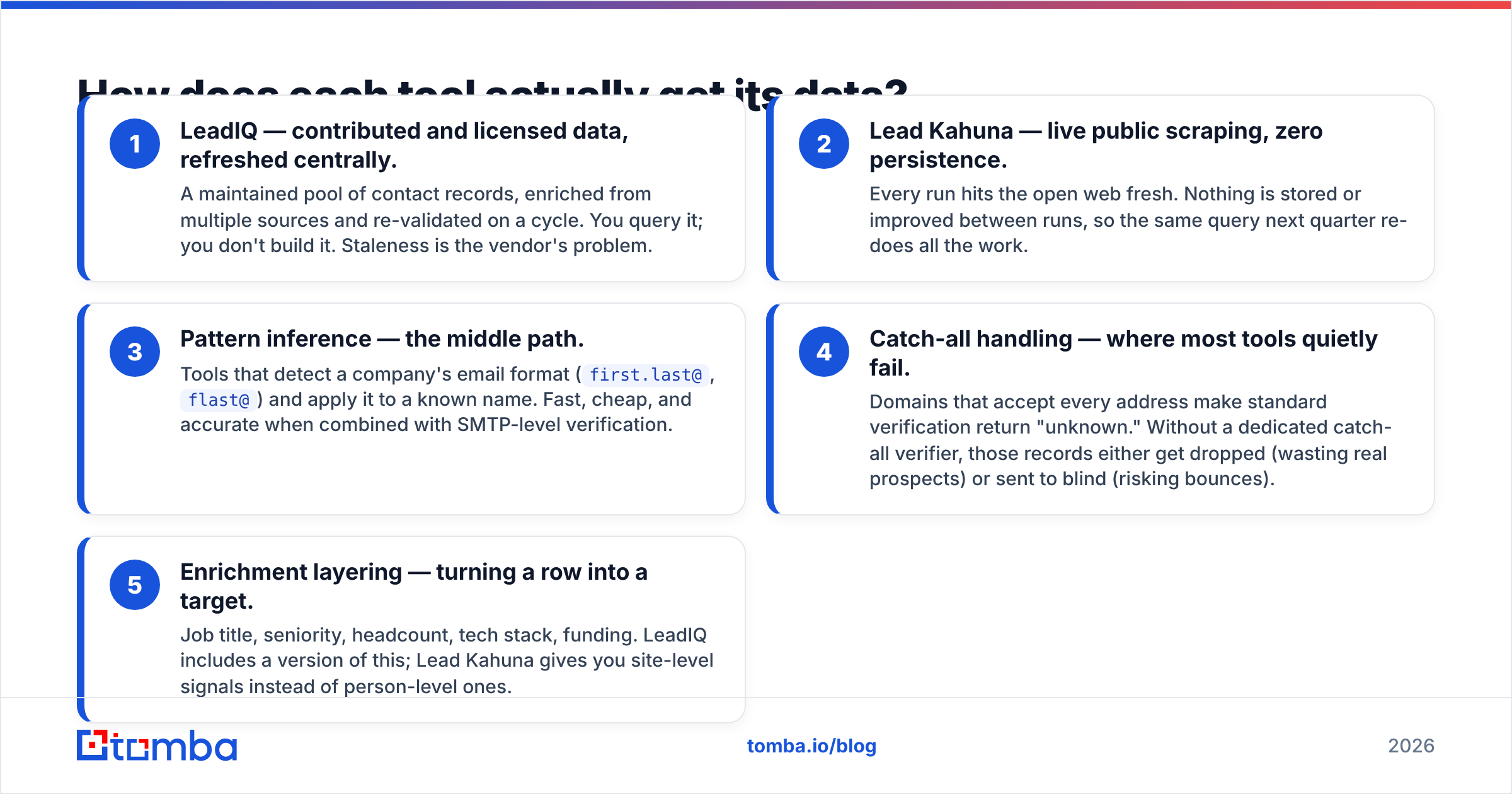
- LeadIQ — licensed data, refreshed centrally. A kept pool of records, re-checked on a cycle. You query it; you do not build it. Stale data is the vendor's problem.
- Lead Kahuna — live scraping, no memory. Every run hits the open web fresh. Nothing is stored, so next quarter the same query redoes the work.
- Pattern inference — the middle path. Some tools spot a company's email format (
first.last@,flast@) and apply it to a known name. That works when paired with SMTP checks. - Catch-all handling — where tools fail quietly. Some domains accept every address, so checks return "unknown". Without a catch-all verifier, those rows get dropped or mailed blind.
- Enrichment — turning a row into a target. Job title, seniority, headcount, tech stack, funding. LeadIQ does this. Lead Kahuna gives site-level signals instead.
Know the mechanism and you know where it breaks. Database tools fail on small and non-US firms. Scrapers fail on anything not published in public. Pattern tools fail with no verifier behind them.
What does each one cost in practice?#
Cost is where the LeadIQ vs Lead Kahuna choice gets concrete.
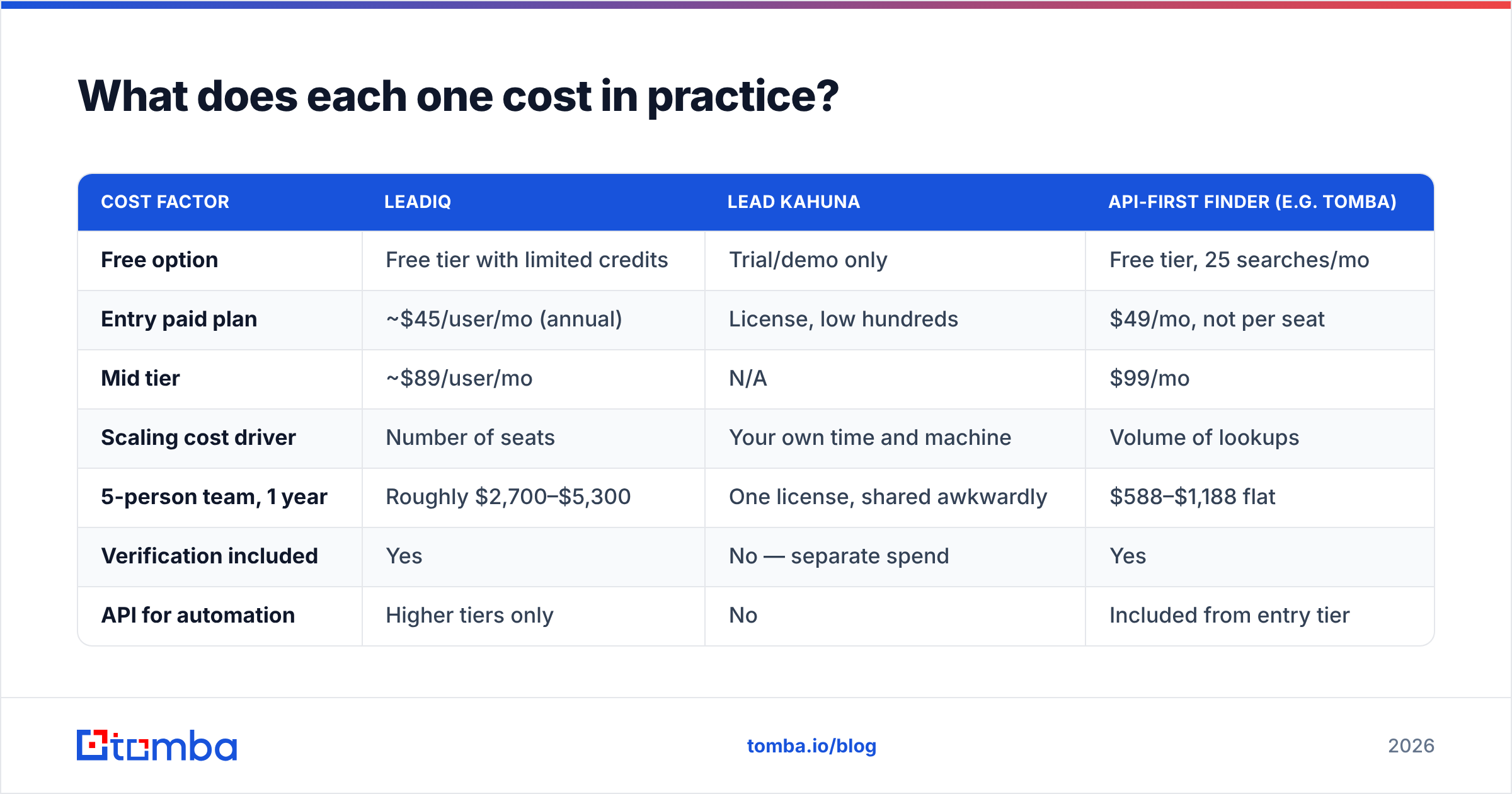
| Cost factor | LeadIQ | Lead Kahuna | API-first finder (e.g. Tomba) |
|---|---|---|---|
| Free option | Free tier with limited credits | Trial/demo only | Free tier, 25 searches/mo |
| Entry paid plan | ~$45/user/mo (annual) | License, low hundreds | $49/mo, not per seat |
| Mid tier | ~$89/user/mo | N/A | $99/mo |
| Scaling cost driver | Number of seats | Your own time and machine | Volume of lookups |
| 5-person team, 1 year | Roughly $2,700–$5,300 | One license, shared awkwardly | $588–$1,188 flat |
| Verification included | Yes | No — separate spend | Yes |
| API for automation | Higher tiers only | No | Included from entry tier |
Two cost traps deserve names.
LeadIQ's trap is seats. Per-user pricing works when every user prospects daily. It hurts when three SDRs prospect daily and four AEs look up two contacts a week. You pay full price for all seven. Teams then share a seat, which breaks both the terms and the attribution.
Lead Kahuna's trap is labor. The license looks cheap until you price the cleanup. You dedupe rows, drop dead domains, replace info@ with a real contact, then verify the rest. At $30 an hour, six hours per list wipes out the savings on your first campaign.

Who should choose LeadIQ?#
Choose LeadIQ if most of these are true:
- You sell to named accounts. Marketing or RevOps builds the target list. You do not find it by keyword.
- LinkedIn is your prospecting surface. Reps live in Sales Navigator, so capture-from-profile saves real time.
- CRM hygiene matters. Records must be routed, deduped, and attributed without hand imports.
- Your team calls as well as emails. A tool that surfaces direct dials earns its price.
- Your team is small. Under about 10 active prospectors, seat pricing still makes sense.
Where it lets you down: non-US coverage is thin, and credits run out faster than people expect. The price per verified contact is also high if an email is all you want.
Who should choose Lead Kahuna?#
Choose Lead Kahuna if most of these are true:
- Your buyers are local and non-technical. Restaurants, builders, clinics, gyms — firms with a website but no B2B database record.
- You prospect by category, not by name. "Every roofer in three counties" is a query LeadIQ cannot answer well.
- The website is your pitch. Site audits, SEO gaps, missing SSL — those signals become your opening line.
- You are a solo operator or tiny agency. A flat license beats per-seat pricing when there is one seat.
- You have budgeted a cleaning step. You know raw output needs work and you planned for it.
Where it lets you down: no person-level targeting, no CRM sync, Windows only, and full compliance risk on you. Nothing it produces is pre-verified.
LeadIQ vs Lead Kahuna: is there a better third option?#
Often, yes. The real question behind LeadIQ vs Lead Kahuna is usually simpler. How do I get verified work emails for the people I have already picked, without overpaying?
That framing changes the shortlist.
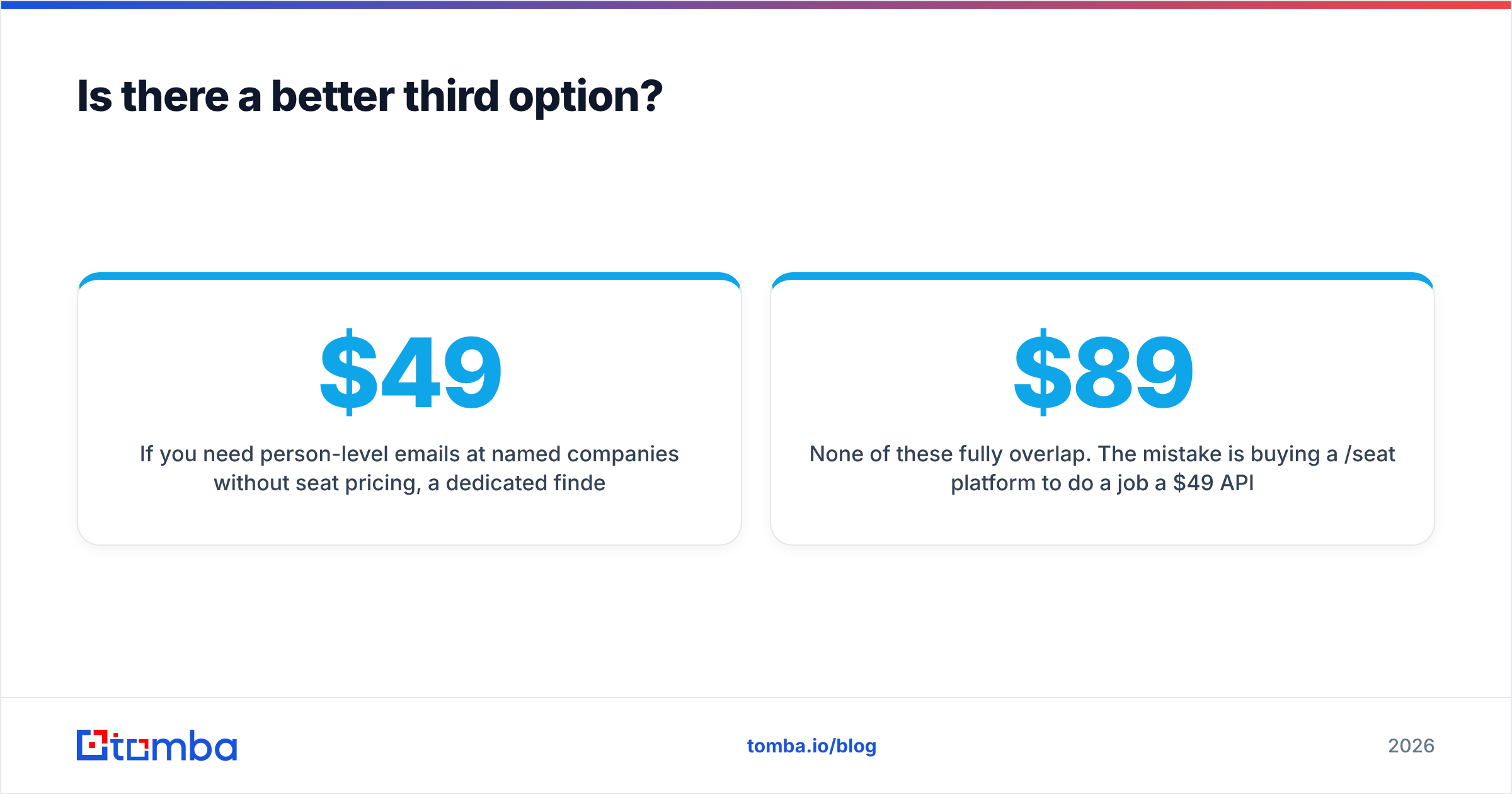
You need person-level emails without seat pricing. A dedicated finder with an API fits better. Tomba's pricing starts free at 25 searches a month and moves to $49/mo. It is account-based, not per seat, so a five-person team pays once. Finder, verifier, domain search, catch-all handling, and enrichment sit in one account. The Tomba API wires lookups into your own workflow instead of an extension. Most teams start with the LeadIQ alternative breakdown.
You want a ready-made list, not a tool. BookYourData sells pay-as-you-go B2B contact lists with a verification guarantee and no subscription. For a one-off campaign into a defined segment, a clean bought list can beat running any tool.
Your motion really is local SMB discovery. Then Lead Kahuna is hard to replace. Just pair it with a verifier instead of sending raw.
None of these fully overlap. One common mistake: buying an $89-per-seat platform for a job a $49-per-month API does better. The other: treating scraper output as campaign-ready.
Frequently asked questions#
Is Lead Kahuna a direct LeadIQ competitor? No. They overlap only in that both produce contact lists. LeadIQ finds specific people at specific companies. Lead Kahuna finds categories of businesses in a place. Most teams that weigh LeadIQ vs Lead Kahuna pick one and never look at the other.
Which one is better for cold email deliverability? LeadIQ, because checks are built in. But "better" is relative. Any list, from any source, should pass through a verifier before your first send. Bounce rates above 3% start to hurt sender reputation, and scraped lists often top 10%.
Can I use both?
Yes, and some agencies do. Lead Kahuna finds the target businesses. A finder then gets a named buyer's email at each one, since scraped info@ addresses convert poorly. That combination is common in local SEO agency work.
Does LeadIQ have a free plan? It has a free tier with a small monthly credit allowance. That is enough to test the extension workflow, not enough to run a campaign. Expect to hit the ceiling within a week of real use.
What about compliance? LeadIQ handles GDPR and CCPA posture at the vendor level and publishes its documentation. With a desktop scraper, you are the data controller for everything you collect. That includes lawful basis and deletion requests. If you sell into the EU, that gap is not a footnote. Lead generation practices vary a lot by country, so check yours.
The verdict#
The LeadIQ vs Lead Kahuna verdict is short. Pick LeadIQ if you are a B2B sales team working named accounts on LinkedIn, and you need CRM-native workflow more than raw volume. Pick Lead Kahuna if you are an agency or solo operator building bulk local lists by category, and you have budgeted a cleaning step.
Pick neither if what you really need is verified work emails at scale, priced by volume rather than by headcount. That is a different product class. Paying per seat for it is the most common way outbound teams overspend.
If that last line fits you, start with the Tomba Email Finder. Drop in a name and a domain. You get a verified work email back with a confidence score. Scale the same logic through the API when you are ready to automate. The free tier gives you 25 searches a month. Test it against contacts you already know — the only honest way to judge any data tool before you pay.
Related guides#
// get started
Find, verify and enrich your first contacts today
Start on the free plan with 25 searches a month, then scale when your team is ready.
Free plan · No credit card required · GDPR & CCPA
// about the author