LeadIQ vs LetsExtract: Honest 2026 Comparison for B2B Prospecting
LeadIQ is built for sales teams working in LinkedIn and a CRM. LetsExtract pulls emails from websites and search results. Here is how they compare on data quality, pricing, workflow and fit, and where each one falls short.
TL;DR
- LeadIQ is a prospecting tool for sales teams. It captures contacts from LinkedIn and Sales Navigator, adds verified emails and phone numbers, and pushes the records into Salesforce, HubSpot, Outreach or Salesloft.
- LetsExtract is an email extraction tool. It scans websites, search-engine results and pages you browse, then collects every email address it finds. It works well for building wide lists on a tight budget.
- In the LeadIQ vs LetsExtract choice, the question isn't which tool is "better." It's how you work. If your reps prospect named buyers one at a time, choose LeadIQ. If you're a solo marketer or agency collecting contacts at scale from the open web, choose LetsExtract.
- Neither tool removes the need to verify addresses. Scraped lists especially need a verification pass before any email goes out.
- If you want name-plus-domain email finding, domain search and verification in one place at a lower price per seat, add Tomba to your shortlist.
What are LeadIQ and LetsExtract, really?#
The two tools show up in the same search results, but they come from very different places.
LeadIQ began as a way for SDRs to stop copying and pasting LinkedIn profiles into spreadsheets. It's now a sales prospecting platform. You open a LinkedIn or Sales Navigator profile, click the extension, and LeadIQ adds a work email, often a direct dial or mobile number, and firmographic data. It then syncs the record to your CRM and sequencing tool, checking for duplicates first. More recent additions include AI-written outreach (Scribe), job-change tracking for past champions, and team-level data governance.
LetsExtract comes from the scraping side. The product family includes a Chrome extension and, historically, a Windows desktop app (Email Studio). Both crawl web pages, search results and some social profiles, then pull out email addresses, phone numbers and social links. It also includes an email finder (name plus domain) and a built-in verifier. The goal is volume: point it at a keyword, a list of URLs or a niche, and get back a large contact list.
So the easiest way to frame the comparison:
- LeadIQ answers the question "What is this specific person's work email, and how do I get it into my CRM cleanly?"
- LetsExtract answers the question "Which emails are publicly listed across these 500 websites?"
How do LeadIQ and LetsExtract compare feature by feature?#
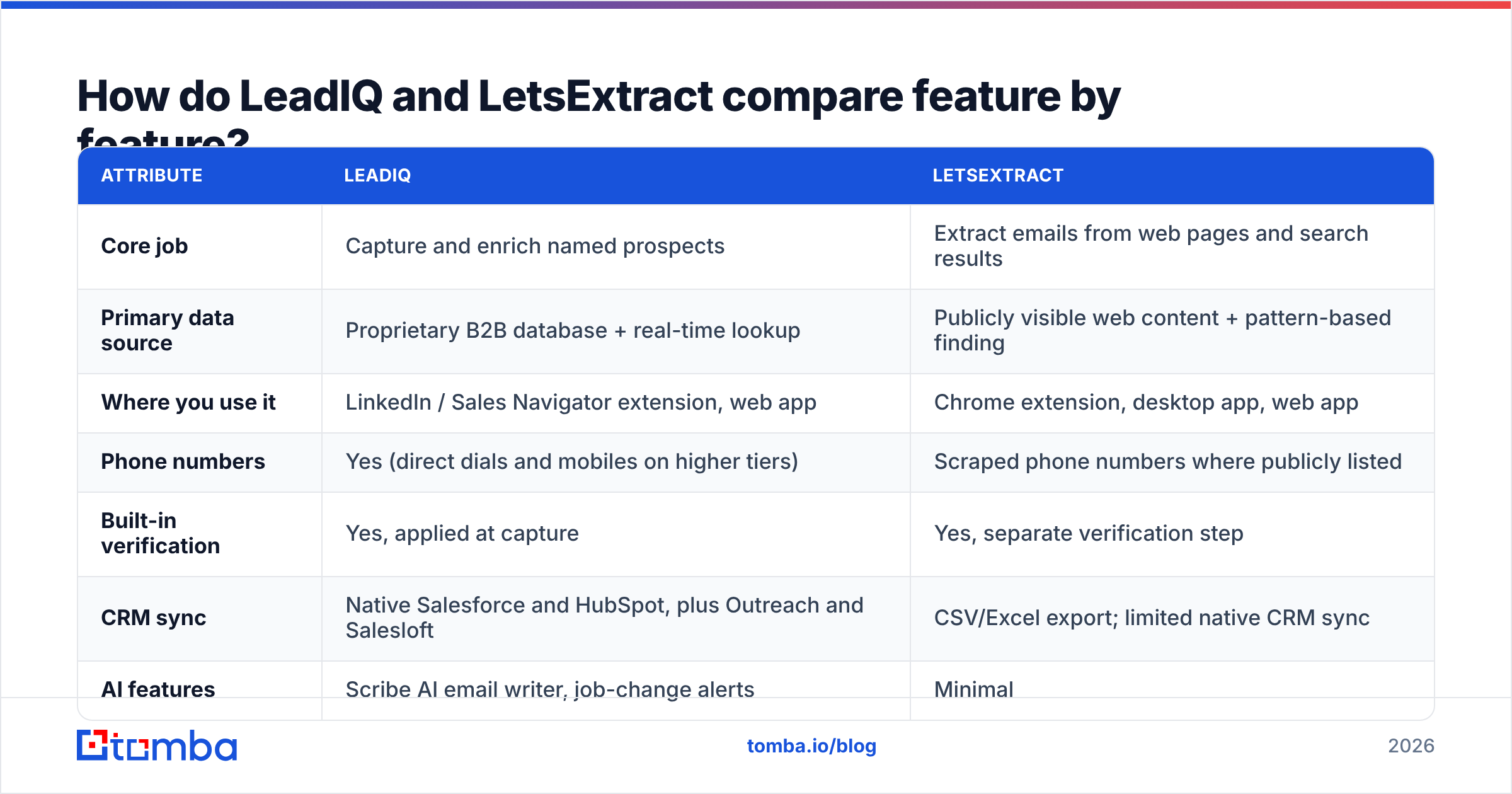
Here's how the two stack up on the attributes that matter most to buyers. Pricing changes often, so treat these as approximate and check each vendor's pricing page before you buy.
| Attribute | LeadIQ | LetsExtract |
|---|---|---|
| Core job | Capture and enrich named prospects | Extract emails from web pages and search results |
| Primary data source | Proprietary B2B database + real-time lookup | Publicly visible web content + pattern-based finding |
| Where you use it | LinkedIn / Sales Navigator extension, web app | Chrome extension, desktop app, web app |
| Phone numbers | Yes (direct dials and mobiles on higher tiers) | Scraped phone numbers where publicly listed |
| Built-in verification | Yes, applied at capture | Yes, separate verification step |
| CRM sync | Native Salesforce and HubSpot, plus Outreach and Salesloft | CSV/Excel export; limited native CRM sync |
| AI features | Scribe AI email writer, job-change alerts | Minimal |
| Free tier | Yes, limited monthly credits | Trial credits |
| Paid entry point | Per-seat monthly plans (roughly $40–$80/user/mo range) | Credit-based plans, generally cheaper per contact |
| Best for | SDR/AE teams running account-based outbound | Freelancers, agencies, local-business and niche list building |
| Main weakness | Cost scales per seat; heavy on LinkedIn workflow | Contact quality varies; many generic inboxes (info@, sales@) |

The pattern is clear. LeadIQ puts accuracy per contact and workflow integration first. LetsExtract puts coverage and cost per contact first. What you're comparing is two ways of building a list.
How accurate is the data from each tool?#
The two tools define "accuracy" differently, so it helps to split it into two questions: is the address real, and does it belong to the person you want?
LeadIQ matches a specific person to a specific address. When a Sales Navigator profile says "VP of RevOps at Acme," LeadIQ tries to return that VP's personal work email, such as jane.doe@acme.com, and verifies it before you spend a credit. G2 reviews generally praise its email accuracy for mid-market and enterprise contacts in North America. Coverage gets thinner for small companies, some European regions and non-tech industries.
LetsExtract returns whatever is published. For a list of dental clinics, marketing agencies or e-commerce stores, that can be exactly what you need, because many small businesses list their contact email on the site. It also means a large share of results are role-based addresses (info@, contact@, support@) rather than decision-makers. Those addresses have lower reply rates and higher spam-complaint risk. The name-plus-domain finder helps, but it works more like a pattern guess plus verification than a lookup against a curated person database.

Whichever tool you choose, don't send to an unverified list. Run exports through a dedicated email verifier, and flag catch-all domains separately. Scraped lists are where bounce rates go up and sender reputation gets damaged.

How do the workflows differ day to day?#
What does a LeadIQ workflow look like?#
A typical LeadIQ day for an SDR:
- Build a lead list in Sales Navigator filtered by title, headcount and industry.
- Capture in bulk with the LeadIQ extension. It pulls contacts, finds emails and phones, and shows the credits used.
- Deduplicate against the CRM automatically. LeadIQ flags contacts or accounts that already exist in Salesforce or HubSpot.
- Push to a sequence in Outreach, Salesloft or your CRM's sequencing tool with one click.
- Personalise with Scribe, which drafts a first-touch email from the prospect's profile and company signals.
The main benefit is fewer tabs and less copy-pasting. For teams where reps book meetings through high-intent, one-to-one outreach, this saves real time every week.
What does a LetsExtract workflow look like?#
A typical LetsExtract session looks more like a research sprint:
- Enter a keyword or seed list, for example "commercial roofing contractors Texas" or a CSV of 800 domains.
- Let the crawler run across search results and site pages to collect emails, phones and social links.
- Filter and verify the results with the built-in checker to remove invalid or disposable addresses.
- Export to CSV/Excel and import into your email tool or CRM.
- Segment manually, since the data rarely includes clean job titles or firmographics.
This suits agencies, lead-gen freelancers and SMB-focused sellers whose target market isn't well covered in LinkedIn-first databases. You get far more rows for the money. You then spend time on cleanup that LeadIQ would have done for you.
Is LeadIQ worth the higher price?#
LeadIQ charges per seat and uses a credit model. Moving from the free tier to paid plans usually gets you more email credits, phone credits, CRM sync and AI features. Enterprise tiers add SSO, admin controls and bigger credit pools. For a five-rep SDR team, the annual contract can become a meaningful budget line.
It's worth the money when:
- Your ICP is well represented on LinkedIn (tech, SaaS, professional services, mid-market and up).
- Reps would otherwise spend hours copying data into Salesforce or HubSpot.
- You need phone numbers as well as emails.
- Clean CRM records matter to RevOps as much as volume does.
It's harder to justify when:
- You're a one-person shop sending a few hundred emails a month.
- Your targets are local businesses, trades or niche verticals with small LinkedIn footprints.
- You mainly need domain-level email discovery rather than person-level enrichment.
Many teams comparing the two end up looking at a third option. If per-seat pricing is the sticking point, our LeadIQ alternative breakdown walks through the trade-offs.
Is LetsExtract good enough for serious outbound?#
For some teams, yes. It's affordable, it covers the long tail of the web, and its extraction engine does something person-centric databases don't: it finds contacts at companies that barely exist on LinkedIn.
The limits are real, though:
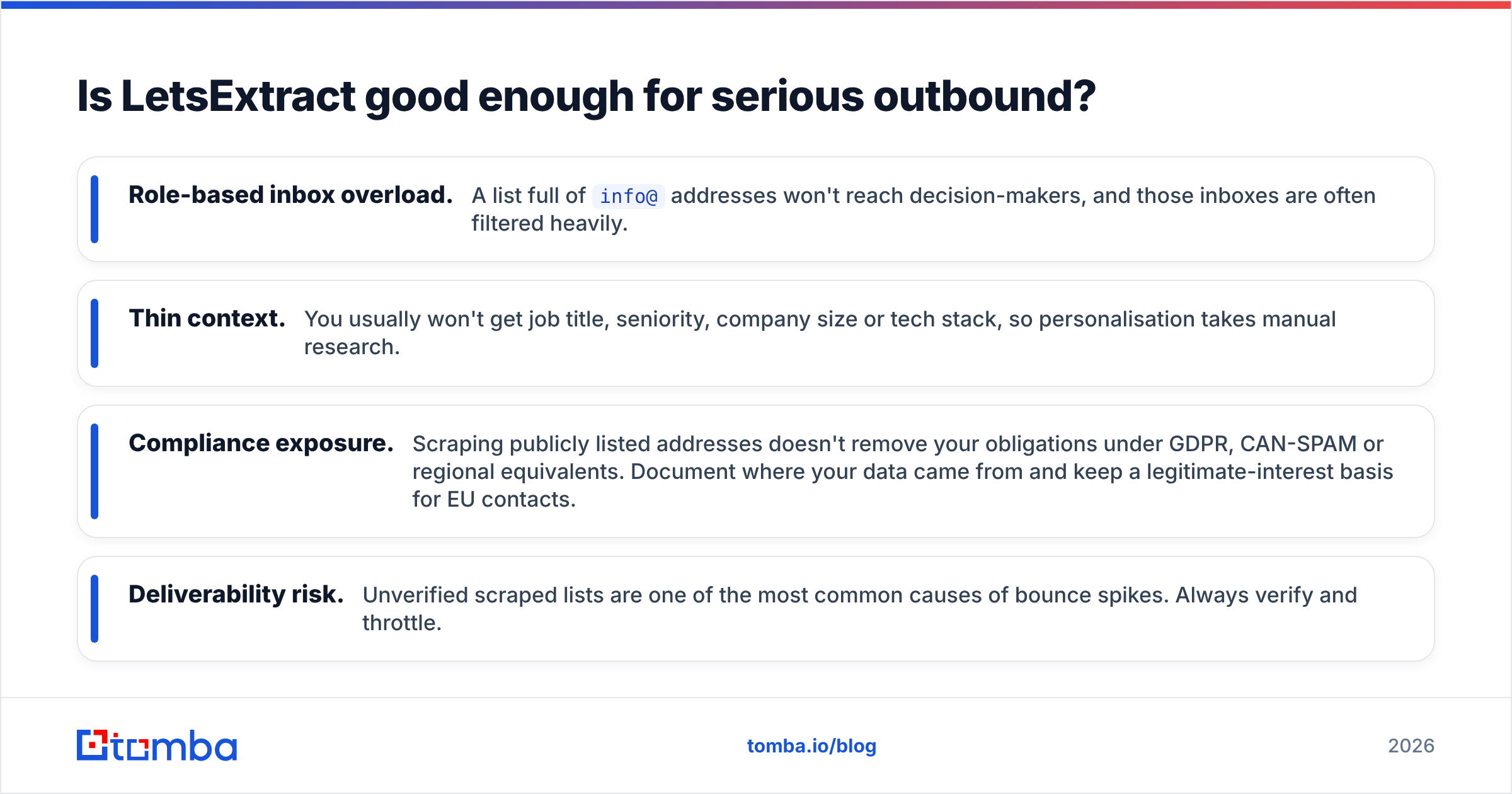
- Role-based inbox overload. A list full of
info@addresses won't reach decision-makers, and those inboxes are often filtered heavily. - Thin context. You usually won't get job title, seniority, company size or tech stack, so personalisation takes manual research.
- Compliance exposure. Scraping publicly listed addresses doesn't remove your obligations under GDPR, CAN-SPAM or regional equivalents. Document where your data came from and keep a legitimate-interest basis for EU contacts.
- Deliverability risk. Unverified scraped lists are one of the most common causes of bounce spikes. Always verify and throttle.
Used carefully, LetsExtract works well as a top-of-funnel discovery tool. Used as your only data source for high-stakes enterprise outreach, it will let you down.

Which tool fits which team?#
Here's a quick decision guide by team type:
- SDR team at a B2B SaaS company: LeadIQ. Its CRM sync, LinkedIn capture and phone data match how you work.
- Solo founder doing outbound on a budget: LetsExtract for wide discovery, plus a name-and-domain email finder for the specific decision-makers you shortlist.
- Lead-gen or marketing agency serving SMB clients: LetsExtract for coverage of local and niche businesses, with strict verification before sending.
- RevOps leader worried about data hygiene: LeadIQ. Its dedupe and governance features are the reason to pay.
- Growth team that wants API-level access to email finding: neither is ideal. Look at tools built API-first.
Where does Tomba fit in the LeadIQ vs LetsExtract debate?#
In practice, many buyers want something in the middle: more accurate than raw scraping, cheaper and less tied to a seat count than LeadIQ.
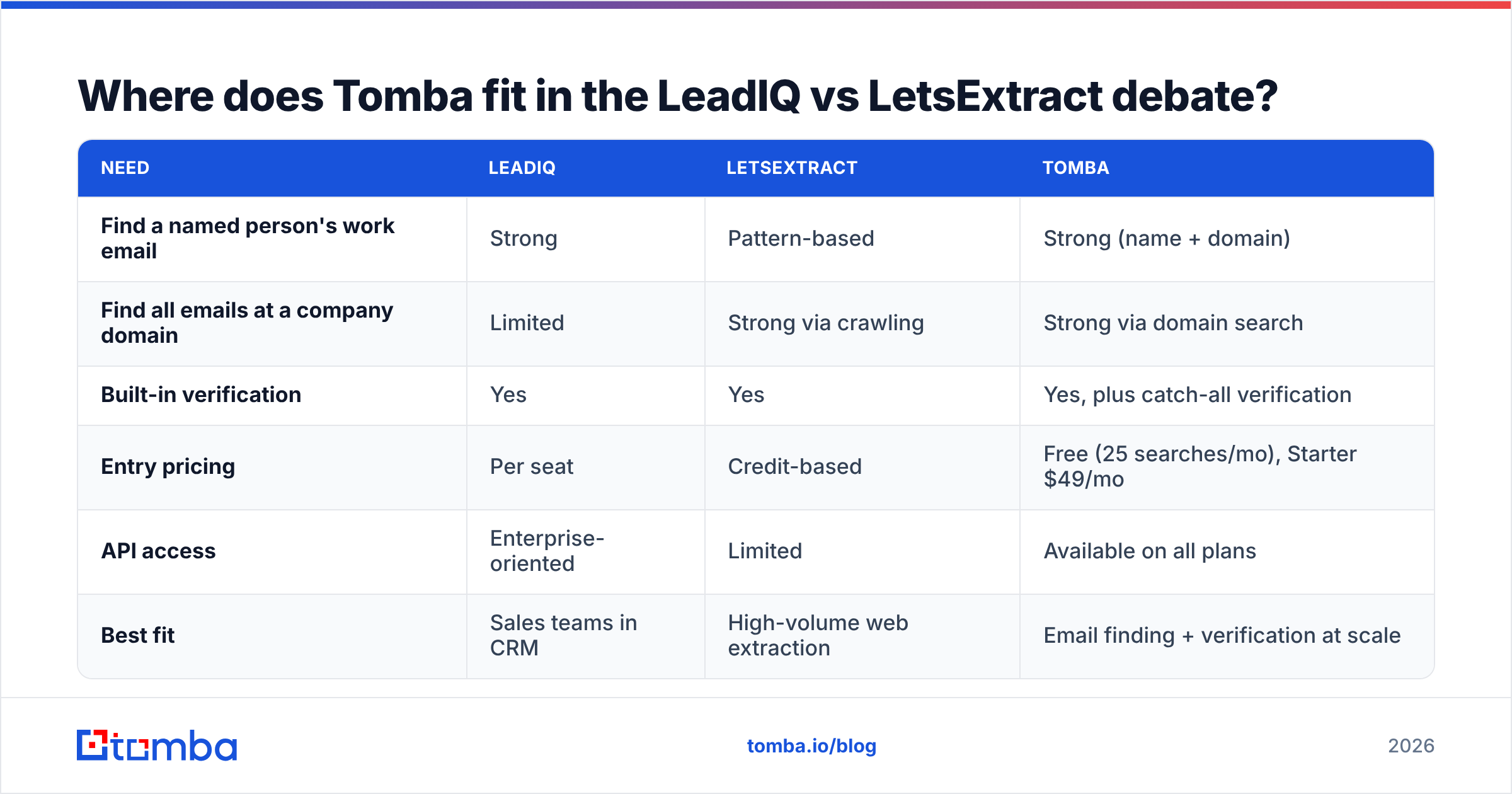
That gap is where Tomba fits, and it's fair to say where it doesn't. Tomba doesn't try to be a full sales engagement suite with AI copywriting and sequencing like LeadIQ's ecosystem. It also isn't a general-purpose web crawler like LetsExtract. It focuses on the email layer:
| Need | LeadIQ | LetsExtract | Tomba |
|---|---|---|---|
| Find a named person's work email | Strong | Pattern-based | Strong (name + domain) |
| Find all emails at a company domain | Limited | Strong via crawling | Strong via domain search |
| Built-in verification | Yes | Yes | Yes, plus catch-all verification |
| Entry pricing | Per seat | Credit-based | Free (25 searches/mo), Starter $49/mo |
| API access | Enterprise-oriented | Limited | Available on all plans |
| Best fit | Sales teams in CRM | High-volume web extraction | Email finding + verification at scale |
If you already use Sales Navigator and a sequencer, Tomba's Chrome extension and native integrations cover most of the "find the email, check it, push it to the CRM" loop without per-seat pricing. If you're building lists from domains, Tomba's domain search returns known addresses tied to names and positions, not only role-based inboxes. The full breakdown is on the Tomba pricing page.
What should you check before you buy either tool?#
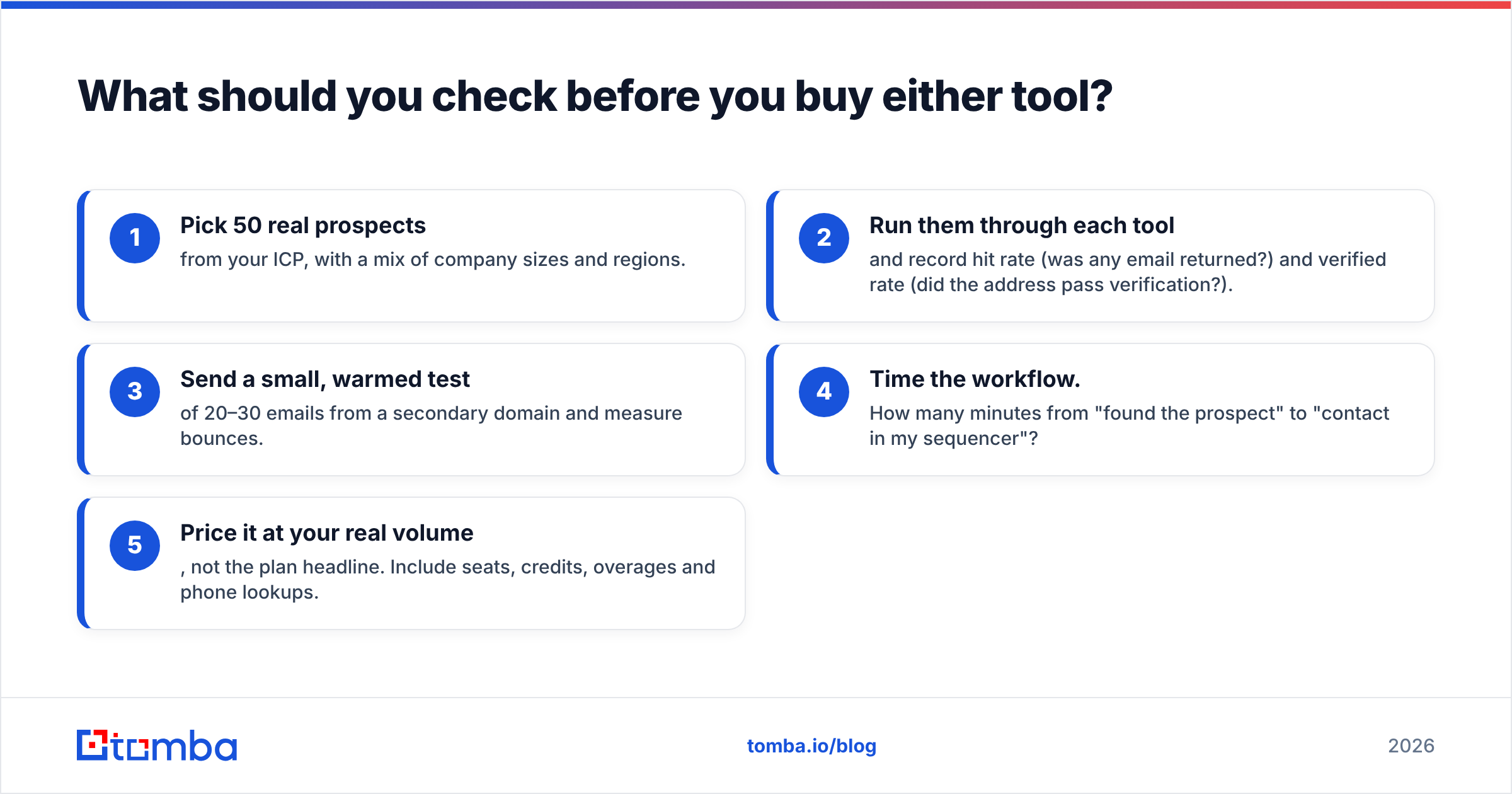
Before signing any contract, run the same test on every tool you're considering:
- Pick 50 real prospects from your ICP, with a mix of company sizes and regions.
- Run them through each tool and record hit rate (was any email returned?) and verified rate (did the address pass verification?).
- Send a small, warmed test of 20–30 emails from a secondary domain and measure bounces.
- Time the workflow. How many minutes from "found the prospect" to "contact in my sequencer"?
- Price it at your real volume, not the plan headline. Include seats, credits, overages and phone lookups.
Independent reviews on G2 are useful for spotting patterns, like complaints about coverage in a specific region, but your own 50-contact test will tell you more than any aggregate score.
So, LeadIQ or LetsExtract?#
Choose LeadIQ if you run a sales team that prospects named buyers on LinkedIn, needs phone numbers, and cares about clean CRM data. You'll pay more per seat, and for teams that fit that profile the time savings usually cover the cost.
Choose LetsExtract if you need volume from the open web, sell into SMB or local markets, and are comfortable verifying and segmenting the data yourself. It's cheaper per contact, and the extra work is yours.
If neither fits, because you want accurate person-level emails, domain-wide discovery and verification without per-seat pricing, test a third option before you commit.
Try Tomba Email Finder. Enter a name and company domain and get a verified professional email address back in seconds. You can also pull every known address at a company with domain search. The free plan includes 25 searches a month, so you can run your own 50-contact benchmark against LeadIQ and LetsExtract before spending anything. Start finding emails with Tomba Email Finder.
Related guides#
// get started
Find, verify and enrich your first contacts today
Start on the free plan with 25 searches a month, then scale when your team is ready.
Free plan · No credit card required · GDPR & CCPA
// about the author