LeadIQ vs Mailtester Ninja: Prospecting Tool or Email Verifier?
LeadIQ finds and captures contacts. Mailtester Ninja checks whether an email address will bounce. Here is how they compare on data, accuracy, pricing and workflow, and when you need one, both, or neither.
TL;DR
- LeadIQ is a prospecting and contact-capture platform. It finds work emails and phone numbers, mostly from LinkedIn and Sales Navigator, and pushes them into your CRM and sequencer.
- Mailtester Ninja is a lightweight email verification tool. It checks whether an address you already have is deliverable, risky, or catch-all. Finding new contacts isn't its core job.
- They solve different problems, so "LeadIQ vs Mailtester Ninja" is less about which one wins and more about where each one sits in your outbound stack.
- Rep-driven teams that live in LinkedIn get more from LeadIQ. Teams with existing lists that need cheap, high-volume cleaning get more from Mailtester Ninja.
- If you want finding and verification under one login and one bill, an all-in-one tool like Tomba covers both jobs.
What is LeadIQ?#
LeadIQ is a B2B prospecting platform built for sales development teams. Most people know it for its Chrome extension. You open a LinkedIn or Sales Navigator profile, click capture, and LeadIQ returns a work email and often a phone number. It then sends the contact to Salesforce, HubSpot, Outreach, Salesloft, or a CSV.
Its main features:
- Contact capture from LinkedIn, Sales Navigator, and company websites
- Email and phone data (phone numbers use more credits than emails)
- CRM and sequencer sync with duplicate checks, so reps don't re-prospect accounts that are already owned
- Job-change tracking, which flags when a champion or past customer moves to a new company
- AI-assisted email writing that drafts personalized openers from profile data
LeadIQ is built for the rep's daily workflow. The product assumes a person is choosing prospects one at a time or in small lists, and it's priced per seat to match. It has a free tier with a small monthly credit allowance. Paid plans are billed per user, and higher tiers add phone credits, team controls, and deeper CRM features. Check LeadIQ's pricing page for current numbers, because seat pricing and credit bundles change often.
What is Mailtester Ninja?#
Mailtester Ninja is an email verification service. You give it an address, or a file of thousands of addresses, and it returns a status: valid, invalid, catch-all, disposable, or unknown. Behind that status are syntax checks, MX record lookups, and SMTP-level handshakes with the receiving mail server that stop short of sending a message.
Its main features:
- Single and bulk verification through a web dashboard
- An API for real-time checks in signup forms or data pipelines
- Catch-all and disposable detection, so you can split risky addresses from safe ones
- Low per-check pricing, which suits large list-cleaning jobs
Mailtester Ninja doesn't try to be a prospecting database. It won't tell you who the VP of Marketing is at a 200-person SaaS company. It tells you whether jane.doe@company.com will bounce. That narrow focus is why it's cheap and fast, and also why it can't replace a contact-data tool.
How do LeadIQ and Mailtester Ninja compare side by side?#
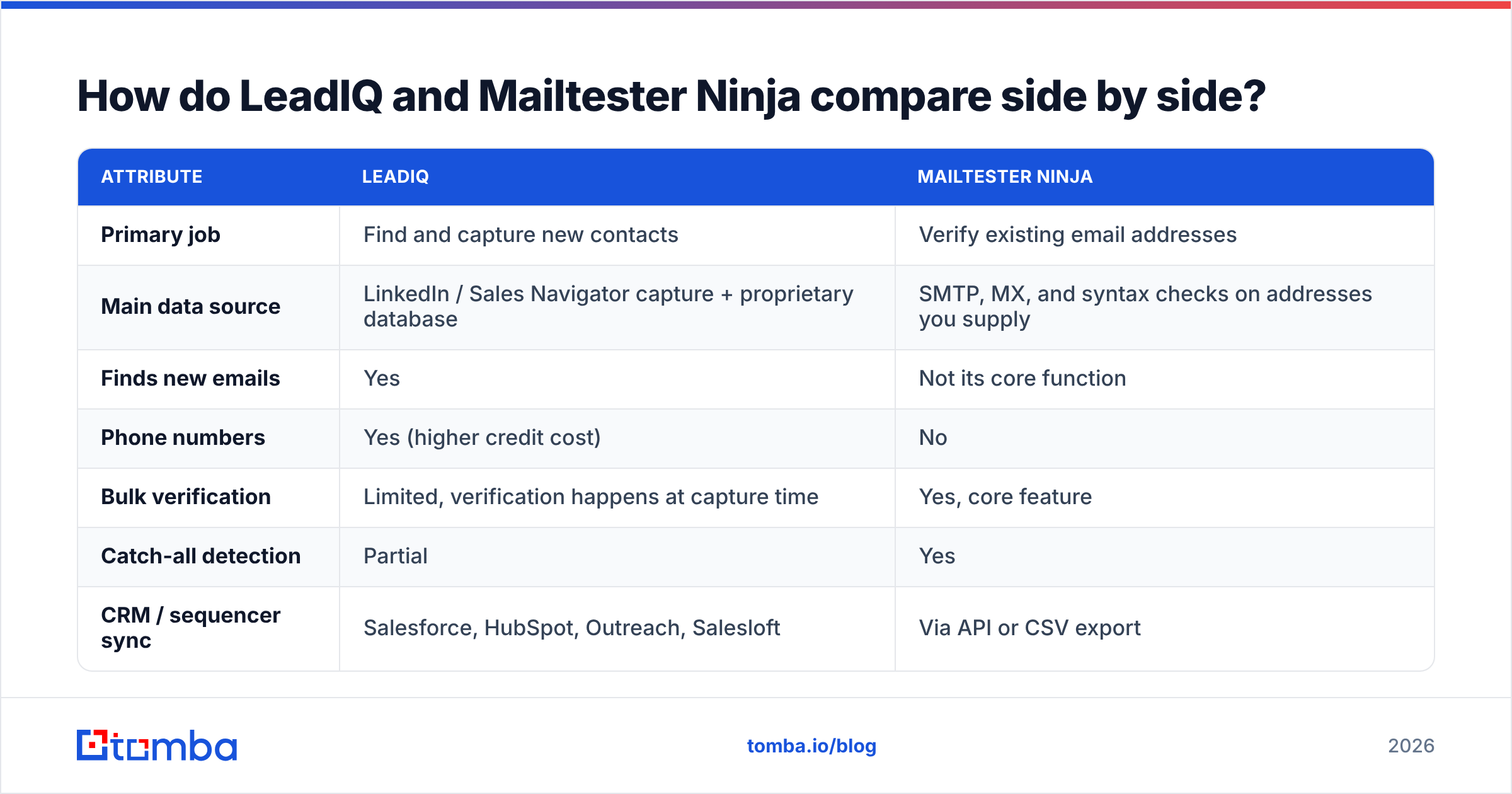
Here's the direct comparison on the attributes that matter when you're choosing.
| Attribute | LeadIQ | Mailtester Ninja |
|---|---|---|
| Primary job | Find and capture new contacts | Verify existing email addresses |
| Main data source | LinkedIn / Sales Navigator capture + proprietary database | SMTP, MX, and syntax checks on addresses you supply |
| Finds new emails | Yes | Not its core function |
| Phone numbers | Yes (higher credit cost) | No |
| Bulk verification | Limited, verification happens at capture time | Yes, core feature |
| Catch-all detection | Partial | Yes |
| CRM / sequencer sync | Salesforce, HubSpot, Outreach, Salesloft | Via API or CSV export |
| Pricing model | Per seat + credits | Per verification credit / volume plans |
| Free tier | Yes, limited credits | Limited free checks |
| Best for | SDR teams prospecting on LinkedIn | Cleaning large lists before a send |
| Main limitation | Per-seat cost adds up for large teams | Doesn't generate new leads |
Put simply, LeadIQ answers "who should I contact and how do I reach them?" Mailtester Ninja answers "will this email land or bounce?"

Is LeadIQ more accurate than Mailtester Ninja?#
You can't compare their accuracy directly, because they measure different things.
LeadIQ's accuracy means: when it gives you an email for a person, is that the right person's current, deliverable address? That depends on how fresh its data is, how well it matches profiles to domains, and whether it verifies before returning a result. LeadIQ does run verification on captured emails. Still, like every contact database, some records go stale as people change jobs. B2B contact data decays at roughly 20–30% a year, a range cited by many data vendors and analysts, so any database needs constant refreshing.
Mailtester Ninja's accuracy means: when it says an address is valid, does the address accept mail? SMTP verification works well on standard domains. It struggles, as every verifier does, with catch-all domains that accept any address at the server level, and with providers that throttle or block verification probes. What matters is how honestly a verifier labels those cases. Marking them "catch-all" or "unknown" is better than marking them "valid" and letting you bounce.

In practice, finder output is only as good as the verification behind it. Many teams run captured contacts through a separate verifier before a campaign, even when the finder says it already verified them. That's exactly the gap Mailtester Ninja fills. It's also why tools that bundle a finder with a dedicated email verifier have gained ground.
How much do LeadIQ and Mailtester Ninja cost?#
The two tools charge in completely different ways, and that shapes which one is cheaper for you.
LeadIQ charges per user. Each seat gets a monthly credit allowance for email and phone captures, with phone numbers costing more. For a five-person SDR team, the bill grows with headcount whether or not every rep uses all their credits. Enterprise plans are negotiated, and they're where job-change tracking and advanced CRM controls usually live.
Mailtester Ninja charges per verification, or by volume tier. There are no seats. One marketer can clean 100,000 addresses without adding users. Per check, it sits at the budget end of the verification market, which is why cost-conscious agencies and cold email operators like it.
Here's a rough way to decide:
- Count your net-new contacts per month. If you need hundreds or thousands of new people, you need a finder. Mailtester Ninja can't create them.
- Count your addresses that need cleaning. If you already have a large list from events, old CRM exports, or purchased data, a verifier will cost far less than recapturing those contacts.
- Count seats. Per-seat tools get expensive past three or four reps. Credit-pool tools scale more gently.
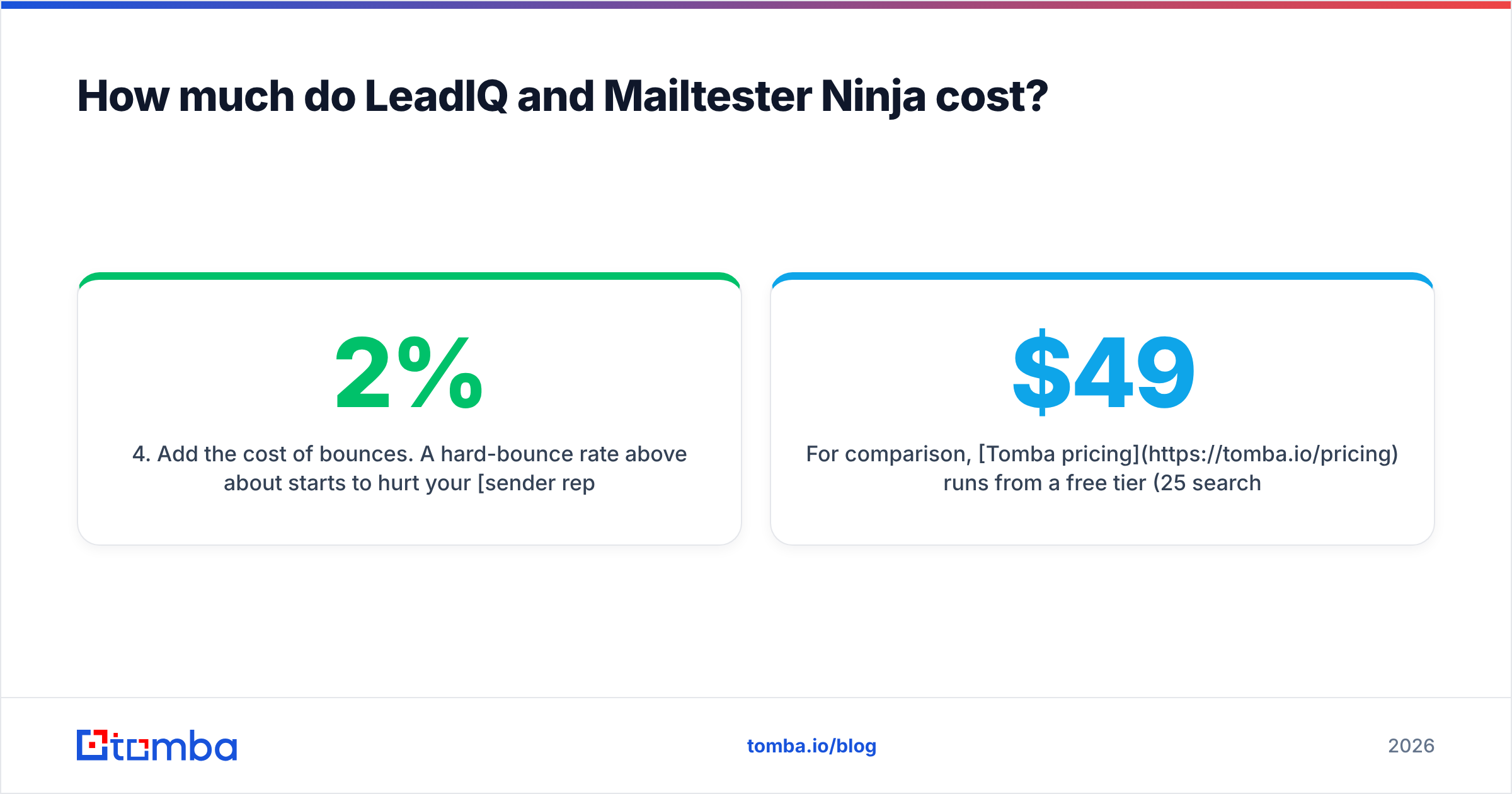
- Add the cost of bounces. A hard-bounce rate above about 2% starts to hurt your sender reputation. The verifier often pays for itself by protecting your domain.
For comparison, Tomba pricing runs from a free tier (25 searches a month) to Starter at $49/mo, Growth at $99/mo, and Pro at $249/mo, with Enterprise on custom terms. Finding and verification come out of one credit pool instead of two separate subscriptions.
Which workflow does each tool fit?#
The better question isn't which tool is better. It's which workflow you're running.
When LeadIQ is the right call#
- Your reps prospect one account at a time on LinkedIn and Sales Navigator.
- You live in Salesforce or HubSpot and need captured contacts to arrive clean, deduplicated, and assigned.
- You care about signals like job changes that tell reps when to reach out.
- You have budget for per-seat licensing and value rep productivity over cost per contact.
LeadIQ's user reviews on G2 regularly praise the Chrome extension and CRM sync. Complaints tend to be about credit limits and phone-number coverage outside North America.
When Mailtester Ninja is the right call#
- You already have the list, from a webinar, a trade show, a partner, or an old CRM, and you need to know what's still alive.
- You run high-volume cold email where every bounce hurts domain health.
- You want an API for real-time checks on signup or lead-capture forms.
- You're budget-constrained and need verification without paying for a full data platform.
When you need both#
Plenty of teams do end up running both: LeadIQ to capture, then Mailtester Ninja (or another verifier) as a second pass before a big sequence launches. That works. The costs are two vendors, two bills, an export and re-import step, and a gap where records can fall out of sync.
What are the pros and cons of each?#
LeadIQ pros
- Strong LinkedIn and Sales Navigator capture experience
- Mature CRM and sequencer integrations
- Job-change tracking adds useful buying signals
- AI writing help built into the capture flow
LeadIQ cons
- Per-seat pricing grows quickly with team size
- Phone credits are limited on lower tiers
- Not built for cleaning large existing lists
Mailtester Ninja pros
- Very low cost per verification
- Fast bulk processing
- Clear labels for catch-all and disposable addresses
- Simple API
Mailtester Ninja cons
- Doesn't find new contacts or enrich records
- No native CRM sync; you work through CSV or API
- Fewer surrounding features (no phone data, no company search)
Is there a tool that does both finding and verification?#
Yes, and for many teams that's the deciding factor. Rather than pairing a contact-capture tool with a separate verifier, you can use a platform where the finder and verifier share one database and one credit balance.
Tomba is one of those options. Its email finder returns addresses by name plus domain, by company, or from LinkedIn through the browser extension. Every result comes with a confidence score and a verification status. For lists you already own, bulk email finder and bulk verification jobs run on the same account, including catch-all handling. The API, Google Sheets add-on, and CRM integrations mean you don't have to export and re-import between vendors.
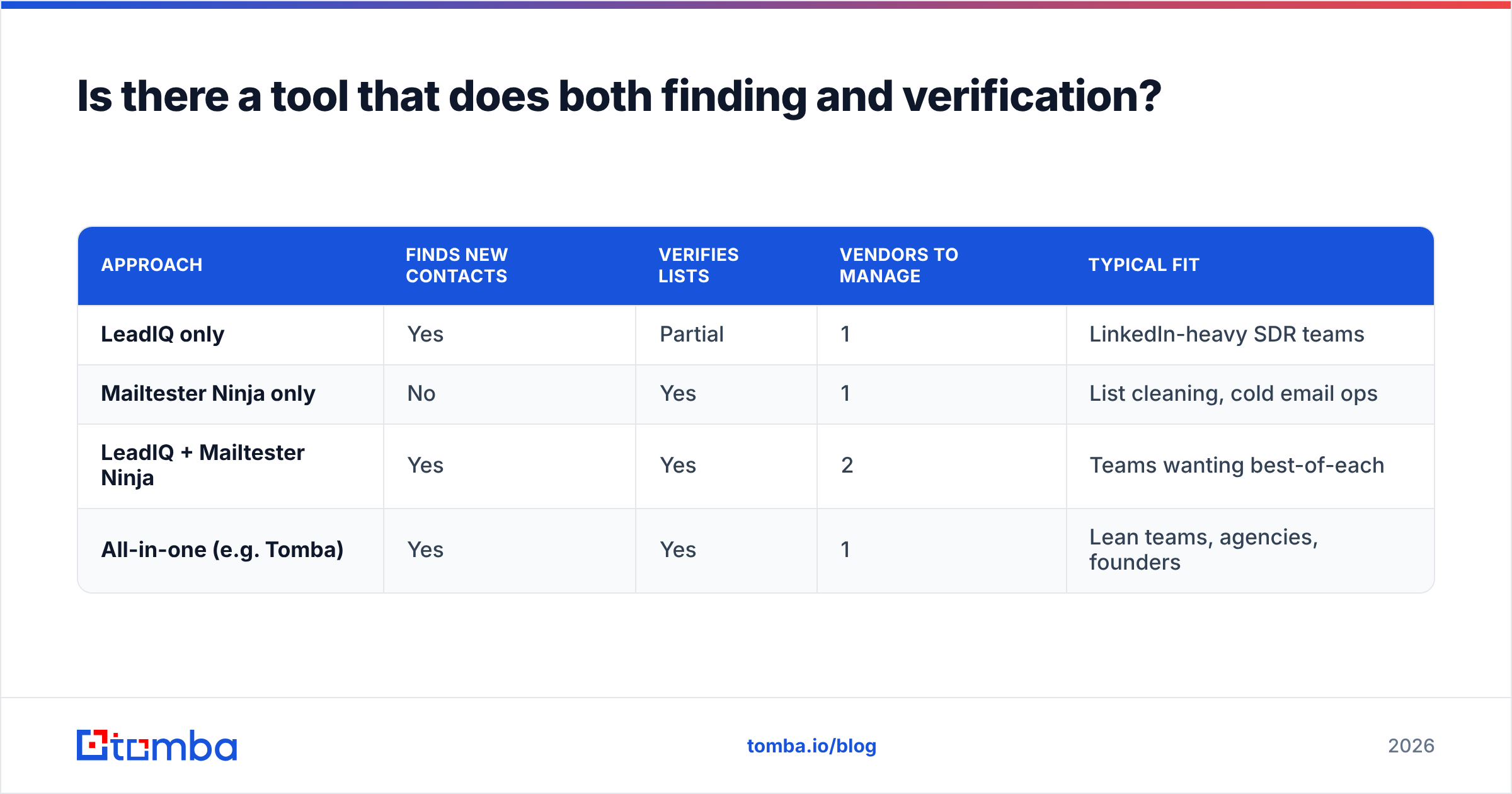
Here's how the three approaches compare:
| Approach | Finds new contacts | Verifies lists | Vendors to manage | Typical fit |
|---|---|---|---|---|
| LeadIQ only | Yes | Partial | 1 | LinkedIn-heavy SDR teams |
| Mailtester Ninja only | No | Yes | 1 | List cleaning, cold email ops |
| LeadIQ + Mailtester Ninja | Yes | Yes | 2 | Teams wanting best-of-each |
| All-in-one (e.g. Tomba) | Yes | Yes | 1 | Lean teams, agencies, founders |
If you're mainly looking at LeadIQ and want something lighter on per-seat cost, our LeadIQ alternative breakdown covers the tradeoffs in more detail.
How should you decide between LeadIQ and Mailtester Ninja?#
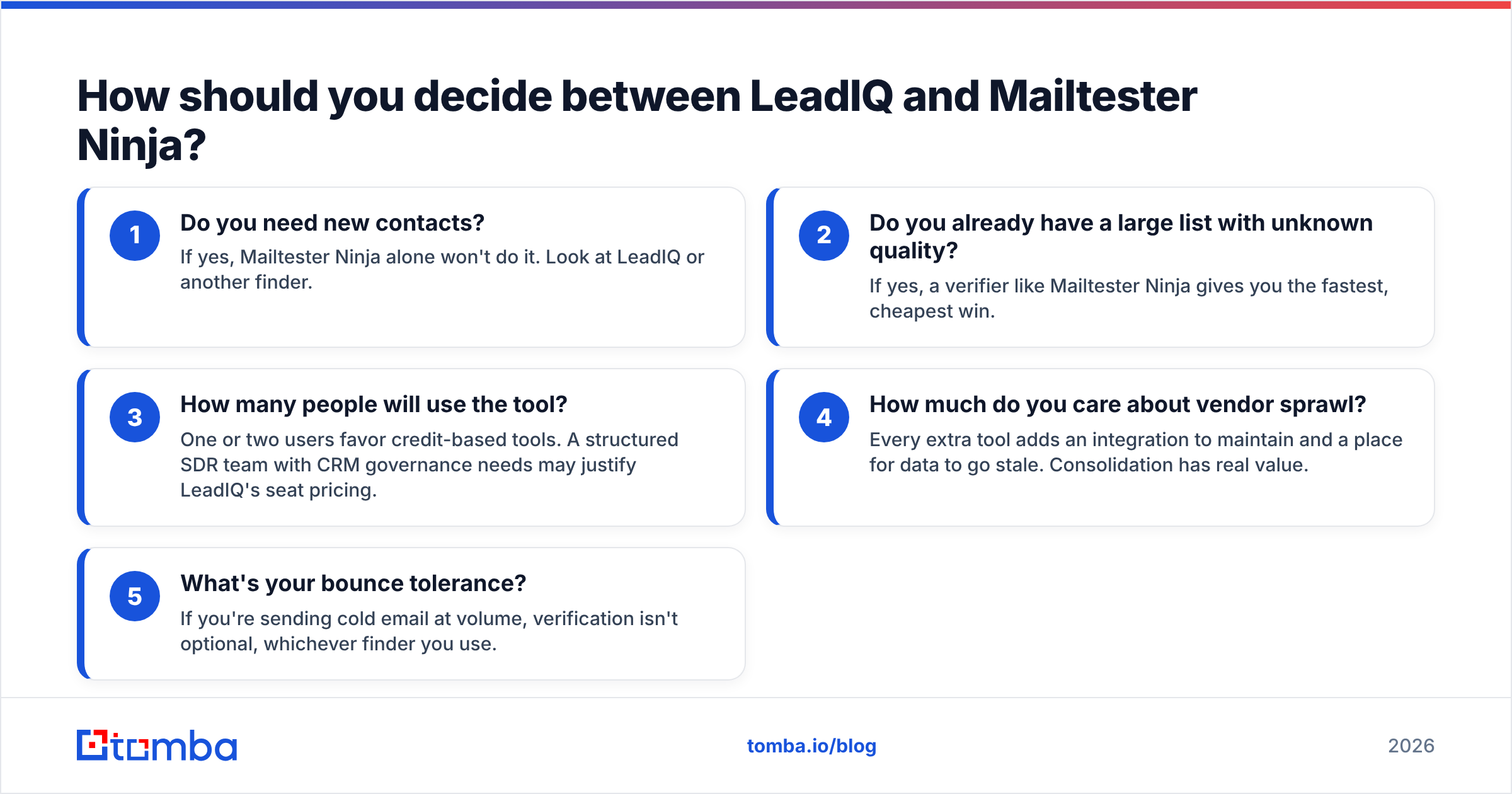
Run through these questions in order:
- Do you need new contacts? If yes, Mailtester Ninja alone won't do it. Look at LeadIQ or another finder.
- Do you already have a large list with unknown quality? If yes, a verifier like Mailtester Ninja gives you the fastest, cheapest win.
- How many people will use the tool? One or two users favor credit-based tools. A structured SDR team with CRM governance needs may justify LeadIQ's seat pricing.
- How much do you care about vendor sprawl? Every extra tool adds an integration to maintain and a place for data to go stale. Consolidation has real value.
- What's your bounce tolerance? If you're sending cold email at volume, verification isn't optional, whichever finder you use.
What's the verdict?#
LeadIQ and Mailtester Ninja aren't competitors in the usual sense. LeadIQ is a prospecting tool for reps who build pipeline from LinkedIn and need contacts to land cleanly in their CRM. Mailtester Ninja is a focused, affordable verifier for anyone who needs to know an address is real before hitting send.
Pick LeadIQ if your bottleneck is finding the right people. Pick Mailtester Ninja if your bottleneck is list quality and bounce rates. If you're paying for both and moving CSVs between them every week, that's a sign a single platform would save you time and money.
Ready to find and verify emails in one place?#
If you'd rather not glue a contact-capture tool to a separate verifier, try the Tomba Email Finder. Search by name and domain, pull every public address for a company, or capture contacts from LinkedIn. Each result comes back with a verification status, so you know what's safe to send before it reaches your sequencer. Start on the free tier with 25 searches a month, then move to Starter at $49/mo when you're ready to scale.
Related guides#
// get started
Find, verify and enrich your first contacts today
Start on the free plan with 25 searches a month, then scale when your team is ready.
Free plan · No credit card required · GDPR & CCPA
// about the author