LeadIQ vs Skrapp: Pricing, Accuracy & Workflow Compared for 2026
LeadIQ is built for sales teams that live in Sales Navigator and the CRM. Skrapp is built for people who need verified emails at a fair price per credit. Here's how to tell which one your team needs.
TL;DR
- LeadIQ is a prospecting workflow tool for SDR teams. It captures contacts from LinkedIn and Sales Navigator, pushes them into Salesforce, HubSpot, Outreach or Salesloft, tracks job changes, and writes first drafts with AI. You pay per seat.
- Skrapp is a plain email finder. It covers LinkedIn, domain search, bulk lookups and verification, and you pay per credit instead of per user.
- Pick LeadIQ if your team already works inside a sales engagement platform and you need clean CRM data with no manual imports.
- Pick Skrapp if you're a founder, recruiter, agency or small team that mainly needs verified emails at a predictable cost.
- If you need domain search, verification, catch-all handling and an API on one credit-based plan, look at a third option before you buy either.
What are LeadIQ and Skrapp, and why do people compare them?#
Both products turn up in the same searches ("LinkedIn email finder", "Chrome extension for prospecting"), and both let you click a LinkedIn profile and get a work email back. That's about where the overlap ends.
LeadIQ sells itself as a prospecting platform. The main job is moving a prospect from LinkedIn into your CRM and sequencer with as few clicks as possible, then keeping that record current. Email finding is one part of that workflow. Around it sit job-change tracking, AI-written outreach (Scribe), and native sync with the tools SDR teams already use.
Skrapp is a more traditional email finder. You can search by name and company, by domain, or in bulk from a CSV, and every email is verified before it's returned. It also has a Chrome extension for LinkedIn and Sales Navigator, a lead search database, and integrations with common CRMs. The pitch is simpler: find the right email, verify it, export it.
So the real comparison is a workflow platform against a data utility. Most bad purchases here come from buying one while needing the other.
How do LeadIQ and Skrapp differ at their core?#
The five differences below decide most buying calls. Check which ones matter to your team before you look at price.
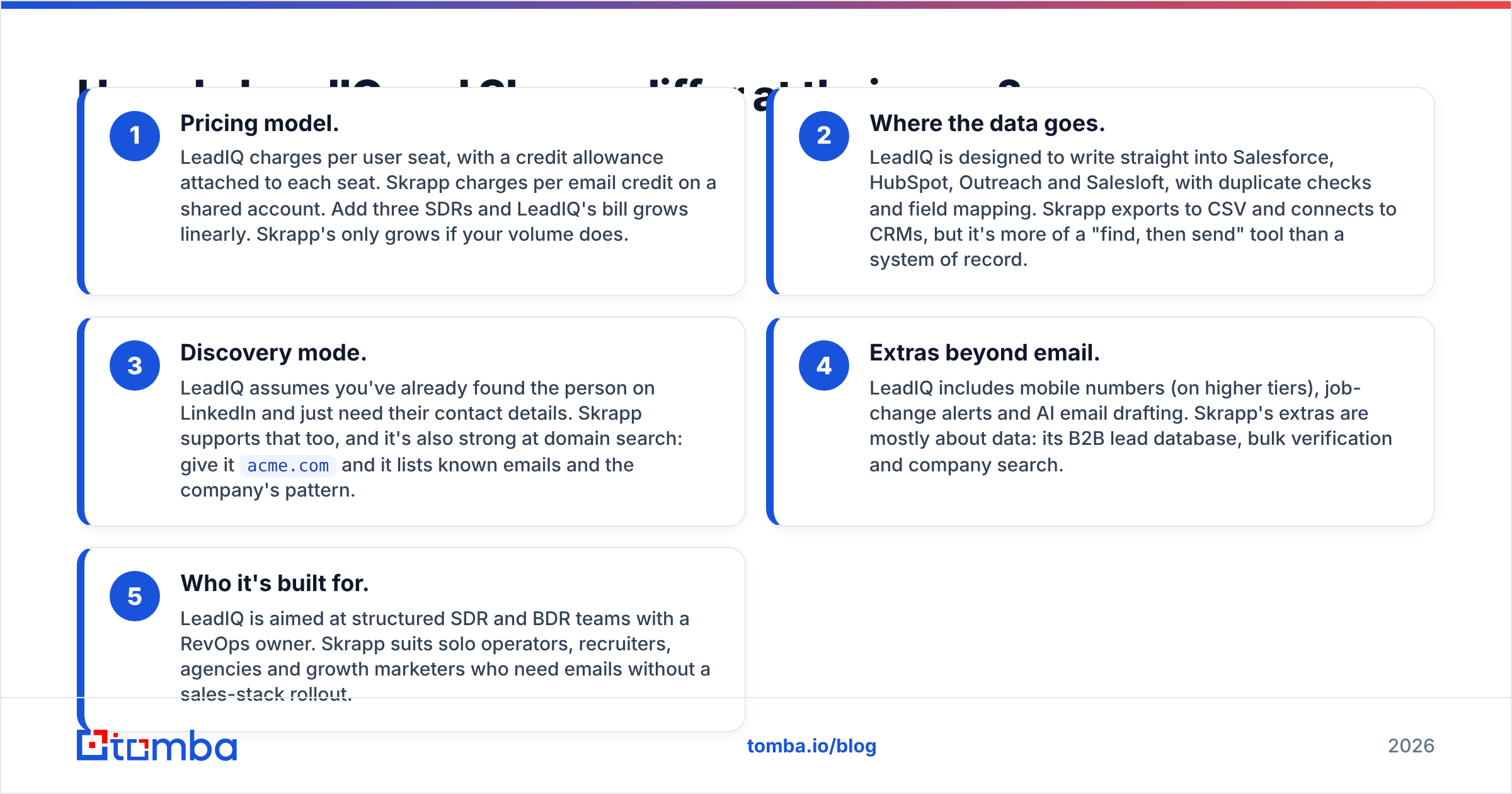
- Pricing model. LeadIQ charges per user seat, with a credit allowance attached to each seat. Skrapp charges per email credit on a shared account. Add three SDRs and LeadIQ's bill grows linearly. Skrapp's only grows if your volume does.
- Where the data goes. LeadIQ is designed to write straight into Salesforce, HubSpot, Outreach and Salesloft, with duplicate checks and field mapping. Skrapp exports to CSV and connects to CRMs, but it's more of a "find, then send" tool than a system of record.
- Discovery mode. LeadIQ assumes you've already found the person on LinkedIn and just need their contact details. Skrapp supports that too, and it's also strong at domain search: give it
acme.comand it lists known emails and the company's pattern. - Extras beyond email. LeadIQ includes mobile numbers (on higher tiers), job-change alerts and AI email drafting. Skrapp's extras are mostly about data: its B2B lead database, bulk verification and company search.
- Who it's built for. LeadIQ is aimed at structured SDR and BDR teams with a RevOps owner. Skrapp suits solo operators, recruiters, agencies and growth marketers who need emails without a sales-stack rollout.

How do LeadIQ and Skrapp compare feature by feature?#
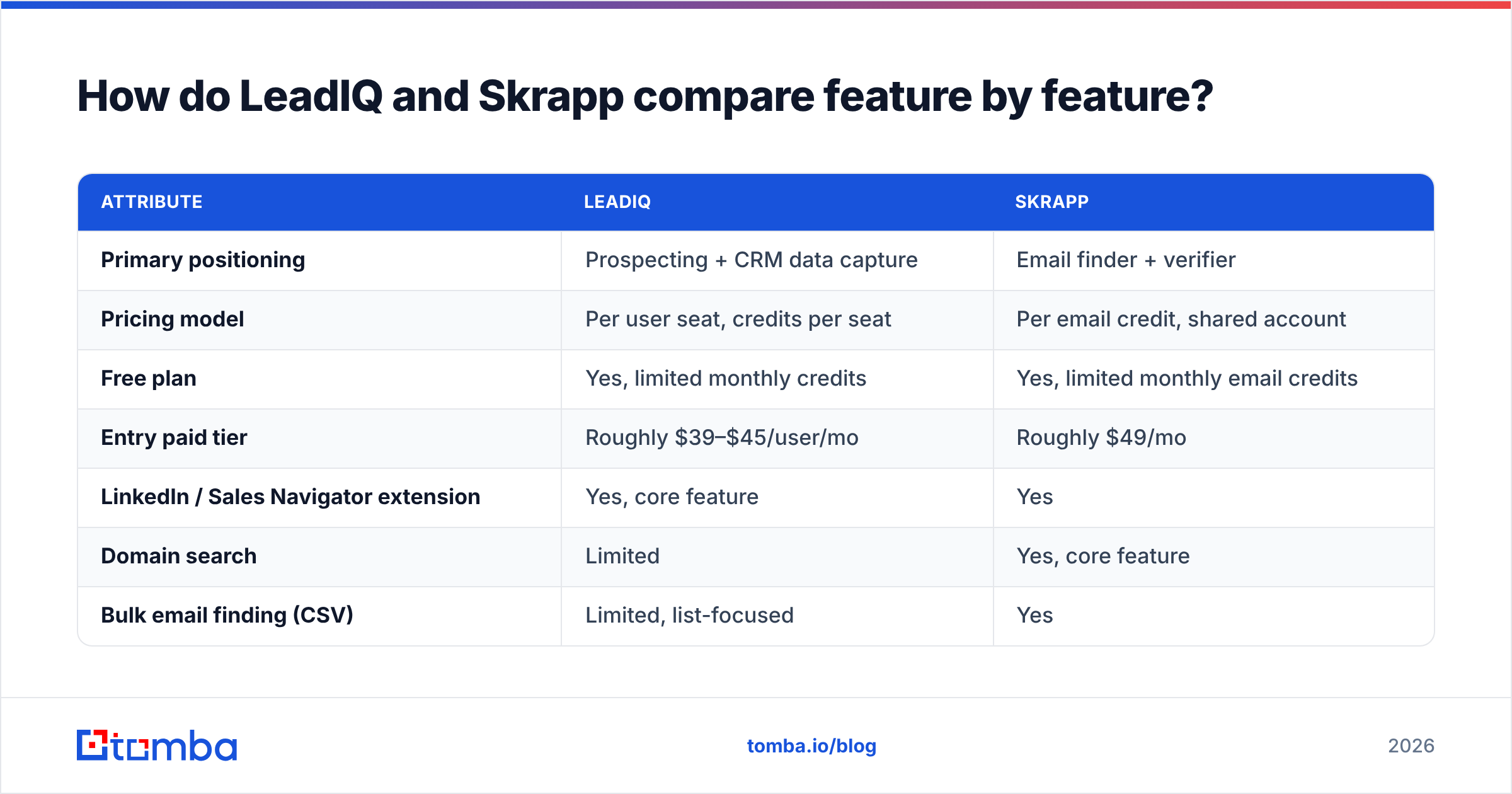
Here's a side-by-side of the attributes that affect day-to-day use. Plan limits change often, so check the vendor pricing pages before you commit. The figures below are list prices at the time of writing.
| Attribute | LeadIQ | Skrapp |
|---|---|---|
| Primary positioning | Prospecting + CRM data capture | Email finder + verifier |
| Pricing model | Per user seat, credits per seat | Per email credit, shared account |
| Free plan | Yes, limited monthly credits | Yes, limited monthly email credits |
| Entry paid tier | Roughly $39–$45/user/mo | Roughly $49/mo |
| LinkedIn / Sales Navigator extension | Yes, core feature | Yes |
| Domain search | Limited | Yes, core feature |
| Bulk email finding (CSV) | Limited, list-focused | Yes |
| Built-in email verification | Yes | Yes, every result verified |
| Mobile / direct dials | Yes, on higher tiers | Limited |
| Job-change tracking | Yes | No |
| AI email writing | Yes (Scribe) | No |
| Native Salesforce / HubSpot sync | Yes, deep | Yes, lighter |
| Outreach / Salesloft sync | Yes, native | Via export or integrations |
| API | Enterprise-oriented | Available |
| Best fit | SDR teams of 3+ with a sequencer | Founders, recruiters, agencies, SMB sales |
Two rows matter more than the rest. Pricing model sets your cost curve as the team grows. Outreach / Salesloft sync tells you whether reps will actually use the tool or end up pasting CSVs around.
Which is more accurate, LeadIQ or Skrapp?#
Neither vendor publishes a methodology you can audit, and there's no independent benchmark on these two specifically that I'd stake your budget on. Anyone quoting "LeadIQ is 95% accurate" or "Skrapp is 98% accurate" is repeating marketing copy.
Here's what can be said honestly.
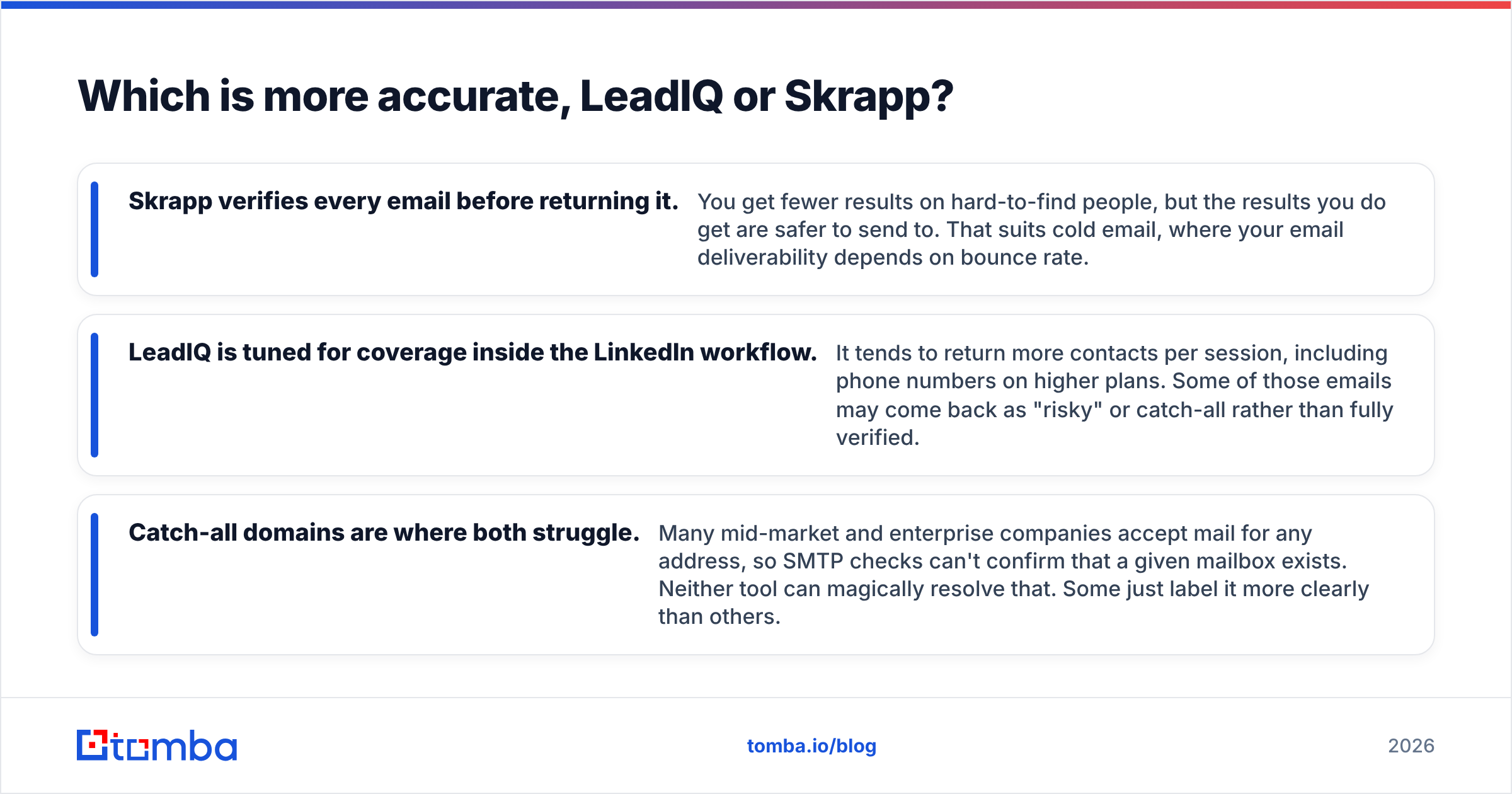
- Skrapp verifies every email before returning it. You get fewer results on hard-to-find people, but the results you do get are safer to send to. That suits cold email, where your email deliverability depends on bounce rate.
- LeadIQ is tuned for coverage inside the LinkedIn workflow. It tends to return more contacts per session, including phone numbers on higher plans. Some of those emails may come back as "risky" or catch-all rather than fully verified.
- Catch-all domains are where both struggle. Many mid-market and enterprise companies accept mail for any address, so SMTP checks can't confirm that a given mailbox exists. Neither tool can magically resolve that. Some just label it more clearly than others.

How to test it yourself in an afternoon: take 100 contacts from your real ICP whose emails you already know (closed-won accounts, past conversations). Run them through both free plans and score each tool on three numbers: found, correct, and marked risky. That result is worth more than any vendor claim, because accuracy varies a lot by region, industry and company size. Then run the "found" results through a separate email verifier as a tiebreaker.
How much do LeadIQ and Skrapp really cost?#
List price is only half the answer. The other half is how the cost scales.
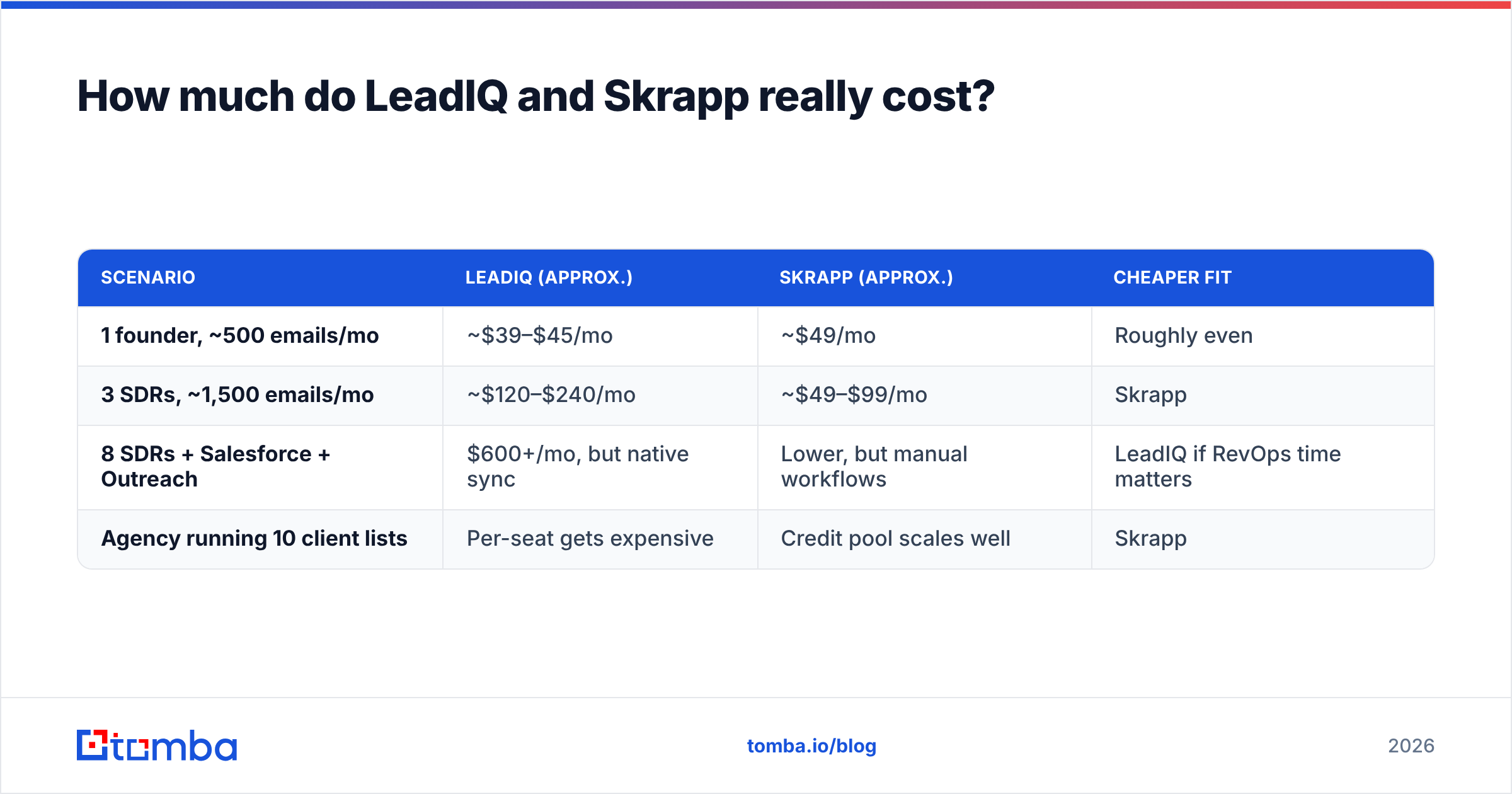
LeadIQ has a free tier for individual testing, then paid plans billed per user. The entry tier sits around $39–$45 per user per month depending on billing cycle, with a Pro tier roughly double that and custom Enterprise pricing. Credits are tied to each seat. A five-rep team on Pro can easily pass $400/month before anyone runs out of credits, and phone credits are usually counted separately from email credits.
Skrapp also has a free tier, then paid plans that start around $49/month and move up by volume of email credits, not headcount. A five-person team sharing one 5,000-credit plan pays the same as one person using 5,000 credits.
| Scenario | LeadIQ (approx.) | Skrapp (approx.) | Cheaper fit |
|---|---|---|---|
| 1 founder, ~500 emails/mo | ~$39–$45/mo | ~$49/mo | Roughly even |
| 3 SDRs, ~1,500 emails/mo | ~$120–$240/mo | ~$49–$99/mo | Skrapp |
| 8 SDRs + Salesforce + Outreach | $600+/mo, but native sync | Lower, but manual workflows | LeadIQ if RevOps time matters |
| Agency running 10 client lists | Per-seat gets expensive | Credit pool scales well | Skrapp |
Check current numbers on the vendor pages or on G2's pricing listings before signing an annual contract. Both vendors adjust tiers regularly.
Hidden costs to watch:
- LeadIQ: phone credits vs email credits, minimum seat counts on annual Enterprise deals, and the admin time to configure CRM field mapping.
- Skrapp: credits burned on searches that return nothing (check the current policy), and the time spent moving CSVs into your sequencer if you skip the integrations.
Which tool fits a LinkedIn-first prospecting workflow?#
If your reps spend most of their day in Sales Navigator, LeadIQ is purpose-built for it. The extension sits on the profile or list, one click captures the contact, and it lands in Salesforce and your Outreach or Salesloft sequence with a duplicate check. For a team running LinkedIn outreach and email in parallel, that removes a lot of copy-paste.
Job-change tracking is the other strong point. When a champion moves to a new company, LeadIQ can flag it, and that warm signal often converts far better than cold outbound.
Skrapp works fine on LinkedIn too. You can pull emails from profiles and search results into lists. The difference is what happens next. Skrapp gives you a clean list, and your own process has to move it into the sequencer. For many small teams that's fine, even preferable, because they don't have a Salesforce admin anyway.
Which tool fits domain search and bulk enrichment?#
This is where Skrapp pulls ahead. Enter a company domain and Skrapp returns known addresses plus the likely email pattern. Upload a CSV of names and companies and it fills in verified emails in bulk. That covers account-based lists, conference attendee lists, recruiter pipelines and agency client work.
LeadIQ can build lists, but its UX assumes one prospect at a time from LinkedIn. Enriching a 3,000-row spreadsheet you bought or scraped from an event isn't what LeadIQ is optimised for.
If domain search and bulk jobs make up most of your use case, compare Skrapp against other data-first tools as well, not just LeadIQ. A dedicated domain search plus bulk finder plus verifier on one credit pool usually beats a seat-based prospecting tool on cost.

What are the pros and cons of each?#
LeadIQ pros
- Very smooth capture from LinkedIn and Sales Navigator
- Deep native sync with Salesforce, HubSpot, Outreach and Salesloft
- Job-change tracking creates warm pipeline
- AI drafting (Scribe) speeds up first-touch personalisation
- Phone numbers on higher tiers
LeadIQ cons
- Per-seat pricing gets expensive as the team grows
- Weaker for domain search and bulk CSV enrichment
- More setup and admin to get full value
- Overkill for solo users or small teams without a sequencer
Skrapp pros
- Every email verified before it's returned
- Strong domain search and bulk email finding
- Credit-based pricing that doesn't penalise adding teammates
- Simple to learn with almost no setup
- Useful beyond sales: recruiting, PR, partnerships
Skrapp cons
- No job-change tracking or AI writing
- Lighter CRM and sequencer integration than LeadIQ
- Limited phone data
- Coverage on catch-all and enterprise domains can be thinner
User reviews on G2 and Capterra follow the same split. LeadIQ reviewers praise workflow and CRM sync and complain about cost. Skrapp reviewers praise simplicity and price and point to coverage gaps on some segments.

Is LeadIQ better than Skrapp?#
LeadIQ is better if all of these are true:
- You have three or more SDRs or BDRs
- You run Salesforce or HubSpot plus Outreach or Salesloft
- Reps prospect mostly from Sales Navigator
- Someone owns CRM hygiene and will configure field mapping
- Job-change signals are part of your pipeline strategy
Skrapp is better if most of these are true:
- You're a founder, recruiter, agency or small sales team
- You need domain search and bulk CSV enrichment, not just LinkedIn capture
- Verified emails and low bounce rates matter more than phone numbers
- You want one shared credit pool, not per-seat licences
- You're happy to export and import rather than rely on deep sync
If you check boxes on both lists, you're probably at the stage where the email-data layer and the workflow layer should be separate tools. Use a credit-based finder for the data and your sequencer's own LinkedIn features for capture.
Are there alternatives worth considering?#
Yes. Both tools sit in a crowded category, and the right answer is often a third option that matches your main use case better.
- If you want LeadIQ's workflow at lower cost: look at tools with native sequencer sync but pooled credits. Our breakdown of the LeadIQ alternative options covers the trade-offs.
- If you want Skrapp's data focus with more coverage: compare finders that combine domain search, bulk finding, dedicated catch-all verification and an API under one plan.
- If your bottleneck is deliverability, not finding: run every list through a verifier before it touches your sending domain, whichever finder you pick.
Whatever you choose, run the 100-contact test described above before committing to an annual plan.
What's the bottom line on LeadIQ vs Skrapp?#
LeadIQ is a workflow purchase. It pays off when a structured SDR team loses real hours to copy-pasting between LinkedIn, the CRM and the sequencer. Skrapp is a data purchase. It pays off when you need verified emails from domains, lists and profiles, and you'd rather pay for volume than for seats.
Neither is objectively "better." They answer different questions. Decide which question your team is actually asking, run a side-by-side test on your own ICP, and let those numbers settle it.
If your answer is "we need accurate, verified emails without per-seat pricing," try Tomba Email Finder. You can find emails by name, domain or company, from LinkedIn with the Chrome extension, or in bulk from a CSV, with verification and catch-all checks built in. The free plan includes 25 searches a month, and paid plans start at $49/month on a shared credit pool (see Tomba pricing). Run the same 100-contact test against LeadIQ and Skrapp and compare the results yourself.
Related guides#
// get started
Find, verify and enrich your first contacts today
Start on the free plan with 25 searches a month, then scale when your team is ready.
Free plan · No credit card required · GDPR & CCPA
// about the author