LeadIQ vs Snappy Leads: Features, Pricing, and Which to Pick
LeadIQ is a mature prospecting platform with deep CRM sync. Snappy Leads is lighter and far less documented. Here is how to test both on your own ICP before you buy seats.
TL;DR
- LeadIQ is the safer choice for SDR teams already on Salesforce, HubSpot, Outreach, or Salesloft. It has native sync, job-change tracking, and AI-assisted email writing, and it charges per seat for them.
- Snappy Leads is much less documented in public. There are fewer reviews, less vendor documentation, and less third-party testing. Only choose it after a controlled trial on your own ideal customer profile (ICP).
- The deciding factor is verified email accuracy on your target accounts, not the feature list. Run the same 100 contacts through both tools and count the bounces.
- If you only need emails found and verified, and don't need a full prospecting workspace, a dedicated email finder with a free tier is often the cheaper route.
- Budget per rep, not per company. Per-seat tools get expensive quickly once you pass five reps.
What is LeadIQ?#
LeadIQ is a B2B prospecting platform built for outbound sales teams. Its main feature is a Chrome extension that runs on LinkedIn and Sales Navigator. You open a profile, click once, and LeadIQ tries to return a work email, sometimes a direct dial, and firmographic data. It then pushes the contact into your CRM or sequencer.
Over the years LeadIQ has added features around that capture workflow:
- Job-change tracking, which alerts you when a champion moves to a new company.
- Scribe, an AI writing assistant that drafts personalised first-touch emails from profile data.
- Native integrations with Salesforce, HubSpot, Outreach, Salesloft, and Gmail.
- Team-level credit management and duplicate detection, so two reps don't prospect the same account.
On the official LeadIQ site, pricing has historically followed a free plan with limited monthly credits, then paid Essential and Pro tiers billed per user, then custom Enterprise pricing. The Pro tier has sat around the $79 per user per month range. Numbers change, so check the current pricing page before you model costs.
LeadIQ's strength is workflow. It is built so a rep never has to leave LinkedIn or copy-paste into a CRM. Its weakness is also workflow: if you don't use the sequencer and CRM sync, you pay for integrations you never use.
What is Snappy Leads?#
Snappy Leads has a much smaller public footprint than LeadIQ. It has fewer reviews on sites like G2, less public documentation, and very little independent accuracy testing. That doesn't make it a bad product. It does mean you should treat vendor claims as claims until your own trial confirms them.
Tools in the Snappy Leads category tend to promise three things:
- Quick contact lookup for a name plus company, or from a list.
- Lower cost of entry than the enterprise-focused prospecting suites.
- Simple export to CSV or a small set of integrations.
Before you commit, ask the vendor directly:
- Where does the data come from, and how often is it refreshed?
- Are emails verified at the time of lookup, or pulled from a cached database?
- How does the tool handle catch-all domains?
- What is the refund or credit-back policy for bounced addresses?
- Which CRMs have native sync, and which are CSV-only?
If you can't get clear written answers to those five questions, you have your answer about data transparency.

How do LeadIQ and Snappy Leads compare feature by feature?#
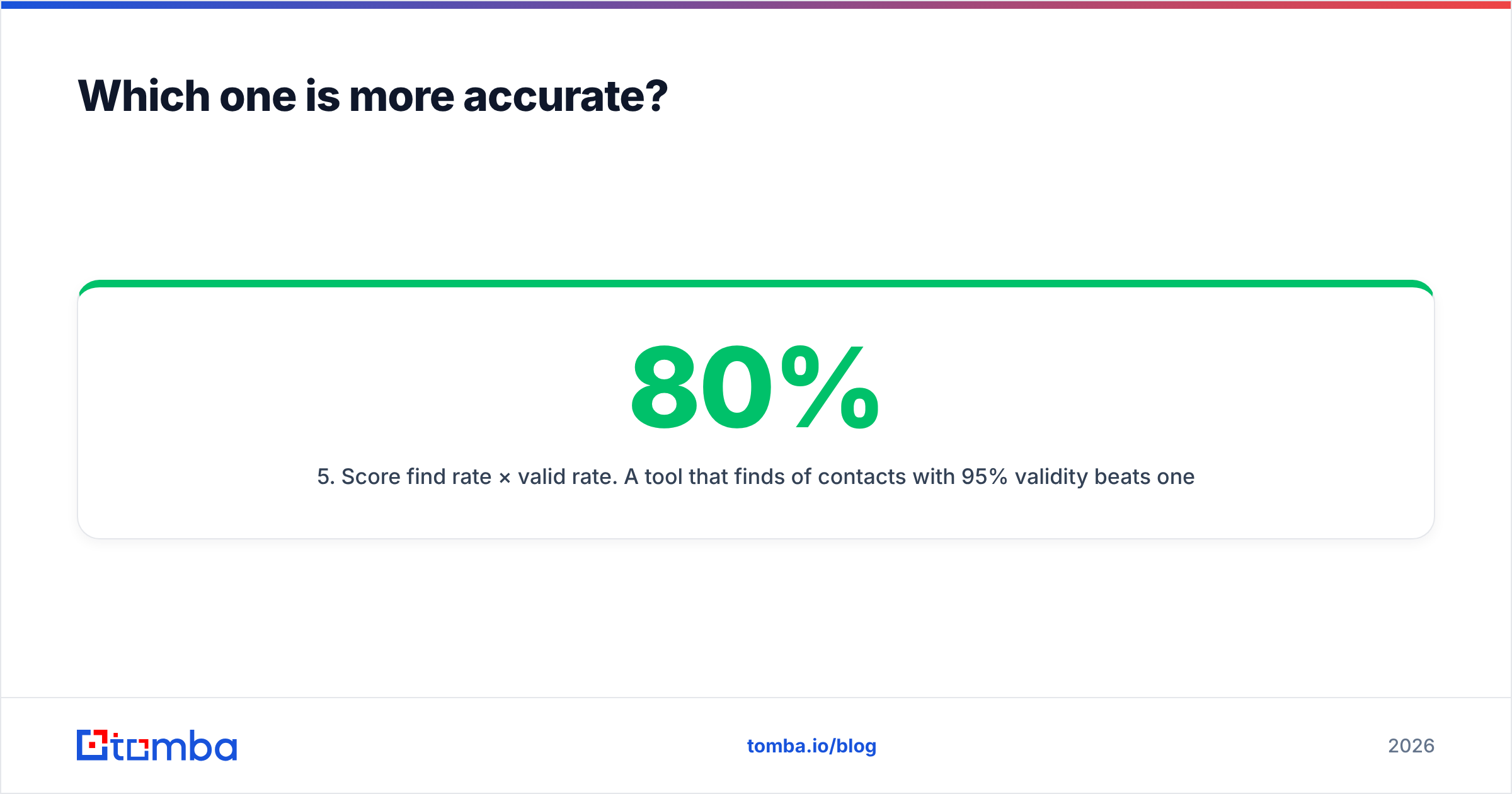
Here is the comparison as it stands in 2026. Where Snappy Leads details aren't publicly verifiable, the table says so instead of guessing. Confirm those rows during your trial.
| Attribute | LeadIQ | Snappy Leads |
|---|---|---|
| Primary use case | SDR prospecting from LinkedIn into CRM or sequencer | Fast contact lookup for small teams (confirm scope on trial) |
| Chrome extension | Yes, LinkedIn and Sales Navigator | Confirm on trial |
| Free tier | Yes, limited monthly credits | Check vendor site |
| Paid pricing model | Per user per month (Essential, Pro), Enterprise custom | Check vendor site |
| Native CRM sync | Salesforce, HubSpot | Confirm which CRMs are native vs CSV |
| Sequencer sync | Outreach, Salesloft, others | Unlikely to match LeadIQ depth; verify |
| Direct dials | Yes, on higher tiers | Confirm availability and coverage |
| Job-change alerts | Yes | Not publicly documented |
| AI email drafting | Yes (Scribe) | Not publicly documented |
| Independent reviews | Large volume on G2 and Capterra | Limited |
| Best fit | 5+ rep outbound teams on a mature stack | Solo sellers or small teams testing a low-cost option |
The pattern is clear. LeadIQ is a platform and Snappy Leads is, at most, a utility. That is fine as long as you buy the one that matches your workflow.
Which one is more accurate?#
For any contact data tool, accuracy is what matters, and neither vendor's marketing numbers will tell you much. Accuracy depends on three things that vary by buyer:
- Your ICP's geography. Coverage in North America is almost always better than in DACH, the Nordics, or LATAM.
- Company size. Enterprise domains often run catch-all mail servers, which makes SMTP verification unreliable.
- Seniority. Data on C-level executives goes stale faster, because executives change jobs and filter aggressively.

Here is how to run a fair test:
- Build a 100-contact sample from your real target list, split evenly across the regions and seniorities you sell into.
- Run the same list through both tools on the same day.
- Verify every returned address independently with a neutral email verifier, so neither vendor grades its own work.
- Send a low-volume test from a warmed inbox and log hard bounces over 72 hours.
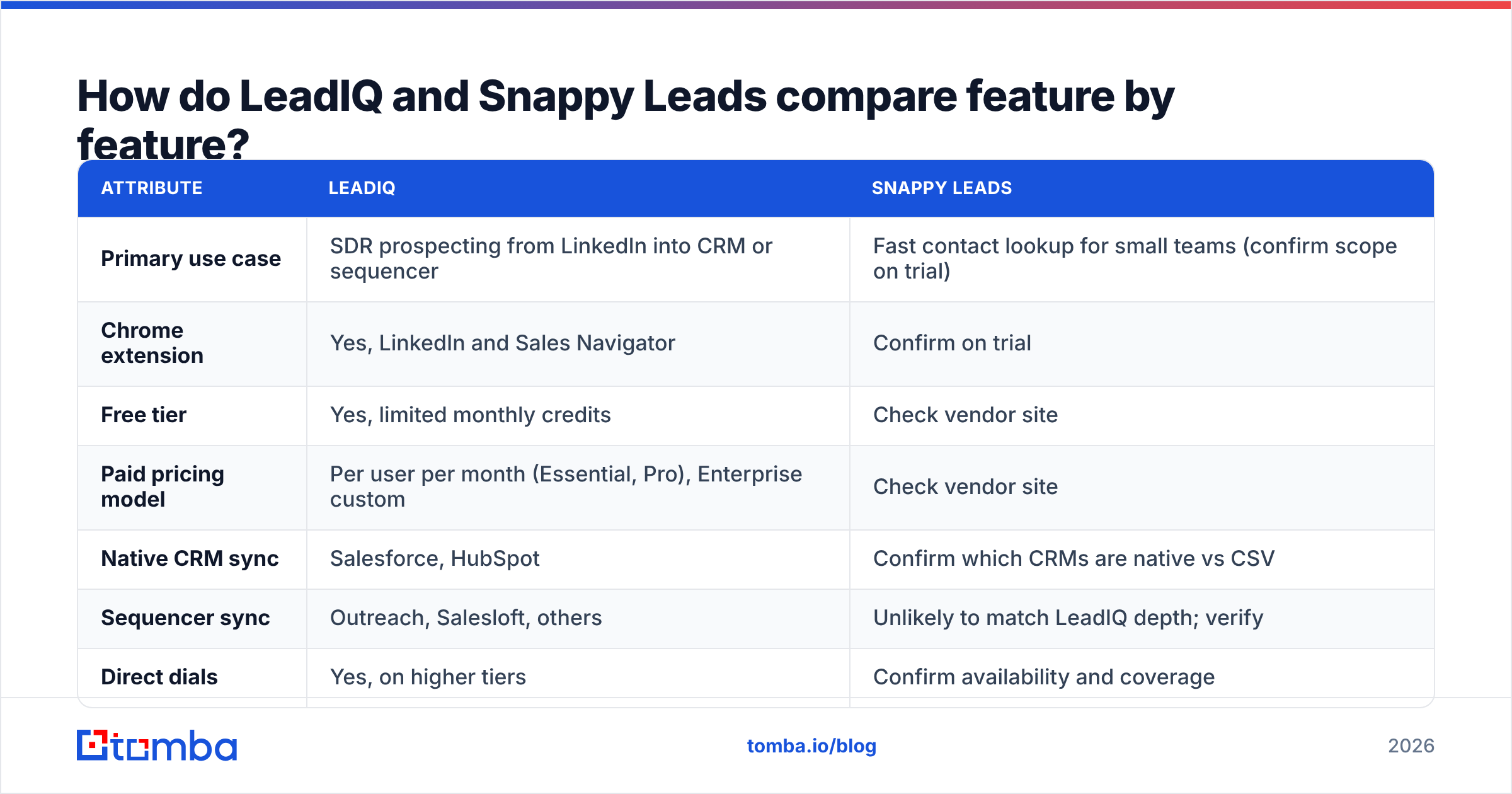
- Score find rate × valid rate. A tool that finds 80% of contacts with 95% validity beats one that finds 90% with 75% validity, because bounces damage your sender reputation.
LeadIQ generally scores well on North American tech and SaaS contacts, which is where its customer base is concentrated. For Snappy Leads there is too little public benchmark data to predict a result. You have to measure it yourself.
How much do LeadIQ and Snappy Leads really cost?#
The list price is only part of the cost. Here is how to calculate the full cost for each tool.
LeadIQ cost drivers
- Per-seat pricing, so a 10-rep team costs ten times the single-seat price.
- Credit caps per tier. Heavy prospectors hit them before month-end.
- Direct dials and advanced integrations sit on higher tiers.
- Annual billing is usually needed to get the best per-seat rate.
Snappy Leads cost drivers
- Lower entry pricing is the usual pitch. Confirm whether it is per seat or per account.
- Ask whether credits are consumed on lookups that return nothing.
- Ask whether bounced emails are credited back.
- Watch for add-on fees for integrations or API access.
A useful formula is cost per verified, deliverable contact:
(Monthly spend) ÷ (contacts found × valid rate)
Run it on your trial data. A tool that looks cheap at $X per month can cost more per usable contact than a pricier tool with better hit rates.
Which tool fits which team?#
Match the tool to your motion, not to its feature list.
- Choose LeadIQ if you run a structured SDR team, your reps live in Sales Navigator, and you need contacts in Salesforce or HubSpot and a sequencer without manual steps. Job-change tracking alone can justify the cost for account-based teams that sell to repeat champions.
- Consider Snappy Leads if you are a solo founder or a two-person sales team, you mostly export to CSV, and a trial on your own ICP shows acceptable accuracy. Keep the commitment monthly until the data proves itself.
- Choose neither if your actual problem is "I have company domains and names, and I need verified emails." In that case, a prospecting suite is more than you need.
That third group is bigger than most teams think. Many buyers evaluate LeadIQ because it is the well-known option, then find they use 20% of it.
What are the alternatives to LeadIQ and Snappy Leads?#
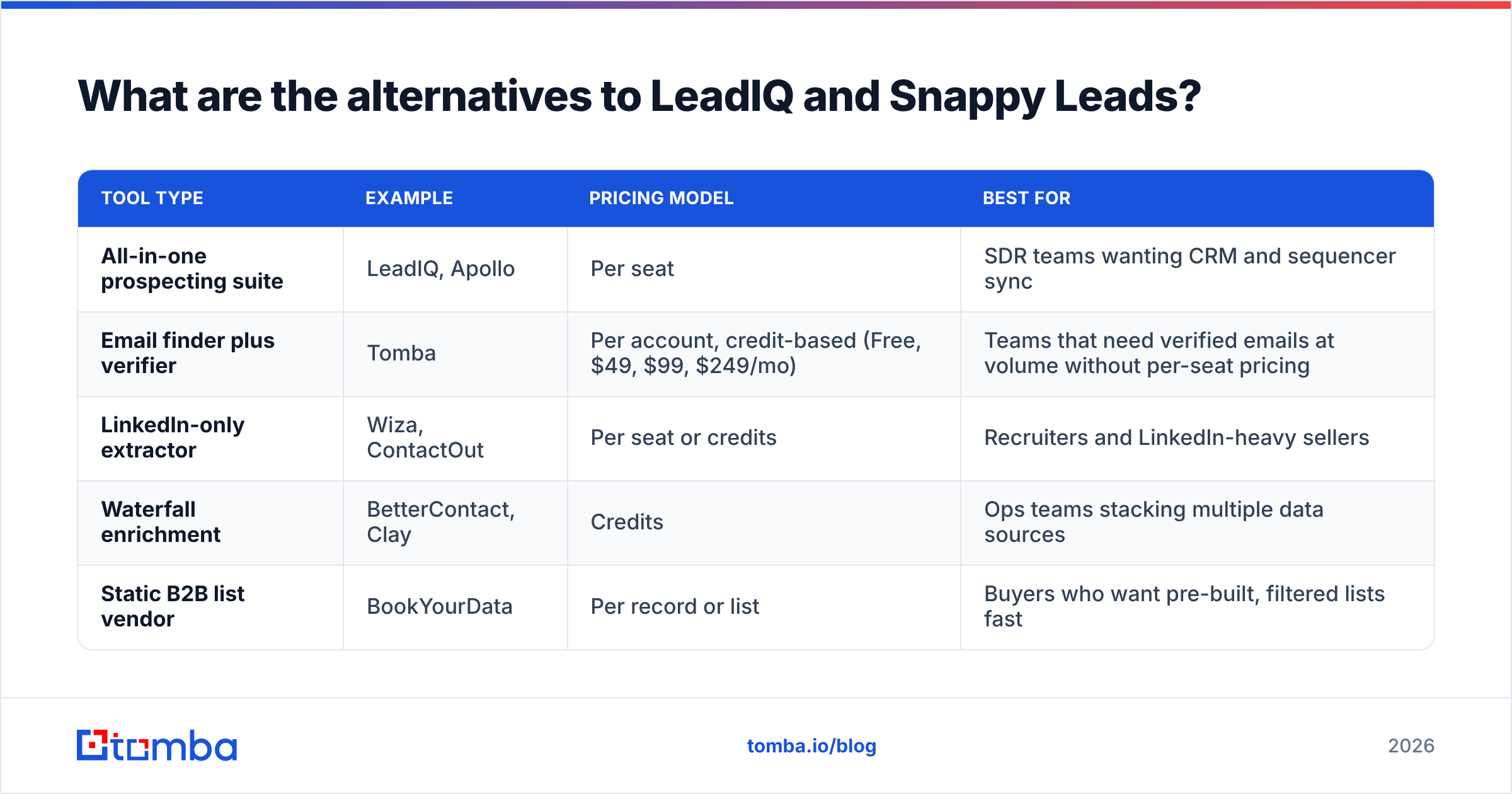
If neither fits, the market has several distinct approaches. Each suits a different kind of buyer.
| Tool type | Example | Pricing model | Best for |
|---|---|---|---|
| All-in-one prospecting suite | LeadIQ, Apollo | Per seat | SDR teams wanting CRM and sequencer sync |
| Email finder plus verifier | Tomba | Per account, credit-based (Free, $49, $99, $249/mo) | Teams that need verified emails at volume without per-seat pricing |
| LinkedIn-only extractor | Wiza, ContactOut | Per seat or credits | Recruiters and LinkedIn-heavy sellers |
| Waterfall enrichment | BetterContact, Clay | Credits | Ops teams stacking multiple data sources |
| Static B2B list vendor | BookYourData | Per record or list | Buyers who want pre-built, filtered lists fast |

If you are specifically replacing LeadIQ, our breakdown of the best LeadIQ alternative options goes deeper on each.
The main split in that table is per-seat vs per-account pricing. Per-seat tools like LeadIQ make sense when every rep uses the extension every day. Per-account tools make more sense when one ops person or founder runs enrichment for the whole team, because you don't pay for seats that sit idle.

How do integrations and workflow compare?#
This is where LeadIQ clearly leads.
LeadIQ's workflow: You open a LinkedIn profile, click capture, and the contact appears in Salesforce with an Outreach sequence already assigned. Duplicate checks run against the CRM before capture, so reps don't waste credits on existing records. For a manager, that means cleaner pipeline data and less time spent auditing CRM hygiene. The HubSpot and Salesforce connectors are mature and widely used.
Snappy Leads' workflow: Confirm it hands-on. For lighter tools, the typical flow is lookup, then export, then import. That adds a manual step and a chance to create duplicates. If you pick a lighter tool, plan a deduplication step before every import.
The middle ground: Several email finders offer a Chrome extension, a Google Sheets add-on, an API, and Zapier or Make connectors without per-seat pricing. You give up LeadIQ's built-in sequencer handoff, but you can build the same pipeline with a Zapier step, and it stays the same whether you have 3 reps or 30.
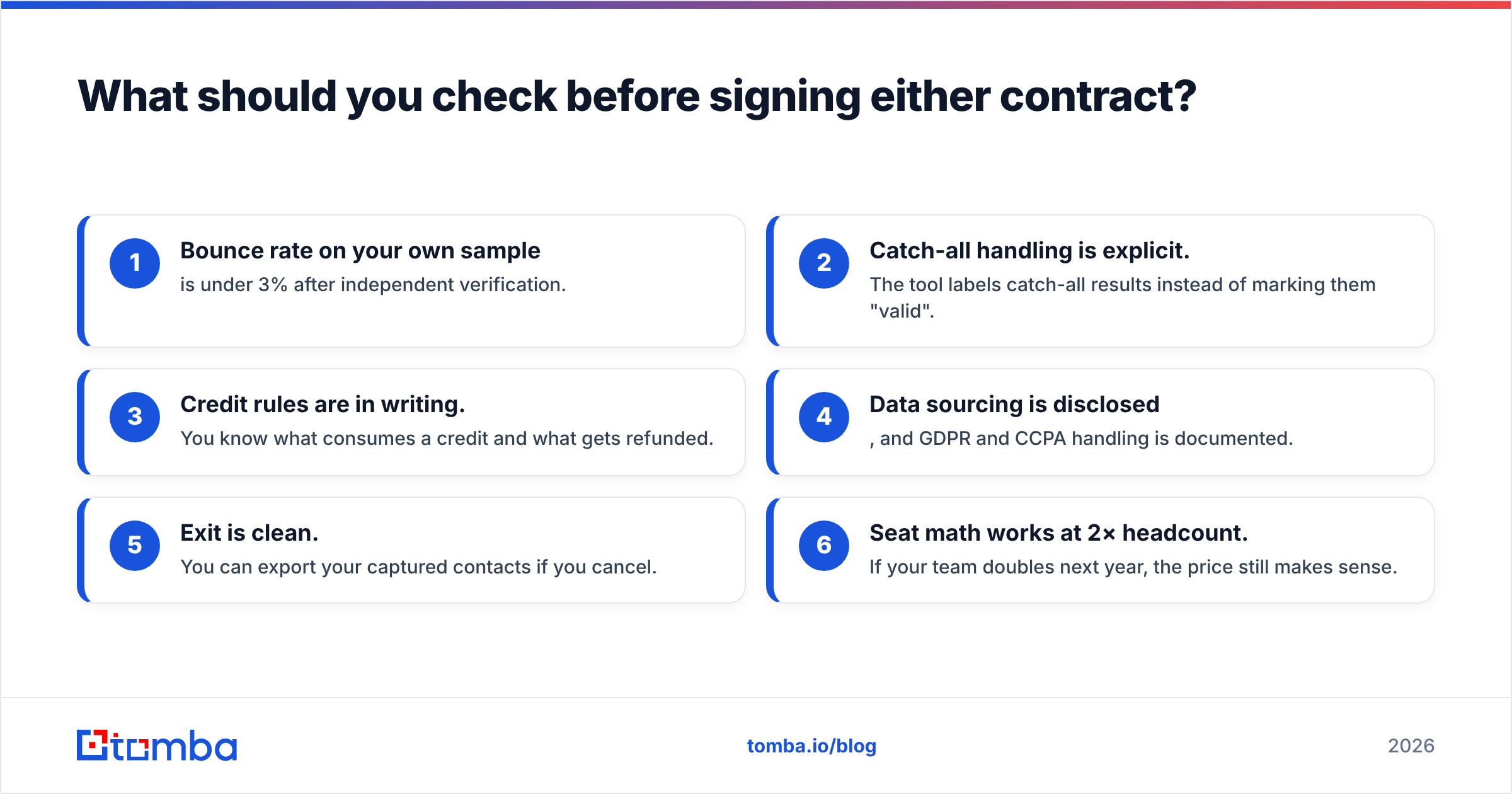
What should you check before signing either contract?#
Use this checklist in the final week of any trial:
- Bounce rate on your own sample is under 3% after independent verification.
- Catch-all handling is explicit. The tool labels catch-all results instead of marking them "valid".
- Credit rules are in writing. You know what consumes a credit and what gets refunded.
- Data sourcing is disclosed, and GDPR and CCPA handling is documented.
- Exit is clean. You can export your captured contacts if you cancel.
- Seat math works at 2× headcount. If your team doubles next year, the price still makes sense.
LeadIQ will pass most of these easily because it has been in the market for years and publishes its compliance posture. Snappy Leads may pass them too. You just need to confirm it rather than assume it.
So, LeadIQ vs Snappy Leads: which should you pick?#
Pick LeadIQ if you have a multi-rep outbound team on Sales Navigator, a real CRM, and a sequencer, and you will use the native sync every day. It is the proven, well-documented option, and the per-seat cost pays off when every seat is busy.
Pick Snappy Leads only after it beats or matches LeadIQ on a 100-contact test from your own ICP, and only if its lower price holds up on the cost-per-deliverable-contact formula. Start monthly and don't prepay annually.
Pick a dedicated email finder if your real job is turning names and domains into verified addresses. Many teams that compare these two tools find out during the trial that they don't need a prospecting suite at all.
Where does Tomba fit in?#
If what you need from LeadIQ or Snappy Leads is verified work emails, Tomba Email Finder does that job without per-seat pricing. You can search by name and company, pull every public address on a domain, or run bulk lists. Every result comes with a verification status, including catch-all detection. The Free tier gives you 25 searches a month, enough to run the 100-contact accuracy test above in batches. Paid plans start at $49/month for the whole account, not per rep (see Tomba pricing). Test your own list in Tomba next to whichever tool you're considering, then compare bounce rates.
Related guides#
// get started
Find, verify and enrich your first contacts today
Start on the free plan with 25 searches a month, then scale when your team is ready.
Free plan · No credit card required · GDPR & CCPA
// about the author