Leadleaper vs Smarte (2026): Which B2B Contact Tool Fits You?
Leadleaper is a lightweight LinkedIn email finder. SMARTe is a quote-based B2B data platform with phone numbers and CRM enrichment. We compare coverage, pricing, workflow, and fit, then tell you which one to pick.
TL;DR
- Leadleaper is a lightweight Chrome extension. It finds emails from LinkedIn, Sales Navigator, and company websites, and it suits solo sellers and small teams who prospect one lead at a time.
- SMARTe is a B2B data platform. It sells contact data (emails, direct dials, mobile numbers) through a database, a browser extension, CRM enrichment, and an API. Pricing is by quote, so it's built for sales teams, not individuals.
- Pick Leadleaper if you want a low-cost tool you can set up in five minutes. Pick SMARTe if phone numbers, global coverage, and CRM enrichment matter more to you than price.
- Whichever you choose, verify emails before you send. Neither tool's "found" status replaces a real verification pass.
- If you need bulk lookups, an API, and transparent pricing between these two extremes, Tomba starts at $49/mo with a free tier.
What is Leadleaper?#
Leadleaper is a prospecting extension for Chrome. You open a LinkedIn profile, a Sales Navigator search, or a company website, click the extension, and it tries to find the person's business email. It saves leads to lists you can export to CSV or send to a CRM.
Leadleaper is built for individuals. You won't find a large standalone database to search, intent signals, or an admin console for 40 reps. You get a browser-first workflow with a free plan and paid tiers that are cheap compared with enterprise data vendors. Check their pricing page for current limits, because the monthly lead allowances on each tier have changed over the years.
Leadleaper works best for:
- Founders and SDRs who build lists by hand from LinkedIn
- Recruiters who need emails for a few dozen candidates a week
- Freelancers and agencies with small budgets
What is SMARTe?#
SMARTe is a B2B contact and company data provider. It focuses on accurate emails, direct dials, and mobile numbers, and it markets strong coverage outside North America (EMEA and APAC), where many US-centric databases are thin.
You access SMARTe data through several channels:
- A prospecting platform where you search and filter contacts and accounts
- A Chrome extension that shows contact data on LinkedIn and company websites
- CRM enrichment for Salesforce and HubSpot that fills in and refreshes records
- An API for teams that want to pipe data into their own systems
Pricing is by quote, usually with an annual contract. There is typically a trial with limited credits, but no self-serve monthly plan you can buy with a credit card. That tells you who SMARTe is for: sales and RevOps teams with a budget line for data.
How do Leadleaper and SMARTe compare side by side?#
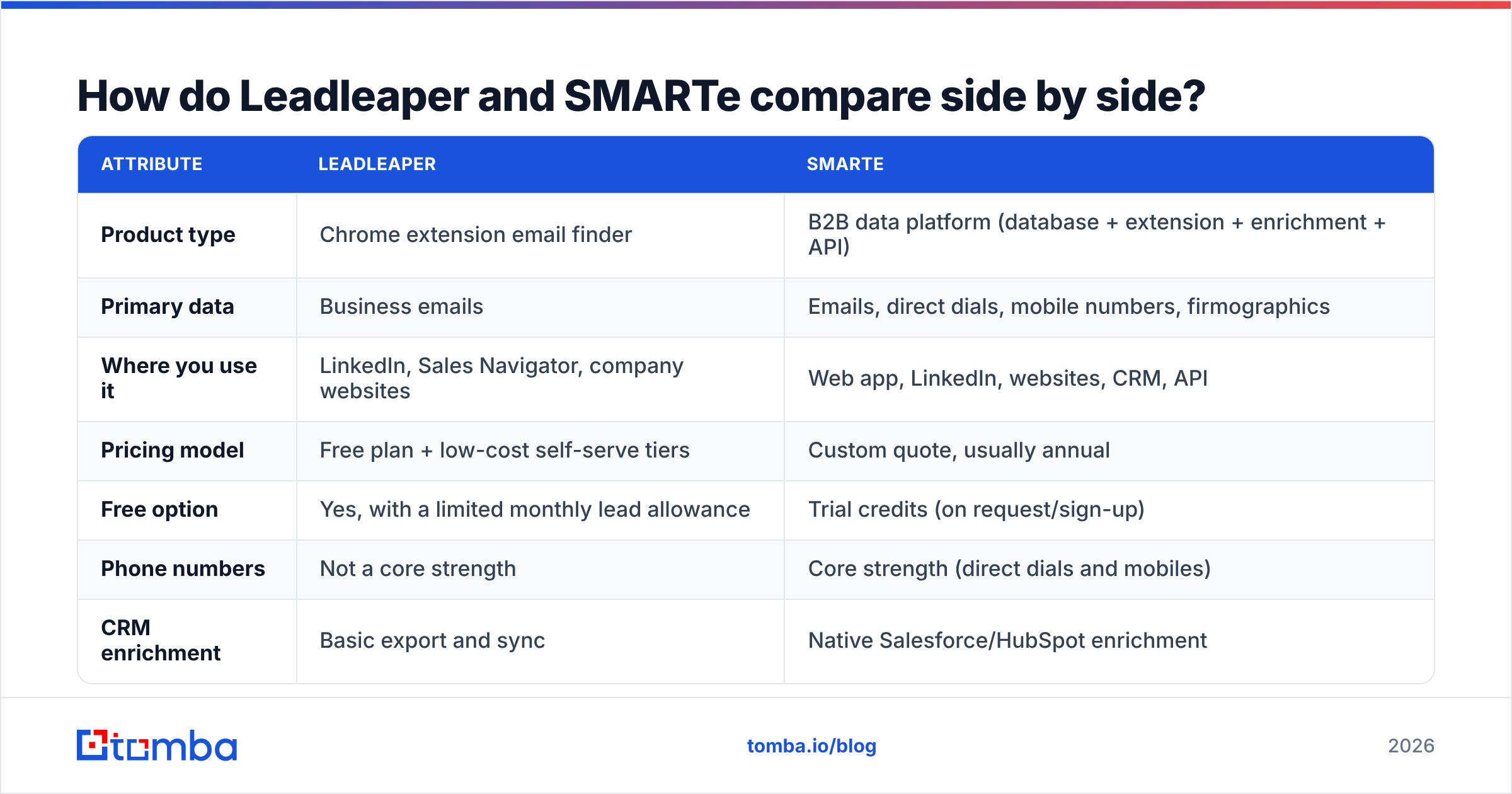
Here's the head-to-head on the attributes that matter when you're choosing between them.
| Attribute | Leadleaper | SMARTe |
|---|---|---|
| Product type | Chrome extension email finder | B2B data platform (database + extension + enrichment + API) |
| Primary data | Business emails | Emails, direct dials, mobile numbers, firmographics |
| Where you use it | LinkedIn, Sales Navigator, company websites | Web app, LinkedIn, websites, CRM, API |
| Pricing model | Free plan + low-cost self-serve tiers | Custom quote, usually annual |
| Free option | Yes, with a limited monthly lead allowance | Trial credits (on request/sign-up) |
| Phone numbers | Not a core strength | Core strength (direct dials and mobiles) |
| CRM enrichment | Basic export and sync | Native Salesforce/HubSpot enrichment |
| Bulk / API | Limited | Yes, API and bulk enrichment |
| Geographic focus | Wherever LinkedIn profiles and site patterns exist | Global, with EMEA/APAC emphasis |
| Best for | Solo sellers, recruiters, small teams | Mid-market and enterprise sales teams |
| Setup time | Minutes | Days to weeks (sales call, contract, CRM mapping) |
The short version: Leadleaper finds an email for the person you're looking at right now. SMARTe gives your whole team a data supply.

How do the two tools actually find contact data?#
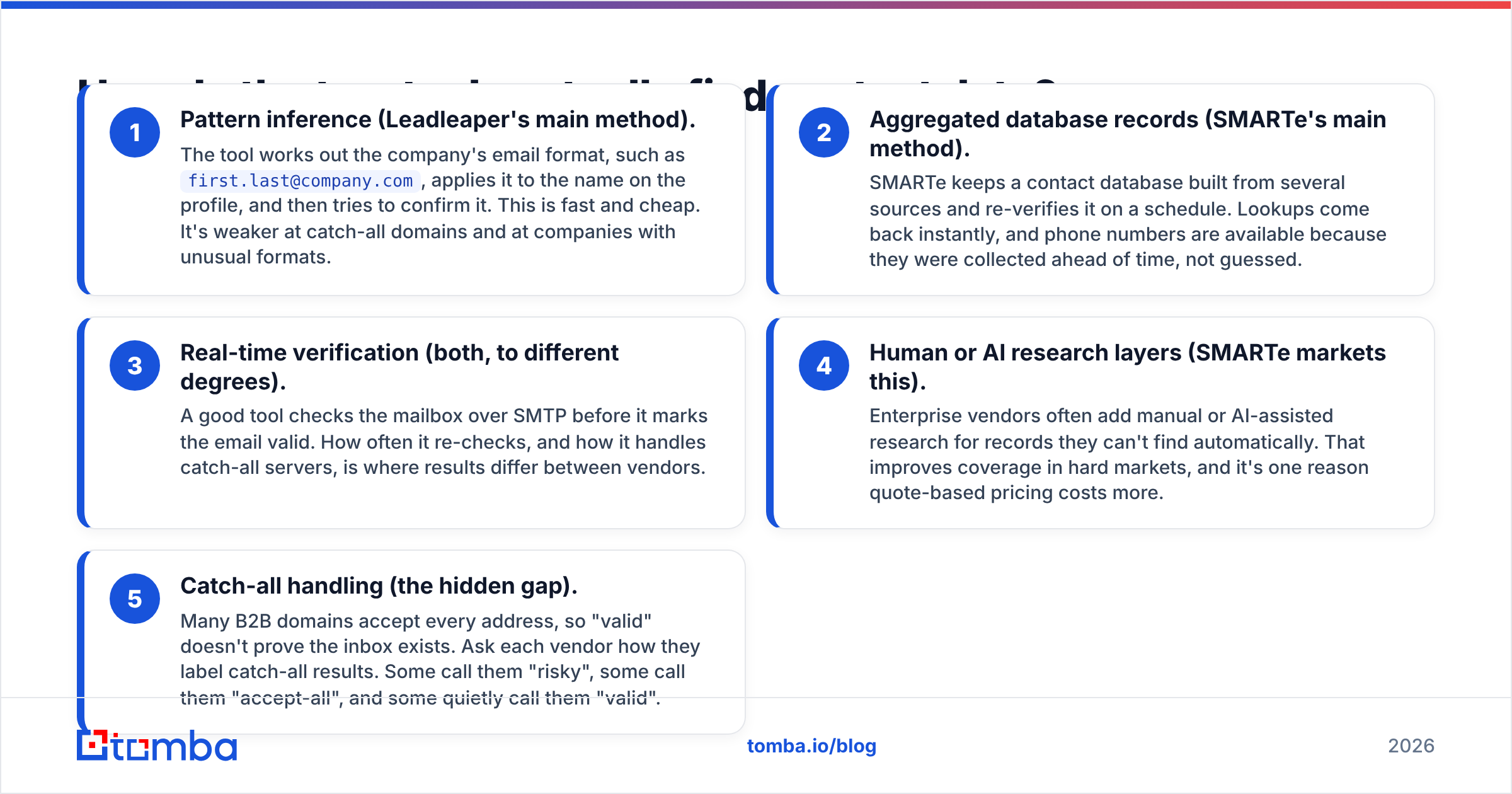
Both tools return an email, but they get it in different ways, and that affects accuracy.
- Pattern inference (Leadleaper's main method). The tool works out the company's email format, such as
first.last@company.com, applies it to the name on the profile, and then tries to confirm it. This is fast and cheap. It's weaker at catch-all domains and at companies with unusual formats. - Aggregated database records (SMARTe's main method). SMARTe keeps a contact database built from several sources and re-verifies it on a schedule. Lookups come back instantly, and phone numbers are available because they were collected ahead of time, not guessed.
- Real-time verification (both, to different degrees). A good tool checks the mailbox over SMTP before it marks the email valid. How often it re-checks, and how it handles catch-all servers, is where results differ between vendors.
- Human or AI research layers (SMARTe markets this). Enterprise vendors often add manual or AI-assisted research for records they can't find automatically. That improves coverage in hard markets, and it's one reason quote-based pricing costs more.
- Catch-all handling (the hidden gap). Many B2B domains accept every address, so "valid" doesn't prove the inbox exists. Ask each vendor how they label catch-all results. Some call them "risky", some call them "accept-all", and some quietly call them "valid".
If you send to unconfirmed catch-all addresses, bounces will pile up. Whatever tool you pick, run the list through an email verifier before it goes into your sequencer.

Is SMARTe more accurate than Leadleaper?#
For phone numbers, yes, clearly. Leadleaper isn't built to find mobile numbers, and SMARTe is. If your team cold calls, this settles the choice.
For emails, it depends on the market. On US tech companies with standard formats, a pattern-based finder like Leadleaper can do well, because the format is predictable and SMTP checks usually work. SMARTe pulls ahead when:
- You prospect in Europe, the Middle East, or Asia-Pacific, where LinkedIn-derived patterns are less complete
- You target large enterprises with catch-all servers and messy email formats
- You need data on people with thin LinkedIn profiles
Don't trust any vendor's accuracy percentage, SMARTe's included. The only benchmark that counts is your own ICP. Take 100 contacts you already know are correct, run them through each tool's trial, and count exact matches, wrong addresses, and misses. Then send a small verified batch and track hard bounces. Ten hours of testing will tell you more than any G2 badge. That said, G2 reviews are still useful for spotting patterns in support quality and contract complaints.

Which is cheaper, Leadleaper or SMARTe?#
Leadleaper is much cheaper up front, and that's not close. You can start free and upgrade with a card. SMARTe needs a sales conversation and usually an annual commitment, and contracts for enterprise data platforms tend to run to four or five figures a year depending on seats and credits.
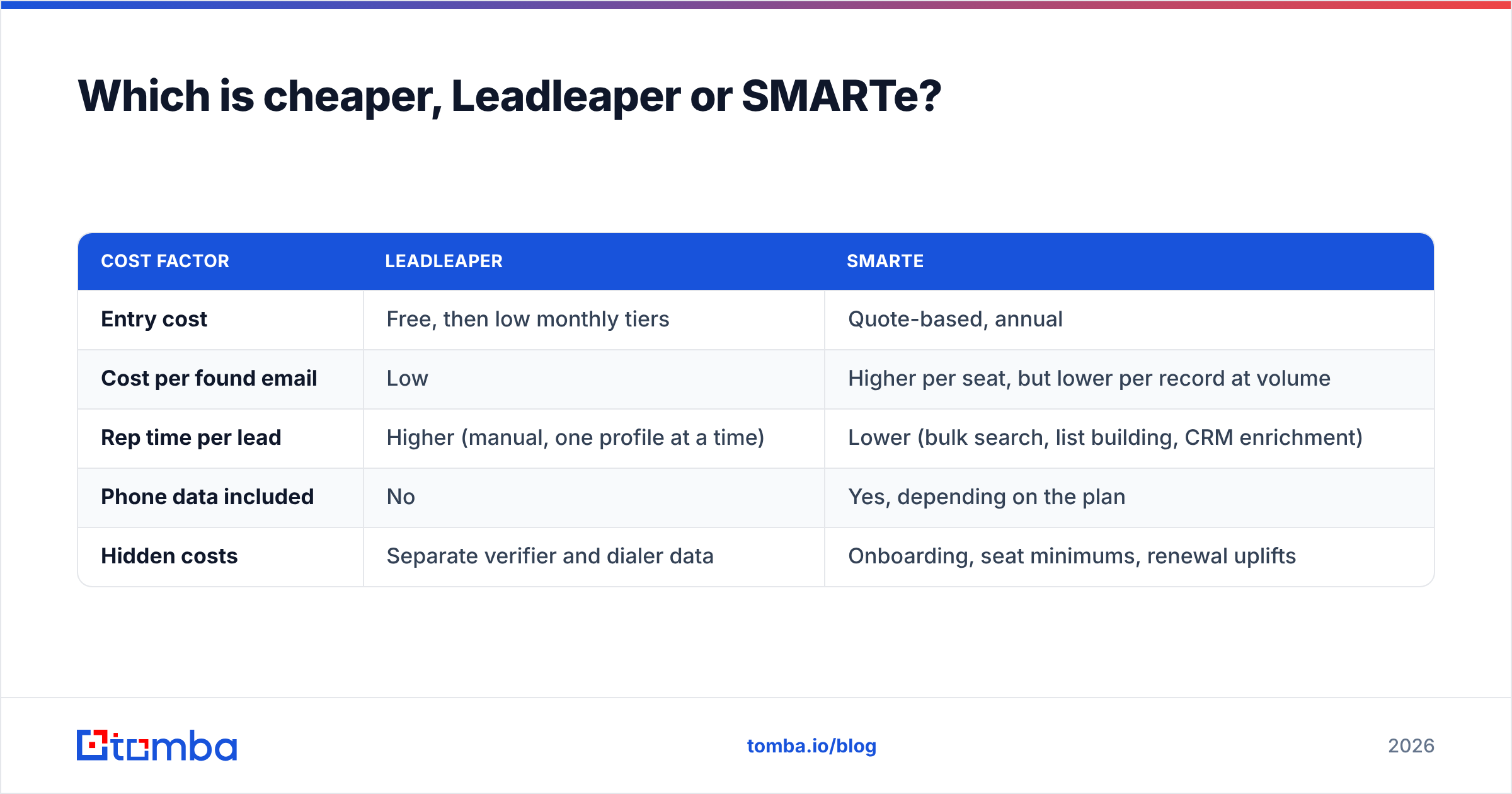
Sticker price is only half the story, though. Work out the cost per usable contact:
| Cost factor | Leadleaper | SMARTe |
|---|---|---|
| Entry cost | Free, then low monthly tiers | Quote-based, annual |
| Cost per found email | Low | Higher per seat, but lower per record at volume |
| Rep time per lead | Higher (manual, one profile at a time) | Lower (bulk search, list building, CRM enrichment) |
| Phone data included | No | Yes, depending on the plan |
| Hidden costs | Separate verifier and dialer data | Onboarding, seat minimums, renewal uplifts |
If one SDR spends two hours a day clicking through LinkedIn profiles, the "free" tool is costing you salary. On the other hand, if you only need 50 emails a month, an annual data contract is money wasted.
Here's a simple rule of thumb:
- Under ~500 contacts/month, one or two users: Leadleaper, or another self-serve finder
- 500 to 5,000 contacts/month, need an API or bulk jobs: a mid-tier self-serve platform
- 5,000+ contacts/month, phone-heavy outbound, CRM hygiene at scale: SMARTe or a similar enterprise vendor
Which tool fits which workflow?#
Match the tool to how your team really prospects, not to the feature list on the homepage.
- LinkedIn-first solo prospecting. You read profiles, write a personal first line, and send 20 emails a day. Leadleaper fits here. It sits in the browser where you already work, and the free plan covers light volume.
- Multi-channel SDR team (email + phone). Reps call in the morning and email in the afternoon. SMARTe fits because direct dials and mobiles are part of the product, not an add-on.
- RevOps keeping the CRM clean. You need to fill in missing fields on 40,000 Salesforce records and refresh job changes every quarter. SMARTe's CRM enrichment is built for this. Leadleaper isn't.
- Growth team building programmatic pipelines. You pull signups, enrich them through an API, and route them to sales. Neither tool is ideal on cost. SMARTe has an API but sits behind a contract, and Leadleaper is browser-bound.
- International outbound. You sell into DACH, the Nordics, or APAC. SMARTe's regional coverage is its selling point, so test it seriously during the trial.
What are the pros and cons of each?#
Leadleaper pros
- Free plan, with no sales call needed to start
- Very short learning curve
- Works directly on LinkedIn, Sales Navigator, and websites
- Low risk: you can cancel whenever you like
Leadleaper cons
- One lead at a time, so it doesn't scale well
- Not a phone data tool
- Limited bulk, API, and enrichment options
- Accuracy depends on how predictable the email pattern is
SMARTe pros
- Emails, direct dials, and mobile numbers in one place
- Global coverage with an EMEA/APAC focus
- Native CRM enrichment and an API
- Built for teams, with admin controls and shared credits
SMARTe cons
- No transparent self-serve pricing
- Annual contracts raise the cost of choosing wrong
- Overkill for individuals and small teams
- Onboarding takes longer than installing an extension
Should you consider an alternative to both?#
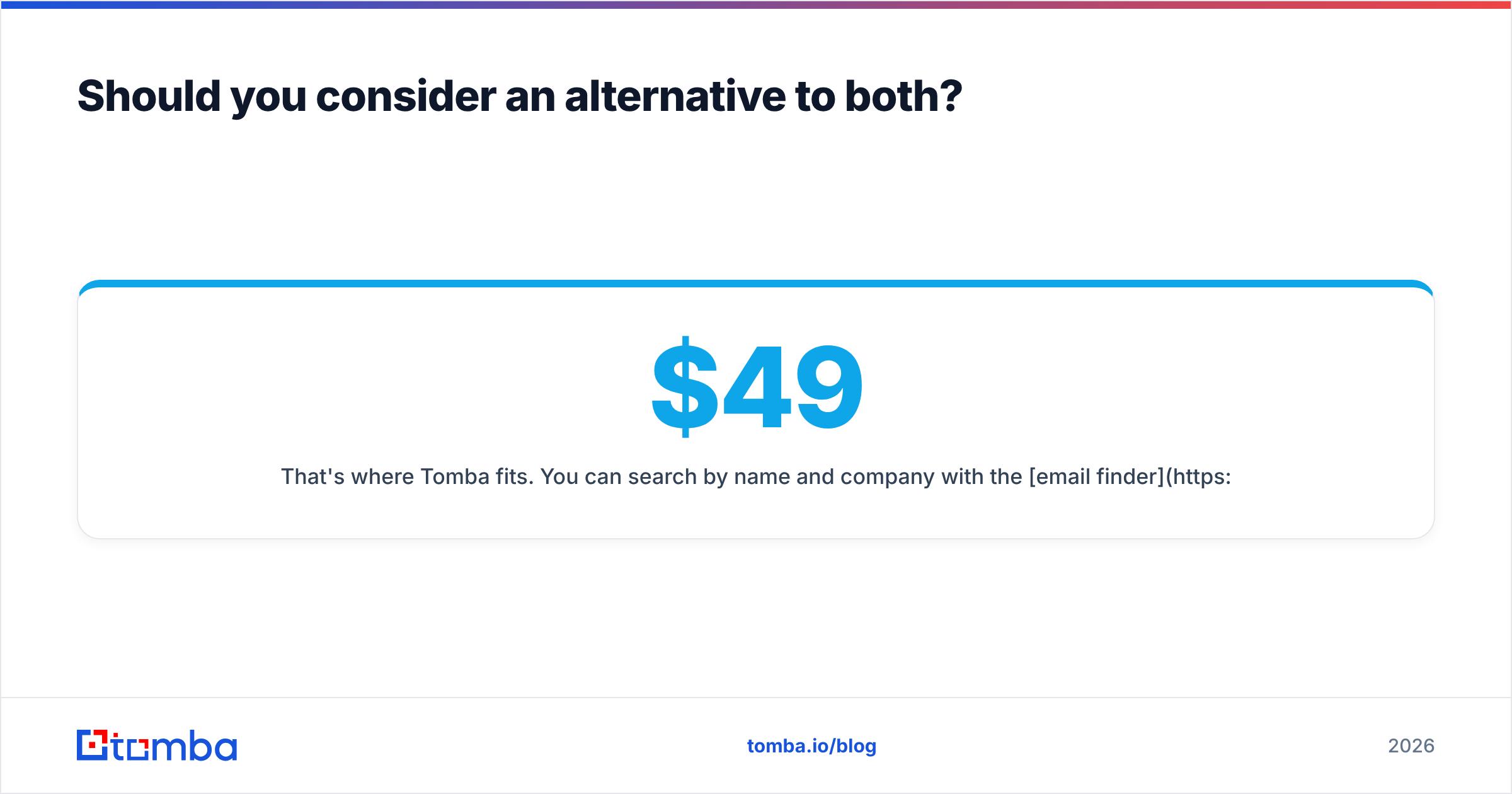
There's a gap between these two tools. Leadleaper is cheap but manual. SMARTe is powerful but gated behind a contract. Many teams need something in between: self-serve pricing, bulk jobs, an API, and verification built in.
That's where Tomba fits. You can search by name and company with the email finder, pull every public address at a company with domain search, run CSVs through the bulk email finder, and get emails straight from profiles with the LinkedIn finder. Plans are public: a free tier with 25 searches a month, then Starter at $49/mo, Growth at $99/mo, and Pro at $249/mo, with Enterprise on request. Full details are on Tomba pricing.
To be fair about it: if phone-first outbound across EMEA is your main motion, test SMARTe properly. Tomba has a phone finder, but a dedicated enterprise phone-data vendor may cover some regions better. And if you truly need ten emails a week, Leadleaper's free plan is hard to beat.

How should you run a fair trial of Leadleaper vs SMARTe?#
Don't pick a tool from a demo. Run this 1-week test instead:
- Build a truth set. Take 100 contacts from closed-won deals or active conversations whose emails you know are correct. Cover your real mix of regions, company sizes, and seniority.
- Run the same list through each tool. Record found, not found, and wrong for each contact. "Wrong" matters more than "not found", because a wrong email costs you deliverability.
- Check catch-all labeling. Note how many results each tool marks as "valid" on domains you know are catch-all.
- Time the workflow. Measure how long a rep takes to build a 50-contact list in each tool. Multiply by headcount and hourly cost.
- Test phones only if you dial. Call 20 numbers from SMARTe and log connects. Skip this step if you don't cold call.
- Price it out at your real volume. Ask SMARTe for a quote at your 12-month contact volume, and compare it with the self-serve tiers of Leadleaper and a mid-tier option.
The winner is the tool with the lowest cost per correct, verified contact in your market. It's often not the one with the nicest UI.
Leadleaper vs SMARTe: which should you choose?#
Choose Leadleaper if you're a solo seller, recruiter, or small team, you prospect by hand on LinkedIn, and budget matters most. It's quick to set up, cheap to run, and good enough for light volume.
Choose SMARTe if you run a multi-rep outbound team, you need direct dials and mobile numbers, you sell internationally, and you want CRM enrichment at scale. Expect a sales process and an annual contract, and expect the data to justify it at volume.
Choose neither if you've outgrown clicking through profiles one at a time but don't want an enterprise contract. A self-serve platform with bulk jobs, an API, and built-in verification will give you better economics.
Ready to find emails without the contract or the clicking?#
If you want LinkedIn-level convenience with bulk and API scale, try the Tomba Email Finder. Search by name and domain, upload a CSV, or call the API, and every result comes back with a verification status so you know what's safe to send. Start on the free tier with 25 searches a month, then move to Starter at $49/mo when your volume grows. Pricing is public and there's no annual lock-in.
Related guides#
// get started
Find, verify and enrich your first contacts today
Start on the free plan with 25 searches a month, then scale when your team is ready.
Free plan · No credit card required · GDPR & CCPA
// about the author