LeadLoft Pricing 2026: Plans, Data Credits and What You Really Pay
LeadLoft looks simple: $99 per seat for unlimited prospecting. Once you add data credits, verification, phone lookups and the $400 AI tier, the bill looks different. Here is the real math for 1, 3 and 10 reps.
TL;DR
- LeadLoft sells per seat. The Unlimited plan is $99/user/month, Scale AI (which adds an AI SDR) is $400/user/month, a low-cost Starter tier begins at $5/month, and a managed "done-for-you" service is priced on request.
- The email finder comes free on Unlimited and Scale AI. Verification (BounceShield) and phone lookups use data credits at $0.10 each, and the account auto-refills $50 at a time.
- Paying annually gets you 2 months free, which brings Unlimited down to about $82.50/seat/month.
- For a 3-rep team that verifies and enriches properly, a realistic bill is $500–$650/month on Unlimited, well above the $297 you'd get from multiplying seats by list price.
- If you already have a sequencer or CRM and mainly need contact data, a standalone finder like Tomba (from $49/mo) usually costs less than paying for extra LeadLoft seats.
What is LeadLoft, and what are you actually paying for?#
LeadLoft is an outbound CRM. It puts prospecting, email sequences, a sales pipeline and (on the top tier) an AI SDR into one workspace. The pitch is that a small sales team can replace three or four tools with one: no separate data vendor, no separate sequencer, no separate CRM for early-stage deals.
That matters for pricing. When you compare LeadLoft to an email finder, you are not comparing like with like. A LeadLoft seat covers:
- Prospecting: finding leads and their work emails inside the app
- Sequencing: multi-step outbound email cadences
- Pipeline/CRM: deals, stages and activity tracking
- AI SDR (Scale AI only): automated research, drafting and follow-up
What the seat does not fully cover is data beyond the basic email lookup. That usage-based layer is where most "why is my invoice higher than I expected?" moments come from.
How much does LeadLoft cost in 2026?#
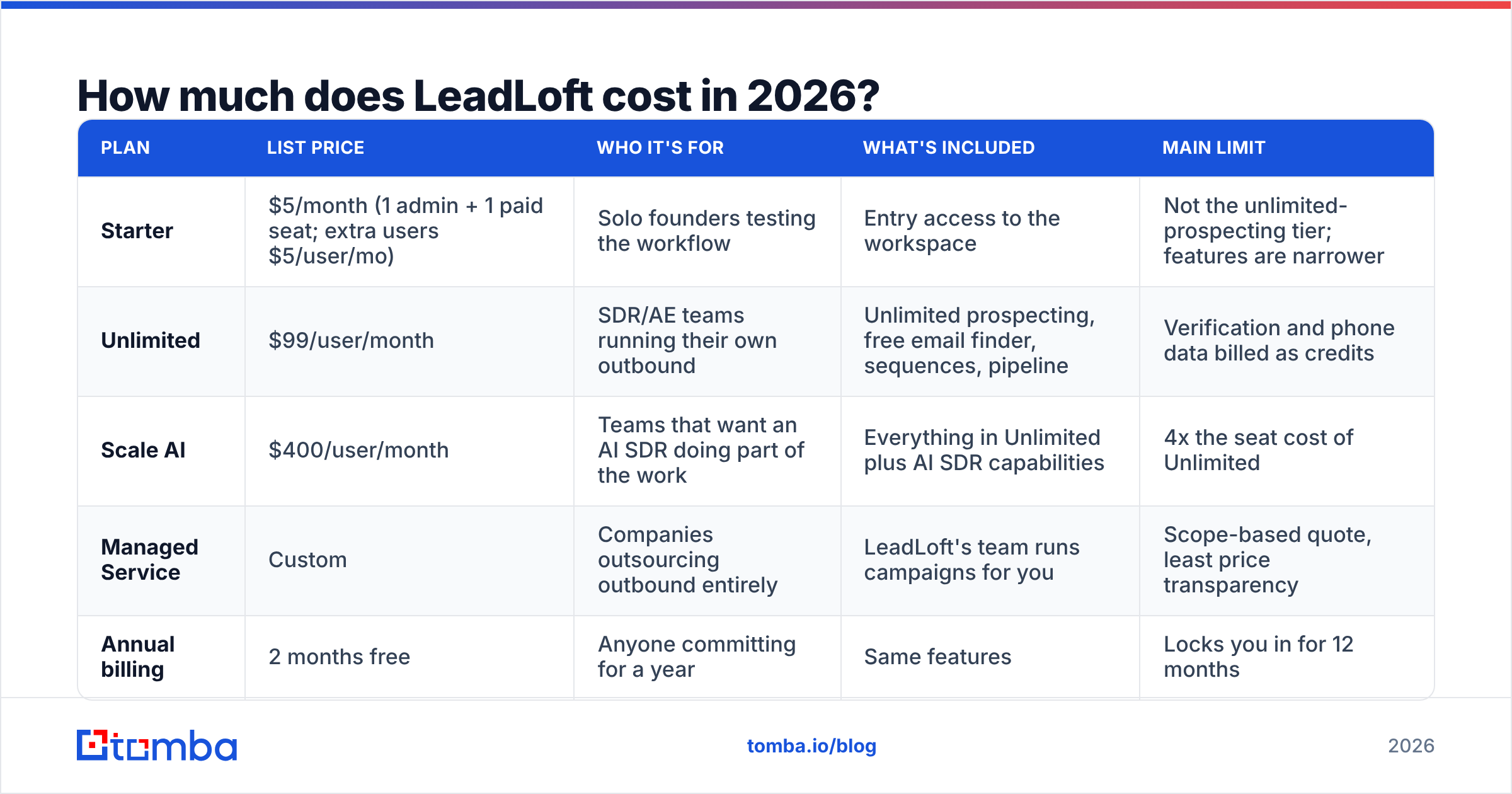
Here is the published structure at the time of writing. Check the official LeadLoft pricing page before you buy, because per-seat SaaS pricing changes often.
| Plan | List price | Who it's for | What's included | Main limit |
|---|---|---|---|---|
| Starter | $5/month (1 admin + 1 paid seat; extra users $5/user/mo) | Solo founders testing the workflow | Entry access to the workspace | Not the unlimited-prospecting tier; features are narrower |
| Unlimited | $99/user/month | SDR/AE teams running their own outbound | Unlimited prospecting, free email finder, sequences, pipeline | Verification and phone data billed as credits |
| Scale AI | $400/user/month | Teams that want an AI SDR doing part of the work | Everything in Unlimited plus AI SDR capabilities | 4x the seat cost of Unlimited |
| Managed Service | Custom | Companies outsourcing outbound entirely | LeadLoft's team runs campaigns for you | Scope-based quote, least price transparency |
| Annual billing | 2 months free | Anyone committing for a year | Same features | Locks you in for 12 months |
Two details are easy to miss:
- Every seat past the first is billed at full price. A 5-person team on Unlimited is $495/month before any credits.
- The Starter tier is not a cheap version of Unlimited. At $5 it's an on-ramp for trying the product. If your team needs real outbound volume, budget for Unlimited from day one.
How do LeadLoft data credits work?#
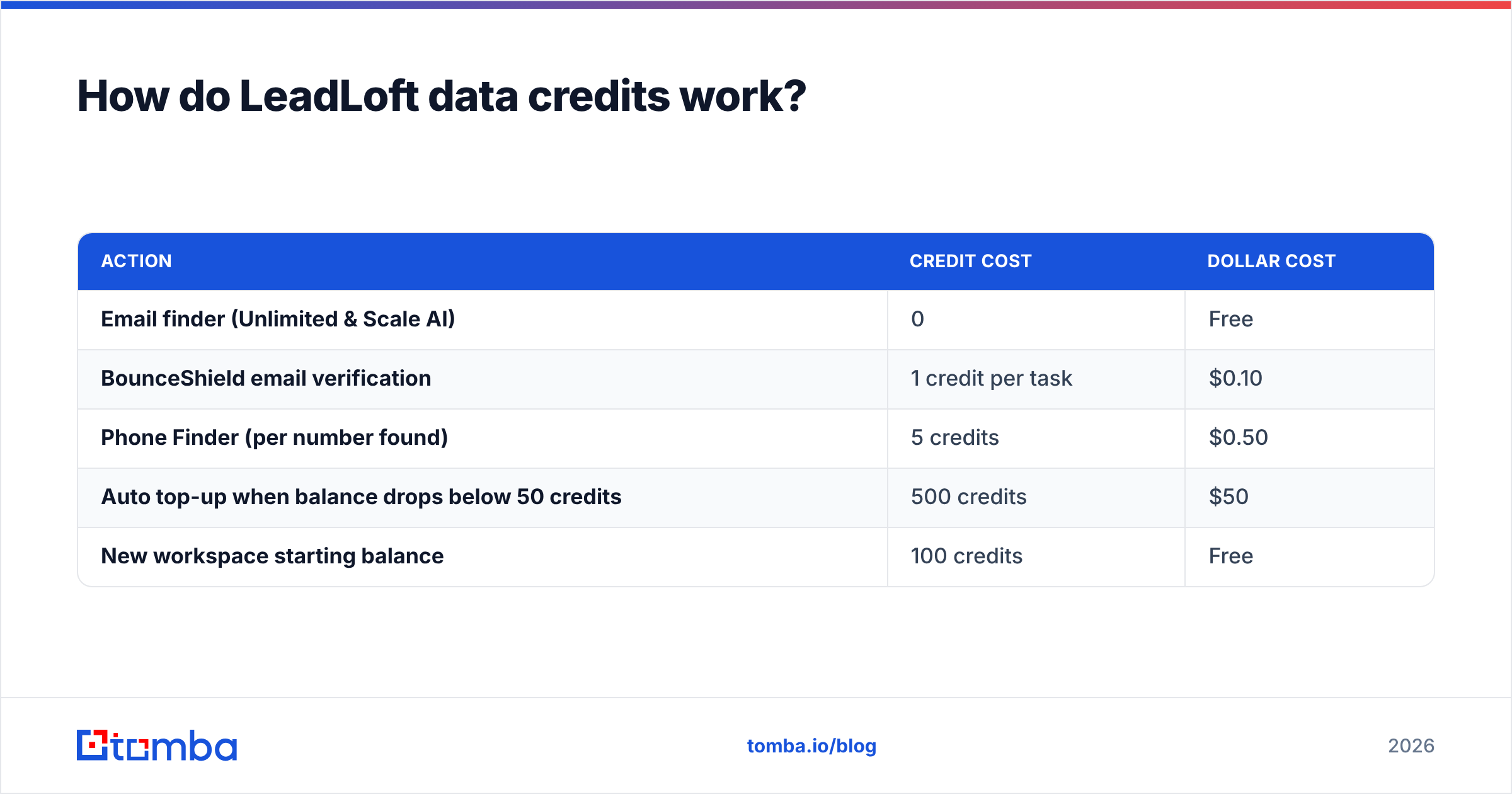
This is the part that changes your real cost. According to LeadLoft's help center article on how much data credits cost, the model looks like this:
| Action | Credit cost | Dollar cost |
|---|---|---|
| Email finder (Unlimited & Scale AI) | 0 | Free |
| BounceShield email verification | 1 credit per task | $0.10 |
| Phone Finder (per number found) | 5 credits | $0.50 |
| Auto top-up when balance drops below 50 credits | 500 credits | $50 |
| New workspace starting balance | 100 credits | Free |
Put simply: finding emails is included, but checking whether they will bounce is not. Most teams can't skip that step. Sending to unverified addresses is one of the fastest ways to damage your sender reputation, and an outbound CRM becomes useless once your domain lands in spam.
The auto-refill is convenient, but you don't choose when it happens. Each time your balance drops below 50 credits, another $50 gets charged. A rep who verifies a 3,000-contact list on a Monday morning triggers six top-ups before lunch.

What does LeadLoft really cost for a 1, 3 or 10-person team?#
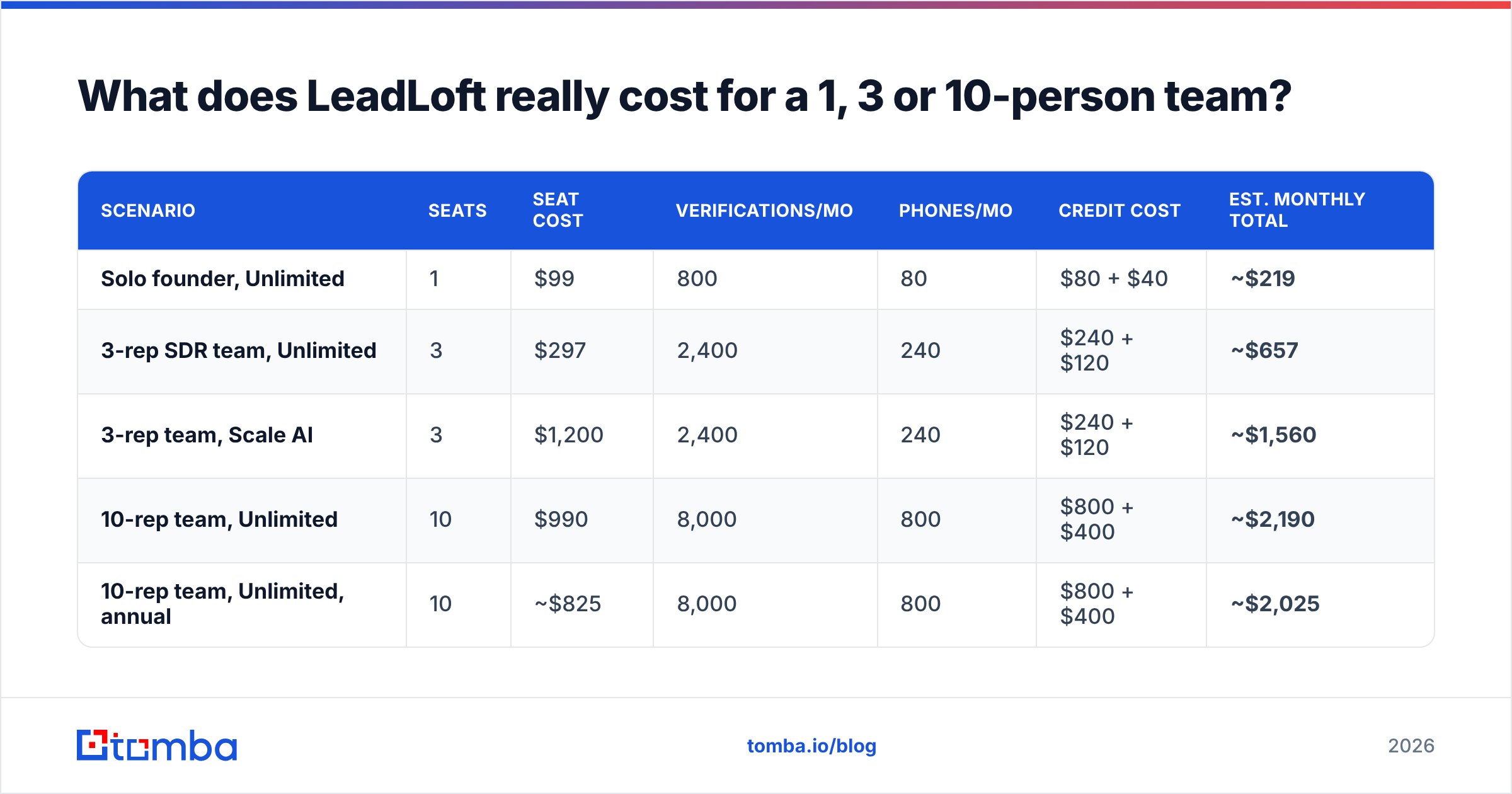
List prices tell you nothing until you add usage. The scenarios below assume monthly billing, that every found email gets verified before sending, and that phone numbers are pulled for about 10% of contacts (common for teams that call their highest-intent leads).
| Scenario | Seats | Seat cost | Verifications/mo | Phones/mo | Credit cost | Est. monthly total |
|---|---|---|---|---|---|---|
| Solo founder, Unlimited | 1 | $99 | 800 | 80 | $80 + $40 | ~$219 |
| 3-rep SDR team, Unlimited | 3 | $297 | 2,400 | 240 | $240 + $120 | ~$657 |
| 3-rep team, Scale AI | 3 | $1,200 | 2,400 | 240 | $240 + $120 | ~$1,560 |
| 10-rep team, Unlimited | 10 | $990 | 8,000 | 800 | $800 + $400 | ~$2,190 |
| 10-rep team, Unlimited, annual | 10 | ~$825 | 8,000 | 800 | $800 + $400 | ~$2,025 |
A few patterns stand out:
- Credits can match or exceed seat costs. For the solo founder, credits add about 120% on top of the $99 seat.
- Annual billing saves less than you'd expect. The discount applies to seats only. Credits are billed on usage no matter which plan you're on.
- Scale AI is a staffing decision. At $400/seat, it makes sense only if the AI SDR clearly replaces human SDR hours. If your reps still write and review every email, you're paying $301/month per seat for work that isn't being offloaded.
Your numbers will vary. Teams with cleaner source data can verify less, and teams that never call can skip phone credits. Still, "seats x $99" is almost never what you end up paying.
Is LeadLoft worth the money?#
It depends on how many tools LeadLoft replaces for you.
LeadLoft is good value when:
- You're a 1–5 person team with no CRM yet and no sequencer. One $99 seat replacing a CRM subscription, a sequencing tool and an email finder is a real saving.
- You want one place for prospecting, outreach and pipeline, so reps don't copy-paste between tabs.
- Your volume per rep is moderate. Unlimited prospecting only pays off if reps actually prospect a lot, but huge volumes push credit spend up.
LeadLoft is poor value when:
- You already pay for HubSpot, Salesforce, Pipedrive, or a dedicated sequencer. At that point, you're paying for a second CRM just to get the data layer.
- You have many seats that only need contact data. Marketers, founders and AEs who look up a few contacts a week don't need a $99 outbound seat.
- You need high-volume enrichment such as list building, bulk verification or data hygiene on an existing database. Per-seat pricing plus per-credit verification gets expensive quickly.
Third-party reviews on G2's LeadLoft pricing page tend to agree. Users like the all-in-one workflow and the simplicity. The pricing complaints are mostly about add-on costs, not the base seat.
How does LeadLoft pricing compare to a standalone email finder?#
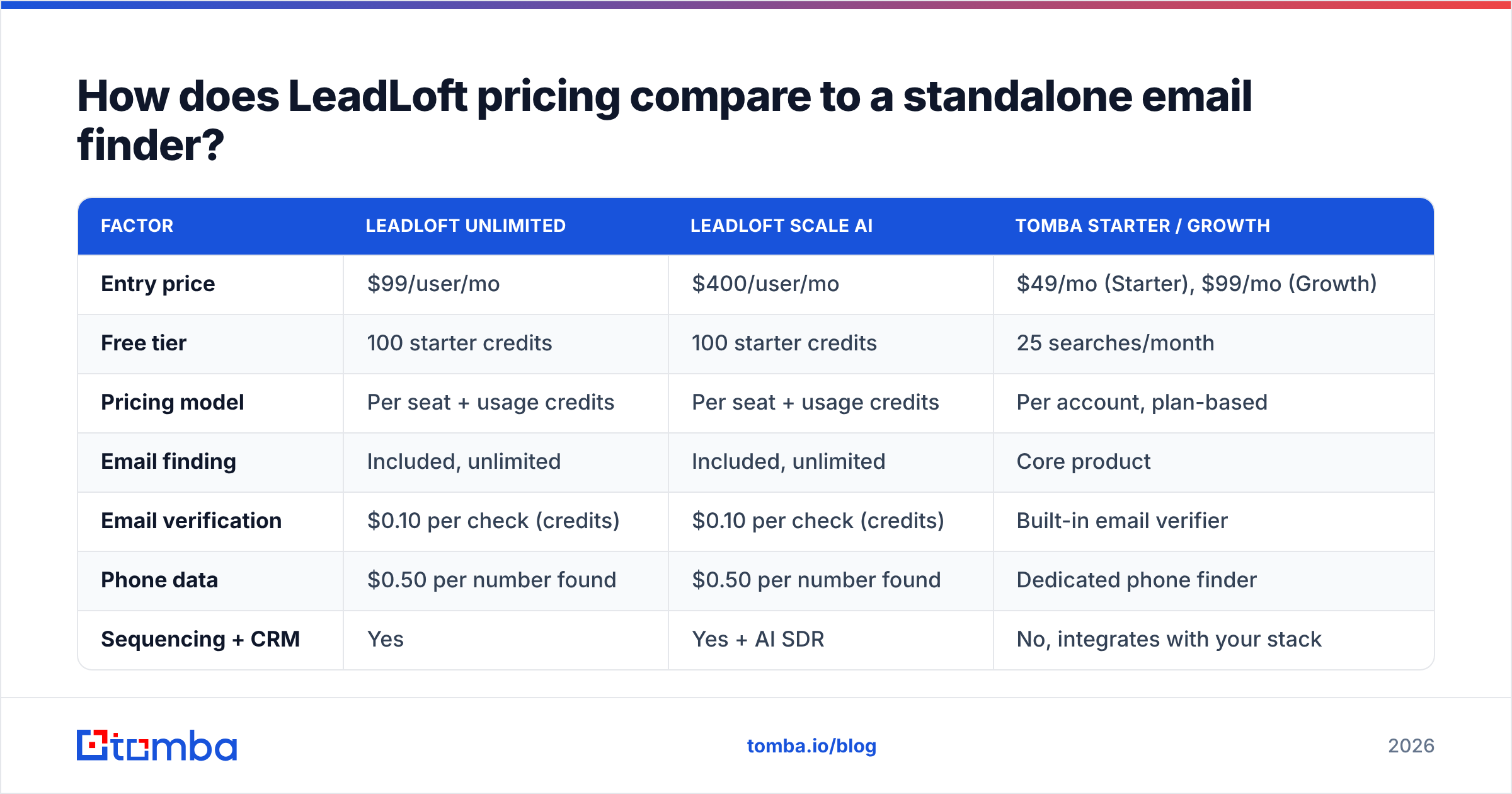
The right comparison depends on what you're buying. If you want an outbound CRM, compare LeadLoft to other outbound CRMs. If what you really need is accurate contact data that feeds tools you already use, compare it to a dedicated finder.
| Factor | LeadLoft Unlimited | LeadLoft Scale AI | Tomba Starter / Growth |
|---|---|---|---|
| Entry price | $99/user/mo | $400/user/mo | $49/mo (Starter), $99/mo (Growth) |
| Free tier | 100 starter credits | 100 starter credits | 25 searches/month |
| Pricing model | Per seat + usage credits | Per seat + usage credits | Per account, plan-based |
| Email finding | Included, unlimited | Included, unlimited | Core product |
| Email verification | $0.10 per check (credits) | $0.10 per check (credits) | Built-in email verifier |
| Phone data | $0.50 per number found | $0.50 per number found | Dedicated phone finder |
| Sequencing + CRM | Yes | Yes + AI SDR | No, integrates with your stack |
| Best for | Small teams without a CRM | Teams replacing SDR hours with AI | Teams that already have a CRM/sequencer |
This isn't a case of one tool being better. They answer different questions:
- "I need my whole outbound motion in one tool": LeadLoft.
- "I need reliable emails and phones going into the tools I already have": a standalone finder. It's priced per account rather than per seat, so adding teammates doesn't multiply your bill.
A common hybrid setup: the SDRs who run sequences get LeadLoft seats, and everyone else (marketing, founders, RevOps doing list cleanup) pulls data from a finder on a shared plan. See Tomba pricing to size that side.
What hidden costs should you budget for?#
Beyond seats and credits, plan for these before you sign:
- Credit auto-refills. They are $50 each and triggered by usage, not by date. Set an internal alert on your billing email so finance isn't surprised by fifteen $50 charges in one month.
- Deliverability infrastructure. Every outbound tool needs warmed sending domains and inboxes. LeadLoft doesn't include domain purchases or Google Workspace/Microsoft 365 mailbox costs, and those typically add $6–$12 per inbox per month.
- Seat creep. Once managers, AEs and an ops person need visibility, 3 seats turn into 6. Check whether read-only or admin access is cheaper before adding full seats.
- The Scale AI jump. Going from Unlimited to Scale AI is +$301/seat/month. Pilot it with one seat before upgrading the whole team.
- Switching costs. If LeadLoft becomes your CRM, moving later means migrating deals, activity history and sequences. That cost doesn't show on the invoice, but it matters.

How can you lower your LeadLoft bill?#
If LeadLoft fits your workflow, these steps keep costs under control:
- Go annual only after 60 days. Get two months of real usage data first, then lock in the 2-months-free discount once you know your seat count.
- Verify in batches, not continuously. Dedupe and filter lists before running BounceShield. Verifying a contact you'll never email wastes $0.10.
- Pull phones selectively. At $0.50 per number, fetch phones only for tier-1 accounts or leads that engaged with your emails.
- Right-size seats. Keep $99 seats for people who actually run sequences, and give occasional users a cheaper data tool.
- Test Scale AI with one seat. Measure meetings booked per $400 against a human SDR's output before scaling.
Frequently asked questions#
Does LeadLoft have a free plan? There's no ongoing free plan comparable to a freemium email finder. New workspaces get 100 free data credits, and the Starter tier costs $5/month.
Is the LeadLoft email finder really unlimited? Yes, on Unlimited and Scale AI, finding emails doesn't use credits. Verifying them with BounceShield does ($0.10 each), and so does phone lookup ($0.50 per number found).
Does LeadLoft offer an annual discount? Yes. Annual plans come with 2 months free, which works out to about 17% off seat costs. Credits are still billed on usage.
What is the difference between Unlimited and Scale AI? Scale AI adds AI SDR capabilities on top of everything in Unlimited, for $400/user/month compared with $99.
Is LeadLoft cheaper than buying a CRM, sequencer and email finder separately? For a small team with none of those tools yet, often yes. If you already pay for a CRM and a sequencer, it's usually cheaper to add a standalone data tool than to add LeadLoft seats.
What's the verdict on LeadLoft pricing?#
LeadLoft's pricing is fair for what it's built to be: an all-in-one outbound CRM for small teams that don't want to assemble a stack. The $99 seat is competitive if it really replaces two or three other subscriptions. The catch is that the headline price isn't the full price. Verification and phone credits can double a solo seat's cost, and Scale AI costs four times as much, so it needs clear proof that the AI is doing real work.
If you already have a CRM and sequencer and mainly need accurate contact data, don't pay for a second CRM to get it. Tomba Email Finder finds professional email addresses by domain, name or company, and verification and phone lookups are available alongside it. Plans start at $49/month per account, not per seat, and there's a free tier with 25 searches a month so you can test data quality on your own target accounts before committing.
Related guides#
// get started
Find, verify and enrich your first contacts today
Start on the free plan with 25 searches a month, then scale when your team is ready.
Free plan · No credit card required · GDPR & CCPA
// about the author