Leadrocks vs Revli: Contact Database or Funding Signals in 2026?
Leadrocks gives you a very large contact database for little money. Revli tells you which startups just raised funding. Here's how to pick the right one for your pipeline, or when to use both.
TL;DR
- Leadrocks is a low-cost B2B contact database with a LinkedIn Chrome extension. It claims more than 100M contacts and has a Free plan, a Starter plan around $29/mo, and an Enterprise tier near $580/mo for 20,000 credits.
- Revli is a funding-intelligence tool. It sends weekly lists of recently funded startups and their investors, with contact details and filters for funding round, hiring and tech stack. Paid plans start around $79/mo, and there's a limited free plan.
- The two tools answer different questions. Leadrocks tells you who to contact. Revli tells you when a company is likely to buy.
- If you sell to startups that just got cash (agencies, dev shops, recruiting, SaaS for scale-ups), Revli's timing signal is worth more than raw volume. If you prospect across many industries and company sizes, Leadrocks covers more ground per dollar.
- Whichever you pick, verify emails before you send. A database export that bounces will cost you more than the subscription did.
What is the real difference between Leadrocks and Revli?#
People compare these two tools a lot, but they don't really compete head to head. They sit at different points in the prospecting stack.
Think of a fishing trip. Leadrocks sells you a very large net. Revli tells you where the fish are feeding this week. You can catch fish with either one, but the net works best when you already know where to cast, and the tip only helps if you have something to catch with.
Leadrocks (leadrocks.io) is a contact database with enrichment features. You filter by role, industry, geography and company size, and you get back work emails, phone numbers and LinkedIn URLs. It also includes a Chrome extension that pulls contacts from LinkedIn and Sales Navigator, a built-in email verifier, basic Gmail/Outlook sequencing, and CSV export.
Revli (revli.com) is built around one trigger event: a company raising money. Each week it publishes lists of newly funded startups and the investors behind them, with decision-maker contacts attached. You can filter by funding round, amount, whether the company is hiring (including the specific job postings), tech stack, and mobile phone availability.
So what you're really choosing between is a breadth-first data strategy and a signal-first data strategy.
How do Leadrocks and Revli compare feature by feature?#
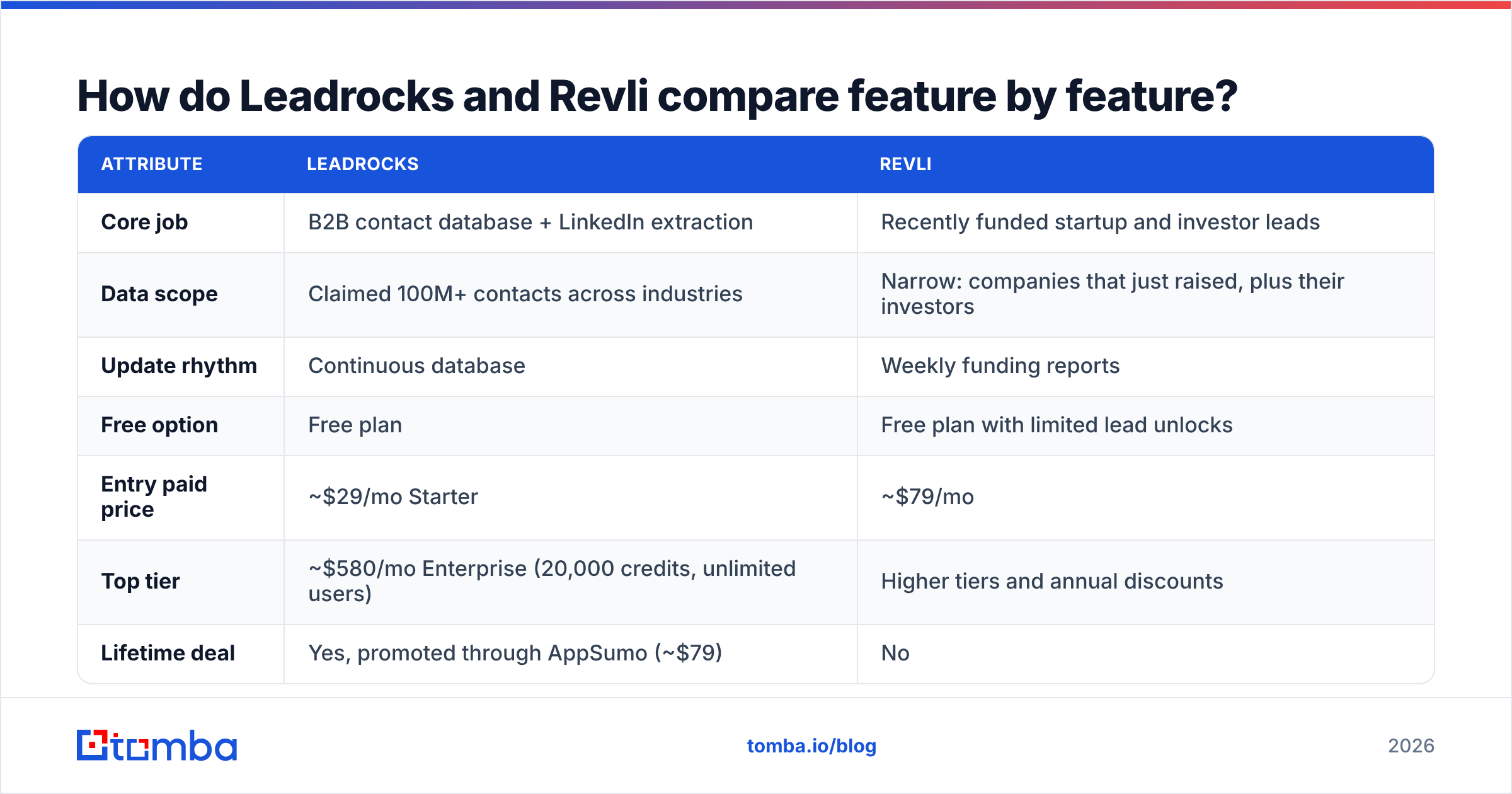
Here's how they line up on the attributes that usually decide a purchase. Pricing reflects publicly listed plans at the time of writing. Both vendors change tiers often, so check their pricing pages before you buy.
| Attribute | Leadrocks | Revli |
|---|---|---|
| Core job | B2B contact database + LinkedIn extraction | Recently funded startup and investor leads |
| Data scope | Claimed 100M+ contacts across industries | Narrow: companies that just raised, plus their investors |
| Update rhythm | Continuous database | Weekly funding reports |
| Free option | Free plan | Free plan with limited lead unlocks |
| Entry paid price | ~$29/mo Starter | ~$79/mo |
| Top tier | ~$580/mo Enterprise (20,000 credits, unlimited users) | Higher tiers and annual discounts |
| Lifetime deal | Yes, promoted through AppSumo (~$79) | No |
| Chrome extension | Yes (LinkedIn + Sales Navigator) | Not a core feature |
| Email verification | Built-in verifier | Contacts delivered as verified |
| Phone numbers | Yes | Yes, including mobile filters |
| Buying-signal filters | Firmographic (role, industry, size, geo) | Funding round, amount, hiring status, tech stack |
| Sequencing | Basic Gmail/Outlook sequences | None; export to CRM |
| API | Limited (email verification) | CRM export focus |
| Best for | High-volume, multi-industry prospecting on a budget | Selling to startups right after they raise |
Two rows matter more than the rest: data scope and buying-signal filters. Everything else is secondary. Leadrocks gives you more rows. Revli gives you fewer rows, but each one comes with a reason to reach out.
Which tool has better data quality?#
No single number settles this. What counts as quality depends on what you plan to do with the data.
Leadrocks' strength is coverage. A 100M+ contact index (the vendor's own figure) means you'll almost always get something back for a role/industry/geo query. The catch is the same one every large database has: people change jobs all the time, so a meaningful share of any big export will be out of date by the time you use it. Leadrocks' built-in verifier helps, but treat it as a first pass. Don't assume a "found" email is safe to send to.
Revli's strength is freshness of context. The contacts are tied to a funding event that happened in the last few days or weeks. The company is almost certainly still operating, it's probably hiring, and its leadership is actively spending. That makes decay less of an issue because you're contacting people at a moment when their situation has just changed.
Where Revli is weaker is depth inside each account. You'll usually get founders and a few senior leaders. You won't get the full org chart. If your buyer is a VP of Engineering at a 300-person Series C company, you may still need another source to find the right person and a verified email for them.
A practical way to judge both tools: pull 100 records from each that match your ICP, run them through an independent email verifier, and compare valid, risky and invalid rates. That half-hour test will tell you more than any vendor claim.

Is Leadrocks cheaper than Revli?#
On sticker price, yes. Leadrocks' Starter plan is roughly a third of Revli's entry price, and its AppSumo lifetime deal gets it close to free if you're a solo founder or a small agency.
Sticker price is the wrong thing to compare, though. What matters is cost per meeting booked.
Say you run a dev agency that sells MVP builds to seed and Series A startups:
- With Leadrocks, you'd filter for "Founder / CTO, Software, 2–50 employees." You'd get thousands of contacts, and most of them have no budget right now. You burn credits and sending reputation on companies that aren't buying.
- With Revli, you'd pull this week's seed and Series A rounds, filtered to companies hiring engineers. You'd get maybe 50–150 accounts, and a large share of them have just been handed money with instructions to ship faster.
For that agency, Revli's ~$79/mo can easily book more meetings than a far larger Leadrocks export. The comparison flips if you sell something every business needs no matter where it is in the funding cycle, like payroll, insurance, IT services or office supplies. Then funding events are a narrow and unnecessary filter, and Leadrocks' volume wins on cost.
Which is better for LinkedIn-driven prospecting?#
Leadrocks, clearly. The Chrome extension is central to the product: you open a LinkedIn search or Sales Navigator list and extract contact data in bulk. If your team already lives in Sales Navigator and builds lists by hand, Leadrocks turns that manual work into exportable rows with emails and phones.
Revli isn't built for this. It's a list-delivery product. You pick from its weekly funding data and export to your CRM. If you want to work from Revli's lists and still enrich a specific LinkedIn profile, you'll need a separate tool, for example a LinkedIn finder or any enrichment extension that fits your stack.
One caution for heavy LinkedIn scrapers: LinkedIn's user agreement restricts automated data collection. Keep extraction volumes reasonable and use warmed-up accounts. The most valuable asset in your outbound setup is your LinkedIn account, not the contact data.
What are the pros and cons of each tool?#
Leadrocks
- Pro: Price-to-volume ratio. Very few tools give you a six-figure-plus contact index at this price.
- Pro: LinkedIn extension. Bulk extraction from LinkedIn and Sales Navigator fits how most SDRs already build lists.
- Pro: All-in-one basics. Search, verification and simple sequencing in one subscription is enough for a solo seller.
- Con: No buying-intent layer. Every contact is treated the same. You need your own signals to prioritize.
- Con: Limited API. The API mainly covers email verification, so building automated enrichment pipelines on it is hard.
- Con: Decay risk at scale. Large exports need independent verification before they go into a sequencer.
Revli
- Pro: Built-in timing. Funding is one of the strongest B2B buying triggers, and Revli packages it weekly.
- Pro: Useful filters. Hiring status with actual job postings, funding amount and tech stack let you write very specific first lines.
- Pro: Investor data. If you sell to VCs, or run partner plays through portfolio companies, investor contacts are a bonus.
- Con: Narrow universe. Only funded startups. Bootstrapped companies, enterprises and SMBs are mostly missing.
- Con: Shallow account depth. Mostly founders and senior leaders, not full buying committees.
- Con: No extraction or sequencing. You'll still need an outreach tool and probably a second enrichment source.
How should you use Leadrocks and Revli together?#
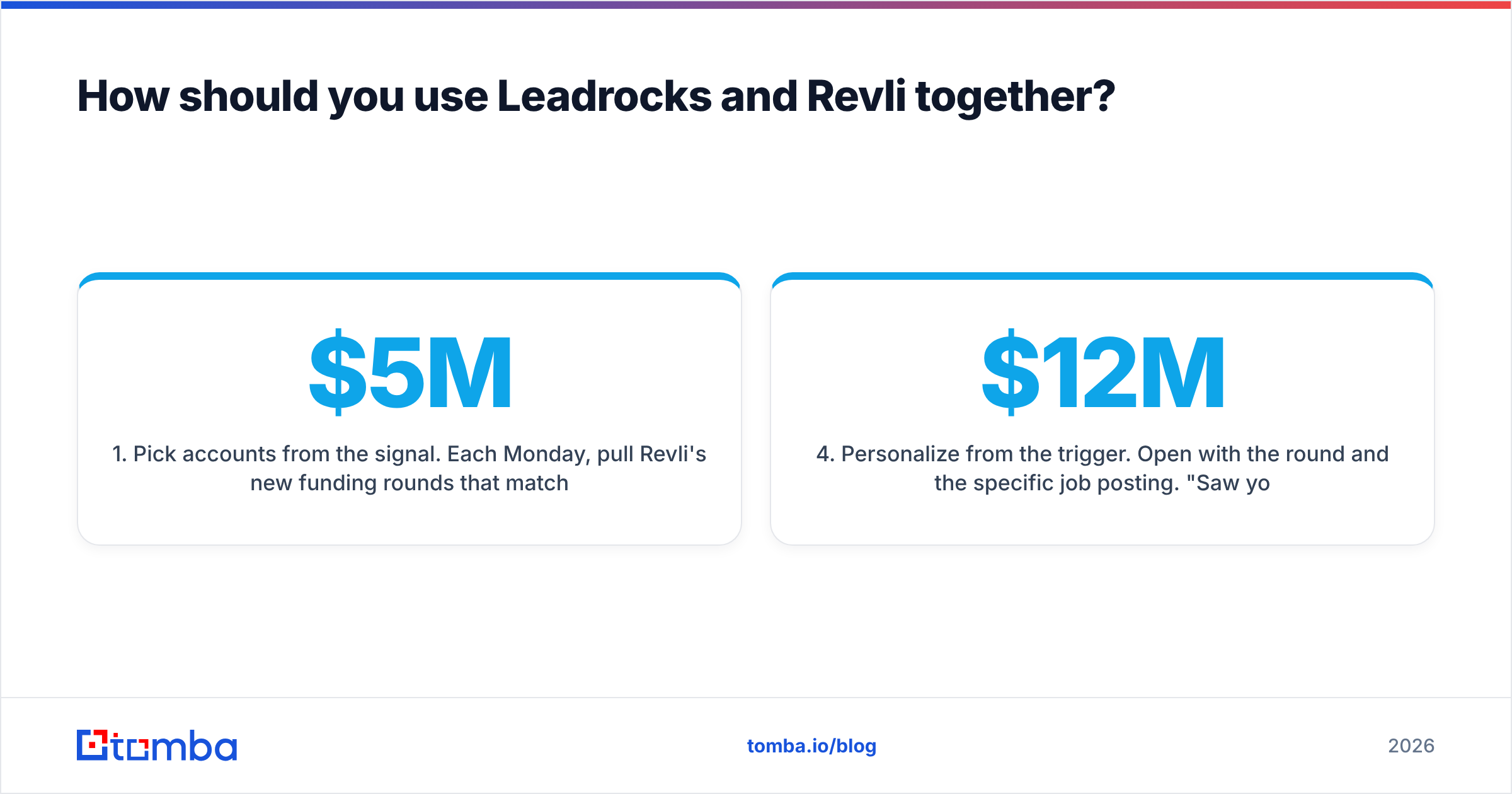
Many teams that are good at outbound don't pick one. They use the signal tool to choose accounts and the database tool to fill in the people. Here's a four-step workflow:
- Pick accounts from the signal. Each Monday, pull Revli's new funding rounds that match your ICP (for example, Series A, $5M–$20M, hiring engineers).
- Widen the buying committee. Run those domains through a database or a domain search to find the VP, director and manager-level contacts Revli doesn't include.
- Verify everything. Run the full list through verification before import. Catch-all domains are common at startups, so flag them separately and don't send to them blindly.
- Personalize from the trigger. Open with the round and the specific job posting. "Saw you just raised a $12M Series A and are hiring three backend engineers" gets far more replies than a generic opener.
This takes more work than one tool alone, but it combines what each tool does best: Revli's timing and the depth of a contact database.

What do reviewers and users say?#
Third-party review volume is thin for both products compared with bigger platforms. You can read Revli's listing on Capterra to see how reviewers describe the weekly reports and filters. Common themes across public Leadrocks reviews are value for money, the lifetime deal, and the usefulness of the LinkedIn extension, along with the usual mixed results on email accuracy in some regions.
Low review counts don't mean the tools are bad. They do mean you should run your own trial instead of relying on social proof. Both offer free plans, so there's no reason to buy before testing.
Where does an email finder fit if neither tool covers everything?#
The gap both tools leave is per-contact accuracy on demand. Leadrocks gives you bulk rows that need cleaning. Revli gives you accounts with a thin layer of contacts. In both cases, you'll eventually have a specific name and company and need a deliverable email address right away.
That's the job of a dedicated email finder: enter a name and domain, get back an email with a confidence score and source, and verify it in the same step. Tomba sits in this layer. It isn't a replacement for Revli's funding signal, and it isn't trying to be a 100M-row list-building database like Leadrocks. It's the precision tool you use after the list exists, to fill gaps and confirm addresses before they reach your sequencer. It also has bulk mode, an API, and Sheets/Excel add-ons if you process lists instead of single contacts. Plans and credit limits are listed on the Tomba pricing page.
Which one should you choose in 2026?#
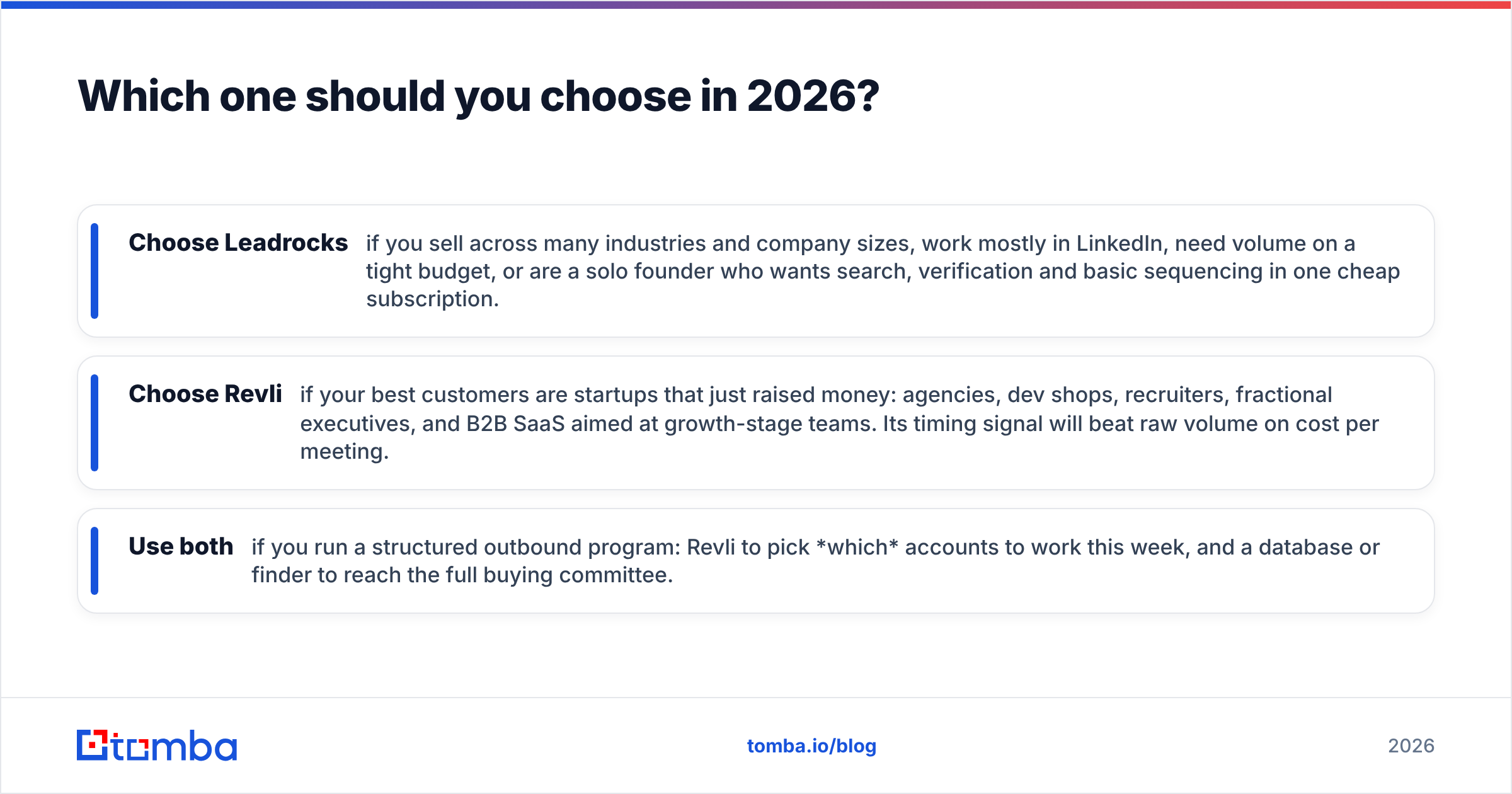
Go by your market, not by the feature list:
- Choose Leadrocks if you sell across many industries and company sizes, work mostly in LinkedIn, need volume on a tight budget, or are a solo founder who wants search, verification and basic sequencing in one cheap subscription.
- Choose Revli if your best customers are startups that just raised money: agencies, dev shops, recruiters, fractional executives, and B2B SaaS aimed at growth-stage teams. Its timing signal will beat raw volume on cost per meeting.
- Use both if you run a structured outbound program: Revli to pick which accounts to work this week, and a database or finder to reach the full buying committee.
Neither tool is universally better. Leadrocks wins on breadth and price. Revli wins on relevance and timing. The mistake is buying the high-volume tool when you need timing, or the timing tool when you need volume.
Ready to fill the gaps either tool leaves?#
Whether you're working from a Revli funding list or cleaning a large Leadrocks export, you'll still need to find and confirm the right address for specific people. Tomba Email Finder finds professional emails from a name and company domain, shows the sources behind each result, and verifies deliverability in the same step, so your sequences reach inboxes instead of bouncing. Start on the free tier (25 searches a month) to test it on your own prospect list, and upgrade to Starter at $49/mo when you're ready to scale.
Related guides#
// get started
Find, verify and enrich your first contacts today
Start on the free plan with 25 searches a month, then scale when your team is ready.
Free plan · No credit card required · GDPR & CCPA
// about the author