LeadRocks vs SalesQL: Which LinkedIn Email Finder Wins in 2026?
LeadRocks is built for searching a B2B database. SalesQL is built for enriching LinkedIn profiles one click at a time. Here is how they compare on data, workflow, credits and cost, and which one suits your outbound motion.
TL;DR
- LeadRocks works from a database first. You filter a B2B contact database by title, industry, location and company size, then export lists. It suits teams that build lists before they touch LinkedIn.
- SalesQL works from LinkedIn first. Its Chrome extension shows emails and phone numbers while you browse LinkedIn and Sales Navigator profiles. It suits reps who already prospect inside LinkedIn.
- Both use credits, and both have a free entry point. Neither tool's built-in verification removes the need to check a list before a large cold send.
- Our pick: choose SalesQL if your team lives in Sales Navigator. Choose LeadRocks if you want to build lists by filter without LinkedIn. If you need API access, bulk verification and domain search in one plan, look at a dedicated email finder such as Tomba.
- Before you commit to a paid plan, test both on 50 of your own ICP contacts. Vendor coverage claims mean little until you check them against your market.
What are LeadRocks and SalesQL?#
Both tools solve the same problem: you know who you want to reach, but you don't have a working email address or direct dial. They start from opposite ends of the prospecting workflow.
LeadRocks is a B2B contact database with a search interface. You set filters (job title, seniority, industry, headcount, geography), get a list of matching people, and reveal their contact details with credits. It also has a Chrome extension for pulling contacts while you browse LinkedIn, but the core product is the searchable database.
SalesQL began as a LinkedIn email extractor and still centres on that. You install the Chrome extension, open a LinkedIn or Sales Navigator profile or search results page, and SalesQL shows the person's email (work and sometimes personal) and phone number where it has them. Bulk extraction from Sales Navigator lists and CRM sync sit on top of that.
Put simply: LeadRocks answers "who fits my ICP?" and SalesQL answers "what's this person's email?" In practice, that difference matters more than any single feature in the tables below.
How do LeadRocks and SalesQL compare feature by feature?#
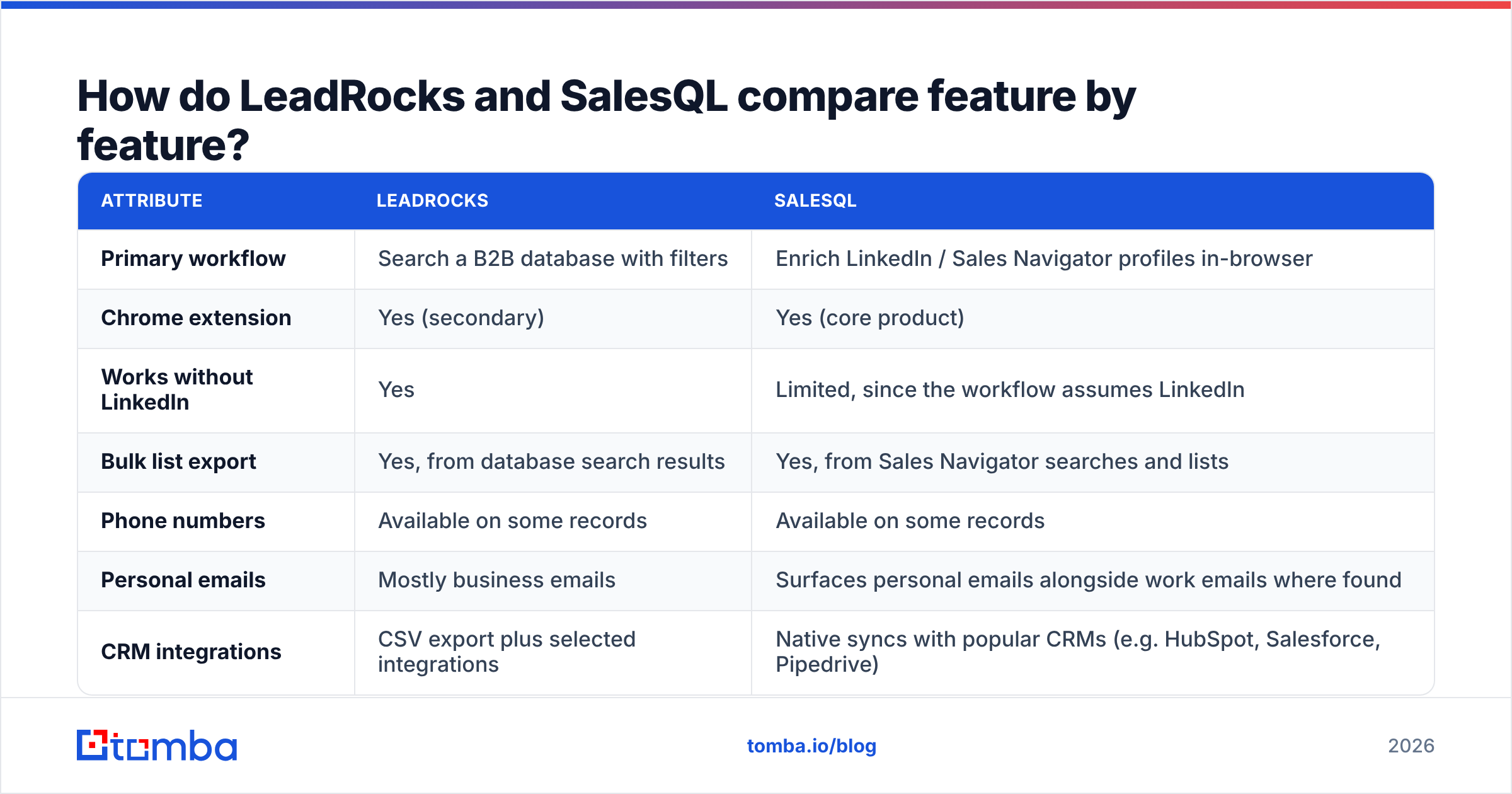
Here is a side-by-side view of what each tool is built to do. Pricing and credit allowances change often, so treat the figures as directional and check each vendor's pricing page before you buy.
| Attribute | LeadRocks | SalesQL |
|---|---|---|
| Primary workflow | Search a B2B database with filters | Enrich LinkedIn / Sales Navigator profiles in-browser |
| Chrome extension | Yes (secondary) | Yes (core product) |
| Works without LinkedIn | Yes | Limited, since the workflow assumes LinkedIn |
| Bulk list export | Yes, from database search results | Yes, from Sales Navigator searches and lists |
| Phone numbers | Available on some records | Available on some records |
| Personal emails | Mostly business emails | Surfaces personal emails alongside work emails where found |
| CRM integrations | CSV export plus selected integrations | Native syncs with popular CRMs (e.g. HubSpot, Salesforce, Pipedrive) |
| Free entry point | Free trial / limited credits | Free plan with a small monthly credit allowance |
| Pricing model | Monthly credit bundles | Monthly credit bundles, per user |
| Best for | Founders and SDRs building lists from filters | SDRs and recruiters working inside Sales Navigator |
The benchmark below compares a wider set of email finders and shows how much accuracy varies between vendors. Treat this as the main reason to run your own test rather than rely on either vendor's marketing claims.

Which tool has better data accuracy and coverage?#
Neither vendor publishes an independent third-party audit of its accuracy, so be skeptical of any single percentage you see, including theirs. What you can reason about is how each tool gets its data. That source tells you where each one will be strong and where it will be weak.
SalesQL is anchored to live LinkedIn profiles. When you look someone up, you see their current title and company on the page next to the email. That gives you a built-in freshness check: if the profile says they moved to a new company last month and the email still shows the old domain, you notice straight away. Match rates are usually strongest for mid-market and enterprise contacts in North America and Western Europe, where LinkedIn profiles are complete.
LeadRocks depends on how complete and how recent its database is. Database-first tools always lag behind job changes to some degree. A person who switched roles three months ago may still show under their old employer until the next refresh. The upside is that you can find contacts at companies where people barely maintain their LinkedIn profiles, and you can filter across the whole database without clicking through profiles one by one.
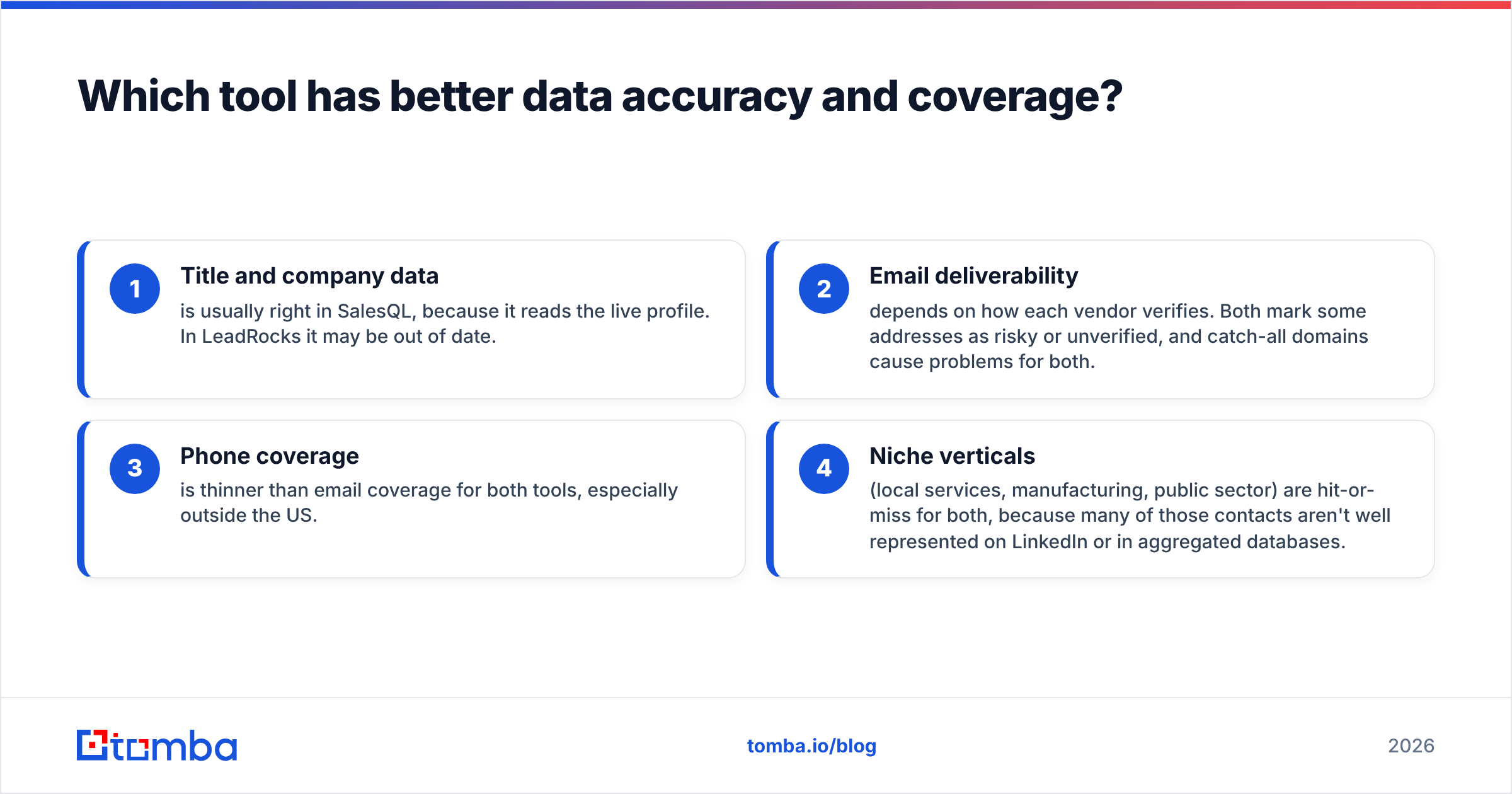
Across both tools, you will usually see this pattern:
- Title and company data is usually right in SalesQL, because it reads the live profile. In LeadRocks it may be out of date.
- Email deliverability depends on how each vendor verifies. Both mark some addresses as risky or unverified, and catch-all domains cause problems for both.
- Phone coverage is thinner than email coverage for both tools, especially outside the US.
- Niche verticals (local services, manufacturing, public sector) are hit-or-miss for both, because many of those contacts aren't well represented on LinkedIn or in aggregated databases.
Review sites such as G2 are worth reading for recent user feedback on bounce rates in specific regions and industries. Weight reviews from companies that look like yours.

How does the day-to-day workflow differ?#
Workflow fit matters more than raw coverage. If a tool doesn't fit how your reps already work, they won't use it.
A typical SalesQL day looks like this. The SDR runs a Sales Navigator search, opens the SalesQL panel, and enriches the visible results in one pass. Contacts sync to the CRM with the LinkedIn URL attached. The rep then writes a first line based on the profile they just looked at. It's quick, visual, and has little friction for anyone who already spends hours in LinkedIn. The downside: if your company doesn't pay for Sales Navigator, the bulk workflow loses much of its value.
A typical LeadRocks day looks like this. A founder or RevOps person builds a filter ("VP Marketing, SaaS, 50–500 employees, DACH"), previews the count, reveals contacts in batches, and exports a CSV to the sequencing tool. It suits teams who plan campaigns by segment rather than by individual profile. The downside: you lose the at-a-glance context that a live LinkedIn profile gives you, so personalisation takes an extra step.
If your team mixes both motions, with SDRs in LinkedIn and marketing building segment lists, you may end up paying for two tools. That's usually the point where teams look for one platform that covers finding, verifying and enriching data.
How much do LeadRocks and SalesQL cost?#
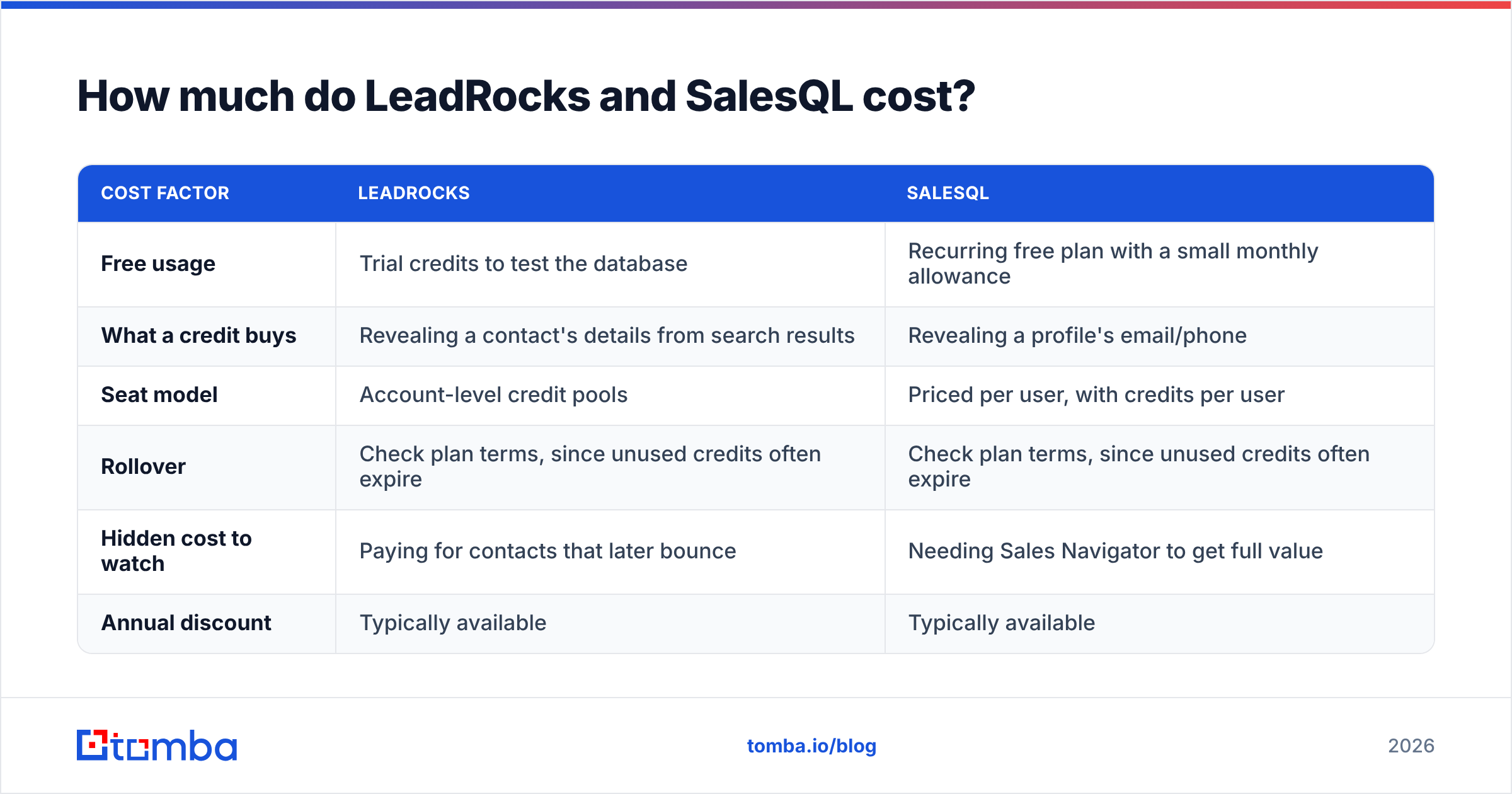
Both tools sell monthly credit bundles, and both let you try before you pay. Prices change often, so this section focuses on how the costs work rather than exact dollar figures. Check SalesQL's pricing page and LeadRocks' site for current numbers.
| Cost factor | LeadRocks | SalesQL |
|---|---|---|
| Free usage | Trial credits to test the database | Recurring free plan with a small monthly allowance |
| What a credit buys | Revealing a contact's details from search results | Revealing a profile's email/phone |
| Seat model | Account-level credit pools | Priced per user, with credits per user |
| Rollover | Check plan terms, since unused credits often expire | Check plan terms, since unused credits often expire |
| Hidden cost to watch | Paying for contacts that later bounce | Needing Sales Navigator to get full value |
| Annual discount | Typically available | Typically available |
The biggest cost is often not on the pricing page at all. It's bounces. If 10% of an exported list bounces, you've paid for credits you can't use, and worse, you've hurt your sender reputation on the domain your whole team sends from. Whichever tool you choose, run the export through an email verifier before it goes into a sequence.
For comparison, Tomba pricing starts with a free tier of 25 searches a month. Paid plans are Starter at $49/mo, Growth at $99/mo and Pro at $249/mo, and Enterprise is priced on request. Verification, domain search and the API are included on the same account rather than sold as separate tools.
Is LeadRocks better than SalesQL?#
It depends on where your prospecting starts. Here's how to decide:
- Pick SalesQL if your reps already work in Sales Navigator, you care about seeing current job titles, you want per-seat CRM sync, and you sometimes need personal emails (for example, recruiters reaching passive candidates).
- Pick LeadRocks if you plan campaigns by segment, you don't want to depend on LinkedIn, you want to preview how many contacts match before you spend credits, and most of your work is CSV exports into a sequencer.
- Consider neither on its own if you need an API for product-led enrichment, bulk verification of lists you already have, or email discovery across a whole company domain. Neither tool was designed around those use cases.
The comparison table below shows where both tools sit among the wider email-finder market. That's useful if you're shortlisting beyond these two.

What are the pros and cons of each?#
LeadRocks: pros
- You can build a list by filter without opening a single LinkedIn profile
- You see how many contacts match a segment before you spend credits
- Works for teams without Sales Navigator seats
LeadRocks: cons
- Database lag after job changes
- Less context for personalisation straight from search results
- The extension feels secondary to the main web app
SalesQL: pros
- Fits cleanly into LinkedIn and Sales Navigator
- Job titles stay current because they come from the live profile
- Native CRM syncs and a recurring free plan
SalesQL: cons
- Most useful with a paid Sales Navigator seat
- Per-user pricing adds up for larger SDR teams
- Personal emails are a compliance consideration in some regions (check your GDPR position before emailing them)
How should you test both before buying?#
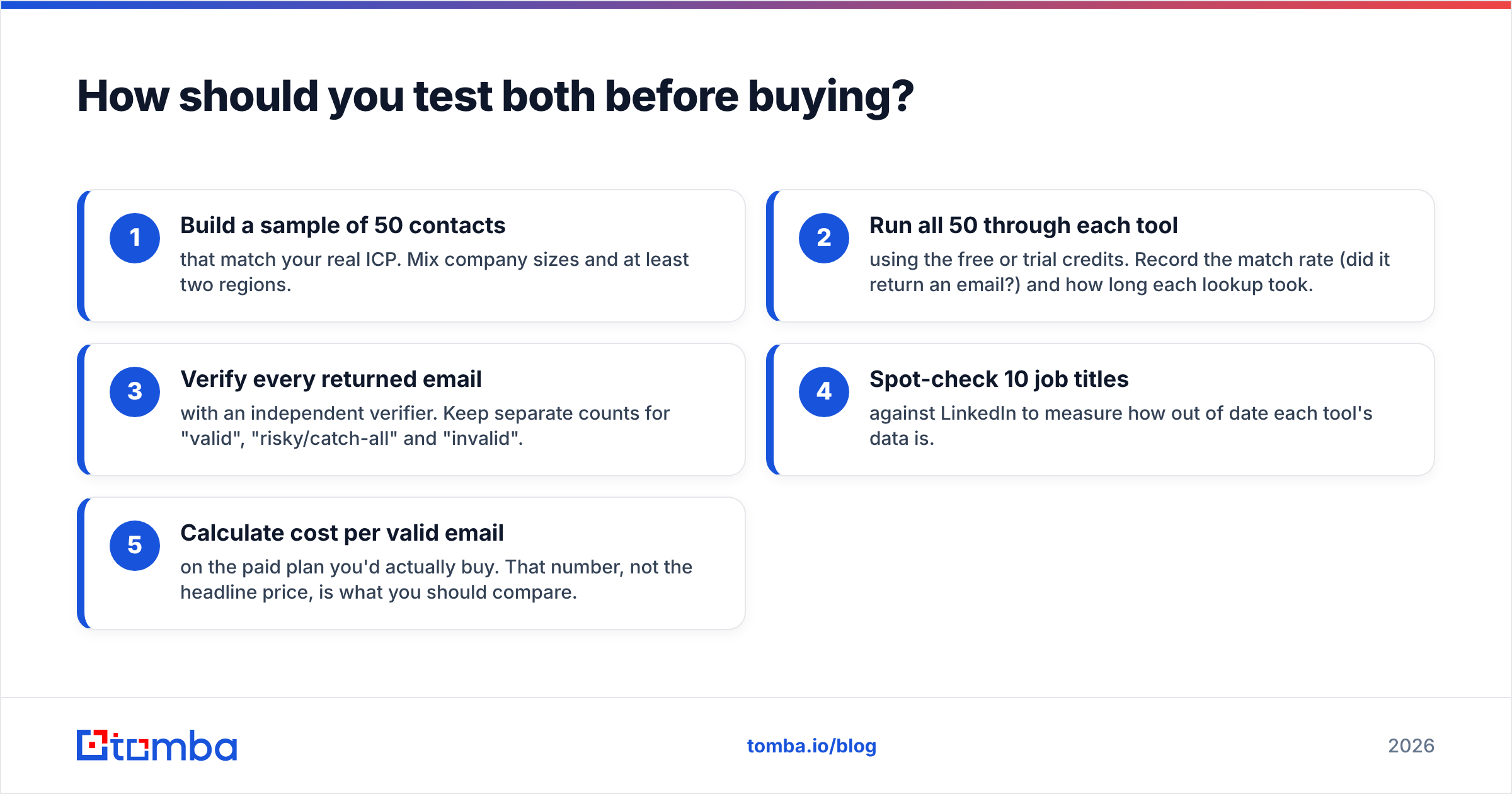
Don't pick based on a demo. Run this 60-minute test instead:
- Build a sample of 50 contacts that match your real ICP. Mix company sizes and at least two regions.
- Run all 50 through each tool using the free or trial credits. Record the match rate (did it return an email?) and how long each lookup took.
- Verify every returned email with an independent verifier. Keep separate counts for "valid", "risky/catch-all" and "invalid".
- Spot-check 10 job titles against LinkedIn to measure how out of date each tool's data is.
- Calculate cost per valid email on the paid plan you'd actually buy. That number, not the headline price, is what you should compare.
If you prospect from LinkedIn and want to skip the per-seat cost, you can also test a LinkedIn finder in the same run to see how its match rates compare.

What do teams get wrong when choosing between them?#
Three mistakes come up again and again:
- Treating match rate as accuracy. A tool that returns an email for 90% of contacts isn't better if a quarter of those bounce. Always measure the valid rate after verification.
- Ignoring catch-all domains. Many mid-market companies accept mail for any address on their domain, so a "found" email can look deliverable and still never reach a person. You need a catch-all check to get a reliable answer.
- Buying for the demo, not the process. A slick LinkedIn overlay is useless to a marketing ops team building segment lists, and a filter-heavy database frustrates reps who want to click and go. Match the tool to the person who will use it every day.
Final verdict: LeadRocks vs SalesQL in 2026#
For LinkedIn-first SDR teams, SalesQL is the more natural fit. It sits where your reps already work, keeps titles current, and syncs cleanly to the CRM. For segment-first list builders who don't want to depend on Sales Navigator, LeadRocks' database-search approach is the better match. Neither is a complete data stack. Both still need an independent verification step before a real send, and neither is built for API-driven enrichment or domain-wide discovery.
If you want one account that covers finding, verifying and enriching data, Tomba Email Finder is worth including in your test. You can find emails by name and company, by domain, or from a LinkedIn profile. Every result can be verified on the same account, and you can run bulk email finder jobs or call the API when your volume outgrows manual lookups. Start on the free tier with 25 searches a month, run the 50-contact test above, and compare your cost per valid email against LeadRocks and SalesQL.
Related guides#
// get started
Find, verify and enrich your first contacts today
Start on the free plan with 25 searches a month, then scale when your team is ready.
Free plan · No credit card required · GDPR & CCPA
// about the author