Leadrocks vs Sendflock: Data Tool or Outreach Tool in 2026?
Leadrocks and Sendflock keep showing up on the same shortlists, but they do different jobs. One finds the contacts and the other emails them. Here is which one you need, and when you need both.
TL;DR
- Leadrocks and Sendflock don't really compete. Leadrocks is a B2B contact database and enrichment tool. Sendflock is cold email sending software built for agencies.
- Pick Leadrocks if your problem is who to contact: you need emails, phone numbers, and LinkedIn-sourced prospect lists.
- Pick Sendflock if your problem is how to contact them at scale: you need inbox rotation, warmup, sequences, and A/B testing across many client mailboxes.
- Most outbound teams end up needing both layers. The data layer decides your bounce rate, and the sending layer decides your inbox placement. A bad contact list will sink a good sender.
- Both have low-cost entry points. Leadrocks has a free plan with 50 monthly credits, and Sendflock offers a 14-day free trial. Test both with your own ICP before you commit.
What is the real difference between Leadrocks and Sendflock?#
Searches for "leadrocks vs sendflock" usually come from someone building an outbound stack for the first time. Both tools show up in "cold email tools" roundups, so they look like competitors. They aren't. They sit at different stages of the same pipeline.
Here's an analogy. Leadrocks is the address book and Sendflock is the postal service. An address book full of wrong addresses doesn't help even if your courier is excellent, and a perfect address book does nothing if nobody delivers the letters.
Leadrocks describes itself as a data enrichment tool and B2B contact database. According to third-party listings, it holds over 100 million records with emails, phone numbers, and LinkedIn profiles. You can filter by job title, location, company, industry, and team size. It also includes a LinkedIn scraping extension, an email verifier, and a basic sequence feature.
Sendflock calls itself "cold email software for agencies." You connect sending mailboxes, warm them up, build multi-step sequences, run A/B tests, and manage campaigns. It doesn't sell you contact data. You bring the list.
So the question isn't which tool is better. It's which layer of your stack is broken right now.
How do Leadrocks and Sendflock compare feature by feature?#
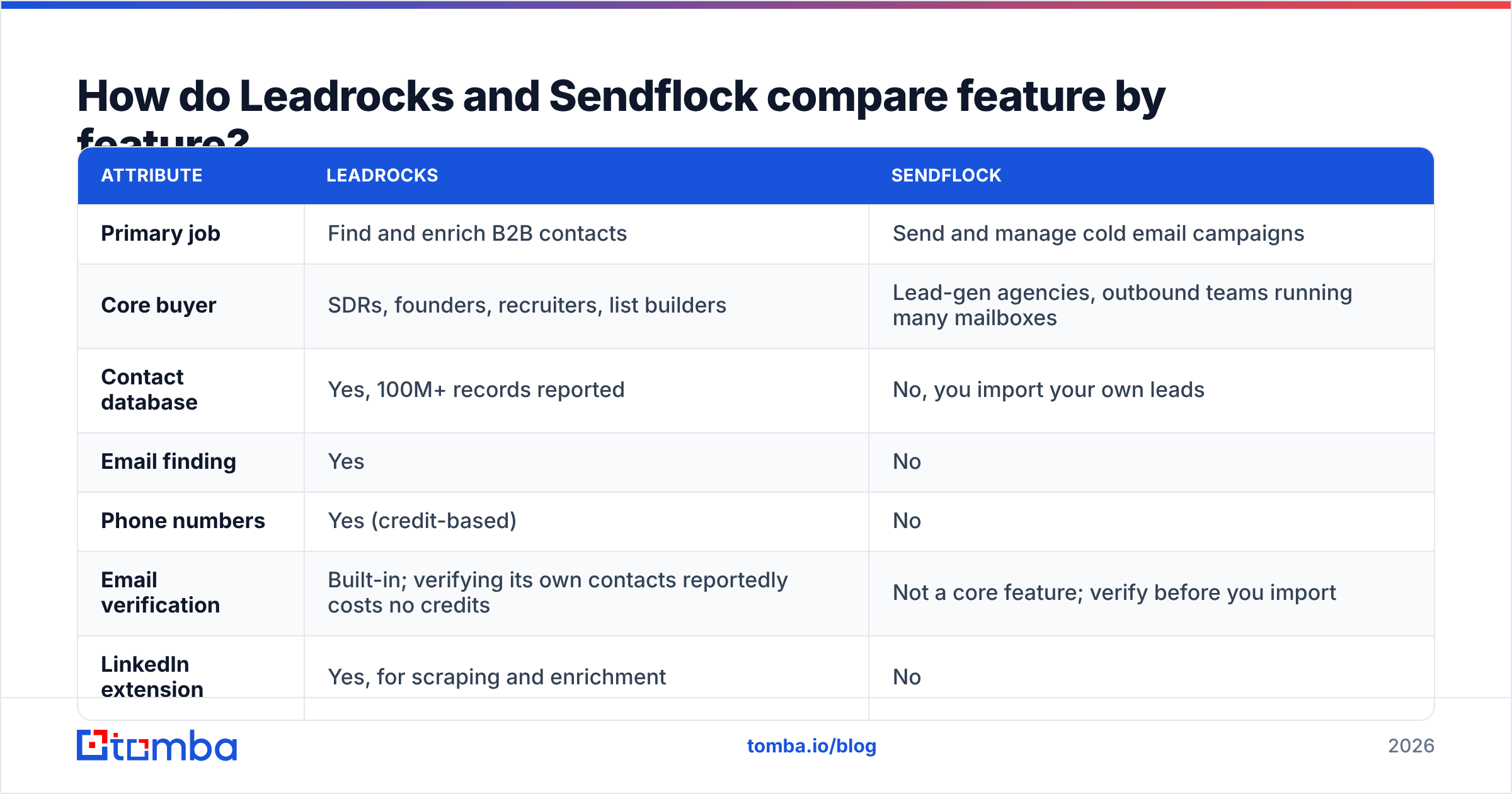
The table below compares the attributes that actually affect an outbound buying decision. Pricing comes from public listings as of 2026, and both vendors change plans often, so check their pricing pages before you buy.
| Attribute | Leadrocks | Sendflock |
|---|---|---|
| Primary job | Find and enrich B2B contacts | Send and manage cold email campaigns |
| Core buyer | SDRs, founders, recruiters, list builders | Lead-gen agencies, outbound teams running many mailboxes |
| Contact database | Yes, 100M+ records reported | No, you import your own leads |
| Email finding | Yes | No |
| Phone numbers | Yes (credit-based) | No |
| Email verification | Built-in; verifying its own contacts reportedly costs no credits | Not a core feature; verify before you import |
| LinkedIn extension | Yes, for scraping and enrichment | No |
| Email warmup | No | Yes, included |
| Unlimited sending accounts | Not applicable | Yes, per vendor listings |
| Sequences and follow-ups | Basic | Core product, with A/B testing |
| Free entry point | Free plan, 50 credits/month, unlimited users | 14-day free trial, no card required per listings |
| Paid pricing model | Credit-based tiers | Monthly tiers by prospect volume (third-party listings show roughly $19 to $49/mo) |
| Best for | Building the list | Working the list |
Read down the "Primary job" row and the rest of the table follows from it. Leadrocks wins every data row and Sendflock wins every sending row, because each tool was built for its own half of the pipeline.
Is Leadrocks good for finding B2B emails?#
Leadrocks is a reasonable choice if you prospect heavily on LinkedIn and want one tool for searching, enriching, and exporting. Its strengths:
- LinkedIn-first workflow. The browser extension pulls prospect data while you browse profiles or search results, which suits SDRs who already live in LinkedIn.
- Generous free tier for teams. The free plan includes 50 monthly credits and unlimited users, so a small team can trial it without a procurement conversation.
- Emails and phones in one place. You don't need a separate phone vendor for light dialing.
- Built-in verification. Verifying contacts that came from Leadrocks' own database reportedly doesn't consume extra credits, which removes a hidden cost that many databases charge for.
- Bring-your-own-list verification. You can upload outside lists and check them with separate verification credits.
The trade-offs are the usual ones for database-style tools. Record freshness varies by region and seniority. Credit-based pricing gets expensive when you need phone numbers at volume. The built-in sequence feature is also thin compared with a dedicated sender, so heavier outbound programs still pair it with a sending tool.
Test any database with a sample of 100 contacts from your exact ICP. Run them through an independent email verifier and count the valid, risky, and invalid results. That number matters more than any "100M+ records" headline.

Is Sendflock good for cold email at scale?#
Sendflock is designed for agencies running outbound for several clients at once, and its feature set shows it:
- Unlimited email accounts. Agencies rotate dozens of mailboxes across client domains, and per-seat pricing punishes that. Sendflock's listed plans don't charge per mailbox.
- Warmup included. New sending domains need gradual volume ramp-up before they can safely send campaigns. Warmup being built in means you don't need a second subscription.
- A/B testing. You can split-test subject lines and body copy at the sequence step level, which is the fastest way to improve reply rates without growing your list.
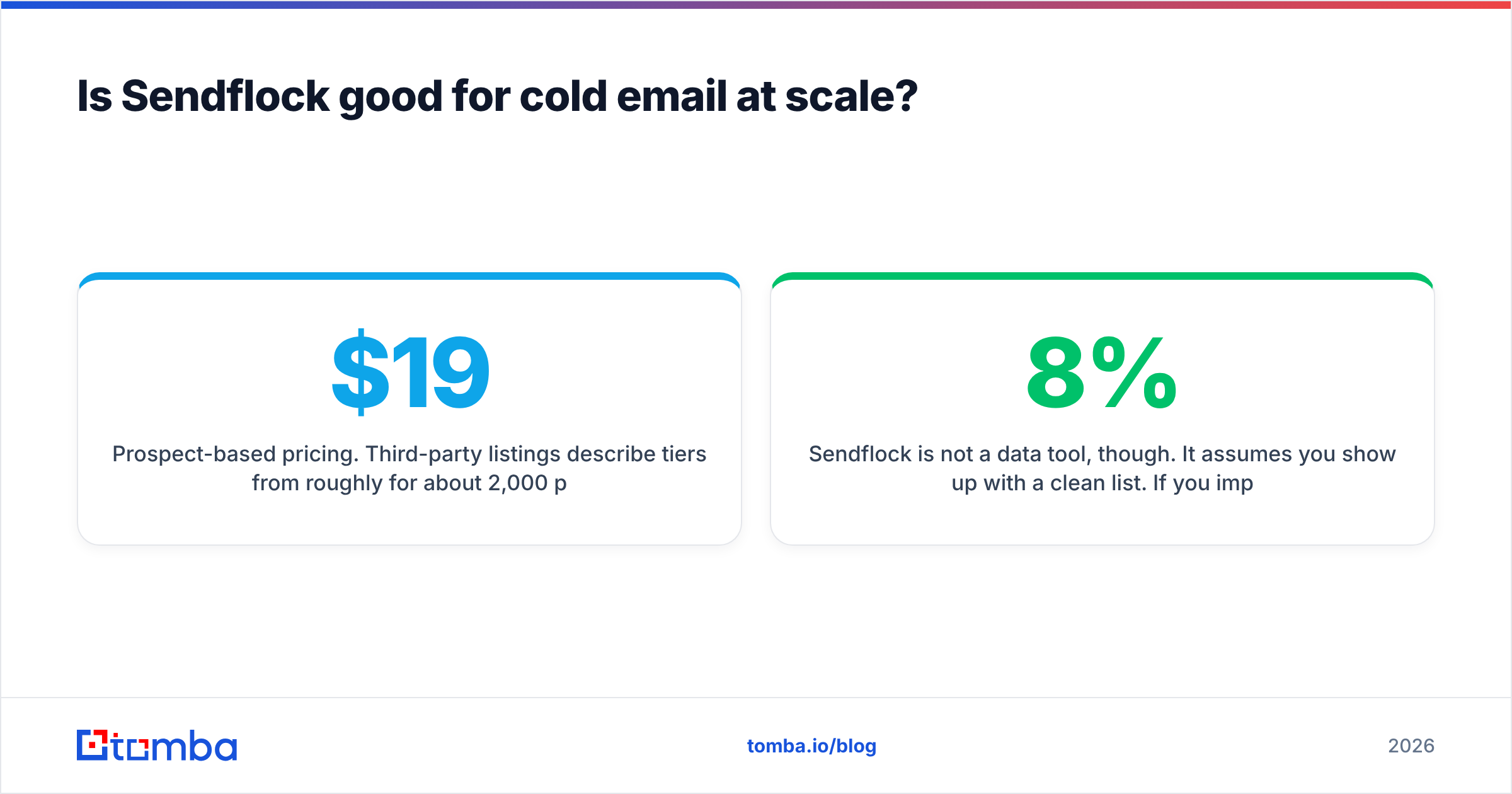
- Prospect-based pricing. Third-party listings describe tiers from roughly $19/mo for about 2,000 prospects up to around $49/mo for about 15,000. That's cheap next to enterprise sales engagement platforms.
Sendflock is not a data tool, though. It assumes you show up with a clean list. If you import 10,000 unverified addresses and 8% bounce, no amount of warmup protects your sender reputation. Mailbox providers see the bounces and throttle or junk the rest of your campaign.
Being a smaller vendor also means fewer native integrations and a smaller community than Instantly or Smartlead. If you mainly care about ecosystem, see our Instantly alternative breakdown for a wider view of the sending-tool market.
Which should you choose: Leadrocks or Sendflock?#
Pick based on your bottleneck, not on feature count. Use this decision list:
- You have no contacts yet. Start with Leadrocks or another data tool. Sendflock can't help until you have a list.
- You have a list but replies are low. Look at the sending side. Sendflock's warmup, rotation, and A/B testing target exactly this problem.
- Your bounce rate is above 3%. Your data layer is broken. Verify the list or switch data sources before sending anything else.
- You're an agency with many client domains. Sendflock's unlimited-mailbox model will probably save you more money than any data-tool discount.
- You're a solo founder running under 500 emails a month. Leadrocks' built-in sequences may be enough for now. Add a dedicated sender once volume grows.
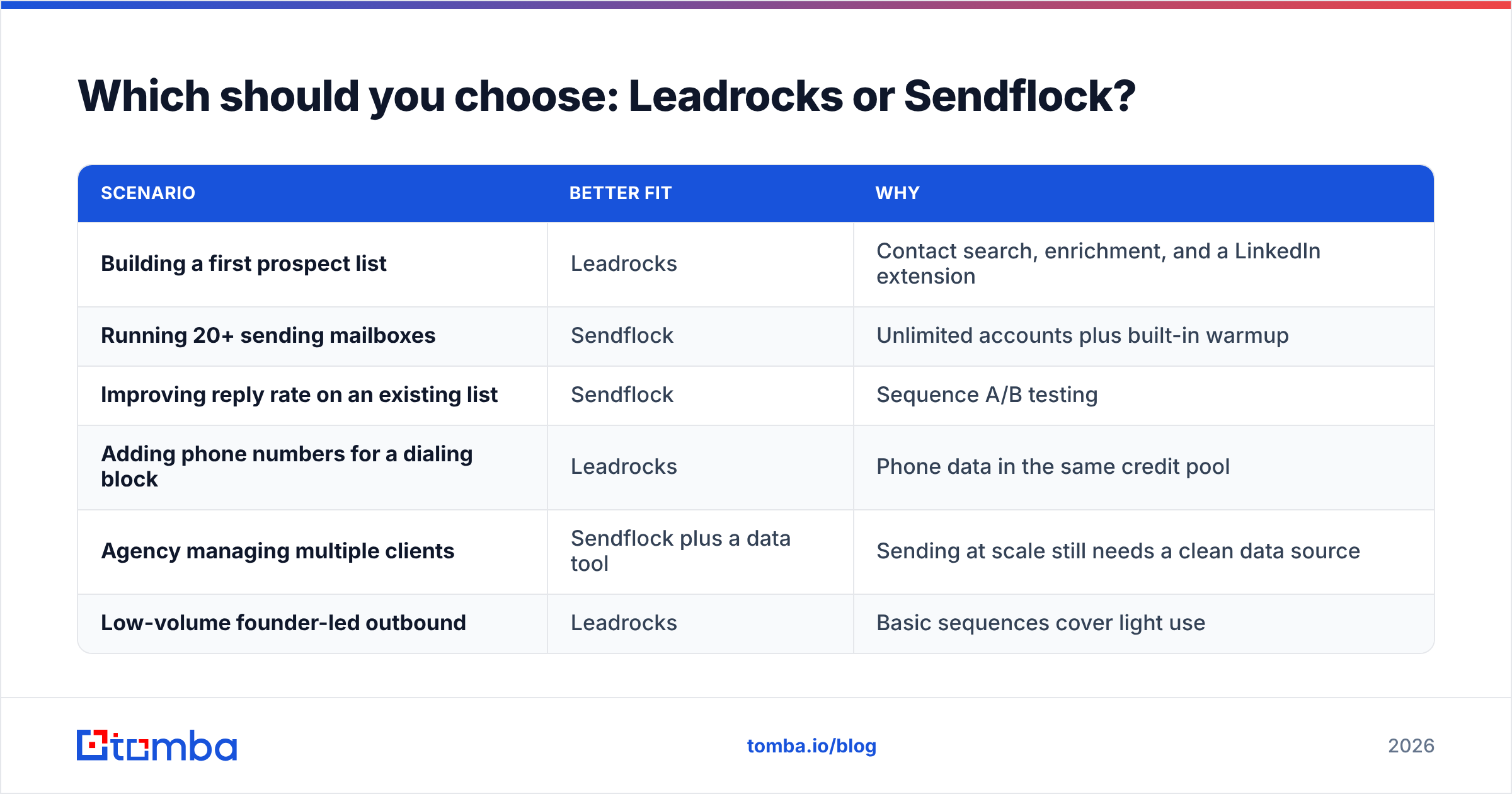
| Scenario | Better fit | Why |
|---|---|---|
| Building a first prospect list | Leadrocks | Contact search, enrichment, and a LinkedIn extension |
| Running 20+ sending mailboxes | Sendflock | Unlimited accounts plus built-in warmup |
| Improving reply rate on an existing list | Sendflock | Sequence A/B testing |
| Adding phone numbers for a dialing block | Leadrocks | Phone data in the same credit pool |
| Agency managing multiple clients | Sendflock plus a data tool | Sending at scale still needs a clean data source |
| Low-volume founder-led outbound | Leadrocks | Basic sequences cover light use |
Why does the data layer decide whether Sendflock works?#
This part of the "leadrocks vs sendflock" question usually gets skipped, and it's the part that costs you the most money.
Cold email deliverability depends on signals mailbox providers measure: bounce rate, spam complaints, engagement, and authentication. Google's sender guidelines spell out requirements for bulk senders, including keeping spam rates low and authenticating your domain. A high hard-bounce rate is one of the quickest ways to damage a domain, and it's a data problem, not a sending problem.
In practice:
- Unverified lists often carry double-digit invalid rates, especially lists scraped from old sources or bought in bulk.
- Catch-all domains accept every address at the SMTP level, so a basic verifier returns "accept-all" instead of a clear yes or no. These addresses need specialist checking.
- Role accounts (info@, sales@) and job changers quietly drag down engagement even when they don't bounce.
Whichever sender you choose, whether Sendflock or something else, the rule doesn't change. Verify every list before import, and re-verify anything older than about 90 days. G2's cold email software category is full of reviews blaming the sender for problems that trace back to the list.

Where does Tomba fit alongside Leadrocks and Sendflock?#
Tomba belongs to the same data layer as Leadrocks. It isn't a sender, so it pairs with Sendflock rather than replacing it. Where it differs from a database-first tool is the workflow: you start from a domain or a name and get back a verified address plus its public sources.
- Domain-first search. Enter a company domain and get the emails associated with it, along with the detected company email pattern.
- Name plus company lookup. The email finder returns a specific person's address with a confidence score.
- Verification in the same account. Run finder output through verification, including catch-all checks, before exporting to Sendflock.
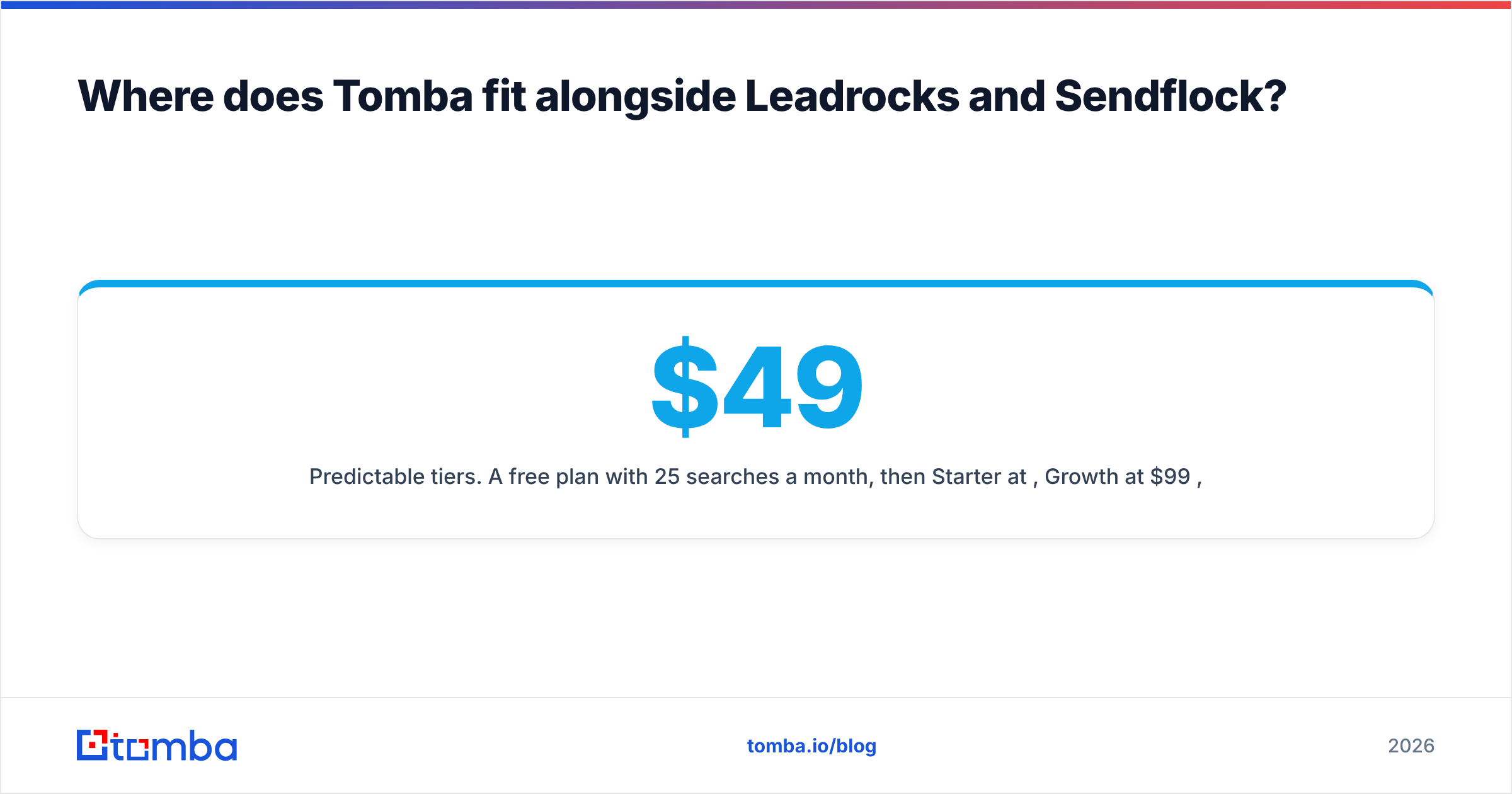
- Predictable tiers. A free plan with 25 searches a month, then Starter at $49/mo, Growth at $99/mo, and Pro at $249/mo. Full Tomba pricing is public.
If you already use Leadrocks and like its LinkedIn workflow, keep it. Tomba works well as a second source for waterfall enrichment: when one provider returns nothing or "risky" for a contact, check another. Coverage differs by region and industry, so two sources nearly always beat one.
What does a clean Leadrocks or Tomba to Sendflock workflow look like?#
This is a practical sequence that keeps bounce rates low and gives your sender a fair chance:
- Define the ICP tightly. Pick job titles, company size, geography, and one trigger (hiring, funding, new tech install).
- Build the raw list. Use Leadrocks search or the LinkedIn extension, or pull contacts by domain with Tomba.
- Fill gaps with a second source. Run contacts with no email, or a risky one, through another finder.
- Verify everything. Drop invalid addresses. Treat catch-all results as a separate, lower-volume segment.
- Deduplicate and tag. Remove duplicates across sources and tag each row by data source so you can compare bounce rates later.
- Import to Sendflock. Put catch-all and lower-confidence segments on warmed secondary mailboxes, not your best domain.
- Monitor for the first 72 hours. If hard bounces pass 2 to 3%, pause the campaign and re-check the segment.
Step 5 is the one people skip. Tagging by source is how you find out, with your own data, which provider performs best for your market. That beats trusting vendor accuracy claims.
What are the pros and cons of each tool?#
Leadrocks pros
- Free plan with unlimited users
- LinkedIn extension for in-context prospecting
- Emails and phone numbers in one credit system
- Free verification of its own contacts
Leadrocks cons
- Sequence features are basic compared with dedicated senders
- Phone credits add up at volume
- Data freshness varies by segment, so test before you scale
Sendflock pros
- Built for agencies, with unlimited sending accounts
- Warmup and A/B testing included
- Low entry pricing next to enterprise engagement platforms
Sendflock cons
- No contact data, so you need a separate data tool
- Smaller integration ecosystem than the market leaders
- Pricing details vary between third-party sources, so confirm on the vendor site
Frequently asked questions#
Can Sendflock replace Leadrocks? No. Sendflock doesn't provide contact data or email finding. You need a data source such as Leadrocks or Tomba to build the list first.
Can Leadrocks replace Sendflock? Only for light, low-volume outreach. Leadrocks includes basic sequences, but it isn't built for multi-mailbox rotation, warmup, or agency-scale campaign management.
Which is cheaper? They charge for different things. Leadrocks charges for data credits and Sendflock charges for sending capacity. A realistic outbound stack pays for both layers, and the cheapest setup is the one with the lowest bounce rate, because burned domains cost more than any subscription.
Do I need to verify Leadrocks emails before sending through Sendflock? Leadrocks verifies its own contacts, but re-verify anything that has sat in your CRM for a few months. People change jobs constantly, and addresses decay faster than most teams expect.
Final verdict: Leadrocks vs Sendflock#
Leadrocks is for finding people and Sendflock is for reaching them. If you have no list, start with Leadrocks. If you have a list but weak results, start with Sendflock. Most teams need both layers, and outbound programs usually fail because of bad data upstream, not because they picked the wrong sender.
Before your next Sendflock campaign, make sure every address you import is real. Tomba Email Finder finds professional emails by domain, name, or company, shows the public sources behind each result, and lets you verify in the same step. The free plan covers 25 searches a month, which is enough to benchmark it against your current data source on your own ICP.
Related guides#
// get started
Find, verify and enrich your first contacts today
Start on the free plan with 25 searches a month, then scale when your team is ready.
Free plan · No credit card required · GDPR & CCPA
// about the author