Leadrocks vs Thomson Data: Self-Serve Finder or Managed Lists?
Leadrocks sells self-serve prospecting with a Chrome extension. Thomson Data sells prebuilt and custom B2B lists on a quote. This guide compares pricing models, data freshness, compliance and workflow fit so you can choose the one that suits how your team actually prospects.
TL;DR
- Leadrocks is a self-serve prospecting tool. You get a searchable B2B contact database and a Chrome extension that works alongside LinkedIn, and you pay a monthly subscription for a set number of contact credits.
- Thomson Data is a traditional B2B data vendor. It sells prebuilt and custom contact lists (email and postal), data appending, and install-base lists, and prices each order by quote.
- Pick Leadrocks if your reps prospect one account at a time and need contacts the same day. Pick Thomson Data if marketing needs one large segmented list for a campaign or a CRM backfill.
- Neither tool removes the need to verify addresses right before you send. A list that tested clean in the spring can bounce hard by autumn.
- If you want both on-demand lookups and built-in verification without a sales call, a finder with published pricing, such as Tomba, sits between the two models.
What is the real difference between Leadrocks and Thomson Data?#
These two are often compared, but they sell different things. It's like comparing a grocery store with a caterer. At a grocery store you pick each item yourself when you need it. A caterer delivers a finished spread built to your brief, and you pay for the whole order.
Leadrocks is the grocery store. You log in, filter a B2B database by job title, industry, company size and location, and reveal contact details one at a time or in batches. Its browser extension pulls contact data while you browse LinkedIn profiles, so it fits the way SDRs already work. It's priced as a subscription with monthly credit allowances, and you can see the details on the Leadrocks website.
Thomson Data is the caterer. It is a list and data-services vendor. You tell it who you want to reach (for example, "IT decision makers at US hospitals with 500+ beds" or "companies using a specific ERP"). Its team builds the file, and you get a CSV or a mailing-ready dataset. It also offers data appending (adding missing emails, phones or firmographics to records you already hold) and data cleansing. Its catalogue is on the Thomson Data website.
So the real question isn't which database is bigger. It's whether you want to look up contacts yourself on demand or buy a finished list.
How do Leadrocks and Thomson Data compare feature by feature?#
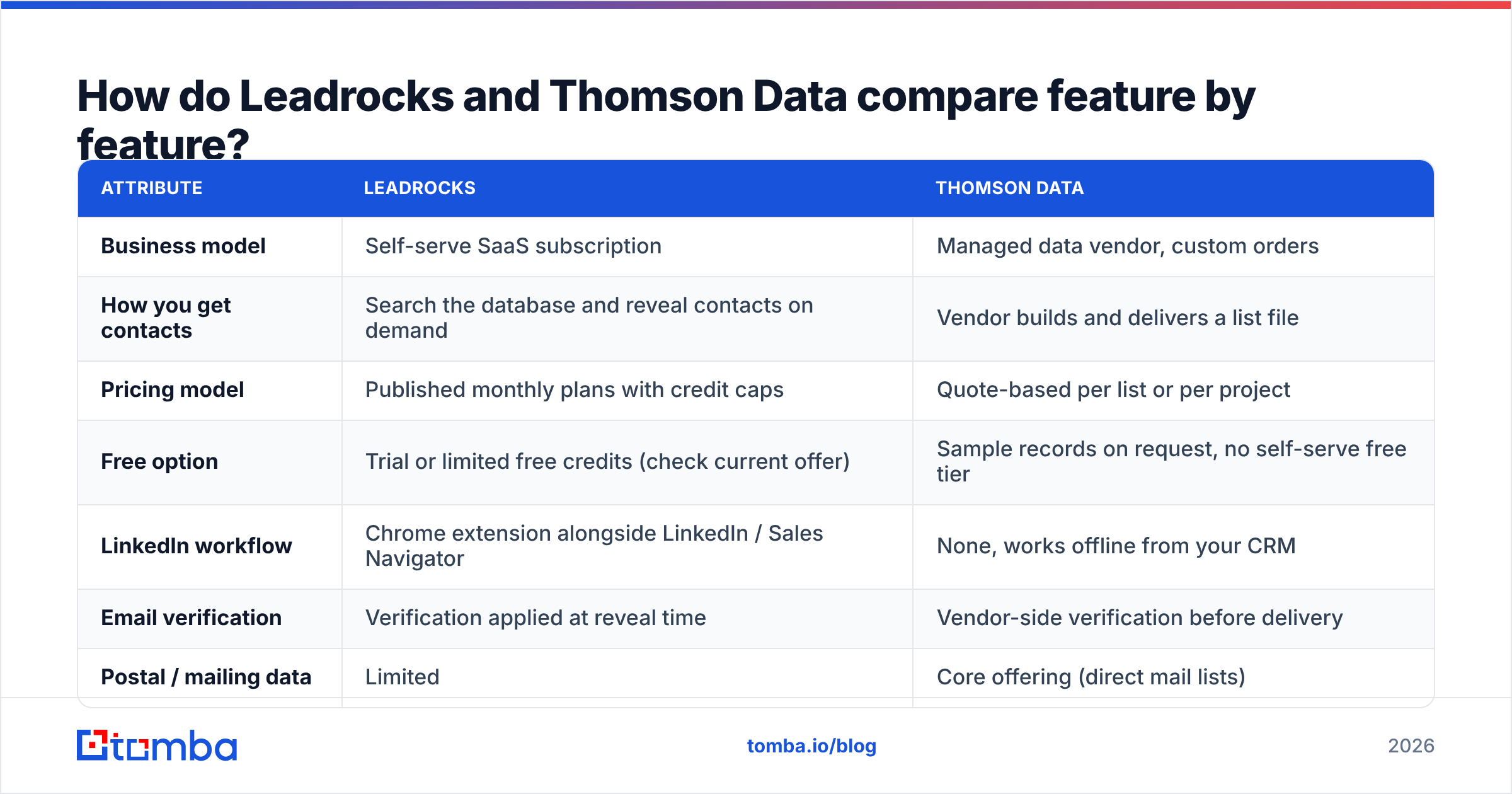
The table covers the attributes that matter most when you choose between them. Pricing and data volumes change often, so check current numbers on each vendor's site before you buy.
| Attribute | Leadrocks | Thomson Data |
|---|---|---|
| Business model | Self-serve SaaS subscription | Managed data vendor, custom orders |
| How you get contacts | Search the database and reveal contacts on demand | Vendor builds and delivers a list file |
| Pricing model | Published monthly plans with credit caps | Quote-based per list or per project |
| Free option | Trial or limited free credits (check current offer) | Sample records on request, no self-serve free tier |
| LinkedIn workflow | Chrome extension alongside LinkedIn / Sales Navigator | None, works offline from your CRM |
| Email verification | Verification applied at reveal time | Vendor-side verification before delivery |
| Postal / mailing data | Limited | Core offering (direct mail lists) |
| Data append / enrichment of your CRM | Limited, record by record | Core service (email, phone, firmographic append) |
| Install-base / technographic lists | Basic filters | Dedicated technology-user lists |
| Time to first contact | Minutes | Days (scoping, build, delivery) |
| Best fit | SDRs, founders, small outbound teams | Marketing ops, ABM campaigns, CRM backfills |
The rows point to one pattern. Leadrocks is built for speed and granularity. Thomson Data is built for volume and segmentation depth.
How should you think about data freshness?#
Data freshness matters more than any other attribute in this comparison, and it's where the two delivery models differ most.
B2B contact data decays all the time. People change jobs, companies rebrand domains, and mailboxes get shut down. A common industry estimate puts annual B2B data decay at roughly 20–30%, although the real rate depends heavily on the industry and seniority you target.
With Leadrocks, you reveal a contact at the moment you need it, so the data you get is as fresh as the database's latest refresh. The contact goes into a sequence within hours, and there's little time for it to go stale in between.
With Thomson Data, the vendor verifies the list before delivery. Then it sits in your CRM or marketing platform. If you use it in a campaign over six months, the last send reaches a noticeably older file than the first one. This isn't a flaw in Thomson Data. The same thing happens to any static list from any vendor.

What you should do either way:
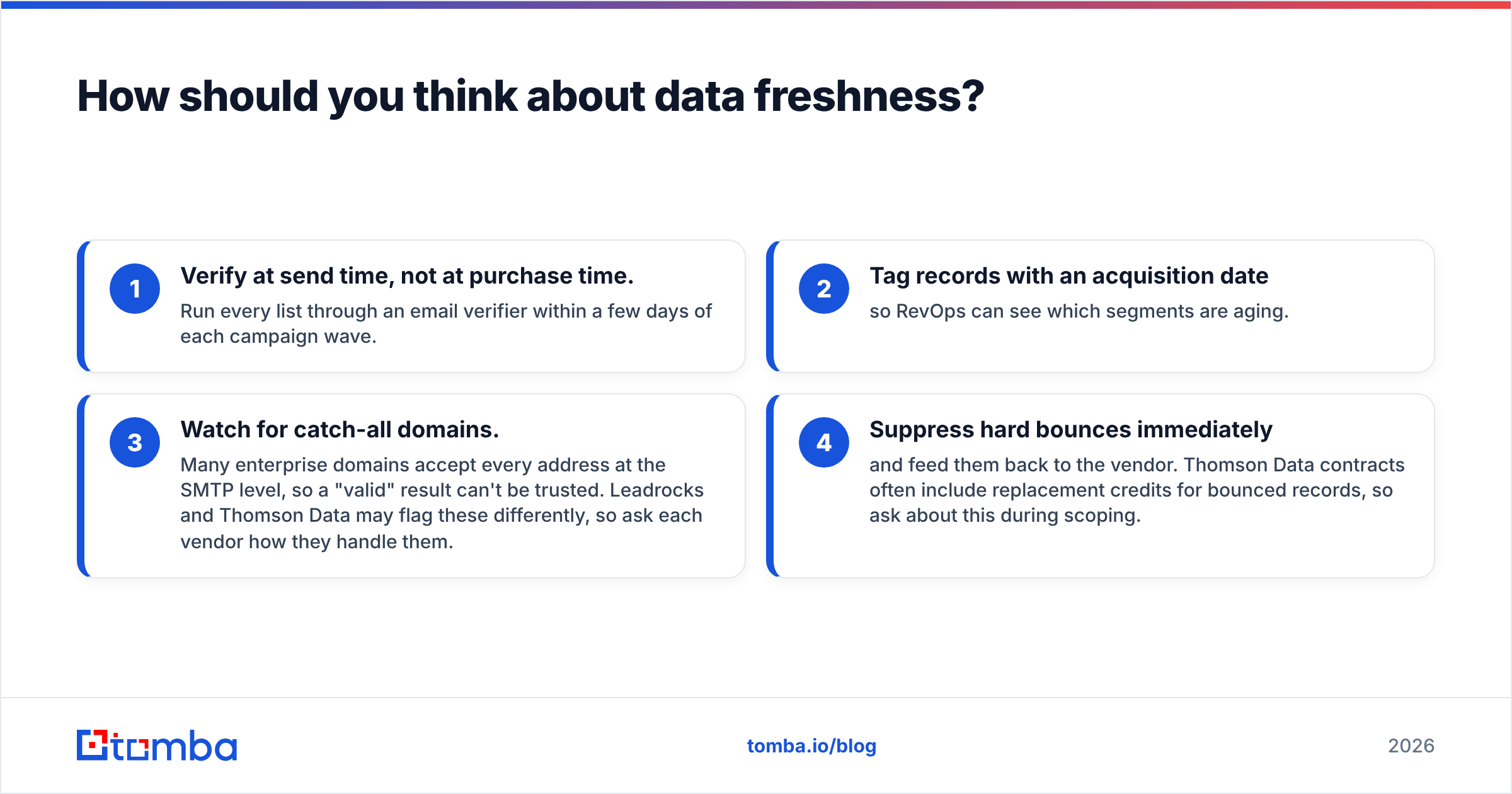
- Verify at send time, not at purchase time. Run every list through an email verifier within a few days of each campaign wave.
- Tag records with an acquisition date so RevOps can see which segments are aging.
- Watch for catch-all domains. Many enterprise domains accept every address at the SMTP level, so a "valid" result can't be trusted. Leadrocks and Thomson Data may flag these differently, so ask each vendor how they handle them.
- Suppress hard bounces immediately and feed them back to the vendor. Thomson Data contracts often include replacement credits for bounced records, so ask about this during scoping.
How much do Leadrocks and Thomson Data cost?#
The pricing structures are so different that a straight price comparison can mislead you.
Leadrocks publishes subscription tiers. You pay monthly and get a fixed number of contact credits, and higher tiers unlock more credits and team features. Budgeting is simple: you know your cost per month, and you can work out cost per contact by dividing the plan price by the credits you actually use. If you only use half your credits, your effective cost per contact doubles.
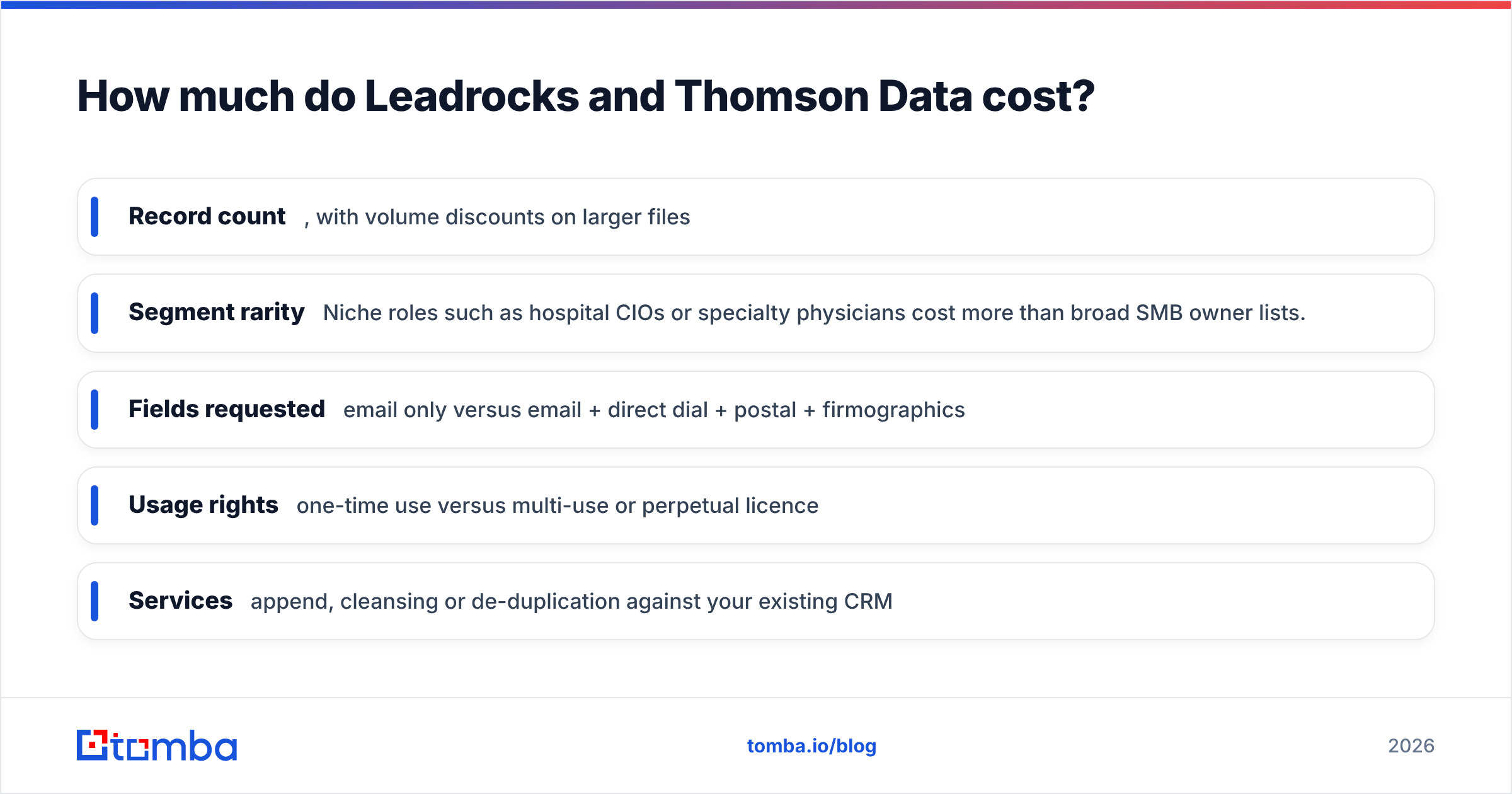
Thomson Data quotes each order. What drives the price:
- Record count, with volume discounts on larger files
- Segment rarity. Niche roles such as hospital CIOs or specialty physicians cost more than broad SMB owner lists.
- Fields requested: email only versus email + direct dial + postal + firmographics
- Usage rights: one-time use versus multi-use or perpetual licence
- Services: append, cleansing or de-duplication against your existing CRM
For a one-off campaign that needs 20,000 tightly segmented records, one quote from Thomson Data can cost less than a year of self-serve seats. For a team that needs 300 new contacts each week, every week, a subscription almost always works out cheaper and faster.

There's one hidden cost to budget for with either vendor: bounces. Your sending domain pays for them, even if a vendor refunds the credits. If you send a campaign to an unverified file and it bounces at 8–10%, you can damage your email deliverability for weeks.
Which is better for outbound sales teams?#
For SDR- and AE-led outbound, Leadrocks usually fits better, for three reasons:
- It fits the LinkedIn workflow. Reps research prospects on LinkedIn anyway, so an extension that shows contact data right there saves tab switching and CSV imports.
- You prospect one account at a time. Account-based outbound needs the right three people at 40 specific accounts, not 40,000 loosely matched names. On-demand lookup suits that.
- Costs stay predictable per rep. A seat-based subscription maps cleanly to headcount.
Where Leadrocks can struggle is coverage in niche verticals and regions. Self-serve databases usually cover tech, SaaS and North American mid-market companies well. Coverage thins out in areas like regional manufacturing, public sector or healthcare administration. Test your own ICP before you commit: take 50 target accounts and check how many decision-makers each tool actually returns.
Which is better for marketing and ABM campaigns?#
For marketing-led programs, Thomson Data usually fits better:
- Multichannel campaigns that combine email with direct mail need postal addresses, which are a core Thomson Data product and a side feature at most self-serve tools.
- Technology install-base lists (for example, "companies running a specific CRM or ERP") help competitive displacement campaigns. Thomson Data sells these as dedicated products.
- CRM backfill and append. If your CRM has 50,000 accounts with missing emails or out-of-date titles, a managed append job is much faster than revealing records one by one.
- Event and webinar promotion often needs one large, well-segmented list on a deadline, which is exactly the kind of job a list vendor is set up for.
The trade-off is agility. If the campaign brief changes mid-flight, you go back to scoping and quoting, while a self-serve user just changes a filter.
How do they handle compliance and data sourcing?#
Compliance should rule a vendor in or out, and in 2026 procurement teams increasingly ask about it first.
Ask both vendors the same questions:
- Where does the data come from? Is it public web sources, contributory networks, partnerships or compiled directories?
- What is the lawful basis for processing EU and UK contacts under GDPR? For B2B outreach this is usually legitimate interest, and you should get a documented assessment.
- How are opt-out and deletion requests handled, and do they flow through to lists already delivered?
- Is there a suppression list you can apply before delivery?
- Can they provide a data processing agreement (DPA)?
Managed vendors like Thomson Data usually give you contractual paperwork per order. Self-serve tools usually cover compliance through platform terms and a privacy policy. Neither approach is better by default. What matters is whether the documentation satisfies your legal team. Before signing, it's also worth checking independent reviews on G2 for recurring comments about data accuracy and support responsiveness.
What are the pros and cons of each?#
Leadrocks — pros
- Self-serve access, so you get your first contact within minutes
- Chrome extension alongside LinkedIn
- Clear, published subscription pricing
- Good for small teams and ABM with steady, low volume
Leadrocks — cons
- Credit caps can limit large campaigns
- Coverage in niche verticals and regions may be thinner
- Limited postal and bulk append capability
Thomson Data — pros
- Deep segmentation, including technographic and industry-specific lists
- Postal data for direct mail
- Managed append and cleansing services for existing CRMs
- One quote can cover a large one-off campaign
Thomson Data — cons
- No self-serve lookup, so every change needs a new request
- Quote-based pricing makes early budgeting harder
- Static files age once delivered, so you need to verify again regularly
Is there a middle ground between self-serve and managed lists?#
Yes. Many teams end up with a hybrid: a managed vendor for the occasional large segmented pull, and an on-demand finder for daily prospecting and for checking addresses before sends.
That on-demand layer needs three things:
- Lookup by name + company or domain. A rep who has a prospect's name and company website should get a verified email in seconds. A domain search that lists every public address and pattern at a company covers the account-mapping side.
- Verification built in, so bought lists can be re-checked before each campaign wave without buying another tool.
- Transparent pricing without a scoping call. For reference, Tomba plans run from a free tier (25 searches/month) through Starter at $49/mo, Growth at $99/mo and Pro at $249/mo, with Enterprise on custom terms.
This setup lets you keep a Thomson Data–style list for the big quarterly direct-mail and email push. Daily outbound runs through a self-serve finder, and everything passes a verification check within days of sending.
So, Leadrocks vs Thomson Data: which should you choose?#
Decide by workflow, not by database size:
- Choose Leadrocks if you're a founder, SDR team or small agency that prospects on LinkedIn, needs contacts the same day, and prefers a predictable monthly bill.
- Choose Thomson Data if you're a marketing or RevOps team running large segmented campaigns, need postal or install-base data, or have a CRM that needs a bulk append.
- Use both (or a hybrid) if you have outbound reps and campaign marketers working on the same ICP. In that case, standardise on one verification step so that neither source harms your sender reputation.
Whichever you pick, run a pilot first. Send each vendor the same 50 accounts from your real ICP, then compare how many decision-makers each returns, the verified-email rate and the bounce rate after one real send. Those three numbers will tell you more than any feature page.
If what you actually need is fast, on-demand contact discovery with verification included, try the Tomba Email Finder. You enter a name and a company or domain and get a verified professional email back in seconds. It works in the browser, through the API or in bulk, and you can start on the free tier before you commit to a plan. It works well on its own for daily prospecting, or alongside any list vendor to keep purchased data clean before every send.
Related guides#
// get started
Find, verify and enrich your first contacts today
Start on the free plan with 25 searches a month, then scale when your team is ready.
Free plan · No credit card required · GDPR & CCPA
// about the author