Leads Database: How to Choose, Build, and Keep One Accurate in 2026
A leads database is only as good as the day you last checked it. Here is how to pick a provider, build your own, and keep bounce rates under 2% without overpaying for records you won't use.
TL;DR
- A leads database is a searchable store of companies and contacts, including emails, phones, titles, and firmographics, that your team prospects from. The size of the database matters less than how fresh the records are and how well they fit your ICP.
- B2B contact data goes stale fast. Commonly cited estimates put decay at 20–30% of records per year, so verify every list before you send to it.
- You have three options: buy access to a large platform (ZoomInfo, Apollo, Lusha), buy per record from a credit-based vendor (BookYourData, Tomba), or build your own with an email finder and enrichment.
- Most lean teams do best with a hybrid: pull a targeted list, enrich the gaps, verify, and then load it into the CRM.
- Price the whole year before you sign. Seat licences, export caps, and credit expiry matter more than the headline monthly price.
What is a leads database?#
A leads database is a structured collection of prospect records that sales and marketing teams search, filter, and export to run outbound campaigns. A typical record combines two layers:
- Company data (firmographics): name, domain, industry, headcount, revenue band, location, tech stack, funding.
- Contact data: full name, job title, seniority, department, work email, direct dial or mobile, LinkedIn URL.
The term covers two different things. One is a vendor database, the multi-million-record index you rent access to. The other is your internal leads database, the curated subset in your CRM that your reps actually work. Teams tend to treat these as one thing. They aren't. A vendor can have 200 million contacts, and the only number that matters to you is how many of them match your ideal customer profile and still work today.
If you want the broader context, lead generation is the discipline, and the leads database is the raw material behind it.
Why does the size of a leads database matter less than its freshness?#
People change jobs, companies rebrand, domains migrate, and inboxes get shut down. Every one of those events quietly breaks a record. With the 20–30% annual decay estimate, a list you bought in January can have a quarter of its emails bouncing or going to departed employees by December.
That hurts in two ways:
- Wasted spend. You paid for records that no longer reach anyone.
- Deliverability damage. High bounce rates tell mailbox providers you're sending to purchased or scraped lists. Your domain reputation drops, and then your good emails start landing in spam too.
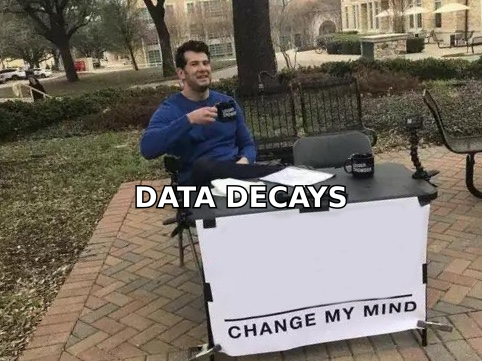
So the useful question to ask a vendor is how recently a record was verified and how they verified it, not how many contacts they have. A vendor that re-verifies on export, or lets you verify before you pay, is worth more than one with a bigger headline number.
What are the main types of leads databases?#
Before you compare vendors, work out which kind you're buying. The type decides the pricing model, the refresh cadence, and how much cleanup you'll do.
- All-in-one sales intelligence platforms. These are large proprietary databases with intent data, org charts, and built-in sequencing. Examples: ZoomInfo, Apollo. They have wide coverage but usually come with annual contracts and per-seat pricing.
- Contact-first data vendors. Their focus is emails and phone numbers for named people, often sold through a Chrome extension on LinkedIn. Example: Lusha. They're fast for reps who prospect one person at a time.
- Pay-per-record list builders. You filter a database, preview the counts, and pay only for the contacts you export, usually with a deliverability guarantee. Example: BookYourData. This model works well for campaign-sized lists without a seat commitment.
- Email finder and enrichment platforms. You bring the targets (domains, names, a CSV of accounts) and the tool finds and verifies emails and fills in missing fields. Example: Tomba. This is the build-your-own route.
- Your CRM as the system of record. HubSpot, Salesforce, or Pipedrive store everything above once it's clean. It isn't a data source, but it's where decay either gets managed or ignored.
How do the leading leads database providers compare?#
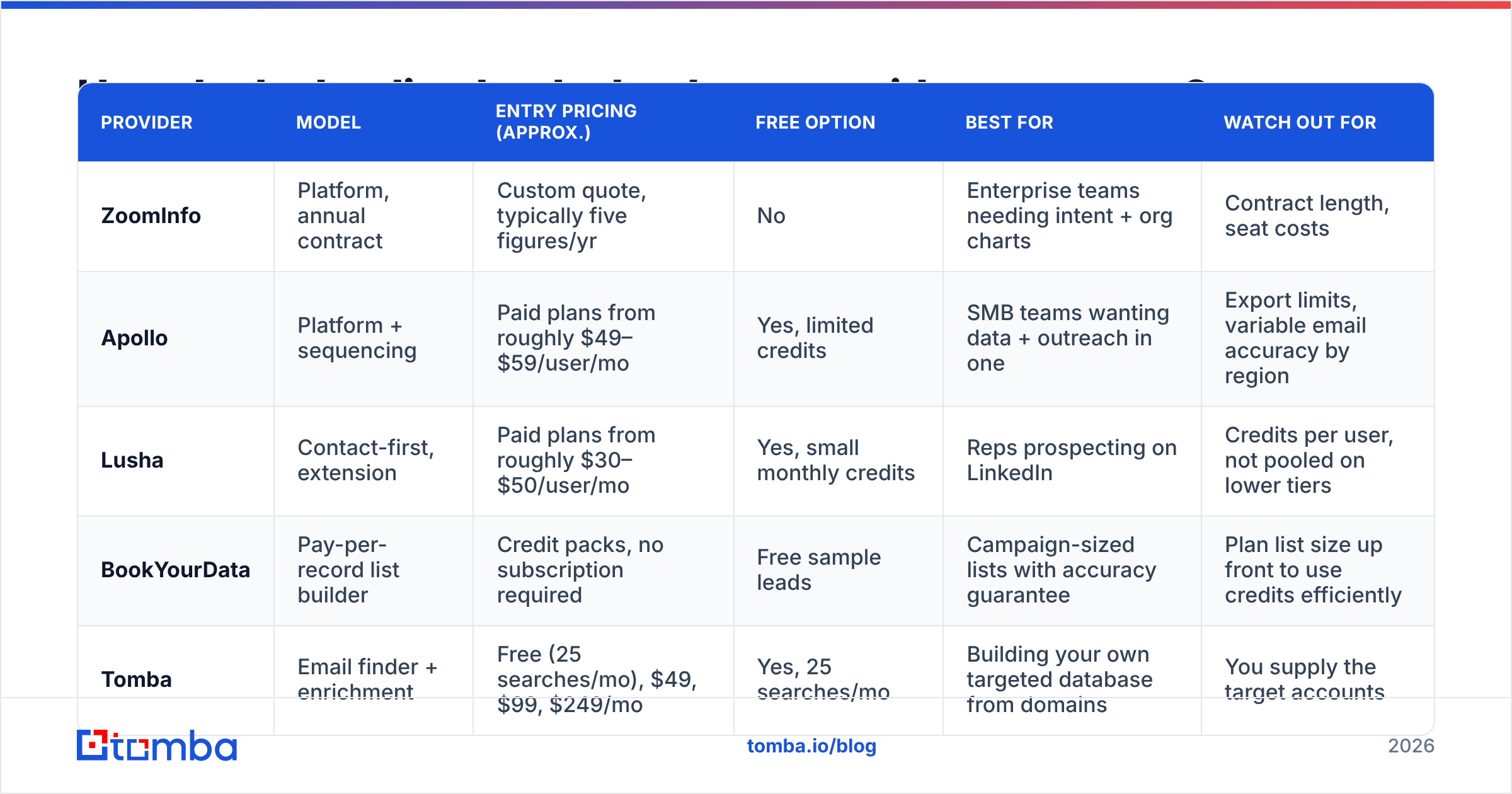
The table below compares the tools teams most often shortlist. Pricing models change often, so treat the figures as orientation and confirm on each vendor's site before you budget. Peer reviews on G2's lead intelligence category are a good sanity check on day-to-day accuracy.
| Provider | Model | Entry pricing (approx.) | Free option | Best for | Watch out for |
|---|---|---|---|---|---|
| ZoomInfo | Platform, annual contract | Custom quote, typically five figures/yr | No | Enterprise teams needing intent + org charts | Contract length, seat costs |
| Apollo | Platform + sequencing | Paid plans from roughly $49–$59/user/mo | Yes, limited credits | SMB teams wanting data + outreach in one | Export limits, variable email accuracy by region |
| Lusha | Contact-first, extension | Paid plans from roughly $30–$50/user/mo | Yes, small monthly credits | Reps prospecting on LinkedIn | Credits per user, not pooled on lower tiers |
| BookYourData | Pay-per-record list builder | Credit packs, no subscription required | Free sample leads | Campaign-sized lists with accuracy guarantee | Plan list size up front to use credits efficiently |
| Tomba | Email finder + enrichment | Free (25 searches/mo), $49, $99, $249/mo | Yes, 25 searches/mo | Building your own targeted database from domains | You supply the target accounts |
Some patterns stand out:
- Seat-based platforms make sense when many reps work the database every day. When one ops person builds lists for everyone, you pay for seats nobody uses.
- Pay-per-record vendors like BookYourData fit teams that run discrete campaigns, such as a quarterly push into a new vertical. You pay for the 3,000 contacts you need, not a year of access.
- Finder-plus-enrichment tools fit teams that already know their target accounts from an ABM list, a conference attendee list, or inbound website visitors, and need to turn domains into verified decision-maker emails.
Should you buy a leads database or build your own?#
It depends on how well you already know your market.
Buy when:
- You're entering a new segment and don't know the account universe yet.
- You need firmographic filtering at scale, such as "every SaaS company in DACH with 50–200 employees".
- Your team is large enough to use seat-based platform features like intent and sequencing.
Build when:
- You already have a named account list (ABM, partner lists, event leads, CRM accounts that went cold).
- Your ICP is narrow enough that a big database returns a lot of irrelevant records.
- You want records that are verified at the moment you use them, not at the moment the vendor last crawled them.
Hybrid (what most teams end up doing): Pull a broad account list from a database vendor, then use an email finder and enrichment layer to fill contact gaps and re-verify before sending. The vendor gives you coverage and your own verification step gives you accuracy.
How do you build a leads database from scratch?#
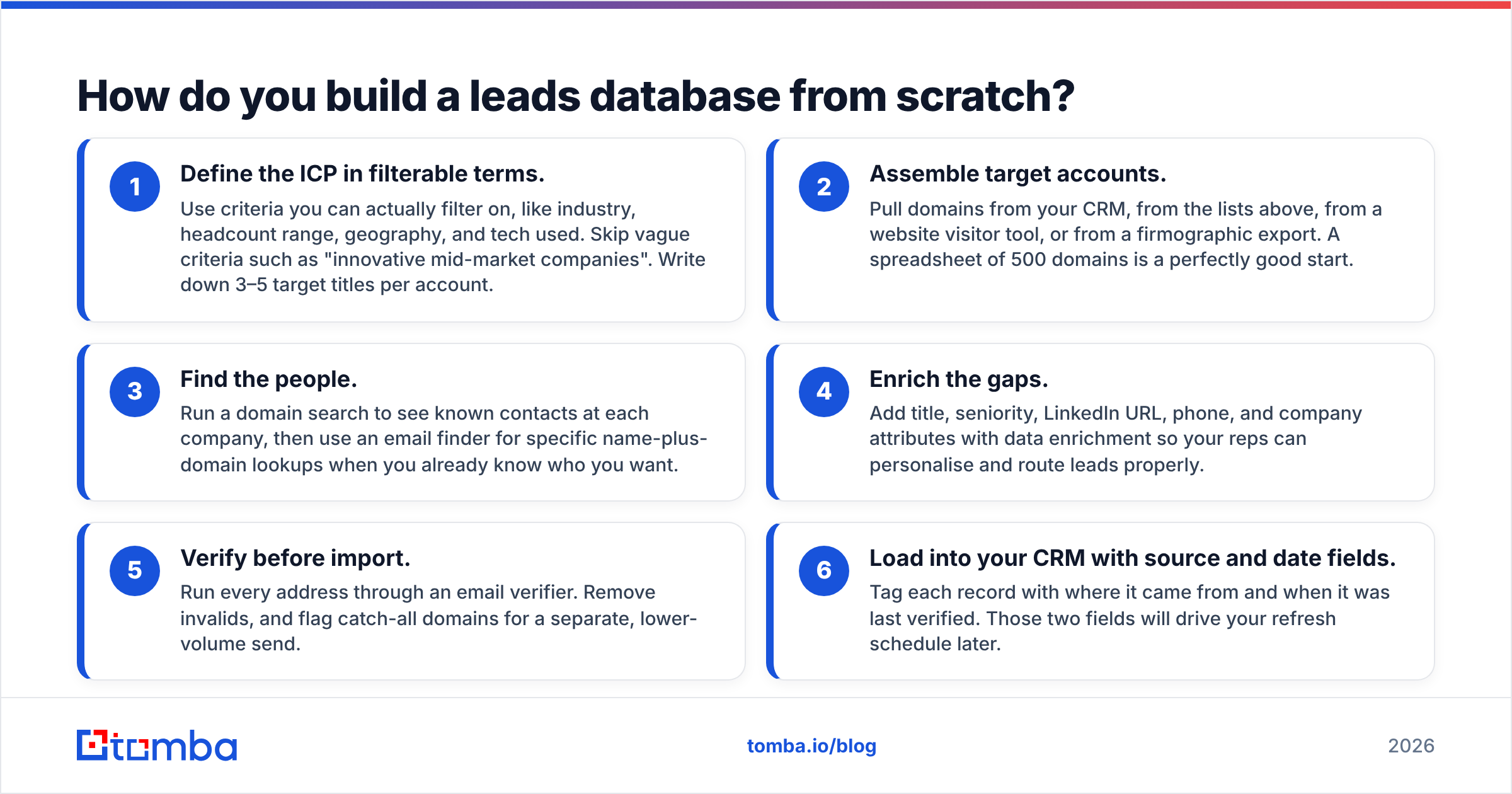
If you go the build route, this workflow produces a clean, ICP-matched list without paying for millions of records you'll never touch.
- Define the ICP in filterable terms. Use criteria you can actually filter on, like industry, headcount range, geography, and tech used. Skip vague criteria such as "innovative mid-market companies". Write down 3–5 target titles per account.
- Assemble target accounts. Pull domains from your CRM, from the lists above, from a website visitor tool, or from a firmographic export. A spreadsheet of 500 domains is a perfectly good start.
- Find the people. Run a domain search to see known contacts at each company, then use an email finder for specific name-plus-domain lookups when you already know who you want.
- Enrich the gaps. Add title, seniority, LinkedIn URL, phone, and company attributes with data enrichment so your reps can personalise and route leads properly.
- Verify before import. Run every address through an email verifier. Remove invalids, and flag catch-all domains for a separate, lower-volume send.
- Load into your CRM with source and date fields. Tag each record with where it came from and when it was last verified. Those two fields will drive your refresh schedule later.
This approach costs far less per usable contact than a platform subscription, because every record starts from an account you already chose.
How do you keep a leads database accurate over time?#
Building the list is the easy part. The ongoing work is keeping it accurate.

A maintenance routine that actually holds up:
- Re-verify before every campaign. Re-verify anything older than 60–90 days, even if it passed last quarter.
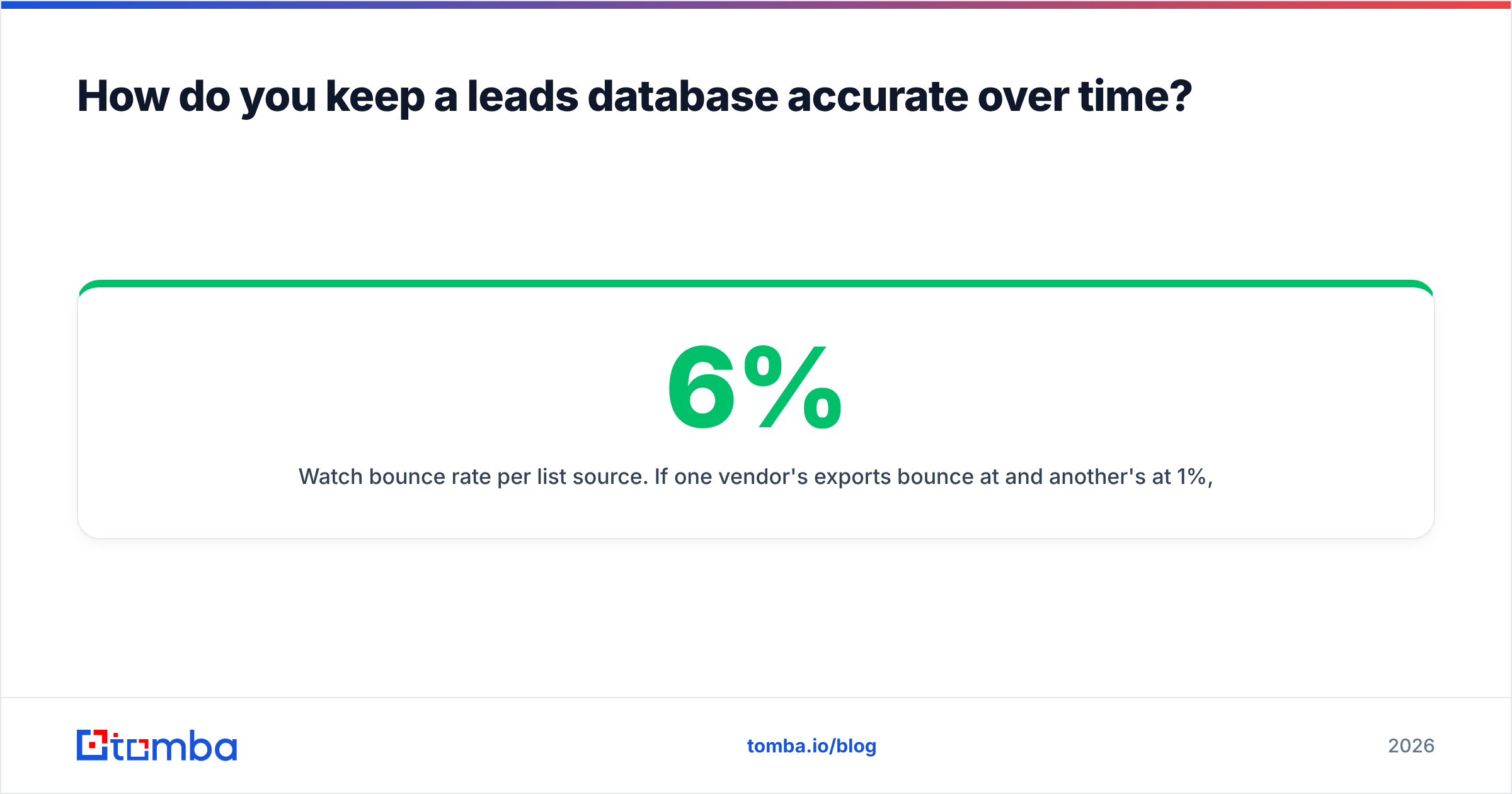
- Watch bounce rate per list source. If one vendor's exports bounce at 6% and another's at 1%, you have your renewal decision. Keep hard bounces under roughly 2%.
- Suppress, don't delete. Keep bounced and unsubscribed contacts in a suppression list so they never get re-imported from a fresh export.
- Refresh job changes. When a champion leaves, find their replacement at the old account and follow the champion to their new company. Both are warm leads.
- Deduplicate on import. Match on email and on name + domain. Duplicates inflate your database size and cause reps to double-touch the same prospect.
- Store a "last verified" timestamp. Your CRM, whether that's HubSpot or anything else, should let you build a view of stale records so decay is visible rather than hidden.
What should a leads database cost in 2026?#
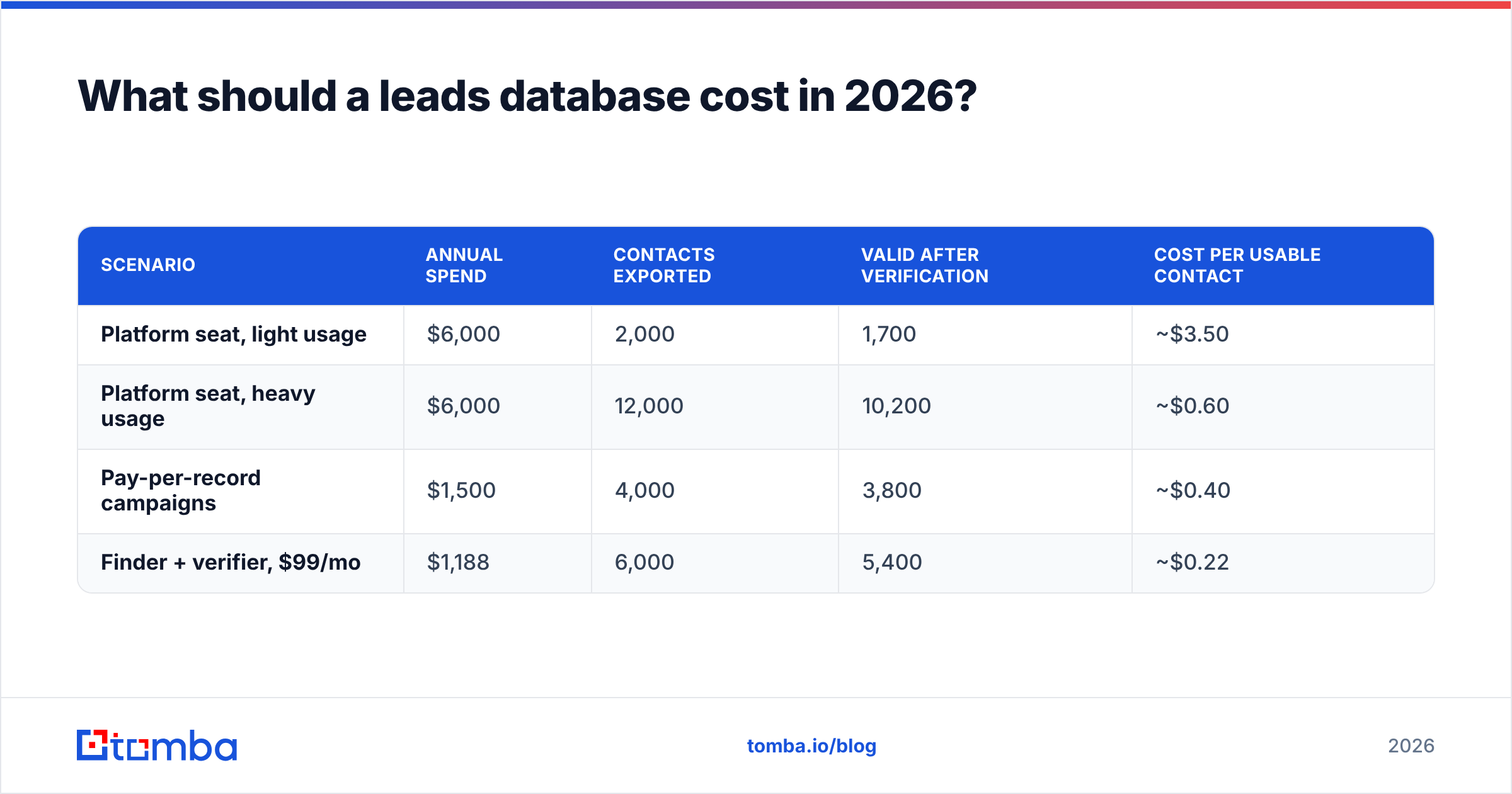
Budget by cost per usable contact, not by monthly fee. Here's a rough way to compare:
| Scenario | Annual spend | Contacts exported | Valid after verification | Cost per usable contact |
|---|---|---|---|---|
| Platform seat, light usage | $6,000 | 2,000 | 1,700 | ~$3.50 |
| Platform seat, heavy usage | $6,000 | 12,000 | 10,200 | ~$0.60 |
| Pay-per-record campaigns | $1,500 | 4,000 | 3,800 | ~$0.40 |
| Finder + verifier, $99/mo | $1,188 | 6,000 | 5,400 | ~$0.22 |
These are illustrative numbers, not quotes, but the shape is consistent. Seat-based tools are cheap only when you use them heavily. Credit-based and finder-based models scale down better for small teams and scale up predictably for campaign work.
Check these before you sign:
- Do unused credits roll over or expire monthly?
- Is there a separate export cap on top of the credits?
- Are verification credits separate from search credits?
- Is there a minimum contract term or auto-renewal clause?
For Tomba specifically, the tiers are Free (25 searches/mo), Starter at $49/mo, Growth at $99/mo, Pro at $249/mo, and Enterprise on custom terms. Full limits are on the Tomba pricing page.
Is a leads database compliant with GDPR and CAN-SPAM?#
It can be, but compliance depends on how you use the data as much as on where it came from.
- Under GDPR, B2B cold outreach usually relies on "legitimate interest". That means a relevant offer, a clear identity, an easy opt-out, and honouring objections promptly. The GDPR overview on Wikipedia covers the principles if you need a refresher.
- Under CAN-SPAM (US), you need accurate headers, a physical address, and a working unsubscribe that you honour within 10 business days.
- Ask vendors where their data comes from, whether they honour opt-out requests at the source, and whether they sign a DPA. A reputable vendor answers all three without hesitation.
Keep your own records of source and collection date. The source and "last verified" fields from the build workflow double as your compliance audit trail.
Which leads database approach is right for your team?#
A quick decision guide:
- Enterprise team, 20+ reps, needs intent data and org charts: an all-in-one platform like ZoomInfo is worth evaluating.
- SMB team that wants data and sequencing in one tool: Apollo is a common starting point.
- Reps who prospect person by person on LinkedIn: a contact-first extension like Lusha fits that workflow.
- Campaign-driven team that wants to pay only for what it exports: a pay-per-record vendor like BookYourData is a strong, low-commitment choice.
- Team that already knows its target accounts and wants verified emails on demand: build your own with an email finder, enrichment, and a verifier. You can also browse the Tomba database when you need a starting set.
Whichever you pick, the rule is the same: verify before you send, record when each contact was last checked, and re-verify on a schedule.
If you already have a list of target companies and need the right people's verified work emails, start with Tomba Email Finder. Enter a domain or a name plus company, get a verified address back, and export straight to your CRM or spreadsheet. The free plan gives you 25 searches a month, which is enough to check accuracy against your current data source before you spend anything.
Related guides#
// get started
Find, verify and enrich your first contacts today
Start on the free plan with 25 searches a month, then scale when your team is ready.
Free plan · No credit card required · GDPR & CCPA
// about the author