Leadsforge vs No2bounce: Which Tool Fits Your Outbound Stack?
Leadsforge builds lead lists. No2bounce cleans them. We compare pricing, credit costs, and workflows so you know which one your outbound stack needs, or whether you need both.
TL;DR
- Leadsforge and No2bounce do different jobs. Leadsforge is an AI lead-generation tool that builds contact lists from a plain-language description of your ideal customer. No2bounce is an email verification service that checks whether addresses you already have will bounce.
- Pricing works differently. At the time of writing, Leadsforge's Essential plan costs $49/mo for 2,000 export credits (1 credit per email, 10 per phone number). No2bounce sells pay-as-you-go packs, for example 25,000 verifications for $30.
- Choose Leadsforge if you don't have leads yet. Choose No2bounce if you already have a list, such as a CRM export, event list, or scraped data, and you need to protect your sender reputation.
- Many teams use both: they source with one tool and verify with the other. If you'd rather not juggle two tools, a single platform that finds and verifies contacts removes that step.
What is the real difference between Leadsforge and No2bounce?#
Most "Leadsforge vs No2bounce" searches rest on a false premise: that the two tools compete head to head. Mostly they don't.
Leadsforge (leadsforge.ai) is a prospecting and list-building tool from the Forge family of outbound products, the same group behind Salesforge. You describe your ideal customer in a chat-style prompt, for example "Series A fintech companies in the UK with a Head of Sales." Leadsforge returns matching companies and contacts, which you export to CSV or push straight into a Salesforge sequence. The output is new leads.
No2bounce (no2bounce.com) is a verification service. You upload a list or call its API, and it tells you which addresses are valid, invalid, risky, or catch-all. It has no database of its own to prospect from. The output is a cleaner version of the list you gave it.
So the real choice is about where your pipeline breaks today. If you have no contacts, you have a sourcing problem. If you have contacts but 8% of them bounce, you have a data-hygiene problem. Each tool solves one of those.
How do Leadsforge and No2bounce compare side by side?#
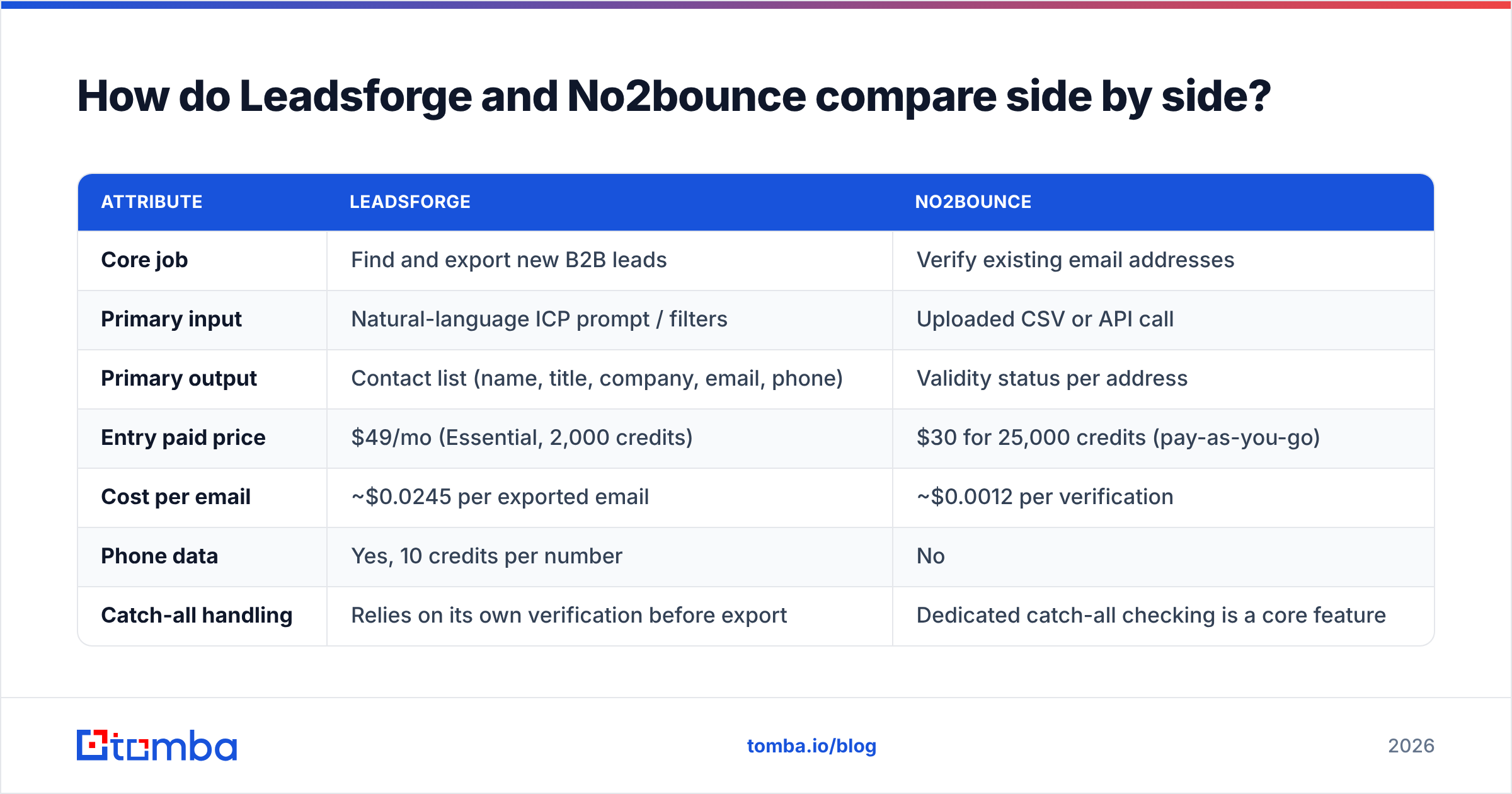
The table below compares the attributes that actually affect a buying decision. Pricing reflects each vendor's public pricing pages at the time of writing. Both change their packs regularly, so check them before you commit.
| Attribute | Leadsforge | No2bounce |
|---|---|---|
| Core job | Find and export new B2B leads | Verify existing email addresses |
| Primary input | Natural-language ICP prompt / filters | Uploaded CSV or API call |
| Primary output | Contact list (name, title, company, email, phone) | Validity status per address |
| Entry paid price | $49/mo (Essential, 2,000 credits) | $30 for 25,000 credits (pay-as-you-go) |
| Cost per email | ~$0.0245 per exported email | ~$0.0012 per verification |
| Phone data | Yes, 10 credits per number | No |
| Catch-all handling | Relies on its own verification before export | Dedicated catch-all checking is a core feature |
| Free trial | 100 free credits | 100 free credits, no card required |
| Credit expiry | Credits roll over | Credits don't expire |
| Native sequencing | Tight integration with Salesforge | None; exports to your sender of choice |
| Best for | Founders and SDRs starting from zero | Teams with an existing list or CRM to clean |
Two numbers matter most here. First, one verification on No2bounce costs about 20x less than one exported email on Leadsforge. That's expected, because checking an address is much cheaper than discovering one. Second, Leadsforge charges 10x more credits for phone numbers than for emails, so a phone-heavy workflow will use up the Essential plan quickly.
How does each tool fit into an outbound workflow?#
It helps to think of your outbound pipeline as a supply chain. A tool that sits in the wrong stage won't help, however good it is. Here is where each product plugs in:
- Define the ICP. You decide who you're targeting. Neither tool does this for you, but Leadsforge's prompt interface makes the step faster because you type the ICP instead of stacking 15 filters.
- Source contacts. This is Leadsforge's home turf. It turns the ICP into companies and people with emails, and phone numbers if you pay for them.
- Verify and clean. This is No2bounce's home turf. Every list gets checked before it touches a sending domain, whatever its source: Leadsforge exports, trade-show badge scans, or a two-year-old CRM segment.
- Resolve catch-alls. This is also No2bounce's strength. Catch-all domains accept mail to any address, so a basic SMTP check can't confirm that a specific mailbox exists. A dedicated catch-all verifier turns those "unknown" results into decisions you can act on.
- Sequence and send. This step belongs to Salesforge, Instantly, Smartlead, or similar tools. Leadsforge hands off natively to Salesforge. No2bounce hands off to whatever sender you use.
- Monitor bounces. Neither tool owns this step, but cleaner input from steps 2–4 is what keeps bounce rates under the roughly 2% threshold that mailbox providers watch.
The pattern is clear from the list. Leadsforge covers steps 1–2, No2bounce covers steps 3–4, and they overlap very little.

Is Leadsforge worth it for lead generation?#
Leadsforge is worth it if you prospect regularly and don't want to learn a complex filter UI. Its best feature is how quickly it turns a vague brief into a first list.
Where it shines:
- Prompt-based search. You can type "B2B SaaS companies with 50–200 employees that recently hired a RevOps lead" and get a usable starting list without building a boolean query.
- Lookalike logic. You can feed it a company you already sell to and have it find similar accounts. That makes it useful for expanding from a handful of good customers.
- Forge ecosystem fit. If you already send through Salesforge, the export step disappears and the list goes straight into a sequence.
- Credits roll over. Unused credits carry forward, so a slow month doesn't waste your budget.
Where to be careful:
- Per-contact cost is higher than raw verification. At about $0.0245 per email on the Essential plan, a 10,000-contact campaign runs about $245 in export credits alone. That's reasonable for net-new data, but you'll feel it if you waste credits on loose ICP prompts.
- Phone numbers are expensive in credits. At 10 credits each, 200 phone numbers use 2,000 credits, which is the whole monthly Essential allowance.
- Verify the export anyway. Any lead database, Leadsforge included, contains contacts whose data has gone stale since collection. People change jobs and domains change mail providers. Budget a verification pass before you send.
Is No2bounce good for email verification?#
No2bounce is a good fit if your main problem is a list you already have and don't trust. Its pricing makes large-volume cleaning cheap, and catch-all handling is central to the product rather than an extra.
Where it shines:
- Low cost per check. A 25,000-credit pack for $30 works out to about $0.0012 per address, which puts it at the budget end of the verification market. For a sense of the wider range, see the category listings on G2's No2bounce page.
- Catch-all focus. Many verifiers return "unknown" for any catch-all domain and stop there. No2bounce puts catch-all checking at the front of the product, which matters most when you sell into mid-market and enterprise companies, where catch-all configurations are common.
- No subscription pressure. Pay-as-you-go packs that don't expire suit teams that clean lists in batches, such as a quarterly CRM clean-up or a post-event import, rather than continuously.
- API access. You can verify in real time at the point of capture, for example on a signup form, instead of cleaning afterwards.
Where to be careful:
- It cannot find anyone. If an address fails verification, No2bounce tells you it's bad but doesn't give you a replacement. You still need a separate way to find the correct email.
- No enrichment. You get validity status, not job titles, company size, or phone numbers.
- Verification is only one piece of deliverability. A perfectly clean list still lands in spam if your domain authentication, warm-up, or copy is poor.
Which one should you choose: Leadsforge or No2bounce?#
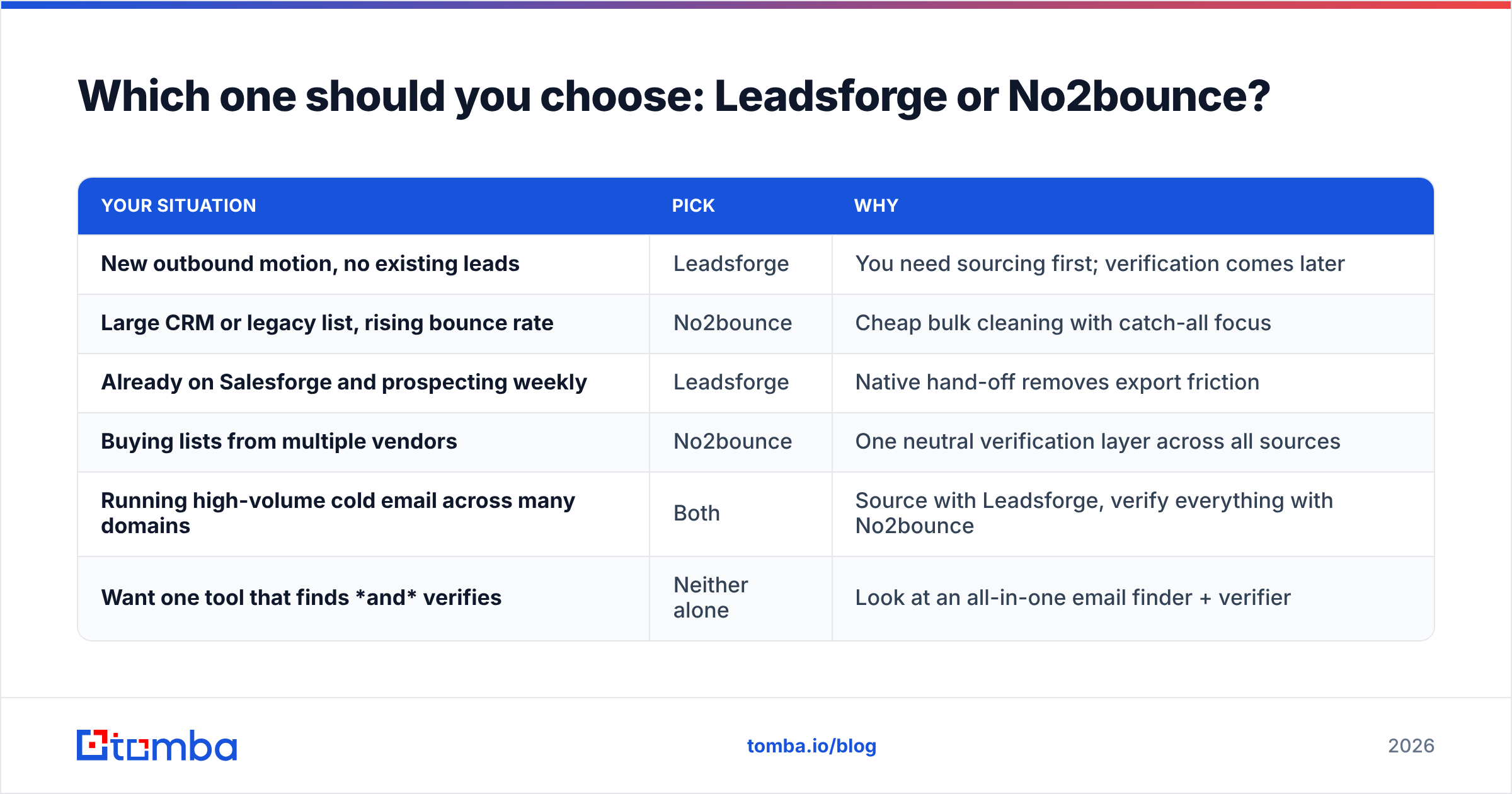
Match the tool to the gap in your process. Here is the short decision guide:
| Your situation | Pick | Why |
|---|---|---|
| New outbound motion, no existing leads | Leadsforge | You need sourcing first; verification comes later |
| Large CRM or legacy list, rising bounce rate | No2bounce | Cheap bulk cleaning with catch-all focus |
| Already on Salesforge and prospecting weekly | Leadsforge | Native hand-off removes export friction |
| Buying lists from multiple vendors | No2bounce | One neutral verification layer across all sources |
| Running high-volume cold email across many domains | Both | Source with Leadsforge, verify everything with No2bounce |
| Want one tool that finds and verifies | Neither alone | Look at an all-in-one email finder + verifier |
If you picked "Both," expect to manage two logins, two credit balances, and a CSV round-trip between them. For many teams that's fine. For a solo founder or a two-person SDR team, the handoff is where things go wrong: someone forgets to verify a list, a campaign bounces at 9%, and the sending domain takes weeks to recover.
What does a combined workflow cost in practice?#
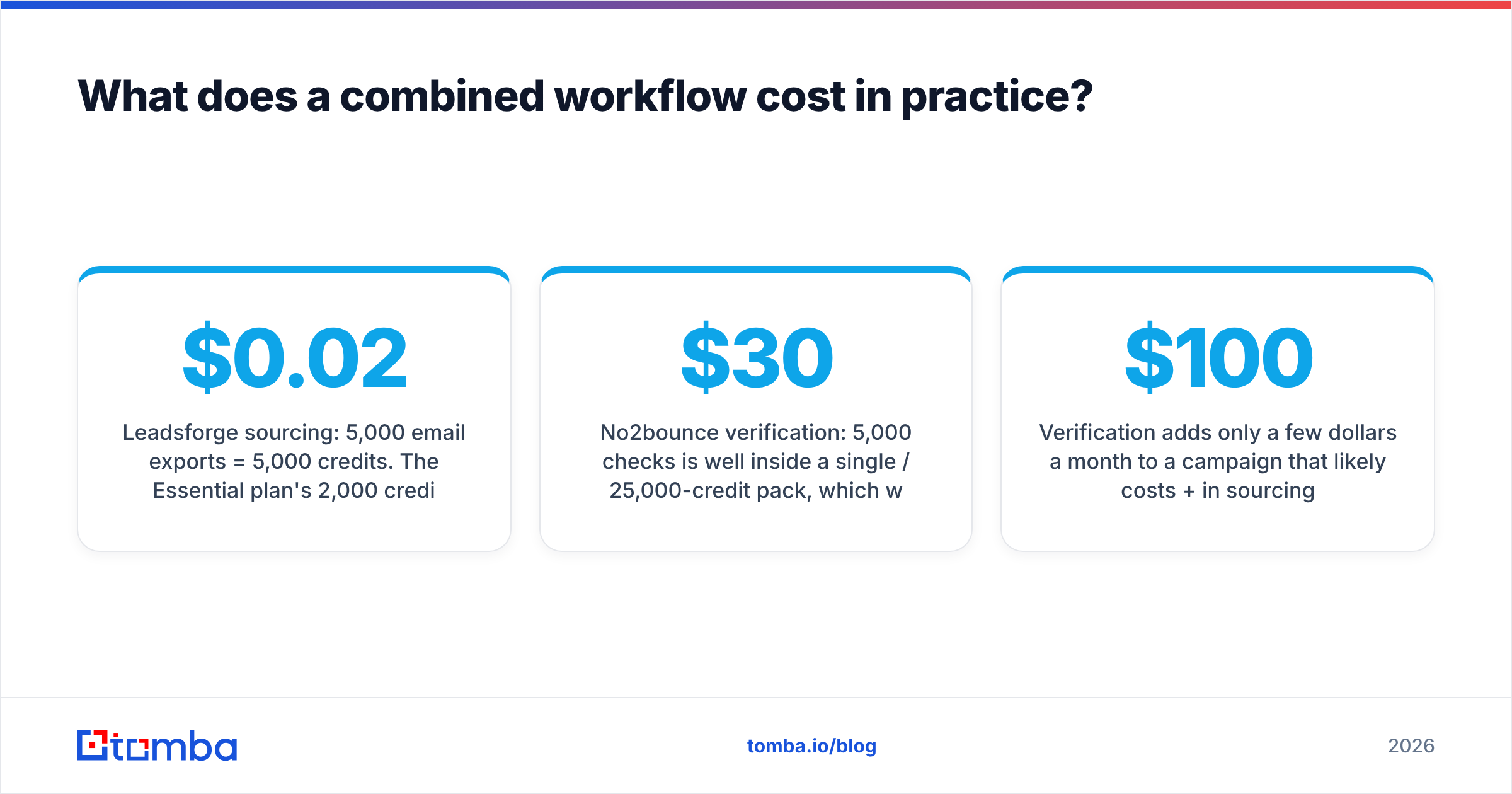
Here is a worked example. Say you want to email 5,000 net-new contacts per month.
- Leadsforge sourcing: 5,000 email exports = 5,000 credits. The Essential plan's 2,000 credits won't cover that, so you'd need a higher tier or extra credits. The yearly plans bundle 12,000–48,000 credits with cheaper overage ($0.02–$0.04 per credit), which brings effective cost down at volume.
- No2bounce verification: 5,000 checks is well inside a single $30 / 25,000-credit pack, which would last about five months at that pace.
Verification adds only a few dollars a month to a campaign that likely costs $100+ in sourcing. That makes skipping verification a poor way to save money. One bad campaign can hurt a domain's sender reputation for weeks, and replacing burned domains and inboxes costs far more than a verification pack.
Are there alternatives that do both jobs in one place?#
Yes. The split between "finder" and "verifier" is a matter of how vendors package products, not a technical necessity. Several platforms bundle both, so that every address they return has already been checked, and you can re-verify imported lists in the same place.
Tomba is one of them. Its core product is an email finder that works from a name plus a company or domain. Alongside it are a standalone email verifier, a catch-all verifier, domain search, a phone finder, and data enrichment. Pricing starts with a free tier of 25 searches per month, then Starter at $49/mo, Growth at $99/mo, Pro at $249/mo, and custom Enterprise. See Tomba pricing for what each tier includes.
To be fair about the trade-offs:
- Leadsforge's prompt-based ICP search is a different experience from name- or domain-based lookup. If you think in "describe my buyer" terms and live in Salesforge, that workflow has real value.
- No2bounce's per-check price is hard to beat for pure bulk cleaning of very large lists, such as hundreds of thousands of rows.
- An all-in-one tool wins on simplicity. You get one credit balance, one export, and verification built into the finding step, so nobody can forget to run it.

What mistakes do teams make when comparing these tools?#
After watching many teams build outbound stacks, we see the same four mistakes repeatedly:
- Comparing them on the same axis. Asking "which has better accuracy" makes little sense when one produces data and the other judges it. Compare Leadsforge with other lead databases, and compare No2bounce with other verifiers.
- Trusting "verified" labels blindly. A contact marked verified at export can go stale in 60–90 days as people change roles. Re-verify anything older than a quarter before sending.
- Discarding every catch-all result. Throwing out all catch-all addresses can remove 20–30% of an enterprise list. Resolve them with a catch-all-aware check instead of deleting them in bulk.
- Treating verification as the whole deliverability strategy. Verification lowers hard bounces. It won't fix a missing SPF record, a cold domain, or spammy copy. HubSpot's guide to email deliverability is a solid primer on the other pieces.
So, Leadsforge vs No2bounce: what's the verdict?#
Leadsforge is the better choice when you need leads. No2bounce is the better choice when you need clean leads from a list you already have. Neither replaces the other, and plenty of outbound teams run both: they source with Leadsforge and verify everything, including the Leadsforge exports, with No2bounce before a single email goes out.
If you're starting from zero and live inside the Forge ecosystem, begin with Leadsforge and add a verification layer before your first send. If your CRM is full and your bounce rate is rising, No2bounce is an inexpensive fix you can apply today.
If you'd rather not bolt two tools together, try Tomba Email Finder. You can look up professional emails by name, company, or domain, and each address is checked before it reaches your sequence. There's also a built-in verifier for the lists you already have. The free tier gives you 25 searches a month to test it on your own ICP before you pay anything.
Related guides#
// get started
Find, verify and enrich your first contacts today
Start on the free plan with 25 searches a month, then scale when your team is ready.
Free plan · No credit card required · GDPR & CCPA
// about the author