Leadsforge vs Thomson Data: AI Lead Lists or Managed Data Vendor?
Leadsforge builds lead lists from a chat prompt in minutes. Thomson Data sells custom, vendor-built lists after a sales conversation. Here is which model fits your pipeline, budget, and data-quality bar.
- Leadsforge is a self-serve, AI-driven list builder. You describe your ideal customer in plain English and it returns contacts you can enrich and export within minutes. It suits outbound teams and agencies that need to iterate quickly.
- Thomson Data is a traditional managed B2B data vendor. It sells custom and industry-specific contact lists (healthcare, technology users, and similar) on a quote basis. It suits marketing teams that want a vendor to build and deliver a large file.
- The real choice is how you want to buy data: software you run yourself, or a list someone builds for you. It is not a question of which database is "bigger".
- Neither option removes the need to verify before you send. Treat every exported or delivered list as unverified until it passes an email verifier.
- If you only need accurate emails for accounts you already know, a dedicated email finder is usually cheaper than either.
What is the difference between Leadsforge and Thomson Data?#
These two products sit at opposite ends of the B2B data market. The simplest way to see it: Leadsforge works like a search engine, and Thomson Data works like a catering order.
With Leadsforge, you log in, type something like "Series A SaaS companies in the US with 50–200 employees, VP of Sales or Head of Growth", and the tool builds a list for you. You refine it, reveal emails or phone numbers with credits, and push the results to your sequencer or CRM. The whole loop happens in one session, and you control it.
With Thomson Data, you usually start with a conversation. You describe your target market to a sales rep, the vendor scopes the count and fields, sends you a quote, and delivers a file. That file might be a healthcare list, a list of companies that use a specific technology, or a custom build. Thomson Data also offers data appending, which fills gaps in records you already hold.
Neither model is better in the abstract. The better one is whichever matches how often you need new data, how specific your targeting is, and who on your team will do the work.
How do Leadsforge and Thomson Data compare feature by feature?#
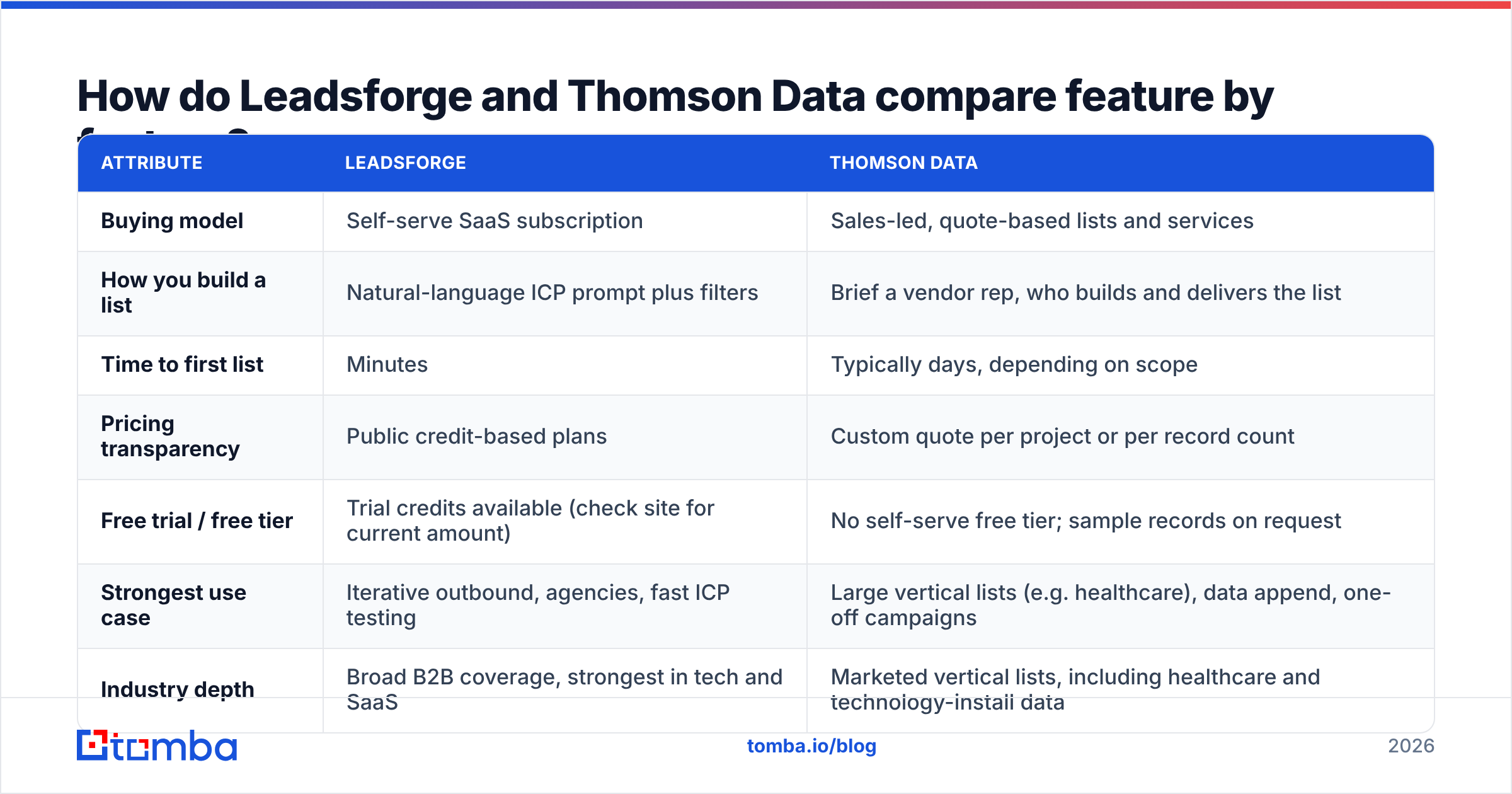
Here is the side-by-side view. Pricing in this category changes often and managed vendors rarely publish rate cards, so confirm current numbers on each vendor's site before you budget.
| Attribute | Leadsforge | Thomson Data |
|---|---|---|
| Buying model | Self-serve SaaS subscription | Sales-led, quote-based lists and services |
| How you build a list | Natural-language ICP prompt plus filters | Brief a vendor rep, who builds and delivers the list |
| Time to first list | Minutes | Typically days, depending on scope |
| Pricing transparency | Public credit-based plans | Custom quote per project or per record count |
| Free trial / free tier | Trial credits available (check site for current amount) | No self-serve free tier; sample records on request |
| Strongest use case | Iterative outbound, agencies, fast ICP testing | Large vertical lists (e.g. healthcare), data append, one-off campaigns |
| Industry depth | Broad B2B coverage, strongest in tech and SaaS | Marketed vertical lists, including healthcare and technology-install data |
| Integrations | Native push into the Salesforge ecosystem, CSV, CRM exports | File delivery (CSV/Excel); integration is your job |
| Data refresh | Queried at search time, with enrichment on reveal | Fixed at delivery; ages from the day you receive it |
| Who does the work | Your SDR or ops team | The vendor's data team |
| Main risk | Output only as good as your prompt and filters | Paying for records that go stale before you use them |
The row that matters most is data refresh. A self-serve tool pulls records when you search. A delivered file starts decaying the moment it lands in your inbox. B2B contact data decays quickly because people change jobs, companies rebrand, and mail servers change. Industry estimates often put annual decay at 20–30%, so a list bought in January has visibly degraded by summer.

How does Leadsforge actually work?#
Leadsforge comes from the team behind Salesforge, and it shows. The product is designed to feed an outbound machine, not to sit in a marketing data warehouse.
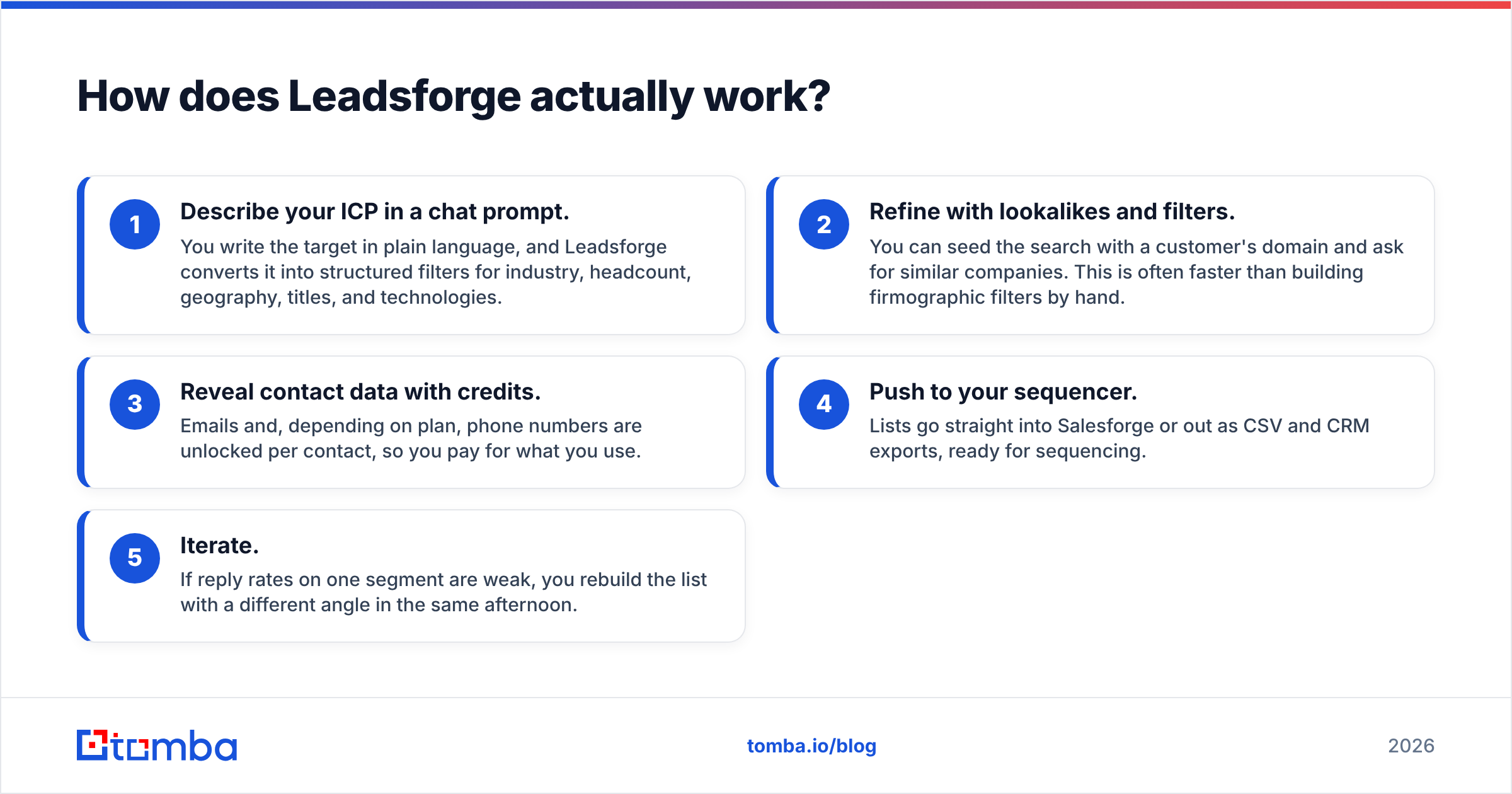
The workflow looks like this:
- Describe your ICP in a chat prompt. You write the target in plain language, and Leadsforge converts it into structured filters for industry, headcount, geography, titles, and technologies.
- Refine with lookalikes and filters. You can seed the search with a customer's domain and ask for similar companies. This is often faster than building firmographic filters by hand.
- Reveal contact data with credits. Emails and, depending on plan, phone numbers are unlocked per contact, so you pay for what you use.
- Push to your sequencer. Lists go straight into Salesforge or out as CSV and CRM exports, ready for sequencing.
- Iterate. If reply rates on one segment are weak, you rebuild the list with a different angle in the same afternoon.
The main advantage is speed of iteration. Outbound is an experiment, and you want to test five ICP hypotheses in a week, not one per quarter. Leadsforge fits that rhythm.
The main weakness is that the AI prompt is only as good as your targeting. If your ICP definition is vague, you get a fast, confident, vague list. Leadsforge also inherits the usual limits of any aggregated database. Coverage is strongest where public web signals are dense, such as tech, SaaS, and agencies. It is thinner for local businesses, manufacturing floors, and regulated industries.
How does Thomson Data actually work?#
Thomson Data runs a service business with a data product attached. Its catalogue covers industry and job-function lists (it markets healthcare and technology-user lists heavily), plus services like email appending, data cleansing, and custom list builds.
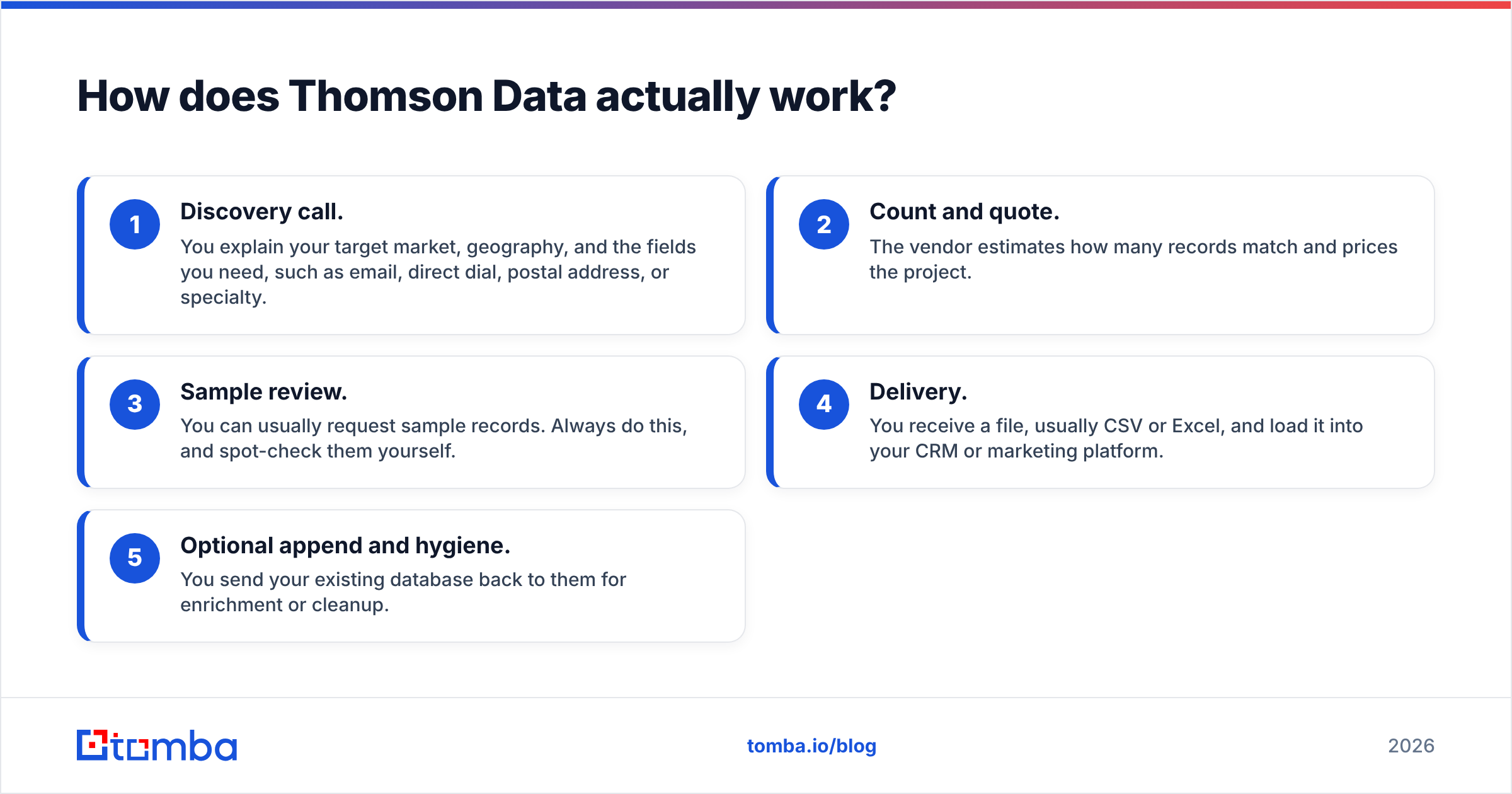
The typical engagement:
- Discovery call. You explain your target market, geography, and the fields you need, such as email, direct dial, postal address, or specialty.
- Count and quote. The vendor estimates how many records match and prices the project.
- Sample review. You can usually request sample records. Always do this, and spot-check them yourself.
- Delivery. You receive a file, usually CSV or Excel, and load it into your CRM or marketing platform.
- Optional append and hygiene. You send your existing database back to them for enrichment or cleanup.
The main advantage is scale and specialisation without in-house effort. If you are a medical device company that needs 40,000 hospital procurement contacts for a direct-mail and email campaign, a managed vendor is a reasonable way to get there. You would not have your SDRs click through filters for weeks.
The weaknesses are structural. You depend on a quote cycle for every new segment. You can't easily test and discard hypotheses. The file starts ageing at delivery. Like most list vendors, Thomson Data advertises accuracy commitments. If those matter to you, get the exact terms in writing: what bounce rate triggers a replacement, how it's measured, and within what time window.
Is Leadsforge or Thomson Data better for outbound sales teams?#
For most outbound SDR teams, Leadsforge is the better fit. Outbound rewards small, precise, frequently refreshed lists, and that is exactly what a self-serve tool produces. You can build 300 contacts for this week's campaign, run it, read the replies, and change the segment next week. There's no procurement step in the loop.
Thomson Data makes more sense for outbound in narrower cases:
- You sell into a vertical where aggregated databases are thin. Healthcare is the classic example: physicians, clinic managers, and hospital administrators are underrepresented in tech-centric tools.
- You need postal addresses or multi-channel fields for a coordinated mail and email play.
- You have no ops capacity. Nobody on the team has time to build and QA lists, and a vendor-delivered file is better than nothing.
Community reviews on sites like G2 are worth scanning for both vendors. Focus on reviews that mention bounce rates and support responsiveness, not overall star averages.
Is Leadsforge or Thomson Data better for marketing and ABM campaigns?#
This is where Thomson Data closes the gap. Marketing teams often need:
- Volume: tens of thousands of records for nurture or event promotion
- Field breadth: postal address, specialty, company revenue bands
- A single deliverable that can be loaded into a marketing automation platform
A managed vendor handles that well, especially if the campaign is one-off, such as a trade show or product launch.
For account-based marketing, the answer flips back toward self-serve tools. ABM means a defined account list and finding the right five to ten people inside each account. You'll keep adjusting that as deals move. Leadsforge's lookalike and filter approach fits better, and pairing it with a domain search tool lets you pull every public professional address for a target company in one query.
What does each option really cost?#
Sticker price is the wrong comparison. The number that matters is cost per verified, reachable contact that you actually use.
Leadsforge uses public, credit-based subscription plans. You pay for reveals, so wasted spend comes from revealing contacts who don't fit your ICP. Tight filters keep the effective cost per useful contact low. Check leadsforge.ai for current plan tiers and credit allowances, because they have changed more than once.
Thomson Data prices per project or per record count on a quote basis. Wasted spend comes from three places:
- Records you never use. Buying 20,000 contacts when you only work 5,000 is common.
- Records that decay before use. If the file sits for months, a meaningful share will bounce.
- Records that were never valid. This is why the accuracy guarantee terms matter.
To compare fairly, estimate:
- Contacts you will actually work in the next 90 days
- Expected valid rate after you run them through verification
- Internal hours to build (Leadsforge) or to brief and QA (Thomson Data)
Then divide total cost by usable contacts. Teams that do this math often find that a mid-sized outbound program is cheaper self-serve. Large, vertical, one-time campaigns often come out cheaper through a vendor.
How accurate is the data from each provider?#
Neither vendor can promise that every email will land. That's not a knock on either one; it's how B2B email works. Three factors drive real-world accuracy:
- Freshness. Search-time data (Leadsforge) usually beats a delivered file (Thomson Data) as the months go by. That advantage disappears if you export from Leadsforge and let the CSV sit.
- Catch-all domains. Many companies accept every address at the server level, so a basic check reports "valid" even for addresses that don't exist. Both providers' data will include some of these. You need a separate catch-all check to decide how to treat them.
- Role versus personal addresses. Lists padded with
info@andsales@addresses look bigger than they are, so ask each vendor how they handle role addresses.
The operational rule is simple: verify every list, from every source, right before you send. Run exports through an email verifier the week you plan to email them, not the week you bought them. This protects your sender reputation more than any vendor guarantee can, and it gives you your own bounce data for the next vendor conversation.

Which should you choose: Leadsforge or Thomson Data?#
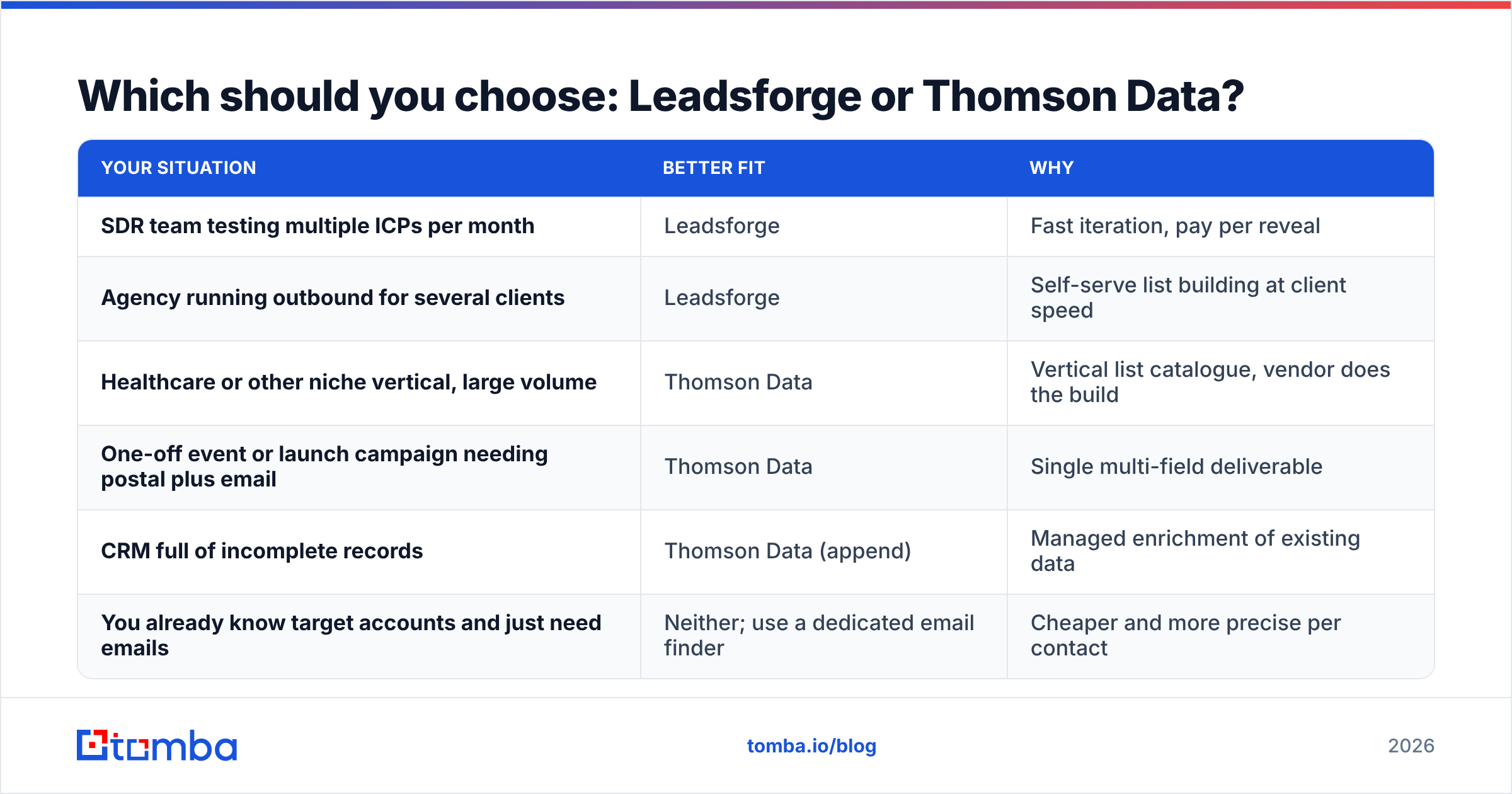
Use this decision shortcut:
| Your situation | Better fit | Why |
|---|---|---|
| SDR team testing multiple ICPs per month | Leadsforge | Fast iteration, pay per reveal |
| Agency running outbound for several clients | Leadsforge | Self-serve list building at client speed |
| Healthcare or other niche vertical, large volume | Thomson Data | Vertical list catalogue, vendor does the build |
| One-off event or launch campaign needing postal plus email | Thomson Data | Single multi-field deliverable |
| CRM full of incomplete records | Thomson Data (append) | Managed enrichment of existing data |
| You already know target accounts and just need emails | Neither; use a dedicated email finder | Cheaper and more precise per contact |
That last row matters more than people expect. Many teams shopping for "a lead database" already have their target account list from their CRM, intent data, or a founder's head. What they're missing is the right person's email at each company. For that job, a full list-building platform or a managed list purchase is overkill. A focused email finder that takes a name and domain and returns a verified address will do it at a fraction of the cost.
Can you combine Leadsforge or Thomson Data with other tools?#
Yes, and most mature teams do. A common stack looks like this:
- Source accounts with Leadsforge (ICP search and lookalikes) or a Thomson Data vertical list
- Fill gaps for missing or low-confidence contacts with an email finder or domain search
- Verify everything right before sequencing, with catch-all handling
- Sequence in your outbound tool, and send bounces back to your data vendor as evidence
This layered approach keeps you from depending on one data source's blind spots. It also gives you leverage: when you can show a vendor your measured bounce rate on their file, renewal and replacement conversations get much more productive.
Final verdict: Leadsforge vs Thomson Data#
Pick Leadsforge if you run outbound on a weekly rhythm, want to own your list building, and value speed and iteration over sheer volume. Its chat-based ICP search and native sequencer hand-off make it a strong fit for SDR teams and agencies.
Pick Thomson Data if you need large, vertical-specific files (especially healthcare), multi-field records for integrated campaigns, or managed append and cleanup of an existing database. Negotiate the accuracy guarantee terms before you sign.
For either one, budget for verification and plan to fill gaps. No single provider covers every contact you'll want.
If your real bottleneck is finding the right person's email at companies you've already chosen, start with the Tomba Email Finder. Search by name, domain, or company, get verified professional addresses, and test it on the free tier (25 searches a month) before you commit. Paid plans start at $49/month, and you can compare every tier on the Tomba pricing page.
Related guides#
// get started
Find, verify and enrich your first contacts today
Start on the free plan with 25 searches a month, then scale when your team is ready.
Free plan · No credit card required · GDPR & CCPA
// about the author