LeadsGorilla vs SalesQL: Local Leads or LinkedIn Emails in 2026?
LeadsGorilla finds local businesses with marketing gaps you can pitch. SalesQL pulls contact details from LinkedIn profiles. They solve different problems, so the right pick depends on who you sell to.
TL;DR
- LeadsGorilla is a local lead generation tool built for marketing agencies. It finds small businesses on sources like Google Maps and flags gaps in their online presence that you can pitch, such as no mobile site, weak reviews or no ad pixel.
- SalesQL is a LinkedIn contact finder. You open a profile or a Sales Navigator search, and it returns work emails, personal emails and phone numbers for named people.
- If you sell to local SMBs (dentists, restaurants, roofers), LeadsGorilla fits your workflow. If you sell to named decision-makers at B2B companies, SalesQL fits better.
- Neither tool is a full verification stack. Whichever one you pick, run the emails through a verifier before you send.
- If you need domain-level and name-level email finding plus verification outside LinkedIn, a dedicated email finder like Tomba covers the gap between these two tools.
What is the real difference between LeadsGorilla and SalesQL?#
These two tools come up in the same searches, but they come from different corners of lead generation.
LeadsGorilla starts with a business. You enter a niche and a location, for example "chiropractors in Denver", and it returns a list of local companies along with an audit of their digital footprint. The pitch angle is built in: "this clinic has no Facebook pixel and a 3.2-star rating, so sell them reputation management." The contact data you get is usually company-level. That means generic inboxes (info@, contact@), a business phone number and social links.
SalesQL starts with a person. It's a Chrome extension that sits on top of LinkedIn and LinkedIn Sales Navigator. You open a profile or a list of search results, and it returns contact details for that individual: business email, sometimes a personal email, and phone numbers where it has them. Then you export them to CSV or push them into your CRM.
One way to picture it: LeadsGorilla is a metal detector for your local market, and SalesQL is a phone book for people you've already found on LinkedIn. Which one you need depends on whether you're hunting for companies to pitch or for specific people to reach.
How do LeadsGorilla and SalesQL compare feature by feature?#
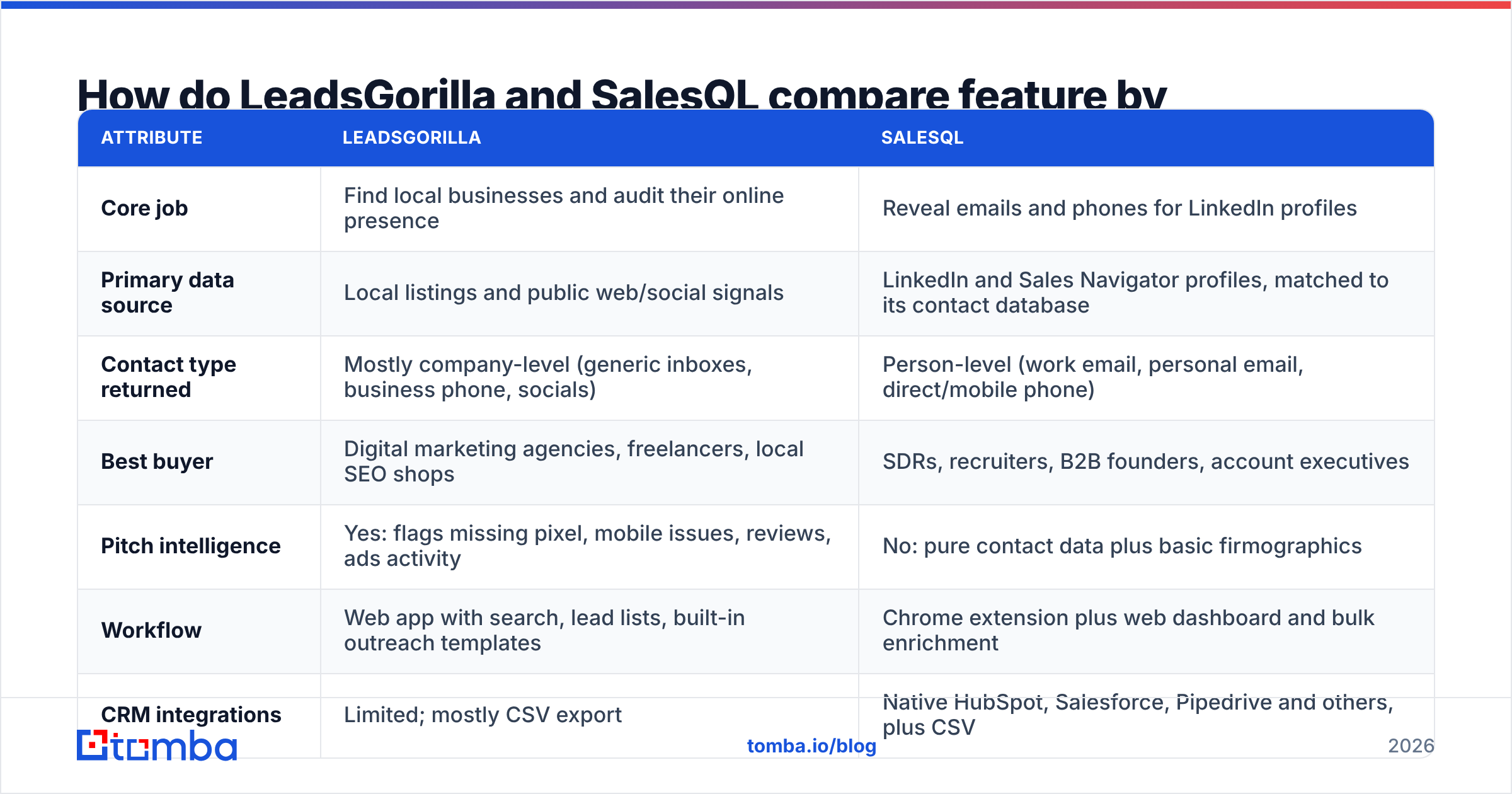
Here is the side-by-side. Pricing for both vendors changes often, and LeadsGorilla has historically been sold through launch-style offers, so treat price cells as directional and check each vendor's current page before you buy.
| Attribute | LeadsGorilla | SalesQL |
|---|---|---|
| Core job | Find local businesses and audit their online presence | Reveal emails and phones for LinkedIn profiles |
| Primary data source | Local listings and public web/social signals | LinkedIn and Sales Navigator profiles, matched to its contact database |
| Contact type returned | Mostly company-level (generic inboxes, business phone, socials) | Person-level (work email, personal email, direct/mobile phone) |
| Best buyer | Digital marketing agencies, freelancers, local SEO shops | SDRs, recruiters, B2B founders, account executives |
| Pitch intelligence | Yes: flags missing pixel, mobile issues, reviews, ads activity | No: pure contact data plus basic firmographics |
| Workflow | Web app with search, lead lists, built-in outreach templates | Chrome extension plus web dashboard and bulk enrichment |
| CRM integrations | Limited; mostly CSV export | Native HubSpot, Salesforce, Pipedrive and others, plus CSV |
| Pricing model | Historically one-time or annual licences with upsells | Monthly/annual SaaS subscription with a small free tier |
| Email verification | Basic at best; verify externally | Emails are validated, but independent re-verification is still wise |
| Main risk | Generic inboxes, low reply rates, dated listings | Personal-email compliance (GDPR), LinkedIn dependency |
The feature list shows where each tool falls short. LeadsGorilla tells you why a business might buy, but it rarely tells you who to email. SalesQL tells you exactly who to email, but it has no view of whether that company needs what you sell.
Which tool finds better email addresses?#
For person-level B2B emails, SalesQL is the stronger tool. That's what it was designed to do. You're pulling contact data for a named individual whose job title, company and seniority you can already see on LinkedIn. SalesQL says its data is validated before it's shown, and it separates business emails from personal ones so you can choose which to use.
LeadsGorilla's email output is a different kind of data. For a local bakery or a two-location dental practice, the "email" is often the public inbox on the website or Facebook page. That isn't a flaw. For many local businesses, the owner really does read info@. But deliverability and reply rates on generic inboxes are usually lower, and your email sits in the same queue as vendor spam and customer complaints.
A practical point applies to both tools: don't send to any list without verifying it first. Local listings go stale quickly when businesses close, rebrand or change web hosts. LinkedIn-sourced emails go stale when people change jobs, which in B2B happens often. Running every export through an email verifier before it reaches your sequencer protects your sender reputation far more cheaply than cleaning up after a bounce spike.
How does pricing compare?#
The two tools have different pricing models, so a straight comparison of monthly numbers can mislead you.
LeadsGorilla has historically been sold like many marketing tools launched on affiliate marketplaces: a low front-end price for an annual or one-time licence, followed by upsells for commercial rights, more searches or agency features. That can look cheap at first. The costs to watch are upsells you'll need for real agency use, and whether updates and data refreshes continue after the licence period. Confirm the current offer on the vendor's site before you commit.
SalesQL uses standard SaaS pricing. There's a free tier with a small monthly allowance of credits, and paid plans are priced by monthly email and phone credits, with team plans above that. Check SalesQL's pricing page for current numbers, because credit allowances change. The practical cost to watch is phone credits. On many LinkedIn-based tools, direct dials and mobiles use up your allowance much faster than emails.
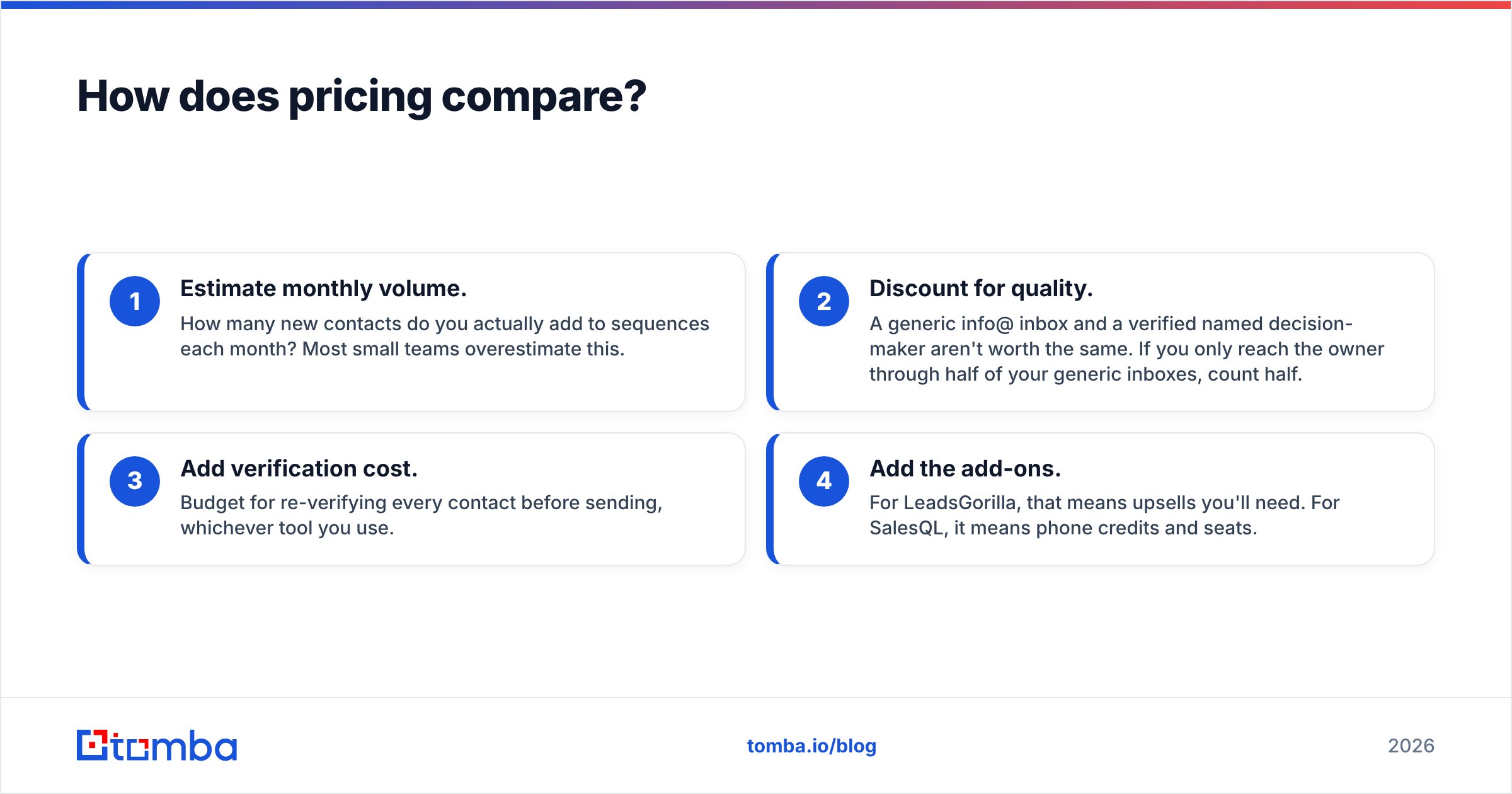
A simple way to compare them is cost per usable contact:
- Estimate monthly volume. How many new contacts do you actually add to sequences each month? Most small teams overestimate this.
- Discount for quality. A generic info@ inbox and a verified named decision-maker aren't worth the same. If you only reach the owner through half of your generic inboxes, count half.
- Add verification cost. Budget for re-verifying every contact before sending, whichever tool you use.
- Add the add-ons. For LeadsGorilla, that means upsells you'll need. For SalesQL, it means phone credits and seats.
Run those numbers with your own volumes. The "cheap" tool often turns out to be the expensive one once you count only contacts that can actually generate a reply.
Who should choose LeadsGorilla?#
LeadsGorilla makes sense if your buyer is a local business and your product is a marketing service. Its best users tend to fit this profile:
- Agencies selling SEO, web design, Google Ads, Facebook Ads or reputation management to local SMBs.
- Freelancers who need a pitch angle, not just a contact. Opening with "Your site isn't mobile-friendly and you're losing Google Maps traffic" works better than "Want more leads?"
- Teams that prospect by city and niche rather than by job title.
- Budget-conscious solo operators who prefer a licence to a recurring subscription.
The trade-offs you accept:
- Contact data is mostly company-level, so you'll often need a second step to find the owner's actual email.
- Coverage outside the US and a few major markets can be uneven. Test your target cities before you rely on it.
- It's the wrong tool for mid-market or enterprise prospecting. A 400-person SaaS company won't show up as a "local business with a missing pixel."
Who should choose SalesQL?#
SalesQL makes sense if your buyer is a person with a job title at a B2B company, and LinkedIn is where you find them.
- SDRs and AEs building lists from Sales Navigator searches who want contact details in one click.
- Recruiters who need personal emails and mobile numbers to reach passive candidates.
- Founders doing founder-led sales who already live on LinkedIn and want a low-friction way to get from a profile to an inbox.
- Teams on HubSpot, Salesforce or Pipedrive who want enriched contacts pushed straight into the CRM rather than copied from CSVs.
The trade-offs you accept:
- Your workflow depends on LinkedIn. If a prospect isn't on LinkedIn, or their profile is thin, SalesQL has little to work with.
- Personal emails and mobiles raise compliance questions. Under the GDPR, cold outreach to personal contact data of EU residents needs a documented lawful basis. Many B2B teams choose to stick to business emails for cold outreach.
- You don't get pitch intelligence. You know who someone is, but not whether their company needs you right now.
Can you use LeadsGorilla and SalesQL together?#
Yes, but first ask whether you actually need both.
A realistic combined workflow for an agency moving upmarket looks like this. Use LeadsGorilla to find multi-location local businesses with obvious marketing gaps. Look up the owner or marketing manager on LinkedIn. Then use SalesQL to reveal that person's business email. You get the pitch angle from one tool and the right person from the other.
The catch is cost and tool sprawl. You're paying for two subscriptions to do one job, and the second step only works when the decision-maker has a LinkedIn profile. Many local business owners don't, or they haven't updated it since 2019.

A leaner alternative is to go straight from the company's domain to its people. Most local businesses with a website use a predictable email pattern. A domain search returns the public addresses tied to that domain, with names and roles attached where available. An email finder that works from first name, last name and domain can reach the owner even when there's no LinkedIn profile to open.
How do they handle data freshness and compliance?#
You won't see this on either vendor's sales page, but it matters more than any feature.
Freshness. Local business data decays because businesses close, move or change their websites. B2B person data decays because people change jobs. Any contact older than about six months without re-verification should be treated as unconfirmed. Neither tool can guarantee that a record is current at the moment you send. Only a verification check just before you send can confirm that.
Compliance. LeadsGorilla mostly deals in publicly listed business contact details, which is generally lower-risk ground, though CAN-SPAM, CASL and GDPR still apply to how you email. SalesQL returns personal contact details alongside business ones. That's useful for recruiters, but B2B sales teams emailing into the EU or UK should set a clear internal policy on when personal emails may be used. HubSpot's guide to GDPR for sales and marketing is a solid plain-English starting point.
Sender reputation. Whichever tool feeds your list, sending unverified contacts at volume damages your domain. Hard bounces above roughly 2% on a cold campaign are a warning sign. Above 5%, mailbox providers start treating you like a spammer.
Are there better options than LeadsGorilla or SalesQL?#
"Better" depends on the job, so here's the honest version.
- If you're an agency selling to local businesses, LeadsGorilla's audit features are a real advantage that general email finders don't offer. What it lacks is person-level email finding, so you pair it with a domain-based finder.
- If you're a B2B team prospecting on LinkedIn, SalesQL is a solid, focused choice. It competes with other LinkedIn extensions on credit price, data coverage in your region and CRM fit. Read recent reviews on G2 filtered by your company size before you decide.
- If your prospect list starts from company domains, which covers most account-based lists, event attendee lists, scraped directories and CRM backfills, a domain-first email finder with built-in verification fits better than either tool.
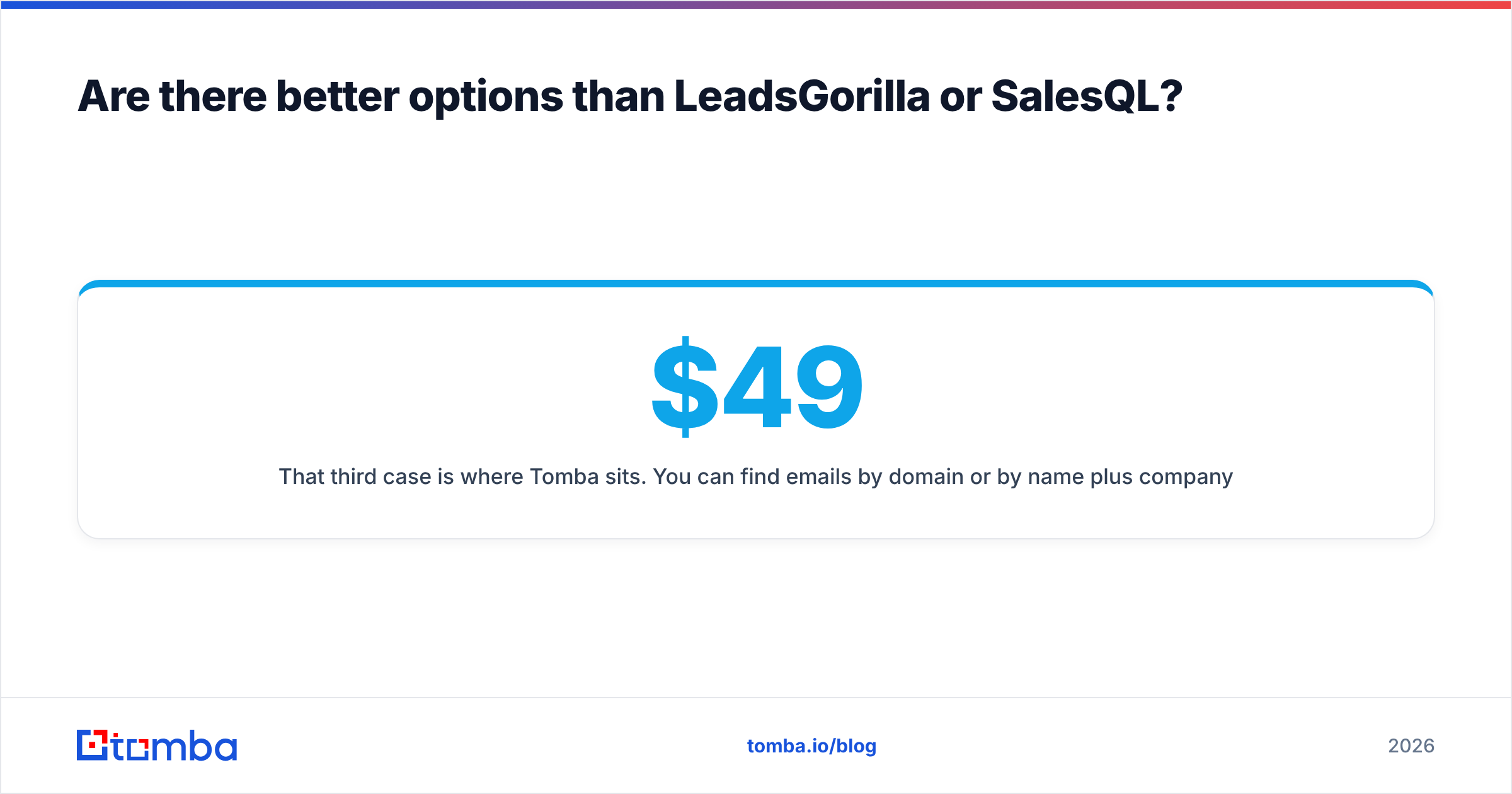
That third case is where Tomba sits. You can find emails by domain or by name plus company, verify them in the same workflow, and use the LinkedIn finder or the Chrome extension when you do start from a profile. Plans start with a free tier of 25 searches a month, then Starter at $49/mo, Growth at $99/mo and Pro at $249/mo, with Enterprise on custom terms. Full details are on Tomba pricing.
So, LeadsGorilla vs SalesQL: which one should you pick?#
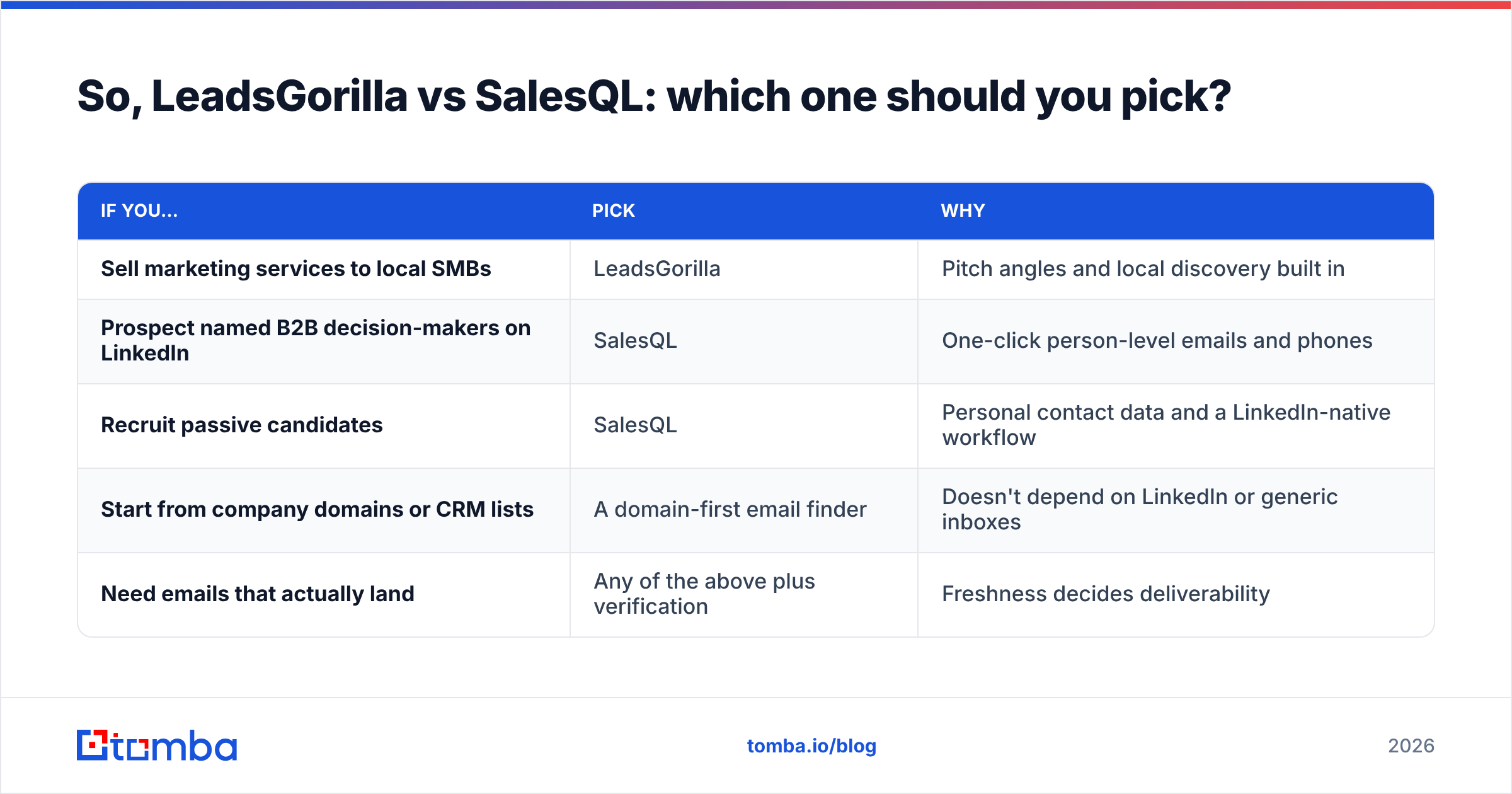
Choose based on who you sell to, not on the feature list.
| If you… | Pick | Why |
|---|---|---|
| Sell marketing services to local SMBs | LeadsGorilla | Pitch angles and local discovery built in |
| Prospect named B2B decision-makers on LinkedIn | SalesQL | One-click person-level emails and phones |
| Recruit passive candidates | SalesQL | Personal contact data and a LinkedIn-native workflow |
| Start from company domains or CRM lists | A domain-first email finder | Doesn't depend on LinkedIn or generic inboxes |
| Need emails that actually land | Any of the above plus verification | Freshness decides deliverability |
Whichever tool you choose, run a real test first. Pull 50 contacts from your actual ideal customer profile, verify them independently, send a small campaign and measure bounce rate and reply rate. Two weeks of data will tell you more than any comparison post, this one included.
If you want person-level emails without relying on LinkedIn profiles or generic info@ inboxes, try the Tomba Email Finder. Enter a domain or a name plus company, get the professional email with a confidence score, and verify it in the same step before it goes into your sequence. The free tier gives you 25 searches a month, which is enough to test it against the list you're working on now.
Related guides#
// get started
Find, verify and enrich your first contacts today
Start on the free plan with 25 searches a month, then scale when your team is ready.
Free plan · No credit card required · GDPR & CCPA
// about the author