Leadsrush vs Seamless.AI: Honest 2026 Comparison for B2B Teams
Leadsrush is a budget database and email finder that you pay for by the export. Seamless.AI is a sales-led contact platform with per-seat contracts. Here's how they compare on price, credits, data and lock-in, and which one fits your team.
TL;DR
- Leadsrush is a low-cost B2B database and email finder. It charges one search credit per 10 exported results and keeps verification credits separate. It suits solo operators and small agencies that want lists without a sales call.
- Seamless.AI is a larger contact-data platform with a Chrome extension, phone numbers and CRM sync. Its paid plans are quote-only, and third-party breakdowns put them at roughly $147+ per user per month.
- Both have free tiers. Leadsrush gives 50 searches and 100 verifications a month. Seamless.AI gives 50 credits in total, and they don't renew.
- The biggest practical difference is how you pay. Leadsrush is self-serve. Seamless.AI uses annual, per-seat contracts, and reviewers often complain about the auto-renewal terms.
- If all you need is verified work emails at a predictable price, a focused email finder like Tomba ($49/mo Starter) may beat both on cost per valid contact.
What is Leadsrush?#
Leadsrush is a self-serve lead generation tool built by Reganam Ltd. It sells itself as a B2B database for outreach professionals: marketers, recruiters, agency owners and small sales teams who need contact lists without a sales-led contract.
The product has four main parts:
- A searchable B2B database of companies and contacts, including local business data
- An email finder and verifier for individual lookups, LinkedIn profile lists and domain uploads
- Technology lookups, so you can find companies running Shopify, WooCommerce, Stripe, PayPal and similar tools
- Integrations (the Leadsrush features page lists 18 native connectors) to push leads into your CRM or email platform
The credit model is unusual, so read it carefully. Leadsrush has two separate pools: search credits and email verification credits. Search credits are charged per 10 results you export. If you export 46 results, that costs 5 credits. If you export 160, it costs 16. Each email verification costs 1 credit from the second pool.
Leadsrush has also been sold as a lifetime deal on marketplaces like RocketHub. That's why you'll see it mentioned in bootstrapped-founder communities more often than in enterprise RevOps stacks.
What is Seamless.AI?#
Seamless.AI is one of the best-known US contact-data platforms. It uses a search engine plus a Chrome extension: you look someone up on LinkedIn or a company website, and Seamless tries to return their email, direct dial and mobile number in real time.
Its core pieces are:
- A real-time contact search across people and companies
- A Chrome extension that works on LinkedIn and company websites
- Phone numbers (direct dials and mobiles) alongside emails
- CRM and sales engagement integrations (Salesforce, HubSpot, Outreach and others)
- Intent and buyer signals on higher tiers
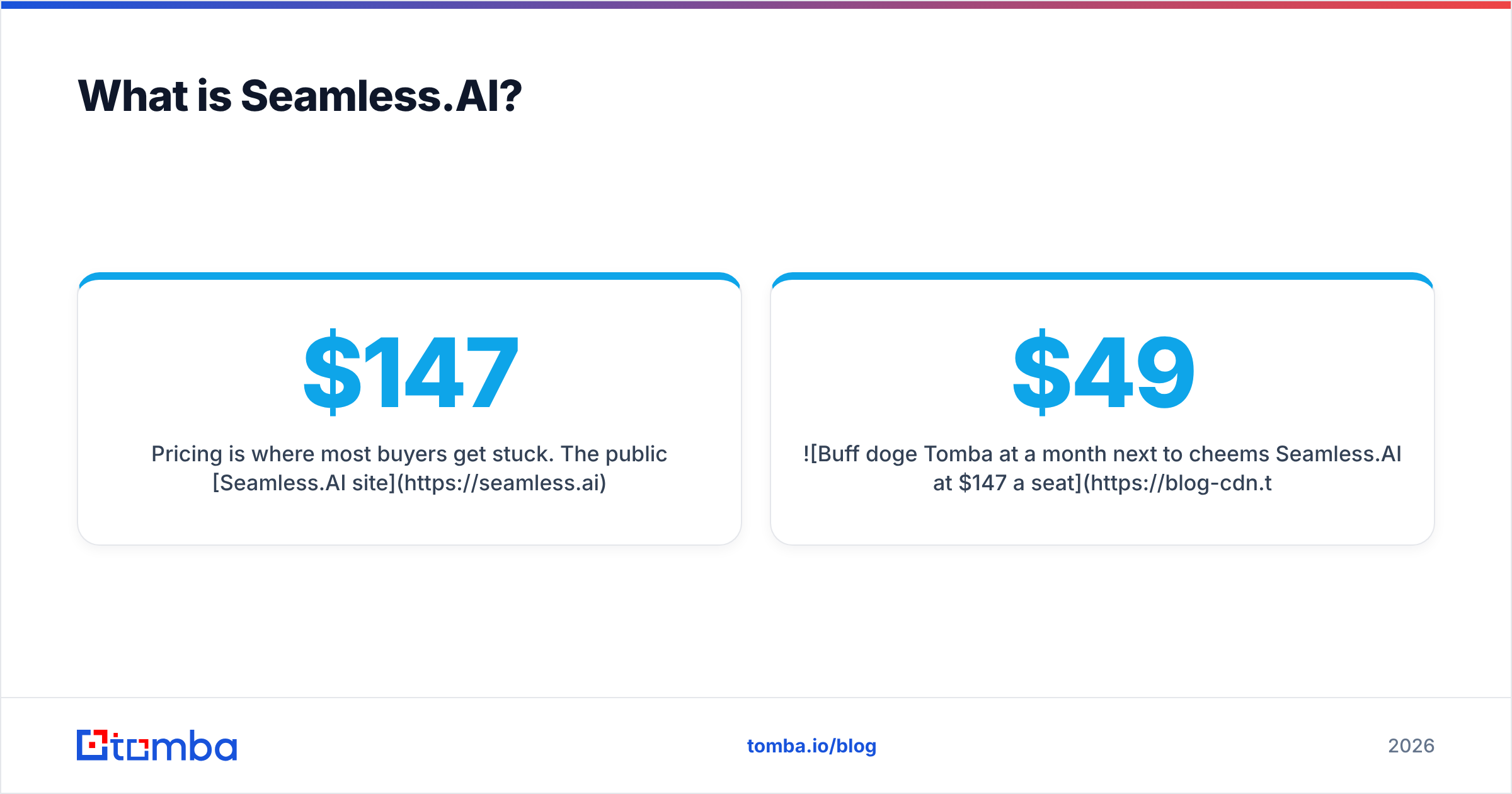
Pricing is where most buyers get stuck. The public Seamless.AI site lists a Free plan with 50 credits, then Pro and Enterprise tiers that both say "Contact sales." Third-party breakdowns from 2026 put Pro at roughly $147 to $299 per user per month, sold on annual credit packages. Seamless also deducts credits per lookup attempt, even when the lookup doesn't return a valid email or number.

How do Leadsrush and Seamless.AI differ at their core?#
Most comparison posts list features side by side. In practice, these two tools differ on five structural points, and those points matter more than any single feature:
- Buying motion. Leadsrush is fully self-serve: sign up, pick a plan and export. Seamless.AI puts every paid tier behind a sales conversation, so you can't know your real price until you've taken a demo.
- Credit unit. Leadsrush charges per block of 10 exported results, which makes bulk list building cheap. Seamless.AI charges per contact lookup, including failed ones, so each failed search still costs you a credit.
- Data depth. Seamless.AI goes after direct dials and mobile numbers, and adds intent signals on higher tiers. Leadsrush focuses on emails, company data and tech-stack filters.
- Workflow location. Seamless.AI is built for people who live in LinkedIn and the Chrome extension. Leadsrush is built for people who build lists in a web app and export CSVs.
- Contract risk. Leadsrush offers monthly and annual plans (annual saves up to 30%). Seamless.AI's annual commitments and auto-renewal terms come up again and again in public reviews on sites like G2.
If you get these five right, you'll know which tool fits before you open a free trial.
Leadsrush vs Seamless.AI: how do features and pricing compare?#
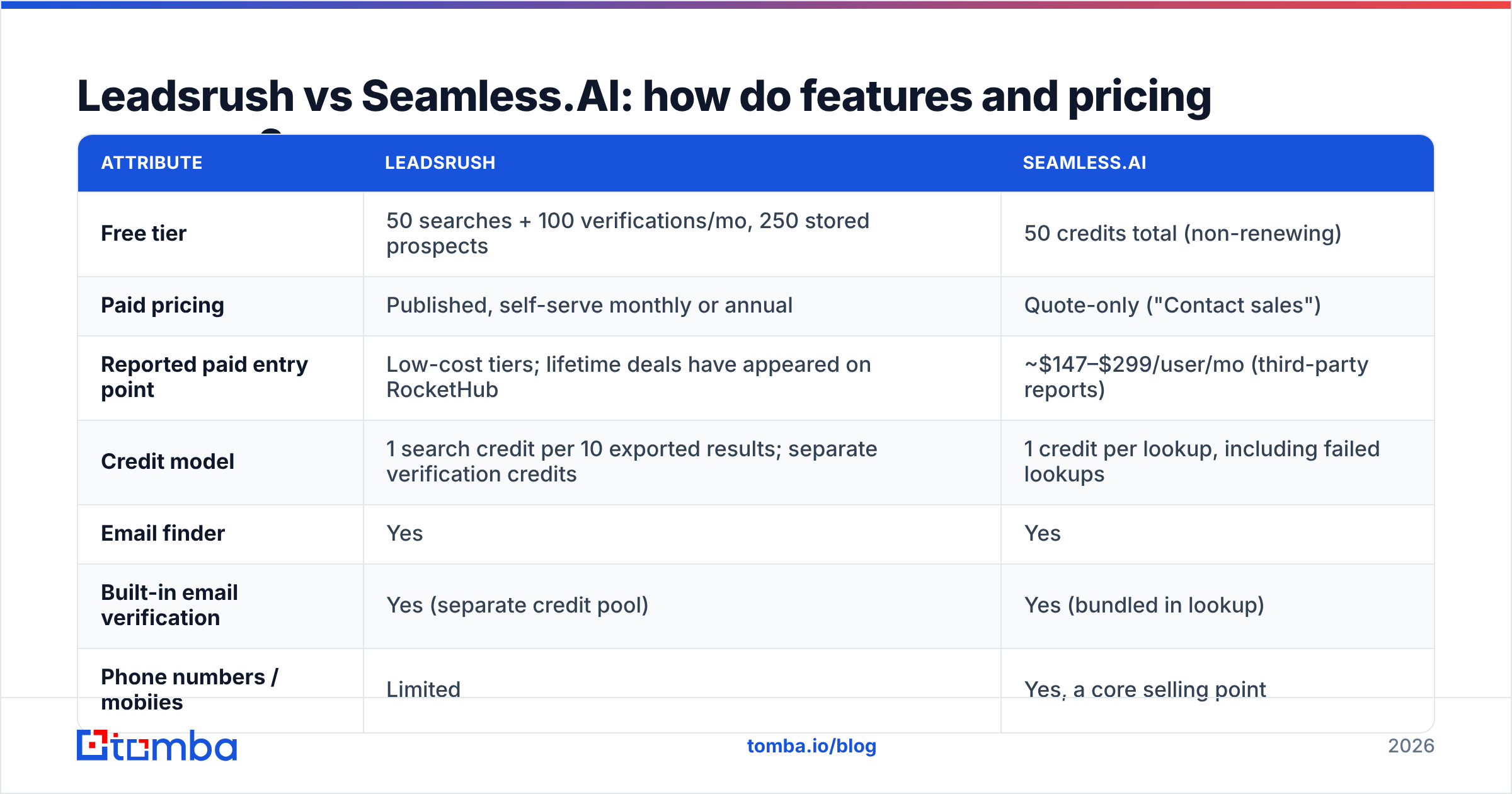
This table covers what matters most when you choose between them. Prices are based on public pricing pages and 2026 third-party breakdowns. Confirm current numbers before you buy, because both vendors change their plans.
| Attribute | Leadsrush | Seamless.AI |
|---|---|---|
| Free tier | 50 searches + 100 verifications/mo, 250 stored prospects | 50 credits total (non-renewing) |
| Paid pricing | Published, self-serve monthly or annual | Quote-only ("Contact sales") |
| Reported paid entry point | Low-cost tiers; lifetime deals have appeared on RocketHub | ~$147–$299/user/mo (third-party reports) |
| Credit model | 1 search credit per 10 exported results; separate verification credits | 1 credit per lookup, including failed lookups |
| Email finder | Yes | Yes |
| Built-in email verification | Yes (separate credit pool) | Yes (bundled in lookup) |
| Phone numbers / mobiles | Limited | Yes, a core selling point |
| Chrome extension for LinkedIn | LinkedIn list import and enrichment | Yes, a core workflow |
| Technology filters | Yes (Shopify, WooCommerce, Stripe, etc.) | Limited |
| Intent data | No | Higher tiers |
| CRM integrations | 18 native connectors | Salesforce, HubSpot, Outreach and more |
| Contract | Monthly or annual | Annual, per seat, auto-renews |
| Best for | Solo founders, agencies, SMB list builders | Funded SDR teams calling and emailing US mid-market |

Which tool has more accurate data?#
Neither vendor publishes an independent accuracy audit, so treat any "98% accurate" claim on a landing page as marketing, not evidence. What you can do is look at the mechanics that drive accuracy.
Seamless.AI builds and checks contacts in real time when you search. That helps freshness, because you're not pulling a record that was scraped two years ago. The trade-off is the per-lookup credit charge. When a lookup comes back empty or uncertain, you still pay for it. Public reviews mostly say Seamless's data quality is acceptable to good for US contacts and weaker outside North America. Most of the complaints are about billing, not data.
Leadsrush works from a pre-built database with verification on top. Pre-built databases are fast and cheap per record, but they decay. B2B contact data goes stale at a meaningful rate every year as people change jobs. The separate verification pool is Leadsrush's answer to that: you pull the list cheaply, then verify before you send.

Whichever tool you choose, don't send cold email to unverified addresses. Run every export through an email verifier before it reaches your sequencer. Hard bounces above roughly 2% hurt your sender reputation fast, and no data vendor refunds a burned domain.
A simple accuracy test you can run on both free tiers:
- Pick 25 contacts you already know are valid (current customers, partners).
- Look up all 25 in each tool.
- Count found, found and correct, and found but wrong.
- Divide "found and correct" by credits spent. That gives you cost per valid contact, which is the only accuracy number that matters for your budget.
How much will each tool actually cost you?#
The sticker price isn't the real price. What you pay depends on how each credit unit maps to your workflow.
Leadsrush cost logic. Because you pay per 10 exported results, bulk exports are where it's cheapest. Exporting 1,000 contacts costs about 100 search credits. Verifying those 1,000 emails costs another 1,000 verification credits from the separate pool. So when you budget, plan for the verification pool, not the search pool. That's the one you'll run out of first.
Seamless.AI cost logic. Credits map one-to-one to lookups. If a Pro seat lands around $147/mo on an annual contract with a fixed yearly credit package, a five-rep team is looking at roughly $8,800+ a year before any upgrades. Failed lookups still use credits, so your effective cost per valid contact is higher than the headline rate.

Watch for these hidden costs:
- Seat creep. Seamless.AI prices per user, so adding two SDRs next quarter adds two seats.
- Renewal windows. Annual auto-renewals usually need notice well before the renewal date. Put the date in your calendar the day you sign.
- Verification overage. On Leadsrush, heavy exporters hit the verification limit before the search limit.
- Phone data premium. If you need mobiles, Seamless's higher cost buys something Leadsrush mostly doesn't offer. It isn't overhead if you actually call.
Is Leadsrush better than Seamless.AI for small teams?#
For most teams of one to five people who mainly send cold email, yes. Leadsrush is the easier buy for three reasons:
- You can see the price before you pay. No demo, no negotiation, and no surprise quote.
- List building is cheap. Charging per 10 exported results suits people who build 500 to 5,000-contact lists for campaigns.
- Technology filters are useful for agencies. "All Shopify stores in Germany using Stripe" is a real campaign brief, and Leadsrush handles it directly.
Seamless.AI makes more sense once your team calls as well as emails, works mostly from LinkedIn, and has a budget that fits per-seat annual contracts. Mobile numbers, intent signals and deep CRM sync are what you're paying for. If your reps don't use them, you're overpaying.
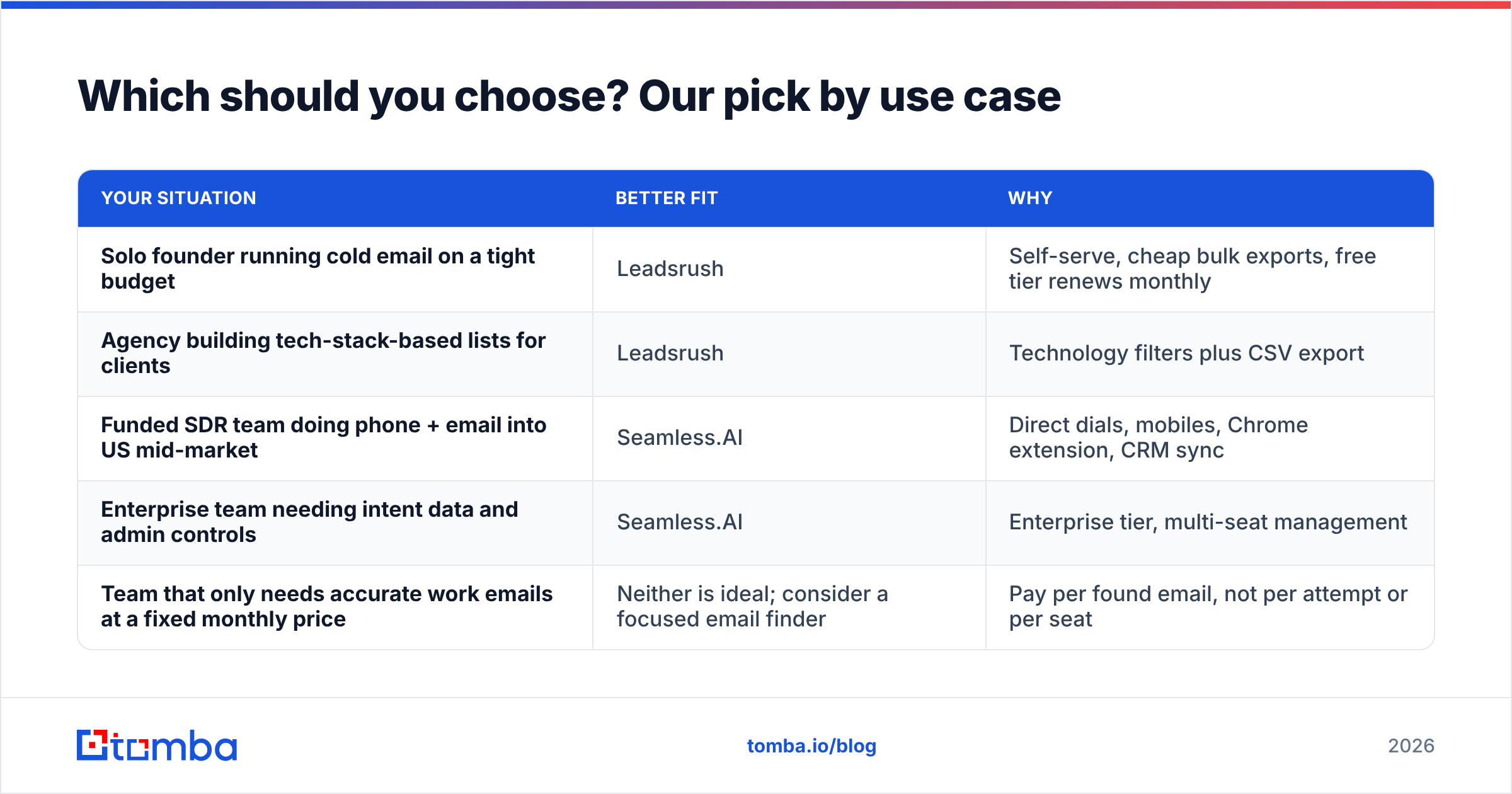
Which should you choose? Our pick by use case#
| Your situation | Better fit | Why |
|---|---|---|
| Solo founder running cold email on a tight budget | Leadsrush | Self-serve, cheap bulk exports, free tier renews monthly |
| Agency building tech-stack-based lists for clients | Leadsrush | Technology filters plus CSV export |
| Funded SDR team doing phone + email into US mid-market | Seamless.AI | Direct dials, mobiles, Chrome extension, CRM sync |
| Enterprise team needing intent data and admin controls | Seamless.AI | Enterprise tier, multi-seat management |
| Team that only needs accurate work emails at a fixed monthly price | Neither is ideal; consider a focused email finder | Pay per found email, not per attempt or per seat |
Our verdict: Leadsrush wins on price clarity and value for email-first list building. Seamless.AI wins on phone data and LinkedIn-native workflow, but you should only sign once you've benchmarked cost per valid contact on the free tier and negotiated the renewal terms in writing.
Are there better alternatives to Leadsrush and Seamless.AI?#
If neither tool quite fits, it's usually because you want something in between. You want more precision than a bulk database gives you, but without Seamless.AI's contract overhead. That's where focused email finders come in.
Tomba is one example. It's built around finding and verifying professional emails. You can look up a person by name and company, or run a domain search to list every public email tied to a company domain. Verification, catch-all checks, phone finder and enrichment sit next to it. Pricing is published: a free tier with 25 searches a month, then Starter at $49/mo, Growth at $99/mo and Pro at $249/mo. All are self-serve, with no per-seat quote. See the full Tomba pricing for the credit breakdown.
If you're specifically leaving Seamless.AI, our Seamless.AI alternative breakdown covers the migration trade-offs in more detail.
Frequently asked questions#
Does Leadsrush have a free plan? Yes. The free plan includes 50 searches and 100 email verifications a month, plus storage for up to 250 prospects, with no credit card required.
Is Seamless.AI pricing public? Only the free plan is. Pro and Enterprise both say "Contact sales" on the pricing page. Third-party reports in 2026 put Pro at around $147–$299 per user per month.
Does Seamless.AI charge for failed lookups? Yes. Credits are used per lookup attempt, even when no valid email or phone number comes back.
Can I use either tool without verifying emails separately? Both include verification, but running exports through an independent verifier before sending is still best practice. It's the cheapest protection you can buy for your sending domain.
Ready to find emails without the contract?#
If your main need is verified work emails, and not a phone-dialer database or a per-seat annual contract, try the Tomba Email Finder. Search by name and company or by domain, verify on the spot, and start on the free tier with 25 searches a month before moving to Starter at $49/mo. Run the same 25-contact test described above against Leadsrush and Seamless.AI, and keep whichever gives you the lowest cost per valid contact.
Related guides#
// get started
Find, verify and enrich your first contacts today
Start on the free plan with 25 searches a month, then scale when your team is ready.
Free plan · No credit card required · GDPR & CCPA
// about the author