Leadsrush vs Wiza (2026): Which Lead Tool Should You Pick?
Leadsrush starts from domains and technologies. Wiza starts from LinkedIn and Sales Navigator. We compare how each finds data, what it costs, how it handles accuracy, and which one fits your outbound motion.
TL;DR
- Leadsrush starts with the account. You search a domain, a technology, or a local business category and get back a B2B database. One search credit covers up to 10 contacts per domain.
- Wiza starts with the person. It turns LinkedIn and Sales Navigator searches into enriched lists, and you only spend credits on verified emails.
- Pricing is structured differently. Wiza publishes monthly plans: Free, Starter at $49/mo, Email at $83–$99/mo and Email + Phone at $166–$199/mo. Leadsrush has mostly spread through lifetime deals on marketplaces like RocketHub, so check its site before you budget.
- Pick Leadsrush if you prospect by company, tech stack, or local business. Pick Wiza if your team already lives in Sales Navigator.
- Verify before you send, whichever you choose. Database age and catch-all domains hurt both tools more than any feature difference does.
What are Leadsrush and Wiza, in one sentence each?#
Leadsrush is a B2B lead database with a built-in email verifier. You search by domain, technology, or local business data, export the contacts, and push them to your CRM or automation tools.
Wiza is a prospecting tool built on LinkedIn. It takes a LinkedIn or Sales Navigator search (or a list of profile URLs) and adds verified work emails, phone numbers, and firmographic data.
They both give you "emails for outreach," which is why people compare them. They get there from opposite directions, though. Leadsrush asks "which company?" first. Wiza asks "which person?" first. Most of the practical differences follow from that.
An analogy helps. Leadsrush is like walking into a building and asking reception for the staff directory. Wiza is like already knowing the name of the person you want to meet and asking for their direct line. Each approach works. Which one suits you depends on what you know before you start.
How does each tool actually find contacts?#
Before you compare prices, look at the workflow, because the workflow determines what you'll pay per useful contact.
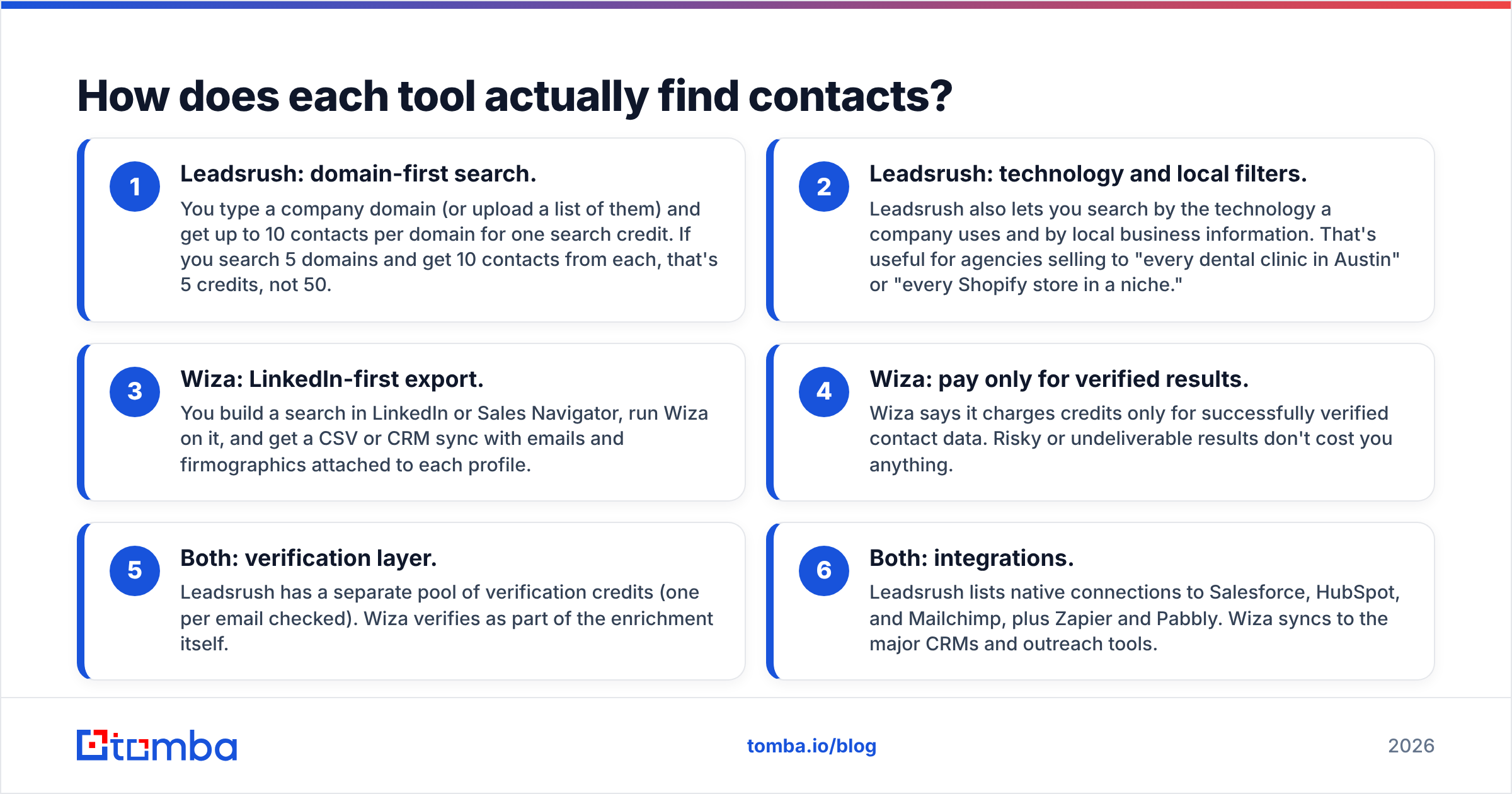
- Leadsrush: domain-first search. You type a company domain (or upload a list of them) and get up to 10 contacts per domain for one search credit. If you search 5 domains and get 10 contacts from each, that's 5 credits, not 50.
- Leadsrush: technology and local filters. Leadsrush also lets you search by the technology a company uses and by local business information. That's useful for agencies selling to "every dental clinic in Austin" or "every Shopify store in a niche."
- Wiza: LinkedIn-first export. You build a search in LinkedIn or Sales Navigator, run Wiza on it, and get a CSV or CRM sync with emails and firmographics attached to each profile.
- Wiza: pay only for verified results. Wiza says it charges credits only for successfully verified contact data. Risky or undeliverable results don't cost you anything.
- Both: verification layer. Leadsrush has a separate pool of verification credits (one per email checked). Wiza verifies as part of the enrichment itself.
- Both: integrations. Leadsrush lists native connections to Salesforce, HubSpot, and Mailchimp, plus Zapier and Pabbly. Wiza syncs to the major CRMs and outreach tools.
The trade-off: Leadsrush's per-domain credit is cheap when you want breadth inside an account. Wiza's pay-per-verified model is efficient when you want precision on a list of named people.
Is Leadsrush or Wiza better for accuracy?#
Neither vendor publishes an independent, audited accuracy figure, so be skeptical of any single number you see quoted. What you can reason about is where each tool's errors come from.
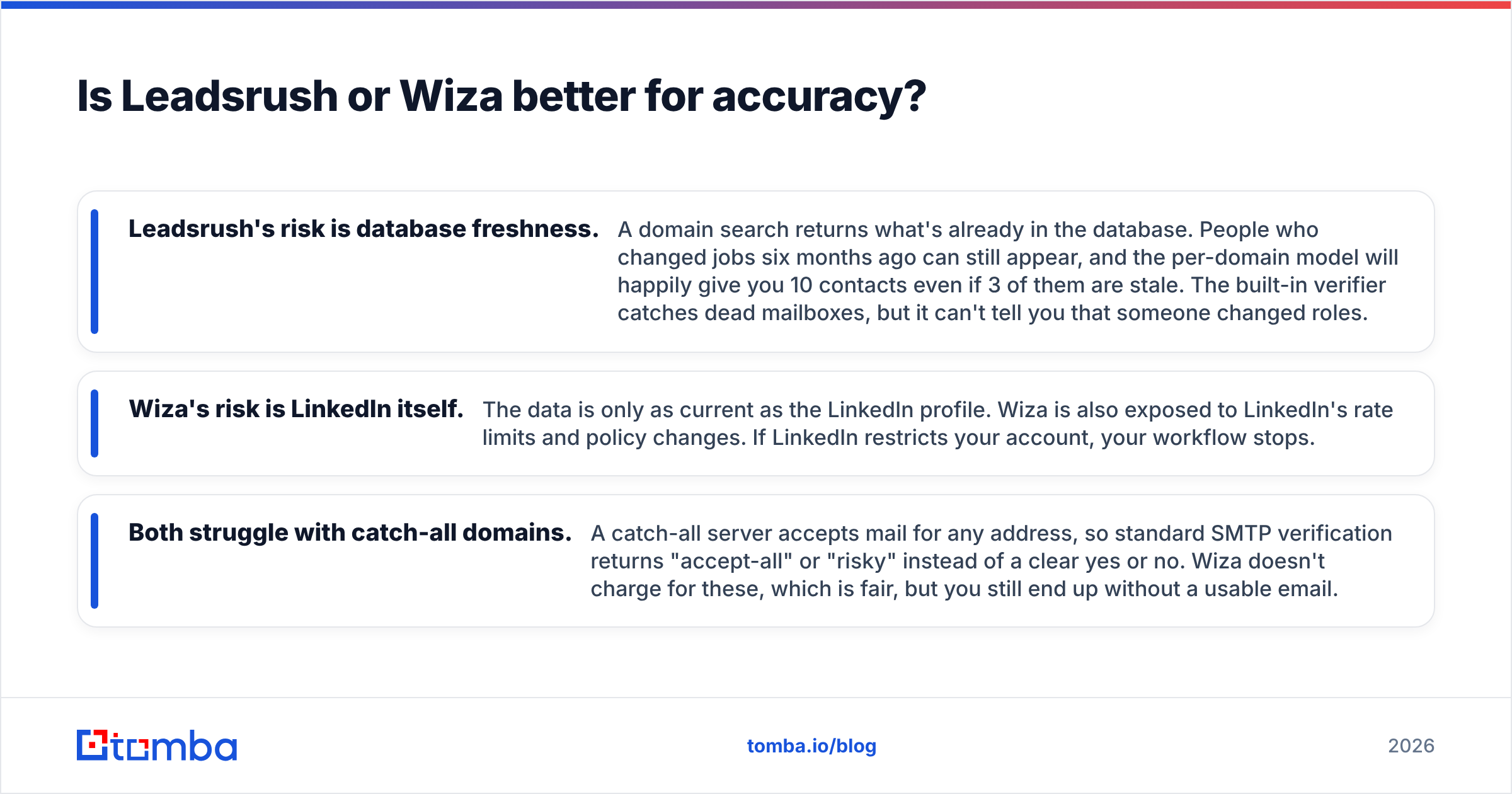
- Leadsrush's risk is database freshness. A domain search returns what's already in the database. People who changed jobs six months ago can still appear, and the per-domain model will happily give you 10 contacts even if 3 of them are stale. The built-in verifier catches dead mailboxes, but it can't tell you that someone changed roles.
- Wiza's risk is LinkedIn itself. The data is only as current as the LinkedIn profile. Wiza is also exposed to LinkedIn's rate limits and policy changes. If LinkedIn restricts your account, your workflow stops.
- Both struggle with catch-all domains. A catch-all server accepts mail for any address, so standard SMTP verification returns "accept-all" or "risky" instead of a clear yes or no. Wiza doesn't charge for these, which is fair, but you still end up without a usable email.

In practice, run a sample before you commit. Take 100 contacts you already know are good, run them through both tools, and count three things: found, verified, and bounced after sending. That tells you more than any vendor's marketing.
Whichever tool you use, send every export through a dedicated email verifier before it reaches your sequencer. It's the cheapest protection you can buy for your sender reputation.
How do Leadsrush and Wiza compare side by side?#

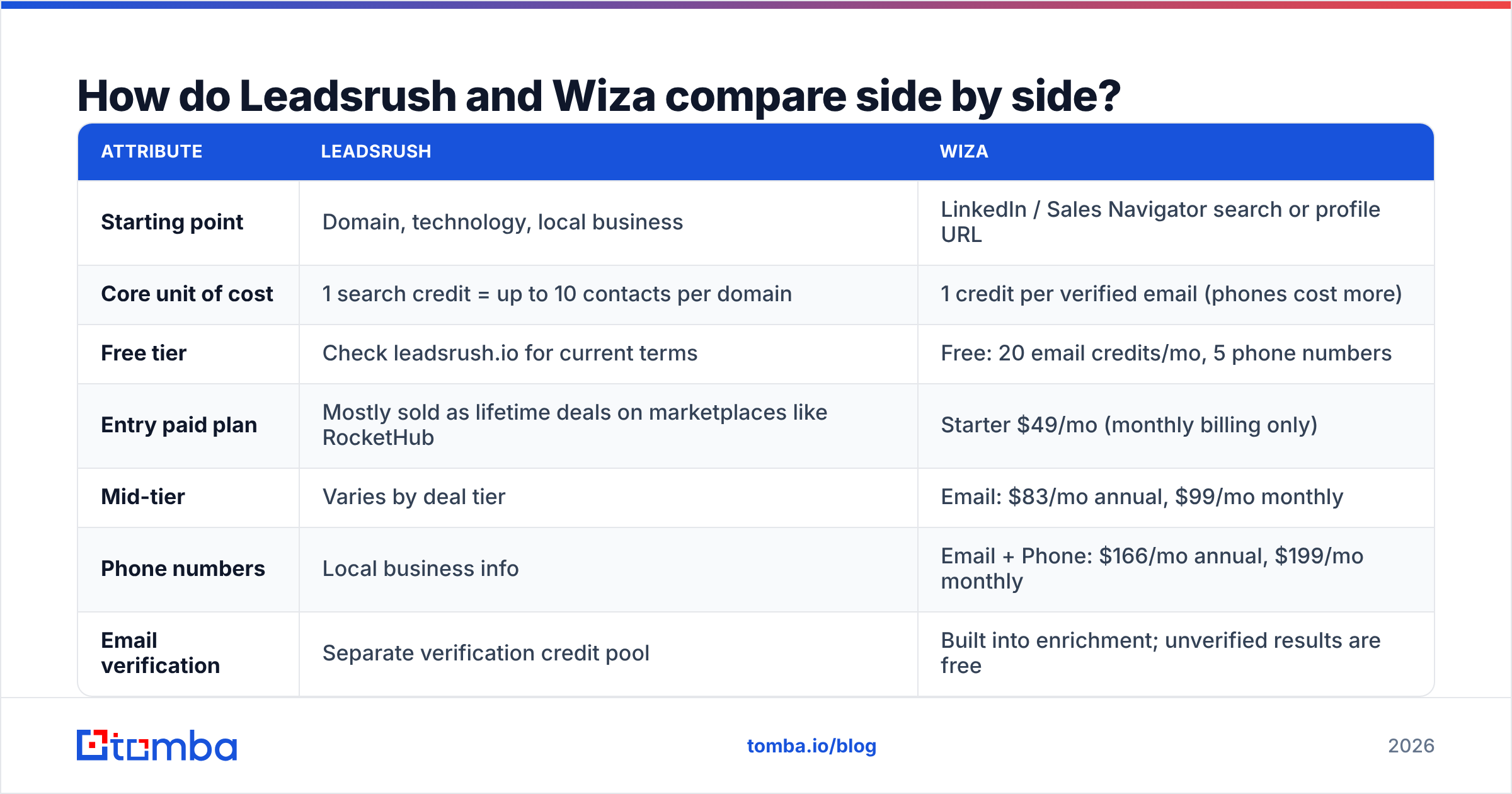
| Attribute | Leadsrush | Wiza |
|---|---|---|
| Starting point | Domain, technology, local business | LinkedIn / Sales Navigator search or profile URL |
| Core unit of cost | 1 search credit = up to 10 contacts per domain | 1 credit per verified email (phones cost more) |
| Free tier | Check leadsrush.io for current terms | Free: 20 email credits/mo, 5 phone numbers |
| Entry paid plan | Mostly sold as lifetime deals on marketplaces like RocketHub | Starter $49/mo (monthly billing only) |
| Mid-tier | Varies by deal tier | Email: $83/mo annual, $99/mo monthly |
| Phone numbers | Local business info | Email + Phone: $166/mo annual, $199/mo monthly |
| Email verification | Separate verification credit pool | Built into enrichment; unverified results are free |
| Credit rollover | Depends on plan | No rollover on monthly plans |
| Integrations | Salesforce, HubSpot, Mailchimp, Zapier, Pabbly | Major CRMs and outreach tools, CSV export |
| Best fit | Agencies, local-SMB prospecting, tech-stack targeting | SDR teams already working in Sales Navigator |
| Main weakness | Database freshness; less person-level targeting | Depends on LinkedIn; phone credits get expensive |
Wiza pricing above comes from its published plans and third-party summaries like G2's Wiza pricing page. Confirm on wiza.co before you buy, because SaaS pricing changes often. For Leadsrush, check leadsrush.io directly. Lifetime-deal terms vary a lot by marketplace and tier.
Which is cheaper, Leadsrush or Wiza?#
It depends on how many usable contacts you need, not on the sticker price.
Where Leadsrush comes out cheaper: You're prospecting across hundreds of small companies and you're happy with "whoever is at this domain." One credit for up to 10 contacts is very efficient for account coverage. If you bought a lifetime deal, your cost per month goes toward zero over time, as long as the product keeps getting updated.
Where Wiza comes out cheaper: You need specific people (VP of Sales at 200 named accounts, for example) and don't want to pay for contacts you'll throw away. Because you only pay for verified emails, your cost per deliverable contact is predictable. You won't pay for 8 irrelevant contacts to get the 2 you wanted.
Hidden costs to watch:
- Wiza phone reveals cost about double what email credits cost. If your team cold calls, budget for the Email + Phone plan, not the Email plan.
- Wiza monthly credits don't roll over. Unused credits at the end of the month are gone.
- Leadsrush lifetime deals carry vendor risk. You're betting that the database keeps getting refreshed without recurring revenue from you. Ask how often the data is updated before you buy.
- Both need a Sales Navigator seat or a separate verifier to run a complete workflow. Wiza needs LinkedIn access to be useful. Leadsrush users often add a second verifier for catch-all handling.
Who should choose Leadsrush?#
Choose Leadsrush if most of these apply to you:
- You prospect by account or by segment ("all B2B SaaS companies using HubSpot") rather than by named person.
- You run an agency or sell to local businesses, where LinkedIn coverage is thin and domain or local-listing data is more complete.
- You want tech-stack targeting without paying for a dedicated technographics platform.
- You prefer a one-time purchase to another monthly subscription and accept the trade-offs that come with it.
Leadsrush fits a top-of-funnel list-building role well. You'll still want a verification pass and some manual qualification before anything goes into a sequence.
Who should choose Wiza?#
Choose Wiza if most of these apply to you:
- Your SDRs already build lists in Sales Navigator and want emails attached to them with one click.
- You care more about precision per contact than about volume per account.
- You want predictable billing where bad data doesn't cost you credits.
- You need phone numbers for a call-plus-email cadence and can pay for the higher tier.
Wiza is effectively the enrichment layer on top of LinkedIn. If LinkedIn is where your prospecting starts, Wiza removes the copy-and-paste step. If you'd like the same person-first workflow without depending on LinkedIn, see our breakdown of Wiza alternative options.
What does neither tool solve on its own?#
Some gaps show up with both tools, and they're worth planning for before you sign up for either.
Account-level email discovery without LinkedIn. Wiza needs a LinkedIn profile to start from. Leadsrush gives you a set of contacts but doesn't always show you the company's email pattern or the public sources behind each address. A domain search that returns every public email tied to a company, with sources and a detected format (first.last@, f.last@), lets you reason about accuracy yourself instead of trusting a black box.
Catch-all domains. Neither tool gives you a clear verdict on accept-all servers. If a large share of your targets are mid-market companies on Microsoft 365 or custom mail servers, you'll see a lot of "risky" results.
Deliverability hygiene. A tool that finds emails doesn't protect your domain. Bounce rates above 2–3% and spam complaints are what damage your sender reputation, and HubSpot's guidance on email bounce rates says the same thing. Clean lists are your responsibility, whichever tool produced them.
Is there a middle ground between Leadsrush and Wiza?#
Yes. A lot of teams end up wanting Leadsrush's account-first breadth and Wiza's person-first precision in one place, with verification built in. That's the gap a general-purpose email finder fills.
Here's how that workflow usually runs:
- Start from the domain to see every public email and the company's email pattern.
- Look up the specific person by name and domain (or by LinkedIn URL) when you know who you want.
- Verify every result, with separate handling for catch-all domains.
- Push to your CRM or sequencer through native integrations, Google Sheets, or an API.
Tomba is built around that flow. Plans start with a free tier of 25 searches per month, then Starter at $49/mo, Growth at $99/mo, and Pro at $249/mo, with custom Enterprise pricing. You can compare tiers on the Tomba pricing page. It isn't a replacement for Sales Navigator if your team lives there, and it isn't a local-business directory. It covers the domain-to-person-to-verified-email path in one tool.
Frequently asked questions#
Is Leadsrush a Wiza alternative?#
Partly. Both deliver B2B emails, but Leadsrush searches by domain, technology, and local business, while Wiza enriches LinkedIn profiles. If you stopped using LinkedIn tomorrow, Leadsrush would still work and Wiza mostly wouldn't. If your whole process runs through Sales Navigator, Leadsrush won't replace Wiza's one-click export.
Does Wiza charge for emails it can't verify?#
According to Wiza, no. Credits are spent only on successfully verified contact data. Risky or undeliverable results don't count against your balance.
How does the Leadsrush credit system work?#
One search credit covers one domain and returns up to 10 contacts. Email verification uses a separate pool, with one verification credit per email checked.
Can I use both tools together?#
You can. Some teams use Leadsrush to build account lists by technology or segment, then use Wiza on Sales Navigator to find specific decision-makers at those accounts. Run a single verification pass on the combined list before sending, so you don't pay twice for duplicate contacts.
Which is better for cold calling?#
Wiza, if you're willing to pay for the Email + Phone plan, because it attaches mobile numbers to named people. Leadsrush's local business data is useful for company main lines but less so for reaching a specific person directly.
So, Leadsrush vs Wiza: which should you pick?#
Pick Wiza if your prospecting starts in LinkedIn Sales Navigator, you want pay-for-verified billing, and you need phone numbers for named decision-makers. Pick Leadsrush if you prospect by domain, tech stack, or local segment and prefer a one-time purchase to another subscription. Neither is the better tool overall. Each suits a different starting point.
Whichever you choose, test it on 100 known-good contacts first, and never send an unverified export.
If you want account-level discovery and person-level lookups in one place without depending on LinkedIn, try the Tomba Email Finder. Search by domain, name, or company, see the sources behind every address, and verify before you send. The free tier gives you 25 searches a month to run the same 100-contact test against Leadsrush and Wiza and compare the results yourself.
Related guides#
// get started
Find, verify and enrich your first contacts today
Start on the free plan with 25 searches a month, then scale when your team is ready.
Free plan · No credit card required · GDPR & CCPA
// about the author