LeadZen.ai vs Sales Automation Systems: Which Do You Need in 2026?
LeadZen.ai finds leads. Sales automation systems work them. Here's how the two differ, where they overlap, what each really costs, and how to tell which one your team is missing.
TL;DR
- LeadZen.ai is a lead-data tool. It finds and enriches B2B contacts. Sales automation systems like Outreach, Salesloft, Apollo, HubSpot Sales Hub, and Reply.io are execution engines. They sequence, send, track, and log outreach.
- These are different jobs, so most teams don't choose one over the other. The real question is which layer is weaker in your stack right now.
- If your sequences run fine but bounce rates sit above 3–5% or you keep running out of targets, fix the data layer first. If you have plenty of contacts but reps follow up by hand, fix the automation layer.
- LeadZen.ai's public pricing is inconsistent across review sites, so ask for a quote. Automation platforms range from free tiers up to enterprise seats well above $100/user/month.
- Whatever you pick, verify the data before it goes into a sequencer. Good automation can't rescue bad contact data.
What is LeadZen.ai, exactly?#
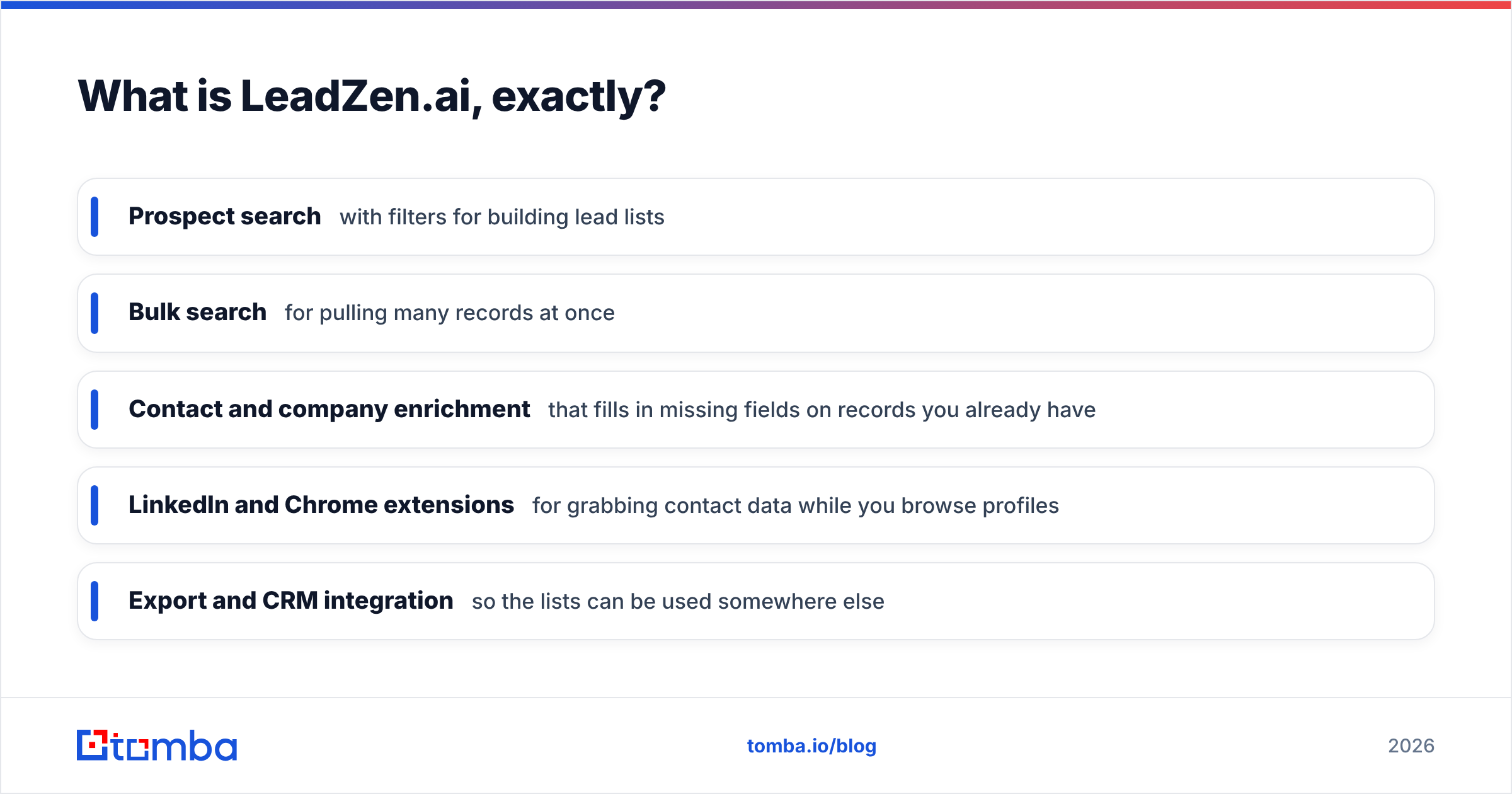
LeadZen.ai calls itself an AI-driven B2B lead generation platform, aimed mostly at startups and SMBs. In practice it's a prospect database with a discovery layer on top. You describe your ideal customer, filter by industry, role, location, and company attributes, and get contact records that include emails, phone numbers, and firmographics.
The main features, according to its own materials and third-party listings:
- Prospect search with filters for building lead lists
- Bulk search for pulling many records at once
- Contact and company enrichment that fills in missing fields on records you already have
- LinkedIn and Chrome extensions for grabbing contact data while you browse profiles
- Export and CRM integration so the lists can be used somewhere else
The last point matters most. LeadZen.ai's job mostly ends once the list is exported. It is not designed to run a 7-step multichannel cadence, rotate sending inboxes, or tell a rep which prospect opened an email three times this morning.
A note on pricing: review aggregators disagree about what LeadZen.ai costs. Listings range from roughly $133/month to several thousand dollars per month, and some describe per-meeting packages. Get a written quote tied to your credit volume before you compare it with anything else.
What counts as a "sales automation system"?#
Sales force automation is an older category, but in 2026 it usually means sales engagement platforms. These tools take a list of contacts and handle the repetitive work of running outreach:
- Multi-step sequences across email, calls, LinkedIn tasks, and SMS
- Scheduled sends, reply detection, and automatic stop-on-reply
- Task queues that tell reps who to call today
- Activity logging back to the CRM
- Analytics on open, reply, and meeting rates by step and template
The common names are Outreach, Salesloft, HubSpot Sales Hub, Apollo, Reply.io, and cold-email senders like Instantly. Some of them, Apollo especially, also include a contact database. That's the reason "LeadZen.ai vs sales automation" is a real question and not a category mistake: there is some overlap at the edges.
If you want the definition first, the Tomba glossary covers sales automation in more depth.
How do LeadZen.ai and sales automation systems compare side by side?#
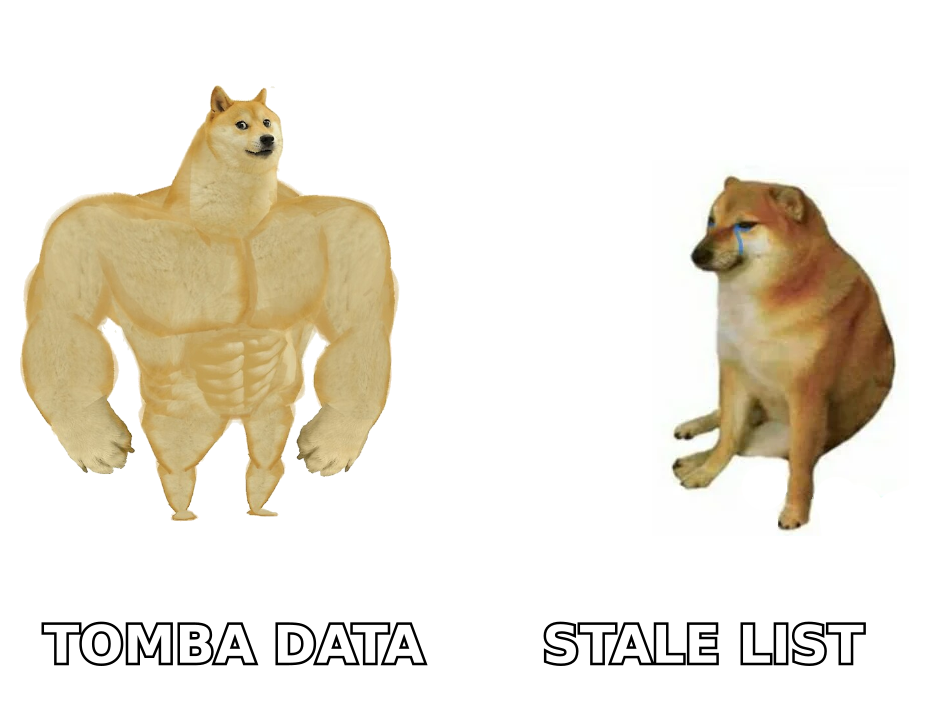
This table compares the two categories, not every vendor in them. Automation prices are approximate list prices at the time of writing and change often, so check each vendor's pricing page.
| Attribute | LeadZen.ai | Sales automation systems (Outreach, Salesloft, HubSpot, Apollo, Reply.io) |
|---|---|---|
| Primary job | Find and enrich B2B contacts | Run, track, and optimize outreach |
| Core output | Lead lists with emails, phones, firmographics | Sequences, tasks, sent messages, meetings booked |
| Contact database | Yes, it's the product | Only some (Apollo yes; Outreach/Salesloft no) |
| Multi-step sequences | No or minimal | Yes, core feature |
| Inbox rotation / deliverability controls | No | Varies (Instantly, Reply.io strong; Outreach via integrations) |
| CRM sync | Export + integrations | Deep bidirectional sync is standard |
| Typical buyer | Founder, SDR, small sales team | Sales ops, RevOps, SDR managers |
| Pricing model | Credits / plans; public figures inconsistent, get a quote | Per seat: free tiers (HubSpot, Apollo) up to $100+/user/mo (Outreach, Salesloft) |
| Biggest risk | Data decay and bounce rates if not verified | Automating bad data at scale and burning your domains |
The main takeaway from the table: LeadZen.ai decides who you contact. A sales automation system decides how and when you contact them. Comparing them feature by feature is a bit like comparing a fuel supplier to an engine.
Where do the two categories actually overlap?#
There are three places where the line blurs, and they're worth knowing before you pay for both.
- All-in-one platforms. Apollo bundles a large contact database with sequencing. If you're already on Apollo, a separate lead database may duplicate spend. The trade-off is that an all-in-one database is usually broad rather than deep, and many teams still add a second data source for coverage in niche segments or regions.
- Enrichment inside the automation tool. HubSpot, Outreach, and Salesloft all offer enrichment directly or through their marketplaces. It works for filling fields on existing records. It isn't built to discover new accounts from scratch.
- Browser extensions. LeadZen.ai and most automation tools both have Chrome extensions that work on LinkedIn. The difference is what happens next: LeadZen's extension captures data, while an automation tool's extension usually adds the prospect straight into a sequence.
If you're a two-person team, one all-in-one tool can reasonably cover both layers. Once you have a dedicated SDR team, the two layers usually split, because data quality and execution quality get optimized separately.
Which one should you buy first?#
Start with whichever layer is failing. Here's a quick diagnostic.
Your data layer is the bottleneck if:
- Hard bounce rates are above 3% on new campaigns
- Reps spend more than an hour a day hunting for emails by hand
- You keep re-contacting the same few hundred accounts because nobody can find new ones
- Your reply rate is fine on warm lists but falls apart on cold ones
In that case, a lead-data tool (LeadZen.ai, Tomba, or a similar provider) will do more for you than a new sequencer.
Your automation layer is the bottleneck if:
- Follow-ups happen "when someone remembers"
- Managers can't tell which templates or steps actually book meetings
- Activity isn't logged in the CRM, so pipeline reviews run on guesses
- You have lots of contacts sitting in spreadsheets that nobody works
In that case, a sales engagement platform is the fix, and more data would just pile up.
Both are broken? Fix data first. A strong sequencer running on a weak list only reaches the wrong people, or bounces, faster. Bounces also hurt your sender reputation, and that damage carries over to your good campaigns.
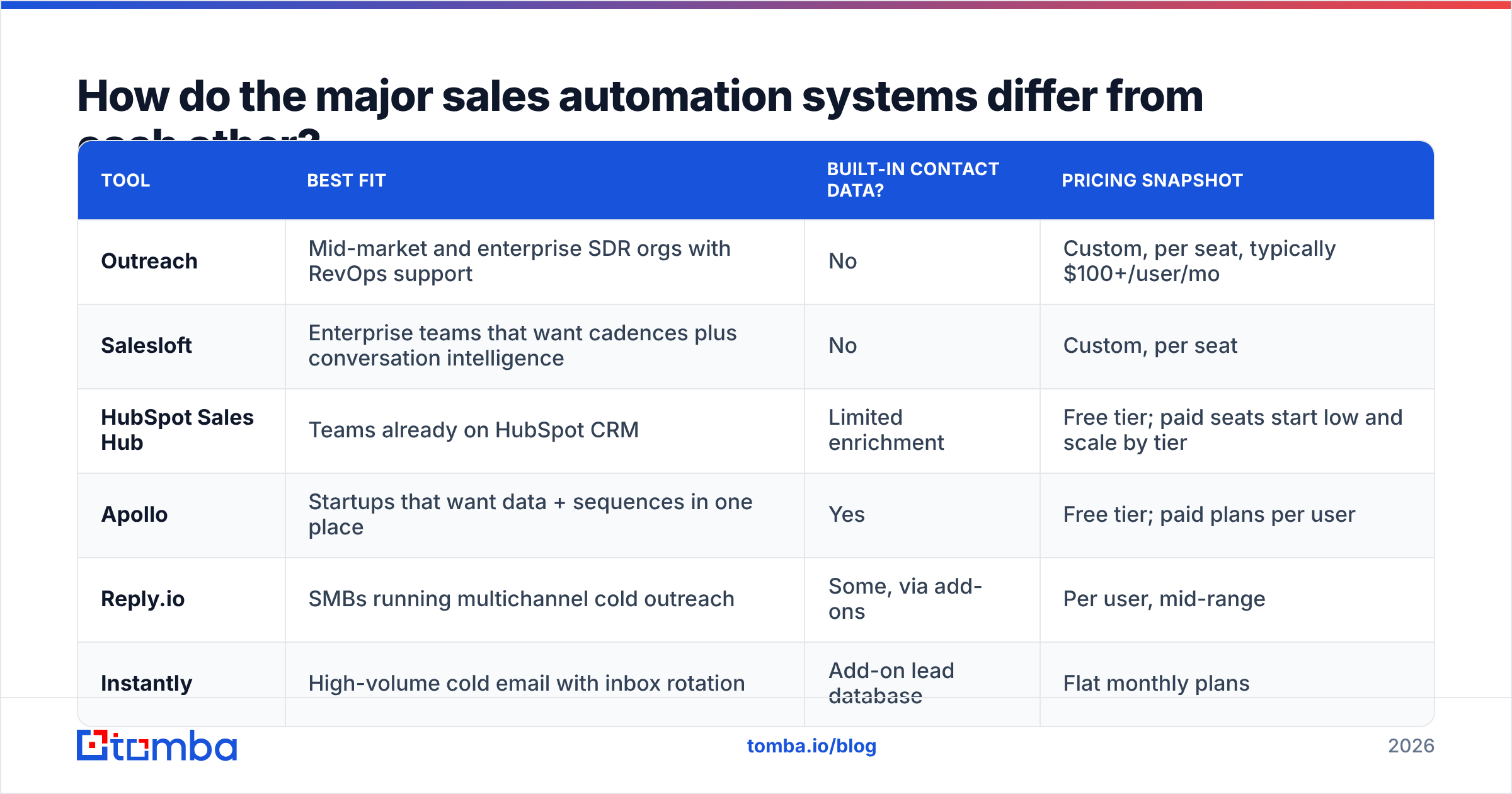
How do the major sales automation systems differ from each other?#
Once you know you need the automation layer, the next choice is which tool. Here's a short guide to where each one fits:
| Tool | Best fit | Built-in contact data? | Pricing snapshot |
|---|---|---|---|
| Outreach | Mid-market and enterprise SDR orgs with RevOps support | No | Custom, per seat, typically $100+/user/mo |
| Salesloft | Enterprise teams that want cadences plus conversation intelligence | No | Custom, per seat |
| HubSpot Sales Hub | Teams already on HubSpot CRM | Limited enrichment | Free tier; paid seats start low and scale by tier |
| Apollo | Startups that want data + sequences in one place | Yes | Free tier; paid plans per user |
| Reply.io | SMBs running multichannel cold outreach | Some, via add-ons | Per user, mid-range |
| Instantly | High-volume cold email with inbox rotation | Add-on lead database | Flat monthly plans |
For HubSpot specifically, the Sales Hub product page spells out which sequencing features belong to which tier. That matters, because sequences aren't included on the free plan.
If you're comparing enterprise engagement platforms, our breakdown of the Outreach alternative landscape covers the cheaper options.

Is an "AI lead generation" tool a replacement for a sales automation system?#
No, and vendors that suggest otherwise are overselling. "AI" in lead-data tools usually means one of three things:
- Smarter filtering: natural-language ICP search instead of dropdown filters
- Lookalike discovery: "find companies like my 20 best customers"
- Scoring or intent signals: ranking leads by how likely they are to buy
All three are useful. None of them sends an email, schedules a follow-up, or tells a rep who to call. AI features in sales automation systems do a different job: drafting personalized first lines, suggesting next steps, summarizing calls, and flagging deals at risk.
Think of the two AI layers as feeding each other. The better your AI-sourced list, the more your AI-assisted sequences have to work with.
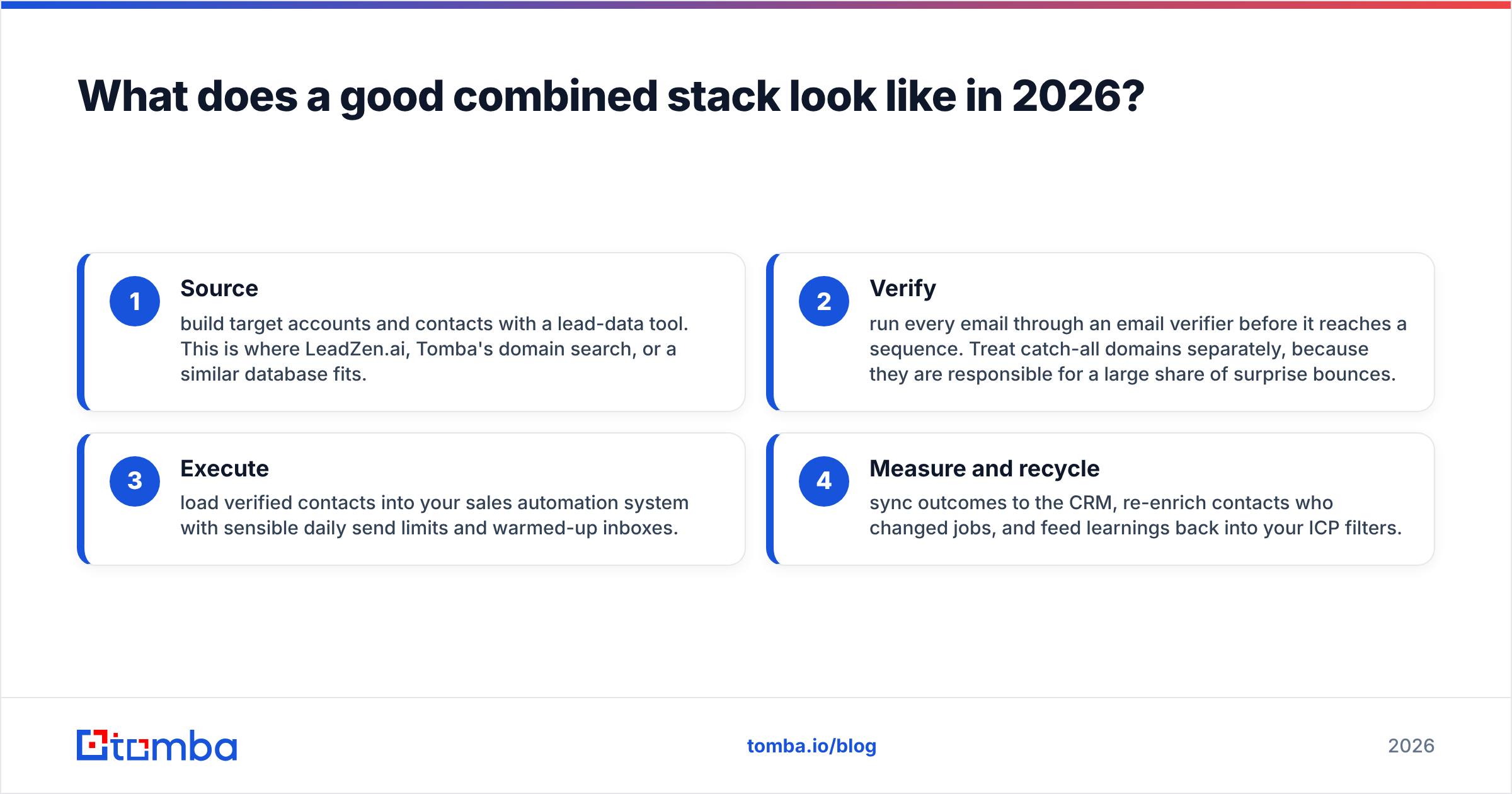
What does a good combined stack look like in 2026?#
Most healthy outbound stacks we see follow the same four-stage flow, whatever vendors they use:
- Source: build target accounts and contacts with a lead-data tool. This is where LeadZen.ai, Tomba's domain search, or a similar database fits.
- Verify: run every email through an email verifier before it reaches a sequence. Treat catch-all domains separately, because they are responsible for a large share of surprise bounces.
- Execute: load verified contacts into your sales automation system with sensible daily send limits and warmed-up inboxes.
- Measure and recycle: sync outcomes to the CRM, re-enrich contacts who changed jobs, and feed learnings back into your ICP filters.
Skipping step 2 is the most common and most expensive mistake. Lead databases decay. People change roles, companies rebrand domains, and inboxes get shut down. Industry estimates commonly put B2B contact decay at well over 20% per year. Verifying right before you send, not just when you export, protects deliverability for every campaign.
How should you evaluate LeadZen.ai against other data providers?#
If the diagnostic says your data layer needs work, don't pick a provider based on its marketing page. Run a controlled test:
- Pull the same 200 target contacts from two or three providers, using identical ICP filters.
- Verify every email with one independent verifier so the results are comparable.
- Measure find rate (how many targets returned an email at all) and valid rate (how many of those passed verification).
- Check phone coverage separately if you cold call, since mobile coverage varies a lot by region.
- Price it per valid contact, not per credit. A cheap credit that returns an invalid email is expensive.
Peer reviews on G2 help you shortlist, but your own segment test is what should decide it. A provider with great coverage of US SaaS can be thin on European manufacturing, and the reverse happens too.
What are the pros and cons of each approach?#
LeadZen.ai (lead-data layer)
- Pro: fast list-building for SMB and startup ICPs
- Pro: enrichment plus LinkedIn and Chrome capture in one tool
- Pro: fills a gap that pure sequencers like Outreach and Salesloft leave open
- Con: public pricing is hard to pin down, so budget depends on a sales conversation
- Con: you still need a separate tool to run outreach
- Con: like any database, records need re-verification before sending
Sales automation systems (execution layer)
- Pro: consistent follow-up, which is where most replies actually come from
- Pro: measurable steps, so you can see which template books meetings
- Pro: CRM logging that makes forecasting honest
- Con: per-seat pricing adds up quickly for enterprise tools
- Con: these tools scale whatever you give them, including bad data
- Con: setup and governance usually need a RevOps owner
So, LeadZen.ai vs sales automation: which wins?#
Neither wins outright, because they don't compete for the same job. Here's the practical verdict:
- Solo founder or team under 3 reps: an all-in-one tool (Apollo, or a lead-data tool plus a lightweight sender like Instantly) is usually enough. Add verification before you send.
- Growing SDR team (3–15 reps): use a dedicated lead-data source plus a proper engagement platform. This is where LeadZen.ai or a comparable data provider paired with Reply.io, HubSpot, or Outreach makes sense.
- Enterprise: you'll probably run Outreach or Salesloft for execution and one or more data vendors for coverage. The focus shifts to data governance, deduplication, and enrichment refresh cycles.
What doesn't work at any size is buying a sequencer and hoping it fixes a data problem, or buying more data when the real problem is that nobody follows up.
Where does Tomba fit into this stack?#
If your diagnostic points to the data layer, Tomba covers the source and verify stages directly. The Tomba Email Finder returns professional emails by name, domain, or company, and each result can be checked through the built-in verifier before it goes into Outreach, HubSpot, Apollo, Reply.io, or any other sequencer you already use. There's a free tier with 25 searches a month so you can run the 200-contact test above on your own segment, and paid plans start at $49/month (see Tomba pricing for Growth and Pro tiers). Keep the automation platform that works for your team, and make sure the data you feed it is solid.
Related guides#
// get started
Find, verify and enrich your first contacts today
Start on the free plan with 25 searches a month, then scale when your team is ready.
Free plan · No credit card required · GDPR & CCPA
// about the author