Leadzenai vs Tomba: Which B2B Lead Tool Fits Your Team in 2026?
Leadzen.ai sells AI-driven lead discovery. Tomba sells domain-first email finding and verification. We compare data, accuracy, pricing and workflow fit so you can pick the right one.
TL;DR
- Leadzen.ai is an AI-assisted lead discovery platform. You describe your ideal customer, and it returns companies and contacts. It works best when you don't have a target list yet.
- Tomba is a domain-first email finder and verifier. It works best when you already know which companies or people you want and need deliverable email addresses fast.
- Tomba's pricing is public and predictable: a free tier with 25 searches/mo, then Starter at $49/mo, Growth at $99/mo and Pro at $249/mo. Leadzen.ai uses credit-based plans, so check its site for current tiers.
- If your bottleneck is who to target, test Leadzen.ai first. If it's how to reach them without bouncing, test Tomba first.
- Many teams run both: a discovery tool builds the list, and an email finder plus verifier cleans it before anything gets sent.
What is the real difference between Leadzen.ai and Tomba?#
These two tools overlap on paper, but they start from opposite ends of the prospecting workflow.
Leadzen.ai presents itself as an AI-powered B2B lead generation platform. You start with a description of your market (industry, geography, company size, job titles) and it returns matching companies and decision-makers, with contact details where it has them. It is a discovery tool first and a contact-data tool second.
Tomba works the other way around. The core product is an email finder. You give it a domain, a company name or a person's name, and it returns professional email addresses along with a confidence signal and the public sources it found them in. Verification, domain search, catch-all handling, phone finding and enrichment are all built around that core.
In practice the question you're answering is simple:
- "I don't know who to sell to yet." Leadzen.ai's AI search is designed for this.
- "I know exactly who I want. I just need their email, and it can't bounce." That is what Tomba is built for.
Keep this split in mind for the rest of the comparison. Most "which is better" arguments disappear once you're clear on which of these two problems you actually have.
How do Leadzen.ai and Tomba compare feature by feature?#
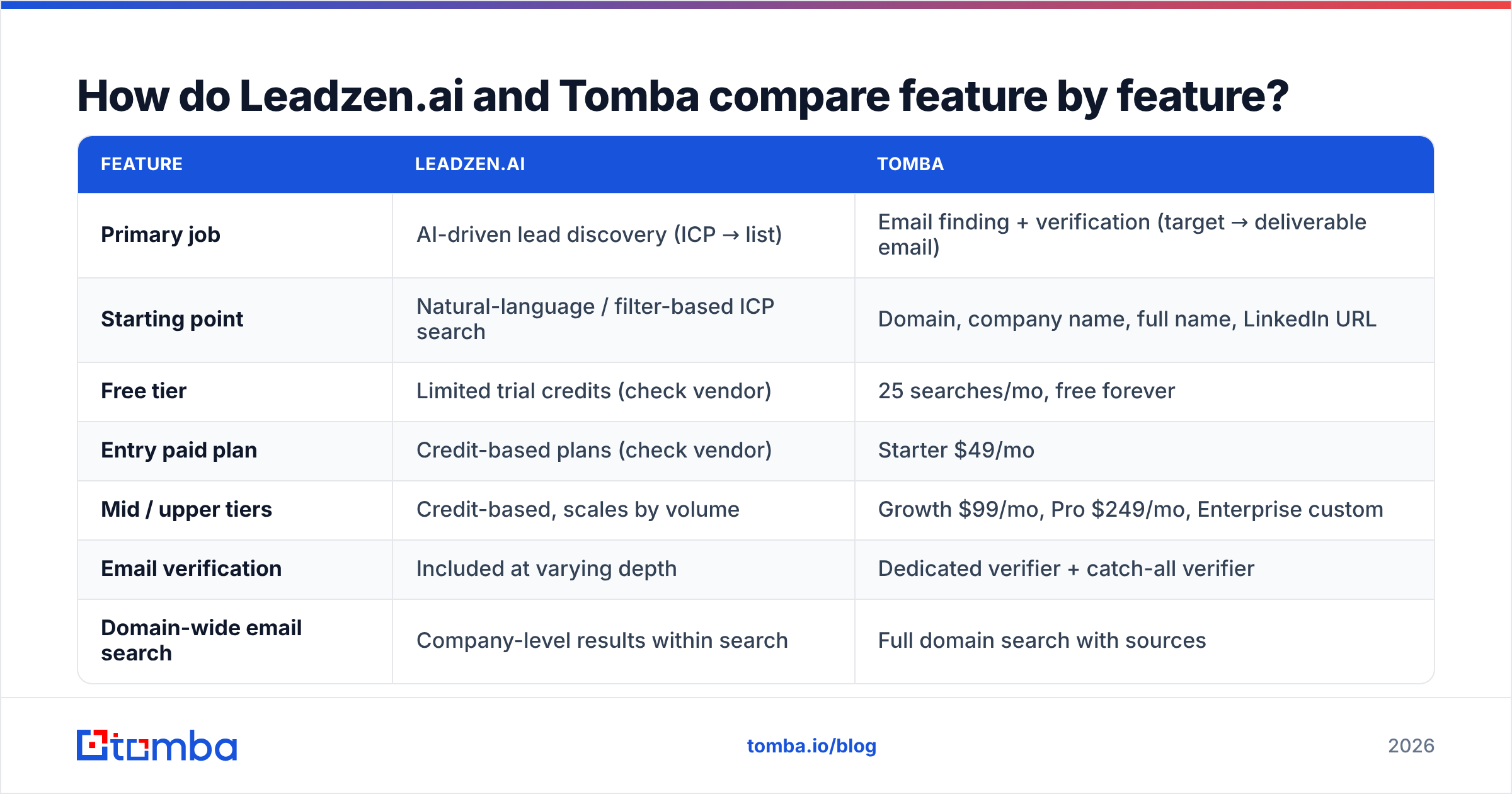
Here's the side-by-side view. Leadzen.ai changes its plans and packaging fairly often, so treat anything marked "check vendor" as something to confirm on their site before you buy.
| Feature | Leadzen.ai | Tomba |
|---|---|---|
| Primary job | AI-driven lead discovery (ICP → list) | Email finding + verification (target → deliverable email) |
| Starting point | Natural-language / filter-based ICP search | Domain, company name, full name, LinkedIn URL |
| Free tier | Limited trial credits (check vendor) | 25 searches/mo, free forever |
| Entry paid plan | Credit-based plans (check vendor) | Starter $49/mo |
| Mid / upper tiers | Credit-based, scales by volume | Growth $99/mo, Pro $249/mo, Enterprise custom |
| Email verification | Included at varying depth | Dedicated verifier + catch-all verifier |
| Domain-wide email search | Company-level results within search | Full domain search with sources |
| Phone numbers | Offered for some contacts | Phone finder + phone validator |
| Chrome extension | Yes (LinkedIn-focused) | Yes (websites + LinkedIn) |
| API | Available (check vendor docs) | Public REST API, CLI, MCP server |
| Spreadsheet tooling | CSV export | Google Sheets, Excel and Airtable add-ons, bulk upload |
| CRM integrations | Export-based / selected CRMs | HubSpot, Salesforce, Pipedrive, Zapier, Make |
| Best fit | Teams building lists from scratch | Teams with a target list who need clean emails |
The pattern is consistent across the table. Leadzen.ai puts more effort into the search experience. Tomba puts more effort into the contact data layer: finding the email, proving it's deliverable, and piping it into whichever tool your team already uses.
Which tool is more accurate for finding emails?#
Accuracy is where most comparisons get vague, so let's be specific about what "accurate" means for an email tool:
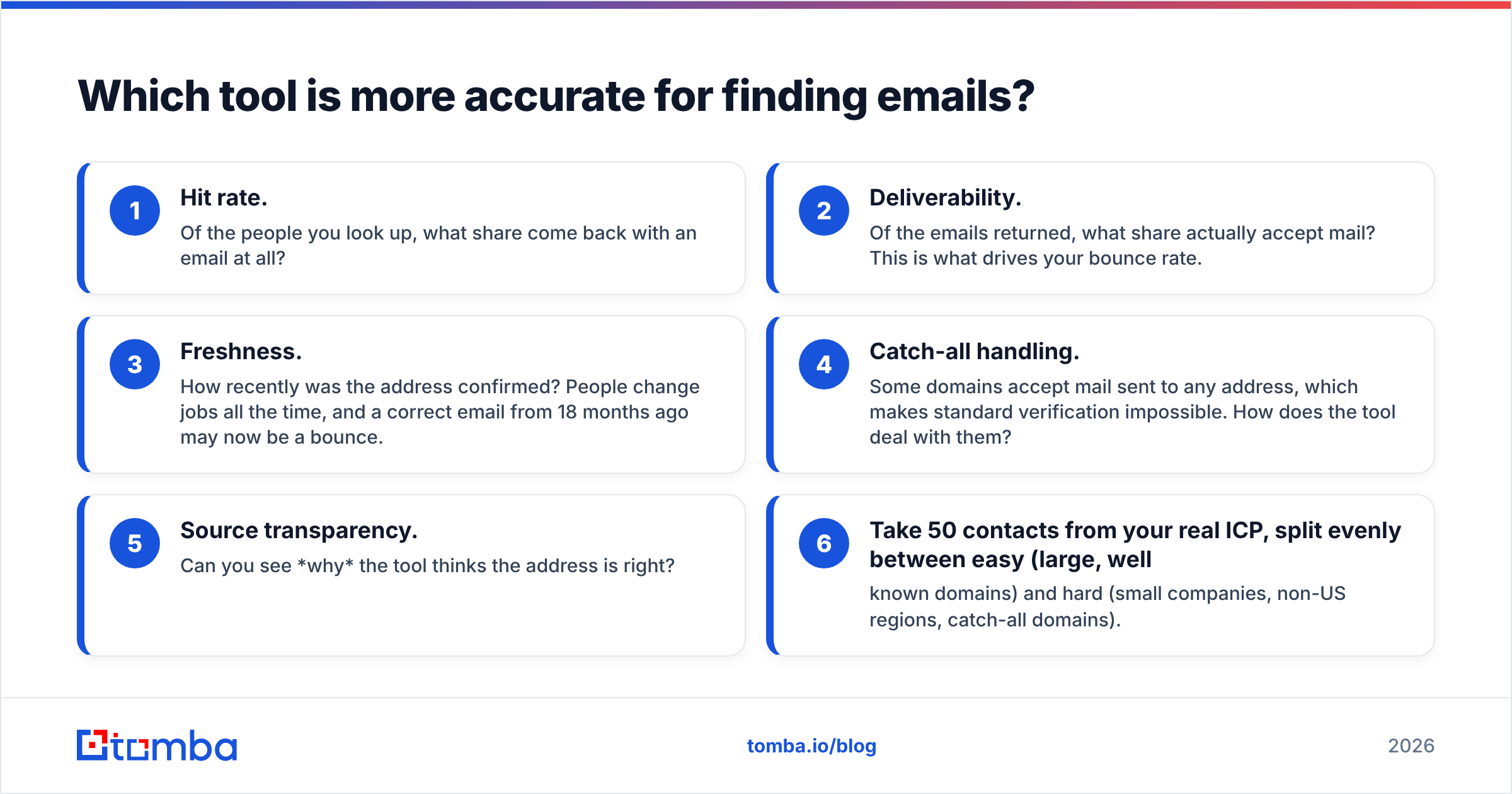
- Hit rate. Of the people you look up, what share come back with an email at all?
- Deliverability. Of the emails returned, what share actually accept mail? This is what drives your bounce rate.
- Freshness. How recently was the address confirmed? People change jobs all the time, and a correct email from 18 months ago may now be a bounce.
- Catch-all handling. Some domains accept mail sent to any address, which makes standard verification impossible. How does the tool deal with them?
- Source transparency. Can you see why the tool thinks the address is right?
Tomba's approach is built around points 2, 4 and 5. Every result comes with a confidence score and the public web sources it was found on. You can run everything through the email verifier before export, and catch-all domains get their own verification path instead of a shrug of "accept-all, good luck."

Leadzen.ai's accuracy is harder to judge from the outside. Its data comes from its own discovery engine rather than a lookup-and-verify pipeline, and results tend to vary by region and seniority. Some users say its coverage of the Indian and wider APAC markets is a strength, and you should weigh that if those are your territories. We haven't run a controlled head-to-head test, and we'd be suspicious of any blog that claims an exact accuracy percentage for a tool it doesn't operate.
What we'd recommend instead is a 30-minute test you can run yourself:
- Take 50 contacts from your real ICP, split evenly between easy (large, well-known domains) and hard (small companies, non-US regions, catch-all domains).
- Look up all 50 in both tools.
- Run every returned address through the same independent verifier.
- Compare hit rate, verified-deliverable rate, and time spent.
That test will tell you more than any vendor claim, this article included.

How does pricing compare between Leadzen.ai and Tomba?#
Tomba's pricing is flat and public, so you can model it in a spreadsheet:
- Free: 25 searches/mo, enough to run the 50-contact test above over two months, or to use as a light personal tool.
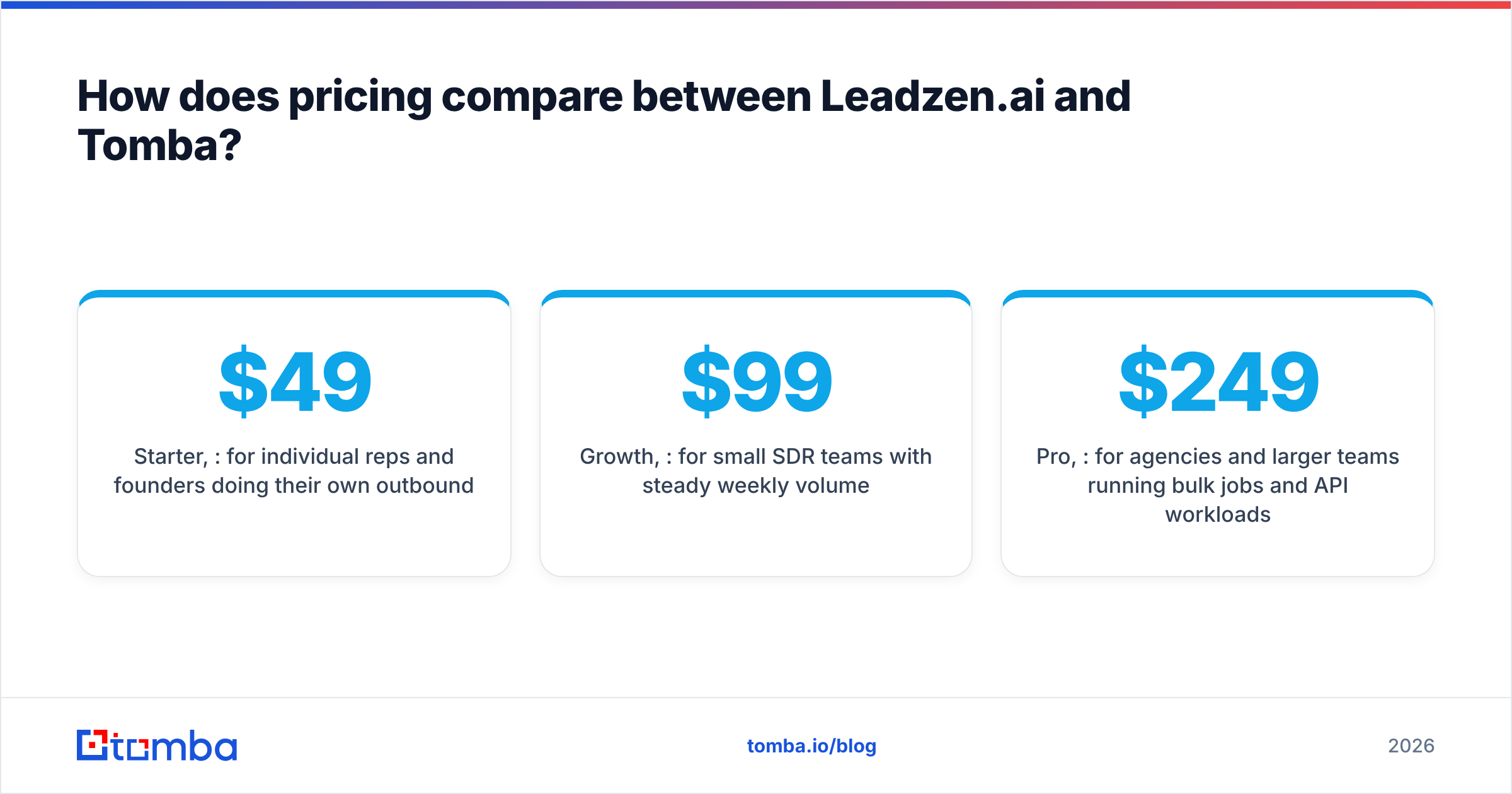
- Starter, $49/mo: for individual reps and founders doing their own outbound.
- Growth, $99/mo: for small SDR teams with steady weekly volume.
- Pro, $249/mo: for agencies and larger teams running bulk jobs and API workloads.
- Enterprise: custom volume and terms.
Full details are on the Tomba pricing page.
Leadzen.ai runs on credits. Different actions, such as revealing an email, revealing a phone number or exporting records, can use different amounts, and plans have historically been offered in both USD and INR. That model can suit discovery-heavy work, because you pay mostly for records you actually choose to unlock. The trade-off is that forecasting is harder: a month of heavy phone reveals costs a very different amount from a month of email-only lookups.
Three questions help you compare fairly:
- What does one verified, usable contact cost? Not one credit or one search, but one contact you would actually send to.
- Do unused credits roll over? If they don't, a quiet month costs the same as a busy one.
- Is verification billed separately? A cheap find followed by a paid verify can cost more than one bundled lookup.
Plug your own numbers in. For most teams that already have target accounts, the flat-tier model works out cheaper per usable email. For teams that need AI discovery, a credit model that bundles search can come out ahead.
What does each tool's workflow look like day to day?#
Features on a pricing page matter less than what your reps actually do every morning. Here are the two workflows.
A typical Leadzen.ai session
- Describe your ICP ("Series A fintech companies in Bangalore, 50–200 employees, Head of Growth").
- Review the AI-generated list of companies and contacts.
- Filter out poor fits and unlock contact details on the rest.
- Export to CSV or push to your outreach tool.
That's fast when you're starting from a blank page. The risk is step 3. If you don't verify what you unlock, your bounce rate becomes a problem for your sending domain.
A typical Tomba session
- Start from a target account list (from your CRM, an ABM tool or a spreadsheet).
- Run a domain search to see every public email on each company's domain, with its role and sources.
- Use the email finder for specific people you've already identified on LinkedIn or company websites.
- Verify everything in bulk, then sync to HubSpot, Salesforce or Pipedrive, or keep working in Google Sheets.
This is slower if you truly have no list. It's much faster, and safer for your sender reputation, if you do.
Which integrations and developer options matter most?#
If your team lives in a CRM and a sequencer, integrations decide whether a tool gets used or quietly abandoned.
Tomba's integration surface is broad:
- Native CRM connectors for HubSpot, Salesforce and Pipedrive.
- No-code automation through Zapier and Make, so a new CRM record can trigger a lookup automatically.
- Spreadsheet add-ons for Google Sheets, Excel and Airtable, handy for RevOps teams that clean data in bulk.
- Developer tools: a public REST API, a CLI and an MCP server, so you can call Tomba from scripts, data pipelines or AI agents.
- Browser extension that works on company websites as well as LinkedIn.
Leadzen.ai's integrations focus on getting lists out of the platform: CSV export, a Chrome extension for LinkedIn and an API for teams that want to pull discovery results programmatically. If your stack is simple (one CRM, one sequencer), that may be enough. If you're building automated enrichment inside your RevOps stack, the depth of Tomba's API and connectors will matter more.
For a broader view of how buyers rate these categories, the reviews on G2 are worth a scan. Filter by company size and region, because accuracy complaints often cluster in specific markets.
Is Leadzen.ai or Tomba better for your use case?#
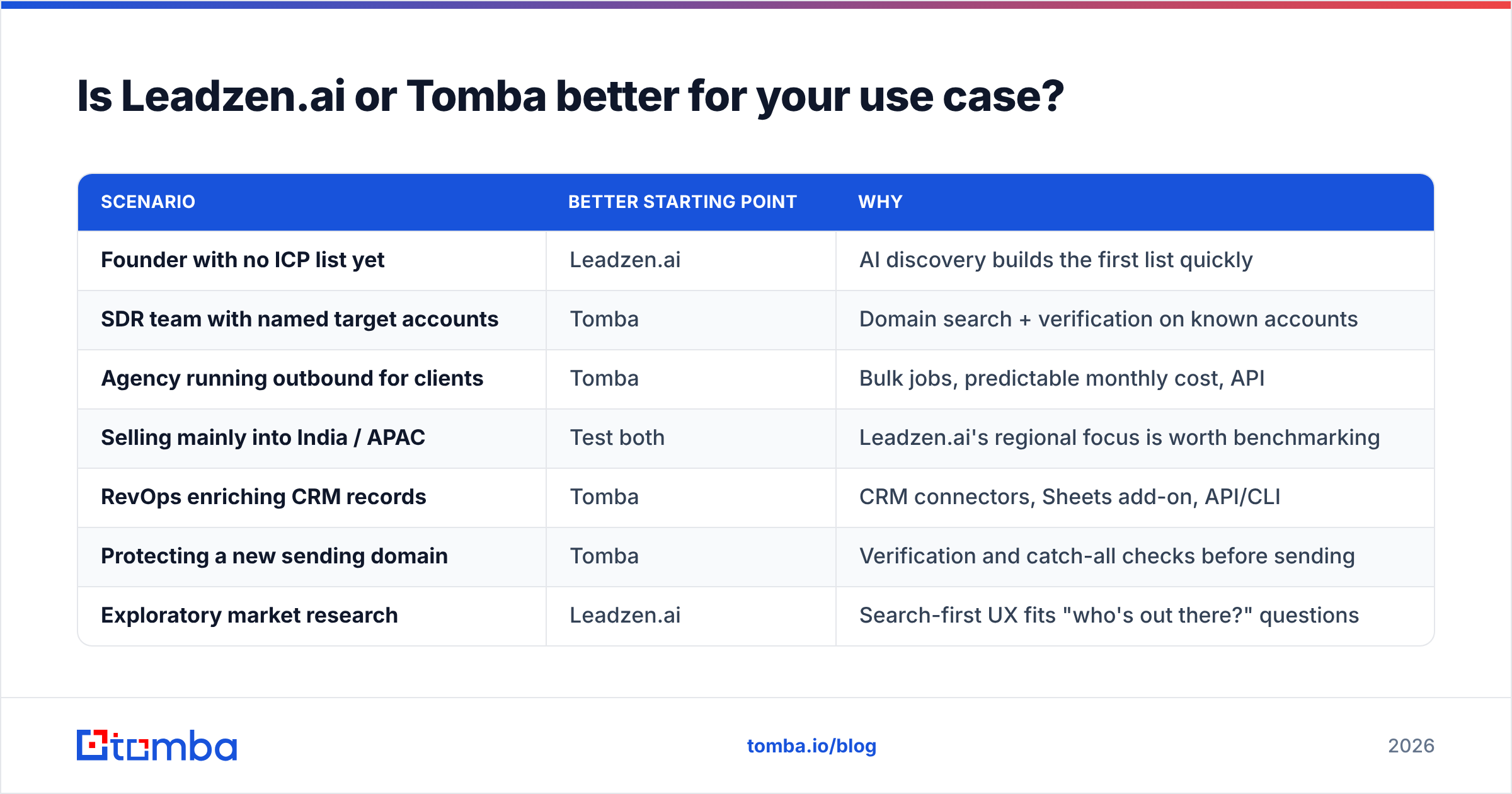
Here's the short answer, broken down by who's buying.
| Scenario | Better starting point | Why |
|---|---|---|
| Founder with no ICP list yet | Leadzen.ai | AI discovery builds the first list quickly |
| SDR team with named target accounts | Tomba | Domain search + verification on known accounts |
| Agency running outbound for clients | Tomba | Bulk jobs, predictable monthly cost, API |
| Selling mainly into India / APAC | Test both | Leadzen.ai's regional focus is worth benchmarking |
| RevOps enriching CRM records | Tomba | CRM connectors, Sheets add-on, API/CLI |
| Protecting a new sending domain | Tomba | Verification and catch-all checks before sending |
| Exploratory market research | Leadzen.ai | Search-first UX fits "who's out there?" questions |
Choose Leadzen.ai if you don't know who your buyers are yet, you sell into markets where it has strong regional coverage, and you're comfortable adding a separate verification step before sending.
Choose Tomba if you already have target accounts or names, deliverability matters to you (it should), and you want the contact data to flow into your CRM and sequencer without manual CSV work.
Use both if you want AI discovery at the top of the funnel and verified contact data at the bottom. This is a common setup. Research firms like Gartner have long noted that B2B buying groups are large and change often, which is why keeping discovery separate from verification tends to produce cleaner pipelines than relying on a single database.
What are the pros and cons of each?#
Leadzen.ai: pros
- AI-first search makes it easy to turn a vague ICP into a concrete list
- Reported regional strength in India and APAC
- Credit model means you mostly pay for what you unlock
- LinkedIn-focused Chrome extension for in-context prospecting
Leadzen.ai: cons
- Credit costs are harder to forecast month to month
- Verification depth is less transparent than a dedicated verifier's
- Fewer native CRM and no-code integrations
- Accuracy varies by region and seniority, so benchmark before committing
Tomba: pros
- Public, flat pricing from a free tier to $249/mo Pro
- Confidence scores and public sources shown for each email
- Dedicated email verifier and catch-all verifier
- Wide integration and developer surface (API, CLI, MCP, Sheets, CRMs)
- Domain search shows a company's whole public email footprint
Tomba: cons
- Not an AI discovery engine: you need at least a domain or a name to start
- The free tier (25 searches/mo) is best suited to testing, not production volume
- Heavy phone-number work may need a higher tier
How should you run a fair trial of both tools?#
Don't pick based on landing pages, this one included. Run a one-week trial:
- Day 1: Define 50 target contacts across easy and hard segments.
- Day 2: Run the list through both tools. Log the hit rate and time spent.
- Day 3: Verify every returned address with the same independent checker.
- Day 4: Send a small, warmed-up campaign (20–30 emails per tool) and track bounces.
- Day 5: Calculate cost per verified, delivered contact. That's the number that decides it.

If Leadzen.ai wins on discovery and Tomba wins on deliverable contact data, which is what usually happens when the two jobs are this different, then you have your stack.
So, who wins: Leadzen.ai or Tomba?#
It depends on which half of the problem hurts more. Leadzen.ai is the stronger pick when you're staring at a blank page and need AI to suggest who to target. Tomba is the stronger pick when you have the targets and need emails you can trust: found, verified, sourced and synced into your CRM, at a price you can predict.
If your pipeline is suffering from bounces, stale contacts or hours lost guessing email formats, start with the Tomba Email Finder. The free plan gives you 25 searches a month to run the 50-contact benchmark above on your own ICP. Paid plans start at $49/mo when you're ready to scale. Look up a domain, check the confidence score and sources, verify in one click and push clean contacts straight into your outreach stack.
Related guides#
// get started
Find, verify and enrich your first contacts today
Start on the free plan with 25 searches a month, then scale when your team is ready.
Free plan · No credit card required · GDPR & CCPA
// about the author