Leadzilla Pricing, Reviews, Pros and Cons: Honest 2026 Breakdown
Leadzilla combines a B2B contact database with AI-written icebreakers. Here's what it really costs in 2026, what reviewers praise and complain about, and when a dedicated email finder is the smarter buy.
TL;DR
- Leadzilla combines a B2B contact database with AI-written email icebreakers and basic prospect tracking. It's meant to replace several cold-outreach tools with one.
- Pricing has been sold two ways. Third-party roundups list a subscription at around $49/month for roughly 600 emails, and lifetime-deal marketplaces have sold one-time plans starting at $99. Check the current offer on the vendor's site before you commit.
- Reviews like the low entry cost and the icebreaker feature. The complaints focus on unclear credit limits, uneven data coverage outside North America, and doubts about long-term support for lifetime-deal buyers.
- If what you mostly need is accurate, verified email addresses, a dedicated email finder with public, stable pricing usually costs less per usable contact.
- Before buying Leadzilla or anything else, run a 50–100 contact test on your own ICP and measure the bounce rate.
What is Leadzilla?#
Leadzilla (leadzilla.ai) is a prospecting tool with three parts:
- A B2B contact database. You search for decision-makers by title, industry, company size and location, then export names, emails and company data.
- AI email icebreakers. It writes a personalized opening line for each prospect from their public profile and company information.
- Lightweight opportunity tracking. It flags which prospects are warming up so you can prioritize follow-ups.
The pitch is consolidation. Instead of paying for a data provider, a personalization tool and a separate tracker, you get one login and one bill. Leadzilla's own marketing says it removes most of the cold-outreach tools a small team would otherwise stack.
That pitch fits a specific buyer: a founder, freelancer or one-to-three-person sales team that wants to start cold email this week without building a stack. It fits less well if you're a RevOps team with strict data-quality SLAs, CRM sync requirements and a verification workflow already in place.
How much does Leadzilla cost in 2026?#
Leadzilla's pricing is harder to pin down than most tools in this category, and that uncertainty is part of the cost.
What public sources show:
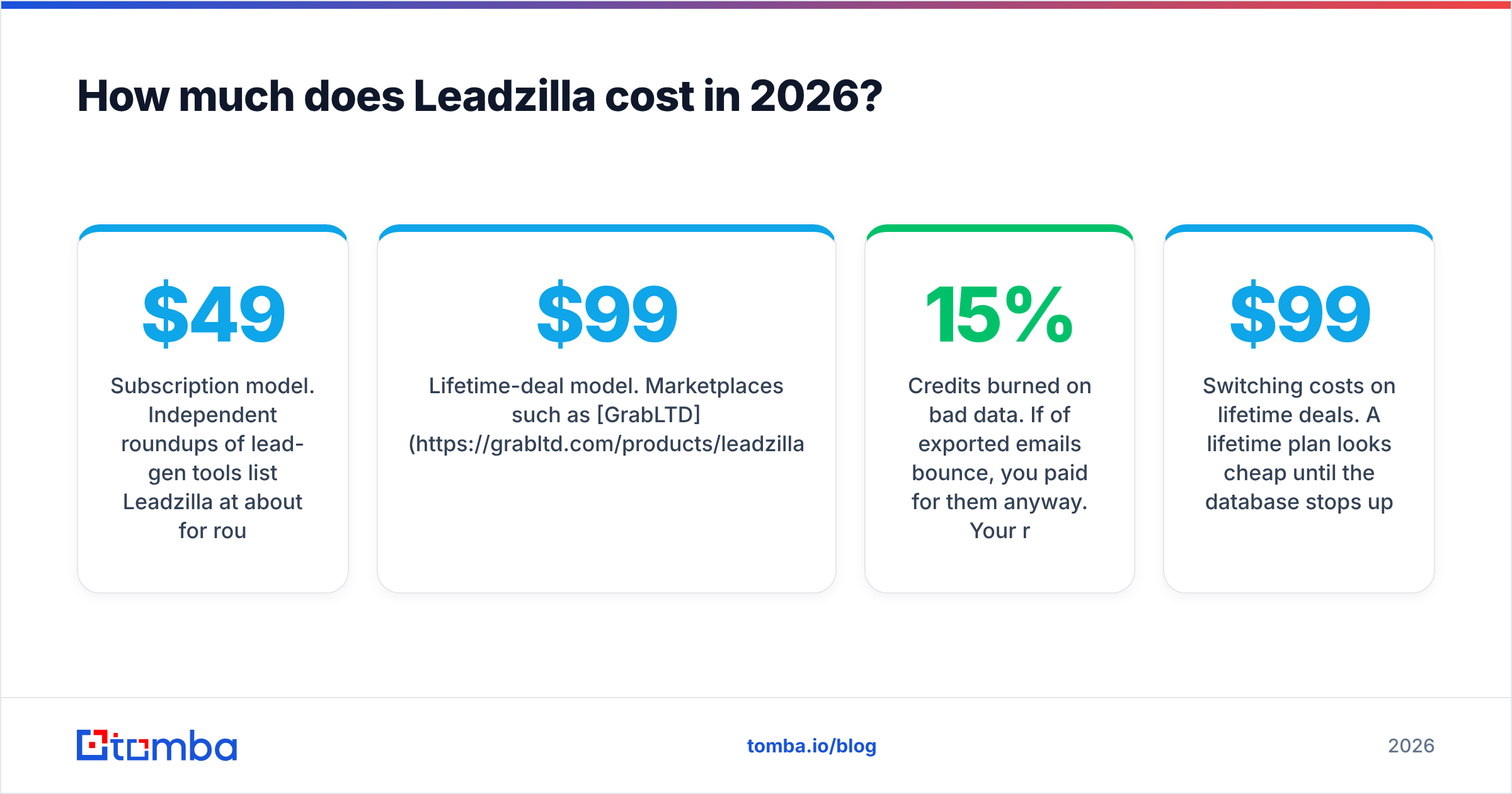
- Subscription model. Independent roundups of lead-gen tools list Leadzilla at about $49/month for roughly 600 emails. That works out to about $0.08 per contact if you use every credit.
- Lifetime-deal model. Marketplaces such as GrabLTD have listed one-time plans starting at $99. Advertised limits were around 1,000–3,000 new leads per month, from a database described as 100M+ verified contacts, with ICP filtering and CRM-ready exports.
- Support caveat. At least one deal marketplace now marks the original Leadzilla lifetime deal as archived and says the product may no longer be supported the way it was when sold. If you're considering a lifetime deal, get written confirmation from the vendor about what's still maintained.
We couldn't verify a current, complete tier-by-tier price list on the vendor site when this was written. Treat the numbers above as reported figures and confirm them at checkout. A vendor that has sold both subscriptions and lifetime deals may change plan names, credit counts and feature gates more often than a vendor with one stable pricing page.
What are the hidden costs?#
The monthly price is rarely what you end up paying. With any contact-data tool, including Leadzilla, watch for:
- Credits burned on bad data. If 15% of exported emails bounce, you paid for them anyway. Your real cost per deliverable contact is higher than the sticker price.
- Verification you still need. If the tool's own verification is weak, you'll pay a separate email verifier to clean lists before sending. That's a second line item.
- Seat and export limits. Consolidated tools often cap exports, users or AI generations per plan. Adding a second SDR can double the bill.
- Switching costs on lifetime deals. A $99 lifetime plan looks cheap until the database stops updating. Stale B2B data decays quickly, since people change jobs all the time, so a frozen dataset gets less valuable every month.

What do Leadzilla reviews say?#
Review volume for Leadzilla is small compared with category leaders. Before relying on any single opinion, check aggregated feedback on G2 and on the deal marketplaces where it was sold. The recurring themes are consistent, though.
What do users like?#
- Low entry price. Whether you use the ~$49/month subscription or a lifetime deal, it's one of the cheaper ways to get a searchable B2B database with emails attached.
- AI icebreakers save real time. Writing a personalized first line for 200 prospects by hand takes hours. Having a draft generated for each contact is the feature reviewers mention most.
- Simple interface. Filter, select, export. Solo users say they got useful output on day one without training.
- Everything in one place. Small teams like not having to glue three tools together with Zapier.
What do users complain about?#
- Uneven data accuracy by region and seniority. North American mid-market contacts tend to be well covered. EMEA, APAC and niche verticals are thinner, and some users report higher bounce rates there.
- Credit limits aren't always clear. Buyers aren't always sure what counts as a credit: a view, an export, a verified email, or an AI generation.
- Limited integrations. Compared with enterprise sales-intelligence platforms, native CRM sync and API access are basic.
- Long-term support questions. Lifetime-deal buyers worry most about whether the database will keep refreshing and whether bugs will get fixed.
- Generic icebreakers at scale. AI lines built from thin public data can read as templated ("I saw you're the VP of Sales at…"). You'll still want to edit the best-fit prospects by hand.
What are Leadzilla's pros and cons at a glance?#
| Attribute | Pros | Cons |
|---|---|---|
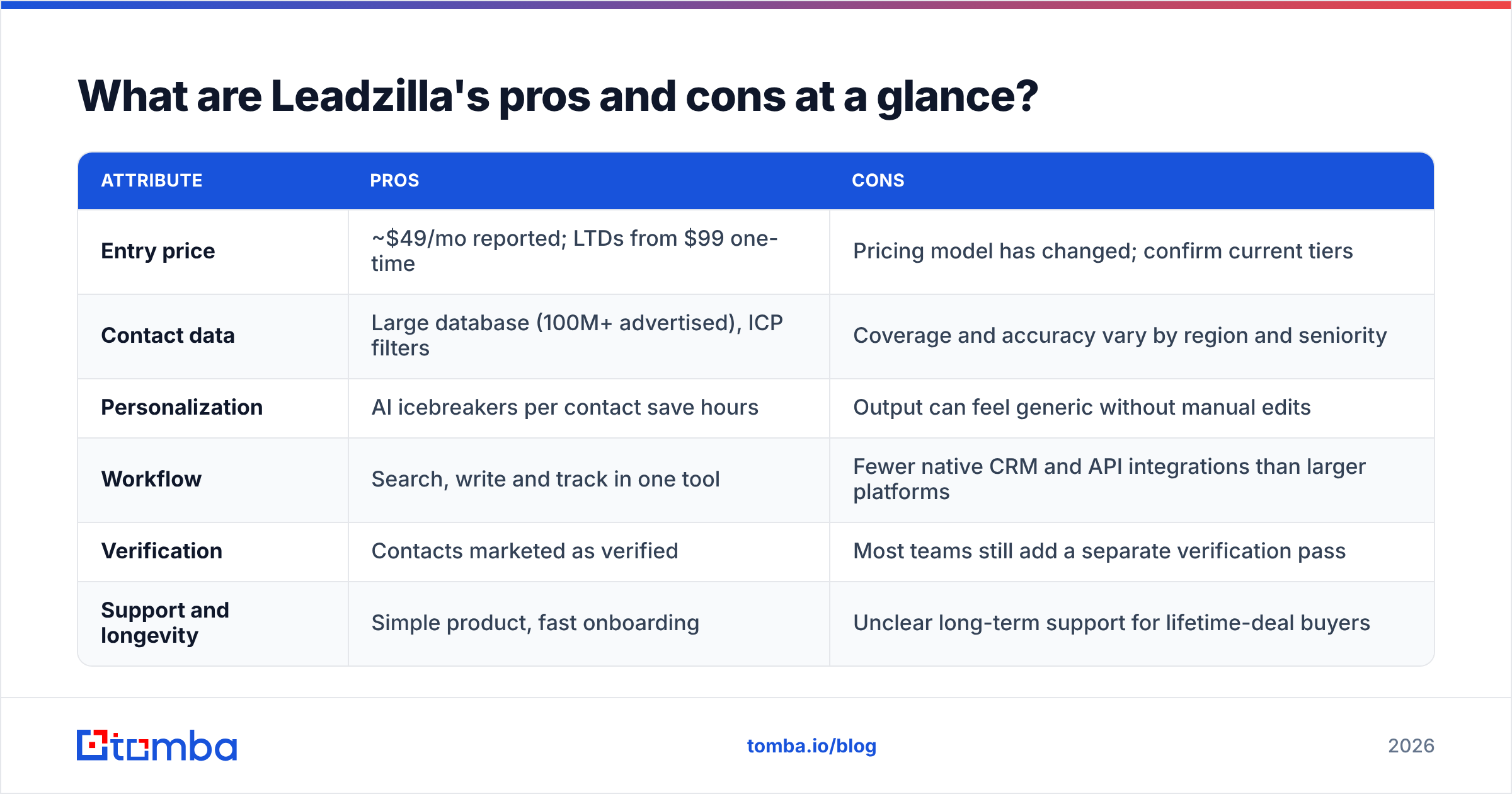
| Entry price | ~$49/mo reported; LTDs from $99 one-time | Pricing model has changed; confirm current tiers |
| Contact data | Large database (100M+ advertised), ICP filters | Coverage and accuracy vary by region and seniority |
| Personalization | AI icebreakers per contact save hours | Output can feel generic without manual edits |
| Workflow | Search, write and track in one tool | Fewer native CRM and API integrations than larger platforms |
| Verification | Contacts marketed as verified | Most teams still add a separate verification pass |
| Support and longevity | Simple product, fast onboarding | Unclear long-term support for lifetime-deal buyers |
How does Leadzilla compare to a dedicated email finder?#
This is the decision most buyers are really making. Leadzilla packages data and AI copy together. A dedicated email finder does one job, finding and verifying the right address, and leaves copywriting to your sequencer or your own writing.
Neither is better in every case. The right choice depends on your bottleneck. If your problem is "I don't know what to say," the icebreaker feature matters. If your problem is "my emails bounce and my domain reputation is suffering," data accuracy and verification matter much more. That's where specialists usually win.

Accuracy benchmarks like the one above are the right lens for this decision. A tool that returns 600 contacts at 80% deliverability gives you about 480 usable emails. A tool that returns 500 contacts at 97% gives you about 485, with far less damage to your sender reputation.
| Feature | Leadzilla | Tomba | Typical all-in-one sales platform |
|---|---|---|---|
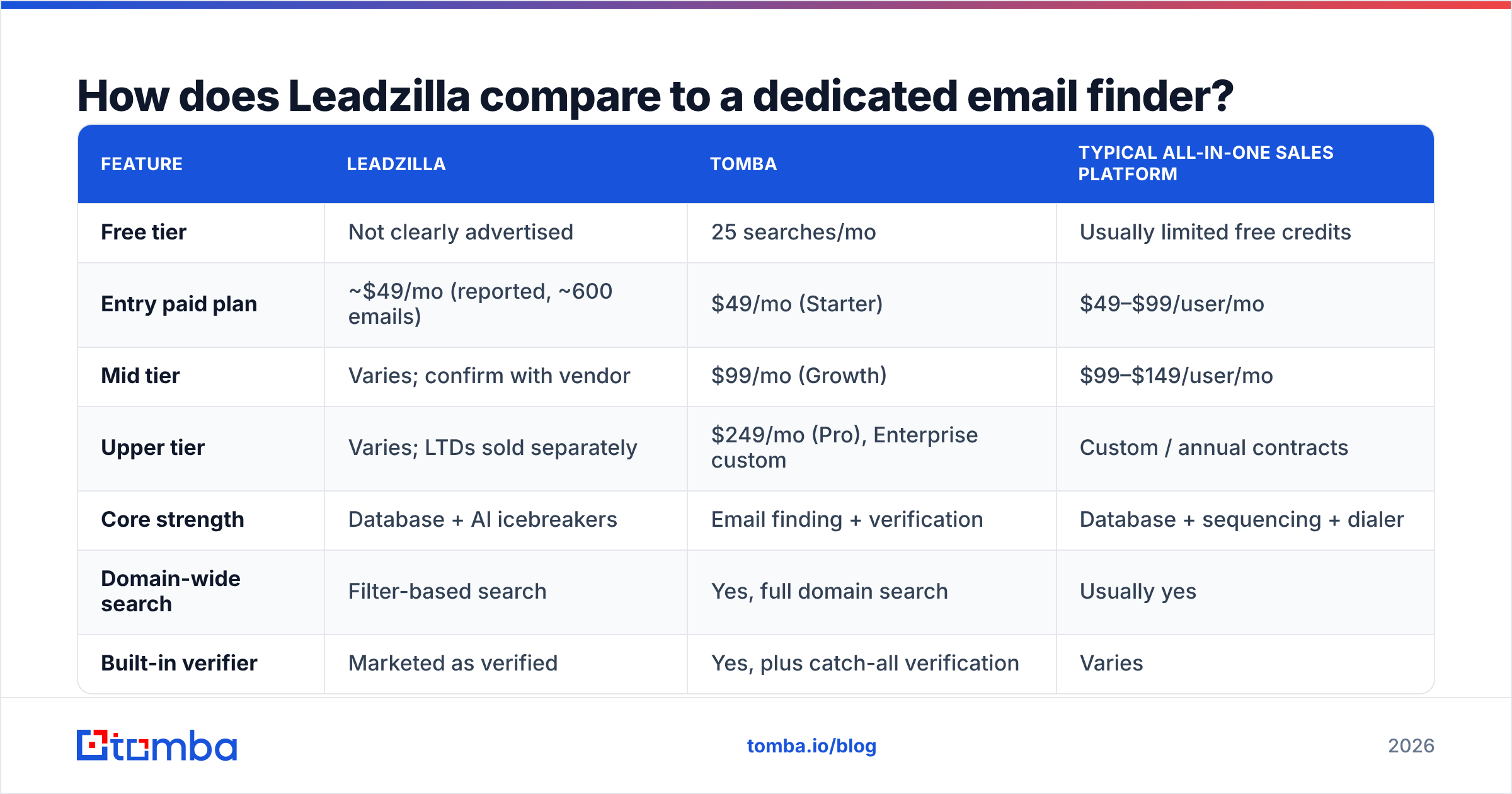
| Free tier | Not clearly advertised | 25 searches/mo | Usually limited free credits |
| Entry paid plan | ~$49/mo (reported, ~600 emails) | $49/mo (Starter) | $49–$99/user/mo |
| Mid tier | Varies; confirm with vendor | $99/mo (Growth) | $99–$149/user/mo |
| Upper tier | Varies; LTDs sold separately | $249/mo (Pro), Enterprise custom | Custom / annual contracts |
| Core strength | Database + AI icebreakers | Email finding + verification | Database + sequencing + dialer |
| Domain-wide search | Filter-based search | Yes, full domain search | Usually yes |
| Built-in verifier | Marketed as verified | Yes, plus catch-all verification | Varies |
| Phone numbers | Limited | Phone finder + validator | Often yes, credit-heavy |
| API / CLI / MCP | Limited | API, CLI, MCP server | API on higher tiers |
| Best for | Solo founders wanting copy + data | Teams that prioritize deliverable emails | Mid-market teams wanting one platform |

At the entry level the prices are nearly the same: both land around $49/month. The difference is what the $49 covers and how predictable it stays. Tomba publishes its full plan ladder on its pricing page, so you can model a year of costs before you sign. With Leadzilla you'll need to confirm current tiers directly.
Who should buy Leadzilla?#
Leadzilla makes sense when all of the following apply:
- You're a solo seller or tiny team sending a few hundred cold emails a month, not tens of thousands.
- Copywriting is your bottleneck, and AI-drafted first lines would noticeably speed you up.
- Your ICP is mostly North American SMB or mid-market, where coverage is strongest.
- You can live with a less mature integration layer, for example exporting CSVs into your sequencer instead of syncing live to Salesforce or HubSpot.
- You've confirmed support terms if you're buying a lifetime deal.
If you can't tick most of those, you'll likely outgrow the tool, or end up paying for a verifier and a copy tool on top of it anyway.
Who should look elsewhere?#
Skip Leadzilla, or at least run a strict pilot first, if:
- Deliverability is critical. You're warming new domains, or your bounce rate is already above 2–3%. Mailbox providers like Google and Microsoft penalize senders with high bounce rates, and one bad list can undo weeks of warmup.
- You sell into EMEA, APAC or niche verticals where database coverage thins out.
- You need programmatic access to enrich inbound leads, clean CRM records or plug into an AI agent workflow.
- Finance wants predictable, published pricing for annual budgeting.
In those cases, a specialist email finder paired with your existing sequencer (Instantly, Lemlist, Smartlead, Apollo sequences, or your CRM's built-in tool) usually works better.
How do you test Leadzilla (or any alternative) before paying?#
Don't pick a data tool from a pricing page or a review roundup, including this one. Run the same test on every tool you're considering:
- Build a 100-contact test list from your real ICP: the actual titles, industries and regions you sell into.
- Pull emails for the same 100 people from each tool.
- Measure match rate: how many of the 100 did each tool return an email for?
- Verify every returned address with one neutral verifier, so each tool's self-reported "verified" label doesn't skew the results.
- Calculate cost per deliverable email: plan price ÷ (credits × deliverable rate).
- Check catch-all handling. Many companies accept all mail at the server level, so a basic check can't confirm a mailbox exists. See how each tool labels these and whether it offers a catch-all verifier.
This takes about an hour and will tell you more than any review. It often shows that the "cheaper" tool is more expensive per email that actually lands.

Is Leadzilla worth it in 2026?#
For a solo founder who wants data and AI icebreakers in one cheap tool, Leadzilla can be worth trying, as long as you confirm current pricing and support terms first. The combination of a searchable database and generated first lines is useful when you're starting cold email from scratch.
For teams that care most about deliverability, predictable spend and integrations, it's harder to justify. The reported ~$49/month entry price is the same as dedicated email finders that publish stable plan ladders, include verification and catch-all handling, and offer API access. The AI icebreaker feature is also less unique than it used to be. Most sequencers and many free tools now generate personalized first lines, so it's not a strong reason on its own to accept weaker data guarantees.
It's also worth thinking about longevity. Contact data only stays valuable if it keeps refreshing. A tool with an unclear pricing model and archived lifetime deals carries more risk than a vendor with a public changelog and steady release cadence. That doesn't mean Leadzilla will disappear. It means you should protect yourself: pay monthly rather than annually until you trust it, export what you need, and keep verification as an independent step in your workflow.
What's the bottom line on Leadzilla pricing and reviews?#
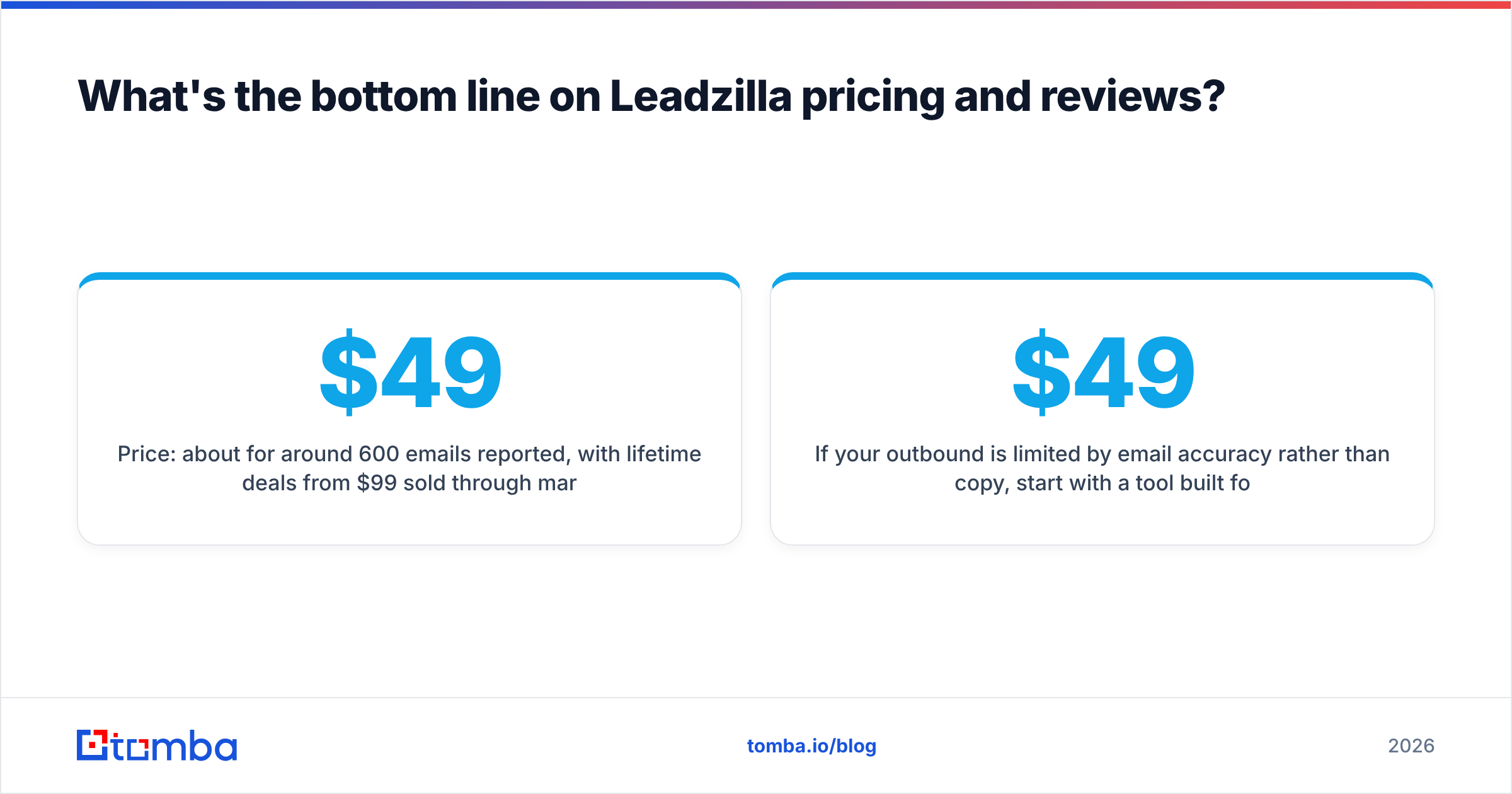
- Price: about $49/month for around 600 emails reported, with lifetime deals from $99 sold through marketplaces. Confirm the current tiers directly.
- Best feature: AI icebreakers combined with a searchable B2B database.
- Biggest risks: unclear credit definitions, uneven regional accuracy, limited integrations and support uncertainty for lifetime-deal buyers.
- Best-fit buyer: solo sellers and micro-teams targeting North American SMBs.
- Better fit elsewhere: teams where bounce rate, compliance and CRM sync matter more than auto-written first lines.
If your outbound is limited by email accuracy rather than copy, start with a tool built for that job. Tomba Email Finder finds professional email addresses by name, company or domain, verifies them before you export, and flags catch-all domains so you're not guessing. The free tier gives you 25 searches a month to run the 100-contact test above (across a few days) against Leadzilla or any other tool. When you're ready to scale, paid plans start at $49/month and are published openly, so you know exactly what you'll pay.
Related guides#
// get started
Find, verify and enrich your first contacts today
Start on the free plan with 25 searches a month, then scale when your team is ready.
Free plan · No credit card required · GDPR & CCPA
// about the author