Lemlist Pricing 2026: Plans, Per-Seat Costs and Hidden Fees
Lemlist's plans look simple until seats, credits, extra sending inboxes and add-ons start stacking up. Here's what a real team pays in 2026, and when a cheaper stack makes more sense.
TL;DR
- Lemlist charges per user, per month. At the time of writing, the core self-serve plans are Email Pro (about $69/user/mo billed monthly) and Multichannel Expert (about $99/user/mo billed monthly), with roughly 20% off on annual billing. Enterprise is custom-quoted.
- The price on the pricing page is rarely what you end up paying. Seats, lead-data credits, extra sending domains and inboxes, and a separate email-finding or verification tool can double the bill.
- Lemlist is worth it if you run personalized, multichannel sequences (email plus LinkedIn plus calls) and value lemwarm and its image/video personalization.
- If you mostly send email-only cold campaigns at volume, a cheaper sequencer paired with a dedicated email finder will usually cost less per booked meeting.
- Before you commit to annual billing, test your first 500 leads on the free trial and work out your cost per verified contact.
What does Lemlist cost in 2026?#
Lemlist is a cold outreach platform. It started out known for personalized images and "lemwarm" inbox warmup, and has since grown into a multichannel sequencer with a built-in B2B lead database. Its pricing has been restructured several times over the last few years. Older plan names like "Email Starter" and "Outreach Scale" have been merged or retired, so a lot of third-party articles you'll find are out of date.
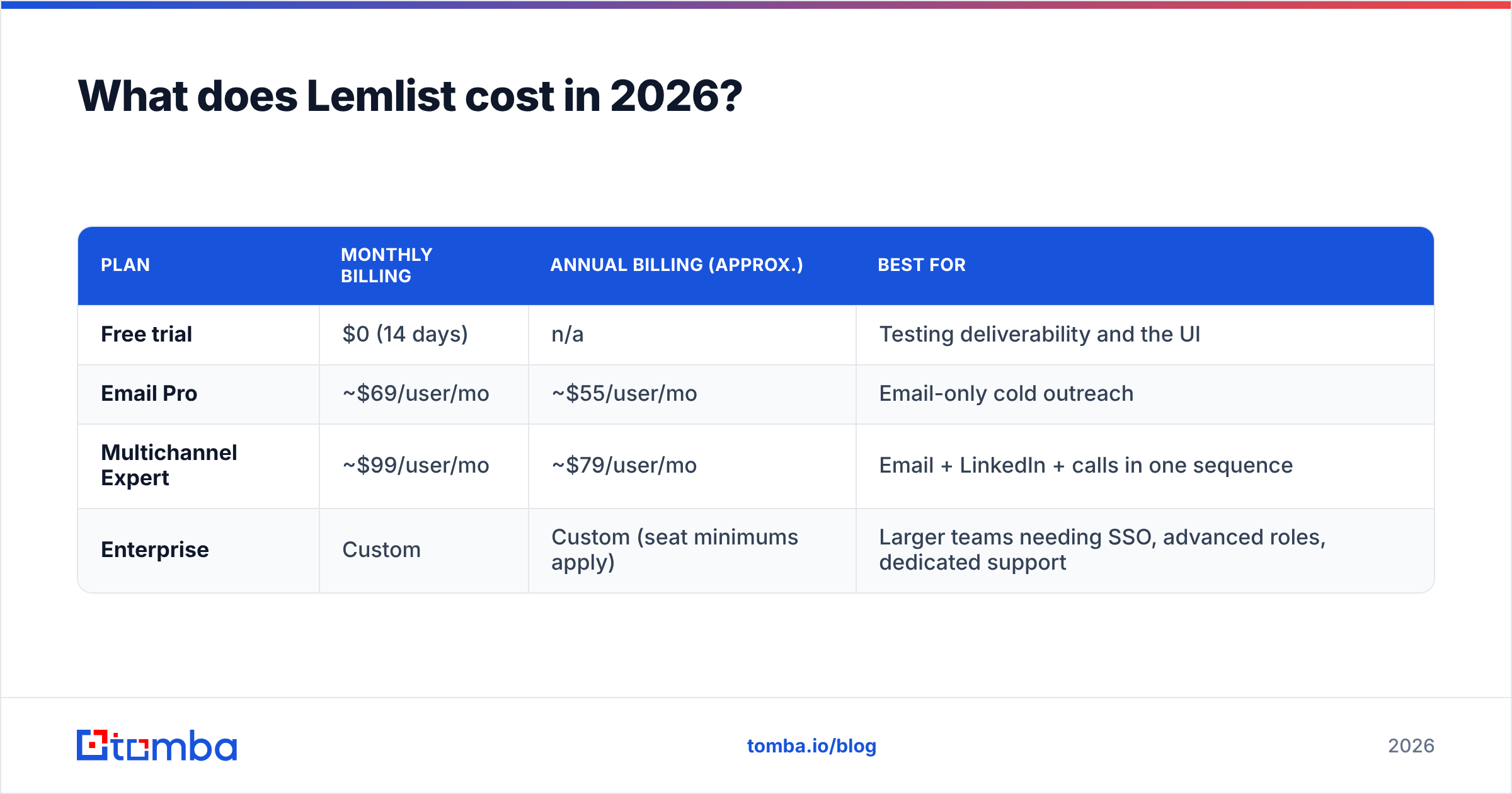
At the time of writing, the public lineup looks like this. Always confirm against lemlist's official pricing page before you buy, because lemlist changes plan contents more often than most vendors.
| Plan | Monthly billing | Annual billing (approx.) | Best for |
|---|---|---|---|
| Free trial | $0 (14 days) | n/a | Testing deliverability and the UI |
| Email Pro | ~$69/user/mo | ~$55/user/mo | Email-only cold outreach |
| Multichannel Expert | ~$99/user/mo | ~$79/user/mo | Email + LinkedIn + calls in one sequence |
| Enterprise | Custom | Custom (seat minimums apply) | Larger teams needing SSO, advanced roles, dedicated support |
Two details matter more than the headline numbers:
- Pricing is per seat. Every rep who launches campaigns needs their own license, so a five-person SDR team on Multichannel Expert costs about $495/month on monthly billing before you add anything else.
- Lead-data credits are metered. Plans include a monthly allowance of credits for finding emails and phone numbers in lemlist's database. Once that runs out, you either buy more credits or bring contacts in from another tool.
What's actually included in each Lemlist plan?#
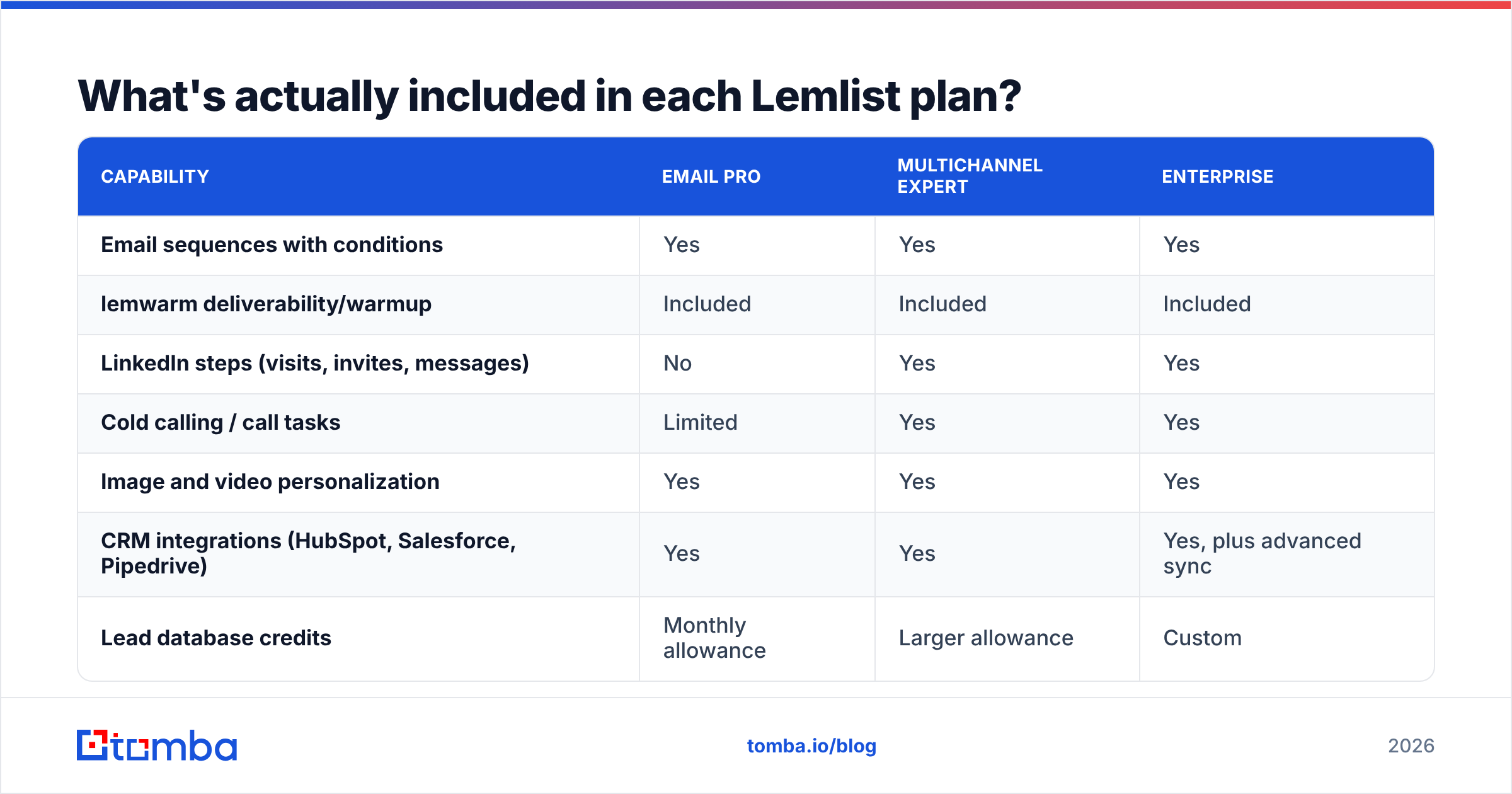
The tiers differ on channels and automation depth more than on raw sending volume. Here's how the plans compare in practice:
| Capability | Email Pro | Multichannel Expert | Enterprise |
|---|---|---|---|
| Email sequences with conditions | Yes | Yes | Yes |
| lemwarm deliverability/warmup | Included | Included | Included |
| LinkedIn steps (visits, invites, messages) | No | Yes | Yes |
| Cold calling / call tasks | Limited | Yes | Yes |
| Image and video personalization | Yes | Yes | Yes |
| CRM integrations (HubSpot, Salesforce, Pipedrive) | Yes | Yes | Yes, plus advanced sync |
| Lead database credits | Monthly allowance | Larger allowance | Custom |
| API access | Yes | Yes | Yes |
| SSO, advanced user permissions | No | No | Yes |
The real line is between Email Pro and Multichannel Expert. If you don't plan to touch LinkedIn from inside your sequencer, Email Pro covers the core use case, and you avoid paying about $30 per seat per month for features you won't use.

Where do the hidden costs come from?#
Lemlist's list price is honest. What gets people is the total cost of running a real outbound program. These are the five line items that most often push a lemlist bill well past the pricing page:
- Extra seats for shared inboxes. Many teams rotate several sending mailboxes per rep to stay under safe daily limits. Depending on how you set this up, more senders can mean more seats or more complex account management. Read lemlist's current rules on sending identities per user before you design your domain setup.
- Lead-data credit top-ups. The included credits cover light prospecting. Teams that pull hundreds of new contacts a week run out fast and end up buying credit packs, or paying for a separate email finder anyway.
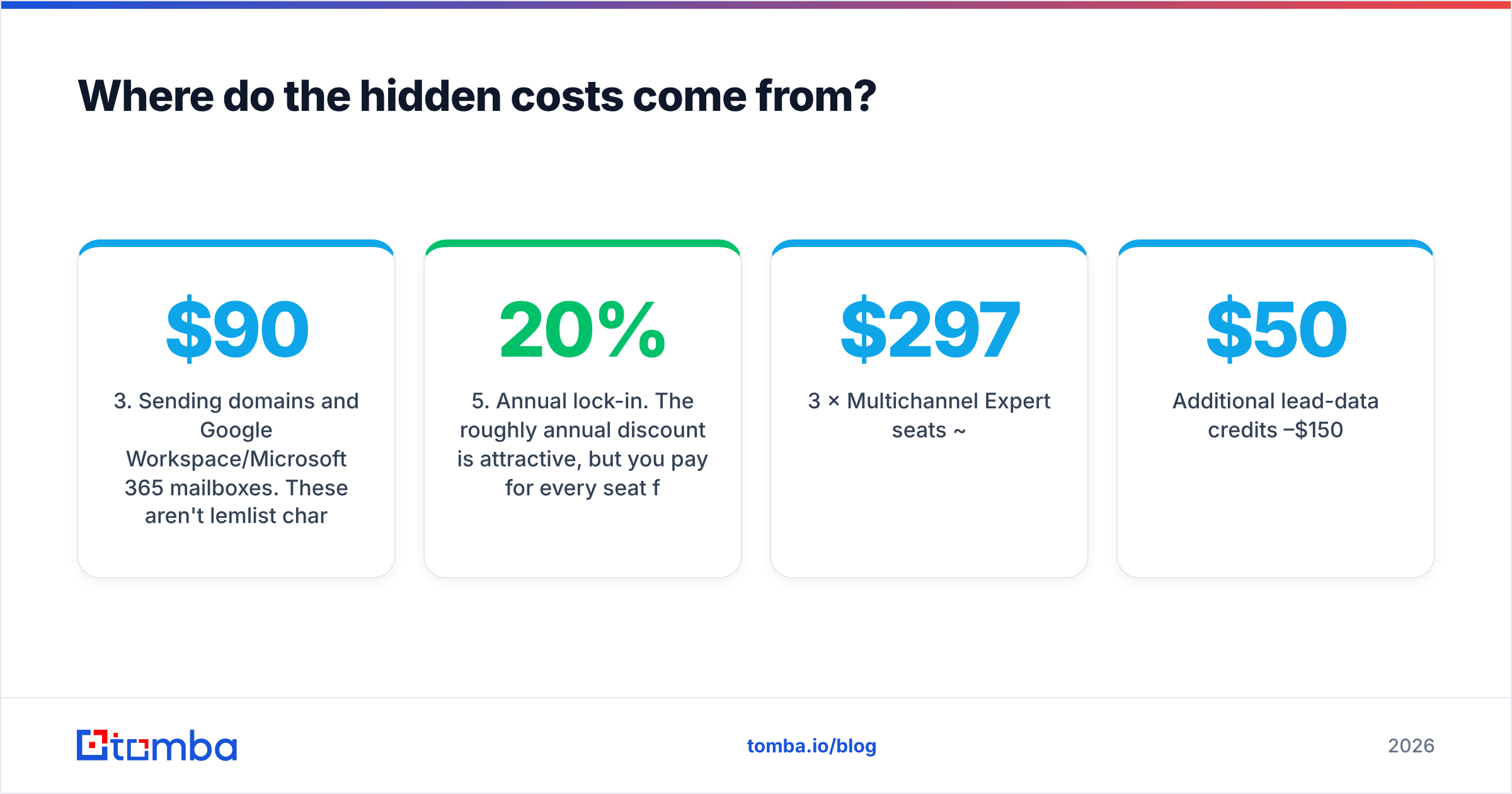
- Sending domains and Google Workspace/Microsoft 365 mailboxes. These aren't lemlist charges, but cold outreach at scale requires them. Five secondary domains with three mailboxes each works out to about $90–$110/month in mailbox fees alone, plus domain registration.
- Email verification. Lemlist validates emails it finds, but if you import lists from events, scrapers or older CRM data, you'll want a dedicated email verifier to protect your bounce rate. That's another per-credit cost.
- Annual lock-in. The roughly 20% annual discount is attractive, but you pay for every seat for 12 months. If a rep leaves in month three, that seat usually stays paid.
A realistic monthly budget for a three-rep team on Multichannel Expert (monthly billing) looks something like this:
| Line item | Estimated monthly cost |
|---|---|
| 3 × Multichannel Expert seats | ~$297 |
| Additional lead-data credits | $50–$150 |
| Sending mailboxes (≈9 inboxes) | ~$55–$65 |
| Secondary domains (amortized) | ~$5–$10 |
| External verification for imported lists | $20–$50 |
| Total | ~$430–$570/month |
That's roughly $145–$190 per rep per month, compared with a $99 sticker price. None of this is unique to lemlist. Every sequencer has the same infrastructure costs. The point is to compare tools on total cost, not headline cost.
Is Lemlist worth it compared with Instantly, Smartlead and Apollo?#
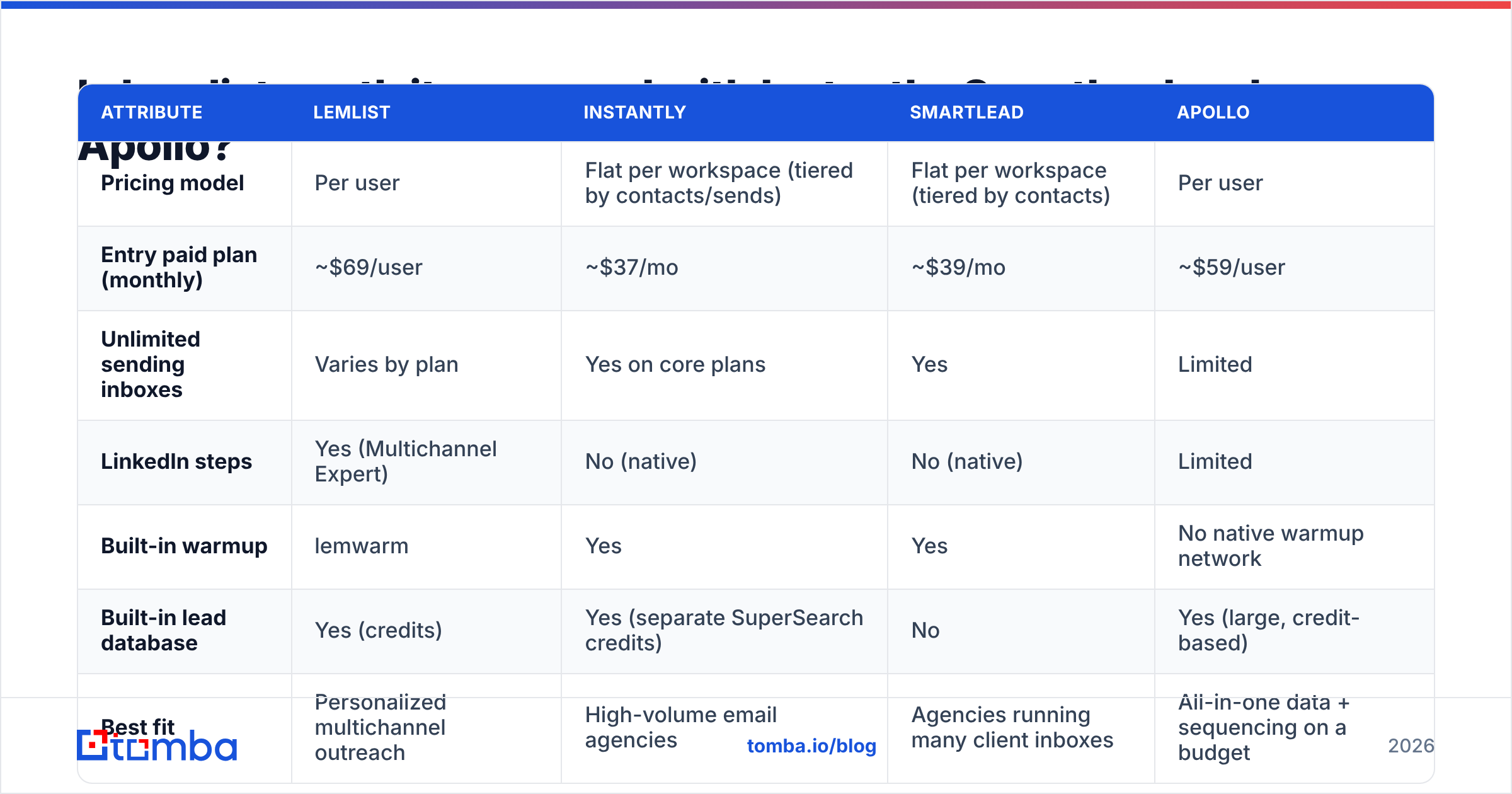
It depends on what you're optimizing for. Lemlist charges more per seat than volume-focused sequencers, and in return you get multichannel steps, strong personalization features and a polished UI. If you do mostly high-volume, email-only sending, the math usually points somewhere else.
| Attribute | Lemlist | Instantly | Smartlead | Apollo |
|---|---|---|---|---|
| Pricing model | Per user | Flat per workspace (tiered by contacts/sends) | Flat per workspace (tiered by contacts) | Per user |
| Entry paid plan (monthly) | ~$69/user | ~$37/mo | ~$39/mo | ~$59/user |
| Unlimited sending inboxes | Varies by plan | Yes on core plans | Yes | Limited |
| LinkedIn steps | Yes (Multichannel Expert) | No (native) | No (native) | Limited |
| Built-in warmup | lemwarm | Yes | Yes | No native warmup network |
| Built-in lead database | Yes (credits) | Yes (separate SuperSearch credits) | No | Yes (large, credit-based) |
| Best fit | Personalized multichannel outreach | High-volume email agencies | Agencies running many client inboxes | All-in-one data + sequencing on a budget |
Competitor prices are the entry-level monthly list prices at the time of writing. They change often, so check each vendor's page, or cross-check user-reported pricing on G2's lemlist reviews and comparable listings.
A few patterns show up when you compare these side by side:
- Per-seat versus flat pricing is the biggest cost driver. A solo founder pays similar amounts on lemlist and Instantly. A ten-rep team pays several times more on a per-seat tool.
- Multichannel is lemlist's moat. If LinkedIn touches drive a meaningful share of your replies, the Multichannel Expert premium can pay for itself. If they don't, you're paying for unused features.
- Data quality isn't the sequencer's job. Every one of these tools depends on the contacts you feed it. A sequencer with a weak list loses to a cheap sequencer with a verified list every time.
If you're already weighing options, see our Instantly alternative breakdown for how volume-first tools compare on data sourcing.
Who should pay for Lemlist, and who shouldn't?#
Lemlist is a good fit if you:
- Run account-based or highly personalized outreach where custom images, landing pages and LinkedIn touches lift reply rates.
- Have a small team (one to five reps) where per-seat pricing stays manageable.
- Want warmup, sequencing, LinkedIn automation and basic lead sourcing in one login instead of stitching together four tools.
- Care more about reply quality than raw volume.
You'll probably overpay if you:
- Send email-only campaigns to large lists and mostly care about deliverability at volume.
- Are an agency managing dozens of client inboxes, where flat-rate tools scale more cheaply.
- Already have a data provider and CRM-native sequences (HubSpot or Salesforce) and only need a sending layer.
- Burn through lead credits monthly and end up buying data twice.
For teams in that second group, a common and cheaper setup is to split the stack: one tool for finding and verifying contacts, one lean tool for sending. You pay for data only when you actually find a contact, and for sending only on the inboxes you use.
How can you lower your Lemlist bill without losing results?#
If you've decided lemlist is the right sequencer, you can still cut the total cost a lot. These are the moves that usually matter most:
- Match the plan to real channel usage. Pull your last 90 days of replies by step type. If fewer than 10–15% came from LinkedIn steps, downgrade reps who don't need them to Email Pro.
- Go annual only for committed seats. Put your core team on annual billing and keep new or seasonal reps on monthly until they've ramped.
- Source and verify contacts outside the credit meter. Use a dedicated email finder to build lists by domain or name, verify them, then import clean CSVs into lemlist. This keeps lemlist credits for ad-hoc lookups instead of bulk list building.
- Clean imported lists before every campaign. Bounces hurt the reputation of every domain you send from. A verification pass costs a fraction of a burned domain, and a burned domain means new domains, new mailboxes and weeks of warmup.
- Audit seats quarterly. Deactivate users who haven't launched a campaign in 30 days. This sounds obvious, but idle seats are the most common waste in per-user sales tools.
- Negotiate at five or more seats. Once you're near Enterprise territory, ask sales about volume pricing, credit bundles and flexible seat swaps before signing.

How does Lemlist's lead database compare with a dedicated email finder?#
Lemlist's built-in database is convenient. You search, add to a campaign and launch without leaving the app. For light prospecting that convenience is worth paying for.
The trade-off is economics and control. Credits bundled into a sequencer are priced as a convenience add-on, and you can't easily reuse the data outside that tool. A dedicated finder charges per search across plans built for volume, lets you export anywhere (CRM, sheets, another sequencer), and usually has more lookup options: domain search, LinkedIn lookup, author finding, and verification in the same workflow.
For comparison, Tomba pricing starts with a free tier of 25 searches a month, then Starter at $49/mo, Growth at $99/mo and Pro at $249/mo, with Enterprise custom. Those are flat plans, not per seat, so the whole team can pull from one pool of searches and push verified contacts into lemlist, HubSpot or anywhere else.
The practical rule: if more than about a third of your lemlist spend is going toward data, split data out into its own tool.
What should you check before you buy Lemlist?#
Use the 14-day trial as a real test rather than a quick look at the UI. Run through this checklist:
- Deliverability baseline. Connect one warmed inbox, send a small campaign, and track open and reply rates against your current tool.
- Credit burn rate. Build one realistic list with lemlist's database and note how many credits 100 usable contacts took. Multiply that by your monthly prospecting volume.
- Multichannel lift. Run the same sequence with and without LinkedIn steps on two comparable segments. If the lift is marginal, Email Pro is enough.
- CRM sync. Confirm that replies, bounces and meeting outcomes flow into your CRM the way RevOps needs them to.
- Seat model. Check exactly how lemlist counts senders, inboxes and users on your target plan, and get it in writing if you're buying Enterprise.
You can also cross-check reviewer sentiment on Capterra's lemlist listing for recurring complaints about support, billing or deliverability before signing an annual contract.
Frequently asked questions#
Does Lemlist have a free plan?#
Not a permanent one. Lemlist offers a 14-day free trial so you can test sequences, warmup and the lead database. After that, you need a paid plan.
Is Lemlist pricing per user?#
Yes. Lemlist's self-serve plans are billed per user per month, which is the biggest reason costs climb as teams grow.
How much does Lemlist cost annually?#
Annual billing gives roughly a 20% discount, which brings Email Pro to about $55/user/mo and Multichannel Expert to about $79/user/mo at the time of writing. Check lemlist's pricing page for current figures.
Is lemwarm included in Lemlist plans?#
Lemwarm is bundled into lemlist's current paid plans. It's also sold as a standalone product for people who only want warmup.
What's the cheapest way to use Lemlist?#
Buy Email Pro on annual billing for committed reps only, source and verify leads with a separate email finder, and import clean lists so your included credits last longer.
The verdict: is Lemlist pricing worth it?#
Lemlist is priced as a premium, personalization-first outreach tool, and it's worth it when multichannel sequences and custom personalization actually move your reply rates. For small teams running thoughtful, account-based campaigns, $69–$99 per seat can be justified. For volume-driven, email-only outbound, or for teams paying for both data credits and a separate data tool, the per-seat model gets expensive quickly, and a split stack is usually cheaper per meeting booked.
Whichever sequencer you choose, the list you feed it sets the ceiling on your results. If you want verified contacts without paying per-seat data premiums, try the Tomba Email Finder. Search by domain, name or company, verify in the same workflow, and export clean lists straight into lemlist or any other sequencer. Start on the free tier with 25 searches a month and upgrade to Starter at $49/mo when your pipeline needs more.
Related guides#
// get started
Find, verify and enrich your first contacts today
Start on the free plan with 25 searches a month, then scale when your team is ready.
Free plan · No credit card required · GDPR & CCPA
// about the author